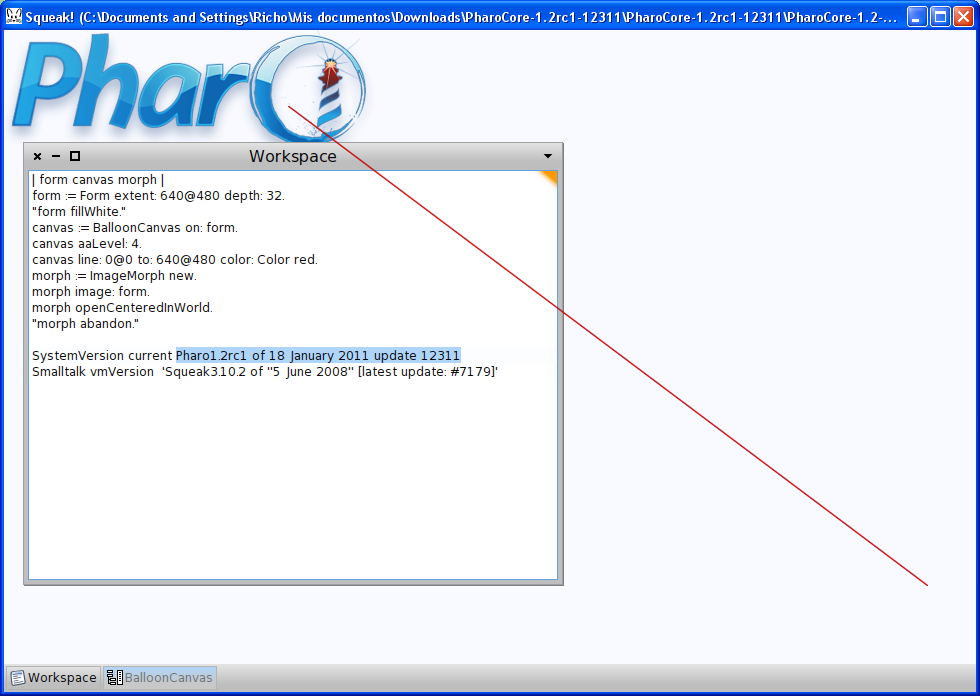
Mmmm... maybe it is platform related. I really don't know. I'm on Windows XP. Pharo version: Pharo1.2rc1 of 18 January 2011 update 12311 Squeak version: Squeak4.2alpha of 4 January 2011 update 10854 Vm version: Squeak3.10.2 of ''5 June 2008'' [latest update: #7179] On Sun, Jan 23, 2011 at 5:00 PM, Udo Schneider <udo.schneider@homeaddress.de
wrote:
Hi Richo,
could you tell me which Image/VM/OS you where using?
On my System (Mac OS X 10.6.6) Pharo 1.1 and Squeak 4.1 on Cog VM (r2349) and regular VM (4.2.5beta1U) both show no antialiasing (image attached)
Is this maybe somehow platform/plugin related?
Best Regards,
Udo
On 23.01.11 20:28, Ricardo Moran wrote:
Hi Udo,
Out of curiosity, I executed your code in Squeak and the antialiasing works there. Debugging a little, I found a difference in BalloonCanvas>>#line:to:width:color:. If you update Pharo's implementation with Squeak's one it works in Pharo as well. There might be other differences so you might look into that.
I hope this helps. Richo
On Sun, Jan 23, 2011 at 4:09 PM, Udo Schneider <udo.schneider@homeaddress.de <mailto:udo.schneider@homeaddress.de>> wrote:
All,
I'm using the following code. IMHO the line is jagged ... but maybe I'm doing something wrong:
form := Form extent: 640@480 depth: 32. "form fillWhite." canvas := BalloonCanvas on: form. canvas aaLevel: 4. canvas line: 0@0 to: 640@480 color: Color red. morph := ImageMorph new. morph image: form. morph openCenteredInWorld. "morph abandon."
CU.
Udo
On 22.01.11 15:37, Udo Schneider wrote:
All,
does somebody has a pointer to a graphics lib/framework/engine for Pharo which works with Anti-Aliasing.
My first tests with Balloon2D were disappointing (maybe I'm doing something wrong). But even setting aaLevel does not seem to bring any result. I.e. the line drawing code falls back to superclass code which simply draws the same jagged lines like always.
Any pointers?
CU,
Udo