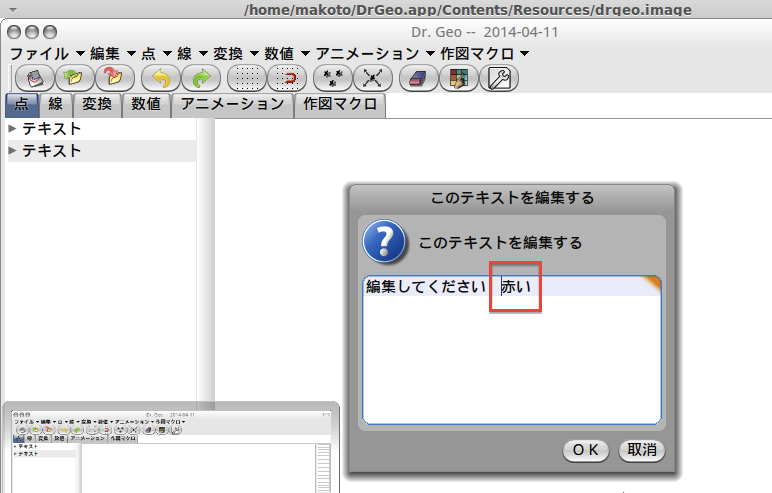
hello Is it possible to integrate this fix in the VM to get Japanese input working? I guess it will be interesting for Pharo as well. thanks Hilaire ---------- Message transféré ---------- De : "TAKAHASHI Makoto" <makoto@kobe-u.ac.jp> Date : 11 avr. 2014 15:46 Objet : Re: Japanese input in DrGeo à : <hilaire.fernandes@gmail.com> Cc : Hello Hilarie, Recently, Hachisuka-San in Aichi Sangyo University has resolved the issue of Scratch in Linux. http://www.asu.ac.jp/hachi/v3/scratch14ime.html Unfortunately, this page is written in Japanese. (However you can see codes.) The resolution of the problem in DrGeo is as follows: 1. In drgeo.sh, add exec options '-compositioninput' like exec "$VM/pharo" \ -plugins "$VM" \ -encoding utf-8 \ -vm-display-X11 \ -compositioninput \ "$image" 2. Change recordPendingKeys(void) in vm-display-X11/sqUnixX11.c as follows and rebuild vm-display-X11. static int recordPendingKeys(void) { if (inputCount <= 0) { if (inputBuf != inputString) { free(inputBuf); inputBuf= inputString; } return 0; } int utf32 = 0; while (inputCount > 0) { //110x xxxx 10xx xxxx if(inputCount >= 2 && pendingKey[0] >= 0xc0 && pendingKey[0] <= 0xdf && pendingKey[1] >= 0x80 && pendingKey[1] <= 0xbf) { utf32 = ((pendingKey[0] & 0x1f) << 6) | (pendingKey[1] & 0x3f); recordKeyboardEvent(0, EventKeyDown, modifierState, utf32); recordKeyboardEvent(0, EventKeyChar, modifierState, utf32); pendingKey+=2; inputCount-=2; //1110 xxxx 10xx xxxx 10xx xxxx } else if(inputCount >= 3 && pendingKey[0] >= 0xe0 && pendingKey[0] <= 0xef && pendingKey[1] >= 0x80 && pendingKey[1] <= 0xbf && pendingKey[2] >= 0x80 && pendingKey[2] <= 0xbf) { utf32 = ((pendingKey[0] & 0x0f) << 12) | ((pendingKey[1] & 0x3f) << 6) | (pendingKey[2] & 0x3f); recordKeyboardEvent(0, EventKeyDown, modifierState, utf32); recordKeyboardEvent(0, EventKeyChar, modifierState, utf32); pendingKey+=3; inputCount-=3; //1111 0xxx 10xx xxxx 10xx xxxx 10xx xxxx } else if(inputCount >= 4 && pendingKey[0] >= 0xf0 && pendingKey[0] <= 0xf7 && pendingKey[1] >= 0x80 && pendingKey[1] <= 0xbf && pendingKey[2] >= 0x80 && pendingKey[2] <= 0xbf && pendingKey[3] >= 0x80 && pendingKey[3] <= 0xbf) { utf32 = ((pendingKey[0] & 0x07) << 18) | ((pendingKey[1] & 0x3f) << 12) | ((pendingKey[2] & 0x3f) << 6) | (pendingKey[3] & 0x3f); recordKeyboardEvent(0, EventKeyDown, modifierState, utf32); recordKeyboardEvent(0, EventKeyChar, modifierState, utf32); pendingKey+=4; inputCount-=4; } else { recordKeyboardEvent(*pendingKey, EventKeyDown, modifierState, 0); recordKeyboardEvent(*pendingKey, EventKeyChar, modifierState, 0); recordKeystroke(*pendingKey); /* DEPRECATED */ pendingKey++; inputCount--; } } return 1; } 3. Exchange vm-display-X11 in DrGeo.app/Contents/Linux. I tried this resolution. Finally I can put japanese character in DrGeo in LinuxMint 16. TAKAHASHI Makoto E-mail makoto@kobe-u.ac.jp On Wed, 1 Aug 2012 18:17:45 +0900, TAKAHASHI Makoto wrote:
Hello Hilaire,
On Tue, 31 Jul 2012 12:32:42 +0200, Hilaire Fernandes wrote:
What is your operating system?
My operating systems are MacOS X(10.6,10.7) and Windows 7. DrGeo on Windows 7 has no problem and DrGeo on MacOS X has some problem that input-window disappear when we input Japanese characters by Kotoeri. We can only see kotoeri-henkan- menu. However, we can input correct characters like this.
If Linux which input system are you using?
I have tried to input Japanese characters in Ubuntu. Unfortunately, I can't input them.
Thanks
Hilsire
Le mardi 31 juillet 2012, TAKAHASHI Makoto <makoto@kobe-u.ac.jp> a écrit
:
Hello Hilaire,
On Mon, 30 Jul 2012 19:41:35 +0200, Hilaire Fernandes wrote:
Now I am wondering, with the latest release of DrGeo 12.07 and your system, can you input Japanese characters?
Yes, it's OK. I have tried to input Japanese characters to bitmap output name, sketch name, macro name, free text. No problem is found.
Thank you.
-- TAKAHASHI Makoto E-mail makoto@kobe-u.ac.jp