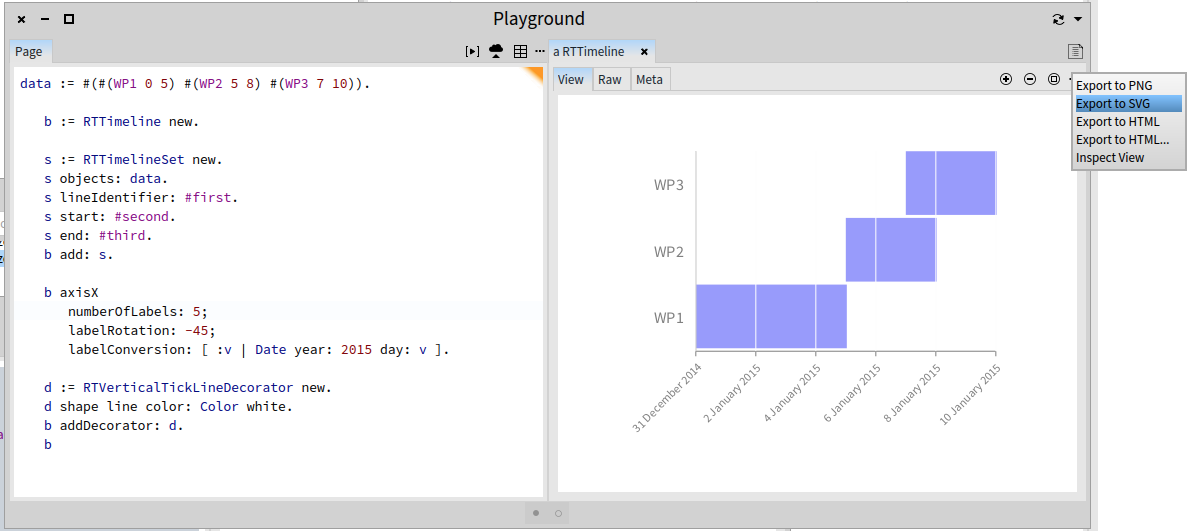
Simply use the menu: Cheers, Alexandre -- _,.;:~^~:;._,.;:~^~:;._,.;:~^~:;._,.;:~^~:;._,.;: Alexandre Bergel http://www.bergel.eu ^~:;._,.;:~^~:;._,.;:~^~:;._,.;:~^~:;._,.;:~^~:;.
On Jul 30, 2015, at 11:59 AM, H. Hirzel <hannes.hirzel@gmail.com> wrote:
Alexandre,
This is really agile ... version 1005 of Roassal loaded and version 305 of Trachel :-)
The GANTT chart works fine, see screen shot.
How do I export it as SVG code in Roassal?
--Hannes
On 7/29/15, Alexandre Bergel <alexandre.bergel@me.com> wrote:
Pure agile development: the latest version is the one that count. You need to update two packages: Roassal2 and Trachel.
Cheers, Alexandre -- _,.;:~^~:;._,.;:~^~:;._,.;:~^~:;._,.;:~^~:;._,.;: Alexandre Bergel http://www.bergel.eu ^~:;._,.;:~^~:;._,.;:~^~:;._,.;:~^~:;._,.;:~^~:;.
On Jul 29, 2015, at 3:24 PM, H. Hirzel <hannes.hirzel@gmail.com> wrote:
Or a configuration? Which one?
--HH
On 7/29/15, H. Hirzel <hannes.hirzel@gmail.com> wrote:
Thanks for the updated GANTT script.
My question was about the version of Roassal to load.
Which one? I just go for version 1000?
See screenshot.
--Hannes
On 7/29/15, Alexandre Bergel <alexandre.bergel@me.com> wrote:
You should load the latest Roassal.
How do I do that? I just loaded Roassal into a fresh Pharo4.0 image and RTTimeLine is not included.
We did some refactoring. Instead, you should do:
-=-=-=-=-=-=-=-= data := #(#(WP1 0 5) #(WP2 5 8) #(WP3 7 10)).
b := RTTimeline new.
s := RTTimelineSet new. s objects: data. s lineIdentifier: #first. s start: #second. s end: #third. b add: s.
b axisX numberOfLabels: 5; labelRotation: -45; labelConversion: [ :v | Date year: 2015 day: v ].
d := RTVerticalTickLineDecorator new. d shape line color: Color white. b addDecorator: d. b -=-=-=-=-=-=-=-=
The class RTTimelineExample contains many examples
Let us know how it goes
Alexandre
Alexandre
Le 9 mai 2015 à 19:06, H. Hirzel <hannes.hirzel@gmail.com> a écrit :
Thank you for the examples, Alexandre!
I have Pharo 4.0 with Roassal 2.0 installed (AlexandreBergel.718)
I paste the following into a 'Playground' window and 'do it'.
b := RTTimeLine new.
b addEntry: (RTTimeLineEntry new identifier: #WP1; start: 0; end: 5). b addEntry: (RTTimeLineEntry new identifier: #WP2; start: 5; end: 8). b addEntry: (RTTimeLineEntry new identifier: #WP3; start: 7; end: 10).
b axisX numberOfLabels: 5. b
I get the error message that RTTimeLine is not known.
What am I missing?
--Hannes
On 5/8/15, Alexandre Bergel <alexandre.bergel@me.com> wrote: Hi Hannes!
Here is a first shoot paired-programmed with Juraj using Roassal:
-=-=-=-=-=-=-=-=-=-=-=-= b := RTTimeLine new.
b addEntry: (RTTimeLineEntry new identifier: #WP1; start: 0; end: 5). b addEntry: (RTTimeLineEntry new identifier: #WP2; start: 5; end: 8). b addEntry: (RTTimeLineEntry new identifier: #WP3; start: 7; end: 10).
b axisX numberOfLabels: 5. b -=-=-=-=-=-=-=-=-=-=-=-=
Here some slightly more elaborated example:
-=-=-=-=-=-=-=-=-=-=-=-= âOne color per entry" | b d | b := RTTimeLine new. b addEntry: (RTTimeLineEntry new identifier: #c1; start: 0; end: 5). b addEntry: (RTTimeLineEntry new identifier: #c1; start: 6; end: 8).
b addEntry: (RTTimeLineEntry new identifier: #c2; start: 0; end: 5). b addEntry: (RTTimeLineEntry new identifier: #c2; start: 8; end: 10).
b addEntry: (RTTimeLineEntry new identifier: #c3; start: 0; end: 10).
b addEntry: (RTTimeLineEntry new identifier: #c4; start: 5; end: 10).
b addEntry: (RTTimeLineEntry new identifier: #c5; start: 5; end: 8).
d := RTVerticalTickLineDecorator new. d shape line color: Color white. b addDecorator: d. b axisX numberOfLabels: 5; labelRotation: -45; labelConversion: [ :v | Date year: 2015 day: v ].
b shape color: (RTMultiLinearColorForIdentity new objects: b entries). b -=-=-=-=-=-=-=-=-=-=-=-=
One color per timeline
-=-=-=-=-=-=-=-=-=-=-=-= | b | b := RTTimeLine new. b addEntry: (RTTimeLineEntry new identifier: #c1; start: 0; end: 5). b addEntry: (RTTimeLineEntry new identifier: #c1; start: 6; end: 8).
b addEntry: (RTTimeLineEntry new identifier: #c2; start: 0; end: 5). b addEntry: (RTTimeLineEntry new identifier: #c2; start: 8; end: 10).
b addEntry: (RTTimeLineEntry new identifier: #c3; start: 0; end: 10).
b addEntry: (RTTimeLineEntry new identifier: #c4; start: 5; end: 10).
b addEntry: (RTTimeLineEntry new identifier: #c5; start: 5; end: 8).
d := RTVerticalTickLineDecorator new. d shape line color: Color white. b addDecorator: d. b axisX numberOfLabels: 5; labelRotation: -45; labelConversion: [ :v | Date year: 2015 day: v ].
b shape color: (RTMultiLinearColorForIdentity new command: #identifier; objects: #(c1 c2 c3 c4 c5)). b -=-=-=-=-=-=-=-=-=-=-=-=
Age of some classes: -=-=-=-=-=-=-=-=-=-=-=-= | b | b := RTTimeLine new. b extent: 500 @ 500. ((RTShape withAllSubclasses sortedAs: #ageInDaysRounded) select: #hasMethods) do: [ :cls | e := RTTimeLineEntry new. e identifier: cls. e start: cls computeYoungestMethod ageInDays. e end: cls computeOldestMethod ageInDays. b addEntry: e ]. b -=-=-=-=-=-=-=-=-=-=-=-=
All these examples are in the Roassal time line example menu.
This is still an early version. Let us know how it goes! https://www.facebook.com/ObjectProfile/posts/840542572699008
Cheers, Alexandre
-- _,.;:~^~:;._,.;:~^~:;._,.;:~^~:;._,.;:~^~:;._,.;: Alexandre Bergel http://www.bergel.eu ^~:;._,.;:~^~:;._,.;:~^~:;._,.;:~^~:;._,.;:~^~:;.
On May 7, 2015, at 4:25 PM, H. Hirzel <hannes.hirzel@gmail.com> wrote:
Hello
Has somebody done a GANTT chart?
GanttChartMorph openOn: aCollectionOfActivities
?
Activities have - id - description - start date - end date ?
Regards
Hannes
_______________________________________________ Moose-dev mailing list Moose-dev@iam.unibe.ch https://www.iam.unibe.ch/mailman/listinfo/moose-dev
_______________________________________________ Moose-dev mailing list Moose-dev@iam.unibe.ch https://www.iam.unibe.ch/mailman/listinfo/moose-dev
<Roassal2_configurations_Screenshot from 2015-07-29 18:23:50.png>_______________________________________________ Moose-dev mailing list Moose-dev@iam.unibe.ch https://www.iam.unibe.ch/mailman/listinfo/moose-dev
<Pharo_Roassal_GANTT_chart_Screenshot from 2015-07-30 14:55:31.png>