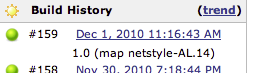
That's how I did it: Install the "Hudson description setter plugin" [1]
From Pharo, when you do the build and know the last build number, log this version to stdout (e.g., "[version] 1.2 #12421").
In the job config enable "Set build description" and add the following settings: - Set build description: "\[version\] (.*)" - Description: "\1" [1] http://wiki.hudson-ci.org/display/HUDSON/Description+Setter+Plugin Like this you get a description below each build as shown in the attached screenshot. Cheers, Adrian On Dec 8, 2010, at 09:39 , Marcus Denker wrote:
On Dec 8, 2010, at 9:35 AM, Marcus Denker wrote:
On Dec 8, 2010, at 8:25 AM, Luc Fabresse wrote:
Hi all,
I was looking the results of the 1.2 build #33. https://pharo-ic.lille.inria.fr/hudson/job/Pharo%20Core%201.2/33/
Where is displayed the version number of the 1.2 used for this build? Was it the12271?
I always loads all updates... so it's the version that was available at the time of build. It would be nice to display the update number... if anyone has an idea how to do that?
And I forgot: after an update is commited, the build starts automatically within 2 minutes. So in the end this means: the latest build on Hudson is the latest update available.
Marcus
-- Marcus Denker -- http://www.marcusdenker.de INRIA Lille -- Nord Europe. Team RMoD.