Hi 2018-02-03 15:54 GMT-03:00 Esteban Lorenzano <estebanlm@gmail.com>:
On 3 Feb 2018, at 17:09, Hernán Morales Durand <hernan.morales@gmail.com> wrote:
Hi Nicolai,
2018-02-03 10:42 GMT-03:00 Nicolai Hess <nicolaihess@gmail.com>:
The setup finally somehow works:
I followed the guide at https://github.com/pharo-project/pharo/wiki/Contribute-a-fix-to-Pharo
* wget -O- get.pharo.org/70+vm | bash
Does not work (windows msys-console) It starts donwloading something but not pharo
this is very weird, I will check.
I checked and it works.
I tried to do at seperate steps: Only the image * wget -O- get.pharo.org/70 | bash
Works
* wget -O- get.pharo.org/vm | bash
works, but is the wrong VM I guess, I can not open the image
* wget -O- get.pharo.org/vm70 | bash
works, seems to load the right vm
* ./pharo-ui Pharo.image
Starts the vm but complains about : "Pharo cannot write to the changes file named u:\tmp\pharo\Pharo.changes."
I am sure the file is writable.
The vm reports to be built on aug 27 2017, is this right?
I think is this one:
https://pharo.fogbugz.com/f/cases/20805/Cannot-write-to-the-changes-file-err...
yes, this is a known bug that we need to fix soon.
Setting up Iceberg: Yes, need option 2, that is, I use the commandline to clone a repository and add it to iceberg. Cloning from iceberg directly does not work (long file names).
that should not be anymore an issue (since we migrated to tonel). but cloning in disk is faster :)
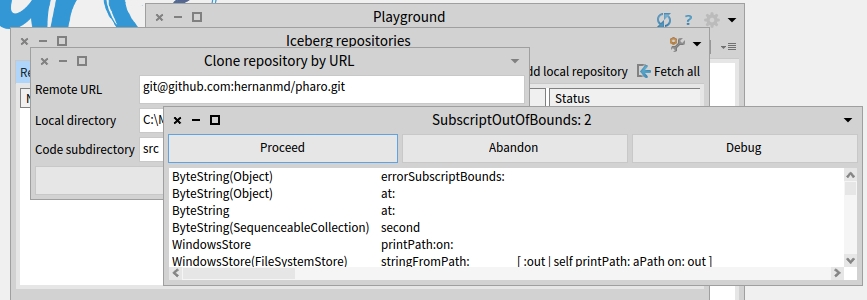
I used the "Create repository" button in the Clone repository dialog, and the error in the attached screenshot is raised. As I reported a couple of days ago in the Pillar thread, you have to add $: to drive letter using MinGW: IceCredentialsProvider useCustomSsh: true. IceCredentialsProvider sshCredentials publicKey: '/c:/Users/[MY_USERNAME]/.ssh/id_rsa.pub'; privateKey: '/c:/Users/[MY_USERNAME]/.ssh/id_rsa' Also if I add "Code subdirectory: src" Iceberg shows "Code directory missing"
Ok, now I see some uncommitted changes, the guide says: "you may need to invoke synchronize"
But how? There is a "synchronize repository... " and "Synchronize full repository ..." menu entry.
Which one? The first synchronize does not show me how to actually do anything and the second one shows a intimidating warning :)
I thought exactly the same. It opens a non-modal window titled "Synchronizing" but Process Browser didn't how any related process.
FInally I removed my fork (it was pretty old), did a new fork and sstarted with a fresh image.
I fixed that⦠it should be the first synchronize. But you do not have to do anything other than execute it ;) anyway, what I need to do is to put a note of what happens if (as you) your fork is too old: in that case you can go to Pharo/Synchronize repositories (but anyway, you do not need it⦠creating a branch from fogbugz issue will do a fetch and put you in the right place).
Finally, the initial setup up is done, I now try to do some work with it and report back
thanks! I hope everything goes smooth :)
cheers! Esteban
nicolai