Difference between 'do-it' (ctrl d) and 'do-it and go' (ctrl -g)?

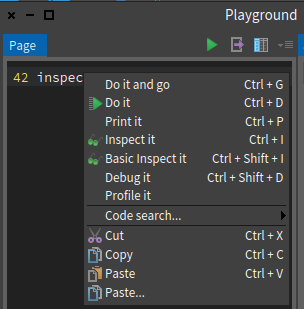
Hello In Pharo 6.1 what is the difference between the 'do-it' (ctrl d) and 'do-it and go menu entry in the playground (see screen shot)? Regards Hannes

On lun. 4 sept. 2017 at 09:59, H. Hirzel <hannes.hirzel@gmail.com> wrote:
Hello
In Pharo 6.1 what is the difference between the
'do-it' (ctrl d) and
'do-it and go
menu entry in the playground (see screen shot)?
Regards Hannes
Hi, Do it and go will open an inspector *in* the playground with the result of the execution. -- Cyril Ferlicot https://ferlicot.fr http://www.synectique.eu 2 rue Jacques Prévert 01, 59650 Villeneuve d'ascq France

On 4 September 2017 at 09:58, H. Hirzel <hannes.hirzel@gmail.com> wrote:
Hello
In Pharo 6.1 what is the difference between the
'do-it' (ctrl d) and
'do-it and go
menu entry in the playground (see screen shot)?
Regards Hannes
Ctrl-d will execute the selected expression, but not show the resulting object. Ctrl-g will execute the selected expression and open a new tab inspecting the resulting object. Cheers, Alistair
participants (3)
-
 Alistair Grant
 -
 Cyril Ferlicot
 -
 H. Hirzel