How can I set the SmaccDebugParser in Moose

Hi I found the SmaCCParserDebugger and I found the debug menu in the Smacc tool. Now I get a GT and byteCode debugger but I do not find a way to make the new debugger actif. Stef
Andrei? Help? On Fri, Apr 7, 2017 at 3:14 PM, Stephane Ducasse <stepharo.self@gmail.com> wrote:
Hi
I found the SmaCCParserDebugger and I found the debug menu in the Smacc tool. Now I get a GT and byteCode debugger but I do not find a way to make the new debugger actif.
Stef

Not exactly sure how to do to it because I never used it.
From what I see in SmaCCParserDebugger>>handlesContext: if you have in the stack a context created by SmaCCParser>>parse you should have a 'SmaCCParser' button at the top right of the window. But maybe John can provide you with more details.
Cheers, Andrei On Fri, Apr 14, 2017 at 2:45 PM, Stephane Ducasse <stepharo.self@gmail.com> wrote:
Andrei? Help?
On Fri, Apr 7, 2017 at 3:14 PM, Stephane Ducasse <stepharo.self@gmail.com> wrote:
Hi
I found the SmaCCParserDebugger and I found the debug menu in the Smacc tool. Now I get a GT and byteCode debugger but I do not find a way to make the new debugger actif.
Stef
John? How do we activate the Smacc debugger in moose? On Fri, Apr 14, 2017 at 10:36 PM, Andrei Chis <chisvasileandrei@gmail.com> wrote:
Not exactly sure how to do to it because I never used it. From what I see in SmaCCParserDebugger>>handlesContext: if you have in the stack a context created by SmaCCParser>>parse you should have a 'SmaCCParser' button at the top right of the window. But maybe John can provide you with more details.
Cheers, Andrei
On Fri, Apr 14, 2017 at 2:45 PM, Stephane Ducasse <stepharo.self@gmail.com
wrote:
Andrei? Help?
On Fri, Apr 7, 2017 at 3:14 PM, Stephane Ducasse <stepharo.self@gmail.com
wrote:
Hi
I found the SmaCCParserDebugger and I found the debug menu in the Smacc tool. Now I get a GT and byteCode debugger but I do not find a way to make the new debugger actif.
Stef

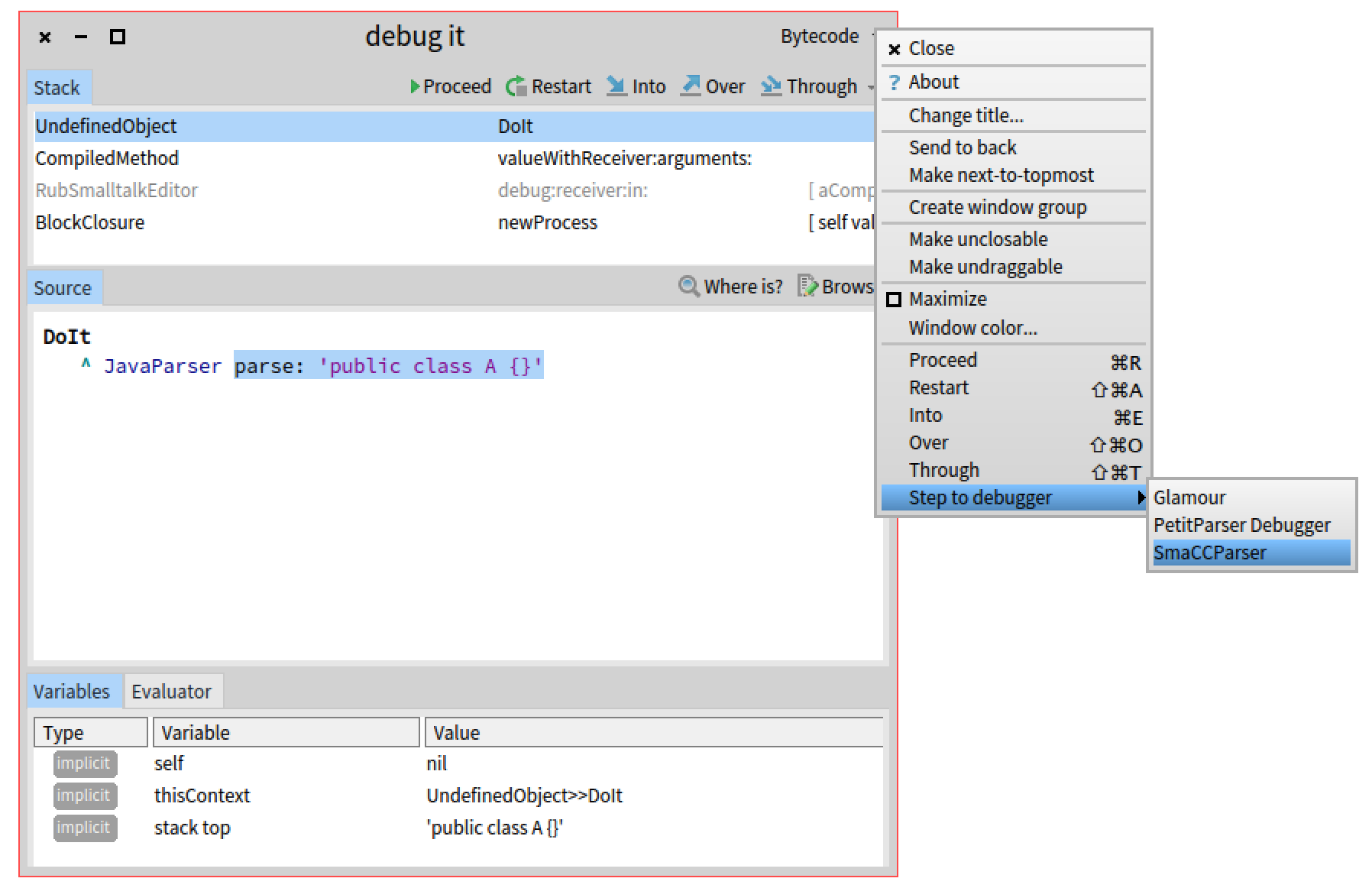
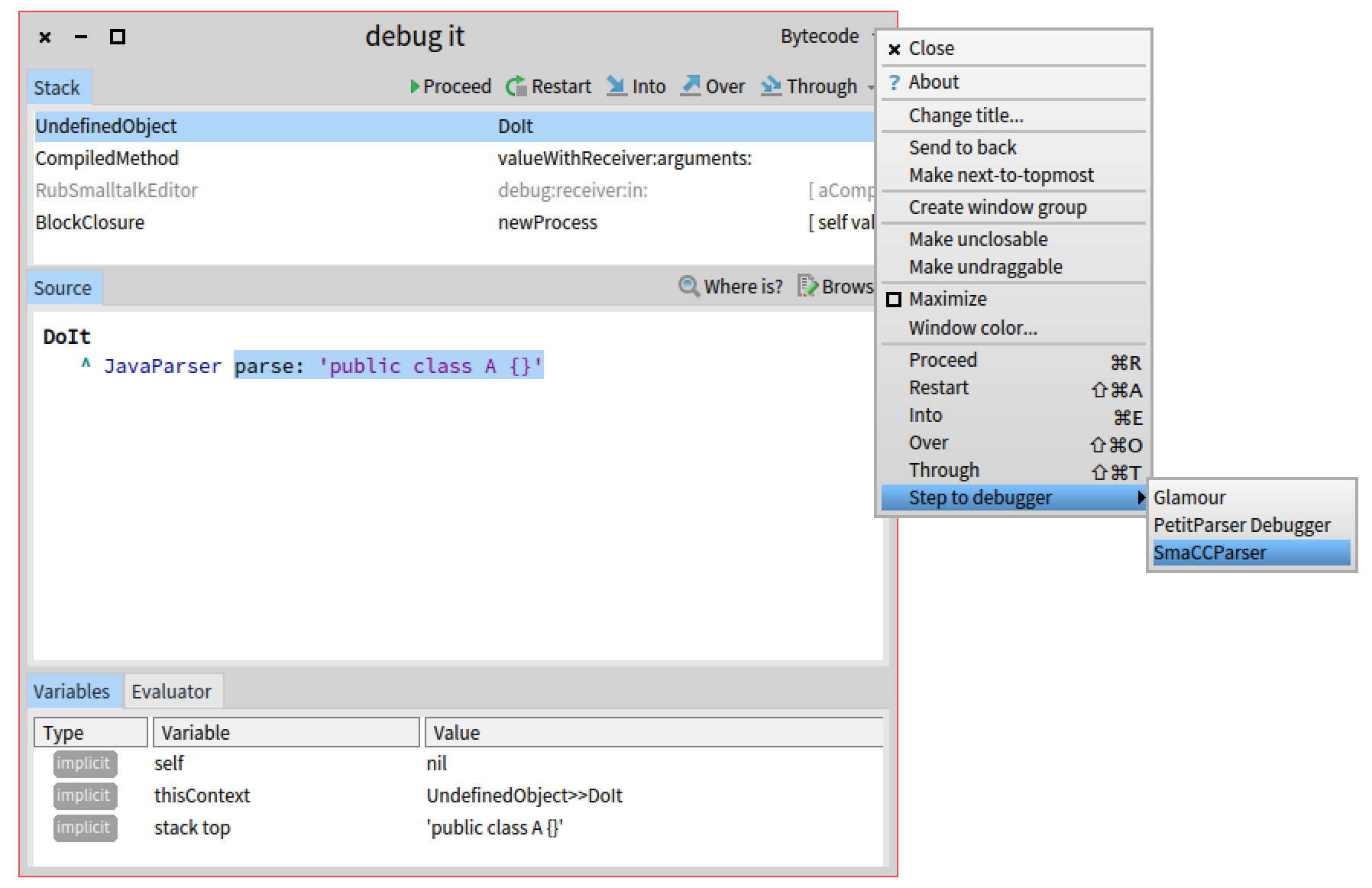
Hi, I believe what you want is to start debugging a parser with some script and then stepping through it. The SmaCC debugger only gets activated if the SmaCC code is in the execution context. So, if you do not have it yet you can âStep to debuggerâ. For example: - Try debugging: JavaParser parse: 'public class A {}' - Then from the window menu, choose âStep to debuggerâ / âSmaCCâ - And you will get the SmaCC debugger Cheers, Doru
On Apr 15, 2017, at 2:34 PM, Stephane Ducasse <stepharo.self@gmail.com> wrote:
John? How do we activate the Smacc debugger in moose?
On Fri, Apr 14, 2017 at 10:36 PM, Andrei Chis <chisvasileandrei@gmail.com> wrote: Not exactly sure how to do to it because I never used it. From what I see in SmaCCParserDebugger>>handlesContext: if you have in the stack a context created by SmaCCParser>>parse you should have a 'SmaCCParser' button at the top right of the window. But maybe John can provide you with more details.
Cheers, Andrei
On Fri, Apr 14, 2017 at 2:45 PM, Stephane Ducasse <stepharo.self@gmail.com> wrote: Andrei? Help?
On Fri, Apr 7, 2017 at 3:14 PM, Stephane Ducasse <stepharo.self@gmail.com> wrote: Hi
I found the SmaCCParserDebugger and I found the debug menu in the Smacc tool. Now I get a GT and byteCode debugger but I do not find a way to make the new debugger actif.
Stef
-- www.tudorgirba.com www.feenk.com "Innovation comes in the least expected form. That is, if it is expected, it already happened."
ok thanks On Sat, Apr 15, 2017 at 11:05 PM, Tudor Girba <tudor@tudorgirba.com> wrote:
Hi,
I believe what you want is to start debugging a parser with some script and then stepping through it.
The SmaCC debugger only gets activated if the SmaCC code is in the execution context. So, if you do not have it yet you can âStep to debuggerâ.
For example: - Try debugging: JavaParser parse: 'public class A {}' - Then from the window menu, choose âStep to debuggerâ / âSmaCCâ - And you will get the SmaCC debugger
Cheers, Doru
On Apr 15, 2017, at 2:34 PM, Stephane Ducasse <stepharo.self@gmail.com> wrote:
John? How do we activate the Smacc debugger in moose?
On Fri, Apr 14, 2017 at 10:36 PM, Andrei Chis <chisvasileandrei@gmail.com
wrote: Not exactly sure how to do to it because I never used it. From what I see in SmaCCParserDebugger>>handlesContext: if you have in the stack a context created by SmaCCParser>>parse you should have a 'SmaCCParser' button at the top right of the window. But maybe John can provide you with more details.
Cheers, Andrei
On Fri, Apr 14, 2017 at 2:45 PM, Stephane Ducasse <stepharo.self@gmail.com
wrote: Andrei? Help?
On Fri, Apr 7, 2017 at 3:14 PM, Stephane Ducasse <stepharo.self@gmail.com
wrote: Hi
I found the SmaCCParserDebugger and I found the debug menu in the Smacc tool. Now I get a GT and byteCode debugger but I do not find a way to make the new debugger actif.
Stef
-- www.tudorgirba.com www.feenk.com
"Innovation comes in the least expected form. That is, if it is expected, it already happened."
participants (3)
-
 Andrei Chis
 -
 Stephane Ducasse
 -
 Tudor Girba