[Ann] PharoLauncher v1.0.1 released!

Hi all, I just released a new version of the PharoLauncher 1.0.1. Here are major improvements since last version: Pharo launcher is now distributed with a Pharo 60 image with a 32-bits threaded VM (to avoid hangs when using OSProcess). Add a VM management utility able to find (and download) the appropriate VM for a given image. So, the launcher is NOT shipped anymore with an extra VM. It will fetch required VM when needed. Pharo Launcher files (images, VMs) are now considered as user Documents (easier to find). Consequently, they are now stored in the standard documents folder, i.e. $HOME/Documents/Pharo on OS X, $HOME/My Documents/Pharo on windows, $HOME/Pharo on Linux (some linux distributions provide a document folder but some others not, so we put it in the HOME directory in all cases). In this folder, you will find your images and virtual machines needed to run images. Use of ProcessWrapper to run images on Windows. Adds download of sources file for Pharo images > 60. Left panel is now used for official images and Jenkins jobs templates and right panel is used for local images. New mooc entry with the image ready to start the Pharo Mooc. New deprecated category to find old official Pharo images. Use system unzip when possible (Pharo unzip does not manage file permissions nor symbolic links). You can get platform bundles from files.pharo.org: Os X: http://files.pharo.org/platform/launcher/Pharo_1.0.1.dmg Windows: http://files.pharo.org/platform/launcher/pharo_installer-1.0.1.exe Linux: http://files.pharo.org/platform/launcher/Pharo-linux-1.0.1.zip Enjoy, Christophe. For those wanted more info on how the adequate VM is computed, here is the process: determine the image format version find (and optionnaly fetch) a compatible VM (a VM able to run this image format) and run the image to get its Pharo version number find (and optionnaly fetch) the appropriate VM for this specific Pharo image version. Sources files are also downloaded with the VM when applicable. run the image with the appropriate VM

This is great. Absolutely love it. -- Sent from: http://forum.world.st/Pharo-Smalltalk-Users-f1310670.html

I've tried it on Linux, and after the download has finished it cannot launch a Pharo 6.1 image. Find attached the PharoDebug.log Seems it's searching for the sources file in a wrong location. *Pharo cannot locate the sources file named /home/gcotelli/Pharo/pharo-launcher/bin/lib/pharo/5.0-201707201942/PharoV60.sources.* Let me know if you need more info. Regards, Gabriel On Fri, Oct 6, 2017 at 8:26 AM, Christophe Demarey < christophe.demarey@inria.fr> wrote:
Hi all,
I just released a new version of the *PharoLauncher 1.0.1*. Here are major improvements since last version:
- Pharo launcher is now distributed with a Pharo 60 image with a 32-bits threaded VM (to avoid hangs when using OSProcess). - Add a *VM management* utility able to find (and download) the appropriate VM for a given image. So, the launcher is NOT shipped anymore with an extra VM. It will fetch required VM when needed. - *Pharo Launcher files (images, VMs)* are now considered as user Documents (easier to find). Consequently, they are *now stored in the standard documents folder*, i.e. - *$HOME/Documents/Pharo* on OS X, - *$HOME/My Documents/Pharo* on windows, - *$HOME/Pharo* on Linux (some linux distributions provide a document folder but some others not, so we put it in the HOME directory in all cases). - In this folder, you will find your images and virtual machines needed to run images. - Use of ProcessWrapper to run images on Windows. - Adds download of sources file for Pharo images > 60. - Left panel is now used for official images and Jenkins jobs templates and right panel is used for local images. - New mooc entry with the image ready to start the Pharo Mooc. - New deprecated category to find old official Pharo images. - Use system unzip when possible (Pharo unzip does not manage file permissions nor symbolic links).
You can get platform bundles from files.pharo.org:
- Os X: http://files.pharo.org/platform/launcher/Pharo_1.0.1.dmg - Windows: http://files.pharo.org/platform/launcher/pharo_ installer-1.0.1.exe - Linux: http://files.pharo.org/platform/launcher/Pharo-linux-1.0.1.zip
Enjoy, Christophe.
For those wanted more info on how the adequate VM is computed, here is the process:
1. determine the image format version 2. find (and optionnaly fetch) a compatible VM (a VM able to run this image format) and run the image to get its Pharo version number 3. find (and optionnaly fetch) the appropriate VM for this specific Pharo image version. Sources files are also downloaded with the VM when applicable. 4. run the image with the appropriate VM
Hi Gabriel,
Le 6 oct. 2017 à 15:48, Gabriel Cotelli <g.cotelli@gmail.com> a écrit :
I've tried it on Linux, and after the download has finished it cannot launch a Pharo 6.1 image. Find attached the PharoDebug.log
Seems it's searching for the sources file in a wrong location. Pharo cannot locate the sources file named /home/gcotelli/Pharo/pharo-launcher/bin/lib/pharo/5.0-201707201942/PharoV60.sources.
Strange indeed! Iâm not able to reproduce it on my ubuntu vm. Itâs surprising that sources file is search in the folder of the VM shipped with the launcher. Images are run with VM downloaded in the VM store ($HOME/Pharo/vms) and sources file is search in the vm directory. Could you tell me if you run the launcher from a terminal? Could you send me your environment variables to see if I can find something relevant there?
I've tried running it from the terminal and it works!. If I double-click it from the file manager and choose "Run in Terminal" it gives the previously commented error. On Fri, Oct 6, 2017 at 5:35 PM, Christophe Demarey < christophe.demarey@inria.fr> wrote:
Hi Gabriel,
Le 6 oct. 2017 à 15:48, Gabriel Cotelli <g.cotelli@gmail.com> a écrit :
I've tried it on Linux, and after the download has finished it cannot launch a Pharo 6.1 image. Find attached the PharoDebug.log
Seems it's searching for the sources file in a wrong location. *Pharo cannot locate the sources file named /home/gcotelli/Pharo/pharo-launcher/bin/lib/pharo/5.0-201707201942/PharoV60.sources.*
Strange indeed! Iâm not able to reproduce it on my ubuntu vm.
Itâs surprising that sources file is search in the folder of the VM shipped with the launcher. Images are run with VM downloaded in the VM store ($HOME/Pharo/vms) and sources file is search in the vm directory. Could you tell me if you run the launcher from a terminal? Could you send me your environment variables to see if I can find something relevant there?

Just starting pharolauncher on windows still does not work (if you put it into the default "program" folder). On start, it tries to create a local direcitory "pharo-local" and does not have the permission to do so. You need to start it with admin-rights. 2017-10-06 22:43 GMT+02:00 Gabriel Cotelli <g.cotelli@gmail.com>:
I've tried running it from the terminal and it works!.
If I double-click it from the file manager and choose "Run in Terminal" it gives the previously commented error.
On Fri, Oct 6, 2017 at 5:35 PM, Christophe Demarey < christophe.demarey@inria.fr> wrote:
Hi Gabriel,
Le 6 oct. 2017 à 15:48, Gabriel Cotelli <g.cotelli@gmail.com> a écrit :
I've tried it on Linux, and after the download has finished it cannot launch a Pharo 6.1 image. Find attached the PharoDebug.log
Seems it's searching for the sources file in a wrong location. *Pharo cannot locate the sources file named /home/gcotelli/Pharo/pharo-launcher/bin/lib/pharo/5.0-201707201942/PharoV60.sources.*
Strange indeed! Iâm not able to reproduce it on my ubuntu vm.
Itâs surprising that sources file is search in the folder of the VM shipped with the launcher. Images are run with VM downloaded in the VM store ($HOME/Pharo/vms) and sources file is search in the vm directory. Could you tell me if you run the launcher from a terminal? Could you send me your environment variables to see if I can find something relevant there?
2017-10-07 9:38 GMT+02:00 Nicolai Hess <nicolaihess@gmail.com>:
Just starting pharolauncher on windows still does not work (if you put it into the default "program" folder). On start, it tries to create a local direcitory "pharo-local" and does not have the permission to do so. You need to start it with admin-rights.
Starting images for different vms works great. No more need to manually fight with downloading vms or source files :) Great!
2017-10-06 22:43 GMT+02:00 Gabriel Cotelli <g.cotelli@gmail.com>:
I've tried running it from the terminal and it works!.
If I double-click it from the file manager and choose "Run in Terminal" it gives the previously commented error.
On Fri, Oct 6, 2017 at 5:35 PM, Christophe Demarey < christophe.demarey@inria.fr> wrote:
Hi Gabriel,
Le 6 oct. 2017 à 15:48, Gabriel Cotelli <g.cotelli@gmail.com> a écrit :
I've tried it on Linux, and after the download has finished it cannot launch a Pharo 6.1 image. Find attached the PharoDebug.log
Seems it's searching for the sources file in a wrong location. *Pharo cannot locate the sources file named /home/gcotelli/Pharo/pharo-launcher/bin/lib/pharo/5.0-201707201942/PharoV60.sources.*
Strange indeed! Iâm not able to reproduce it on my ubuntu vm.
Itâs surprising that sources file is search in the folder of the VM shipped with the launcher. Images are run with VM downloaded in the VM store ($HOME/Pharo/vms) and sources file is search in the vm directory. Could you tell me if you run the launcher from a terminal? Could you send me your environment variables to see if I can find something relevant there?

+ 1000 :) On Sat, Oct 7, 2017 at 9:44 AM, Nicolai Hess <nicolaihess@gmail.com> wrote:
2017-10-07 9:38 GMT+02:00 Nicolai Hess <nicolaihess@gmail.com>:
Just starting pharolauncher on windows still does not work (if you put it into the default "program" folder). On start, it tries to create a local direcitory "pharo-local" and does not have the permission to do so. You need to start it with admin-rights.
Starting images for different vms works great. No more need to manually fight with downloading vms or source files :) Great!
2017-10-06 22:43 GMT+02:00 Gabriel Cotelli <g.cotelli@gmail.com>:
I've tried running it from the terminal and it works!.
If I double-click it from the file manager and choose "Run in Terminal" it gives the previously commented error.
On Fri, Oct 6, 2017 at 5:35 PM, Christophe Demarey <christophe.demarey@inria.fr> wrote:
Hi Gabriel,
Le 6 oct. 2017 à 15:48, Gabriel Cotelli <g.cotelli@gmail.com> a écrit :
I've tried it on Linux, and after the download has finished it cannot launch a Pharo 6.1 image. Find attached the PharoDebug.log
Seems it's searching for the sources file in a wrong location. Pharo cannot locate the sources file named /home/gcotelli/Pharo/pharo-launcher/bin/lib/pharo/5.0-201707201942/PharoV60.sources.
Strange indeed! Iâm not able to reproduce it on my ubuntu vm.
Itâs surprising that sources file is search in the folder of the VM shipped with the launcher. Images are run with VM downloaded in the VM store ($HOME/Pharo/vms) and sources file is search in the vm directory. Could you tell me if you run the launcher from a terminal? Could you send me your environment variables to see if I can find something relevant there?
Hi Nicolai,
Le 7 oct. 2017 à 09:38, Nicolai Hess <nicolaihess@gmail.com> a écrit :
Just starting pharolauncher on windows still does not work (if you put it into the default "program" folder). On start, it tries to create a local direcitory "pharo-local" and does not have the permission to do so. You need to start it with admin-rights.
A Pharo image needs write permission in the image folder to store image sessions (epicea) as well as other image data (package cache, play-cache, changes file, etc.) Maybe we should disable Epicea and it could work in a read only environment? For now, either you can start it with admin rights or you install Pharo Launcher in a user folder. Regards, Christophe

On Sat, Oct 7, 2017 at 3:38 PM, Nicolai Hess <nicolaihess@gmail.com> wrote:
Just starting pharolauncher on windows still does not work (if you put it into the default "program" folder). On start, it tries to create a local direcitory "pharo-local" and does not have the permission to do so. You need to start it with admin-rights.
Why are we making it harder for Windows users in corporate environments by requiring them to have admin-rights they often won't have, while in Linux PharoLancher is installed into user folders? Also there is the UAC Virtualization fiasco that complicates installing upgrades. http://lists.pharo.org/pipermail/pharo-dev_lists.pharo.org/2014-January/0916... Could we *please* install Windows PharoLauncher into user folders? What reason is there not to? cheers -ben
On Fri, Oct 6, 2017 at 5:35 PM, Christophe Demarey < christophe.demarey@inria.fr> wrote:
Hi Gabriel,
Le 6 oct. 2017 à 15:48, Gabriel Cotelli <g.cotelli@gmail.com> a écrit :
I've tried it on Linux, and after the download has finished it cannot launch a Pharo 6.1 image. Find attached the PharoDebug.log
Seems it's searching for the sources file in a wrong location. *Pharo cannot locate the sources file named /home/gcotelli/Pharo/pharo-launcher/bin/lib/pharo/5.0-201707201942/PharoV60.sources.*
I have wondered for a while if sources files should searched for up the
directory hierarchy looking for a "/sources" folder to minimize the number of copies needed. cheers -ben
Le 7 oct. 2017 à 14:26, Ben Coman <btc@openinworld.com> a écrit :
On Sat, Oct 7, 2017 at 3:38 PM, Nicolai Hess <nicolaihess@gmail.com <mailto:nicolaihess@gmail.com>> wrote: Just starting pharolauncher on windows still does not work (if you put it into the default "program" folder). On start, it tries to create a local direcitory "pharo-local" and does not have the permission to do so. You need to start it with admin-rights.
Why are we making it harder for Windows users in corporate environments by requiring them to have admin-rights they often won't have, while in Linux PharoLancher is installed into user folders?
« Program » folder is the default location where to install apps on Windows. If a user does not have admin rights, he can simply install it under its home directory.
Also there is the UAC Virtualization fiasco that complicates installing upgrades. http://lists.pharo.org/pipermail/pharo-dev_lists.pharo.org/2014-January/0916... <http://lists.pharo.org/pipermail/pharo-dev_lists.pharo.org/2014-January/0916...>
Could we *please* install Windows PharoLauncher into user folders?
Users can choose to install Pharo Launcher where they wish. We could choose another default location but not sure it is best option. To me, the real problem is: why does Pharo apps (and Pharo Launcher) needs to write data in the application directory? By example, for Pharo Launcher, we do not need to load any code nor to backup sessions.
Hi christophe This is why we worked (but never released) on silent Pharo. Stef On Mon, Oct 9, 2017 at 9:59 AM, Christophe Demarey <christophe.demarey@inria.fr> wrote:
Le 7 oct. 2017 à 14:26, Ben Coman <btc@openinworld.com> a écrit :
On Sat, Oct 7, 2017 at 3:38 PM, Nicolai Hess <nicolaihess@gmail.com> wrote:
Just starting pharolauncher on windows still does not work (if you put it into the default "program" folder). On start, it tries to create a local direcitory "pharo-local" and does not have the permission to do so. You need to start it with admin-rights.
Why are we making it harder for Windows users in corporate environments by requiring them to have admin-rights they often won't have, while in Linux PharoLancher is installed into user folders?
« Program » folder is the default location where to install apps on Windows. If a user does not have admin rights, he can simply install it under its home directory.
Also there is the UAC Virtualization fiasco that complicates installing upgrades. http://lists.pharo.org/pipermail/pharo-dev_lists.pharo.org/2014-January/0916...
Could we *please* install Windows PharoLauncher into user folders?
Users can choose to install Pharo Launcher where they wish. We could choose another default location but not sure it is best option.
To me, the real problem is: why does Pharo apps (and Pharo Launcher) needs to write data in the application directory? By example, for Pharo Launcher, we do not need to load any code nor to backup sessions.
Le 6 oct. 2017 à 22:43, Gabriel Cotelli <g.cotelli@gmail.com> a écrit :
I've tried running it from the terminal and it works!.
If I double-click it from the file manager and choose "Run in Terminal" it gives the previously commented error.
I fear I cannot do much for this problem. I tried on ubuntu and fedora to run but I have no way to run this exe directly. I have no menu « Run in terminal » . I was only able to create a launcher file (pharo.desktop). Then, by double-clicking on this launcher file, I was able to run the launcher and a pharo 6.1 image without error. Maybe the best would be to use a launcher file (exemple as attachment). Regards, Christophe
Tx Christophe We should add a new page on Pharo.org about the launcher. On Fri, Oct 6, 2017 at 1:26 PM, Christophe Demarey <christophe.demarey@inria.fr> wrote:
Hi all,
I just released a new version of the PharoLauncher 1.0.1. Here are major improvements since last version:
Pharo launcher is now distributed with a Pharo 60 image with a 32-bits threaded VM (to avoid hangs when using OSProcess). Add a VM management utility able to find (and download) the appropriate VM for a given image. So, the launcher is NOT shipped anymore with an extra VM. It will fetch required VM when needed. Pharo Launcher files (images, VMs) are now considered as user Documents (easier to find). Consequently, they are now stored in the standard documents folder, i.e.
$HOME/Documents/Pharo on OS X, $HOME/My Documents/Pharo on windows, $HOME/Pharo on Linux (some linux distributions provide a document folder but some others not, so we put it in the HOME directory in all cases). In this folder, you will find your images and virtual machines needed to run images.
Use of ProcessWrapper to run images on Windows. Adds download of sources file for Pharo images > 60. Left panel is now used for official images and Jenkins jobs templates and right panel is used for local images. New mooc entry with the image ready to start the Pharo Mooc. New deprecated category to find old official Pharo images. Use system unzip when possible (Pharo unzip does not manage file permissions nor symbolic links).
You can get platform bundles from files.pharo.org:
Os X: http://files.pharo.org/platform/launcher/Pharo_1.0.1.dmg Windows: http://files.pharo.org/platform/launcher/pharo_installer-1.0.1.exe Linux: http://files.pharo.org/platform/launcher/Pharo-linux-1.0.1.zip
Enjoy, Christophe.
For those wanted more info on how the adequate VM is computed, here is the process:
determine the image format version find (and optionnaly fetch) a compatible VM (a VM able to run this image format) and run the image to get its Pharo version number find (and optionnaly fetch) the appropriate VM for this specific Pharo image version. Sources files are also downloaded with the VM when applicable. run the image with the appropriate VM

Stephane Ducasse-3 wrote
Tx Christophe
+100. Launcher has become indispensable! ----- Cheers, Sean -- Sent from: http://forum.world.st/Pharo-Smalltalk-Users-f1310670.html

+1.0.1 :-)
Pharo Launcher files (images, VMs) are now considered as user Documents (easier to find). Consequently, they are now stored in the standard documents folder, i.e. *$HOME/Pharo*
This seems like a step backwards. The expected location is $XDG_DATA_HOME/Pharo . Is it possible to change or configure this? Peter On Fri, Oct 6, 2017 at 7:47 PM, Sean P. DeNigris <sean@clipperadams.com> wrote:
Stephane Ducasse-3 wrote
Tx Christophe
+100. Launcher has become indispensable!
----- Cheers, Sean -- Sent from: http://forum.world.st/Pharo-Smalltalk-Users-f1310670.html
Hi Peter,
Le 6 oct. 2017 à 21:13, Peter Uhnák <i.uhnak@gmail.com> a écrit :
+1.0.1 :-)
Pharo Launcher files (images, VMs) are now considered as user Documents (easier to find). Consequently, they are now stored in the standard documents folder, i.e. $HOME/Pharo
This seems like a step backwards. The expected location is $XDG_DATA_HOME/Pharo . Is it possible to change or configure this?
We decide to consider Pharo Launcher files (virtual machines, images) as user documents. Thatâs why we changed the location of these files on all platforms. $XDG_DATA_HOME/Pharo is not a document location on linux and there is no standard Documents location. Thatâs why we ended to put Pharo Launcher files in a Pharo folder in the HOME directory. Maybe it is not the best choice. If we can find an agreement on the best Pharo Launcher documents location on Linux, it can be changed. You can already configure where you want to store Pharo Launcher images and vms (2 different settings). Christophe

On 9 Oct 2017, at 10:10, Christophe Demarey <Christophe.Demarey@inria.fr> wrote:
Hi Peter,
Le 6 oct. 2017 à 21:13, Peter Uhnák <i.uhnak@gmail.com <mailto:i.uhnak@gmail.com>> a écrit :
+1.0.1 :-)
Pharo Launcher files (images, VMs) are now considered as user Documents (easier to find). Consequently, they are now stored in the standard documents folder, i.e. $HOME/Pharo
This seems like a step backwards. The expected location is $XDG_DATA_HOME/Pharo . Is it possible to change or configure this?
why a step backwards? Pharo images are not *data* in the sense is intended for XDG_DATA_HOME. In practice, an image is more like a document Pharo can read⦠data files are configurations, etc. an app needs to work properly in the local environment. Pharo images instead, are modifiable/editable/whatever euphemism you want⦠thatâs why we considered more like VMWare considers their Virtual Machines, then they belong to some place in the home directory that is of easy access.
We decide to consider Pharo Launcher files (virtual machines, images) as user documents. Thatâs why we changed the location of these files on all platforms. $XDG_DATA_HOME/Pharo is not a document location on linux and there is no standard Documents location. Thatâs why we ended to put Pharo Launcher files in a Pharo folder in the HOME directory.
yeah, this.
Maybe it is not the best choice.
I like that choice :)
If we can find an agreement on the best Pharo Launcher documents location on Linux, it can be changed.
You can already configure where you want to store Pharo Launcher images and vms (2 different settings).
yeah⦠you can always customise your own working set. Esteban
Christophe
why a step backwards? Pharo images are not *data* in the sense is intended for XDG_DATA_HOME. In practice, an image is more like a document Pharo can read⦠data files are configurations, etc. an app needs to work properly in the local environment. Pharo images instead, are modifiable/editable/whatever euphemism you want⦠thatâs why we considered more like VMWare considers their Virtual Machines, then they belong to some place in the home directory that is of easy access.
I guess I hate when applications are throwing their garbage into my $HOME (this also goes for VirtualBox, Eclipse, and everyone else). If I am not accessing the files directly, but they are pretty much always managed by some other applications, then for me they are polluting $HOME. (And yes, I sometimes do launch to image by hand, or manipulate VirtualBox by hand, but that doesn't change the fact that it is not the primary way to work with it.) But no worries, I rest my case and I patch it for myself. (So no need to add configuration for this either.) Peter

« Program » folder is the default location where to install apps on Windows. If a user does not have admin rights, he can simply install it under its home directory.
Also there is the UAC Virtualization fiasco that complicates installing upgrades. http://lists.pharo.org/pipermail/pharo-dev_lists. pharo.org/2014-January/091645.html
Could we *please* install Windows PharoLauncher into user folders?
Users can choose to install Pharo Launcher where they wish. We could choose another default location but not sure it is best option.
Nope, I donât have any option of changing Pharo launcher installation. I double click the exe and receive a message telling me I need administrative rights. Can this be changed? Itâs a deal breaker for those using Windows. On Mon, Oct 9, 2017 at 10:56 AM, Peter Uhnák <i.uhnak@gmail.com> wrote:
why a step backwards?
Pharo images are not *data* in the sense is intended for XDG_DATA_HOME. In practice, an image is more like a document Pharo can read⦠data files are configurations, etc. an app needs to work properly in the local environment. Pharo images instead, are modifiable/editable/whatever euphemism you want ⦠thatâs why we considered more like VMWare considers their Virtual Machines, then they belong to some place in the home directory that is of easy access.
I guess I hate when applications are throwing their garbage into my $HOME (this also goes for VirtualBox, Eclipse, and everyone else). If I am not accessing the files directly, but they are pretty much always managed by some other applications, then for me they are polluting $HOME. (And yes, I sometimes do launch to image by hand, or manipulate VirtualBox by hand, but that doesn't change the fact that it is not the primary way to work with it.)
But no worries, I rest my case and I patch it for myself. (So no need to add configuration for this either.)
Peter
Ok, the executable is just a zip, why not distribute it as a zip? On Tue, Oct 10, 2017 at 2:00 PM, Vitor Medina Cruz <vitormcruz@gmail.com> wrote:
« Program » folder is the default location where to install apps on
Windows. If a user does not have admin rights, he can simply install it under its home directory.
Also there is the UAC Virtualization fiasco that complicates installing upgrades. http://lists.pharo.org/pipermail/pharo-dev_lists.pharo.org/ 2014-January/091645.html
Could we *please* install Windows PharoLauncher into user folders?
Users can choose to install Pharo Launcher where they wish. We could choose another default location but not sure it is best option.
Nope, I donât have any option of changing Pharo launcher installation. I double click the exe and receive a message telling me I need administrative rights. Can this be changed? Itâs a deal breaker for those using Windows.
On Mon, Oct 9, 2017 at 10:56 AM, Peter Uhnák <i.uhnak@gmail.com> wrote:
why a step backwards?
Pharo images are not *data* in the sense is intended for XDG_DATA_HOME. In practice, an image is more like a document Pharo can read⦠data files are configurations, etc. an app needs to work properly in the local environment. Pharo images instead, are modifiable/editable/whatever euphemism you want ⦠thatâs why we considered more like VMWare considers their Virtual Machines, then they belong to some place in the home directory that is of easy access.
I guess I hate when applications are throwing their garbage into my $HOME (this also goes for VirtualBox, Eclipse, and everyone else). If I am not accessing the files directly, but they are pretty much always managed by some other applications, then for me they are polluting $HOME. (And yes, I sometimes do launch to image by hand, or manipulate VirtualBox by hand, but that doesn't change the fact that it is not the primary way to work with it.)
But no worries, I rest my case and I patch it for myself. (So no need to add configuration for this either.)
Peter
Hi Vitor,
Le 10 oct. 2017 à 19:00, Vitor Medina Cruz <vitormcruz@gmail.com> a écrit :
« Program » folder is the default location where to install apps on Windows. If a user does not have admin rights, he can simply install it under its home directory.
Also there is the UAC Virtualization fiasco that complicates installing upgrades. http://lists.pharo.org/pipermail/pharo-dev_lists.pharo.org/2014-January/0916... <http://lists.pharo.org/pipermail/pharo-dev_lists.pharo.org/2014-January/0916...>
Could we *please* install Windows PharoLauncher into user folders?
Users can choose to install Pharo Launcher where they wish. We could choose another default location but not sure it is best option.
Nope, I donât have any option of changing Pharo launcher installation. I double click the exe and receive a message telling me I need administrative rights. Can this be changed? Itâs a deal breaker for those using Windows.
For Windows, Pharo is shipped with an installer. Its only goal is to ask you where to install Pharo. So yes, the installation directory is configurable. Just to be sure, here the link to the installer: http://files.pharo.org/platform/launcher/pharo_installer-1.0.1.exe
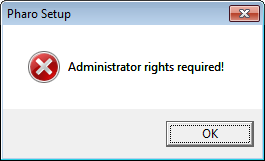
Hi Christophe, Yes, but: 1- I canât execute it if I donât have administrative rights â I have tried with the provided link. Before I get to the installation directory choice, windows prompt me an error telling me I must be an admin. It is probably some windows policy for all exe files, I know it is possible to bypass this as some applications do (Intellij for example), but it is usually easier to provide a zip; [image: Inline image 1] 2- 7-Zip can open this executable as it were a zip file, thatâs how I manage to install Pharo Launcher. On Wed, Oct 11, 2017 at 4:17 AM, Christophe Demarey < christophe.demarey@inria.fr> wrote:
Hi Vitor,
Le 10 oct. 2017 à 19:00, Vitor Medina Cruz <vitormcruz@gmail.com> a écrit :
« Program » folder is the default location where to install apps on
Windows. If a user does not have admin rights, he can simply install it under its home directory.
Also there is the UAC Virtualization fiasco that complicates installing upgrades. http://lists.pharo.org/pipermail/pharo-dev_lists.pharo.org/ 2014-January/091645.html
Could we *please* install Windows PharoLauncher into user folders?
Users can choose to install Pharo Launcher where they wish. We could choose another default location but not sure it is best option.
Nope, I donât have any option of changing Pharo launcher installation. I double click the exe and receive a message telling me I need administrative rights. Can this be changed? Itâs a deal breaker for those using Windows.
For Windows, Pharo is shipped with an installer. Its only goal is to ask you where to install Pharo. So yes, the installation directory is configurable. Just to be sure, here the link to the installer: http://files.pharo. org/platform/launcher/pharo_installer-1.0.1.exe
Hi Vitor,
Le 11 oct. 2017 à 13:44, Vitor Medina Cruz <vitormcruz@gmail.com> a écrit :
Hi Christophe,
Yes, but: 1- I canât execute it if I donât have administrative rights
ok. That the point I missed. I think I will add a zip file with PharoLauncher for windows for user like you not having admin rights.
âââI have tried with the provided link. Before I get to the installation directory choice, windows prompt me an error telling me I must be an admin. It is probably some windows policy for all exe files, I know it is possible to bypass this as some applications do (Intellij for example), but it is usually easier to provide a zip;
<image.png>
2- 7-Zip can open this executable as it were a zip file, thatâs how I manage to install Pharo Launcher.
I need to think on the best way to handle that. Regards, Christophe.
On Thu, Oct 12, 2017 at 3:43 PM, Christophe Demarey < christophe.demarey@inria.fr> wrote:
Hi Vitor,
Le 11 oct. 2017 à 13:44, Vitor Medina Cruz <vitormcruz@gmail.com> a écrit :
Hi Christophe,
Yes, but:
1- I canât execute it if I donât have administrative rights
ok. That the point I missed. I think I will add a zip file with PharoLauncher for windows for user like you not having admin rights.
Might this be a "portable" app, where downloaded images and VMs are stored next to the PharoLancher application, configured by a startup-setting file? Alternatively... searching around I found this... https://stackoverflow.com/questions/18990418/nsis-require-admin-permission https://github.com/NSIS-Dev/Documentation/blob/master/Reference/RequestExecu... Also, when PharoLauncher is installed by an administrator and later used by a standard user, I guess there may be problems with Pharo needing to write changes to a restricted location?? Maybe that can be dealt with by... when a new user runs PharoLauncher from the start menu, copy it to their user folder $LocalAppdata\Programs\PharoLauncher and run PharoLauncher from there where they have privilege to write? https://stackoverflow.com/questions/31641818/install-application-files-to-st... btw, where are the NSIS source files accessible? Can they be dropped in the PharoLauncher git repo? HTH cheers -ben
Hi Ben,
Le 13 oct. 2017 à 06:20, Ben Coman <btc@openinworld.com> a écrit :
On Thu, Oct 12, 2017 at 3:43 PM, Christophe Demarey <christophe.demarey@inria.fr <mailto:christophe.demarey@inria.fr>> wrote: Hi Vitor,
Le 11 oct. 2017 à 13:44, Vitor Medina Cruz <vitormcruz@gmail.com <mailto:vitormcruz@gmail.com>> a écrit :
Hi Christophe,
Yes, but: 1- I canât execute it if I donât have administrative rights
ok. That the point I missed. I think I will add a zip file with PharoLauncher for windows for user like you not having admin rights.
Might this be a "portable" app, where downloaded images and VMs are stored next to the PharoLancher application, configured by a startup-setting file?
Alternatively... searching around I found this... https://stackoverflow.com/questions/18990418/nsis-require-admin-permission <https://stackoverflow.com/questions/18990418/nsis-require-admin-permission> https://github.com/NSIS-Dev/Documentation/blob/master/Reference/RequestExecu... <https://github.com/NSIS-Dev/Documentation/blob/master/Reference/RequestExecu...>
Good catch. probably by using RequestExecutionLevel = highest should solve the problem.
Also, when PharoLauncher is installed by an administrator and later used by a standard user, I guess there may be problems with Pharo needing to write changes to a restricted location?? Maybe that can be dealt with by... when a new user runs PharoLauncher from the start menu, copy it to their user folder $LocalAppdata\Programs\PharoLauncher and run PharoLauncher from there where they have privilege to write? https://stackoverflow.com/questions/31641818/install-application-files-to-st... <https://stackoverflow.com/questions/31641818/install-application-files-to-st...>
Yes, you could have problems but I do not think that adding more complexity to the installer is the way to go. I would rather prefer, in preference order: 1/ Pharo Launcher do not need to write data, 2/ if files need to be written, they should go to a Pharo data folder (e.g. $LocalAppdata\Programs\PharoLauncher) or to the user apps setting folder. What I would like is that a Pharo image writes data where it should
btw, where are the NSIS source files accessible?
https://github.com/pharo-project/pharo-build-scripts/tree/master/windows-ins...
Can they be dropped in the PharoLauncher git repo?
No because they are shared and used with other Pharo build scripts. Thanks for the information. Cheers, Christophe
On Wed, Oct 11, 2017 at 3:17 PM, Christophe Demarey < christophe.demarey@inria.fr> wrote:
Hi Vitor,
Le 10 oct. 2017 à 19:00, Vitor Medina Cruz <vitormcruz@gmail.com> a écrit :
« Program » folder is the default location where to install apps on
Windows. If a user does not have admin rights, he can simply install it under its home directory.
Also there is the UAC Virtualization fiasco that complicates installing upgrades. http://lists.pharo.org/pipermail/pharo-dev_lists.pharo.org/ 2014-January/091645.html
Could we *please* install Windows PharoLauncher into user folders?
Users can choose to install Pharo Launcher where they wish. We could choose another default location but not sure it is best option.
Nope, I donât have any option of changing Pharo launcher installation. I double click the exe and receive a message telling me I need administrative rights. Can this be changed? Itâs a deal breaker for those using Windows.
For Windows, Pharo is shipped with an installer. Its only goal is to ask you where to install Pharo. So yes, the installation directory is configurable. Just to be sure, here the link to the installer: http://files.pharo. org/platform/launcher/pharo_installer-1.0.1.exe
Hi Christophe, Can you get access to a Windows machine to try this... 1. Create a Standard User account with a password different from the default account... https://technet.microsoft.com/en-us/library/dn772452(v=ws.11).aspx 2. Log in as the standard user account. 3. Without typing another password, install PharoLauncher from cheers -ben
Le 9 oct. 2017 à 15:56, Peter Uhnák <i.uhnak@gmail.com> a écrit :
I guess I hate when applications are throwing their garbage into my $HOME (this also goes for VirtualBox, Eclipse, and everyone else).
Perfectly understandable.
If I am not accessing the files directly, but they are pretty much always managed by some other applications, then for me they are polluting $HOME. (And yes, I sometimes do launch to image by hand, or manipulate VirtualBox by hand, but that doesn't change the fact that it is not the primary way to work with it.)
But no worries, I rest my case and I patch it for myself. (So no need to add configuration for this either.)
No need to patch, you already have settings to configure where to store images and virtual machines. Regards, Christophe

On 06-10-17 13:26, Christophe Demarey wrote:
For those wanted more info on how the adequate VM is computed, here is the process: determine the image format version find (and optionnaly fetch) a compatible VM (a VM able to run this image format) and run the image to get its Pharo version number find (and optionnaly fetch) the appropriate VM for this specific Pharo image version. Sources files are also downloaded with the VM when applicable. run the image with the appropriate VM
Thanks, Christophe. It might be useful to regularly check for newer vms, at least the stable ones. VMs are supposed to be backwards compatible. Stephan
Le 11 oct. 2017 à 12:10, stephan <stephan@stack.nl> a écrit :
On 06-10-17 13:26, Christophe Demarey wrote:
For those wanted more info on how the adequate VM is computed, here is the process: determine the image format version find (and optionnaly fetch) a compatible VM (a VM able to run this image format) and run the image to get its Pharo version number find (and optionnaly fetch) the appropriate VM for this specific Pharo image version. Sources files are also downloaded with the VM when applicable. run the image with the appropriate VM
Thanks, Christophe.
It might be useful to regularly check for newer vms, at least the stable ones. VMs are supposed to be backwards compatible.
Right. I added an issue: https://github.com/pharo-project/pharo-launcher/issues/42
participants (11)
-
 Ben Coman
 -
 Christophe Demarey
 -
 Esteban Lorenzano
 -
 Gabriel Cotelli
 -
 kmo
kmo -
 Nicolai Hess
 -
 Peter Uhnák
 -
 Sean P. DeNigris
 -
 stephan
 -
 Stephane Ducasse
 -
 Vitor Medina Cruz