Problem installing Seaside on Windows

Hi everyone. I have been developing a new web site using Seaside on my M1 MacBookAir and I have had no issues. To deploy it, I have to install Pharo on either a Windows 10 or a Windows Server 2012 server. Pharo has installed on both without any issues. However, I am having problems installing Seaside. I have Pharo 8.0 installed on both (64 bit version). If I try and install from the Catalog, I get the following error in the Transcript. IceGenericError: Failed to stat file 'C:/Users/david/Documents/Pharo/images/Pharo 8.0 - 64bit (stable)/pharo-local. If I try using Monticello, I get the following: Metacello new baseline:'Seaside3'; repository: 'github://SeasideSt/Seaside:master/repository'; load I got an error while cloning: There was an authentication error while trying to execute the operation: . This happens usually because you didn't provide a valid set of credentials. You may fix this problem in different ways: 1. adding your keys to ssh-agent, executing ssh-add ~/.ssh/id_rsa in your command line. 2. adding your keys in settings (open settings browser search for "Use custom SSH keys" and add your public and private keys). 3. using HTTPS instead SSH (Just use an url in the form HTTPS://etc.git). I will try to clone the HTTPS variant. Can you help please? David Totally Objects

Hi David, I have repeatedly installed Seaside on Pharo 8 / 9 64 bit - Windows 10 without any issues and I have done it both ssh and https I do it quickly / simply by tools->iceberg->[+ add] (on top panel right) on popup select: 'clone from github.com' fill in owner: SeasideSt (case does not matter) project: seaside local directory: (leave the default for now) protocol try https first (not sure if github requires a password) or ssh which may be slightly complicated once seaside libraries are pulled in and seaside appears in the iceberg panel then right click on seaside on popup scroll down to metacello->install baseline (default) hope that works Long Haired David wrote
Hi everyone.
I have been developing a new web site using Seaside on my M1 MacBookAir and I have had no issues.
To deploy it, I have to install Pharo on either a Windows 10 or a Windows Server 2012 server. Pharo has installed on both without any issues. However, I am having problems installing Seaside.
I have Pharo 8.0 installed on both (64 bit version).
If I try and install from the Catalog, I get the following error in the Transcript.
IceGenericError: Failed to stat file 'C:/Users/david/Documents/Pharo/images/Pharo 8.0 - 64bit (stable)/pharo-local.
If I try using Monticello, I get the following:
Metacello new baseline:'Seaside3'; repository: 'github://SeasideSt/Seaside:master/repository'; load I got an error while cloning: There was an authentication error while trying to execute the operation: . This happens usually because you didn't provide a valid set of credentials. You may fix this problem in different ways:
1. adding your keys to ssh-agent, executing ssh-add ~/.ssh/id_rsa in your command line. 2. adding your keys in settings (open settings browser search for "Use custom SSH keys" and add your public and private keys). 3. using HTTPS instead SSH (Just use an url in the form HTTPS://etc.git). I will try to clone the HTTPS variant.
Can you help please?
David Totally Objects
----- cheers, Sanjay -- Sent from: http://forum.world.st/Pharo-Smalltalk-Users-f1310670.html

david did you succeed to clone or checkout a github repo from this machine and without pharo at all? Because Pharo is just using libgit. S.
On 22 Mar 2021, at 18:58, David Pennington <david@totallyobjects.com> wrote:
Tried that. I got the following
Failed to get server certificate: the handle is in the wrong state for the requested operation.
I assume that someone thinks that this is helpful:-)
On 22 Mar 2021 16:06, Sanjay Minni <sm@planage.com> wrote: Hi David,
I have repeatedly installed Seaside on Pharo 8 / 9 64 bit - Windows 10 without any issues and I have done it both ssh and https
I do it quickly / simply by
tools->iceberg->[+ add] (on top panel right) on popup select: 'clone from github.com' fill in owner: SeasideSt (case does not matter) project: seaside local directory: (leave the default for now) protocol try https first (not sure if github requires a password) or ssh which may be slightly complicated once seaside libraries are pulled in and seaside appears in the iceberg panel then right click on seaside on popup scroll down to metacello->install baseline (default)
hope that works
Long Haired David wrote
Hi everyone.
I have been developing a new web site using Seaside on my M1 MacBookAir and I have had no issues.
To deploy it, I have to install Pharo on either a Windows 10 or a Windows Server 2012 server. Pharo has installed on both without any issues. However, I am having problems installing Seaside.
I have Pharo 8.0 installed on both (64 bit version).
If I try and install from the Catalog, I get the following error in the Transcript.
IceGenericError: Failed to stat file 'C:/Users/david/Documents/Pharo/images/Pharo 8.0 - 64bit (stable)/pharo-local.
If I try using Monticello, I get the following:
Metacello new baseline:'Seaside3'; repository: 'github://SeasideSt/Seaside:master/repository'; load I got an error while cloning: There was an authentication error while trying to execute the operation: . This happens usually because you didn't provide a valid set of credentials. You may fix this problem in different ways:
1. adding your keys to ssh-agent, executing ssh-add ~/.ssh/id_rsa in your command line. 2. adding your keys in settings (open settings browser search for "Use custom SSH keys" and add your public and private keys). 3. using HTTPS instead SSH (Just use an url in the form HTTPS://etc.git). I will try to clone the HTTPS variant.
Can you help please?
David Totally Objects
----- cheers, Sanjay -- Sent from: http://forum.world.st/Pharo-Smalltalk-Users-f1310670.html
-------------------------------------------- Stéphane Ducasse http://stephane.ducasse.free.fr / http://www.pharo.org 03 59 35 87 52 Assistant: Aurore Dalle FAX 03 59 57 78 50 TEL 03 59 35 86 16 S. Ducasse - Inria 40, avenue Halley, Parc Scientifique de la Haute Borne, Bât.A, Park Plaza Villeneuve d'Ascq 59650 France
On 22 Mar 2021, at 19:18, David Pennington <david@totallyobjects.com> wrote:
I am sorry but github is a mystery to me.
You see you have to debug because if you cannot clone a repo then why Pharo would?
I installed all of this on my mac with no troubles. Surely it can't be anymore difficult on PC?
I know why I do not use a windows. And I can tell you that there are real differences. S.
OK, I got my software working fine on the Mac but I really need it on Windows now so I have had another go. I have followed all the instructions and I have a public key registered with GIT for both the Mac and the Windows laptop. The Mac now quite happily installs stuff that wouldn't load before. (TinyLogger). However, the Windows laptop now get a lot further with the Seaside install but fails with this message: "LGit_GIT_EEXISTS: Failed to stat file 'C:/Users/david/Documents/Pharo/images/Pharo 8.0 - 64bit (sta...aximumAbsoluteAge.maximumRelativeAge.overflowAction..st': The filename or extension is too long. " Any thoughts? On 22/03/2021 18:18, David Pennington wrote:
I am sorry but github is a mystery to me. I installed all of this on my mac with no troubles. Surely it can't be anymore difficult on PC?
On 22 Mar 2021 18:05, Stéphane Ducasse <stephane.ducasse@inria.fr> wrote:
david
did you succeed to clone or checkout a github repo from this machine and without pharo at all? Because Pharo is just using libgit.
S.
On 22 Mar 2021, at 18:58, David Pennington <david@totallyobjects.com> wrote:
Tried that. I got the following
Failed to get server certificate: the handle is in the wrong state for the requested operation.
I assume that someone thinks that this is helpful:-)
On 22 Mar 2021 16:06, Sanjay Minni <sm@planage.com> wrote:
Hi David,
I have repeatedly installed Seaside on Pharo 8 / 9 64 bit - Windows 10 without any issues and I have done it both ssh and https
I do it quickly / simply by
tools->iceberg->[+ add] (on top panel right) on popup select: 'clone from github.com [1]' fill in owner: SeasideSt (case does not matter) project: seaside local directory: (leave the default for now) protocol try https first (not sure if github requires a password) or ssh which may be slightly complicated once seaside libraries are pulled in and seaside appears in the iceberg panel then right click on seaside on popup scroll down to metacello->install baseline (default)
hope that works
Long Haired David wrote
Hi everyone.
I have been developing a new web site using Seaside on my M1 MacBookAir and I have had no issues.
To deploy it, I have to install Pharo on either a Windows 10 or a Windows Server 2012 server. Pharo has installed on both without any issues. However, I am having problems installing Seaside.
I have Pharo 8.0 installed on both (64 bit version).
If I try and install from the Catalog, I get the following error in the Transcript.
IceGenericError: Failed to stat file 'C:/Users/david/Documents/Pharo/images/Pharo 8.0 - 64bit (stable)/pharo-local.
If I try using Monticello, I get the following:
Metacello new baseline:'Seaside3'; repository: 'github://SeasideSt/Seaside:master/repository'; load I got an error while cloning: There was an authentication error while trying to execute the operation: . This happens usually because you didn't provide a valid set of credentials. You may fix this problem in different ways:
1. adding your keys to ssh-agent, executing ssh-add ~/.ssh/id_rsa in your command line. 2. adding your keys in settings (open settings browser search for "Use custom SSH keys" and add your public and private keys). 3. using HTTPS instead SSH (Just use an url in the form HTTPS://etc.git). I will try to clone the HTTPS variant.
Can you help please?
David Totally Objects
----- cheers, Sanjay -- Sent from: http://forum.world.st/Pharo-Smalltalk-Users-f1310670.html
-------------------------------------------- Stéphane Ducasse http://stephane.ducasse.free.fr / http://www.pharo.org 03 59 35 87 52 Assistant: Aurore Dalle FAX 03 59 57 78 50 TEL 03 59 35 86 16 S. Ducasse - Inria 40, avenue Halley, Parc Scientifique de la Haute Borne, Bât.A, Park Plaza Villeneuve d'Ascq 59650 France Links: ------ [1] http://github.com
Yes you hit the window filename length problem. Retry by creating one more pharo 8 image. Only don't take the default image name as you have taken. Change it to very short like p8-1 to keep image file name and consequently the folder name length to a minimum Then install seaside. If that doesn't work repost and we will try still another option Regards Sanjay On Fri, 2 Apr, 2021, 9:36 pm David Pennington, <david@totallyobjects.com> wrote:
OK, I got my software working fine on the Mac but I really need it on Windows now so I have had another go. I have followed all the instructions and I have a public key registered with GIT for both the Mac and the Windows laptop. The Mac now quite happily installs stuff that wouldn't load before. (TinyLogger). However, the Windows laptop now get a lot further with the Seaside install but fails with this message:
"LGit_GIT_EEXISTS: Failed to stat file 'C:/Users/david/Documents/Pharo/images/Pharo 8.0 - 64bit (sta...aximumAbsoluteAge.maximumRelativeAge.overflowAction..st': The filename or extension is too long. " Any thoughts?
On 22/03/2021 18:18, David Pennington wrote:
I am sorry but github is a mystery to me. I installed all of this on my mac with no troubles. Surely it can't be anymore difficult on PC?
On 22 Mar 2021 18:05, Stéphane Ducasse <stephane.ducasse@inria.fr> wrote:
david
did you succeed to clone or checkout a github repo from this machine and without pharo at all? Because Pharo is just using libgit.
S.
On 22 Mar 2021, at 18:58, David Pennington <david@totallyobjects.com> wrote:
Tried that. I got the following
Failed to get server certificate: the handle is in the wrong state for the requested operation.
I assume that someone thinks that this is helpful:-)
On 22 Mar 2021 16:06, Sanjay Minni <sm@planage.com> wrote:
Hi David,
I have repeatedly installed Seaside on Pharo 8 / 9 64 bit - Windows 10 without any issues and I have done it both ssh and https
I do it quickly / simply by
tools->iceberg->[+ add] (on top panel right) on popup select: 'clone from github.com' fill in owner: SeasideSt (case does not matter) project: seaside local directory: (leave the default for now) protocol try https first (not sure if github requires a password) or ssh which may be slightly complicated once seaside libraries are pulled in and seaside appears in the iceberg panel then right click on seaside on popup scroll down to metacello->install baseline (default)
hope that works
Long Haired David wrote
Hi everyone.
I have been developing a new web site using Seaside on my M1 MacBookAir and I have had no issues.
To deploy it, I have to install Pharo on either a Windows 10 or a Windows Server 2012 server. Pharo has installed on both without any issues. However, I am having problems installing Seaside.
I have Pharo 8.0 installed on both (64 bit version).
If I try and install from the Catalog, I get the following error in the Transcript.
IceGenericError: Failed to stat file 'C:/Users/david/Documents/Pharo/images/Pharo 8.0 - 64bit (stable)/pharo-local.
If I try using Monticello, I get the following:
Metacello new baseline:'Seaside3'; repository: 'github://SeasideSt/Seaside:master/repository'; load I got an error while cloning: There was an authentication error while trying to execute the operation: . This happens usually because you didn't provide a valid set of credentials. You may fix this problem in different ways:
1. adding your keys to ssh-agent, executing ssh-add ~/.ssh/id_rsa in your command line. 2. adding your keys in settings (open settings browser search for "Use custom SSH keys" and add your public and private keys). 3. using HTTPS instead SSH (Just use an url in the form HTTPS://etc.git).
I will try to clone the HTTPS variant.
Can you help please?
David Totally Objects
----- cheers, Sanjay -- Sent from: http://forum.world.st/Pharo-Smalltalk-Users-f1310670.html
-------------------------------------------- Stéphane Ducasse http://stephane.ducasse.free.fr / http://www.pharo.org 03 59 35 87 52 Assistant: Aurore Dalle FAX 03 59 57 78 50 TEL 03 59 35 86 16 S. Ducasse - Inria 40, avenue Halley, Parc Scientifique de la Haute Borne, Bât.A, Park Plaza Villeneuve d'Ascq 59650 France

According to my experiences this happens if Pharo images are located deeply in the directory path. It helps if you move the image in question to some higher level. In any case, C:\Pharo should work no matter what. Seaside has lots of dependencies which are then located under its repository. Tomaz On Fri, 2 Apr 2021, 18:31 Sanjay Minni, <sm@planage.com> wrote:
Yes you hit the window filename length problem.
Retry by creating one more pharo 8 image. Only don't take the default image name as you have taken. Change it to very short like p8-1 to keep image file name and consequently the folder name length to a minimum
Then install seaside.
If that doesn't work repost and we will try still another option
Regards Sanjay
On Fri, 2 Apr, 2021, 9:36 pm David Pennington, <david@totallyobjects.com> wrote:
OK, I got my software working fine on the Mac but I really need it on Windows now so I have had another go. I have followed all the instructions and I have a public key registered with GIT for both the Mac and the Windows laptop. The Mac now quite happily installs stuff that wouldn't load before. (TinyLogger). However, the Windows laptop now get a lot further with the Seaside install but fails with this message:
"LGit_GIT_EEXISTS: Failed to stat file 'C:/Users/david/Documents/Pharo/images/Pharo 8.0 - 64bit (sta...aximumAbsoluteAge.maximumRelativeAge.overflowAction..st': The filename or extension is too long. " Any thoughts?
On 22/03/2021 18:18, David Pennington wrote:
I am sorry but github is a mystery to me. I installed all of this on my mac with no troubles. Surely it can't be anymore difficult on PC?
On 22 Mar 2021 18:05, Stéphane Ducasse <stephane.ducasse@inria.fr> wrote:
david
did you succeed to clone or checkout a github repo from this machine and without pharo at all? Because Pharo is just using libgit.
S.
On 22 Mar 2021, at 18:58, David Pennington <david@totallyobjects.com> wrote:
Tried that. I got the following
Failed to get server certificate: the handle is in the wrong state for the requested operation.
I assume that someone thinks that this is helpful:-)
On 22 Mar 2021 16:06, Sanjay Minni <sm@planage.com> wrote:
Hi David,
I have repeatedly installed Seaside on Pharo 8 / 9 64 bit - Windows 10 without any issues and I have done it both ssh and https
I do it quickly / simply by
tools->iceberg->[+ add] (on top panel right) on popup select: 'clone from github.com' fill in owner: SeasideSt (case does not matter) project: seaside local directory: (leave the default for now) protocol try https first (not sure if github requires a password) or ssh which may be slightly complicated once seaside libraries are pulled in and seaside appears in the iceberg panel then right click on seaside on popup scroll down to metacello->install baseline (default)
hope that works
Long Haired David wrote
Hi everyone.
I have been developing a new web site using Seaside on my M1 MacBookAir and I have had no issues.
To deploy it, I have to install Pharo on either a Windows 10 or a Windows Server 2012 server. Pharo has installed on both without any issues. However, I am having problems installing Seaside.
I have Pharo 8.0 installed on both (64 bit version).
If I try and install from the Catalog, I get the following error in the Transcript.
IceGenericError: Failed to stat file 'C:/Users/david/Documents/Pharo/images/Pharo 8.0 - 64bit (stable)/pharo-local.
If I try using Monticello, I get the following:
Metacello new baseline:'Seaside3'; repository: 'github://SeasideSt/Seaside:master/repository'; load I got an error while cloning: There was an authentication error while trying to execute the operation: . This happens usually because you didn't provide a valid set of credentials. You may fix this problem in different ways:
1. adding your keys to ssh-agent, executing ssh-add ~/.ssh/id_rsa in your command line. 2. adding your keys in settings (open settings browser search for "Use custom SSH keys" and add your public and private keys). 3. using HTTPS instead SSH (Just use an url in the form HTTPS://etc.git).
I will try to clone the HTTPS variant.
Can you help please?
David Totally Objects
----- cheers, Sanjay -- Sent from: http://forum.world.st/Pharo-Smalltalk-Users-f1310670.html
-------------------------------------------- Stéphane Ducasse http://stephane.ducasse.free.fr / http://www.pharo.org 03 59 35 87 52 Assistant: Aurore Dalle FAX 03 59 57 78 50 TEL 03 59 35 86 16 S. Ducasse - Inria 40, avenue Halley, Parc Scientifique de la Haute Borne, Bât.A, Park Plaza Villeneuve d'Ascq 59650 France
Thank you to everyone for your help. I sorted out the public and private keys and shortened the path but it kept up with an authentication issue. I deleted everything and installed V 9.0. I shortened its name and ran the GitHub code and I now have Seaside installed and running. I now need to install STON and I can get my code working. What a great community this is! David On 02/04/2021 17:43, Tomaž Turk wrote:
According to my experiences this happens if Pharo images are located deeply in the directory path. It helps if you move the image in question to some higher level. In any case, C:\Pharo should work no matter what.
Seaside has lots of dependencies which are then located under its repository.
Tomaz
On Fri, 2 Apr 2021, 18:31 Sanjay Minni, <sm@planage.com> wrote: Yes you hit the window filename length problem.
Retry by creating one more pharo 8 image. Only don't take the default image name as you have taken. Change it to very short like p8-1 to keep image file name and consequently the folder name length to a minimum
Then install seaside.
If that doesn't work repost and we will try still another option
Regards Sanjay
On Fri, 2 Apr, 2021, 9:36 pm David Pennington, <david@totallyobjects.com> wrote:
OK, I got my software working fine on the Mac but I really need it on Windows now so I have had another go. I have followed all the instructions and I have a public key registered with GIT for both the Mac and the Windows laptop. The Mac now quite happily installs stuff that wouldn't load before. (TinyLogger). However, the Windows laptop now get a lot further with the Seaside install but fails with this message:
"LGit_GIT_EEXISTS: Failed to stat file 'C:/Users/david/Documents/Pharo/images/Pharo 8.0 - 64bit (sta...aximumAbsoluteAge.maximumRelativeAge.overflowAction..st': The filename or extension is too long. " Any thoughts?
On 22/03/2021 18:18, David Pennington wrote:
I am sorry but github is a mystery to me. I installed all of this on my mac with no troubles. Surely it can't be anymore difficult on PC?
On 22 Mar 2021 18:05, Stéphane Ducasse <stephane.ducasse@inria.fr> wrote:
david
did you succeed to clone or checkout a github repo from this machine and without pharo at all? Because Pharo is just using libgit.
S.
On 22 Mar 2021, at 18:58, David Pennington <david@totallyobjects.com> wrote:
Tried that. I got the following
Failed to get server certificate: the handle is in the wrong state for the requested operation.
I assume that someone thinks that this is helpful:-)
On 22 Mar 2021 16:06, Sanjay Minni <sm@planage.com> wrote:
Hi David,
I have repeatedly installed Seaside on Pharo 8 / 9 64 bit - Windows 10 without any issues and I have done it both ssh and https
I do it quickly / simply by
tools->iceberg->[+ add] (on top panel right) on popup select: 'clone from github.com [1]' fill in owner: SeasideSt (case does not matter) project: seaside local directory: (leave the default for now) protocol try https first (not sure if github requires a password) or ssh which may be slightly complicated once seaside libraries are pulled in and seaside appears in the iceberg panel then right click on seaside on popup scroll down to metacello->install baseline (default)
hope that works
Long Haired David wrote
Hi everyone.
I have been developing a new web site using Seaside on my M1 MacBookAir and I have had no issues.
To deploy it, I have to install Pharo on either a Windows 10 or a Windows Server 2012 server. Pharo has installed on both without any issues. However, I am having problems installing Seaside.
I have Pharo 8.0 installed on both (64 bit version).
If I try and install from the Catalog, I get the following error in the Transcript.
IceGenericError: Failed to stat file 'C:/Users/david/Documents/Pharo/images/Pharo 8.0 - 64bit (stable)/pharo-local.
If I try using Monticello, I get the following:
Metacello new baseline:'Seaside3'; repository: 'github://SeasideSt/Seaside:master/repository'; load I got an error while cloning: There was an authentication error while trying to execute the operation: . This happens usually because you didn't provide a valid set of credentials. You may fix this problem in different ways:
1. adding your keys to ssh-agent, executing ssh-add ~/.ssh/id_rsa in your command line. 2. adding your keys in settings (open settings browser search for "Use custom SSH keys" and add your public and private keys). 3. using HTTPS instead SSH (Just use an url in the form HTTPS://etc.git). I will try to clone the HTTPS variant.
Can you help please?
David Totally Objects
----- cheers, Sanjay -- Sent from: http://forum.world.st/Pharo-Smalltalk-Users-f1310670.html
-------------------------------------------- Stéphane Ducasse http://stephane.ducasse.free.fr / http://www.pharo.org 03 59 35 87 52 Assistant: Aurore Dalle FAX 03 59 57 78 50 TEL 03 59 35 86 16 S. Ducasse - Inria 40, avenue Halley, Parc Scientifique de la Haute Borne, Bât.A, Park Plaza Villeneuve d'Ascq 59650 France Links: ------ [1] http://github.com

I normally build on the server where I deploy (linux of course), but you do not have to. Pharo is cross platform. So it is perfectly possible to build your deployment image on your mac, copy it over and run it on the server. I would always advise to not save the image with running servers inside, but to use a start up script to start your server explicitly.
On 2 Apr 2021, at 19:32, David Pennington <david@totallyobjects.com> wrote:
Thank you to everyone for your help. I sorted out the public and private keys and shortened the path but it kept up with an authentication issue. I deleted everything and installed V 9.0. I shortened its name and ran the GitHub code and I now have Seaside installed and running. I now need to install STON and I can get my code working.
What a great community this is!
David
On 02/04/2021 17:43, Tomaž Turk wrote:
According to my experiences this happens if Pharo images are located deeply in the directory path. It helps if you move the image in question to some higher level. In any case, C:\Pharo should work no matter what.
Seaside has lots of dependencies which are then located under its repository.
Tomaz
On Fri, 2 Apr 2021, 18:31 Sanjay Minni, <sm@planage.com> wrote: Yes you hit the window filename length problem.
Retry by creating one more pharo 8 image. Only don't take the default image name as you have taken. Change it to very short like p8-1 to keep image file name and consequently the folder name length to a minimum
Then install seaside.
If that doesn't work repost and we will try still another option
Regards Sanjay
On Fri, 2 Apr, 2021, 9:36 pm David Pennington, <david@totallyobjects.com> wrote: OK, I got my software working fine on the Mac but I really need it on Windows now so I have had another go. I have followed all the instructions and I have a public key registered with GIT for both the Mac and the Windows laptop. The Mac now quite happily installs stuff that wouldn't load before. (TinyLogger). However, the Windows laptop now get a lot further with the Seaside install but fails with this message:
"LGit_GIT_EEXISTS: Failed to stat file 'C:/Users/david/Documents/Pharo/images/Pharo 8.0 - 64bit (sta...aximumAbsoluteAge.maximumRelativeAge.overflowAction..st': The filename or extension is too long. " Any thoughts?
On 22/03/2021 18:18, David Pennington wrote:
I am sorry but github is a mystery to me. I installed all of this on my mac with no troubles. Surely it can't be anymore difficult on PC?
On 22 Mar 2021 18:05, Stéphane Ducasse <stephane.ducasse@inria.fr> wrote: david
did you succeed to clone or checkout a github repo from this machine and without pharo at all? Because Pharo is just using libgit.
S.
On 22 Mar 2021, at 18:58, David Pennington <david@totallyobjects.com> wrote:
Tried that. I got the following
Failed to get server certificate: the handle is in the wrong state for the requested operation.
I assume that someone thinks that this is helpful:-)
On 22 Mar 2021 16:06, Sanjay Minni <sm@planage.com> wrote: Hi David,
I have repeatedly installed Seaside on Pharo 8 / 9 64 bit - Windows 10 without any issues and I have done it both ssh and https
I do it quickly / simply by
tools->iceberg->[+ add] (on top panel right) on popup select: 'clone from github.com' fill in owner: SeasideSt (case does not matter) project: seaside local directory: (leave the default for now) protocol try https first (not sure if github requires a password) or ssh which may be slightly complicated once seaside libraries are pulled in and seaside appears in the iceberg panel then right click on seaside on popup scroll down to metacello->install baseline (default)
hope that works
Long Haired David wrote
Hi everyone.
I have been developing a new web site using Seaside on my M1 MacBookAir and I have had no issues.
To deploy it, I have to install Pharo on either a Windows 10 or a Windows Server 2012 server. Pharo has installed on both without any issues. However, I am having problems installing Seaside.
I have Pharo 8.0 installed on both (64 bit version).
If I try and install from the Catalog, I get the following error in the Transcript.
IceGenericError: Failed to stat file 'C:/Users/david/Documents/Pharo/images/Pharo 8.0 - 64bit (stable)/pharo-local.
If I try using Monticello, I get the following:
Metacello new baseline:'Seaside3'; repository: 'github://SeasideSt/Seaside:master/repository'; load I got an error while cloning: There was an authentication error while trying to execute the operation: . This happens usually because you didn't provide a valid set of credentials. You may fix this problem in different ways:
1. adding your keys to ssh-agent, executing ssh-add ~/.ssh/id_rsa in your command line. 2. adding your keys in settings (open settings browser search for "Use custom SSH keys" and add your public and private keys). 3. using HTTPS instead SSH (Just use an url in the form HTTPS://etc.git). I will try to clone the HTTPS variant.
Can you help please?
David Totally Objects
----- cheers, Sanjay -- Sent from: http://forum.world.st/Pharo-Smalltalk-Users-f1310670.html
-------------------------------------------- Stéphane Ducasse http://stephane.ducasse.free.fr / http://www.pharo.org 03 59 35 87 52 Assistant: Aurore Dalle FAX 03 59 57 78 50 TEL 03 59 35 86 16 S. Ducasse - Inria 40, avenue Halley, Parc Scientifique de la Haute Borne, Bât.A, Park Plaza Villeneuve d'Ascq 59650 France
On 22 Mar 2021, at 19:05, Stéphane Ducasse <stephane.ducasse@inria.fr> wrote:
david
did you succeed to clone or checkout a github repo from this machine and without pharo at all?
This is indeed step one: make sure that you can check out code from git(hub) on the command line in Windows. Only if that works you can do the next steps. BTW, once you have a repository checked out, you can just point Iceberg to it and load code. PS: yes, you will also have to learn the basic of git(hub).
Because Pharo is just using libgit.
S.
On 22 Mar 2021, at 18:58, David Pennington <david@totallyobjects.com> wrote:
Tried that. I got the following
Failed to get server certificate: the handle is in the wrong state for the requested operation.
I assume that someone thinks that this is helpful:-)
On 22 Mar 2021 16:06, Sanjay Minni <sm@planage.com> wrote: Hi David,
I have repeatedly installed Seaside on Pharo 8 / 9 64 bit - Windows 10 without any issues and I have done it both ssh and https
I do it quickly / simply by
tools->iceberg->[+ add] (on top panel right) on popup select: 'clone from github.com' fill in owner: SeasideSt (case does not matter) project: seaside local directory: (leave the default for now) protocol try https first (not sure if github requires a password) or ssh which may be slightly complicated once seaside libraries are pulled in and seaside appears in the iceberg panel then right click on seaside on popup scroll down to metacello->install baseline (default)
hope that works
Long Haired David wrote
Hi everyone.
I have been developing a new web site using Seaside on my M1 MacBookAir and I have had no issues.
To deploy it, I have to install Pharo on either a Windows 10 or a Windows Server 2012 server. Pharo has installed on both without any issues. However, I am having problems installing Seaside.
I have Pharo 8.0 installed on both (64 bit version).
If I try and install from the Catalog, I get the following error in the Transcript.
IceGenericError: Failed to stat file 'C:/Users/david/Documents/Pharo/images/Pharo 8.0 - 64bit (stable)/pharo-local.
If I try using Monticello, I get the following:
Metacello new baseline:'Seaside3'; repository: 'github://SeasideSt/Seaside:master/repository'; load I got an error while cloning: There was an authentication error while trying to execute the operation: . This happens usually because you didn't provide a valid set of credentials. You may fix this problem in different ways:
1. adding your keys to ssh-agent, executing ssh-add ~/.ssh/id_rsa in your command line. 2. adding your keys in settings (open settings browser search for "Use custom SSH keys" and add your public and private keys). 3. using HTTPS instead SSH (Just use an url in the form HTTPS://etc.git). I will try to clone the HTTPS variant.
Can you help please?
David Totally Objects
----- cheers, Sanjay -- Sent from: http://forum.world.st/Pharo-Smalltalk-Users-f1310670.html
-------------------------------------------- Stéphane Ducasse http://stephane.ducasse.free.fr / http://www.pharo.org 03 59 35 87 52 Assistant: Aurore Dalle FAX 03 59 57 78 50 TEL 03 59 35 86 16 S. Ducasse - Inria 40, avenue Halley, Parc Scientifique de la Haute Borne, Bât.A, Park Plaza Villeneuve d'Ascq 59650 France

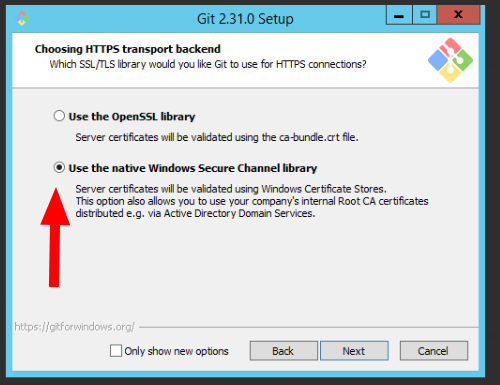
Before you give up, try this: Install (or reinstall) git from https://git-scm.com/ and make sure to set up the option to use Windows Secure Channel library. [image: image.png] It has solved a lot of issues for me with pharo + git on windows, and not being able to clone via https. On Tue, 23 Mar 2021 at 11:08, David Pennington <david@totallyobjects.com> wrote:
This is way to complicated for 70 year old developer. Running the code on the github page loaded Seaside,inifile and Ston without fuss so why is it so difficult on Windows? I have given up and decided to set my Mac up to be on with the lid down and use that as a server as this is a low traffic Web site. Thanks for all your help. David
On 23 Mar 2021 07:32, Sven Van Caekenberghe <sven@stfx.eu> wrote:
On 22 Mar 2021, at 19:05, Stéphane Ducasse <stephane.ducasse@inria.fr> wrote:
david
did you succeed to clone or checkout a github repo from this machine and without pharo at all?
This is indeed step one: make sure that you can check out code from git(hub) on the command line in Windows. Only if that works you can do the next steps.
BTW, once you have a repository checked out, you can just point Iceberg to it and load code.
PS: yes, you will also have to learn the basic of git(hub).
Because Pharo is just using libgit.
S.
On 22 Mar 2021, at 18:58, David Pennington <david@totallyobjects.com> wrote:
Tried that. I got the following
Failed to get server certificate: the handle is in the wrong state for the requested operation.
I assume that someone thinks that this is helpful:-)
On 22 Mar 2021 16:06, Sanjay Minni <sm@planage.com> wrote: Hi David,
I have repeatedly installed Seaside on Pharo 8 / 9 64 bit - Windows 10 without any issues and I have done it both ssh and https
I do it quickly / simply by
tools->iceberg->[+ add] (on top panel right) on popup select: 'clone from github.com' fill in owner: SeasideSt (case does not matter) project: seaside local directory: (leave the default for now) protocol try https first (not sure if github requires a password) or ssh which may be slightly complicated once seaside libraries are pulled in and seaside appears in the iceberg panel then right click on seaside on popup scroll down to metacello->install baseline (default)
hope that works
Long Haired David wrote
Hi everyone.
I have been developing a new web site using Seaside on my M1 MacBookAir and I have had no issues.
To deploy it, I have to install Pharo on either a Windows 10 or a Windows Server 2012 server. Pharo has installed on both without any issues. However, I am having problems installing Seaside.
I have Pharo 8.0 installed on both (64 bit version).
If I try and install from the Catalog, I get the following error in the Transcript.
IceGenericError: Failed to stat file 'C:/Users/david/Documents/Pharo/images/Pharo 8.0 - 64bit (stable)/pharo-local.
If I try using Monticello, I get the following:
Metacello new baseline:'Seaside3'; repository: 'github://SeasideSt/Seaside:master/repository'; load I got an error while cloning: There was an authentication error while trying to execute the operation: . This happens usually because you didn't provide a valid set of credentials. You may fix this problem in different ways:
1. adding your keys to ssh-agent, executing ssh-add ~/.ssh/id_rsa in your command line. 2. adding your keys in settings (open settings browser search for "Use custom SSH keys" and add your public and private keys). 3. using HTTPS instead SSH (Just use an url in the form HTTPS://etc.git). I will try to clone the HTTPS variant.
Can you help please?
David Totally Objects
----- cheers, Sanjay -- Sent from: http://forum.world.st/Pharo-Smalltalk-Users-f1310670.html
-------------------------------------------- Stéphane Ducasse http://stephane.ducasse.free.fr / http://www.pharo.org 03 59 35 87 52 Assistant: Aurore Dalle FAX 03 59 57 78 50 TEL 03 59 35 86 16 S. Ducasse - Inria 40, avenue Halley, Parc Scientifique de la Haute Borne, Bât.A, Park Plaza Villeneuve d'Ascq 59650 France
The error seems wierd, but I am a pure windows user and have not encountered any problem except 1 issue which i will mention below. I dont know what, if any, at all of below will help and its difficult to reproduce / simulate the problem as it may clobber up something else. Logically none of the below are required, though logically you shouldnt be facing any problem either. anyways - first a simple path 1. create a github login - thats all and do remember your ID and password which may be needed later 2. In github click your icon on top right, then go to settings-> SSH and GPG keys and enter your SSH public key, you will find instructions along the way. paste your id_isa.pub file from C:\Users\<you>\.ssh (note: i assume you have generated your ssh key files) 3. save and exit then create a new image thru pharo launcher - ** change image name to a short name ** i.e. change default "Pharo 8.0 - 64bit (stable)" to say "p8my1" or whatever here is a typical windows problem of long file names which aggravates as packages with long names are installed now try to to install iceberg->add->clone github-> seasidest | seaside | | (https or ssh) enter github credentials when asked hope that helps Long Haired David wrote
Tried that. I got the following Failed to get server certificate: the handle is in the wrong state for the requested operation. I assume that someone thinks that this is helpful:-) On 22 Mar 2021 16:06, Sanjay Minni <
sm@
> wrote: Hi David, I have repeatedly installed Seaside on Pharo 8 / 9 64 bit - Windows 10 without any issues and I have done it both ssh and https I do it quickly / simply by tools->iceberg->[+ add] (on top panel right) on popup select: 'clone from github.com' fill in owner: SeasideSt (case does not matter) project: seaside local directory: (leave the default for now) protocol try https first (not sure if github requires a password) or ssh which may be slightly complicated once seaside libraries are pulled in and seaside appears in the iceberg panel then right click on seaside on popup scroll down to metacello->install baseline (default) hope that works Long Haired David wrote > Hi everyone. > > I have been developing a new web site using Seaside on my M1 MacBookAir > and I have had no issues. > > To deploy it, I have to install Pharo on either a Windows 10 or a Windows > Server 2012 server. Pharo has installed on both without any issues. > However, I am having problems installing Seaside. > > I have Pharo 8.0 installed on both (64 bit version). > > If I try and install from the Catalog, I get the following error in the > Transcript. > > IceGenericError: Failed to stat file > 'C:/Users/david/Documents/Pharo/images/Pharo 8.0 - 64bit > (stable)/pharo-local. > > If I try using Monticello, I get the following: > > Metacello new > baseline:'Seaside3'; > repository: 'github://SeasideSt/Seaside:master/repository'; > load > I got an error while cloning: There was an authentication error while > trying to execute the operation: . > This happens usually because you didn't provide a valid set of > credentials. > You may fix this problem in different ways: > > 1. adding your keys to ssh-agent, executing ssh-add ~/.ssh/id_rsa in your > command line. > 2. adding your keys in settings (open settings browser search for "Use > custom SSH keys" and > add your public and private keys). > 3. using HTTPS instead SSH (Just use an url in the form HTTPS://etc.git). > I will try to clone the HTTPS variant. > > Can you help please? > > David > Totally Objects ----- cheers, Sanjay -- Sent from: http://forum.world.st/Pharo-Smalltalk-Users-f1310670.html ;
----- cheers, Sanjay -- Sent from: http://forum.world.st/Pharo-Smalltalk-Users-f1310670.html
David I think that we will release a new Windows VM soon. We are chasing a problem related to some failures on Windows. Now I cannot give you a fixed date.
On 22 Mar 2021, at 16:36, David Pennington <david@totallyobjects.com> wrote:
Hi everyone.
I have been developing a new web site using Seaside on my M1 MacBookAir and I have had no issues.
To deploy it, I have to install Pharo on either a Windows 10 or a Windows Server 2012 server. Pharo has installed on both without any issues. However, I am having problems installing Seaside.
I have Pharo 8.0 installed on both (64 bit version).
If I try and install from the Catalog, I get the following error in the Transcript.
IceGenericError: Failed to stat file 'C:/Users/david/Documents/Pharo/images/Pharo 8.0 - 64bit (stable)/pharo-local.
If I try using Monticello, I get the following:
Metacello new baseline:'Seaside3'; repository: 'github://SeasideSt/Seaside:master/repository'; load I got an error while cloning: There was an authentication error while trying to execute the operation: . This happens usually because you didn't provide a valid set of credentials. You may fix this problem in different ways:
1. adding your keys to ssh-agent, executing ssh-add ~/.ssh/id_rsa in your command line. 2. adding your keys in settings (open settings browser search for "Use custom SSH keys" and add your public and private keys). 3. using HTTPS instead SSH (Just use an url in the form HTTPS://etc.git). I will try to clone the HTTPS variant.
Can you help please?
David Totally Objects
-------------------------------------------- Stéphane Ducasse http://stephane.ducasse.free.fr / http://www.pharo.org 03 59 35 87 52 Assistant: Aurore Dalle FAX 03 59 57 78 50 TEL 03 59 35 86 16 S. Ducasse - Inria 40, avenue Halley, Parc Scientifique de la Haute Borne, Bât.A, Park Plaza Villeneuve d'Ascq 59650 France

I am not sure if it solves your problem but you could set to load via https with: Iceberg remoteTypeSelector: #httpsUrl before loading with metacello Am Mo., 22. März 2021 um 16:37 Uhr schrieb David Pennington < david@totallyobjects.com>:
Hi everyone.
I have been developing a new web site using Seaside on my M1 MacBookAir and I have had no issues.
To deploy it, I have to install Pharo on either a Windows 10 or a Windows Server 2012 server. Pharo has installed on both without any issues. However, I am having problems installing Seaside.
I have Pharo 8.0 installed on both (64 bit version).
If I try and install from the Catalog, I get the following error in the Transcript.
IceGenericError: Failed to stat file 'C:/Users/david/Documents/Pharo/images/Pharo 8.0 - 64bit (stable)/pharo-local.
If I try using Monticello, I get the following:
Metacello new baseline:'Seaside3'; repository: 'github://SeasideSt/Seaside:master/repository'; load I got an error while cloning: There was an authentication error while trying to execute the operation: . This happens usually because you didn't provide a valid set of credentials. You may fix this problem in different ways:
1. adding your keys to ssh-agent, executing ssh-add ~/.ssh/id_rsa in your command line. 2. adding your keys in settings (open settings browser search for "Use custom SSH keys" and add your public and private keys). 3. using HTTPS instead SSH (Just use an url in the form HTTPS://etc.git). I will try to clone the HTTPS variant.
Can you help please?
David Totally Objects
participants (7)
-
 David Pennington
 -
 Julián Maestri
 -
 Sabine Manaa
 -
 Sanjay Minni
 -
 Stéphane Ducasse
 -
 Sven Van Caekenberghe
 -
 Tomaž Turk