
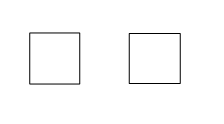
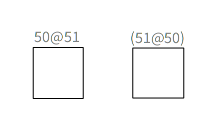
Hi, I've been experiencing weird behavior with pixel rendering... basically one pixel lines will get blurred for some reason even though there is no half-pixel overlapping. Here is a test code (screenshots attached below). Without the labels the left box will be blurred while the right is better (even though it still has slight shadow); when I add labels however their behavior will switch. What I would expect is to have nice sharp lines all the time. Is this Athens issue? Roassal? Pharo? Its ugly both on Linux and Windows. ==================================== | view box1 box2 | view := RTView new. box1 := RTBox new width: 50; height: 51; fillColor: Color transparent; borderColor: Color black; elementOn: '50@51'. view add: box1. box2 := RTBox new width: 51; height: 50; fillColor: Color transparent; borderColor: Color black; elementOn: '51@50'. view add: box2. "box1 @ RTLabelled. box2 @ RTLabelled." box1 translateTo: -50 @ 0. box2 translateTo: 50 @ 0. view open ==================================== Peter

What is your host system? If you're on a mac is it Retina? If you're on windows, what dpi setting are you using? Pe 3 mar. 2015, la 00:31, Peter Uhnák <i.uhnak@gmail.com> a scris:
Hi,
I've been experiencing weird behavior with pixel rendering...
basically one pixel lines will get blurred for some reason even though there is no half-pixel overlapping.
Here is a test code (screenshots attached below). Without the labels the left box will be blurred while the right is better (even though it still has slight shadow); when I add labels however their behavior will switch.
What I would expect is to have nice sharp lines all the time. Is this Athens issue? Roassal? Pharo? Its ugly both on Linux and Windows.
==================================== | view box1 box2 | view := RTView new. box1 := RTBox new width: 50; height: 51; fillColor: Color transparent; borderColor: Color black; elementOn: '50@51'. view add: box1. box2 := RTBox new width: 51; height: 50; fillColor: Color transparent; borderColor: Color black; elementOn: '51@50'. view add: box2.
"box1 @ RTLabelled. box2 @ RTLabelled."
box1 translateTo: -50 @ 0. box2 translateTo: 50 @ 0.
view open ====================================
Peter
<without labels.png> <with labels.png>
On Tue, Mar 3, 2015 at 9:15 AM, Mircea S. <mircea@unom.ro> wrote:
What is your host system?
If you're on a mac is it Retina?
If you're on windows, what dpi setting are you using?
As I've mentioned, it is both on Linux and Windows (I don't have a mac so I can't test that). My Linux laptop LCD has 96dpi, and external screen probably higher (I'll check in the evening). The Windows was another machine, also 96dpi. However I don't see how that could be DPI related considering with the "correct" size it is rendered correctly. Peter
Pe 3 mar. 2015, la 00:31, Peter Uhnák <i.uhnak@gmail.com> a scris:
Hi,
I've been experiencing weird behavior with pixel rendering...
basically one pixel lines will get blurred for some reason even though there is no half-pixel overlapping.
Here is a test code (screenshots attached below). Without the labels the left box will be blurred while the right is better (even though it still has slight shadow); when I add labels however their behavior will switch.
What I would expect is to have nice sharp lines all the time. Is this Athens issue? Roassal? Pharo? Its ugly both on Linux and Windows.
==================================== | view box1 box2 | view := RTView new. box1 := RTBox new width: 50; height: 51; fillColor: Color transparent; borderColor: Color black; elementOn: '50@51'. view add: box1. box2 := RTBox new width: 51; height: 50; fillColor: Color transparent; borderColor: Color black; elementOn: '51@50'. view add: box2.
"box1 @ RTLabelled. box2 @ RTLabelled."
box1 translateTo: -50 @ 0. box2 translateTo: 50 @ 0.
view open ====================================
Peter
<without labels.png> <with labels.png>

Le 02/03/2015 23:31, Peter Uhnák a écrit :
basically one pixel lines will get blurred for some reason even though there is no half-pixel overlapping.
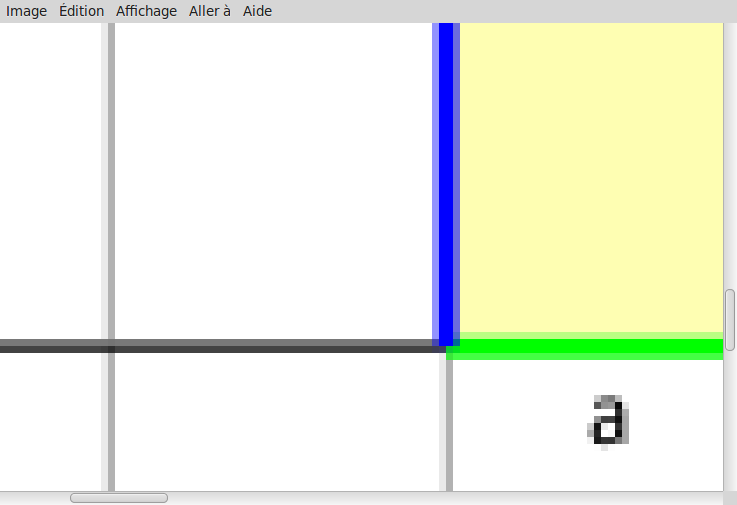
I noted the same visual artefact on Dr. Geo with perfectly horizontal 1 pixel width/horizontal line (enclosed zoomed screenshot) Hilaire -- Dr. Geo - http://drgeo.eu iStoa - http://istoa.drgeo.eu

2015-03-03 15:44 GMT+01:00 Hilaire <hilaire@drgeo.eu>:
Le 02/03/2015 23:31, Peter Uhnák a écrit :
basically one pixel lines will get blurred for some reason even though there is no half-pixel overlapping.
I noted the same visual artefact on Dr. Geo with perfectly horizontal 1 pixel width/horizontal line (enclosed zoomed screenshot)
with cairo, coordinates are between pixels -> http://cairographics.org/FAQ/#sharp_lines
Hilaire
-- Dr. Geo - http://drgeo.eu iStoa - http://istoa.drgeo.eu
with cairo, coordinates are between pixels
-> http://cairographics.org/FAQ/#sharp_lines
Aha! Thank you.
Now the question is how this could be solved. One of their suggestions is use even-integer width, but that from principle wouldn't be true, since it still overlaps by half-a-pixel (so one full and two 1/2 pixels). So the other option is to apply transformation matrix to the whole visualization? So much work for a sharp line. :( And considering that it seems to be blurred in one axis differently than the other... I'll play some more with it. Pete

Hi Peter! I was able to reproduce the problem you describe on Mac. Indeed, it would be great to have a solution for this. Thanks for looking into this. Cheers, Alexandre
On Mar 3, 2015, at 10:37 AM, Peter Uhnák <i.uhnak@gmail.com> wrote:
with cairo, coordinates are between pixels
-> http://cairographics.org/FAQ/#sharp_lines
Aha! Thank you.
Now the question is how this could be solved. One of their suggestions is use even-integer width, but that from principle wouldn't be true, since it still overlaps by half-a-pixel (so one full and two 1/2 pixels). So the other option is to apply transformation matrix to the whole visualization? So much work for a sharp line. :( And considering that it seems to be blurred in one axis differently than the other... I'll play some more with it.
Pete
-- _,.;:~^~:;._,.;:~^~:;._,.;:~^~:;._,.;:~^~:;._,.;: Alexandre Bergel http://www.bergel.eu ^~:;._,.;:~^~:;._,.;:~^~:;._,.;:~^~:;._,.;:~^~:;.
Le 03/03/2015 16:22, Nicolai Hess a écrit :
with cairo, coordinates are between pixels
Yeah, I guess something like that. Thanks Hilaire -- Dr. Geo - http://drgeo.eu iStoa - http://istoa.drgeo.eu
Added this issue here: https://code.google.com/p/moose-technology/issues/detail?id=1109 Cheers, Alexandre
On Mar 2, 2015, at 5:31 PM, Peter Uhnák <i.uhnak@gmail.com> wrote:
Hi,
I've been experiencing weird behavior with pixel rendering...
basically one pixel lines will get blurred for some reason even though there is no half-pixel overlapping.
Here is a test code (screenshots attached below). Without the labels the left box will be blurred while the right is better (even though it still has slight shadow); when I add labels however their behavior will switch.
What I would expect is to have nice sharp lines all the time. Is this Athens issue? Roassal? Pharo? Its ugly both on Linux and Windows.
==================================== | view box1 box2 | view := RTView new. box1 := RTBox new width: 50; height: 51; fillColor: Color transparent; borderColor: Color black; elementOn: '50@51'. view add: box1. box2 := RTBox new width: 51; height: 50; fillColor: Color transparent; borderColor: Color black; elementOn: '51@50'. view add: box2.
"box1 @ RTLabelled. box2 @ RTLabelled."
box1 translateTo: -50 @ 0. box2 translateTo: 50 @ 0.
view open ====================================
Peter
<without labels.png><with labels.png>
-- _,.;:~^~:;._,.;:~^~:;._,.;:~^~:;._,.;:~^~:;._,.;: Alexandre Bergel http://www.bergel.eu ^~:;._,.;:~^~:;._,.;:~^~:;._,.;:~^~:;._,.;:~^~:;.
participants (5)
-
 Alexandre Bergel
 -
 Hilaire
 -
 Mircea S.
 -
 Nicolai Hess
 -
 Peter Uhnák