Getting Pharo running on AWS

Hi everyone, New here, encouraged (from Discord) to try my questions here. Iâm struggling to get AWS to run in an Ubuntu AWS instance. I tried following the directions here: https://ci.inria.fr/pharo-contribution/job/EnterprisePharoBook/lastSuccessfu... <https://ci.inria.fr/pharo-contribution/job/EnterprisePharoBook/lastSuccessfu...> but I was getting some error about threads and configurations that I simply didnât understand. Then I tried using Pharo-snap: https://github.com/akgrant43/pharo-snap <https://github.com/akgrant43/pharo-snap> Pharo-snap made some of the config problems go away, but when I try starting Pharo on AWS, I get: ubuntu@ip-172-31-16-17:~$ ./pharo Pharo-sea-roa-sound.image Usage: [<subcommand>] [--help] [--copyright] [--version] [--list] [ --no-quit ] --help print this help message --copyright print the copyrights --version print the version for the image and the vm --list list a description of all active command line handlers --no-quit keep the image running without activating any other command line handler --deploymentPassword if a password needs to be used by the user to launch the command --readWriteAccessMode, --readOnlyAccessMode, --writeOnlyAccessMode, --disabledAccessMode specify disk access mode, read-write mode as default <subcommand> a valid subcommand in --list Preference File Modification: --preferences-file load the preferences from the given <FILE> --no-default-preferences do not load any preferences from the default locations Documentation: A PharoCommandLineHandler handles default command line arguments and options. The PharoCommandLineHandler is activated before all other handlers. It first checks if another handler is available. If so it will activate the found handler. Clearly, Iâm doing something wrong, but donât know what the next step is, since there isnât an explicit error message. Can someone point a newbie towards the appropriate next steps? Thanks! - Mark

Hi Mark, I can't help you with pharo-snap. But the installation instructions from the Enterprise book, using the command line zero config tools, should still apply and work. What exactly did go wrong ? Sven
On 28 May 2020, at 18:23, Mark Guzdial <mjguz@umich.edu> wrote:
Hi everyone,
New here, encouraged (from Discord) to try my questions here.
Iâm struggling to get AWS to run in an Ubuntu AWS instance. I tried following the directions here: https://ci.inria.fr/pharo-contribution/job/EnterprisePharoBook/lastSuccessfu... but I was getting some error about threads and configurations that I simply didnât understand. Then I tried using Pharo-snap: https://github.com/akgrant43/pharo-snap
Pharo-snap made some of the config problems go away, but when I try starting Pharo on AWS, I get:
ubuntu@ip-172-31-16-17:~$ ./pharo Pharo-sea-roa-sound.image
Usage: [<subcommand>] [--help] [--copyright] [--version] [--list] [ --no-quit ] --help print this help message --copyright print the copyrights --version print the version for the image and the vm --list list a description of all active command line handlers --no-quit keep the image running without activating any other command line handler --deploymentPassword if a password needs to be used by the user to launch the command --readWriteAccessMode, --readOnlyAccessMode, --writeOnlyAccessMode, --disabledAccessMode specify disk access mode, read-write mode as default <subcommand> a valid subcommand in --list
Preference File Modification: --preferences-file load the preferences from the given <FILE> --no-default-preferences do not load any preferences from the default locations
Documentation: A PharoCommandLineHandler handles default command line arguments and options. The PharoCommandLineHandler is activated before all other handlers. It first checks if another handler is available. If so it will activate the found handler.
Clearly, Iâm doing something wrong, but donât know what the next step is, since there isnât an explicit error message. Can someone point a newbie towards the appropriate next steps?
Thanks! - Mark
You mean what went wrong before Pharo Snap? I don't have those error messages anymore. When I find the time, I'll try to start over again. Can you help me interpret the messages I do have? Are those Pharo-Snap specific or are those Pharo command line messages? Thanks! - Mark ------ Mark Guzdial, mjguz@umich.edu - Professor of Electrical Engineering and Computer Science, and Engineering Education Research, College of Engineering and Professor of Information, School of Information (courtesy) - Blog: http://computinged.wordpress.com On Thu, May 28, 2020 at 3:20 PM Sven Van Caekenberghe <sven@stfx.eu> wrote:
Hi Mark,
I can't help you with pharo-snap.
But the installation instructions from the Enterprise book, using the command line zero config tools, should still apply and work.
What exactly did go wrong ?
Sven
On 28 May 2020, at 18:23, Mark Guzdial <mjguz@umich.edu> wrote:
Hi everyone,
New here, encouraged (from Discord) to try my questions here.
Iâm struggling to get AWS to run in an Ubuntu AWS instance. I tried following the directions here: https://ci.inria.fr/pharo-contribution/job/EnterprisePharoBook/lastSuccessfu... but I was getting some error about threads and configurations that I simply didnât understand. Then I tried using Pharo-snap: https://github.com/akgrant43/pharo-snap
Pharo-snap made some of the config problems go away, but when I try starting Pharo on AWS, I get:
ubuntu@ip-172-31-16-17:~$ ./pharo Pharo-sea-roa-sound.image
Usage: [<subcommand>] [--help] [--copyright] [--version] [--list] [ --no-quit ] --help print this help message --copyright print the copyrights --version print the version for the image and the vm --list list a description of all active command line handlers --no-quit keep the image running without activating any other command line handler --deploymentPassword if a password needs to be used by the user to launch the command --readWriteAccessMode, --readOnlyAccessMode, --writeOnlyAccessMode, --disabledAccessMode specify disk access mode, read-write mode as default <subcommand> a valid subcommand in --list
Preference File Modification: --preferences-file load the preferences from the given <FILE> --no-default-preferences do not load any preferences from the default locations
Documentation: A PharoCommandLineHandler handles default command line arguments and options. The PharoCommandLineHandler is activated before all other handlers. It first checks if another handler is available. If so it will activate the found handler.
Clearly, Iâm doing something wrong, but donât know what the next step is, since there isnât an explicit error message. Can someone point a newbie towards the appropriate next steps?
Thanks! - Mark

You see I told you :) S.
On 28 May 2020, at 18:23, Mark Guzdial <mjguz@umich.edu> wrote:
Hi everyone,
New here, encouraged (from Discord) to try my questions here.
Iâm struggling to get AWS to run in an Ubuntu AWS instance. I tried following the directions here: https://ci.inria.fr/pharo-contribution/job/EnterprisePharoBook/lastSuccessfu... <https://ci.inria.fr/pharo-contribution/job/EnterprisePharoBook/lastSuccessfu...> but I was getting some error about threads and configurations that I simply didnât understand. Then I tried using Pharo-snap: https://github.com/akgrant43/pharo-snap <https://github.com/akgrant43/pharo-snap>
Pharo-snap made some of the config problems go away, but when I try starting Pharo on AWS, I get:
ubuntu@ip-172-31-16-17:~$ ./pharo Pharo-sea-roa-sound.image
Usage: [<subcommand>] [--help] [--copyright] [--version] [--list] [ --no-quit ] --help print this help message --copyright print the copyrights --version print the version for the image and the vm --list list a description of all active command line handlers --no-quit keep the image running without activating any other command line handler --deploymentPassword if a password needs to be used by the user to launch the command --readWriteAccessMode, --readOnlyAccessMode, --writeOnlyAccessMode, --disabledAccessMode specify disk access mode, read-write mode as default <subcommand> a valid subcommand in --list
Preference File Modification: --preferences-file load the preferences from the given <FILE> --no-default-preferences do not load any preferences from the default locations
Documentation: A PharoCommandLineHandler handles default command line arguments and options. The PharoCommandLineHandler is activated before all other handlers. It first checks if another handler is available. If so it will activate the found handler.
Clearly, Iâm doing something wrong, but donât know what the next step is, since there isnât an explicit error message. Can someone point a newbie towards the appropriate next steps?
Thanks! - Mark
-------------------------------------------- Stéphane Ducasse http://stephane.ducasse.free.fr / http://www.pharo.org 03 59 35 87 52 Assistant: Aurore Dalle FAX 03 59 57 78 50 TEL 03 59 35 86 16 S. Ducasse - Inria 40, avenue Halley, Parc Scientifique de la Haute Borne, Bât.A, Park Plaza Villeneuve d'Ascq 59650 France
mark can you show us the contents of the pharo command because may be it is wrapping the Pharo command. did you try without snap (no idea what is it). Did you the script of sven because they work without snap. S
On 28 May 2020, at 18:23, Mark Guzdial <mjguz@umich.edu> wrote:
Hi everyone,
New here, encouraged (from Discord) to try my questions here.
Iâm struggling to get AWS to run in an Ubuntu AWS instance. I tried following the directions here: https://ci.inria.fr/pharo-contribution/job/EnterprisePharoBook/lastSuccessfu... <https://ci.inria.fr/pharo-contribution/job/EnterprisePharoBook/lastSuccessfu...> but I was getting some error about threads and configurations that I simply didnât understand. Then I tried using Pharo-snap: https://github.com/akgrant43/pharo-snap <https://github.com/akgrant43/pharo-snap>
Pharo-snap made some of the config problems go away, but when I try starting Pharo on AWS, I get:
ubuntu@ip-172-31-16-17:~$ ./pharo Pharo-sea-roa-sound.image
Usage: [<subcommand>] [--help] [--copyright] [--version] [--list] [ --no-quit ] --help print this help message --copyright print the copyrights --version print the version for the image and the vm --list list a description of all active command line handlers --no-quit keep the image running without activating any other command line handler --deploymentPassword if a password needs to be used by the user to launch the command --readWriteAccessMode, --readOnlyAccessMode, --writeOnlyAccessMode, --disabledAccessMode specify disk access mode, read-write mode as default <subcommand> a valid subcommand in --list
Preference File Modification: --preferences-file load the preferences from the given <FILE> --no-default-preferences do not load any preferences from the default locations
Documentation: A PharoCommandLineHandler handles default command line arguments and options. The PharoCommandLineHandler is activated before all other handlers. It first checks if another handler is available. If so it will activate the found handler.
Clearly, Iâm doing something wrong, but donât know what the next step is, since there isnât an explicit error message. Can someone point a newbie towards the appropriate next steps?
Thanks! - Mark
-------------------------------------------- Stéphane Ducasse http://stephane.ducasse.free.fr / http://www.pharo.org 03 59 35 87 52 Assistant: Aurore Dalle FAX 03 59 57 78 50 TEL 03 59 35 86 16 S. Ducasse - Inria 40, avenue Halley, Parc Scientifique de la Haute Borne, Bât.A, Park Plaza Villeneuve d'Ascq 59650 France
I did try without snap. That's when I was getting an error about being able to set a priority for a separate thread. I don't have that verbatim. Here's the content of the pharo script: #!/usr/bin/env bash # some magic to find out the real location of this script dealing with symlinks DIR=`readlink "$0"` || DIR="$0"; DIR=`dirname "$DIR"`; cd "$DIR" DIR=`pwd` cd - > /dev/null # disable parameter expansion to forward all arguments unprocessed to the VM set -f # run the VM and pass along all arguments as is "$DIR"/"pharo-vm/pharo" --nodisplay "$@" ------ Mark Guzdial, mjguz@umich.edu - Professor of Electrical Engineering and Computer Science, and Engineering Education Research, College of Engineering and Professor of Information, School of Information (courtesy) - Blog: http://computinged.wordpress.com On Thu, May 28, 2020 at 4:08 PM Stéphane Ducasse <stephane.ducasse@inria.fr> wrote:
mark
can you show us the contents of the pharo command because may be it is wrapping the Pharo command. did you try without snap (no idea what is it). Did you the script of sven because they work without snap.
S
On 28 May 2020, at 18:23, Mark Guzdial <mjguz@umich.edu> wrote:
Hi everyone,
New here, encouraged (from Discord) to try my questions here.
Iâm struggling to get AWS to run in an Ubuntu AWS instance. I tried following the directions here: https://ci.inria.fr/pharo-contribution/job/EnterprisePharoBook/lastSuccessfu... but I was getting some error about threads and configurations that I simply didnât understand. Then I tried using Pharo-snap: https://github.com/akgrant43/pharo-snap
Pharo-snap made some of the config problems go away, but when I try starting Pharo on AWS, I get:
*ubuntu@ip-172-31-16-17*:*~*$ ./pharo Pharo-sea-roa-sound.image
Usage: [<subcommand>] [--help] [--copyright] [--version] [--list] [ --no-quit ] --help print this help message --copyright print the copyrights --version print the version for the image and the vm --list list a description of all active command line handlers --no-quit keep the image running without activating any other command line handler --deploymentPassword if a password needs to be used by the user to launch the command --readWriteAccessMode, --readOnlyAccessMode, --writeOnlyAccessMode, --disabledAccessMode specify disk access mode, read-write mode as default <subcommand> a valid subcommand in --list
Preference File Modification: --preferences-file load the preferences from the given <FILE> --no-default-preferences do not load any preferences from the default locations
Documentation: A PharoCommandLineHandler handles default command line arguments and options. The PharoCommandLineHandler is activated before all other handlers. It first checks if another handler is available. If so it will activate the found handler.
Clearly, Iâm doing something wrong, but donât know what the next step is, since there isnât an explicit error message. Can someone point a newbie towards the appropriate next steps?
Thanks! - Mark
-------------------------------------------- Stéphane Ducasse http://stephane.ducasse.free.fr / http://www.pharo.org 03 59 35 87 52 Assistant: Aurore Dalle FAX 03 59 57 78 50 TEL 03 59 35 86 16 S. Ducasse - Inria 40, avenue Halley, Parc Scientifique de la Haute Borne, Bât.A, Park Plaza Villeneuve d'Ascq 59650 France
Mark, Make sure to use 64-bit (that is 64-bit Pharo on 64-bit Linux), it will make your life much easier. Here is a short example: stfx@audio359:~$ mkdir pharo8 stfx@audio359:~$ cd !$ cd pharo8 stfx@audio359:~/pharo8$ curl get.pharo.org/64/80+vm | bash % Total % Received % Xferd Average Speed Time Time Time Current Dload Upload Total Spent Left Speed 100 3054 100 3054 0 0 67866 0 --:--:-- --:--:-- --:--:-- 69409 Downloading the latest 80 Image: http://files.pharo.org/get-files/80/pharo64.zip Pharo.image Downloading the latest pharoVM: http://files.pharo.org/get-files/80/pharo64-linux-stable.zip pharo-vm/pharo Creating starter scripts pharo and pharo-ui stfx@audio359:~/pharo8$ nohup ./pharo Pharo.image eval --no-quit 'ZnServer startOn: 9090' & [1] 84125 nohup: ignoring input and appending output to 'nohup.out' stfx@audio359:~/pharo8$ curl http://localhost:9090/random CF4173824EF6E0D9F336E5464A5FACB8ABEFFD1A6EE7A5F9F6631186F619606 stfx@audio359:~/pharo8$ jobs [1]+ Running nohup ./pharo Pharo.image eval --no-quit 'ZnServer startOn: 9090' & stfx@audio359:~/pharo8$ kill %1 [1]+ Terminated nohup ./pharo Pharo.image eval --no-quit 'ZnServer startOn: 9090' BTW, nohup is one way to keep something running after you log out (systemctl services being the pro/real way) Is this not how it works out for you ? Sven
On 28 May 2020, at 23:15, Mark Guzdial <mjguz@umich.edu> wrote:
I did try without snap. That's when I was getting an error about being able to set a priority for a separate thread. I don't have that verbatim.
Here's the content of the pharo script:
#!/usr/bin/env bash # some magic to find out the real location of this script dealing with symlinks DIR=`readlink "$0"` || DIR="$0"; DIR=`dirname "$DIR"`; cd "$DIR" DIR=`pwd` cd - > /dev/null # disable parameter expansion to forward all arguments unprocessed to the VM set -f # run the VM and pass along all arguments as is "$DIR"/"pharo-vm/pharo" --nodisplay "$@"
------ Mark Guzdial, mjguz@umich.edu ⢠Professor of Electrical Engineering and Computer Science, and Engineering Education Research, College of Engineering and Professor of Information, School of Information (courtesy) ⢠Blog: http://computinged.wordpress.com
On Thu, May 28, 2020 at 4:08 PM Stéphane Ducasse <stephane.ducasse@inria.fr> wrote: mark
can you show us the contents of the pharo command because may be it is wrapping the Pharo command. did you try without snap (no idea what is it). Did you the script of sven because they work without snap.
S
On 28 May 2020, at 18:23, Mark Guzdial <mjguz@umich.edu> wrote:
Hi everyone,
New here, encouraged (from Discord) to try my questions here.
Iâm struggling to get AWS to run in an Ubuntu AWS instance. I tried following the directions here: https://ci.inria.fr/pharo-contribution/job/EnterprisePharoBook/lastSuccessfu... but I was getting some error about threads and configurations that I simply didnât understand. Then I tried using Pharo-snap: https://github.com/akgrant43/pharo-snap
Pharo-snap made some of the config problems go away, but when I try starting Pharo on AWS, I get:
ubuntu@ip-172-31-16-17:~$ ./pharo Pharo-sea-roa-sound.image
Usage: [<subcommand>] [--help] [--copyright] [--version] [--list] [ --no-quit ] --help print this help message --copyright print the copyrights --version print the version for the image and the vm --list list a description of all active command line handlers --no-quit keep the image running without activating any other command line handler --deploymentPassword if a password needs to be used by the user to launch the command --readWriteAccessMode, --readOnlyAccessMode, --writeOnlyAccessMode, --disabledAccessMode specify disk access mode, read-write mode as default <subcommand> a valid subcommand in --list
Preference File Modification: --preferences-file load the preferences from the given <FILE> --no-default-preferences do not load any preferences from the default locations
Documentation: A PharoCommandLineHandler handles default command line arguments and options. The PharoCommandLineHandler is activated before all other handlers. It first checks if another handler is available. If so it will activate the found handler.
Clearly, Iâm doing something wrong, but donât know what the next step is, since there isnât an explicit error message. Can someone point a newbie towards the appropriate next steps?
Thanks! - Mark
-------------------------------------------- Stéphane Ducasse http://stephane.ducasse.free.fr / http://www.pharo.org 03 59 35 87 52 Assistant: Aurore Dalle FAX 03 59 57 78 50 TEL 03 59 35 86 16 S. Ducasse - Inria 40, avenue Halley, Parc Scientifique de la Haute Borne, Bât.A, Park Plaza Villeneuve d'Ascq 59650 France
THANK YOU, SVEN! That totally worked! It *didnât* work when I tried to access the instance from a browser. (The curl to localhost did work.) I figured out that I also had to edit the AWS Security Groups to allow port 9090. But once I did that, I reached Pharo running on AWS from an external web browser! I also discovered that the image that I thought Iâd pre-loaded with Seaside and my code wouldnât start with this process at all. The job immediately quit. I need to learn better how to load an image appropriately. Iâll go back to the Enterprise book and learn about these scripts of yours. Thank you! - Mark
On May 28, 2020, at 6:16 PM, Sven Van Caekenberghe <sven@stfx.eu> wrote:
Mark,
Make sure to use 64-bit (that is 64-bit Pharo on 64-bit Linux), it will make your life much easier.
Here is a short example:
stfx@audio359:~$ mkdir pharo8
stfx@audio359:~$ cd !$ cd pharo8
stfx@audio359:~/pharo8$ curl get.pharo.org/64/80+vm | bash % Total % Received % Xferd Average Speed Time Time Time Current Dload Upload Total Spent Left Speed 100 3054 100 3054 0 0 67866 0 --:--:-- --:--:-- --:--:-- 69409 Downloading the latest 80 Image: http://files.pharo.org/get-files/80/pharo64.zip Pharo.image Downloading the latest pharoVM: http://files.pharo.org/get-files/80/pharo64-linux-stable.zip pharo-vm/pharo Creating starter scripts pharo and pharo-ui
stfx@audio359:~/pharo8$ nohup ./pharo Pharo.image eval --no-quit 'ZnServer startOn: 9090' & [1] 84125 nohup: ignoring input and appending output to 'nohup.out'
stfx@audio359:~/pharo8$ curl http://localhost:9090/random CF4173824EF6E0D9F336E5464A5FACB8ABEFFD1A6EE7A5F9F6631186F619606
stfx@audio359:~/pharo8$ jobs [1]+ Running nohup ./pharo Pharo.image eval --no-quit 'ZnServer startOn: 9090' &
stfx@audio359:~/pharo8$ kill %1 [1]+ Terminated nohup ./pharo Pharo.image eval --no-quit 'ZnServer startOn: 9090'
BTW, nohup is one way to keep something running after you log out (systemctl services being the pro/real way)
Is this not how it works out for you ?
Sven
On 28 May 2020, at 23:15, Mark Guzdial <mjguz@umich.edu> wrote:
I did try without snap. That's when I was getting an error about being able to set a priority for a separate thread. I don't have that verbatim.
Here's the content of the pharo script:
#!/usr/bin/env bash # some magic to find out the real location of this script dealing with symlinks DIR=`readlink "$0"` || DIR="$0"; DIR=`dirname "$DIR"`; cd "$DIR" DIR=`pwd` cd - > /dev/null # disable parameter expansion to forward all arguments unprocessed to the VM set -f # run the VM and pass along all arguments as is "$DIR"/"pharo-vm/pharo" --nodisplay "$@"
------ Mark Guzdial, mjguz@umich.edu ⢠Professor of Electrical Engineering and Computer Science, and Engineering Education Research, College of Engineering and Professor of Information, School of Information (courtesy) ⢠Blog: http://computinged.wordpress.com
On Thu, May 28, 2020 at 4:08 PM Stéphane Ducasse <stephane.ducasse@inria.fr> wrote: mark
can you show us the contents of the pharo command because may be it is wrapping the Pharo command. did you try without snap (no idea what is it). Did you the script of sven because they work without snap.
S
On 28 May 2020, at 18:23, Mark Guzdial <mjguz@umich.edu> wrote:
Hi everyone,
New here, encouraged (from Discord) to try my questions here.
Iâm struggling to get AWS to run in an Ubuntu AWS instance. I tried following the directions here: https://ci.inria.fr/pharo-contribution/job/EnterprisePharoBook/lastSuccessfu... but I was getting some error about threads and configurations that I simply didnât understand. Then I tried using Pharo-snap: https://github.com/akgrant43/pharo-snap
Pharo-snap made some of the config problems go away, but when I try starting Pharo on AWS, I get:
ubuntu@ip-172-31-16-17:~$ ./pharo Pharo-sea-roa-sound.image
Usage: [<subcommand>] [--help] [--copyright] [--version] [--list] [ --no-quit ] --help print this help message --copyright print the copyrights --version print the version for the image and the vm --list list a description of all active command line handlers --no-quit keep the image running without activating any other command line handler --deploymentPassword if a password needs to be used by the user to launch the command --readWriteAccessMode, --readOnlyAccessMode, --writeOnlyAccessMode, --disabledAccessMode specify disk access mode, read-write mode as default <subcommand> a valid subcommand in --list
Preference File Modification: --preferences-file load the preferences from the given <FILE> --no-default-preferences do not load any preferences from the default locations
Documentation: A PharoCommandLineHandler handles default command line arguments and options. The PharoCommandLineHandler is activated before all other handlers. It first checks if another handler is available. If so it will activate the found handler.
Clearly, Iâm doing something wrong, but donât know what the next step is, since there isnât an explicit error message. Can someone point a newbie towards the appropriate next steps?
Thanks! - Mark
-------------------------------------------- Stéphane Ducasse http://stephane.ducasse.free.fr / http://www.pharo.org 03 59 35 87 52 Assistant: Aurore Dalle FAX 03 59 57 78 50 TEL 03 59 35 86 16 S. Ducasse - Inria 40, avenue Halley, Parc Scientifique de la Haute Borne, Bât.A, Park Plaza Villeneuve d'Ascq 59650 France
While Iâm asking newbie questions, perhaps you could explain this example in the Enterprise book: What is http://www.smalltalkhub.com/mc/Me/MyApp/main <http://www.smalltalkhub.com/mc/Me/MyApp/main> here? Is ConfigurationOfMyApp my name, or is it a command line parameter? Thanks! - Mark
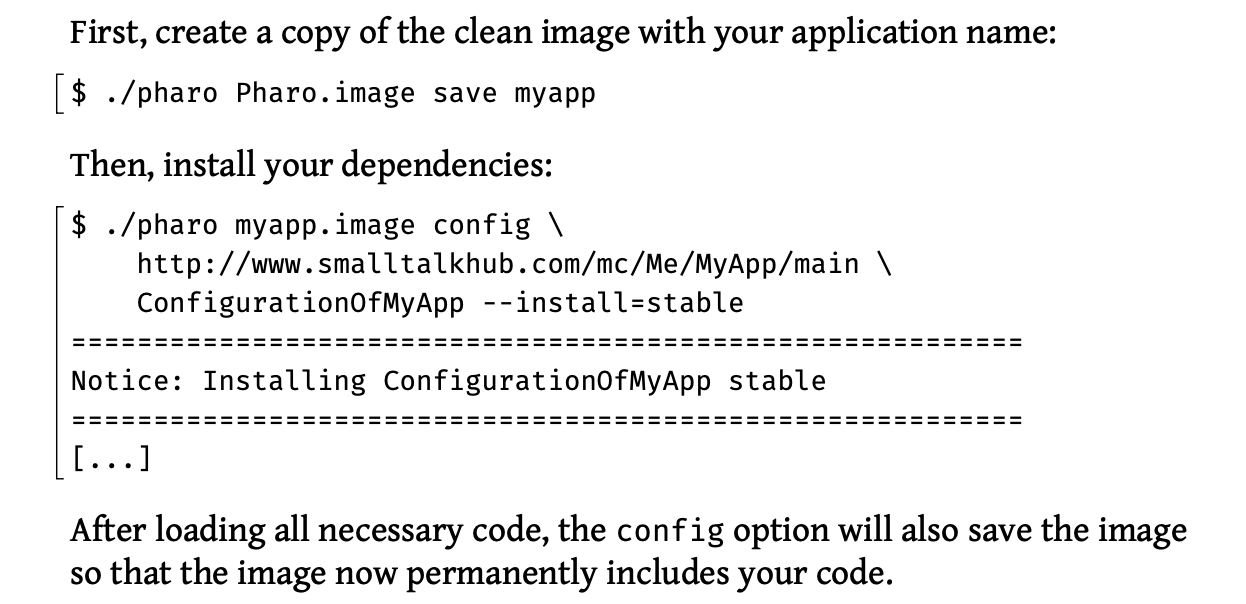
Hi Mark, There is of course a significant learning curve here. You will need to understand what Metacello is, Monticello & Iceberg (GitHub) repositories, ConfigurationOfXXX & BaselineOfXXX. The books are good starting points. This is another recent thread: http://forum.world.st/running-Pharo8-in-Digitalocean-tt5115160.html HTH, Sven
On 29 May 2020, at 02:07, Mark Guzdial <mjguz@umich.edu> wrote:
While Iâm asking newbie questions, perhaps you could explain this example in the Enterprise book:
<PastedGraphic-1.png>
What is http://www.smalltalkhub.com/mc/Me/MyApp/main here? Is ConfigurationOfMyApp my name, or is it a command line parameter?
Thanks! - Mark
On 29 May 2020, at 08:43, Sven Van Caekenberghe <sven@stfx.eu> wrote:
Hi Mark,
There is of course a significant learning curve here. You will need to understand what Metacello is, Monticello & Iceberg (GitHub) repositories, ConfigurationOfXXX & BaselineOfXXX.
The books are good starting points.
This is another recent thread: http://forum.world.st/running-Pharo8-in-Digitalocean-tt5115160.html
Part of which you can read here: https://pharoweekly.wordpress.com/2020/05/20/deployment-tips-from-the-pros/
HTH,
Sven
On 29 May 2020, at 02:07, Mark Guzdial <mjguz@umich.edu> wrote:
While Iâm asking newbie questions, perhaps you could explain this example in the Enterprise book:
<PastedGraphic-1.png>
What is http://www.smalltalkhub.com/mc/Me/MyApp/main here? Is ConfigurationOfMyApp my name, or is it a command line parameter?
Thanks! - Mark
Thanks, Sven. Yes, thereâs a big learning curve to be able to use your scripts, but they do seem powerful. Iâm trying to work my way through your minimal-pharo-server-tools. Iâm using these scripts right now: $ git clone https://github.com/svenvc/minimal-pharo-server-tools.git $ ~/minimal-pharo-server-tools/install.sh $ cd build && ~/pharo/build.sh $ ~/minimal-pharo-server-tools/run/pharo-http-server/deploy.sh $ sudo systemctl start pharo-http-server Cloning and installing went fine. Iâm working on this line "cd build && ~/pharo/build.sh.â There is no build directory in cloned git repository. There is a build.sh, but it has hard-coded references to the directory pharo (as in the line). There is no directory pharo in the repository, and it doesnât get created in install.sh. Should I be renaming the server-tools directory as pharo? Or should I be installing pharo inside the repository structure? tl;dr: What directory structure do your tools expect, and what do I have to create (vs what your scripts create)? Thanks! - Mark
On May 29, 2020, at 2:43 AM, Sven Van Caekenberghe <sven@stfx.eu> wrote:
Hi Mark,
There is of course a significant learning curve here. You will need to understand what Metacello is, Monticello & Iceberg (GitHub) repositories, ConfigurationOfXXX & BaselineOfXXX.
The books are good starting points.
This is another recent thread: http://forum.world.st/running-Pharo8-in-Digitalocean-tt5115160.html
HTH,
Sven
On 29 May 2020, at 02:07, Mark Guzdial <mjguz@umich.edu> wrote:
While Iâm asking newbie questions, perhaps you could explain this example in the Enterprise book:
<PastedGraphic-1.png>
What is http://www.smalltalkhub.com/mc/Me/MyApp/main here? Is ConfigurationOfMyApp my name, or is it a command line parameter?
Thanks! - Mark
On 29 May 2020, at 14:19, Mark Guzdial <mjguz@umich.edu> wrote:
Thanks, Sven. Yes, thereâs a big learning curve to be able to use your scripts, but they do seem powerful.
Iâm trying to work my way through your minimal-pharo-server-tools. Iâm using these scripts right now:
$ git clone https://github.com/svenvc/minimal-pharo-server-tools.git
$ ~/minimal-pharo-server-tools/install.sh $ cd build && ~/pharo/build.sh $ ~/minimal-pharo-server-tools/run/pharo-http-server/deploy.sh $ sudo systemctl start pharo-http-server
Cloning and installing went fine. Iâm working on this line "cd build && ~/pharo/build.sh.â There is no build directory in cloned git repository. There is a build.sh, but it has hard-coded references to the directory pharo (as in the line). There is no directory pharo in the repository, and it doesnât get created in install.sh. Should I be renaming the server-tools directory as pharo? Or should I be installing pharo inside the repository structure?
tl;dr: What directory structure do your tools expect, and what do I have to create (vs what your scripts create)?
Yes, there was a small typo there: there is no ~/build directory, there is a ~/pharo directory, which gets created when you run the install.sh script. Later, the deploy.sh script creates the ~/pharo-http-server directory where the example server/services runs from.
Thanks! - Mark
On May 29, 2020, at 2:43 AM, Sven Van Caekenberghe <sven@stfx.eu> wrote:
Hi Mark,
There is of course a significant learning curve here. You will need to understand what Metacello is, Monticello & Iceberg (GitHub) repositories, ConfigurationOfXXX & BaselineOfXXX.
The books are good starting points.
This is another recent thread: http://forum.world.st/running-Pharo8-in-Digitalocean-tt5115160.html
HTH,
Sven
On 29 May 2020, at 02:07, Mark Guzdial <mjguz@umich.edu> wrote:
While Iâm asking newbie questions, perhaps you could explain this example in the Enterprise book:
<PastedGraphic-1.png>
What is http://www.smalltalkhub.com/mc/Me/MyApp/main here? Is ConfigurationOfMyApp my name, or is it a command line parameter?
Thanks! - Mark

Hi Mark, Something you may want to consider in the future is to use Docker. You can easily deploy Docker images with Pharo and you can also use `docker-machine` to create and manage your AWS EC2 instances. I recently wrote a blog post about that but with VA Smalltalk: https://dev.to/martinezpeck/deploying-vasmalltalk-on-amazon-aws-arm-servers-... Best, On Fri, May 29, 2020 at 9:30 AM Sven Van Caekenberghe <sven@stfx.eu> wrote:
On 29 May 2020, at 14:19, Mark Guzdial <mjguz@umich.edu> wrote:
Thanks, Sven. Yes, thereâs a big learning curve to be able to use your scripts, but they do seem powerful.
Iâm trying to work my way through your minimal-pharo-server-tools. Iâm using these scripts right now:
$ git clone https://github.com/svenvc/minimal-pharo-server-tools.git
$ ~/minimal-pharo-server-tools/install.sh $ cd build && ~/pharo/build.sh $ ~/minimal-pharo-server-tools/run/pharo-http-server/deploy.sh $ sudo systemctl start pharo-http-server
Cloning and installing went fine. Iâm working on this line "cd build && ~/pharo/build.sh.â There is no build directory in cloned git repository. There is a build.sh, but it has hard-coded references to the directory pharo (as in the line). There is no directory pharo in the repository, and it doesnât get created in install.sh. Should I be renaming the server-tools directory as pharo? Or should I be installing pharo inside the repository structure?
tl;dr: What directory structure do your tools expect, and what do I have to create (vs what your scripts create)?
Yes, there was a small typo there: there is no ~/build directory, there is a ~/pharo directory, which gets created when you run the install.sh script.
Later, the deploy.sh script creates the ~/pharo-http-server directory where the example server/services runs from.
Thanks! - Mark
On May 29, 2020, at 2:43 AM, Sven Van Caekenberghe <sven@stfx.eu> wrote:
Hi Mark,
There is of course a significant learning curve here. You will need to understand what Metacello is, Monticello & Iceberg (GitHub) repositories, ConfigurationOfXXX & BaselineOfXXX.
The books are good starting points.
This is another recent thread: http://forum.world.st/running-Pharo8-in-Digitalocean-tt5115160.html
HTH,
Sven
On 29 May 2020, at 02:07, Mark Guzdial <mjguz@umich.edu> wrote:
While Iâm asking newbie questions, perhaps you could explain this example in the Enterprise book:
<PastedGraphic-1.png>
What is http://www.smalltalkhub.com/mc/Me/MyApp/main here? Is ConfigurationOfMyApp my name, or is it a command line parameter?
Thanks! - Mark
-- Mariano Martinez Peck Email: marianopeck@gmail.com Twitter: @MartinezPeck LinkedIn: www.linkedin.com/in/mariano-martinez-peck <https://www.linkedin.com/in/mariano-mart%C3%ADnez-peck/> Blog: https://marianopeck.wordpress.com/
participants (4)
-
 Mariano Martinez Peck
 -
 Mark Guzdial
 -
 Stéphane Ducasse
 -
 Sven Van Caekenberghe