
Hi - has anyone made anything where you can create a full screen presentation in Pharo with slides with some large text, bullet points and embedded pictures - but then itâs a facade that lets you evaluate items in the slide or jump to any code mentioned? Sort of like what Alan Kay does in the eToys images? I need to do a presentation next week and I always loved it when I was fooled into thinking I was looking at a staticâish powerpoint and then suddenly realised it was a live environment. It doesnât sound that hard to do something simple - but Iâm not sure if I can pull it off in time for my presentation. But am curious if we have something. (For bonus points, GT-Spotter stuff would work in it over top of the presentation to demonstrate simple things) Tim

Well technically this is easy to do with Morphic. Probably Spec 2. Doing it from inside the Pharo window will give you the ability to demonstrate live code and Morphic is live code. If you donât want to do everything with Morphic you can create this in any app of your choosing , export to images and have Morphic load those images. I donât see why this would take more than a couple of hours to prepare , the actual Morphic code should not take more than 20 minutes. It a simple case of a SystemWindowMorph embedding a couple of button morph (for going forward and backward) and an ImageMorph. Plus a timer if you want the slides to proceed automatically. If you feel adventurous you can do this entirely on Morphic , again should not take you more than two hours total together with content creation. TextMorph should be more than enough. I would have said use Pillar but in this case itâs an overkill and Pillar does not allow for the precise positioning of images like Morphic does. On Wed, 1 Nov 2017 at 20:35, Tim Mackinnon <tim@testit.works> wrote:
Hi - has anyone made anything where you can create a full screen presentation in Pharo with slides with some large text, bullet points and embedded pictures - but then itâs a facade that lets you evaluate items in the slide or jump to any code mentioned?
Sort of like what Alan Kay does in the eToys images?
I need to do a presentation next week and I always loved it when I was fooled into thinking I was looking at a staticâish powerpoint and then suddenly realised it was a live environment.
It doesnât sound that hard to do something simple - but Iâm not sure if I can pull it off in time for my presentation. But am curious if we have something.
(For bonus points, GT-Spotter stuff would work in it over top of the presentation to demonstrate simple things)
Tim
Oh there is also the possibility this is already available via GTInspector, last time I checked I remember it having a slideshow preview of images collection and it embeds a workspace as well. So maybe you already have what you need. On Wed, 1 Nov 2017 at 22:57, Dimitris Chloupis <kilon.alios@gmail.com> wrote:
Well technically this is easy to do with Morphic. Probably Spec 2. Doing it from inside the Pharo window will give you the ability to demonstrate live code and Morphic is live code.
If you donât want to do everything with Morphic you can create this in any app of your choosing , export to images and have Morphic load those images. I donât see why this would take more than a couple of hours to prepare , the actual Morphic code should not take more than 20 minutes.
It a simple case of a SystemWindowMorph embedding a couple of button morph (for going forward and backward) and an ImageMorph. Plus a timer if you want the slides to proceed automatically.
If you feel adventurous you can do this entirely on Morphic , again should not take you more than two hours total together with content creation. TextMorph should be more than enough.
I would have said use Pillar but in this case itâs an overkill and Pillar does not allow for the precise positioning of images like Morphic does. On Wed, 1 Nov 2017 at 20:35, Tim Mackinnon <tim@testit.works> wrote:
Hi - has anyone made anything where you can create a full screen presentation in Pharo with slides with some large text, bullet points and embedded pictures - but then itâs a facade that lets you evaluate items in the slide or jump to any code mentioned?
Sort of like what Alan Kay does in the eToys images?
I need to do a presentation next week and I always loved it when I was fooled into thinking I was looking at a staticâish powerpoint and then suddenly realised it was a live environment.
It doesnât sound that hard to do something simple - but Iâm not sure if I can pull it off in time for my presentation. But am curious if we have something.
(For bonus points, GT-Spotter stuff would work in it over top of the presentation to demonstrate simple things)
Tim
Yes I was thinking of something like the morphic approach with a palette for adding buttons, text, images (maybe someone has done a simple vector paint app - didn't think to check). Of course it quickly gets annoying without a simple template mechanism to have a consistent header/footer - and you also need to try it on a projector and make sure it actually looks right... and so it will take longer than a few hours is my fear (my morphic is a bit rusty too). Not a horrible amount of work - but I actually need to create my slides and demo so may be a longer term project unless someone has already done it. Tim Sent from my iPhone
On 1 Nov 2017, at 20:57, Dimitris Chloupis <kilon.alios@gmail.com> wrote:
Well technically this is easy to do with Morphic. Probably Spec 2. Doing it from inside the Pharo window will give you the ability to demonstrate live code and Morphic is live code.
If you donât want to do everything with Morphic you can create this in any app of your choosing , export to images and have Morphic load those images. I donât see why this would take more than a couple of hours to prepare , the actual Morphic code should not take more than 20 minutes.
It a simple case of a SystemWindowMorph embedding a couple of button morph (for going forward and backward) and an ImageMorph. Plus a timer if you want the slides to proceed automatically.
If you feel adventurous you can do this entirely on Morphic , again should not take you more than two hours total together with content creation. TextMorph should be more than enough.
I would have said use Pillar but in this case itâs an overkill and Pillar does not allow for the precise positioning of images like Morphic does.
On Wed, 1 Nov 2017 at 20:35, Tim Mackinnon <tim@testit.works> wrote: Hi - has anyone made anything where you can create a full screen presentation in Pharo with slides with some large text, bullet points and embedded pictures - but then itâs a facade that lets you evaluate items in the slide or jump to any code mentioned?
Sort of like what Alan Kay does in the eToys images?
I need to do a presentation next week and I always loved it when I was fooled into thinking I was looking at a staticâish powerpoint and then suddenly realised it was a live environment.
It doesnât sound that hard to do something simple - but Iâm not sure if I can pull it off in time for my presentation. But am curious if we have something.
(For bonus points, GT-Spotter stuff would work in it over top of the presentation to demonstrate simple things)
Tim
Well if you have a specific template in mind then you can use Pillar and input the final results as images back to Morphic. Creating a full PowerPoint implementation with Morphic sounds an overkill to me. Why waste all this time when there so many great external solutions ? Or you even bypass Pillar and go straight to a PowerPoint app, export to jpgs and import to Morphic. Definetly not more than 2 hours work. If you love open source LibreOffice has an excellent presentation app https://www.libreoffice.org/discover/impress/ On Thu, 2 Nov 2017 at 01:23, Tim Mackinnon <tim@testit.works> wrote:
Yes I was thinking of something like the morphic approach with a palette for adding buttons, text, images (maybe someone has done a simple vector paint app - didn't think to check).
Of course it quickly gets annoying without a simple template mechanism to have a consistent header/footer - and you also need to try it on a projector and make sure it actually looks right... and so it will take longer than a few hours is my fear (my morphic is a bit rusty too).
Not a horrible amount of work - but I actually need to create my slides and demo so may be a longer term project unless someone has already done it.
Tim
Sent from my iPhone
On 1 Nov 2017, at 20:57, Dimitris Chloupis <kilon.alios@gmail.com> wrote:
Well technically this is easy to do with Morphic. Probably Spec 2. Doing it from inside the Pharo window will give you the ability to demonstrate live code and Morphic is live code.
If you donât want to do everything with Morphic you can create this in any app of your choosing , export to images and have Morphic load those images. I donât see why this would take more than a couple of hours to prepare , the actual Morphic code should not take more than 20 minutes.
It a simple case of a SystemWindowMorph embedding a couple of button morph (for going forward and backward) and an ImageMorph. Plus a timer if you want the slides to proceed automatically.
If you feel adventurous you can do this entirely on Morphic , again should not take you more than two hours total together with content creation. TextMorph should be more than enough.
I would have said use Pillar but in this case itâs an overkill and Pillar does not allow for the precise positioning of images like Morphic does. On Wed, 1 Nov 2017 at 20:35, Tim Mackinnon <tim@testit.works> wrote:
Hi - has anyone made anything where you can create a full screen presentation in Pharo with slides with some large text, bullet points and embedded pictures - but then itâs a facade that lets you evaluate items in the slide or jump to any code mentioned?
Sort of like what Alan Kay does in the eToys images?
I need to do a presentation next week and I always loved it when I was fooled into thinking I was looking at a staticâish powerpoint and then suddenly realised it was a live environment.
It doesnât sound that hard to do something simple - but Iâm not sure if I can pull it off in time for my presentation. But am curious if we have something.
(For bonus points, GT-Spotter stuff would work in it over top of the presentation to demonstrate simple things)
Tim

I did that (well argh more than 12 years ago) now I do not think that I can find the code I will try It looks like I loaded in Pharo some years ago. Here the latest code I found (At that time I developed test first). I'm not sure that I will have the time to get a look. Stef On Wed, Nov 1, 2017 at 7:35 PM, Tim Mackinnon <tim@testit.works> wrote:
Hi - has anyone made anything where you can create a full screen presentation in Pharo with slides with some large text, bullet points and embedded pictures - but then itâs a facade that lets you evaluate items in the slide or jump to any code mentioned?
Sort of like what Alan Kay does in the eToys images?
I need to do a presentation next week and I always loved it when I was fooled into thinking I was looking at a staticâish powerpoint and then suddenly realised it was a live environment.
It doesnât sound that hard to do something simple - but Iâm not sure if I can pull it off in time for my presentation. But am curious if we have something.
(For bonus points, GT-Spotter stuff would work in it over top of the presentation to demonstrate simple things)
Tim
Thanks Stef - Iâll see if I can reincarnate it in the time that I have - if not, maybe this might be my next side project (just need to get my IntelliPharo keybindings over the hill). It looks like it's just the basics right? You add morphs in a script I'm guessing from the tests. Although TextMorph seems broken in Pharo6 in that halos won't let you edit text (walkback) and halos won't let you set text size or bold (they do nothing)? Which is a shame for this kind application - but with Bric maybe it's expected? Anyway - this gives me a head start. Tim Sent from my iPhone
On 2 Nov 2017, at 17:25, Stephane Ducasse <stepharo.self@gmail.com> wrote:
I did that (well argh more than 12 years ago) now I do not think that I can find the code I will try It looks like I loaded in Pharo some years ago. Here the latest code I found (At that time I developed test first). I'm not sure that I will have the time to get a look.
Stef
On Wed, Nov 1, 2017 at 7:35 PM, Tim Mackinnon <tim@testit.works> wrote: Hi - has anyone made anything where you can create a full screen presentation in Pharo with slides with some large text, bullet points and embedded pictures - but then itâs a facade that lets you evaluate items in the slide or jump to any code mentioned?
Sort of like what Alan Kay does in the eToys images?
I need to do a presentation next week and I always loved it when I was fooled into thinking I was looking at a staticâish powerpoint and then suddenly realised it was a live environment.
It doesnât sound that hard to do something simple - but Iâm not sure if I can pull it off in time for my presentation. But am curious if we have something.
(For bonus points, GT-Spotter stuff would work in it over top of the presentation to demonstrate simple things)
Tim <Morphic-Slideshow-StephaneDucasse.27.mcz>

On 01-11-17 19:35, Tim Mackinnon wrote:
Hi - has anyone made anything where you can create a full screen presentation in Pharo with slides with some large text, bullet points and embedded pictures - but then itâs a facade that lets you evaluate items in the slide or jump to any code mentioned?
That is a project I've been toying with in Bloc. Next week is definitely too early. Stephan
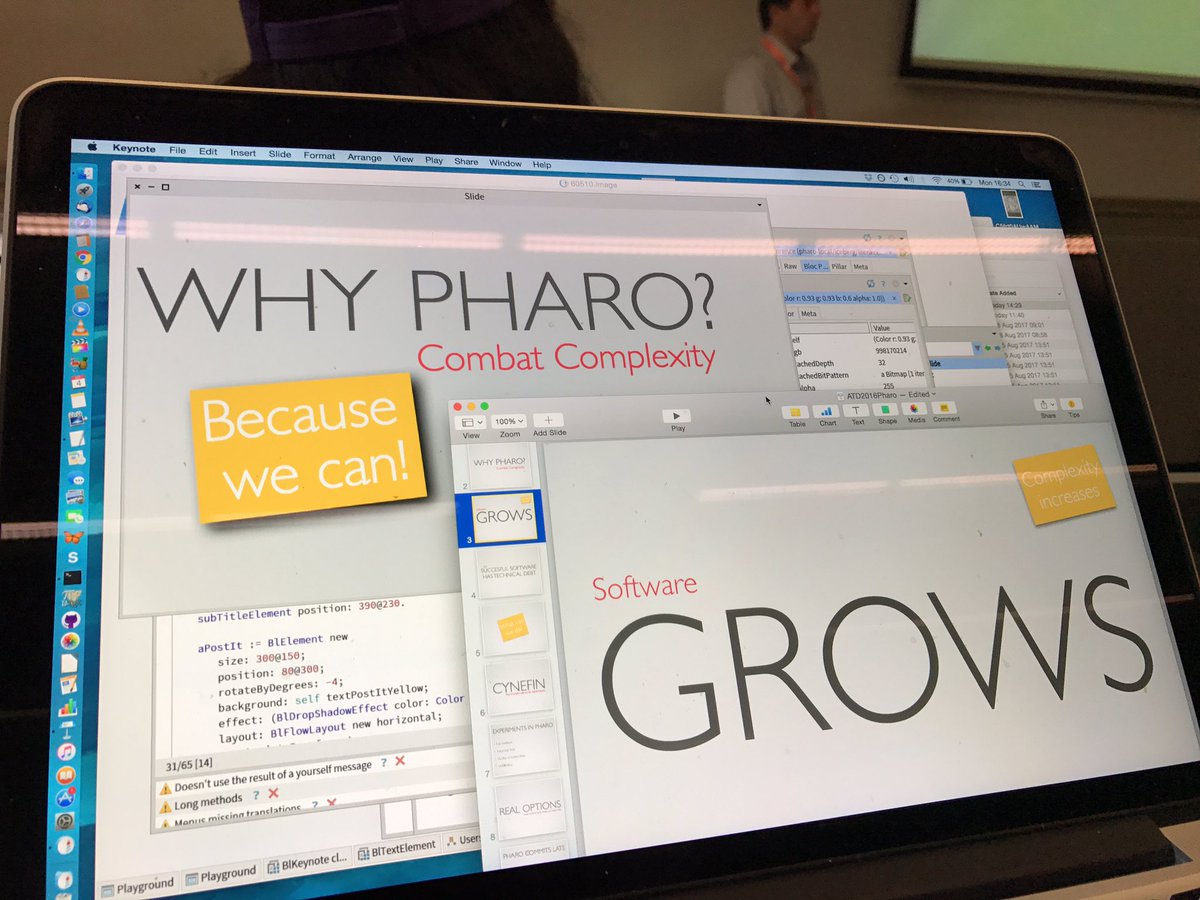
Cool - great minds think alike ;) In your photo - there is keynote, are you creating there and then rendering in Pharo - or are you exporting to keynote to had out afterwards? I was thinking of a little tool palette to let you drop some text and pick some images and store it in pages (like Stef has started doing). I wanted to be able to evaluate expressions in this text to show things in a presentation, and possibly embed methods etc. As everyone has said, its not rocket science but there is a bit to get right (and doing it in Bloc is actually a very good idea BTW). Tim
On 3 Nov 2017, at 11:11, stephan <stephan@stack.nl> wrote:
On 01-11-17 19:35, Tim Mackinnon wrote:
Hi - has anyone made anything where you can create a full screen presentation in Pharo with slides with some large text, bullet points and embedded pictures - but then itâs a facade that lets you evaluate items in the slide or jump to any code mentioned?
That is a project I've been toying with in Bloc. Next week is definitely too early.
Stephan <https:__pbs.twimg.com_media_DI4w6UcWsAAXfbC.jpg>
Ha -actually looking more closely at your photo, it looks like your are doing it in pharo and Iâm guessing are bored in a presentation (looking at the background) and recreating the slides from that presentation in Block (on the sly?)â¦nice Tim
On 3 Nov 2017, at 11:33, Tim Mackinnon <tim@testit.works> wrote:
Cool - great minds think alike ;)
In your photo - there is keynote, are you creating there and then rendering in Pharo - or are you exporting to keynote to had out afterwards?
I was thinking of a little tool palette to let you drop some text and pick some images and store it in pages (like Stef has started doing). I wanted to be able to evaluate expressions in this text to show things in a presentation, and possibly embed methods etc.
As everyone has said, its not rocket science but there is a bit to get right (and doing it in Bloc is actually a very good idea BTW).
Tim
On 3 Nov 2017, at 11:11, stephan <stephan@stack.nl> wrote:
On 01-11-17 19:35, Tim Mackinnon wrote:
Hi - has anyone made anything where you can create a full screen presentation in Pharo with slides with some large text, bullet points and embedded pictures - but then itâs a facade that lets you evaluate items in the slide or jump to any code mentioned?
That is a project I've been toying with in Bloc. Next week is definitely too early.
Stephan <https:__pbs.twimg.com_media_DI4w6UcWsAAXfbC.jpg>
On 03/11/17 12:33, Tim Mackinnon wrote:
Cool - great minds think alike ;)
:)
In your photo - there is keynote, are you creating there and then rendering in Pharo - or are you exporting to keynote to had out afterwards?
That was the first experiment. I took a slide from a keynote presentation I have made and tried reproducing it in Bloc. The quality of the graphics and typographical support is now good enough to do that. It is a page from https://medium.com/concerning-pharo/pharo-50c66685913c I'm not yet sure how I'd want it integrated with gtInspector, how to have a slide-specific DSL and what kind of storage format to use. My Bloc experiments on vimeo are helping me test hypotheses on how I'd want to work with it. Last week I was distracted by private reasons, the weeks before that with PharoLauncher, P3, Iceberg... Interaction between text areas and drag and drop was not yet working as I wanted it to. Earlier experiments I've done with a glamour based browser, including exercises where save would recompile a method and show the results Stephan
I think that this kind of experiences is excellent because this is exactly the level for Bloc. Stef On Fri, Nov 3, 2017 at 1:27 PM, Stephan Eggermont <stephan@stack.nl> wrote:
On 03/11/17 12:33, Tim Mackinnon wrote:
Cool - great minds think alike ;)
:)
In your photo - there is keynote, are you creating there and then rendering in Pharo - or are you exporting to keynote to had out afterwards?
That was the first experiment. I took a slide from a keynote presentation I have made and tried reproducing it in Bloc. The quality of the graphics and typographical support is now good enough to do that. It is a page from https://medium.com/concerning-pharo/pharo-50c66685913c
I'm not yet sure how I'd want it integrated with gtInspector, how to have a slide-specific DSL and what kind of storage format to use.
My Bloc experiments on vimeo are helping me test hypotheses on how I'd want to work with it. Last week I was distracted by private reasons, the weeks before that with PharoLauncher, P3, Iceberg...
Interaction between text areas and drag and drop was not yet working as I wanted it to.
Earlier experiments I've done with a glamour based browser, including exercises where save would recompile a method and show the results
Stephan

I've often used Pharo and Squeak for presentations, particularly when interactive widgets can get me beyond typical presentation stuff. The main hurdle I see in getting a really awesome Pharopoint is that I'd like to have a presenter interface that is different for me the presenter than what the audience sees. Here are some things that come to mind: (1) Allow me to keep my higher resolution 16x10 aspect ratio screen and present to a 4x3 monitor. (2) Allow me to keep presenter notes that people can't see. (3) Allow me a preview of upcoming slides and to jump around. (4) Make my cursor on the presentation leave a trail, so I can highlight things with my mouse.
From a programming Pharo programming perspective, this stuff isn't hard. Where the rubber hits the road is that Pharo needs to interact with the operating system to set up the two different decoration-less windows, displaying one on the projector and keeping the other one on the laptop. In Powerpoint and the like, getting into this mode is just a button click away. Once that functionality is just a few lines of Smalltalk away, I'm sure we'll see really interesting versions of Pharopoint coming soon after.
Just my two cents, Jeff On Sat, Nov 4, 2017 at 12:57 PM Stephane Ducasse <stepharo.self@gmail.com> wrote:
I think that this kind of experiences is excellent because this is exactly the level for Bloc.
Stef
On Fri, Nov 3, 2017 at 1:27 PM, Stephan Eggermont <stephan@stack.nl> wrote:
On 03/11/17 12:33, Tim Mackinnon wrote:
Cool - great minds think alike ;)
:)
In your photo - there is keynote, are you creating there and then rendering in Pharo - or are you exporting to keynote to had out afterwards?
That was the first experiment. I took a slide from a keynote presentation I have made and tried reproducing it in Bloc. The quality of the graphics and typographical support is now good enough to do that. It is a page from https://medium.com/concerning-pharo/pharo-50c66685913c
I'm not yet sure how I'd want it integrated with gtInspector, how to have a slide-specific DSL and what kind of storage format to use.
My Bloc experiments on vimeo are helping me test hypotheses on how I'd want to work with it. Last week I was distracted by private reasons, the weeks before that with PharoLauncher, P3, Iceberg...
Interaction between text areas and drag and drop was not yet working as I wanted it to.
Earlier experiments I've done with a glamour based browser, including exercises where save would recompile a method and show the results
Stephan

On 11/3/17, Stephan Eggermont <stephan@stack.nl> wrote:
On 03/11/17 12:33, Tim Mackinnon wrote:
Cool - great minds think alike ;)
:)
In your photo - there is keynote, are you creating there and then rendering in Pharo - or are you exporting to keynote to had out afterwards?
That was the first experiment. I took a slide from a keynote presentation I have made and tried reproducing it in Bloc. The quality of the graphics and typographical support is now good enough to do that. It is a page from https://medium.com/concerning-pharo/pharo-50c66685913c
Is the code available somewhere?
I'm not yet sure how I'd want it integrated with gtInspector, how to have a slide-specific DSL and what kind of storage format to use.
My Bloc experiments on vimeo are helping me test hypotheses on how I'd want to work with it.
Links to the videos? Thanks in advance Hannes
Last week I was distracted by private reasons, the weeks before that with PharoLauncher, P3, Iceberg...
Interaction between text areas and drag and drop was not yet working as I wanted it to.
Earlier experiments I've done with a glamour based browser, including exercises where save would recompile a method and show the results
Stephan

My Bloc experiments on vimeo are helping me test hypotheses on how I'd want to work with it.
Links to the videos?
Creating Bloc Widgets in Pharo https://vimeo.com/235934701 Creating Bloc Widgets in Pharo 2: ColorPanel https://vimeo.com/236419682 I will add that to the next Monthly pharo newsletter, too. Marcus
Hi stefan I'm interested. So if you want that I do code review and ask super dumb questions let me know. Stef On Fri, Nov 10, 2017 at 1:12 PM, stephan <stephan@stack.nl> wrote:
On 10-11-17 12:06, H. Hirzel wrote:
Is the code available somewhere?
I've been fighting somewhat with Iceberg, and using fast-changing functionality in Bloc. I'm integrating the experiments and will provide a link then.
Stephan
Stephan you can take a lot of the tests I wrote because I did it test first to see :) And yes it would be nice to have play with bloc to do that. Arghhhh too many exciting things to do. On Fri, Nov 3, 2017 at 12:11 PM, stephan <stephan@stack.nl> wrote:
On 01-11-17 19:35, Tim Mackinnon wrote:
Hi - has anyone made anything where you can create a full screen presentation in Pharo with slides with some large text, bullet points and embedded pictures - but then itâs a facade that lets you evaluate items in the slide or jump to any code mentioned?
That is a project I've been toying with in Bloc. Next week is definitely too early.
Stephan

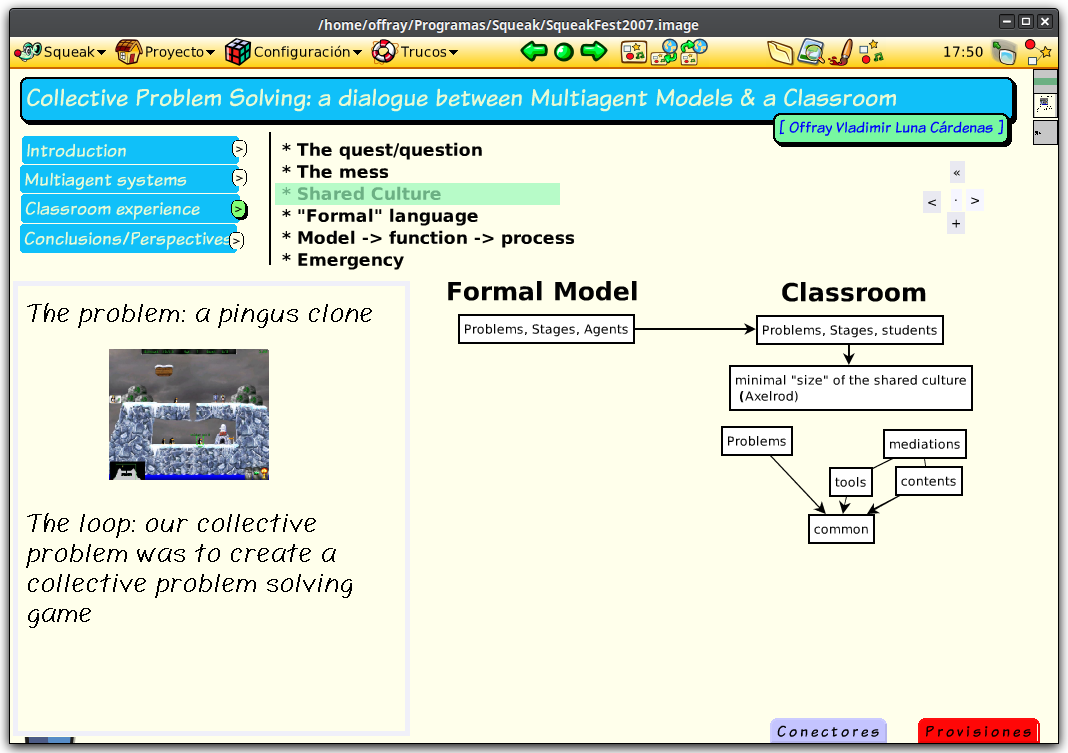
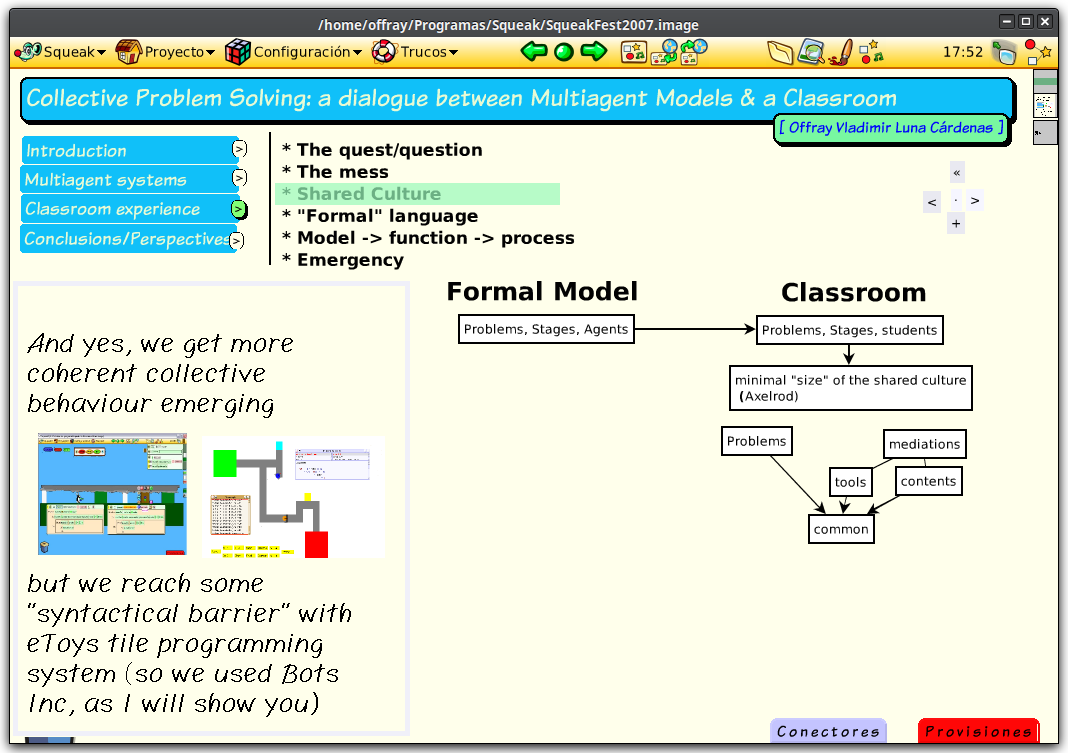
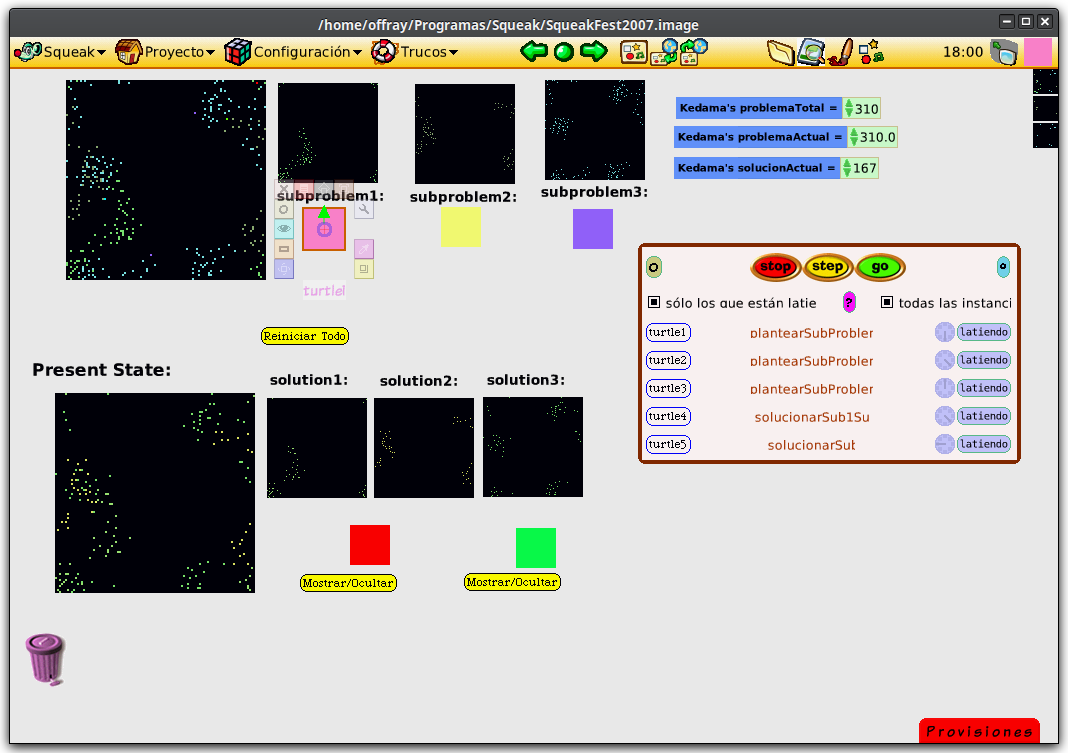
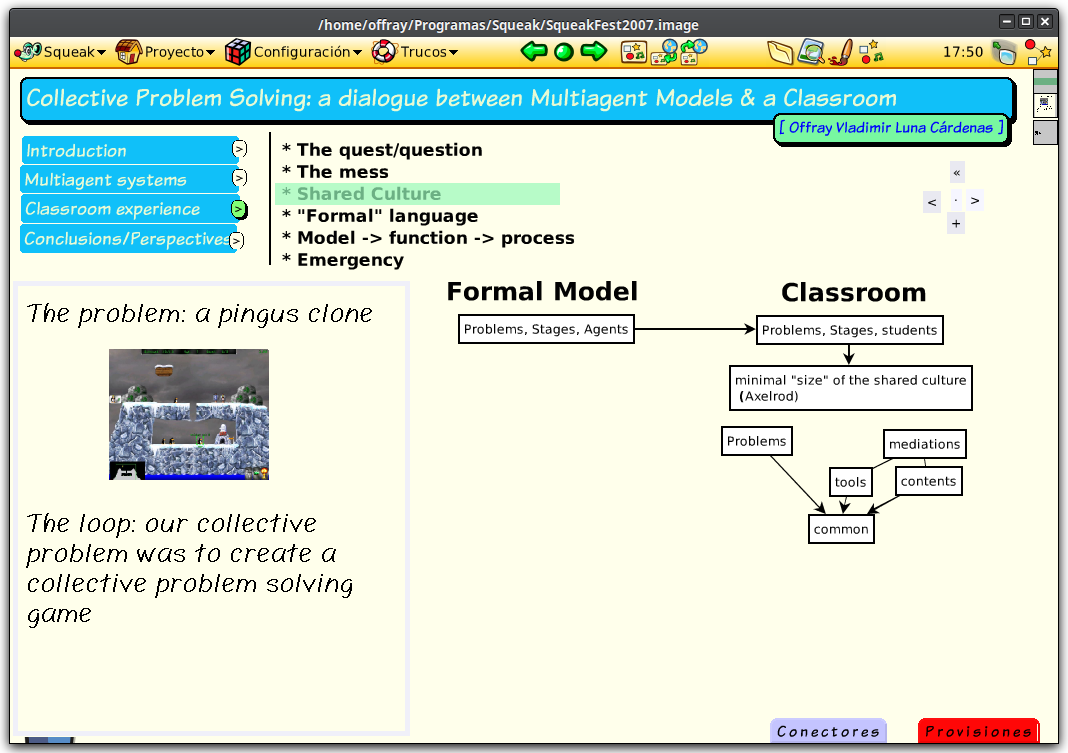
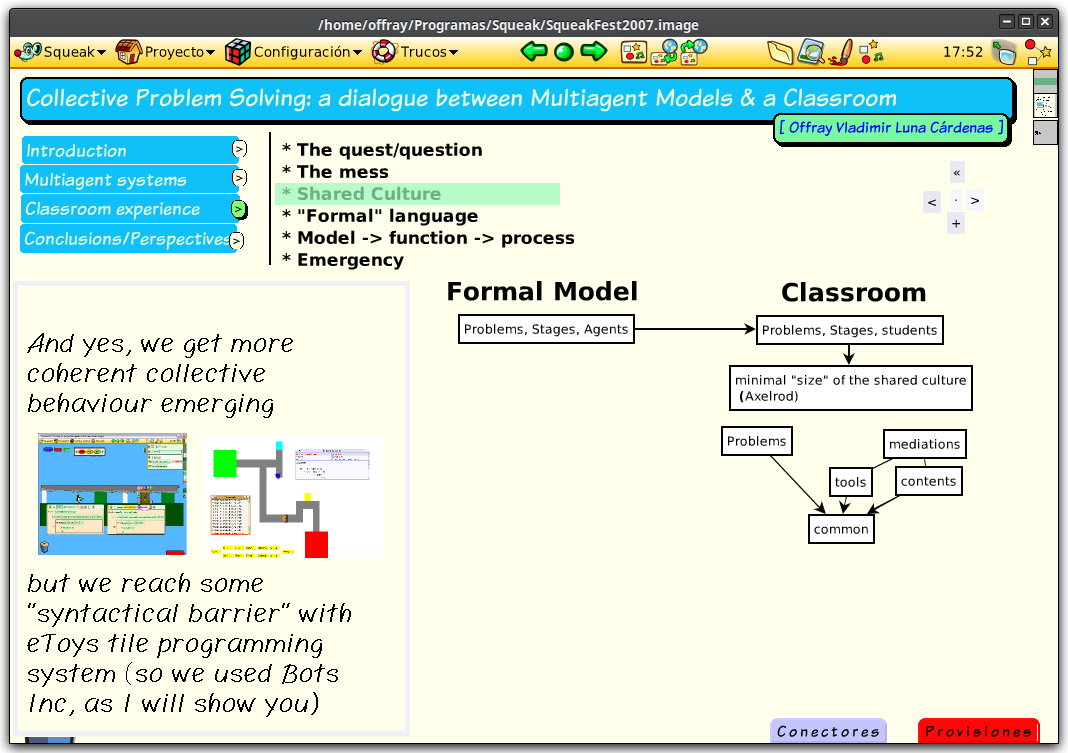
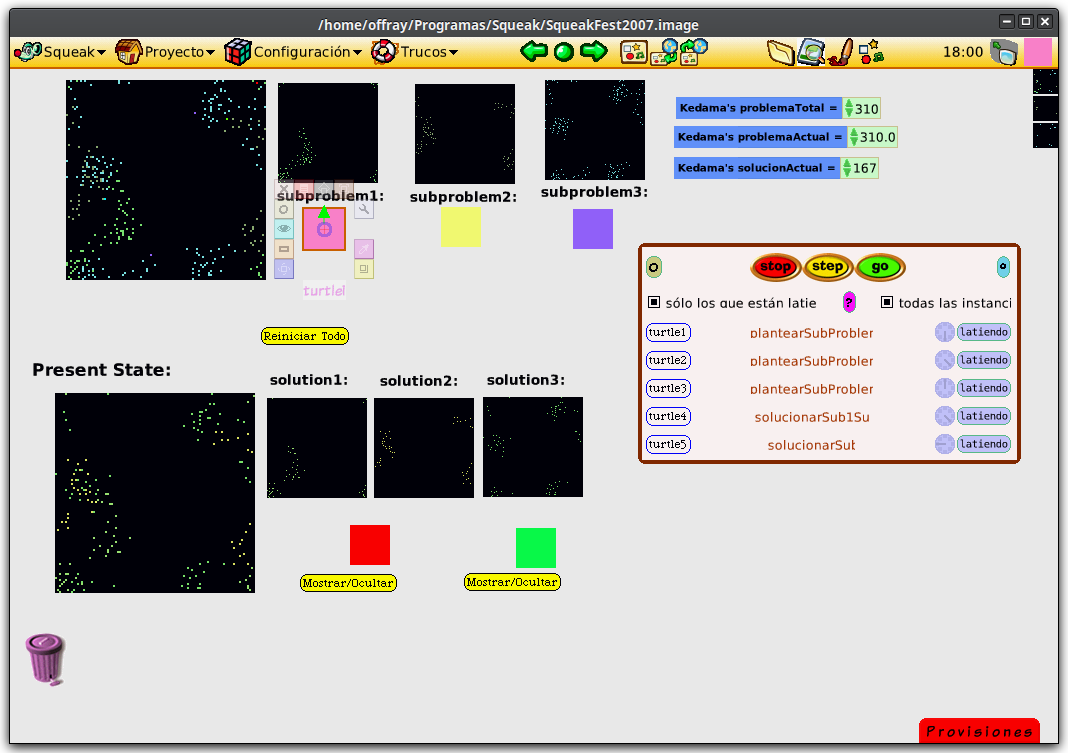
Hi Tim, I did a presentation long time ago (for Squeak Fest 2007) using Etoys (in fact I knew little more that Etoys for teaching, modeling and programming in Smalltalk, and after that, my Smalltalk learning/practice froze until 2014!). Of course, is not what you're looking for, because is not Pharo based, but may be it can give you some ideas. You can download the image from [1] and run it using Squeak 4., from Squeakland, at [2]. Below you can see some screenshots of such presentation, including running a simulation inside it. [1] http://mutabit.com/repos.fossil/offray-maestria-tesis/home [2] http://www.squeakland.org/download/ For my early days, when I discovered Smalltalk back in 2006, to my return 3 years ago, it has been kind of strange to see Smalltalkers making presentations about dynamic mediums using static slides (and not much have changed in 10 years!). I would like to explore using mind mapping as a way of making presentations in Pharo (to support my usual way of presentation using Freeplane[3]). [3] http://freeplane.org/ Cheers, Offray On 01/11/17 13:35, Tim Mackinnon wrote:
Hi - has anyone made anything where you can create a full screen presentation in Pharo with slides with some large text, bullet points and embedded pictures - but then itâs a facade that lets you evaluate items in the slide or jump to any code mentioned?
Sort of like what Alan Kay does in the eToys images?
I need to do a presentation next week and I always loved it when I was fooled into thinking I was looking at a staticâish powerpoint and then suddenly realised it was a live environment.
It doesnât sound that hard to do something simple - but Iâm not sure if I can pull it off in time for my presentation. But am curious if we have something.
(For bonus points, GT-Spotter stuff would work in it over top of the presentation to demonstrate simple things)
Tim

Iâll be honest, when I had to do presentations I cheated and used Director. Granted that was long enough ago that it was still Macromedia Director ⦠Andrew Sent from Mail for Windows 10 From: Offray Vladimir Luna Cárdenas Sent: Sunday, November 5, 2017 6:02 PM To: pharo-users@lists.pharo.org Subject: Re: [Pharo-users] Writing "powerpoint" like presentations in Pharo? Hi Tim, I did a presentation long time ago (for Squeak Fest 2007) using Etoys (in fact I knew little more that Etoys for teaching, modeling and programming in Smalltalk, and after that, my Smalltalk learning/practice froze until 2014!). Of course, is not what you're looking for, because is not Pharo based, but may be it can give you some ideas. You can download the image from [1] and run it using Squeak 4., from Squeakland, at [2]. Below you can see some screenshots of such presentation, including running a simulation inside it. [1] http://mutabit.com/repos.fossil/offray-maestria-tesis/home [2] http://www.squeakland.org/download/ For my early days, when I discovered Smalltalk back in 2006, to my return 3 years ago, it has been kind of strange to see Smalltalkers making presentations about dynamic mediums using static slides (and not much have changed in 10 years!). I would like to explore using mind mapping as a way of making presentations in Pharo (to support my usual way of presentation using Freeplane[3]). [3] http://freeplane.org/ Cheers, Offray On 01/11/17 13:35, Tim Mackinnon wrote: Hi - has anyone made anything where you can create a full screen presentation in Pharo with slides with some large text, bullet points and embedded pictures - but then itâs a facade that lets you evaluate items in the slide or jump to any code mentioned? Sort of like what Alan Kay does in the eToys images? I need to do a presentation next week and I always loved it when I was fooled into thinking I was looking at a staticâish powerpoint and then suddenly realised it was a live environment. It doesnât sound that hard to do something simple - but Iâm not sure if I can pull it off in time for my presentation. But am curious if we have something. (For bonus points, GT-Spotter stuff would work in it over top of the presentation to demonstrate simple things) Tim
On 11/1/17, Tim Mackinnon <tim@testit.works> wrote:
Hi - has anyone made anything where you can create a full screen presentation in Pharo with slides with some large text, bullet points and embedded pictures - but then itâs a facade that lets you evaluate items in the slide or jump to any code mentioned?
Sort of like what Alan Kay does in the eToys images?
I need to do a presentation next week and I always loved it when I was fooled into thinking I was looking at a staticâish powerpoint and then suddenly realised it was a live environment.
It doesnât sound that hard to do something simple - but Iâm not sure if I can pull it off in time for my presentation. But am curious if we have something.
(For bonus points, GT-Spotter stuff would work in it over top of the presentation to demonstrate simple things)
Tim
Hello Tim Depending on what you want to show it might be doable to use Torsten Bergmanns Desktop manager package available through the catalog. Create a sequence of desktops and switch between them with Ctrl + D + N (next) Ctrl + D + P (previous) Use StandardFonts setDemoFonts to have the tools showing font sizes which are readable. To go back to regular fonts use StandardFonts restoreDefaultFonts. There is the Desktops Overview (Ctrl + D + O) which gives you an inspector in order to quickly switch to another desktop. It would be nicer to have the left inspector column be smaller but that would involve some configuration. Maybe it is necessary that you write your own specific GT inspector for the desktops. With this a simple presentation should be doable. Besides the regular tools just use StringMorphs with a large font. Some preconfigures buttons to execute specific commands might also be useful. More feature rich presentations could be done with a DSL. One option is to use Pillar. MOOC slides have been done with Pillar [1], see thread '[Pillar] Pillar source code of ESUG 2015 presentation? Presentations done with Pillar?' The rendering within in Pharo is not fully implemented yet. The thread 'Morphic renderer for Pillar?' has a start which might be sufficient. I think I have some more not yet put into the repo.... A third option would be to continue working on reimplementing a bookmorph / slide show / presentation or something similar as in Squeak and/or Etoys [2] -- Hannes [1] An example presentation in Pillar syntax https://github.com/SquareBracketAssociates/PharoMooc/blob/master/Slides/Week... Slide titles start and end with a dollar sign ${slide:title=In a Nutshell}$ [2] Current Etoys efforts http://wiki.squeak.org/squeak/6531 Ideas and/or part of the code might be reused and adapted.


I also think that would be nice to have. With tool like pillar, graphiscopio, that would be a really great option ! Org-mode generate Beamerâs présentation but we could have much better ^^ And as someone said I also think that would be cool to have a kind of présenter screen. To me the simple way would be to use seamless (or telepharo) to communicate between two pharo images: one displaying, one organizing. My 2 cents ^^ Cedrick
Le 7 nov. 2017 à 08:06, H. Hirzel <hannes.hirzel@gmail.com> a écrit :
On 11/1/17, Tim Mackinnon <tim@testit.works> wrote: Hi - has anyone made anything where you can create a full screen presentation in Pharo with slides with some large text, bullet points and embedded pictures - but then itâs a facade that lets you evaluate items in the slide or jump to any code mentioned?
Sort of like what Alan Kay does in the eToys images?
I need to do a presentation next week and I always loved it when I was fooled into thinking I was looking at a staticâish powerpoint and then suddenly realised it was a live environment.
It doesnât sound that hard to do something simple - but Iâm not sure if I can pull it off in time for my presentation. But am curious if we have something.
(For bonus points, GT-Spotter stuff would work in it over top of the presentation to demonstrate simple things)
Tim
Hello Tim
Depending on what you want to show it might be doable to use
Torsten Bergmanns Desktop manager package
available through the catalog.
Create a sequence of desktops and switch between them with
Ctrl + D + N (next) Ctrl + D + P (previous)
Use
StandardFonts setDemoFonts
to have the tools showing font sizes which are readable.
To go back to regular fonts use
StandardFonts restoreDefaultFonts.
There is the Desktops Overview (Ctrl + D + O) which gives you an inspector in order to quickly switch to another desktop.
It would be nicer to have the left inspector column be smaller but that would involve some configuration. Maybe it is necessary that you write your own specific GT inspector for the desktops.
With this a simple presentation should be doable. Besides the regular tools just use StringMorphs with a large font. Some preconfigures buttons to execute specific commands might also be useful.
More feature rich presentations could be done with a DSL.
One option is to use Pillar. MOOC slides have been done with Pillar [1], see thread
'[Pillar] Pillar source code of ESUG 2015 presentation? Presentations done with Pillar?'
The rendering within in Pharo is not fully implemented yet. The thread 'Morphic renderer for Pillar?' has a start which might be sufficient. I think I have some more not yet put into the repo....
A third option would be to continue working on reimplementing a bookmorph / slide show / presentation or something similar as in Squeak and/or Etoys [2]
-- Hannes
[1] An example presentation in Pillar syntax
https://github.com/SquareBracketAssociates/PharoMooc/blob/master/Slides/Week...
Slide titles start and end with a dollar sign
${slide:title=In a Nutshell}$
[2] Current Etoys efforts http://wiki.squeak.org/squeak/6531 Ideas and/or part of the code might be reused and adapted. <Pharo_Smalltalk_Inspector_on_a_DesktopManager_2017-11-07.png>

Hannes Hirzel wrote
Create a sequence of desktops and switch between them with
That's an interesting idea and holds most true to the Dynabook/Smalltalk principle of keeping the full power of the computer at every level. Hannes Hirzel wrote
One option is to use Pillar. MOOC slides have been done with Pillar
That would be more pink plane with the advantage of being more searchable/reproducible and the disadvantage of being restricted to standard (mostly?)-static content. Hannes Hirzel wrote
A third option would be to continue working on reimplementing a bookmorph / slide show / presentation or something similar as in Squeak and/or Etoys [2]
That would be ideal, but would require some work. This combined with the suggestion from this thread to have both a presenter image and presentation image seems to cover the OP request. As a workaround for now, it seems #1 gets you much of the way there. ----- Cheers, Sean -- Sent from: http://forum.world.st/Pharo-Smalltalk-Users-f1310670.html

This is a very demoralizing thread ... For example, take a look at Smalltalk-78, brought back to life a few years ago by Dan Ingalls, Bert Freudenberg, Ted Kaehler, myself, et al from a disk pack thrown on the trash by Xerox. https://youtu.be/AnrlSqtpOkw?t=135 Part of the motivation, besides the fun of it, was to make a tribute video for Ted Nelson's "Intertwingled" in 2015. I did all the visuals -- which included "slides", dynamics, live coding, etc. -- in Smalltalk-78. I used the Dorado screen format This was also historically interesting because it was Smalltalk-78 that Steve Jobs saw in his famous visit to Parc the next year in 1979. (So what is the big problem with doing something better than PPT in Pharo?) And, in fact, it is also quite demoralizing to have to use this !@#$% non-WYSIWYG horrible web editor to make this comment .... Cheers Alan -- Sent from: http://forum.world.st/Pharo-Smalltalk-Users-f1310670.html
participants (13)
-
 alanone1
 -
 Andrew Glynn
 -
 Cédrick Béler
 -
 Dimitris Chloupis
 -
 H. Hirzel
 -
 J.F. Rick
 -
 Marcus Denker
 -
 Offray Vladimir Luna Cárdenas
 -
 Sean P. DeNigris
 -
 stephan
 -
Stephan Eggermont
-
 Stephane Ducasse
 -
 Tim Mackinnon