Display MozCanvas on screen?

| canvas | . canvas := BlSpartaMozCanvasBuilder extent: 600@400 How do I display this MosCanvas on screen? Does anyone know where I can get documentation on how to do graphics in Pharo? The comments in the code are not understandable to a beginner.

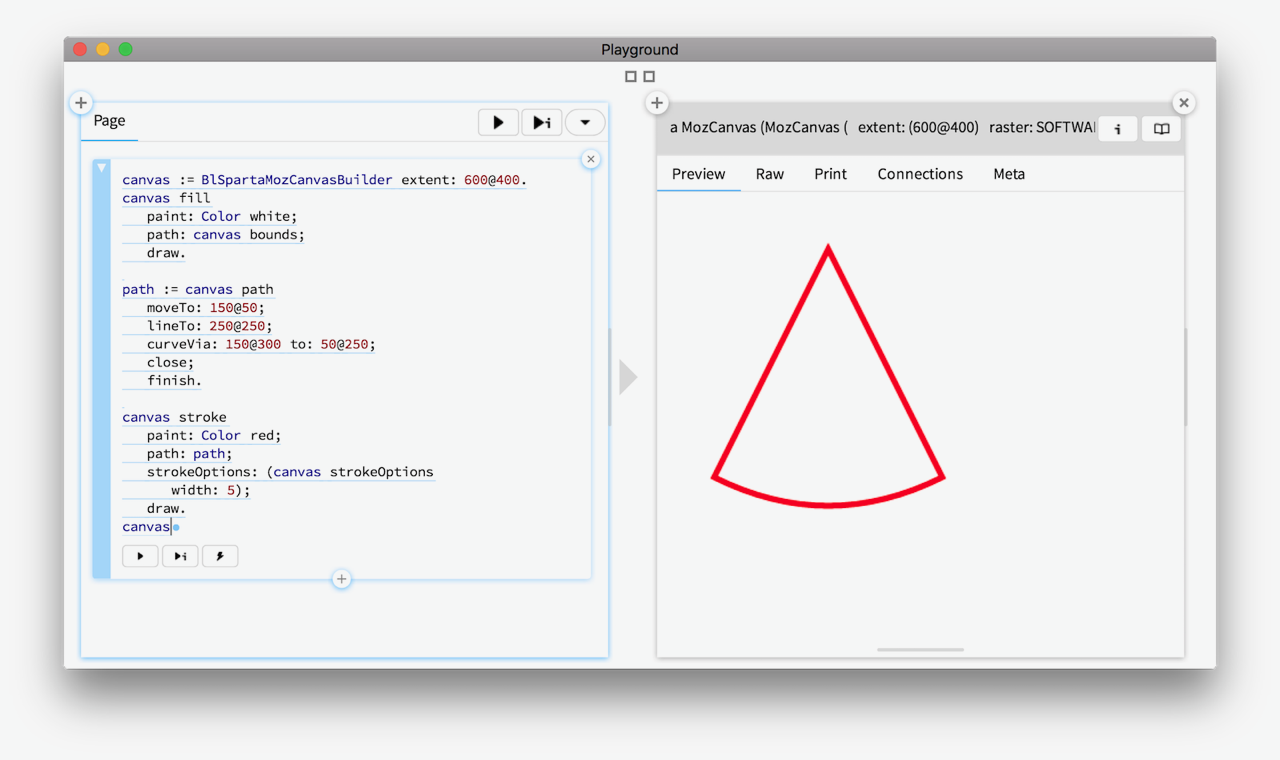
Hi, Look for the examples that are shipped with GT/Brick/Bloc/Sparta. The simplest way you play with the canvas is through the inspector. For example, paste this code in a Playground: canvas := BlSpartaMozCanvasBuilder extent: 600@400. canvas fill paint: Color white; path: canvas bounds; draw. path := canvas path moveTo: 150@50; lineTo: 250@250; curveVia: 150@300 to: 50@250; close; finish. canvas stroke paint: Color red; path: path; strokeOptions: (canvas strokeOptions width: 5); draw. canvas Then inspect the result (Cmd+g), and choose the Preview view from the inspector. Here is how it looks like in the new GT Playground: Cheers, Doru
On Feb 25, 2019, at 11:09 PM, David Richards <david.i.richards.iii@gmail.com> wrote:
| canvas |
. canvas := BlSpartaMozCanvasBuilder extent: 600@400
How do I display this MosCanvas on screen?
Does anyone know where I can get documentation on how to do graphics in Pharo? The comments in the code are not understandable to a beginner.
-- www.feenk.com "We cannot reach the flow of things unless we let go."
participants (2)
-
 David Richards
 -
 Tudor Girba