Automation of MS Office from Pharo

Hello All I am using Pharo (currently P7, moving to P8) under Windows 10. I have MS Office 365 on my system, and use it regularly for non-Smalltalk tasks. It would be very convenient if I could issue commands to MS Office components from within Pharo. My current interest is to manage my incoming e-mails in Outlook, but I can see many other applications. I have a recollection of seeing a reference to automation of Excel to transfer data both ways, but I cannot recall where. I have searched the catalog, but could not see anything that looked relevant. I have also read the uFFI booklet, but again no luck. Could anyone point me to any information or examples of such control, please? It would not have to be Outlook, though that is my main interest; given examples for other Office components, I should be able to follow the pattern. TIA Peter Kenny

Hello, One of the alternatives to integrate with Office is the use of the COM interface. There is an implementation in https://github.com/tesonep/pharo-com. In the test package, there are examples to integrate with Word, Excell, Internet Explorer, and Access. Integration with Outlook can be done in the same fashion. It is good that the API of all the Office products is heavily documented. You can get more information about how to use Outlook here: https://docs.microsoft.com/en-us/office/vba/api/overview/outlook/object-mode... If you have any questions, please let me know. Cheers, Pablo. On Sun, Apr 5, 2020 at 2:44 PM PBKResearch <peter@pbkresearch.co.uk> wrote:
Hello All
I am using Pharo (currently P7, moving to P8) under Windows 10. I have MS Office 365 on my system, and use it regularly for non-Smalltalk tasks. It would be very convenient if I could issue commands to MS Office components from within Pharo. My current interest is to manage my incoming e-mails in Outlook, but I can see many other applications. I have a recollection of seeing a reference to automation of Excel to transfer data both ways, but I cannot recall where. I have searched the catalog, but could not see anything that looked relevant. I have also read the uFFI booklet, but again no luck. Could anyone point me to any information or examples of such control, please? It would not have to be Outlook, though that is my main interest; given examples for other Office components, I should be able to follow the pattern.
TIA
Peter Kenny
-- Pablo Tesone. tesonep@gmail.com
Hello Pablo Many thanks for the suggestion. I have tried to use Pharo-Com to connect to Outlook, and have now got myself into a complete tangle. I have been able to connect to my already-running copy of Outlook, but when I tried to enter propertyNamed: 'Folders', an error message appeared with the text: "Instance of FFIExternalObjectType did not understand emitArgument:context:inCallout:". I could not understand this, so I closed the debugger, assuming the effects would be unwound. I found that, whatever I tried after that, the same message appeared. In desperation I closed down Pharo, without saving the image, and started again. Whatever I tried in using Pharo-Com, the exact same message appeared. Even when I tried running one of your tests, the same message. It seems clear that something in my system, not part of Pharo, has been changed in a way which persists from one run of Pharo to another. I have no idea what it can be, but I see that some parts of Pharo-Com address the registry, so I wonder if I have corrupted that in some way. For the time being I have stopped work on Pharo-Com. I hope that a night's sleep will bring inspiration. In case it means anything to you, I attach a screenshot of the error stack when I try to run the testWord case in PharoCOM-Tests. Thanks again Peter Kenny -----Original Message----- From: Pharo-users <pharo-users-bounces@lists.pharo.org> On Behalf Of tesonep@gmail.com Sent: 05 April 2020 16:23 To: Any question about pharo is welcome <pharo-users@lists.pharo.org> Subject: Re: [Pharo-users] Automation of MS Office from Pharo Hello, One of the alternatives to integrate with Office is the use of the COM interface. There is an implementation in https://github.com/tesonep/pharo-com. In the test package, there are examples to integrate with Word, Excell, Internet Explorer, and Access. Integration with Outlook can be done in the same fashion. It is good that the API of all the Office products is heavily documented. You can get more information about how to use Outlook here: https://docs.microsoft.com/en-us/office/vba/api/overview/outlook/object-mode... If you have any questions, please let me know. Cheers, Pablo. On Sun, Apr 5, 2020 at 2:44 PM PBKResearch <peter@pbkresearch.co.uk> wrote:
Hello All
I am using Pharo (currently P7, moving to P8) under Windows 10. I have MS Office 365 on my system, and use it regularly for non-Smalltalk tasks. It would be very convenient if I could issue commands to MS Office components from within Pharo. My current interest is to manage my incoming e-mails in Outlook, but I can see many other applications. I have a recollection of seeing a reference to automation of Excel to transfer data both ways, but I cannot recall where. I have searched the catalog, but could not see anything that looked relevant. I have also read the uFFI booklet, but again no luck. Could anyone point me to any information or examples of such control, please? It would not have to be Outlook, though that is my main interest; given examples for other Office components, I should be able to follow the pattern.
TIA
Peter Kenny
-- Pablo Tesone. tesonep@gmail.com
If you are using pharo 7, you have to install a different branch of the project. Check in the documentation of pharo-com(the read me in the same repo) On Sun, Apr 5, 2020, 21:41 PBKResearch <peter@pbkresearch.co.uk> wrote:
Hello Pablo
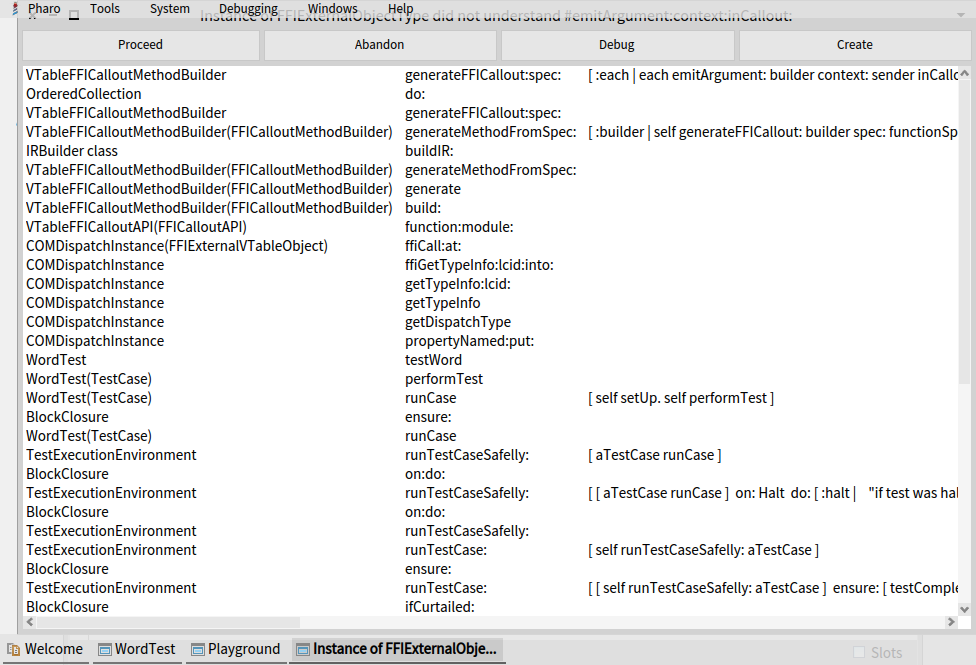
Many thanks for the suggestion. I have tried to use Pharo-Com to connect to Outlook, and have now got myself into a complete tangle. I have been able to connect to my already-running copy of Outlook, but when I tried to enter propertyNamed: 'Folders', an error message appeared with the text: "Instance of FFIExternalObjectType did not understand emitArgument:context:inCallout:". I could not understand this, so I closed the debugger, assuming the effects would be unwound.
I found that, whatever I tried after that, the same message appeared. In desperation I closed down Pharo, without saving the image, and started again. Whatever I tried in using Pharo-Com, the exact same message appeared. Even when I tried running one of your tests, the same message.
It seems clear that something in my system, not part of Pharo, has been changed in a way which persists from one run of Pharo to another. I have no idea what it can be, but I see that some parts of Pharo-Com address the registry, so I wonder if I have corrupted that in some way.
For the time being I have stopped work on Pharo-Com. I hope that a night's sleep will bring inspiration. In case it means anything to you, I attach a screenshot of the error stack when I try to run the testWord case in PharoCOM-Tests.
Thanks again
Peter Kenny
-----Original Message----- From: Pharo-users <pharo-users-bounces@lists.pharo.org> On Behalf Of tesonep@gmail.com Sent: 05 April 2020 16:23 To: Any question about pharo is welcome <pharo-users@lists.pharo.org> Subject: Re: [Pharo-users] Automation of MS Office from Pharo
Hello, One of the alternatives to integrate with Office is the use of the COM interface. There is an implementation in https://github.com/tesonep/pharo-com. In the test package, there are examples to integrate with Word, Excell, Internet Explorer, and Access. Integration with Outlook can be done in the same fashion. It is good that the API of all the Office products is heavily documented.
You can get more information about how to use Outlook here:
https://docs.microsoft.com/en-us/office/vba/api/overview/outlook/object-mode...
If you have any questions, please let me know. Cheers, Pablo.
On Sun, Apr 5, 2020 at 2:44 PM PBKResearch <peter@pbkresearch.co.uk> wrote:
Hello All
I am using Pharo (currently P7, moving to P8) under Windows 10. I have
MS Office 365 on my system, and use it regularly for non-Smalltalk tasks. It would be very convenient if I could issue commands to MS Office components from within Pharo. My current interest is to manage my incoming e-mails in Outlook, but I can see many other applications. I have a recollection of seeing a reference to automation of Excel to transfer data both ways, but I cannot recall where. I have searched the catalog, but could not see anything that looked relevant. I have also read the uFFI booklet, but again no luck. Could anyone point me to any information or examples of such control, please? It would not have to be Outlook, though that is my main interest; given examples for other Office components, I should be able to follow the pattern.
TIA
Peter Kenny
-- Pablo Tesone. tesonep@gmail.com
The install instructions are not the same for Pharo 7, or pharo 8/9 On Sun, Apr 5, 2020, 22:18 tesonep@gmail.com <tesonep@gmail.com> wrote:
If you are using pharo 7, you have to install a different branch of the project. Check in the documentation of pharo-com(the read me in the same repo)
On Sun, Apr 5, 2020, 21:41 PBKResearch <peter@pbkresearch.co.uk> wrote:
Hello Pablo
Many thanks for the suggestion. I have tried to use Pharo-Com to connect to Outlook, and have now got myself into a complete tangle. I have been able to connect to my already-running copy of Outlook, but when I tried to enter propertyNamed: 'Folders', an error message appeared with the text: "Instance of FFIExternalObjectType did not understand emitArgument:context:inCallout:". I could not understand this, so I closed the debugger, assuming the effects would be unwound.
I found that, whatever I tried after that, the same message appeared. In desperation I closed down Pharo, without saving the image, and started again. Whatever I tried in using Pharo-Com, the exact same message appeared. Even when I tried running one of your tests, the same message.
It seems clear that something in my system, not part of Pharo, has been changed in a way which persists from one run of Pharo to another. I have no idea what it can be, but I see that some parts of Pharo-Com address the registry, so I wonder if I have corrupted that in some way.
For the time being I have stopped work on Pharo-Com. I hope that a night's sleep will bring inspiration. In case it means anything to you, I attach a screenshot of the error stack when I try to run the testWord case in PharoCOM-Tests.
Thanks again
Peter Kenny
-----Original Message----- From: Pharo-users <pharo-users-bounces@lists.pharo.org> On Behalf Of tesonep@gmail.com Sent: 05 April 2020 16:23 To: Any question about pharo is welcome <pharo-users@lists.pharo.org> Subject: Re: [Pharo-users] Automation of MS Office from Pharo
Hello, One of the alternatives to integrate with Office is the use of the COM interface. There is an implementation in https://github.com/tesonep/pharo-com. In the test package, there are examples to integrate with Word, Excell, Internet Explorer, and Access. Integration with Outlook can be done in the same fashion. It is good that the API of all the Office products is heavily documented.
You can get more information about how to use Outlook here:
https://docs.microsoft.com/en-us/office/vba/api/overview/outlook/object-mode...
If you have any questions, please let me know. Cheers, Pablo.
On Sun, Apr 5, 2020 at 2:44 PM PBKResearch <peter@pbkresearch.co.uk> wrote:
Hello All
I am using Pharo (currently P7, moving to P8) under Windows 10. I have
MS Office 365 on my system, and use it regularly for non-Smalltalk tasks. It would be very convenient if I could issue commands to MS Office components from within Pharo. My current interest is to manage my incoming e-mails in Outlook, but I can see many other applications. I have a recollection of seeing a reference to automation of Excel to transfer data both ways, but I cannot recall where. I have searched the catalog, but could not see anything that looked relevant. I have also read the uFFI booklet, but again no luck. Could anyone point me to any information or examples of such control, please? It would not have to be Outlook, though that is my main interest; given examples for other Office components, I should be able to follow the pattern.
TIA
Peter Kenny
-- Pablo Tesone. tesonep@gmail.com
Pablo â Yes, I saw the instruction. I used the quoted Metacello procedure for P7 â I used copy and paste from the repo Readme. Peter From: Pharo-users <pharo-users-bounces@lists.pharo.org> On Behalf Of tesonep@gmail.com Sent: 05 April 2020 21:19 To: Any question about pharo is welcome <pharo-users@lists.pharo.org> Subject: Re: [Pharo-users] Automation of MS Office from Pharo The install instructions are not the same for Pharo 7, or pharo 8/9 On Sun, Apr 5, 2020, 22:18 tesonep@gmail.com <mailto:tesonep@gmail.com> <tesonep@gmail.com <mailto:tesonep@gmail.com> > wrote: If you are using pharo 7, you have to install a different branch of the project. Check in the documentation of pharo-com(the read me in the same repo) On Sun, Apr 5, 2020, 21:41 PBKResearch <peter@pbkresearch.co.uk <mailto:peter@pbkresearch.co.uk> > wrote: Hello Pablo Many thanks for the suggestion. I have tried to use Pharo-Com to connect to Outlook, and have now got myself into a complete tangle. I have been able to connect to my already-running copy of Outlook, but when I tried to enter propertyNamed: 'Folders', an error message appeared with the text: "Instance of FFIExternalObjectType did not understand emitArgument:context:inCallout:". I could not understand this, so I closed the debugger, assuming the effects would be unwound. I found that, whatever I tried after that, the same message appeared. In desperation I closed down Pharo, without saving the image, and started again. Whatever I tried in using Pharo-Com, the exact same message appeared. Even when I tried running one of your tests, the same message. It seems clear that something in my system, not part of Pharo, has been changed in a way which persists from one run of Pharo to another. I have no idea what it can be, but I see that some parts of Pharo-Com address the registry, so I wonder if I have corrupted that in some way. For the time being I have stopped work on Pharo-Com. I hope that a night's sleep will bring inspiration. In case it means anything to you, I attach a screenshot of the error stack when I try to run the testWord case in PharoCOM-Tests. Thanks again Peter Kenny -----Original Message----- From: Pharo-users <pharo-users-bounces@lists.pharo.org <mailto:pharo-users-bounces@lists.pharo.org> > On Behalf Of tesonep@gmail.com <mailto:tesonep@gmail.com> Sent: 05 April 2020 16:23 To: Any question about pharo is welcome <pharo-users@lists.pharo.org <mailto:pharo-users@lists.pharo.org> > Subject: Re: [Pharo-users] Automation of MS Office from Pharo Hello, One of the alternatives to integrate with Office is the use of the COM interface. There is an implementation in https://github.com/tesonep/pharo-com. In the test package, there are examples to integrate with Word, Excell, Internet Explorer, and Access. Integration with Outlook can be done in the same fashion. It is good that the API of all the Office products is heavily documented. You can get more information about how to use Outlook here: https://docs.microsoft.com/en-us/office/vba/api/overview/outlook/object-mode... If you have any questions, please let me know. Cheers, Pablo. On Sun, Apr 5, 2020 at 2:44 PM PBKResearch <peter@pbkresearch.co.uk <mailto:peter@pbkresearch.co.uk> > wrote:
Hello All
I am using Pharo (currently P7, moving to P8) under Windows 10. I have MS Office 365 on my system, and use it regularly for non-Smalltalk tasks. It would be very convenient if I could issue commands to MS Office components from within Pharo. My current interest is to manage my incoming e-mails in Outlook, but I can see many other applications. I have a recollection of seeing a reference to automation of Excel to transfer data both ways, but I cannot recall where. I have searched the catalog, but could not see anything that looked relevant. I have also read the uFFI booklet, but again no luck. Could anyone point me to any information or examples of such control, please? It would not have to be Outlook, though that is my main interest; given examples for other Office components, I should be able to follow the pattern.
TIA
Peter Kenny
-- Pablo Tesone. tesonep@gmail.com <mailto:tesonep@gmail.com>
Ok, I was trying to find an easy solution. I will try tomorrow morning to see the problem. Sorry, On Sun, Apr 5, 2020 at 10:29 PM PBKResearch <peter@pbkresearch.co.uk> wrote:
Pablo â Yes, I saw the instruction. I used the quoted Metacello procedure for P7 â I used copy and paste from the repo Readme. Peter
From: Pharo-users <pharo-users-bounces@lists.pharo.org> On Behalf Of tesonep@gmail.com Sent: 05 April 2020 21:19 To: Any question about pharo is welcome <pharo-users@lists.pharo.org> Subject: Re: [Pharo-users] Automation of MS Office from Pharo
The install instructions are not the same for Pharo 7, or pharo 8/9
On Sun, Apr 5, 2020, 22:18 tesonep@gmail.com <tesonep@gmail.com> wrote:
If you are using pharo 7, you have to install a different branch of the project. Check in the documentation of pharo-com(the read me in the same repo)
On Sun, Apr 5, 2020, 21:41 PBKResearch <peter@pbkresearch.co.uk> wrote:
Hello Pablo
Many thanks for the suggestion. I have tried to use Pharo-Com to connect to Outlook, and have now got myself into a complete tangle. I have been able to connect to my already-running copy of Outlook, but when I tried to enter propertyNamed: 'Folders', an error message appeared with the text: "Instance of FFIExternalObjectType did not understand emitArgument:context:inCallout:". I could not understand this, so I closed the debugger, assuming the effects would be unwound.
I found that, whatever I tried after that, the same message appeared. In desperation I closed down Pharo, without saving the image, and started again. Whatever I tried in using Pharo-Com, the exact same message appeared. Even when I tried running one of your tests, the same message.
It seems clear that something in my system, not part of Pharo, has been changed in a way which persists from one run of Pharo to another. I have no idea what it can be, but I see that some parts of Pharo-Com address the registry, so I wonder if I have corrupted that in some way.
For the time being I have stopped work on Pharo-Com. I hope that a night's sleep will bring inspiration. In case it means anything to you, I attach a screenshot of the error stack when I try to run the testWord case in PharoCOM-Tests.
Thanks again
Peter Kenny
-----Original Message----- From: Pharo-users <pharo-users-bounces@lists.pharo.org> On Behalf Of tesonep@gmail.com Sent: 05 April 2020 16:23 To: Any question about pharo is welcome <pharo-users@lists.pharo.org> Subject: Re: [Pharo-users] Automation of MS Office from Pharo
Hello, One of the alternatives to integrate with Office is the use of the COM interface. There is an implementation in https://github.com/tesonep/pharo-com. In the test package, there are examples to integrate with Word, Excell, Internet Explorer, and Access. Integration with Outlook can be done in the same fashion. It is good that the API of all the Office products is heavily documented.
You can get more information about how to use Outlook here: https://docs.microsoft.com/en-us/office/vba/api/overview/outlook/object-mode...
If you have any questions, please let me know. Cheers, Pablo.
On Sun, Apr 5, 2020 at 2:44 PM PBKResearch <peter@pbkresearch.co.uk> wrote:
Hello All
I am using Pharo (currently P7, moving to P8) under Windows 10. I have MS Office 365 on my system, and use it regularly for non-Smalltalk tasks. It would be very convenient if I could issue commands to MS Office components from within Pharo. My current interest is to manage my incoming e-mails in Outlook, but I can see many other applications. I have a recollection of seeing a reference to automation of Excel to transfer data both ways, but I cannot recall where. I have searched the catalog, but could not see anything that looked relevant. I have also read the uFFI booklet, but again no luck. Could anyone point me to any information or examples of such control, please? It would not have to be Outlook, though that is my main interest; given examples for other Office components, I should be able to follow the pattern.
TIA
Peter Kenny
-- Pablo Tesone. tesonep@gmail.com
-- Pablo Tesone. tesonep@gmail.com
Pablo - Thanks for this. Just one bit of news. While I was waiting, I opened a new Pharo 8 image, installed Pharo-Com 9the right one!) and tried to run some of your tests. The Word test started to work, then stopped saying 'test took too long'. But it did open a Word document, and in one trial it printed the opening message. The variant tests were all green. So there are signs that the problem lies with P7. So don't worry too much about me - I probably fouled something up. Peter. -----Original Message----- From: Pharo-users <pharo-users-bounces@lists.pharo.org> On Behalf Of tesonep@gmail.com Sent: 05 April 2020 21:47 To: Any question about pharo is welcome <pharo-users@lists.pharo.org> Subject: Re: [Pharo-users] Automation of MS Office from Pharo Ok, I was trying to find an easy solution. I will try tomorrow morning to see the problem. Sorry, On Sun, Apr 5, 2020 at 10:29 PM PBKResearch <peter@pbkresearch.co.uk> wrote:
Pablo â Yes, I saw the instruction. I used the quoted Metacello procedure for P7 â I used copy and paste from the repo Readme. Peter
From: Pharo-users <pharo-users-bounces@lists.pharo.org> On Behalf Of tesonep@gmail.com Sent: 05 April 2020 21:19 To: Any question about pharo is welcome <pharo-users@lists.pharo.org> Subject: Re: [Pharo-users] Automation of MS Office from Pharo
The install instructions are not the same for Pharo 7, or pharo 8/9
On Sun, Apr 5, 2020, 22:18 tesonep@gmail.com <tesonep@gmail.com> wrote:
If you are using pharo 7, you have to install a different branch of the project. Check in the documentation of pharo-com(the read me in the same repo)
On Sun, Apr 5, 2020, 21:41 PBKResearch <peter@pbkresearch.co.uk> wrote:
Hello Pablo
Many thanks for the suggestion. I have tried to use Pharo-Com to connect to Outlook, and have now got myself into a complete tangle. I have been able to connect to my already-running copy of Outlook, but when I tried to enter propertyNamed: 'Folders', an error message appeared with the text: "Instance of FFIExternalObjectType did not understand emitArgument:context:inCallout:". I could not understand this, so I closed the debugger, assuming the effects would be unwound.
I found that, whatever I tried after that, the same message appeared. In desperation I closed down Pharo, without saving the image, and started again. Whatever I tried in using Pharo-Com, the exact same message appeared. Even when I tried running one of your tests, the same message.
It seems clear that something in my system, not part of Pharo, has been changed in a way which persists from one run of Pharo to another. I have no idea what it can be, but I see that some parts of Pharo-Com address the registry, so I wonder if I have corrupted that in some way.
For the time being I have stopped work on Pharo-Com. I hope that a night's sleep will bring inspiration. In case it means anything to you, I attach a screenshot of the error stack when I try to run the testWord case in PharoCOM-Tests.
Thanks again
Peter Kenny
-----Original Message----- From: Pharo-users <pharo-users-bounces@lists.pharo.org> On Behalf Of tesonep@gmail.com Sent: 05 April 2020 16:23 To: Any question about pharo is welcome <pharo-users@lists.pharo.org> Subject: Re: [Pharo-users] Automation of MS Office from Pharo
Hello, One of the alternatives to integrate with Office is the use of the COM interface. There is an implementation in https://github.com/tesonep/pharo-com. In the test package, there are examples to integrate with Word, Excell, Internet Explorer, and Access. Integration with Outlook can be done in the same fashion. It is good that the API of all the Office products is heavily documented.
You can get more information about how to use Outlook here: https://docs.microsoft.com/en-us/office/vba/api/overview/outlook/objec t-model
If you have any questions, please let me know. Cheers, Pablo.
On Sun, Apr 5, 2020 at 2:44 PM PBKResearch <peter@pbkresearch.co.uk> wrote:
Hello All
I am using Pharo (currently P7, moving to P8) under Windows 10. I have MS Office 365 on my system, and use it regularly for non-Smalltalk tasks. It would be very convenient if I could issue commands to MS Office components from within Pharo. My current interest is to manage my incoming e-mails in Outlook, but I can see many other applications. I have a recollection of seeing a reference to automation of Excel to transfer data both ways, but I cannot recall where. I have searched the catalog, but could not see anything that looked relevant. I have also read the uFFI booklet, but again no luck. Could anyone point me to any information or examples of such control, please? It would not have to be Outlook, though that is my main interest; given examples for other Office components, I should be able to follow the pattern.
TIA
Peter Kenny
-- Pablo Tesone. tesonep@gmail.com
-- Pablo Tesone. tesonep@gmail.com
Pablo - a final update before I close for the night. The Word test on the pharo 8 version comes up green. The strange error message is nowhere to be seen in any Pharo 8 runs. The result is not what I expected; I finish up with two Word documents open, one with the first message, the other with the two messages. I thought the 'finalize' command would close it down. Anyway, it looks as if I need to switch to P8 to use Pharo-Com. I shall continue testing tomorrow on P8. Sorry for the late-night hassle. Peter -----Original Message----- From: Pharo-users <pharo-users-bounces@lists.pharo.org> On Behalf Of PBKResearch Sent: 05 April 2020 21:57 To: 'Any question about pharo is welcome' <pharo-users@lists.pharo.org> Subject: Re: [Pharo-users] Automation of MS Office from Pharo Pablo - Thanks for this. Just one bit of news. While I was waiting, I opened a new Pharo 8 image, installed Pharo-Com 9the right one!) and tried to run some of your tests. The Word test started to work, then stopped saying 'test took too long'. But it did open a Word document, and in one trial it printed the opening message. The variant tests were all green. So there are signs that the problem lies with P7. So don't worry too much about me - I probably fouled something up. Peter. -----Original Message----- From: Pharo-users <pharo-users-bounces@lists.pharo.org> On Behalf Of tesonep@gmail.com Sent: 05 April 2020 21:47 To: Any question about pharo is welcome <pharo-users@lists.pharo.org> Subject: Re: [Pharo-users] Automation of MS Office from Pharo Ok, I was trying to find an easy solution. I will try tomorrow morning to see the problem. Sorry, On Sun, Apr 5, 2020 at 10:29 PM PBKResearch <peter@pbkresearch.co.uk> wrote:
Pablo â Yes, I saw the instruction. I used the quoted Metacello procedure for P7 â I used copy and paste from the repo Readme. Peter
From: Pharo-users <pharo-users-bounces@lists.pharo.org> On Behalf Of tesonep@gmail.com Sent: 05 April 2020 21:19 To: Any question about pharo is welcome <pharo-users@lists.pharo.org> Subject: Re: [Pharo-users] Automation of MS Office from Pharo
The install instructions are not the same for Pharo 7, or pharo 8/9
On Sun, Apr 5, 2020, 22:18 tesonep@gmail.com <tesonep@gmail.com> wrote:
If you are using pharo 7, you have to install a different branch of the project. Check in the documentation of pharo-com(the read me in the same repo)
On Sun, Apr 5, 2020, 21:41 PBKResearch <peter@pbkresearch.co.uk> wrote:
Hello Pablo
Many thanks for the suggestion. I have tried to use Pharo-Com to connect to Outlook, and have now got myself into a complete tangle. I have been able to connect to my already-running copy of Outlook, but when I tried to enter propertyNamed: 'Folders', an error message appeared with the text: "Instance of FFIExternalObjectType did not understand emitArgument:context:inCallout:". I could not understand this, so I closed the debugger, assuming the effects would be unwound.
I found that, whatever I tried after that, the same message appeared. In desperation I closed down Pharo, without saving the image, and started again. Whatever I tried in using Pharo-Com, the exact same message appeared. Even when I tried running one of your tests, the same message.
It seems clear that something in my system, not part of Pharo, has been changed in a way which persists from one run of Pharo to another. I have no idea what it can be, but I see that some parts of Pharo-Com address the registry, so I wonder if I have corrupted that in some way.
For the time being I have stopped work on Pharo-Com. I hope that a night's sleep will bring inspiration. In case it means anything to you, I attach a screenshot of the error stack when I try to run the testWord case in PharoCOM-Tests.
Thanks again
Peter Kenny
-----Original Message----- From: Pharo-users <pharo-users-bounces@lists.pharo.org> On Behalf Of tesonep@gmail.com Sent: 05 April 2020 16:23 To: Any question about pharo is welcome <pharo-users@lists.pharo.org> Subject: Re: [Pharo-users] Automation of MS Office from Pharo
Hello, One of the alternatives to integrate with Office is the use of the COM interface. There is an implementation in https://github.com/tesonep/pharo-com. In the test package, there are examples to integrate with Word, Excell, Internet Explorer, and Access. Integration with Outlook can be done in the same fashion. It is good that the API of all the Office products is heavily documented.
You can get more information about how to use Outlook here: https://docs.microsoft.com/en-us/office/vba/api/overview/outlook/objec t-model
If you have any questions, please let me know. Cheers, Pablo.
On Sun, Apr 5, 2020 at 2:44 PM PBKResearch <peter@pbkresearch.co.uk> wrote:
Hello All
I am using Pharo (currently P7, moving to P8) under Windows 10. I have MS Office 365 on my system, and use it regularly for non-Smalltalk tasks. It would be very convenient if I could issue commands to MS Office components from within Pharo. My current interest is to manage my incoming e-mails in Outlook, but I can see many other applications. I have a recollection of seeing a reference to automation of Excel to transfer data both ways, but I cannot recall where. I have searched the catalog, but could not see anything that looked relevant. I have also read the uFFI booklet, but again no luck. Could anyone point me to any information or examples of such control, please? It would not have to be Outlook, though that is my main interest; given examples for other Office components, I should be able to follow the pattern.
TIA
Peter Kenny
-- Pablo Tesone. tesonep@gmail.com
-- Pablo Tesone. tesonep@gmail.com

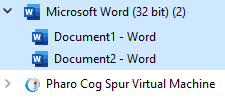
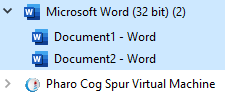
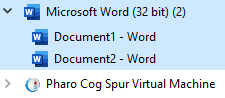
Hello Peter, If you look at the code in the Word test you will notice that the test firstly - creates a new Word instance, - makes it visible to the end user, - then adds an empty document to the documents collection with the text "Hello from Pharo!" - then it tests whether it can receive the same text back from Word. After that, the test - adds a new empty document to the documents collection with the text "Hello from Pharo! Some additional text. ", this time as an array of two texts - it activates this second document (this imitates the end user's window activation on the desktop) - then it tests whether it can receive the same text back from Word. If you look at the Task Manager, you'll notice that you have one Word process with two open documents: Namely, for each document Word creates a new, separate window - the documents are not displayed in one "Word application window", but separately - that's a normal behavior for some versions of MS Office, and it happens also if you open several documents directly in Word. So, there is just one Word instance. 'finalize' clears the references to the Word instance, it doesn't close the program by itself. If you want to do that, you can send Quit message to Word before you destroy the reference (https://docs.microsoft.com/en-us/office/vba/api/word.application.quit(method)). Similar behaviour is with Outlook, here's one example: https://www.excelcommand.com/excel-help/excel-how-to.php?i=124116 The calling among COM objects is asynchronous, and it's usually wise to wrap it in error handling structures. Please tell us how it goes. Best wishes, Tomaz ------ Original Message ------ From: "PBKResearch" <peter@pbkresearch.co.uk> To: "Any question about pharo is welcome" <pharo-users@lists.pharo.org> Sent: 5.4.2020 23:18:02 Subject: Re: [Pharo-users] Automation of MS Office from Pharo
Pablo - a final update before I close for the night. The Word test on the pharo 8 version comes up green. The strange error message is nowhere to be seen in any Pharo 8 runs. The result is not what I expected; I finish up with two Word documents open, one with the first message, the other with the two messages. I thought the 'finalize' command would close it down.
Anyway, it looks as if I need to switch to P8 to use Pharo-Com. I shall continue testing tomorrow on P8.
Sorry for the late-night hassle.
Peter
Hello Tomaž Many thanks for your patient explanation. I should have been able to work out for myself how the Word test works, and indeed I realized some of it when I came to shut down the Word instance and its two documents. But it was late at night, and I should have packed up before then. My last test last night showed that basically I have cracked it for my job of automating Outlook. I have been able to connect to my running instance of Outlook, open my application and interrogate the names of my top-level folders. From now on it should be just a matter of understanding the MS documentation of the Outlook model. However, all this is with Pharo-Com installed in a new Pharo 8 image. I have no idea what went wrong with my first effort on Pharo 7. But I shanât worry about that â I shall gradually move all my bits and pieces to P8. I shall try to work it out myself from here, but I shall come back if I get stuck. Thanks again Peter Kenny From: Pharo-users <pharo-users-bounces@lists.pharo.org> On Behalf Of Tomaž Turk Sent: 06 April 2020 08:04 To: Any question about pharo is welcome <pharo-users@lists.pharo.org> Subject: Re: [Pharo-users] Automation of MS Office from Pharo Hello Peter, If you look at the code in the Word test you will notice that the test firstly - creates a new Word instance, - makes it visible to the end user, - then adds an empty document to the documents collection with the text "Hello from Pharo!" - then it tests whether it can receive the same text back from Word. After that, the test - adds a new empty document to the documents collection with the text "Hello from Pharo! Some additional text. ", this time as an array of two texts - it activates this second document (this imitates the end user's window activation on the desktop) - then it tests whether it can receive the same text back from Word. If you look at the Task Manager, you'll notice that you have one Word process with two open documents: Namely, for each document Word creates a new, separate window - the documents are not displayed in one "Word application window", but separately - that's a normal behavior for some versions of MS Office, and it happens also if you open several documents directly in Word. So, there is just one Word instance. 'finalize' clears the references to the Word instance, it doesn't close the program by itself. If you want to do that, you can send Quit message to Word before you destroy the reference (https://docs.microsoft.com/en-us/office/vba/api/word.application.quit(method)). Similar behaviour is with Outlook, here's one example: https://www.excelcommand.com/excel-help/excel-how-to.php?i=124116 The calling among COM objects is asynchronous, and it's usually wise to wrap it in error handling structures. Please tell us how it goes. Best wishes, Tomaz ------ Original Message ------ From: "PBKResearch" <peter@pbkresearch.co.uk <mailto:peter@pbkresearch.co.uk> > To: "Any question about pharo is welcome" <pharo-users@lists.pharo.org <mailto:pharo-users@lists.pharo.org> > Sent: 5.4.2020 23:18:02 Subject: Re: [Pharo-users] Automation of MS Office from Pharo Pablo - a final update before I close for the night. The Word test on the pharo 8 version comes up green. The strange error message is nowhere to be seen in any Pharo 8 runs. The result is not what I expected; I finish up with two Word documents open, one with the first message, the other with the two messages. I thought the 'finalize' command would close it down. Anyway, it looks as if I need to switch to P8 to use Pharo-Com. I shall continue testing tomorrow on P8. Sorry for the late-night hassle. Peter
Hi Peter, First, thanks to try to use Pharo-COM, that is great, I love to have users for it and find it is useful. Secondly, the Pharo 7 problem is an error I have introduced. It is clear that some changes I have done to support the new version of UFFI (the framework in Pharo to handle FFI calls) have broken the Pharo 7 version, so I will fix it to maintain compatibility. It is great that you were able to make it work! Cheers, On Mon, Apr 6, 2020 at 12:18 PM PBKResearch <peter@pbkresearch.co.uk> wrote:
Hello Tomaž
Many thanks for your patient explanation. I should have been able to work out for myself how the Word test works, and indeed I realized some of it when I came to shut down the Word instance and its two documents. But it was late at night, and I should have packed up before then.
My last test last night showed that basically I have cracked it for my job of automating Outlook. I have been able to connect to my running instance of Outlook, open my application and interrogate the names of my top-level folders. From now on it should be just a matter of understanding the MS documentation of the Outlook model.
However, all this is with Pharo-Com installed in a new Pharo 8 image. I have no idea what went wrong with my first effort on Pharo 7. But I shanât worry about that â I shall gradually move all my bits and pieces to P8. I shall try to work it out myself from here, but I shall come back if I get stuck.
Thanks again
Peter Kenny
*From:* Pharo-users <pharo-users-bounces@lists.pharo.org> *On Behalf Of *Tomaž Turk *Sent:* 06 April 2020 08:04 *To:* Any question about pharo is welcome <pharo-users@lists.pharo.org> *Subject:* Re: [Pharo-users] Automation of MS Office from Pharo
Hello Peter,
If you look at the code in the Word test you will notice that the test firstly
- creates a new Word instance,
- makes it visible to the end user,
- then adds an empty document to the documents collection with the text "Hello from Pharo!"
- then it tests whether it can receive the same text back from Word.
After that, the test
- adds a new empty document to the documents collection with the text "Hello from Pharo! Some additional text. ", this time as an array of two texts
- it activates this second document (this imitates the end user's window activation on the desktop)
- then it tests whether it can receive the same text back from Word.
If you look at the Task Manager, you'll notice that you have one Word process with two open documents:
Namely, for each document Word creates a new, separate window - the documents are not displayed in one "Word application window", but separately - that's a normal behavior for some versions of MS Office, and it happens also if you open several documents directly in Word. So, there is just one Word instance.
'finalize' clears the references to the Word instance, it doesn't close the program by itself. If you want to do that, you can send Quit message to Word before you destroy the reference ( https://docs.microsoft.com/en-us/office/vba/api/word.application.quit(method) ).
Similar behaviour is with Outlook, here's one example: https://www.excelcommand.com/excel-help/excel-how-to.php?i=124116
The calling among COM objects is asynchronous, and it's usually wise to wrap it in error handling structures.
Please tell us how it goes.
Best wishes,
Tomaz
------ Original Message ------
From: "PBKResearch" <peter@pbkresearch.co.uk>
To: "Any question about pharo is welcome" <pharo-users@lists.pharo.org>
Sent: 5.4.2020 23:18:02
Subject: Re: [Pharo-users] Automation of MS Office from Pharo
Pablo - a final update before I close for the night. The Word test on the pharo 8 version comes up green. The strange error message is nowhere to be seen in any Pharo 8 runs. The result is not what I expected; I finish up with two Word documents open, one with the first message, the other with the two messages. I thought the 'finalize' command would close it down.
Anyway, it looks as if I need to switch to P8 to use Pharo-Com. I shall continue testing tomorrow on P8.
Sorry for the late-night hassle.
Peter
-- Pablo Tesone. tesonep@gmail.com
Hello Pablo (and Tomaž) You asked for feedback; after a day of experiments, I have good news and bad news. The good news is that I have been able to navigate through my Outlook Data File, find my way to an e-mail of interest and examine the fields of interest. This means I am 90% of the way to my objective. All I want is to get the HTML code from the message body and pass it to XMLHTMLParser for further analysis. I found it not too difficult to work this out; the fact that a COMDispatchInstance can display all its internals in a playground page meant that I could work it out interactively as a playground exercise. I am still discovering things about the interface; I have only just found out that I can select an item from a list by quoting its name as an argument, rather than its number in the list. I am sure my clumsy code can be tidied up still. I can get to the 100% point in the job by exporting the contents of the e-mail to disk in HTML format, using the SaveAs procedure of the MailItem object. I can then read it back from disk into the parser. But this seems a bit clunky. The content of an HTML mail item is available in the HTMLBody property of the MailItem, so I should be able to pass it programmatically to the parser without going near the disk. This is where I run into trouble. In most of the cases I tried, this worked fine; I could display the HTML body text as a WideString in the playground, assign it to a variable and do whatever I wanted. However, for just one e-mail I tried, as soon as I selected âDo it and goâ in the playground, a message came up that the VM had crashed; the application closed, leaving only a crash dump. I cannot find anything unusual about the message that failed in this way, except that when I save it, it produces a larger file than any of the others (just over 1MB, against up to 300KB for the ones that worked). Could there be a limit on the size of some internal buffer? I thought it worth while mentioning this now, because crashing the VM is generally undesirable. I can solve my problems safely using the SaveAs route, so itâs not a problem for me. Hope this helps; if you want more details, let me know. Overall I am very happy with this library. Peter Kenny From: Pharo-users <pharo-users-bounces@lists.pharo.org> On Behalf Of tesonep@gmail.com Sent: 06 April 2020 11:24 To: Any question about pharo is welcome <pharo-users@lists.pharo.org> Subject: Re: [Pharo-users] Automation of MS Office from Pharo Hi Peter, First, thanks to try to use Pharo-COM, that is great, I love to have users for it and find it is useful. Secondly, the Pharo 7 problem is an error I have introduced. It is clear that some changes I have done to support the new version of UFFI (the framework in Pharo to handle FFI calls) have broken the Pharo 7 version, so I will fix it to maintain compatibility. It is great that you were able to make it work! Cheers, On Mon, Apr 6, 2020 at 12:18 PM PBKResearch <peter@pbkresearch.co.uk <mailto:peter@pbkresearch.co.uk> > wrote: Hello Tomaž Many thanks for your patient explanation. I should have been able to work out for myself how the Word test works, and indeed I realized some of it when I came to shut down the Word instance and its two documents. But it was late at night, and I should have packed up before then. My last test last night showed that basically I have cracked it for my job of automating Outlook. I have been able to connect to my running instance of Outlook, open my application and interrogate the names of my top-level folders. From now on it should be just a matter of understanding the MS documentation of the Outlook model. However, all this is with Pharo-Com installed in a new Pharo 8 image. I have no idea what went wrong with my first effort on Pharo 7. But I shanât worry about that â I shall gradually move all my bits and pieces to P8. I shall try to work it out myself from here, but I shall come back if I get stuck. Thanks again Peter Kenny From: Pharo-users <pharo-users-bounces@lists.pharo.org <mailto:pharo-users-bounces@lists.pharo.org> > On Behalf Of Tomaž Turk Sent: 06 April 2020 08:04 To: Any question about pharo is welcome <pharo-users@lists.pharo.org <mailto:pharo-users@lists.pharo.org> > Subject: Re: [Pharo-users] Automation of MS Office from Pharo Hello Peter, If you look at the code in the Word test you will notice that the test firstly - creates a new Word instance, - makes it visible to the end user, - then adds an empty document to the documents collection with the text "Hello from Pharo!" - then it tests whether it can receive the same text back from Word. After that, the test - adds a new empty document to the documents collection with the text "Hello from Pharo! Some additional text. ", this time as an array of two texts - it activates this second document (this imitates the end user's window activation on the desktop) - then it tests whether it can receive the same text back from Word. If you look at the Task Manager, you'll notice that you have one Word process with two open documents: Namely, for each document Word creates a new, separate window - the documents are not displayed in one "Word application window", but separately - that's a normal behavior for some versions of MS Office, and it happens also if you open several documents directly in Word. So, there is just one Word instance. 'finalize' clears the references to the Word instance, it doesn't close the program by itself. If you want to do that, you can send Quit message to Word before you destroy the reference (https://docs.microsoft.com/en-us/office/vba/api/word.application.quit(method)). Similar behaviour is with Outlook, here's one example: https://www.excelcommand.com/excel-help/excel-how-to.php?i=124116 The calling among COM objects is asynchronous, and it's usually wise to wrap it in error handling structures. Please tell us how it goes. Best wishes, Tomaz ------ Original Message ------ From: "PBKResearch" <peter@pbkresearch.co.uk <mailto:peter@pbkresearch.co.uk> > To: "Any question about pharo is welcome" <pharo-users@lists.pharo.org <mailto:pharo-users@lists.pharo.org> > Sent: 5.4.2020 23:18:02 Subject: Re: [Pharo-users] Automation of MS Office from Pharo Pablo - a final update before I close for the night. The Word test on the pharo 8 version comes up green. The strange error message is nowhere to be seen in any Pharo 8 runs. The result is not what I expected; I finish up with two Word documents open, one with the first message, the other with the two messages. I thought the 'finalize' command would close it down. Anyway, it looks as if I need to switch to P8 to use Pharo-Com. I shall continue testing tomorrow on P8. Sorry for the late-night hassle. Peter -- Pablo Tesone. tesonep@gmail.com <mailto:tesonep@gmail.com>
Dear Peter, I'm glad that you find the package useful! Can you please explain a little bit more about your code, because it's not obvious from your description at which stage the problem occurs. Could you trace it with the debugger, and/or possibly post here the piece of code that fails? Thanks and best wishes, Tomaz ------ Original Message ------ From: "PBKResearch" <peter@pbkresearch.co.uk> To: "Any question about pharo is welcome" <pharo-users@lists.pharo.org> Sent: 6. 04. 2020 19:15:16 Subject: Re: [Pharo-users] Automation of MS Office from Pharo
Hello Pablo (and Tomaž)
You asked for feedback; after a day of experiments, I have good news and bad news.
The good news is that I have been able to navigate through my Outlook Data File, find my way to an e-mail of interest and examine the fields of interest. This means I am 90% of the way to my objective. All I want is to get the HTML code from the message body and pass it to XMLHTMLParser for further analysis. I found it not too difficult to work this out; the fact that a COMDispatchInstance can display all its internals in a playground page meant that I could work it out interactively as a playground exercise. I am still discovering things about the interface; I have only just found out that I can select an item from a list by quoting its name as an argument, rather than its number in the list. I am sure my clumsy code can be tidied up still.
I can get to the 100% point in the job by exporting the contents of the e-mail to disk in HTML format, using the SaveAs procedure of the MailItem object. I can then read it back from disk into the parser. But this seems a bit clunky. The content of an HTML mail item is available in the HTMLBody property of the MailItem, so I should be able to pass it programmatically to the parser without going near the disk. This is where I run into trouble.
In most of the cases I tried, this worked fine; I could display the HTML body text as a WideString in the playground, assign it to a variable and do whatever I wanted. However, for just one e-mail I tried, as soon as I selected âDo it and goâ in the playground, a message came up that the VM had crashed; the application closed, leaving only a crash dump. I cannot find anything unusual about the message that failed in this way, except that when I save it, it produces a larger file than any of the others (just over 1MB, against up to 300KB for the ones that worked). Could there be a limit on the size of some internal buffer?
I thought it worth while mentioning this now, because crashing the VM is generally undesirable. I can solve my problems safely using the SaveAs route, so itâs not a problem for me.
Hope this helps; if you want more details, let me know. Overall I am very happy with this library.
Peter Kenny
From: Pharo-users <pharo-users-bounces@lists.pharo.org> On Behalf Of tesonep@gmail.com Sent: 06 April 2020 11:24 To: Any question about pharo is welcome <pharo-users@lists.pharo.org> Subject: Re: [Pharo-users] Automation of MS Office from Pharo
Hi Peter,
First, thanks to try to use Pharo-COM, that is great, I love to have users for it and find it is useful.
Secondly, the Pharo 7 problem is an error I have introduced. It is clear that some changes I have done to support the new version of UFFI (the framework in Pharo to handle FFI calls) have broken the Pharo 7 version, so I will fix it to maintain compatibility.
It is great that you were able to make it work!
Cheers,
On Mon, Apr 6, 2020 at 12:18 PM PBKResearch <peter@pbkresearch.co.uk> wrote:
Hello Tomaž
Many thanks for your patient explanation. I should have been able to work out for myself how the Word test works, and indeed I realized some of it when I came to shut down the Word instance and its two documents. But it was late at night, and I should have packed up before then.
My last test last night showed that basically I have cracked it for my job of automating Outlook. I have been able to connect to my running instance of Outlook, open my application and interrogate the names of my top-level folders. From now on it should be just a matter of understanding the MS documentation of the Outlook model.
However, all this is with Pharo-Com installed in a new Pharo 8 image. I have no idea what went wrong with my first effort on Pharo 7. But I shanât worry about that â I shall gradually move all my bits and pieces to P8. I shall try to work it out myself from here, but I shall come back if I get stuck.
Thanks again
Peter Kenny
From: Pharo-users <pharo-users-bounces@lists.pharo.org> On Behalf Of Tomaž Turk Sent: 06 April 2020 08:04 To: Any question about pharo is welcome <pharo-users@lists.pharo.org> Subject: Re: [Pharo-users] Automation of MS Office from Pharo
Hello Peter,
If you look at the code in the Word test you will notice that the test firstly
- creates a new Word instance,
- makes it visible to the end user,
- then adds an empty document to the documents collection with the text "Hello from Pharo!"
- then it tests whether it can receive the same text back from Word.
After that, the test
- adds a new empty document to the documents collection with the text "Hello from Pharo! Some additional text. ", this time as an array of two texts
- it activates this second document (this imitates the end user's window activation on the desktop)
- then it tests whether it can receive the same text back from Word.
If you look at the Task Manager, you'll notice that you have one Word process with two open documents:
Namely, for each document Word creates a new, separate window - the documents are not displayed in one "Word application window", but separately - that's a normal behavior for some versions of MS Office, and it happens also if you open several documents directly in Word. So, there is just one Word instance.
'finalize' clears the references to the Word instance, it doesn't close the program by itself. If you want to do that, you can send Quit message to Word before you destroy the reference (https://docs.microsoft.com/en-us/office/vba/api/word.application.quit(method)).
Similar behaviour is with Outlook, here's one example: https://www.excelcommand.com/excel-help/excel-how-to.php?i=124116
The calling among COM objects is asynchronous, and it's usually wise to wrap it in error handling structures.
Please tell us how it goes.
Best wishes,
Tomaz
------ Original Message ------
From: "PBKResearch" <peter@pbkresearch.co.uk>
To: "Any question about pharo is welcome" <pharo-users@lists.pharo.org>
Sent: 5.4.2020 23:18:02
Subject: Re: [Pharo-users] Automation of MS Office from Pharo
Pablo - a final update before I close for the night. The Word test on the pharo 8 version comes up green. The strange error message is nowhere to be seen in any Pharo 8 runs. The result is not what I expected; I finish up with two Word documents open, one with the first message, the other with the two messages. I thought the 'finalize' command would close it down.
Anyway, it looks as if I need to switch to P8 to use Pharo-Com. I shall continue testing tomorrow on P8.
Sorry for the late-night hassle.
Peter
--
Pablo Tesone. tesonep@gmail.com
Hello Tomaž I have been exploring today, to try to narrow down where the problem appears. Itâs difficult to give you some code to reproduce the problem, because you would need to have my Outlook Data File, or an extract of it, plus MS Outlook to run it on. If you want that, I will try to work out how to produce a minimum extract to show the problem. Meanwhile, I can describe what the problem seems to be. All my work has been done in a playground. I can set up a connection to my Outlook Data File and navigate through it to the folder of interest, which contains editions of a newsletter in German. I then inspect one of the items in the folder, which is a COMDispatchInstance and an instance of the object MailItem. My interest is the property HTMLBody of the MailItem, which is as you expect the complete code to display the newsletter. If I inspect the HTMLBody property for most MailItems, it displays with no problem. In some cases, however, as soon as I click âinspect itâ, there is a message saying the VM has crashed, and the system closes with a crash dump. I donât think there is a problem with the fact that I am displaying the property value in an inspector. I tried instead to assign it to a variable in the playground. As soon as I clicked âdo itâ the whole Pharo app closed down, with no message or crash dump. I have tried to find some common factor in the items which will cause the crash, and the one thing I can find is the size of HTMLBody, or equivalently the size of the MailItem. The HTMLBody displays as a WideString in the inspector, and it works fine for an object of about 230K characters. With another message about 10% larger, the VM crash occurred. I have no knowledge of COM interfacing, except what I have picked up in the last two days, but I have been trying to find a general description of a problem which would give the results I have seen. If a COM object has a property which is a BSTRString, and if the string is a WideString with more than about 250K characters, is there some internal buffer overflow? â the crash dump has several mentions of âStack Overflowâ, though I canât really follow it. That is about all I can explain â sorry itâs a bit long-winded. If you want more information, or an extract of my Outlook data file, just let me know. Thanks for your help. Peter Kenny From: Pharo-users <pharo-users-bounces@lists.pharo.org> On Behalf Of Tomaž Turk Sent: 07 April 2020 16:30 To: Any question about pharo is welcome <pharo-users@lists.pharo.org> Subject: Re: [Pharo-users] Automation of MS Office from Pharo Dear Peter, I'm glad that you find the package useful! Can you please explain a little bit more about your code, because it's not obvious from your description at which stage the problem occurs. Could you trace it with the debugger, and/or possibly post here the piece of code that fails? Thanks and best wishes, Tomaz ------ Original Message ------ From: "PBKResearch" <peter@pbkresearch.co.uk <mailto:peter@pbkresearch.co.uk> > To: "Any question about pharo is welcome" <pharo-users@lists.pharo.org <mailto:pharo-users@lists.pharo.org> > Sent: 6. 04. 2020 19:15:16 Subject: Re: [Pharo-users] Automation of MS Office from Pharo Hello Pablo (and Tomaž) You asked for feedback; after a day of experiments, I have good news and bad news. The good news is that I have been able to navigate through my Outlook Data File, find my way to an e-mail of interest and examine the fields of interest. This means I am 90% of the way to my objective. All I want is to get the HTML code from the message body and pass it to XMLHTMLParser for further analysis. I found it not too difficult to work this out; the fact that a COMDispatchInstance can display all its internals in a playground page meant that I could work it out interactively as a playground exercise. I am still discovering things about the interface; I have only just found out that I can select an item from a list by quoting its name as an argument, rather than its number in the list. I am sure my clumsy code can be tidied up still. I can get to the 100% point in the job by exporting the contents of the e-mail to disk in HTML format, using the SaveAs procedure of the MailItem object. I can then read it back from disk into the parser. But this seems a bit clunky. The content of an HTML mail item is available in the HTMLBody property of the MailItem, so I should be able to pass it programmatically to the parser without going near the disk. This is where I run into trouble. In most of the cases I tried, this worked fine; I could display the HTML body text as a WideString in the playground, assign it to a variable and do whatever I wanted. However, for just one e-mail I tried, as soon as I selected âDo it and goâ in the playground, a message came up that the VM had crashed; the application closed, leaving only a crash dump. I cannot find anything unusual about the message that failed in this way, except that when I save it, it produces a larger file than any of the others (just over 1MB, against up to 300KB for the ones that worked). Could there be a limit on the size of some internal buffer? I thought it worth while mentioning this now, because crashing the VM is generally undesirable. I can solve my problems safely using the SaveAs route, so itâs not a problem for me. Hope this helps; if you want more details, let me know. Overall I am very happy with this library. Peter Kenny From: Pharo-users <pharo-users-bounces@lists.pharo.org <mailto:pharo-users-bounces@lists.pharo.org> > On Behalf Of tesonep@gmail.com <mailto:tesonep@gmail.com> Sent: 06 April 2020 11:24 To: Any question about pharo is welcome <pharo-users@lists.pharo.org <mailto:pharo-users@lists.pharo.org> > Subject: Re: [Pharo-users] Automation of MS Office from Pharo Hi Peter, First, thanks to try to use Pharo-COM, that is great, I love to have users for it and find it is useful. Secondly, the Pharo 7 problem is an error I have introduced. It is clear that some changes I have done to support the new version of UFFI (the framework in Pharo to handle FFI calls) have broken the Pharo 7 version, so I will fix it to maintain compatibility. It is great that you were able to make it work! Cheers, On Mon, Apr 6, 2020 at 12:18 PM PBKResearch <peter@pbkresearch.co.uk <mailto:peter@pbkresearch.co.uk> > wrote: Hello Tomaž Many thanks for your patient explanation. I should have been able to work out for myself how the Word test works, and indeed I realized some of it when I came to shut down the Word instance and its two documents. But it was late at night, and I should have packed up before then. My last test last night showed that basically I have cracked it for my job of automating Outlook. I have been able to connect to my running instance of Outlook, open my application and interrogate the names of my top-level folders. From now on it should be just a matter of understanding the MS documentation of the Outlook model. However, all this is with Pharo-Com installed in a new Pharo 8 image. I have no idea what went wrong with my first effort on Pharo 7. But I shanât worry about that â I shall gradually move all my bits and pieces to P8. I shall try to work it out myself from here, but I shall come back if I get stuck. Thanks again Peter Kenny From: Pharo-users <pharo-users-bounces@lists.pharo.org <mailto:pharo-users-bounces@lists.pharo.org> > On Behalf Of Tomaž Turk Sent: 06 April 2020 08:04 To: Any question about pharo is welcome <pharo-users@lists.pharo.org <mailto:pharo-users@lists.pharo.org> > Subject: Re: [Pharo-users] Automation of MS Office from Pharo Hello Peter, If you look at the code in the Word test you will notice that the test firstly - creates a new Word instance, - makes it visible to the end user, - then adds an empty document to the documents collection with the text "Hello from Pharo!" - then it tests whether it can receive the same text back from Word. After that, the test - adds a new empty document to the documents collection with the text "Hello from Pharo! Some additional text. ", this time as an array of two texts - it activates this second document (this imitates the end user's window activation on the desktop) - then it tests whether it can receive the same text back from Word. If you look at the Task Manager, you'll notice that you have one Word process with two open documents: Namely, for each document Word creates a new, separate window - the documents are not displayed in one "Word application window", but separately - that's a normal behavior for some versions of MS Office, and it happens also if you open several documents directly in Word. So, there is just one Word instance. 'finalize' clears the references to the Word instance, it doesn't close the program by itself. If you want to do that, you can send Quit message to Word before you destroy the reference (https://docs.microsoft.com/en-us/office/vba/api/word.application.quit(method)). Similar behaviour is with Outlook, here's one example: https://www.excelcommand.com/excel-help/excel-how-to.php?i=124116 The calling among COM objects is asynchronous, and it's usually wise to wrap it in error handling structures. Please tell us how it goes. Best wishes, Tomaz ------ Original Message ------ From: "PBKResearch" <peter@pbkresearch.co.uk <mailto:peter@pbkresearch.co.uk> > To: "Any question about pharo is welcome" <pharo-users@lists.pharo.org <mailto:pharo-users@lists.pharo.org> > Sent: 5.4.2020 23:18:02 Subject: Re: [Pharo-users] Automation of MS Office from Pharo Pablo - a final update before I close for the night. The Word test on the pharo 8 version comes up green. The strange error message is nowhere to be seen in any Pharo 8 runs. The result is not what I expected; I finish up with two Word documents open, one with the first message, the other with the two messages. I thought the 'finalize' command would close it down. Anyway, it looks as if I need to switch to P8 to use Pharo-Com. I shall continue testing tomorrow on P8. Sorry for the late-night hassle. Peter -- Pablo Tesone. tesonep@gmail.com <mailto:tesonep@gmail.com>
Hello Tomaž I have been working out how to make your debugging easier. If you have MS Outlook to explore with, I have an extract from my Outlook Data File I can send you, together with a code snippet to run in a playground. With these it should be easy to reproduce the error. HTH Peter Kenny From: Pharo-users <pharo-users-bounces@lists.pharo.org> On Behalf Of PBKResearch Sent: 07 April 2020 18:28 To: 'Tomaž Turk' <tomaz.turk@ef.uni-lj.si>; 'Any question about pharo is welcome' <pharo-users@lists.pharo.org> Subject: Re: [Pharo-users] Automation of MS Office from Pharo Hello Tomaž I have been exploring today, to try to narrow down where the problem appears. Itâs difficult to give you some code to reproduce the problem, because you would need to have my Outlook Data File, or an extract of it, plus MS Outlook to run it on. If you want that, I will try to work out how to produce a minimum extract to show the problem. Meanwhile, I can describe what the problem seems to be. All my work has been done in a playground. I can set up a connection to my Outlook Data File and navigate through it to the folder of interest, which contains editions of a newsletter in German. I then inspect one of the items in the folder, which is a COMDispatchInstance and an instance of the object MailItem. My interest is the property HTMLBody of the MailItem, which is as you expect the complete code to display the newsletter. If I inspect the HTMLBody property for most MailItems, it displays with no problem. In some cases, however, as soon as I click âinspect itâ, there is a message saying the VM has crashed, and the system closes with a crash dump. I donât think there is a problem with the fact that I am displaying the property value in an inspector. I tried instead to assign it to a variable in the playground. As soon as I clicked âdo itâ the whole Pharo app closed down, with no message or crash dump. I have tried to find some common factor in the items which will cause the crash, and the one thing I can find is the size of HTMLBody, or equivalently the size of the MailItem. The HTMLBody displays as a WideString in the inspector, and it works fine for an object of about 230K characters. With another message about 10% larger, the VM crash occurred. I have no knowledge of COM interfacing, except what I have picked up in the last two days, but I have been trying to find a general description of a problem which would give the results I have seen. If a COM object has a property which is a BSTRString, and if the string is a WideString with more than about 250K characters, is there some internal buffer overflow? â the crash dump has several mentions of âStack Overflowâ, though I canât really follow it. That is about all I can explain â sorry itâs a bit long-winded. If you want more information, or an extract of my Outlook data file, just let me know. Thanks for your help. Peter Kenny From: Pharo-users <pharo-users-bounces@lists.pharo.org <mailto:pharo-users-bounces@lists.pharo.org> > On Behalf Of Tomaž Turk Sent: 07 April 2020 16:30 To: Any question about pharo is welcome <pharo-users@lists.pharo.org <mailto:pharo-users@lists.pharo.org> > Subject: Re: [Pharo-users] Automation of MS Office from Pharo Dear Peter, I'm glad that you find the package useful! Can you please explain a little bit more about your code, because it's not obvious from your description at which stage the problem occurs. Could you trace it with the debugger, and/or possibly post here the piece of code that fails? Thanks and best wishes, Tomaz ------ Original Message ------ From: "PBKResearch" <peter@pbkresearch.co.uk <mailto:peter@pbkresearch.co.uk> > To: "Any question about pharo is welcome" <pharo-users@lists.pharo.org <mailto:pharo-users@lists.pharo.org> > Sent: 6. 04. 2020 19:15:16 Subject: Re: [Pharo-users] Automation of MS Office from Pharo Hello Pablo (and Tomaž) You asked for feedback; after a day of experiments, I have good news and bad news. The good news is that I have been able to navigate through my Outlook Data File, find my way to an e-mail of interest and examine the fields of interest. This means I am 90% of the way to my objective. All I want is to get the HTML code from the message body and pass it to XMLHTMLParser for further analysis. I found it not too difficult to work this out; the fact that a COMDispatchInstance can display all its internals in a playground page meant that I could work it out interactively as a playground exercise. I am still discovering things about the interface; I have only just found out that I can select an item from a list by quoting its name as an argument, rather than its number in the list. I am sure my clumsy code can be tidied up still. I can get to the 100% point in the job by exporting the contents of the e-mail to disk in HTML format, using the SaveAs procedure of the MailItem object. I can then read it back from disk into the parser. But this seems a bit clunky. The content of an HTML mail item is available in the HTMLBody property of the MailItem, so I should be able to pass it programmatically to the parser without going near the disk. This is where I run into trouble. In most of the cases I tried, this worked fine; I could display the HTML body text as a WideString in the playground, assign it to a variable and do whatever I wanted. However, for just one e-mail I tried, as soon as I selected âDo it and goâ in the playground, a message came up that the VM had crashed; the application closed, leaving only a crash dump. I cannot find anything unusual about the message that failed in this way, except that when I save it, it produces a larger file than any of the others (just over 1MB, against up to 300KB for the ones that worked). Could there be a limit on the size of some internal buffer? I thought it worth while mentioning this now, because crashing the VM is generally undesirable. I can solve my problems safely using the SaveAs route, so itâs not a problem for me. Hope this helps; if you want more details, let me know. Overall I am very happy with this library. Peter Kenny From: Pharo-users <pharo-users-bounces@lists.pharo.org <mailto:pharo-users-bounces@lists.pharo.org> > On Behalf Of tesonep@gmail.com <mailto:tesonep@gmail.com> Sent: 06 April 2020 11:24 To: Any question about pharo is welcome <pharo-users@lists.pharo.org <mailto:pharo-users@lists.pharo.org> > Subject: Re: [Pharo-users] Automation of MS Office from Pharo Hi Peter, First, thanks to try to use Pharo-COM, that is great, I love to have users for it and find it is useful. Secondly, the Pharo 7 problem is an error I have introduced. It is clear that some changes I have done to support the new version of UFFI (the framework in Pharo to handle FFI calls) have broken the Pharo 7 version, so I will fix it to maintain compatibility. It is great that you were able to make it work! Cheers, On Mon, Apr 6, 2020 at 12:18 PM PBKResearch <peter@pbkresearch.co.uk <mailto:peter@pbkresearch.co.uk> > wrote: Hello Tomaž Many thanks for your patient explanation. I should have been able to work out for myself how the Word test works, and indeed I realized some of it when I came to shut down the Word instance and its two documents. But it was late at night, and I should have packed up before then. My last test last night showed that basically I have cracked it for my job of automating Outlook. I have been able to connect to my running instance of Outlook, open my application and interrogate the names of my top-level folders. From now on it should be just a matter of understanding the MS documentation of the Outlook model. However, all this is with Pharo-Com installed in a new Pharo 8 image. I have no idea what went wrong with my first effort on Pharo 7. But I shanât worry about that â I shall gradually move all my bits and pieces to P8. I shall try to work it out myself from here, but I shall come back if I get stuck. Thanks again Peter Kenny From: Pharo-users <pharo-users-bounces@lists.pharo.org <mailto:pharo-users-bounces@lists.pharo.org> > On Behalf Of Tomaž Turk Sent: 06 April 2020 08:04 To: Any question about pharo is welcome <pharo-users@lists.pharo.org <mailto:pharo-users@lists.pharo.org> > Subject: Re: [Pharo-users] Automation of MS Office from Pharo Hello Peter, If you look at the code in the Word test you will notice that the test firstly - creates a new Word instance, - makes it visible to the end user, - then adds an empty document to the documents collection with the text "Hello from Pharo!" - then it tests whether it can receive the same text back from Word. After that, the test - adds a new empty document to the documents collection with the text "Hello from Pharo! Some additional text. ", this time as an array of two texts - it activates this second document (this imitates the end user's window activation on the desktop) - then it tests whether it can receive the same text back from Word. If you look at the Task Manager, you'll notice that you have one Word process with two open documents: Namely, for each document Word creates a new, separate window - the documents are not displayed in one "Word application window", but separately - that's a normal behavior for some versions of MS Office, and it happens also if you open several documents directly in Word. So, there is just one Word instance. 'finalize' clears the references to the Word instance, it doesn't close the program by itself. If you want to do that, you can send Quit message to Word before you destroy the reference (https://docs.microsoft.com/en-us/office/vba/api/word.application.quit(method)). Similar behaviour is with Outlook, here's one example: https://www.excelcommand.com/excel-help/excel-how-to.php?i=124116 The calling among COM objects is asynchronous, and it's usually wise to wrap it in error handling structures. Please tell us how it goes. Best wishes, Tomaz ------ Original Message ------ From: "PBKResearch" <peter@pbkresearch.co.uk <mailto:peter@pbkresearch.co.uk> > To: "Any question about pharo is welcome" <pharo-users@lists.pharo.org <mailto:pharo-users@lists.pharo.org> > Sent: 5.4.2020 23:18:02 Subject: Re: [Pharo-users] Automation of MS Office from Pharo Pablo - a final update before I close for the night. The Word test on the pharo 8 version comes up green. The strange error message is nowhere to be seen in any Pharo 8 runs. The result is not what I expected; I finish up with two Word documents open, one with the first message, the other with the two messages. I thought the 'finalize' command would close it down. Anyway, it looks as if I need to switch to P8 to use Pharo-Com. I shall continue testing tomorrow on P8. Sorry for the late-night hassle. Peter -- Pablo Tesone. tesonep@gmail.com <mailto:tesonep@gmail.com>
Thanks, Peter. I checked out the Outlook COM interface, noticed that the MailItem.HTMLBody property returns a string, which is implemented as BSTR in COM (more on this here: https://bytecomb.com/vba-internals-string-variables-and-pointers-in-depth/). I tested the maximum lengths of strings with Word and my images crash under these circumstances: - Pharo 8.0 64 bit when returning ByteString is longer than 16.379 characters - Pharo 8.0 32 bit when returning ByteString is longer than 260.080 characters (approximately). 64 bit image crashes without any warning, however the 32 bit one crashes with I presume this is the same behaviour as you report, Peter. I'm attaching the crash.dmp from 32 bit image. I believe that the crash happens when calling COMDispatchInstance>>propertyNamed: with the lengthy string to be returned. Pablo, I hope you have some time to check this, my knowledge ends somewhere here ... :-| Thanks and best wishes, Tomaz
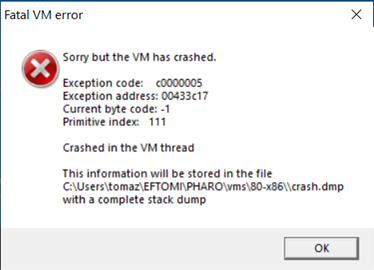
Hi Tomaz Yes, that is exactly the problem I had, and the limit of 260K characters is consistent with my tests. I can get round it by saving the HTML to disk using the MailItem.SaveAs method, and then reading the file back from disk. I would try doing that with a memory disk, but I suspect the SaveAs method will not like writing to it. An alternative would be to use the MailItem.Body property, which only has the text of the message and so is much shorter. I would really need my own parser to read such a file, and I canât load PetitParser or PetitParser2 into Pharo 8. Presumably Pharo-Com should handle a long string more gracefully than just crashing the VM. But if these limits are intrinsic to COM in Windows, rather than Pharo-Com, there may be no way round it so itâs back to SaveAs. Thanks for confirming that itâs not down to an error of mine. Peter Kenny From: Pharo-users <pharo-users-bounces@lists.pharo.org> On Behalf Of Tomaž Turk Sent: 07 April 2020 21:27 To: Any question about pharo is welcome <pharo-users@lists.pharo.org> Subject: Re: [Pharo-users] Automation of MS Office from Pharo Thanks, Peter. I checked out the Outlook COM interface, noticed that the MailItem.HTMLBody property returns a string, which is implemented as BSTR in COM (more on this here: https://bytecomb.com/vba-internals-string-variables-and-pointers-in-depth/). I tested the maximum lengths of strings with Word and my images crash under these circumstances: - Pharo 8.0 64 bit when returning ByteString is longer than 16.379 characters - Pharo 8.0 32 bit when returning ByteString is longer than 260.080 characters (approximately). 64 bit image crashes without any warning, however the 32 bit one crashes with I presume this is the same behaviour as you report, Peter. I'm attaching the crash.dmp from 32 bit image. I believe that the crash happens when calling COMDispatchInstance>>propertyNamed: with the lengthy string to be returned. Pablo, I hope you have some time to check this, my knowledge ends somewhere here ... :-| Thanks and best wishes, Tomaz
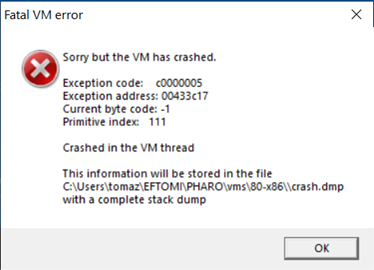
Thanks, Stephane, for the acknowledgement. Peter, as I understand, the limits in COM BSTR data type are defined by the header's length prefix (which is 4 bytes) and software implementatios - for instance, string data type in Visual Basic for Applications is described as "a variable-length string can contain up to approximately 2 billion (2^31) characters", which is in line with the BSTR header. I'm not sure if the OS architecture (32 and 64 bit) influences these values. Best wishes, Tomaz
Tomaz, that was my understanding from the VBA piece you cited yesterday. So presumably it must be something in Pharo-Com which imposes the limits we have seen. I am OK at the moment, because all this work is just an exploration of possibilities; I can wait until you and Pablo have sorted it out. But from the results of your tests, a maximum of 16K in 64-bit systems must be a serious limitation, so something in Pharo-Com needs fixing. For my immediate work, I shall continue exporting the full text using MailItem.SaveAs; my further processing uses files I have exported manually in this way, so itâs not a problem. Thanks Peter Kenny From: Pharo-users <pharo-users-bounces@lists.pharo.org> On Behalf Of Tomaž Turk Sent: 08 April 2020 07:58 To: Any question about pharo is welcome <pharo-users@lists.pharo.org> Subject: Re: [Pharo-users] Automation of MS Office from Pharo Thanks, Stephane, for the acknowledgement. Peter, as I understand, the limits in COM BSTR data type are defined by the header's length prefix (which is 4 bytes) and software implementatios - for instance, string data type in Visual Basic for Applications is described as "a variable-length string can contain up to approximately 2 billion (2^31) characters", which is in line with the BSTR header. I'm not sure if the OS architecture (32 and 64 bit) influences these values. Best wishes, Tomaz
Hi!!! This was a great report. I have submitted a fix in the master of Pharo-COM. Basically the problem was to free twice the BSTR in the Variant. It was being free in the access to the value and in the free of the struct. Why it works with other BSTR when they are smaller, I cannot know. I have added another smoke test using Word Can you try the fix? Thanks, both for helping me with the reports, they were great. On Wed, Apr 8, 2020 at 9:37 AM PBKResearch <peter@pbkresearch.co.uk> wrote:
Tomaz, that was my understanding from the VBA piece you cited yesterday. So presumably it must be something in Pharo-Com which imposes the limits we have seen. I am OK at the moment, because all this work is just an exploration of possibilities; I can wait until you and Pablo have sorted it out. But from the results of your tests, a maximum of 16K in 64-bit systems must be a serious limitation, so something in Pharo-Com needs fixing.
For my immediate work, I shall continue exporting the full text using MailItem.SaveAs; my further processing uses files I have exported manually in this way, so itâs not a problem.
Thanks
Peter Kenny
From: Pharo-users <pharo-users-bounces@lists.pharo.org> On Behalf Of Tomaž Turk Sent: 08 April 2020 07:58 To: Any question about pharo is welcome <pharo-users@lists.pharo.org> Subject: Re: [Pharo-users] Automation of MS Office from Pharo
Thanks, Stephane, for the acknowledgement. Peter, as I understand, the limits in COM BSTR data type are defined by the header's length prefix (which is 4 bytes) and software implementatios - for instance, string data type in Visual Basic for Applications is described as "a variable-length string can contain up to approximately 2 billion (2^31) characters", which is in line with the BSTR header. I'm not sure if the OS architecture (32 and 64 bit) influences these values.
Best wishes,
Tomaz
-- Pablo Tesone. tesonep@gmail.com
Thanks Pablo for your quick response! I tested 32 and 64 bit images with
1.000.000 strings and it works just fine.
Best wishes, Tomaz ------ Original Message ------ From: "tesonep@gmail.com" <tesonep@gmail.com> To: "Any question about pharo is welcome" <pharo-users@lists.pharo.org> Cc: "Tomaž Turk" <tomaz.turk@ef.uni-lj.si> Sent: 8.4.2020 9:54:35 Subject: Re: [Pharo-users] Automation of MS Office from Pharo
Hi!!! This was a great report. I have submitted a fix in the master of Pharo-COM.
Basically the problem was to free twice the BSTR in the Variant. It was being free in the access to the value and in the free of the struct. Why it works with other BSTR when they are smaller, I cannot know.
I have added another smoke test using Word
Can you try the fix?
Thanks, both for helping me with the reports, they were great.
On Wed, Apr 8, 2020 at 9:37 AM PBKResearch <peter@pbkresearch.co.uk> wrote:
Tomaz, that was my understanding from the VBA piece you cited yesterday. So presumably it must be something in Pharo-Com which imposes the limits we have seen. I am OK at the moment, because all this work is just an exploration of possibilities; I can wait until you and Pablo have sorted it out. But from the results of your tests, a maximum of 16K in 64-bit systems must be a serious limitation, so something in Pharo-Com needs fixing.
For my immediate work, I shall continue exporting the full text using MailItem.SaveAs; my further processing uses files I have exported manually in this way, so itâs not a problem.
Thanks
Peter Kenny
From: Pharo-users <pharo-users-bounces@lists.pharo.org> On Behalf Of Tomaž Turk Sent: 08 April 2020 07:58 To: Any question about pharo is welcome <pharo-users@lists.pharo.org> Subject: Re: [Pharo-users] Automation of MS Office from Pharo
Thanks, Stephane, for the acknowledgement. Peter, as I understand, the limits in COM BSTR data type are defined by the header's length prefix (which is 4 bytes) and software implementatios - for instance, string data type in Visual Basic for Applications is described as "a variable-length string can contain up to approximately 2 billion (2^31) characters", which is in line with the BSTR header. I'm not sure if the OS architecture (32 and 64 bit) influences these values.
Best wishes,
Tomaz
-- Pablo Tesone. tesonep@gmail.com

Cool, thanks to the three :) @Peter, Iâd like if you tell us at the end if you had success at automating you mail workflow ^^
El 8 abr 2020, a las 10:15, Tomaž Turk <tomaz.turk@ef.uni-lj.si> escribió:
Thanks Pablo for your quick response! I tested 32 and 64 bit images with >1.000.000 strings and it works just fine.
Best wishes, Tomaz
------ Original Message ------ From: "tesonep@gmail.com" <tesonep@gmail.com> To: "Any question about pharo is welcome" <pharo-users@lists.pharo.org> Cc: "Tomaž Turk" <tomaz.turk@ef.uni-lj.si> Sent: 8.4.2020 9:54:35 Subject: Re: [Pharo-users] Automation of MS Office from Pharo
Hi!!! This was a great report. I have submitted a fix in the master of Pharo-COM.
Basically the problem was to free twice the BSTR in the Variant. It was being free in the access to the value and in the free of the struct. Why it works with other BSTR when they are smaller, I cannot know.
I have added another smoke test using Word
Can you try the fix?
Thanks, both for helping me with the reports, they were great.
On Wed, Apr 8, 2020 at 9:37 AM PBKResearch <peter@pbkresearch.co.uk> wrote:
Tomaz, that was my understanding from the VBA piece you cited yesterday. So presumably it must be something in Pharo-Com which imposes the limits we have seen. I am OK at the moment, because all this work is just an exploration of possibilities; I can wait until you and Pablo have sorted it out. But from the results of your tests, a maximum of 16K in 64-bit systems must be a serious limitation, so something in Pharo-Com needs fixing.
For my immediate work, I shall continue exporting the full text using MailItem.SaveAs; my further processing uses files I have exported manually in this way, so itâs not a problem.
Thanks
Peter Kenny
From: Pharo-users <pharo-users-bounces@lists.pharo.org> On Behalf Of Tomaž Turk Sent: 08 April 2020 07:58 To: Any question about pharo is welcome <pharo-users@lists.pharo.org> Subject: Re: [Pharo-users] Automation of MS Office from Pharo
Thanks, Stephane, for the acknowledgement. Peter, as I understand, the limits in COM BSTR data type are defined by the header's length prefix (which is 4 bytes) and software implementatios - for instance, string data type in Visual Basic for Applications is described as "a variable-length string can contain up to approximately 2 billion (2^31) characters", which is in line with the BSTR header. I'm not sure if the OS architecture (32 and 64 bit) influences these values.
Best wishes,
Tomaz
-- Pablo Tesone. tesonep@gmail.com
Hello Pablo Success! I have rerun one of the troublesome cases, with no problem. I then re-ran the test on the latest 16 messages, collecting all the HTML outputs in an array, which took just over 5 secs total; quicker than I expected. The longest texts, from the most verbose newsletters, run from 267K to over 300K, so that is where they ran into the limit we found yesterday. I now know that I can pass the HTML to the XMLHTMLParser in memory, without saving to file first; this will be more convenient. Thanks for the prompt help. @Guillermo - All this is a proof of possibility, it will need to be combined with other bits I am working on to make the automated system I want. I shall let you know when it is worked out - but it won't be in the next few days! Thanks to all Peter Kenny -----Original Message----- From: Pharo-users <pharo-users-bounces@lists.pharo.org> On Behalf Of Guillermo Polito Sent: 08 April 2020 09:20 To: Tomaž Turk <tomaz.turk@ef.uni-lj.si>; Any question about pharo is welcome <pharo-users@lists.pharo.org> Subject: Re: [Pharo-users] Automation of MS Office from Pharo Cool, thanks to the three :) @Peter, Iâd like if you tell us at the end if you had success at automating you mail workflow ^^
El 8 abr 2020, a las 10:15, Tomaž Turk <tomaz.turk@ef.uni-lj.si> escribió:
Thanks Pablo for your quick response! I tested 32 and 64 bit images with >1.000.000 strings and it works just fine.
Best wishes, Tomaz
------ Original Message ------ From: "tesonep@gmail.com" <tesonep@gmail.com> To: "Any question about pharo is welcome" <pharo-users@lists.pharo.org> Cc: "Tomaž Turk" <tomaz.turk@ef.uni-lj.si> Sent: 8.4.2020 9:54:35 Subject: Re: [Pharo-users] Automation of MS Office from Pharo
Hi!!! This was a great report. I have submitted a fix in the master of Pharo-COM.
Basically the problem was to free twice the BSTR in the Variant. It was being free in the access to the value and in the free of the struct. Why it works with other BSTR when they are smaller, I cannot know.
I have added another smoke test using Word
Can you try the fix?
Thanks, both for helping me with the reports, they were great.
On Wed, Apr 8, 2020 at 9:37 AM PBKResearch <peter@pbkresearch.co.uk> wrote:
Tomaz, that was my understanding from the VBA piece you cited yesterday. So presumably it must be something in Pharo-Com which imposes the limits we have seen. I am OK at the moment, because all this work is just an exploration of possibilities; I can wait until you and Pablo have sorted it out. But from the results of your tests, a maximum of 16K in 64-bit systems must be a serious limitation, so something in Pharo-Com needs fixing.
For my immediate work, I shall continue exporting the full text using MailItem.SaveAs; my further processing uses files I have exported manually in this way, so itâs not a problem.
Thanks
Peter Kenny
From: Pharo-users <pharo-users-bounces@lists.pharo.org> On Behalf Of Tomaž Turk Sent: 08 April 2020 07:58 To: Any question about pharo is welcome <pharo-users@lists.pharo.org> Subject: Re: [Pharo-users] Automation of MS Office from Pharo
Thanks, Stephane, for the acknowledgement. Peter, as I understand, the limits in COM BSTR data type are defined by the header's length prefix (which is 4 bytes) and software implementatios - for instance, string data type in Visual Basic for Applications is described as "a variable-length string can contain up to approximately 2 billion (2^31) characters", which is in line with the BSTR header. I'm not sure if the OS architecture (32 and 64 bit) influences these values.
Best wishes,
Tomaz
-- Pablo Tesone. tesonep@gmail.com

I'd be very interested to hear how this ends up. Parsing Outlook mails from Pharo may prove useful in my day job. cheers -ben On Wed, 8 Apr 2020 at 18:02, PBKResearch <peter@pbkresearch.co.uk> wrote:
Hello Pablo
Success! I have rerun one of the troublesome cases, with no problem. I then re-ran the test on the latest 16 messages, collecting all the HTML outputs in an array, which took just over 5 secs total; quicker than I expected. The longest texts, from the most verbose newsletters, run from 267K to over 300K, so that is where they ran into the limit we found yesterday.
I now know that I can pass the HTML to the XMLHTMLParser in memory, without saving to file first; this will be more convenient. Thanks for the prompt help.
@Guillermo - All this is a proof of possibility, it will need to be combined with other bits I am working on to make the automated system I want. I shall let you know when it is worked out - but it won't be in the next few days!
Thanks to all
Peter Kenny
-----Original Message----- From: Pharo-users <pharo-users-bounces@lists.pharo.org> On Behalf Of Guillermo Polito Sent: 08 April 2020 09:20 To: Tomaž Turk <tomaz.turk@ef.uni-lj.si>; Any question about pharo is welcome <pharo-users@lists.pharo.org> Subject: Re: [Pharo-users] Automation of MS Office from Pharo
Cool, thanks to the three :)
@Peter, Iâd like if you tell us at the end if you had success at automating you mail workflow ^^
El 8 abr 2020, a las 10:15, Tomaž Turk <tomaz.turk@ef.uni-lj.si> escribió:
Thanks Pablo for your quick response! I tested 32 and 64 bit images with 1.000.000 strings and it works just fine.
Best wishes, Tomaz
------ Original Message ------ From: "tesonep@gmail.com" <tesonep@gmail.com> To: "Any question about pharo is welcome" <pharo-users@lists.pharo.org> Cc: "Tomaž Turk" <tomaz.turk@ef.uni-lj.si> Sent: 8.4.2020 9:54:35 Subject: Re: [Pharo-users] Automation of MS Office from Pharo
Hi!!! This was a great report. I have submitted a fix in the master of Pharo-COM.
Basically the problem was to free twice the BSTR in the Variant. It was being free in the access to the value and in the free of the struct. Why it works with other BSTR when they are smaller, I cannot know.
I have added another smoke test using Word
Can you try the fix?
Thanks, both for helping me with the reports, they were great.
On Wed, Apr 8, 2020 at 9:37 AM PBKResearch <peter@pbkresearch.co.uk> wrote:
Tomaz, that was my understanding from the VBA piece you cited
yesterday. So presumably it must be something in Pharo-Com which imposes the limits we have seen. I am OK at the moment, because all this work is just an exploration of possibilities; I can wait until you and Pablo have sorted it out. But from the results of your tests, a maximum of 16K in 64-bit systems must be a serious limitation, so something in Pharo-Com needs fixing.
For my immediate work, I shall continue exporting the full text using
MailItem.SaveAs; my further processing uses files I have exported manually in this way, so itâs not a problem.
Thanks
Peter Kenny
From: Pharo-users <pharo-users-bounces@lists.pharo.org> On Behalf Of
Tomaž Turk
Sent: 08 April 2020 07:58 To: Any question about pharo is welcome <pharo-users@lists.pharo.org> Subject: Re: [Pharo-users] Automation of MS Office from Pharo
Thanks, Stephane, for the acknowledgement. Peter, as I understand, the limits in COM BSTR data type are defined by the header's length prefix (which is 4 bytes) and software implementatios - for instance, string data type in Visual Basic for Applications is described as "a variable-length string can contain up to approximately 2 billion (2^31) characters", which is in line with the BSTR header. I'm not sure if the OS architecture (32 and 64 bit) influences these values.
Best wishes,
Tomaz
-- Pablo Tesone. tesonep@gmail.com
participants (5)
-
 Ben Coman
 -
 Guillermo Polito
 -
 PBKResearch
 -
 tesonep@gmail.com
 -
 Tomaž Turk