[ANN] Multiple Desktop support for Pharo 5

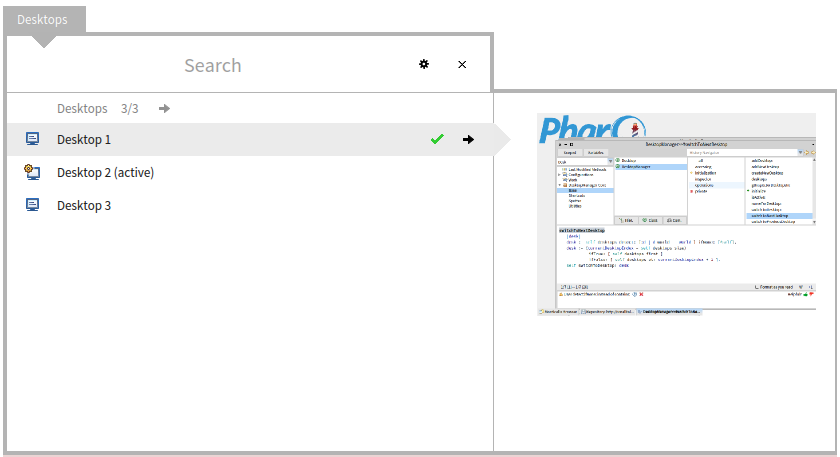
Julien Delplanque provided this week a goodie to switch between "desktops" - but his initial solution was more or less hiding windows and not really switching between real Pharo worlds/desktops. I gave him some tips what could be done on the pharo-user list. Havent heard from him afterwards. Now I was able to spend a few hours on this topic myself and implemented a full multiple desktop solution myself. This works in Pharo 5 only (currently) and requires latest VM (at least on Windows) from files.pharo.org to get the keyboard shortcuts right. To try: Gofer new smalltalkhubUser: 'TorstenBergmann' project: 'DesktopManager'; configuration; loadDevelopment. The goodie has some nice features like keyboard navigation, world menu integration and even a custom spotter with preview of the desktops. Quick start: =========== - evaluate the above expression in a Pharo 5 image - check the world menu "Desktop" - you can press CTRL + D and then CTRL + A (= Desktop Add) to add a new desktop - you can press CTRL + D and then CTRL + D (= Desktop Desktop) to open the overview - you can press CTRL + D and then CTRL + P (= Desktop Previous) to navigate to the previous desktop - you can press CTRL + D and then CTRL + N (= Desktop Next) to navigate to the next desktop The code is hopefully a good example on how to build a custom spotter, shortcuts, inspector extensions, ... Additionally all this is described in a new article including screenshots and a guide on how to use this new goodie: https://medium.com/@astares/multiple-desktops-for-pharo-5cbc46f3179f Actually the article took more time to write than coding but I hope it helps explaining Pharo and why it is a power tool. Project is on http://www.smalltalkhub.com/#!/~TorstenBergmann/DesktopManager Article and code is still subject to change. Have fun T.

Hi, I was actually implementing this feature using your advices : https://github.com/juliendelplanque/multiworlds. But yours looks better anyway. Julien On 27/08/15 03:19, Torsten Bergmann wrote:
Julien Delplanque provided this week a goodie to switch between "desktops" - but his initial solution was more or less hiding windows and not really switching between real Pharo worlds/desktops.
I gave him some tips what could be done on the pharo-user list. Havent heard from him afterwards.
Now I was able to spend a few hours on this topic myself and implemented a full multiple desktop solution myself.
This works in Pharo 5 only (currently) and requires latest VM (at least on Windows) from files.pharo.org to get the keyboard shortcuts right.
To try:
Gofer new smalltalkhubUser: 'TorstenBergmann' project: 'DesktopManager'; configuration; loadDevelopment.
The goodie has some nice features like keyboard navigation, world menu integration and even a custom spotter with preview of the desktops.
Quick start: =========== - evaluate the above expression in a Pharo 5 image - check the world menu "Desktop" - you can press CTRL + D and then CTRL + A (= Desktop Add) to add a new desktop - you can press CTRL + D and then CTRL + D (= Desktop Desktop) to open the overview - you can press CTRL + D and then CTRL + P (= Desktop Previous) to navigate to the previous desktop - you can press CTRL + D and then CTRL + N (= Desktop Next) to navigate to the next desktop
The code is hopefully a good example on how to build a custom spotter, shortcuts, inspector extensions, ... Additionally all this is described in a new article including screenshots and a guide on how to use this new goodie:
https://medium.com/@astares/multiple-desktops-for-pharo-5cbc46f3179f
Actually the article took more time to write than coding but I hope it helps explaining Pharo and why it is a power tool.
Project is on http://www.smalltalkhub.com/#!/~TorstenBergmann/DesktopManager Article and code is still subject to change.
Have fun T.
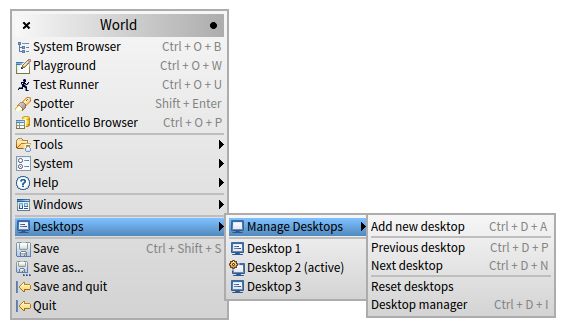
Hi Julien, sorry for "hijacking" the topic. But I got some time left while traveling allowing me to put my recommended puzzle pieces together myself and as I wrote the code was less time consuming compared to the article. The article should help others to investigate in the goodies code and learn how to do own inspector extensions, spotter models, ... in recent Pharo now. If there is something wrong with the implementation feel free to send me comments/corrections. Also note that the project on STHub is open for commits, so if you find something missing please add it. I would like to keep the "multiple desktops" metaphor instead of "multiple worlds" as it better fits what people know and expect. Additional info: ================ Meanwhile the job run that checks the configurations for the Catalog Browser. So in a fresh and updated Pharo 5 image you can just: - hit SHIFT + ENTER to open the default Spotter - enter "DesktopManager" as a search term to find the project automagically - hit enter to load it So there is no need to rember cumbersome Gofer scripts anymore. Just type and go. After loading you can use the tool as written before: - check the world menu "Desktop" - you can press CTRL + D and then CTRL + A (= Desktop Add) to add a new desktop - you can press CTRL + D and then CTRL + D (= Desktop Desktop) to open the overview (custom spotter for desktop selection) - you can press CTRL + D and then CTRL + P (= Desktop Previous) to navigate to the previous desktop - you can press CTRL + D and then CTRL + N (= Desktop Next) to navigate to the next desktop You can also use the world menu (see another screenshot attached). Hope it will become useful to others as well. We should have cared already back in 2010/2011 when Jochen and Sean raised the issue. On the other side with the nice moldable GT tools introduced now in Pharo 4/5 it was really easy to implement. Thanks T.
Gesendet: Donnerstag, 27. August 2015 um 07:52 Uhr Von: "Julien Delplanque" <julien@tamere.eu> An: "Torsten Bergmann" <astares@gmx.de>, "Pharo Development List" <pharo-dev@lists.pharo.org>, "Any question about pharo is welcome" <pharo-users@lists.pharo.org> Betreff: Re: [ANN] Multiple Desktop support for Pharo 5
Hi,
I was actually implementing this feature using your advices : https://github.com/juliendelplanque/multiworlds.
But yours looks better anyway.
Julien
On 27/08/15 03:19, Torsten Bergmann wrote:
Julien Delplanque provided this week a goodie to switch between "desktops" - but his initial solution was more or less hiding windows and not really switching between real Pharo worlds/desktops.
I gave him some tips what could be done on the pharo-user list. Havent heard from him afterwards.
Now I was able to spend a few hours on this topic myself and implemented a full multiple desktop solution myself.
This works in Pharo 5 only (currently) and requires latest VM (at least on Windows) from files.pharo.org to get the keyboard shortcuts right.
To try:
Gofer new smalltalkhubUser: 'TorstenBergmann' project: 'DesktopManager'; configuration; loadDevelopment.
The goodie has some nice features like keyboard navigation, world menu integration and even a custom spotter with preview of the desktops.
Quick start: =========== - evaluate the above expression in a Pharo 5 image - check the world menu "Desktop" - you can press CTRL + D and then CTRL + A (= Desktop Add) to add a new desktop - you can press CTRL + D and then CTRL + D (= Desktop Desktop) to open the overview - you can press CTRL + D and then CTRL + P (= Desktop Previous) to navigate to the previous desktop - you can press CTRL + D and then CTRL + N (= Desktop Next) to navigate to the next desktop
The code is hopefully a good example on how to build a custom spotter, shortcuts, inspector extensions, ... Additionally all this is described in a new article including screenshots and a guide on how to use this new goodie:
https://medium.com/@astares/multiple-desktops-for-pharo-5cbc46f3179f
Actually the article took more time to write than coding but I hope it helps explaining Pharo and why it is a power tool.
Project is on http://www.smalltalkhub.com/#!/~TorstenBergmann/DesktopManager Article and code is still subject to change.
Have fun T.

On 8/27/15, Torsten Bergmann <astares@gmx.de> wrote:
Hi Julien,
sorry for "hijacking" the topic. But I got some time left while traveling allowing me to put my recommended puzzle pieces together myself and as I wrote the code was less time consuming compared to the article. The article
should help others to investigate in the goodies code and learn how to do own inspector extensions, spotter models, ... in recent Pharo now. If there is something wrong with the implementation feel free to send me comments/corrections.
Also note that the project on STHub is open for commits, so if you find something missing please add it. I would like to keep the "multiple desktops" metaphor instead of "multiple worlds" as it better fits what people know and expect.
+1
Additional info: ================ Meanwhile the job run that checks the configurations for the Catalog Browser. So in a fresh and updated Pharo 5 image you can just:
- hit SHIFT + ENTER to open the default Spotter - enter "DesktopManager" as a search term to find the project automagically - hit enter to load it
So there is no need to rember cumbersome Gofer scripts anymore. Just type and go.
After loading you can use the tool as written before:
- check the world menu "Desktop" - you can press CTRL + D and then CTRL + A (= Desktop Add) to add a new desktop - you can press CTRL + D and then CTRL + D (= Desktop Desktop) to open the overview (custom spotter for desktop selection) - you can press CTRL + D and then CTRL + P (= Desktop Previous) to navigate to the previous desktop - you can press CTRL + D and then CTRL + N (= Desktop Next) to navigate to the next desktop
You can also use the world menu (see another screenshot attached).
Hope it will become useful to others as well. We should have cared already back in 2010/2011 when Jochen and Sean raised the issue. On the other side with the nice moldable GT tools introduced now in Pharo 4/5 it was really easy to implement.
Does this mean that it is available in Pharo 4 as well?
Thanks T.
Gesendet: Donnerstag, 27. August 2015 um 07:52 Uhr Von: "Julien Delplanque" <julien@tamere.eu> An: "Torsten Bergmann" <astares@gmx.de>, "Pharo Development List" <pharo-dev@lists.pharo.org>, "Any question about pharo is welcome" <pharo-users@lists.pharo.org> Betreff: Re: [ANN] Multiple Desktop support for Pharo 5
Hi,
I was actually implementing this feature using your advices : https://github.com/juliendelplanque/multiworlds.
But yours looks better anyway.
Julien
On 27/08/15 03:19, Torsten Bergmann wrote:
Julien Delplanque provided this week a goodie to switch between "desktops" - but his initial solution was more or less hiding windows and not really switching between real Pharo worlds/desktops.
I gave him some tips what could be done on the pharo-user list. Havent heard from him afterwards.
Now I was able to spend a few hours on this topic myself and implemented a full multiple desktop solution myself.
This works in Pharo 5 only (currently) and requires latest VM (at least on Windows) from files.pharo.org to get the keyboard shortcuts right.
To try:
Gofer new smalltalkhubUser: 'TorstenBergmann' project: 'DesktopManager'; configuration; loadDevelopment.
The goodie has some nice features like keyboard navigation, world menu integration and even a custom spotter with preview of the desktops.
Quick start: =========== - evaluate the above expression in a Pharo 5 image - check the world menu "Desktop" - you can press CTRL + D and then CTRL + A (= Desktop Add) to add a new desktop - you can press CTRL + D and then CTRL + D (= Desktop Desktop) to open the overview - you can press CTRL + D and then CTRL + P (= Desktop Previous) to navigate to the previous desktop - you can press CTRL + D and then CTRL + N (= Desktop Next) to navigate to the next desktop
The code is hopefully a good example on how to build a custom spotter, shortcuts, inspector extensions, ... Additionally all this is described in a new article including screenshots and a guide on how to use this new goodie:
https://medium.com/@astares/multiple-desktops-for-pharo-5cbc46f3179f
Actually the article took more time to write than coding but I hope it helps explaining Pharo and why it is a power tool.
Project is on http://www.smalltalkhub.com/#!/~TorstenBergmann/DesktopManager Article and code is still subject to change.
Have fun T.
On 27/08/15 11:42, H. Hirzel wrote:
On 8/27/15, Torsten Bergmann <astares@gmx.de> wrote:
Hi Julien,
sorry for "hijacking" the topic. But I got some time left while traveling allowing me to put my recommended puzzle pieces together myself and as I wrote the code was less time consuming compared to the article. The article
should help others to investigate in the goodies code and learn how to do own inspector extensions, spotter models, ... in recent Pharo now. If there is something wrong with the implementation feel free to send me comments/corrections.
Also note that the project on STHub is open for commits, so if you find something missing please add it. I would like to keep the "multiple desktops" metaphor instead of "multiple worlds" as it better fits what people know and expect. +1
Additional info: ================ Meanwhile the job run that checks the configurations for the Catalog Browser. So in a fresh and updated Pharo 5 image you can just:
- hit SHIFT + ENTER to open the default Spotter - enter "DesktopManager" as a search term to find the project automagically - hit enter to load it
So there is no need to rember cumbersome Gofer scripts anymore. Just type and go.
After loading you can use the tool as written before:
- check the world menu "Desktop" - you can press CTRL + D and then CTRL + A (= Desktop Add) to add a new desktop - you can press CTRL + D and then CTRL + D (= Desktop Desktop) to open the overview (custom spotter for desktop selection) - you can press CTRL + D and then CTRL + P (= Desktop Previous) to navigate to the previous desktop - you can press CTRL + D and then CTRL + N (= Desktop Next) to navigate to the next desktop
You can also use the world menu (see another screenshot attached).
Hope it will become useful to others as well. We should have cared already back in 2010/2011 when Jochen and Sean raised the issue. On the other side with the nice moldable GT tools introduced now in Pharo 4/5 it was really easy to implement. Does this mean that it is available in Pharo 4 as well?
I tried it on pharo 4 and it doesn't works, it has the same problem as the one I had when implementing my version. Julien
Julien, could you please describe the problem you had in Pharo 4.0 with more details? --Hannes On 8/27/15, Julien Delplanque <julien@tamere.eu> wrote:
On 27/08/15 11:42, H. Hirzel wrote:
On 8/27/15, Torsten Bergmann <astares@gmx.de> wrote:
Hi Julien,
sorry for "hijacking" the topic. But I got some time left while traveling allowing me to put my recommended puzzle pieces together myself and as I wrote the code was less time consuming compared to the article. The article
should help others to investigate in the goodies code and learn how to do own inspector extensions, spotter models, ... in recent Pharo now. If there is something wrong with the implementation feel free to send me comments/corrections.
Also note that the project on STHub is open for commits, so if you find something missing please add it. I would like to keep the "multiple desktops" metaphor instead of "multiple worlds" as it better fits what people know and expect. +1
Additional info: ================ Meanwhile the job run that checks the configurations for the Catalog Browser. So in a fresh and updated Pharo 5 image you can just:
- hit SHIFT + ENTER to open the default Spotter - enter "DesktopManager" as a search term to find the project automagically - hit enter to load it
So there is no need to rember cumbersome Gofer scripts anymore. Just type and go.
After loading you can use the tool as written before:
- check the world menu "Desktop" - you can press CTRL + D and then CTRL + A (= Desktop Add) to add a new desktop - you can press CTRL + D and then CTRL + D (= Desktop Desktop) to open the overview (custom spotter for desktop selection) - you can press CTRL + D and then CTRL + P (= Desktop Previous) to navigate to the previous desktop - you can press CTRL + D and then CTRL + N (= Desktop Next) to navigate to the next desktop
You can also use the world menu (see another screenshot attached).
Hope it will become useful to others as well. We should have cared already back in 2010/2011 when Jochen and Sean raised the issue. On the other side with the nice moldable GT tools introduced now in Pharo 4/5 it was really easy to implement. Does this mean that it is available in Pharo 4 as well?
I tried it on pharo 4 and it doesn't works, it has the same problem as the one I had when implementing my version.
Julien

Indeed, tell us since maybe someone can find a workaround :) On Thu, Aug 27, 2015 at 1:52 PM, H. Hirzel <hannes.hirzel@gmail.com> wrote:
Julien,
could you please describe the problem you had in Pharo 4.0 with more details?
--Hannes
On 8/27/15, Julien Delplanque <julien@tamere.eu> wrote:
On 27/08/15 11:42, H. Hirzel wrote:
On 8/27/15, Torsten Bergmann <astares@gmx.de> wrote:
Hi Julien,
sorry for "hijacking" the topic. But I got some time left while traveling allowing me to put my recommended puzzle pieces together myself and as
I
wrote the code was less time consuming compared to the article. The article
should help others to investigate in the goodies code and learn how to do own inspector extensions, spotter models, ... in recent Pharo now. If there is something wrong with the implementation feel free to send me comments/corrections.
Also note that the project on STHub is open for commits, so if you find something missing please add it. I would like to keep the "multiple desktops" metaphor instead of "multiple worlds" as it better fits what people know and expect. +1
Additional info: ================ Meanwhile the job run that checks the configurations for the Catalog Browser. So in a fresh and updated Pharo 5 image you can just:
- hit SHIFT + ENTER to open the default Spotter - enter "DesktopManager" as a search term to find the project automagically - hit enter to load it
So there is no need to rember cumbersome Gofer scripts anymore. Just type and go.
After loading you can use the tool as written before:
- check the world menu "Desktop" - you can press CTRL + D and then CTRL + A (= Desktop Add) to add a new desktop - you can press CTRL + D and then CTRL + D (= Desktop Desktop) to open the overview (custom spotter for desktop selection) - you can press CTRL + D and then CTRL + P (= Desktop Previous) to navigate to the previous desktop - you can press CTRL + D and then CTRL + N (= Desktop Next) to navigate to the next desktop
You can also use the world menu (see another screenshot attached).
Hope it will become useful to others as well. We should have cared already back in 2010/2011 when Jochen and Sean raised the issue. On the other side with the nice moldable GT tools introduced now in Pharo 4/5 it was really easy to implement. Does this mean that it is available in Pharo 4 as well?
I tried it on pharo 4 and it doesn't works, it has the same problem as the one I had when implementing my version.
Julien
-- Mariano http://marianopeck.wordpress.com
When changing the desktop, windows opened before where not clickable anymore like if they where a part of the "wallpaper". Julien On 27/08/15 18:52, H. Hirzel wrote:
Julien,
could you please describe the problem you had in Pharo 4.0 with more details?
--Hannes
On 8/27/15, Julien Delplanque <julien@tamere.eu> wrote:
On 27/08/15 11:42, H. Hirzel wrote:
On 8/27/15, Torsten Bergmann <astares@gmx.de> wrote:
Hi Julien,
sorry for "hijacking" the topic. But I got some time left while traveling allowing me to put my recommended puzzle pieces together myself and as I wrote the code was less time consuming compared to the article. The article
should help others to investigate in the goodies code and learn how to do own inspector extensions, spotter models, ... in recent Pharo now. If there is something wrong with the implementation feel free to send me comments/corrections.
Also note that the project on STHub is open for commits, so if you find something missing please add it. I would like to keep the "multiple desktops" metaphor instead of "multiple worlds" as it better fits what people know and expect. +1
Additional info: ================ Meanwhile the job run that checks the configurations for the Catalog Browser. So in a fresh and updated Pharo 5 image you can just:
- hit SHIFT + ENTER to open the default Spotter - enter "DesktopManager" as a search term to find the project automagically - hit enter to load it
So there is no need to rember cumbersome Gofer scripts anymore. Just type and go.
After loading you can use the tool as written before:
- check the world menu "Desktop" - you can press CTRL + D and then CTRL + A (= Desktop Add) to add a new desktop - you can press CTRL + D and then CTRL + D (= Desktop Desktop) to open the overview (custom spotter for desktop selection) - you can press CTRL + D and then CTRL + P (= Desktop Previous) to navigate to the previous desktop - you can press CTRL + D and then CTRL + N (= Desktop Next) to navigate to the next desktop
You can also use the world menu (see another screenshot attached).
Hope it will become useful to others as well. We should have cared already back in 2010/2011 when Jochen and Sean raised the issue. On the other side with the nice moldable GT tools introduced now in Pharo 4/5 it was really easy to implement. Does this mean that it is available in Pharo 4 as well?
I tried it on pharo 4 and it doesn't works, it has the same problem as the one I had when implementing my version.
Julien
I don't take it bad I learned a lot of things while trying to implement it, that's what is important to me :) I just wanted to have it in pharo whoever it comes from ;). Also, nice article! Julien On 27/08/15 08:52, Torsten Bergmann wrote:
Hi Julien,
sorry for "hijacking" the topic. But I got some time left while traveling allowing me to put my recommended puzzle pieces together myself and as I wrote the code was less time consuming compared to the article. The article should help others to investigate in the goodies code and learn how to do own inspector extensions, spotter models, ... in recent Pharo now. If there is something wrong with the implementation feel free to send me comments/corrections.
Also note that the project on STHub is open for commits, so if you find something missing please add it. I would like to keep the "multiple desktops" metaphor instead of "multiple worlds" as it better fits what people know and expect.
Additional info: ================ Meanwhile the job run that checks the configurations for the Catalog Browser. So in a fresh and updated Pharo 5 image you can just:
- hit SHIFT + ENTER to open the default Spotter - enter "DesktopManager" as a search term to find the project automagically - hit enter to load it
So there is no need to rember cumbersome Gofer scripts anymore. Just type and go.
After loading you can use the tool as written before:
- check the world menu "Desktop" - you can press CTRL + D and then CTRL + A (= Desktop Add) to add a new desktop - you can press CTRL + D and then CTRL + D (= Desktop Desktop) to open the overview (custom spotter for desktop selection) - you can press CTRL + D and then CTRL + P (= Desktop Previous) to navigate to the previous desktop - you can press CTRL + D and then CTRL + N (= Desktop Next) to navigate to the next desktop
You can also use the world menu (see another screenshot attached).
Hope it will become useful to others as well. We should have cared already back in 2010/2011 when Jochen and Sean raised the issue. On the other side with the nice moldable GT tools introduced now in Pharo 4/5 it was really easy to implement.
Thanks T.
Gesendet: Donnerstag, 27. August 2015 um 07:52 Uhr Von: "Julien Delplanque" <julien@tamere.eu> An: "Torsten Bergmann" <astares@gmx.de>, "Pharo Development List" <pharo-dev@lists.pharo.org>, "Any question about pharo is welcome" <pharo-users@lists.pharo.org> Betreff: Re: [ANN] Multiple Desktop support for Pharo 5
Hi,
I was actually implementing this feature using your advices : https://github.com/juliendelplanque/multiworlds.
But yours looks better anyway.
Julien
On 27/08/15 03:19, Torsten Bergmann wrote:
Julien Delplanque provided this week a goodie to switch between "desktops" - but his initial solution was more or less hiding windows and not really switching between real Pharo worlds/desktops.
I gave him some tips what could be done on the pharo-user list. Havent heard from him afterwards.
Now I was able to spend a few hours on this topic myself and implemented a full multiple desktop solution myself.
This works in Pharo 5 only (currently) and requires latest VM (at least on Windows) from files.pharo.org to get the keyboard shortcuts right.
To try:
Gofer new smalltalkhubUser: 'TorstenBergmann' project: 'DesktopManager'; configuration; loadDevelopment.
The goodie has some nice features like keyboard navigation, world menu integration and even a custom spotter with preview of the desktops.
Quick start: =========== - evaluate the above expression in a Pharo 5 image - check the world menu "Desktop" - you can press CTRL + D and then CTRL + A (= Desktop Add) to add a new desktop - you can press CTRL + D and then CTRL + D (= Desktop Desktop) to open the overview - you can press CTRL + D and then CTRL + P (= Desktop Previous) to navigate to the previous desktop - you can press CTRL + D and then CTRL + N (= Desktop Next) to navigate to the next desktop
The code is hopefully a good example on how to build a custom spotter, shortcuts, inspector extensions, ... Additionally all this is described in a new article including screenshots and a guide on how to use this new goodie:
https://medium.com/@astares/multiple-desktops-for-pharo-5cbc46f3179f
Actually the article took more time to write than coding but I hope it helps explaining Pharo and why it is a power tool.
Project is on http://www.smalltalkhub.com/#!/~TorstenBergmann/DesktopManager Article and code is still subject to change.
Have fun T.

Thanks a lot Torsten for this writing. In [1] you can find my annotated version using hypothesis[2] [1] https://via.hypothes.is/https://medium.com/concerning-pharo/multiple-desktop... [2] https://hypothes.is/ Cheers, Offray On 26/08/15 20:19, Torsten Bergmann wrote:
Julien Delplanque provided this week a goodie to switch between "desktops" - but his initial solution was more or less hiding windows and not really switching between real Pharo worlds/desktops.
I gave him some tips what could be done on the pharo-user list. Havent heard from him afterwards.
Now I was able to spend a few hours on this topic myself and implemented a full multiple desktop solution myself.
This works in Pharo 5 only (currently) and requires latest VM (at least on Windows) from files.pharo.org to get the keyboard shortcuts right.
To try:
Gofer new smalltalkhubUser: 'TorstenBergmann' project: 'DesktopManager'; configuration; loadDevelopment.
The goodie has some nice features like keyboard navigation, world menu integration and even a custom spotter with preview of the desktops.
Quick start: =========== - evaluate the above expression in a Pharo 5 image - check the world menu "Desktop" - you can press CTRL + D and then CTRL + A (= Desktop Add) to add a new desktop - you can press CTRL + D and then CTRL + D (= Desktop Desktop) to open the overview - you can press CTRL + D and then CTRL + P (= Desktop Previous) to navigate to the previous desktop - you can press CTRL + D and then CTRL + N (= Desktop Next) to navigate to the next desktop
The code is hopefully a good example on how to build a custom spotter, shortcuts, inspector extensions, ... Additionally all this is described in a new article including screenshots and a guide on how to use this new goodie:
https://medium.com/@astares/multiple-desktops-for-pharo-5cbc46f3179f
Actually the article took more time to write than coding but I hope it helps explaining Pharo and why it is a power tool.
Project is on http://www.smalltalkhub.com/#!/~TorstenBergmann/DesktopManager Article and code is still subject to change.
Have fun T.
Hello Torsten the desktops are named 'Desktop 1' 'Desktop 2' 'Desktop 3'. Is it possible to change these names? Regards Hannes On 8/27/15, Torsten Bergmann <astares@gmx.de> wrote:
Julien Delplanque provided this week a goodie to switch between "desktops" - but his initial solution was more or less hiding windows and not really switching between real Pharo worlds/desktops.
I gave him some tips what could be done on the pharo-user list. Havent heard from him afterwards.
Now I was able to spend a few hours on this topic myself and implemented a full multiple desktop solution myself.
This works in Pharo 5 only (currently) and requires latest VM (at least on Windows) from files.pharo.org to get the keyboard shortcuts right.
To try:
Gofer new smalltalkhubUser: 'TorstenBergmann' project: 'DesktopManager'; configuration; loadDevelopment.
The goodie has some nice features like keyboard navigation, world menu integration and even a custom spotter with preview of the desktops.
Quick start: =========== - evaluate the above expression in a Pharo 5 image - check the world menu "Desktop" - you can press CTRL + D and then CTRL + A (= Desktop Add) to add a new desktop - you can press CTRL + D and then CTRL + D (= Desktop Desktop) to open the overview - you can press CTRL + D and then CTRL + P (= Desktop Previous) to navigate to the previous desktop - you can press CTRL + D and then CTRL + N (= Desktop Next) to navigate to the next desktop
The code is hopefully a good example on how to build a custom spotter, shortcuts, inspector extensions, ... Additionally all this is described in a new article including screenshots and a guide on how to use this new goodie:
https://medium.com/@astares/multiple-desktops-for-pharo-5cbc46f3179f
Actually the article took more time to write than coding but I hope it helps explaining Pharo and why it is a power tool.
Project is on http://www.smalltalkhub.com/#!/~TorstenBergmann/DesktopManager Article and code is still subject to change.
Have fun T.
Hi Hannes, I've just added support for this. Update your version or load latest from Catalog. You can then use the menu or CTRL + D and then CTRL + R like "Desktop" -> "Rename" so now you have: CTRL + D and then CTRL + D like "Desktop" -> "Desktop switcher" (a custom Spotter) CTRL + D and then CTRL + F like "Desktop" -> "Fullscreen" (toggles fullscreen) CTRL + D and then CTRL + O like "Desktop" -> "Overview" CTRL + D and then CTRL + P like "Desktop" -> "Previous" CTRL + D and then CTRL + N like "Desktop" -> "Next" CTRL + D and then CTRL + R like "Desktop" -> "Rename" Side note: ========== If you work on Windows take care: if you already switch to Spur VM https://pharo.fogbugz.com/f/cases/17289 the "DesktopManager" and "QuickAccess" goodies will not work as CTRL keys are not handled correctly anymore in pharo-spur32 (for win, dated 14.12.2015) compared to non-spur VM. Esteban knows about this already and followup with merged VM code in the next weeks. As always a time issue. I have to stop in Pharo5.0 Latest update: #50495 (last non-spur image) with most of my stuff for that reason. Hope this helps and happy x-mas. Have fun T.
Gesendet: Montag, 21. Dezember 2015 um 15:49 Uhr Von: "H. Hirzel" <hannes.hirzel@gmail.com> An: "Pharo Development List" <pharo-dev@lists.pharo.org> Cc: "Any question about pharo is welcome" <pharo-users@lists.pharo.org>, astares@gmx.de Betreff: Re: [Pharo-dev] [ANN] Multiple Desktop support for Pharo 5
Hello Torsten
the desktops are named
'Desktop 1' 'Desktop 2' 'Desktop 3'.
Is it possible to change these names?
Regards Hannes
On 8/27/15, Torsten Bergmann <astares@gmx.de> wrote:
Julien Delplanque provided this week a goodie to switch between "desktops" - but his initial solution was more or less hiding windows and not really switching between real Pharo worlds/desktops.
I gave him some tips what could be done on the pharo-user list. Havent heard from him afterwards.
Now I was able to spend a few hours on this topic myself and implemented a full multiple desktop solution myself.
This works in Pharo 5 only (currently) and requires latest VM (at least on Windows) from files.pharo.org to get the keyboard shortcuts right.
To try:
Gofer new smalltalkhubUser: 'TorstenBergmann' project: 'DesktopManager'; configuration; loadDevelopment.
The goodie has some nice features like keyboard navigation, world menu integration and even a custom spotter with preview of the desktops.
Quick start: =========== - evaluate the above expression in a Pharo 5 image - check the world menu "Desktop" - you can press CTRL + D and then CTRL + A (= Desktop Add) to add a new desktop - you can press CTRL + D and then CTRL + D (= Desktop Desktop) to open the overview - you can press CTRL + D and then CTRL + P (= Desktop Previous) to navigate to the previous desktop - you can press CTRL + D and then CTRL + N (= Desktop Next) to navigate to the next desktop
The code is hopefully a good example on how to build a custom spotter, shortcuts, inspector extensions, ... Additionally all this is described in a new article including screenshots and a guide on how to use this new goodie:
https://medium.com/@astares/multiple-desktops-for-pharo-5cbc46f3179f
Actually the article took more time to write than coding but I hope it helps explaining Pharo and why it is a power tool.
Project is on http://www.smalltalkhub.com/#!/~TorstenBergmann/DesktopManager Article and code is still subject to change.
Have fun T.
participants (5)
-
 H. Hirzel
 -
 Julien Delplanque
 -
 Mariano Martinez Peck
 -
 Offray Vladimir Luna Cárdenas
 -
 Torsten Bergmann