Re: [Pharo-users] Roassal : Playing with the contrast

Hi! What do you mean with contrasts? You mean the colors? Currently, there is no way to automatically assign colors to a visualization, although you can use a color palette (look at the class RTPalette). Cheers, Alexandre
On Feb 20, 2018, at 7:01 AM, abdelghani ALIDRA via Pharo-users <pharo-users@lists.pharo.org> wrote:
From: abdelghani ALIDRA <alidrandco@yahoo.fr> Subject: Roassal : Playing with the contrast Date: February 20, 2018 at 7:01:20 AM GMT-3 To: "pharo-users@lists.pharo.org" <pharo-users@lists.pharo.org> Reply-To: abdelghani ALIDRA <alidrandco@yahoo.fr>
Hi,
I am wondering if there is a way to play with the contrast of Roassal visualisations. If so, please tell me how :)
Thank you in advance Abdelghani

Hi Alex and thanks for your answer,By playing with the contrast I mean to change (dynamically) how visible lighter colors are from darker ones. And by dynamically, I mean I dont want to re-build the visu. To be more specific, I can have for a certain visu, a shape coloured with Color red and bordered with Color red slightlyDarker.At some point I would like to see the difference between these two colours and at some other point I dont. So for instance, I increase the contrast and I see the border of the shape them I decrease it then I see the shape uniformaly coloured. So, is there a way to do so?Thanks,Abdelghani De : Alexandre Bergel <alexandre.bergel@me.com> à: abdelghani ALIDRA <alidrandco@yahoo.fr>; Any question about pharo is welcome <pharo-users@lists.pharo.org> Envoyé le : Mercredi 21 février 2018 2h19 Objet : Re: [Pharo-users] Roassal : Playing with the contrast Hi! What do you mean with contrasts? You mean the colors? Currently, there is no way to automatically assign colors to a visualization, although you can use a color palette (look at the class RTPalette). Cheers, Alexandre
On Feb 20, 2018, at 7:01 AM, abdelghani ALIDRA via Pharo-users <pharo-users@lists.pharo.org> wrote:
From: abdelghani ALIDRA <alidrandco@yahoo.fr> Subject: Roassal : Playing with the contrast Date: February 20, 2018 at 7:01:20 AM GMT-3 To: "pharo-users@lists.pharo.org" <pharo-users@lists.pharo.org> Reply-To: abdelghani ALIDRA <alidrandco@yahoo.fr>
Hi,
I am wondering if there is a way to play with the contrast of Roassal visualisations. If so, please tell me how :)
Thank you in advance Abdelghani
Well⦠you can change the color of any element (even if the visualization is open). Simply goes to the canvas and change the trachel shape. I can provide an example if you wish. Alexandre
On Feb 21, 2018, at 8:38 AM, abdelghani ALIDRA <alidrandco@yahoo.fr> wrote:
Hi Alex and thanks for your answer, By playing with the contrast I mean to change (dynamically) how visible lighter colors are from darker ones. And by dynamically, I mean I dont want to re-build the visu.
To be more specific, I can have for a certain visu, a shape coloured with Color red and bordered with Color red slightlyDarker. At some point I would like to see the difference between these two colours and at some other point I dont. So for instance, I increase the contrast and I see the border of the shape them I decrease it then I see the shape uniformaly coloured.
So, is there a way to do so? Thanks, Abdelghani
De : Alexandre Bergel <alexandre.bergel@me.com> à : abdelghani ALIDRA <alidrandco@yahoo.fr>; Any question about pharo is welcome <pharo-users@lists.pharo.org> Envoyé le : Mercredi 21 février 2018 2h19 Objet : Re: [Pharo-users] Roassal : Playing with the contrast
Hi!
What do you mean with contrasts? You mean the colors? Currently, there is no way to automatically assign colors to a visualization, although you can use a color palette (look at the class RTPalette).
Cheers, Alexandre
On Feb 20, 2018, at 7:01 AM, abdelghani ALIDRA via Pharo-users <pharo-users@lists.pharo.org> wrote:
From: abdelghani ALIDRA <alidrandco@yahoo.fr> Subject: Roassal : Playing with the contrast Date: February 20, 2018 at 7:01:20 AM GMT-3 To: "pharo-users@lists.pharo.org" <pharo-users@lists.pharo.org> Reply-To: abdelghani ALIDRA <alidrandco@yahoo.fr>
Hi,
I am wondering if there is a way to play with the contrast of Roassal visualisations. If so, please tell me how :)
Thank you in advance Abdelghani

Alex you should look at my package because it can be useful to roassal. On Wed, Feb 21, 2018 at 9:05 PM, Alexandre Bergel <alexandre.bergel@me.com> wrote:
Well⦠you can change the color of any element (even if the visualization is open). Simply goes to the canvas and change the trachel shape. I can provide an example if you wish.
Alexandre
On Feb 21, 2018, at 8:38 AM, abdelghani ALIDRA <alidrandco@yahoo.fr> wrote:
Hi Alex and thanks for your answer, By playing with the contrast I mean to change (dynamically) how visible lighter colors are from darker ones. And by dynamically, I mean I dont want to re-build the visu.
To be more specific, I can have for a certain visu, a shape coloured with Color red and bordered with Color red slightlyDarker. At some point I would like to see the difference between these two colours and at some other point I dont. So for instance, I increase the contrast and I see the border of the shape them I decrease it then I see the shape uniformaly coloured.
So, is there a way to do so? Thanks, Abdelghani
De : Alexandre Bergel <alexandre.bergel@me.com> à : abdelghani ALIDRA <alidrandco@yahoo.fr>; Any question about pharo is welcome <pharo-users@lists.pharo.org> Envoyé le : Mercredi 21 février 2018 2h19 Objet : Re: [Pharo-users] Roassal : Playing with the contrast
Hi!
What do you mean with contrasts? You mean the colors? Currently, there is no way to automatically assign colors to a visualization, although you can use a color palette (look at the class RTPalette).
Cheers, Alexandre
On Feb 20, 2018, at 7:01 AM, abdelghani ALIDRA via Pharo-users <pharo-users@lists.pharo.org> wrote:
From: abdelghani ALIDRA <alidrandco@yahoo.fr> Subject: Roassal : Playing with the contrast Date: February 20, 2018 at 7:01:20 AM GMT-3 To: "pharo-users@lists.pharo.org" <pharo-users@lists.pharo.org> Reply-To: abdelghani ALIDRA <alidrandco@yahoo.fr>
Hi,
I am wondering if there is a way to play with the contrast of Roassal visualisations. If so, please tell me how :)
Thank you in advance Abdelghani
Yes, I had a look at it. Indeed, it provides a nice set of utility methods. By the way, what the class ColorChecker does? I will make a plugin for it in Roassal. Alexandre
On Feb 21, 2018, at 5:32 PM, Stephane Ducasse <stepharo.self@gmail.com> wrote:
Alex you should look at my package because it can be useful to roassal.
On Wed, Feb 21, 2018 at 9:05 PM, Alexandre Bergel <alexandre.bergel@me.com> wrote:
Well⦠you can change the color of any element (even if the visualization is open). Simply goes to the canvas and change the trachel shape. I can provide an example if you wish.
Alexandre
On Feb 21, 2018, at 8:38 AM, abdelghani ALIDRA <alidrandco@yahoo.fr> wrote:
Hi Alex and thanks for your answer, By playing with the contrast I mean to change (dynamically) how visible lighter colors are from darker ones. And by dynamically, I mean I dont want to re-build the visu.
To be more specific, I can have for a certain visu, a shape coloured with Color red and bordered with Color red slightlyDarker. At some point I would like to see the difference between these two colours and at some other point I dont. So for instance, I increase the contrast and I see the border of the shape them I decrease it then I see the shape uniformaly coloured.
So, is there a way to do so? Thanks, Abdelghani
De : Alexandre Bergel <alexandre.bergel@me.com> à : abdelghani ALIDRA <alidrandco@yahoo.fr>; Any question about pharo is welcome <pharo-users@lists.pharo.org> Envoyé le : Mercredi 21 février 2018 2h19 Objet : Re: [Pharo-users] Roassal : Playing with the contrast
Hi!
What do you mean with contrasts? You mean the colors? Currently, there is no way to automatically assign colors to a visualization, although you can use a color palette (look at the class RTPalette).
Cheers, Alexandre
On Feb 20, 2018, at 7:01 AM, abdelghani ALIDRA via Pharo-users <pharo-users@lists.pharo.org> wrote:
From: abdelghani ALIDRA <alidrandco@yahoo.fr> Subject: Roassal : Playing with the contrast Date: February 20, 2018 at 7:01:20 AM GMT-3 To: "pharo-users@lists.pharo.org" <pharo-users@lists.pharo.org> Reply-To: abdelghani ALIDRA <alidrandco@yahoo.fr>
Hi,
I am wondering if there is a way to play with the contrast of Roassal visualisations. If so, please tell me how :)
Thank you in advance Abdelghani
I should remove it. And we should introduce this package in Pharo and I should do a pass on the image color initialize. Stef On Thu, Feb 22, 2018 at 12:40 PM, Alexandre Bergel <alexandre.bergel@me.com> wrote:
Yes, I had a look at it. Indeed, it provides a nice set of utility methods. By the way, what the class ColorChecker does?
I will make a plugin for it in Roassal.
Alexandre
On Feb 21, 2018, at 5:32 PM, Stephane Ducasse <stepharo.self@gmail.com> wrote:
Alex you should look at my package because it can be useful to roassal.
On Wed, Feb 21, 2018 at 9:05 PM, Alexandre Bergel <alexandre.bergel@me.com> wrote:
Well⦠you can change the color of any element (even if the visualization is open). Simply goes to the canvas and change the trachel shape. I can provide an example if you wish.
Alexandre
On Feb 21, 2018, at 8:38 AM, abdelghani ALIDRA <alidrandco@yahoo.fr> wrote:
Hi Alex and thanks for your answer, By playing with the contrast I mean to change (dynamically) how visible lighter colors are from darker ones. And by dynamically, I mean I dont want to re-build the visu.
To be more specific, I can have for a certain visu, a shape coloured with Color red and bordered with Color red slightlyDarker. At some point I would like to see the difference between these two colours and at some other point I dont. So for instance, I increase the contrast and I see the border of the shape them I decrease it then I see the shape uniformaly coloured.
So, is there a way to do so? Thanks, Abdelghani
De : Alexandre Bergel <alexandre.bergel@me.com> à : abdelghani ALIDRA <alidrandco@yahoo.fr>; Any question about pharo is welcome <pharo-users@lists.pharo.org> Envoyé le : Mercredi 21 février 2018 2h19 Objet : Re: [Pharo-users] Roassal : Playing with the contrast
Hi!
What do you mean with contrasts? You mean the colors? Currently, there is no way to automatically assign colors to a visualization, although you can use a color palette (look at the class RTPalette).
Cheers, Alexandre
On Feb 20, 2018, at 7:01 AM, abdelghani ALIDRA via Pharo-users <pharo-users@lists.pharo.org> wrote:
From: abdelghani ALIDRA <alidrandco@yahoo.fr> Subject: Roassal : Playing with the contrast Date: February 20, 2018 at 7:01:20 AM GMT-3 To: "pharo-users@lists.pharo.org" <pharo-users@lists.pharo.org> Reply-To: abdelghani ALIDRA <alidrandco@yahoo.fr>
Hi,
I am wondering if there is a way to play with the contrast of Roassal visualisations. If so, please tell me how :)
Thank you in advance Abdelghani
On 21 Feb 2018, at 21:05, Alexandre Bergel <alexandre.bergel@me.com> wrote:
Well⦠you can change the color of any element (even if the visualization is open). Simply goes to the canvas and change the trachel shape. I can provide an example if you wish.
Yes please. It would be great if - the modification applies uniformly to all the elements of the visualisation. - Control the modification using a button or a key combination (increase/decrease) I dont know if this possible but anyway, your solution looks fine to me :) Abdelghani
Alexandre
On Feb 21, 2018, at 8:38 AM, abdelghani ALIDRA <alidrandco@yahoo.fr> wrote:
Hi Alex and thanks for your answer, By playing with the contrast I mean to change (dynamically) how visible lighter colors are from darker ones. And by dynamically, I mean I dont want to re-build the visu.
To be more specific, I can have for a certain visu, a shape coloured with Color red and bordered with Color red slightlyDarker. At some point I would like to see the difference between these two colours and at some other point I dont. So for instance, I increase the contrast and I see the border of the shape them I decrease it then I see the shape uniformaly coloured.
So, is there a way to do so? Thanks, Abdelghani
De : Alexandre Bergel <alexandre.bergel@me.com> à : abdelghani ALIDRA <alidrandco@yahoo.fr>; Any question about pharo is welcome <pharo-users@lists.pharo.org> Envoyé le : Mercredi 21 février 2018 2h19 Objet : Re: [Pharo-users] Roassal : Playing with the contrast
Hi!
What do you mean with contrasts? You mean the colors? Currently, there is no way to automatically assign colors to a visualization, although you can use a color palette (look at the class RTPalette).
Cheers, Alexandre
On Feb 20, 2018, at 7:01 AM, abdelghani ALIDRA via Pharo-users <pharo-users@lists.pharo.org> wrote:
From: abdelghani ALIDRA <alidrandco@yahoo.fr> Subject: Roassal : Playing with the contrast Date: February 20, 2018 at 7:01:20 AM GMT-3 To: "pharo-users@lists.pharo.org" <pharo-users@lists.pharo.org> Reply-To: abdelghani ALIDRA <alidrandco@yahoo.fr>
Hi,
I am wondering if there is a way to play with the contrast of Roassal visualisations. If so, please tell me how :)
Thank you in advance Abdelghani
Sorry to reply late. Try this: -=-=-=-=-=-=-=-=-=-=-=-= v := RTView new. fiveCircles := RTEllipse new size: [ :e | 40 atRandom + 5 ]; elementsOn: (1 to: 5). fiveBoxes := RTBox new size: [ :e | 40 atRandom + 5 ]; elementsOn: (1 to: 5). v addAll: fiveCircles; addAll: fiveBoxes. v elements do: [ :element | element translateTo: (200 atRandom @ 200 atRandom) ]. v addMenu: 'Red' callback: [ v canvas shapes do: [ :aTrachelShape | aTrachelShape color: Color red ]. v canvas signalUpdate ]. v addMenu: 'Blue' callback: [ v canvas shapes do: [ :aTrachelShape | aTrachelShape color: Color blue ]. v canvas signalUpdate ]. v -=-=-=-=-=-=-=-=-=-=-=-= Let me know how it goes Alexandre
On Feb 23, 2018, at 3:33 AM, Alidra Abdelghani <alidrandco@yahoo.fr> wrote:
On 21 Feb 2018, at 21:05, Alexandre Bergel <alexandre.bergel@me.com> wrote:
Well⦠you can change the color of any element (even if the visualization is open). Simply goes to the canvas and change the trachel shape. I can provide an example if you wish.
Yes please. It would be great if - the modification applies uniformly to all the elements of the visualisation. - Control the modification using a button or a key combination (increase/decrease)
I dont know if this possible but anyway, your solution looks fine to me :)
Abdelghani
Alexandre
On Feb 21, 2018, at 8:38 AM, abdelghani ALIDRA <alidrandco@yahoo.fr> wrote:
Hi Alex and thanks for your answer, By playing with the contrast I mean to change (dynamically) how visible lighter colors are from darker ones. And by dynamically, I mean I dont want to re-build the visu.
To be more specific, I can have for a certain visu, a shape coloured with Color red and bordered with Color red slightlyDarker. At some point I would like to see the difference between these two colours and at some other point I dont. So for instance, I increase the contrast and I see the border of the shape them I decrease it then I see the shape uniformaly coloured.
So, is there a way to do so? Thanks, Abdelghani
De : Alexandre Bergel <alexandre.bergel@me.com> à : abdelghani ALIDRA <alidrandco@yahoo.fr>; Any question about pharo is welcome <pharo-users@lists.pharo.org> Envoyé le : Mercredi 21 février 2018 2h19 Objet : Re: [Pharo-users] Roassal : Playing with the contrast
Hi!
What do you mean with contrasts? You mean the colors? Currently, there is no way to automatically assign colors to a visualization, although you can use a color palette (look at the class RTPalette).
Cheers, Alexandre
On Feb 20, 2018, at 7:01 AM, abdelghani ALIDRA via Pharo-users <pharo-users@lists.pharo.org> wrote:
From: abdelghani ALIDRA <alidrandco@yahoo.fr> Subject: Roassal : Playing with the contrast Date: February 20, 2018 at 7:01:20 AM GMT-3 To: "pharo-users@lists.pharo.org" <pharo-users@lists.pharo.org> Reply-To: abdelghani ALIDRA <alidrandco@yahoo.fr>
Hi,
I am wondering if there is a way to play with the contrast of Roassal visualisations. If so, please tell me how :)
Thank you in advance Abdelghani
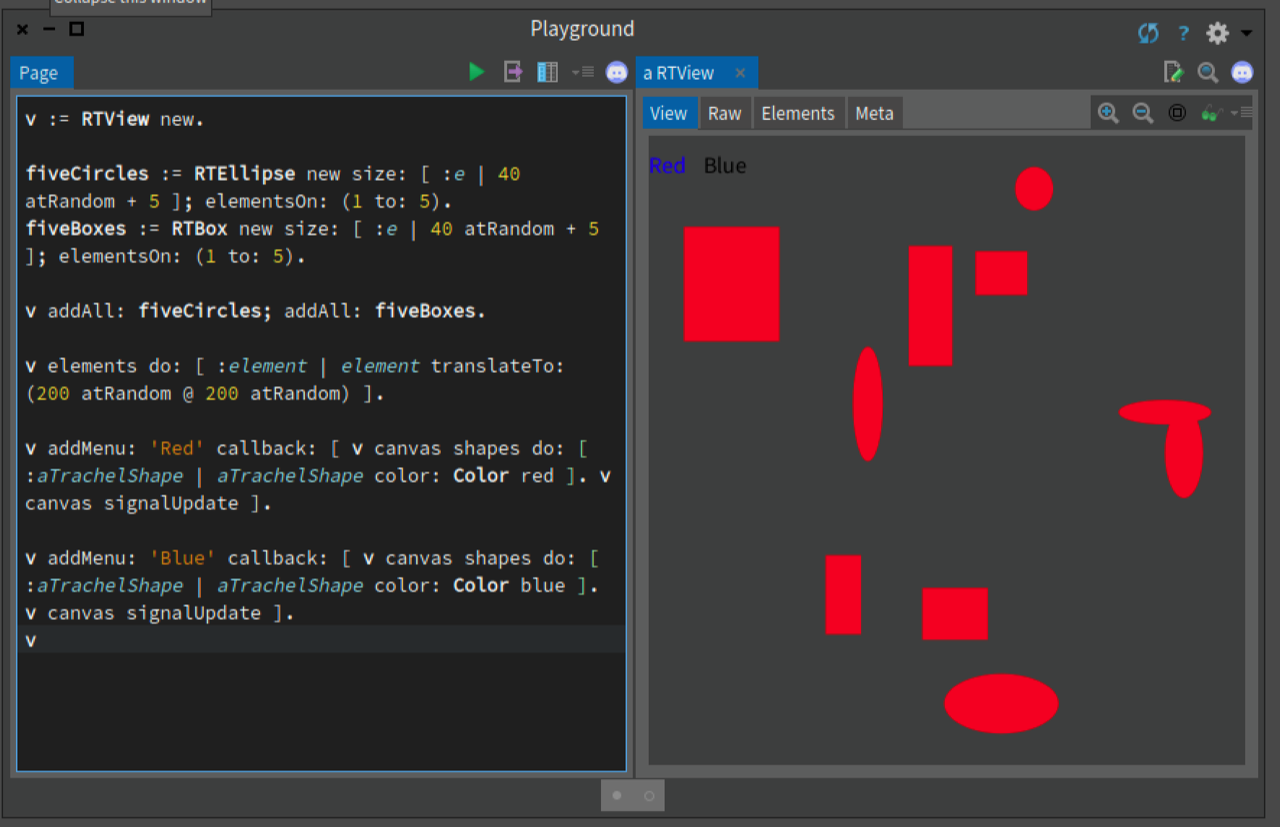
Thanks Alex. I just changed Color red and Color bleu with TrachelShape color slightlyDarker. It works perfect :) Thanks again. Abdelghani
On 01 Mar 2018, at 21:53, Alexandre Bergel <alexandre.bergel@me.com> wrote:
v := RTView new.
fiveCircles := RTEllipse new size: [ :e | 40 atRandom + 5 ]; elementsOn: (1 to: 5). fiveBoxes := RTBox new size: [ :e | 40 atRandom + 5 ]; elementsOn: (1 to: 5).
v addAll: fiveCircles; addAll: fiveBoxes.
v elements do: [ :element | element translateTo: (200 atRandom @ 200 atRandom) ].
v addMenu: 'Red' callback: [ v canvas shapes do: [ :aTrachelShape | aTrachelShape color: Color red ]. v canvas signalUpdate ].
v addMenu: 'Blue' callback: [ v canvas shapes do: [ :aTrachelShape | aTrachelShape color: Color blue ]. v canvas signalUpdate ]. v
participants (4)
-
 abdelghani ALIDRA
 -
 Alexandre Bergel
 -
Alidra Abdelghani
-
 Stephane Ducasse