Using the Debugger to write code

The *Pharo By Example* book says that you can use the Debugger to write code. So if you have a "does not understand" error, you're given the option of Creating a new method. That's cool. But for the life of me, I can't figure out how to create new classes for my application from within the Debugger. Must I create new classes using the System Browser first before I can continue adding new methods from within the Debugger? What's the recommended procedure for all this? Thanks. -- View this message in context: http://forum.world.st/Using-the-Debugger-to-write-code-tp4954451.html Sent from the Pharo Smalltalk Users mailing list archive at Nabble.com.

On Wednesday 12 July 2017 08:33 AM, horrido wrote:
But for the life of me, I can't figure out how to create new classes for my application from within the Debugger. Must I create new classes using the System Browser first before I can continue adding new methods from within the Debugger? What's the recommended procedure for all this?
Not necessarily. In Pharo, everything happens through message sends. Classes are created by sending any one of subclass:* family of messages to the parent class. System Browser makes it convenient by adding a template to its bottom text panel. Magic happens in the subclass:* message sends. When you "inspect" an object in the Debugger, a text panel will open up along the right side where you can type in a command just like in System Browser and "doIt". E.g. to create a subclass from Object. Object subclass: ... HTH .. Subbu

On 12 Jul 2017, at 08:35, K K Subbu <kksubbu.ml@gmail.com> wrote:
On Wednesday 12 July 2017 08:33 AM, horrido wrote:
But for the life of me, I can't figure out how to create new classes for my application from within the Debugger. Must I create new classes using the System Browser first before I can continue adding new methods from within the Debugger? What's the recommended procedure for all this?
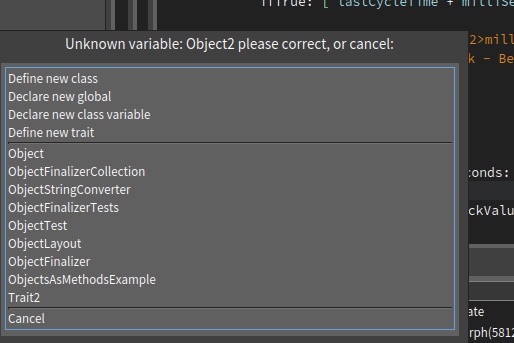
If you add a global variable that does not exist and save the method, you should get a dialog like this, with âDefine new classâ as the first option:

On 12 Jul 2017, at 08:42, Marcus Denker <marcus.denker@inria.fr> wrote:
On 12 Jul 2017, at 08:35, K K Subbu <kksubbu.ml@gmail.com> wrote:
On Wednesday 12 July 2017 08:33 AM, horrido wrote:
But for the life of me, I can't figure out how to create new classes for my application from within the Debugger. Must I create new classes using the System Browser first before I can continue adding new methods from within the Debugger? What's the recommended procedure for all this?
If you add a global variable that does not exist and save the method, you should get a dialog like this, with âDefine new classâ as the first option:
<Untitled.jpg>
Yes, that is it.
From a Playground/Workspace this does not work, but I vaguely remember that it used to, no ?
Then you could start by just pretending your class existed: MyClass new doSomething. <doit> First dialog should be MyClass does not exist, do you want to create it ? Once created, restart and DNU for #doSomething and option to create a new method.

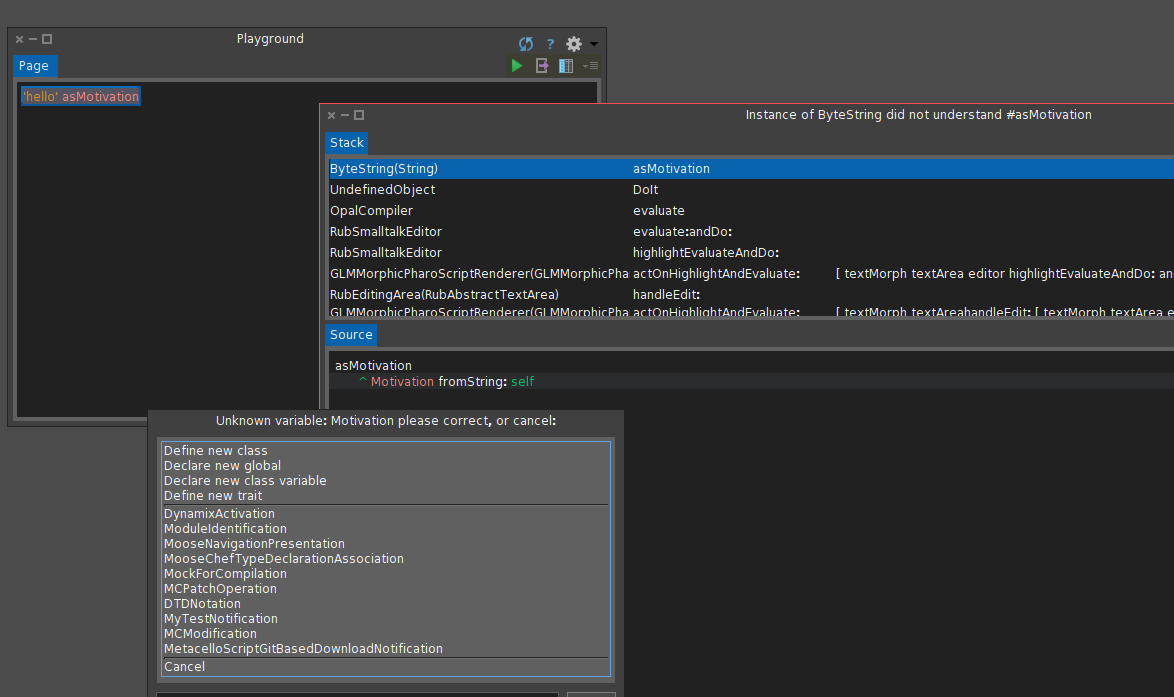
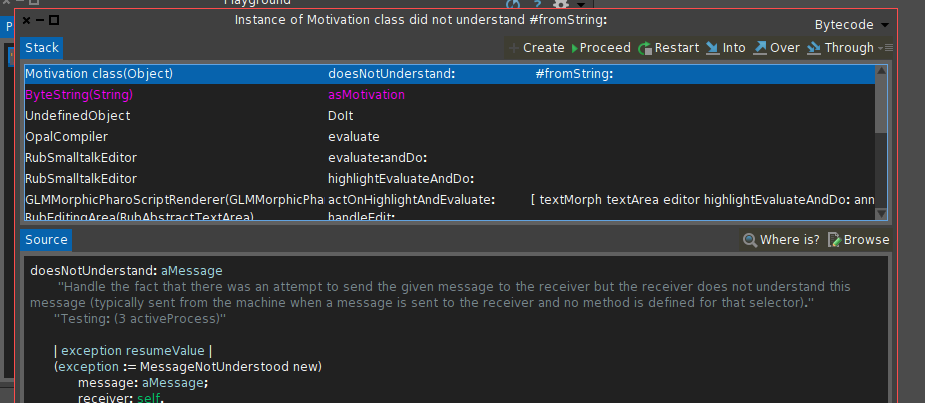
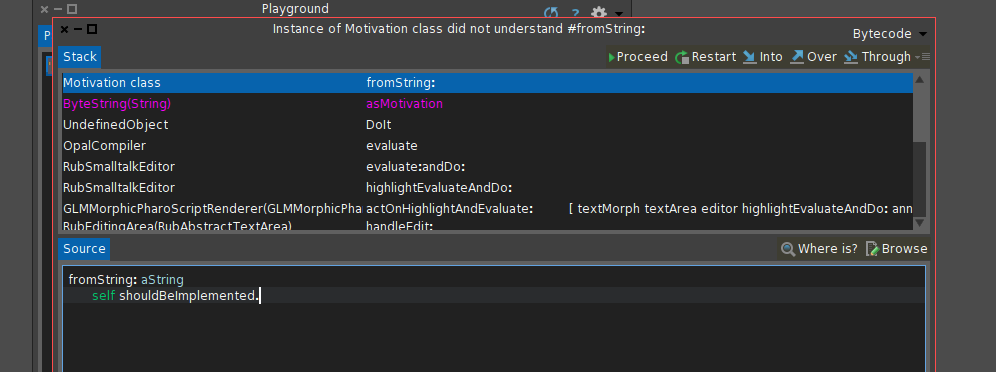
What is not working? Check this: [image: Inline image 1] Hit Define new class and just accept what is proposed, then proceed [image: Inline image 2] Now hit Create and define the method. [image: Inline image 3] etc etc for usual coding. Best, Phil On Wed, Jul 12, 2017 at 8:35 AM, K K Subbu <kksubbu.ml@gmail.com> wrote:
On Wednesday 12 July 2017 08:33 AM, horrido wrote:
But for the life of me, I can't figure out how to create new classes for my application from within the Debugger. Must I create new classes using the System Browser first before I can continue adding new methods from within the Debugger? What's the recommended procedure for all this?
Not necessarily. In Pharo, everything happens through message sends. Classes are created by sending any one of subclass:* family of messages to the parent class. System Browser makes it convenient by adding a template to its bottom text panel. Magic happens in the subclass:* message sends.
When you "inspect" an object in the Debugger, a text panel will open up along the right side where you can type in a command just like in System Browser and "doIt". E.g. to create a subclass from Object.
Object subclass: ...
HTH .. Subbu
Yes, but these are all inside the method editor. I wanted to start with (Motivation fromString: 'foo') sayIt. in a playground/workspace. But with just a DNU it works.
On 12 Jul 2017, at 08:49, phil@highoctane.be wrote:
What is not working? Check this:
<image.png>
Hit Define new class and just accept what is proposed, then proceed
<image.png>
Now hit Create and define the method.
<image.png>
etc etc for usual coding.
Best, Phil
On Wed, Jul 12, 2017 at 8:35 AM, K K Subbu <kksubbu.ml@gmail.com> wrote: On Wednesday 12 July 2017 08:33 AM, horrido wrote: But for the life of me, I can't figure out how to create new classes for my application from within the Debugger. Must I create new classes using the System Browser first before I can continue adding new methods from within the Debugger? What's the recommended procedure for all this?
Not necessarily. In Pharo, everything happens through message sends. Classes are created by sending any one of subclass:* family of messages to the parent class. System Browser makes it convenient by adding a template to its bottom text panel. Magic happens in the subclass:* message sends.
When you "inspect" an object in the Debugger, a text panel will open up along the right side where you can type in a command just like in System Browser and "doIt". E.g. to create a subclass from Object.
Object subclass: ...
HTH .. Subbu
(#Motivation asClass fromString: 'a') sayIt is not working better :-) Should. Phil On Wed, Jul 12, 2017 at 8:54 AM, Sven Van Caekenberghe <sven@stfx.eu> wrote:
Yes, but these are all inside the method editor.
I wanted to start with
(Motivation fromString: 'foo') sayIt.
in a playground/workspace.
But with just a DNU it works.
On 12 Jul 2017, at 08:49, phil@highoctane.be wrote:
What is not working? Check this:
<image.png>
Hit Define new class and just accept what is proposed, then proceed
<image.png>
Now hit Create and define the method.
<image.png>
etc etc for usual coding.
Best, Phil
On Wed, Jul 12, 2017 at 8:35 AM, K K Subbu <kksubbu.ml@gmail.com> wrote: On Wednesday 12 July 2017 08:33 AM, horrido wrote: But for the life of me, I can't figure out how to create new classes for my application from within the Debugger. Must I create new classes using the System Browser first before I can continue adding new methods from within the Debugger? What's the recommended procedure for all this?
Not necessarily. In Pharo, everything happens through message sends. Classes are created by sending any one of subclass:* family of messages to the parent class. System Browser makes it convenient by adding a template to its bottom text panel. Magic happens in the subclass:* message sends.
When you "inspect" an object in the Debugger, a text panel will open up along the right side where you can type in a command just like in System Browser and "doIt". E.g. to create a subclass from Object.
Object subclass: ...
HTH .. Subbu
On 12 Jul 2017, at 08:54, Sven Van Caekenberghe <sven@stfx.eu> wrote:
Yes, but these are all inside the method editor.
I wanted to start with
(Motivation fromString: 'foo') sayIt.
in a playground/workspace.
in the workspace it creates a variable (with value nil)⦠so it treats upper-case unknown vars the same as lower case. I think it might make sense to have for upper case instead the menu that asks what to do (it could there have a âadd binding to workspaceâ entry for the current way, too) Marcus
On 12 Jul 2017, at 09:09, Marcus Denker <marcus.denker@inria.fr> wrote:
On 12 Jul 2017, at 08:54, Sven Van Caekenberghe <sven@stfx.eu> wrote:
Yes, but these are all inside the method editor.
I wanted to start with
(Motivation fromString: 'foo') sayIt.
in a playground/workspace.
in the workspace it creates a variable (with value nil)⦠so it treats upper-case unknown vars the same as lower case.
I think it might make sense to have for upper case instead the menu that asks what to do (it could there have a âadd binding to workspaceâ entry for the current way, too)
for the #asClass case it is more complex. The compiler knows two modes: âInteractiveâ and not. So if there is a undeclared var, it will in interactive mode ask the user what to do, but when compiling non-interactively it will just add the var to Undeclared (with a nil value) and compile a binding to that. Now #asClass happens not at compile-time, but at runtime. The compiler can not do anything (itâs just a message send), and at runtime we do *not* model âinteractive useâ vs. not. Now if you look at Denis enhancement of the test execution, there is now CurrentExecutionEnvironment value which allows us at runtime to check if we run a test (and which). Now we could extend that and model âinteractive useâ vs. ânon-interactiveâ in addition. Then code like #asClass could ask the user in interactive mode to create a non-existing class. But the question is if we would want that⦠(I like the idea of modelling interactive vs. not using the execution environment, though). Marcus
On Wednesday 12 July 2017 01:36 PM, Marcus Denker wrote:
The compiler knows two modes: âInteractiveâ and not. So if there is a undeclared var, it will in interactive mode ask the user what to do, but when compiling non-interactively it will just add the var to Undeclared (with a nil value) and compile a binding to that.
If I run Motivation fromString: 'loo' from Playground or Inspector, I get a DNU window for #fromString not a prompt for defining this variable. Shouldn't Playground/Inspector be considered interactive? Why is Motivation assumed undeclared? Curious .. Subbu

2017-07-12 9:09 GMT+02:00 Marcus Denker <marcus.denker@inria.fr>:
in the workspace it creates a variable (with value nil)⦠so it treats upper-case unknown vars the same as lower case.
I think it might make sense to have for upper case instead the menu that asks what to do (it could there have a âadd binding to workspaceâ entry for the current way, too)
I would prefer same behaviour like in method editor. I really hate when I made mistake in class name and after evaluation I got uppercase binding with nil value.
On 12 Jul 2017, at 10:46, Denis Kudriashov <dionisiydk@gmail.com> wrote:
2017-07-12 9:09 GMT+02:00 Marcus Denker <marcus.denker@inria.fr <mailto:marcus.denker@inria.fr>>: in the workspace it creates a variable (with value nil)⦠so it treats upper-case unknown vars the same as lower case.
I think it might make sense to have for upper case instead the menu that asks what to do (it could there have a âadd binding to workspaceâ entry for the current way, too)
I would prefer same behaviour like in method editor. I really hate when I made mistake in class name and after evaluation I got uppercase binding with nil value.
yes, we should fix it. binding should just be created for lower case vars. Marcus
On 12 Jul 2017, at 10:51, Marcus Denker <marcus.denker@inria.fr> wrote:
On 12 Jul 2017, at 10:46, Denis Kudriashov <dionisiydk@gmail.com <mailto:dionisiydk@gmail.com>> wrote:
2017-07-12 9:09 GMT+02:00 Marcus Denker <marcus.denker@inria.fr <mailto:marcus.denker@inria.fr>>: in the workspace it creates a variable (with value nil)⦠so it treats upper-case unknown vars the same as lower case.
I think it might make sense to have for upper case instead the menu that asks what to do (it could there have a âadd binding to workspaceâ entry for the current way, too)
I would prefer same behaviour like in method editor. I really hate when I made mistake in class name and after evaluation I got uppercase binding with nil value.
yes, we should fix it. binding should just be created for lower case vars.
How to fix it: OCRequestorScope is the scope of variables in tools. #lookupVar: is the method that is doing the lookup. replace the code global := self lookupGlobalVar: name. global ifNotNil: [ ^ global ]. with: name first isUppercase ifTrue: [ ^ outerScope lookupVar: name]. But: right now we abuse the requesterscope to implement the feature that you can hand in an additional dictionary with bindings. See testEvaluateWithBindingsWithUppercaseName This change breaks this feature⦠but it just means we need to implement this better, which I will do . Marcus
2017-07-12 9:09 GMT+02:00 Marcus Denker <marcus.denker@inria.fr <mailto:marcus.denker@inria.fr>>: in the workspace it creates a variable (with value nil)⦠so it treats upper-case unknown vars the same as lower case.
I think it might make sense to have for upper case instead the menu that asks what to do (it could there have a âadd binding to workspaceâ entry for the current way, too)
I would prefer same behaviour like in method editor. I really hate when I made mistake in class name and after evaluation I got uppercase binding with nil value.
yes, we should fix it. binding should just be created for lower case vars.
How to fix it:
OCRequestorScope is the scope of variables in tools. #lookupVar: is the method that is doing the lookup.
replace the code
global := self lookupGlobalVar: name. global ifNotNil: [ ^ global ].
with:
name first isUppercase ifTrue: [ ^ outerScope lookupVar: name].
But: right now we abuse the requesterscope to implement the feature that you can hand in an additional dictionary with bindings. See testEvaluateWithBindingsWithUppercaseName This change breaks this feature⦠but it just means we need to implement this better, which I will do .
For Pharo6: https://pharo.fogbugz.com/f/cases/20254/Playground-should-ask-to-create-clas... <https://pharo.fogbugz.com/f/cases/20254/Playground-should-ask-to-create-clas...> This adds a scope for additional bindings and uses this for the bindings, which then allows us to change the requestorscope as needed. Marcus
participants (6)
-
 Denis Kudriashov
 -
 horrido
 -
 K K Subbu
 -
 Marcus Denker
 -
 phil@highoctane.be
 -
 Sven Van Caekenberghe