suggestions mini-pane shut up

Hi, I find the suggestions mini-pane that appears under a method code rather useless and distracting. I perfectly know that I'm an idiot, so there's no need for the tool to keep reminding me how smart it is instead. Is there a way to get rid of it?

On 28 Feb 2017, at 14:49, Raffaello Giulietti <raffaello.giulietti@lifeware.ch> wrote:
Hi,
I find the suggestions mini-pane that appears under a method code rather useless and distracting.
I perfectly know that I'm an idiot, so there's no need for the tool to keep reminding me how smart it is instead.
Is there a way to get rid of it?
Experiment with the Nautilus Settings: In particular 'Show critique list at the bottom' and 'Show source code annotation pane'. Sven
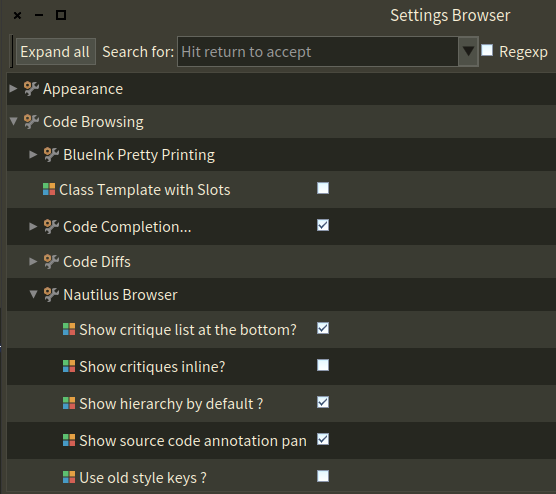
Hi Sven, I already searched in the settings. Here is what I see in the Nautilus Browser settings: Code Browsing Nautilus Browser Show hierarchy by default? Use old style keys? nothing else. On 2017-02-28 14:55, Sven Van Caekenberghe wrote:
On 28 Feb 2017, at 14:49, Raffaello Giulietti <raffaello.giulietti@lifeware.ch <mailto:raffaello.giulietti@lifeware.ch>> wrote:
Hi,
I find the suggestions mini-pane that appears under a method code rather useless and distracting.
I perfectly know that I'm an idiot, so there's no need for the tool to keep reminding me how smart it is instead.
Is there a way to get rid of it?
Experiment with the Nautilus Settings:
In particular 'Show critique list at the bottom' and 'Show source code annotation pane'.
Sven
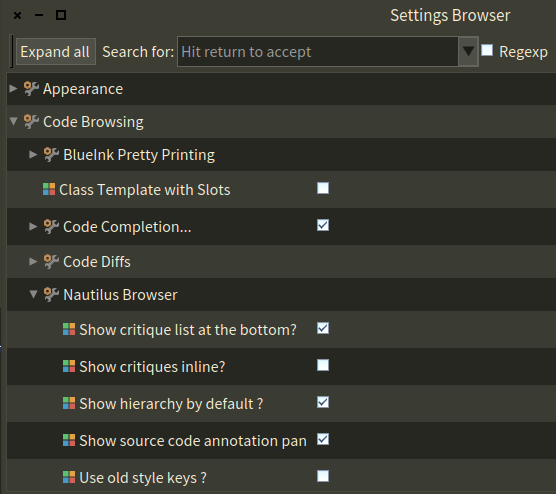
What Pharo version are you using ? The screenshot was from Pharo 6.
On 28 Feb 2017, at 15:06, Raffaello Giulietti <raffaello.giulietti@lifeware.ch> wrote:
Hi Sven,
I already searched in the settings.
Here is what I see in the Nautilus Browser settings:
Code Browsing Nautilus Browser Show hierarchy by default? Use old style keys?
nothing else.
On 2017-02-28 14:55, Sven Van Caekenberghe wrote:
On 28 Feb 2017, at 14:49, Raffaello Giulietti <raffaello.giulietti@lifeware.ch> wrote:
Hi,
I find the suggestions mini-pane that appears under a method code rather useless and distracting.
I perfectly know that I'm an idiot, so there's no need for the tool to keep reminding me how smart it is instead.
Is there a way to get rid of it?
Experiment with the Nautilus Settings:
<Mail Attachment.png>
In particular 'Show critique list at the bottom' and 'Show source code annotation pane'.
Sven
I'm using the latest "official" release, namely Pharo 5. I have no gut to experiment with Pharo 6. If not by the GUI, there still must be a way to evaluate some expression to achieve the same effect, even in Pharo 5. On 2017-02-28 15:11, Sven Van Caekenberghe wrote:
What Pharo version are you using ?
The screenshot was from Pharo 6.
On 28 Feb 2017, at 15:06, Raffaello Giulietti <raffaello.giulietti@lifeware.ch> wrote:
Hi Sven,
I already searched in the settings.
Here is what I see in the Nautilus Browser settings:
Code Browsing Nautilus Browser Show hierarchy by default? Use old style keys?
nothing else.
On 2017-02-28 14:55, Sven Van Caekenberghe wrote:
On 28 Feb 2017, at 14:49, Raffaello Giulietti <raffaello.giulietti@lifeware.ch> wrote:
Hi,
I find the suggestions mini-pane that appears under a method code rather useless and distracting.
I perfectly know that I'm an idiot, so there's no need for the tool to keep reminding me how smart it is instead.
Is there a way to get rid of it?
Experiment with the Nautilus Settings:
<Mail Attachment.png>
In particular 'Show critique list at the bottom' and 'Show source code annotation pane'.
Sven

1. Open settings 2. Type in quality 3. Uncheck nautilus plugin (or remove the plugin via top-right corner of nautilus window -> plugins manager -> remove QA) Peter On Tue, Feb 28, 2017 at 03:16:31PM +0100, Raffaello Giulietti wrote:
I'm using the latest "official" release, namely Pharo 5. I have no gut to experiment with Pharo 6.
If not by the GUI, there still must be a way to evaluate some expression to achieve the same effect, even in Pharo 5.
On 2017-02-28 15:11, Sven Van Caekenberghe wrote:
What Pharo version are you using ?
The screenshot was from Pharo 6.
On 28 Feb 2017, at 15:06, Raffaello Giulietti <raffaello.giulietti@lifeware.ch> wrote:
Hi Sven,
I already searched in the settings.
Here is what I see in the Nautilus Browser settings:
Code Browsing Nautilus Browser Show hierarchy by default? Use old style keys?
nothing else.
On 2017-02-28 14:55, Sven Van Caekenberghe wrote:
On 28 Feb 2017, at 14:49, Raffaello Giulietti <raffaello.giulietti@lifeware.ch> wrote:
Hi,
I find the suggestions mini-pane that appears under a method code rather useless and distracting.
I perfectly know that I'm an idiot, so there's no need for the tool to keep reminding me how smart it is instead.
Is there a way to get rid of it?
Experiment with the Nautilus Settings:
<Mail Attachment.png>
In particular 'Show critique list at the bottom' and 'Show source code annotation pane'.
Sven

which version of Pharo you use ? PS: I do not need QA to remind me I am an idiot, coding is doing that to me every day just fine for 30 years now :D On Tue, Feb 28, 2017 at 4:07 PM Raffaello Giulietti < raffaello.giulietti@lifeware.ch> wrote:
Hi Sven,
I already searched in the settings.
Here is what I see in the Nautilus Browser settings:
Code Browsing Nautilus Browser Show hierarchy by default? Use old style keys?
nothing else.
On 2017-02-28 14:55, Sven Van Caekenberghe wrote:
On 28 Feb 2017, at 14:49, Raffaello Giulietti < raffaello.giulietti@lifeware.ch> wrote:
Hi,
I find the suggestions mini-pane that appears under a method code rather useless and distracting.
I perfectly know that I'm an idiot, so there's no need for the tool to keep reminding me how smart it is instead.
Is there a way to get rid of it?
Experiment with the Nautilus Settings:
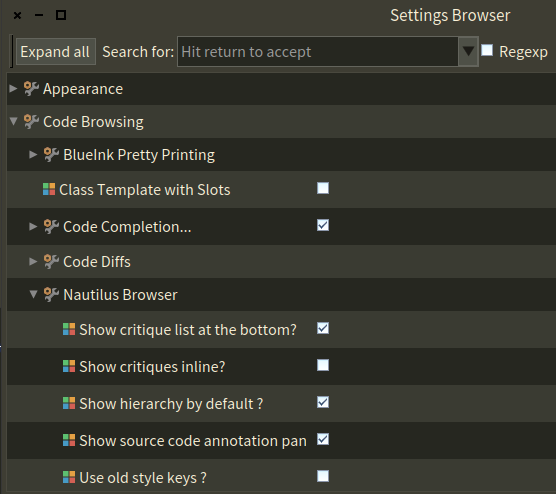
In particular 'Show critique list at the bottom' and 'Show source code annotation pane'.
Sven
participants (4)
-
 Dimitris Chloupis
 -
 Peter Uhnak
 -
 Raffaello Giulietti
 -
 Sven Van Caekenberghe