Font with many Unicode glyphs to display code -- IPA?

Hello I work on an app which has some strings in the code with a considerable number of non ISO8859 symbols (e.g. IPA https://en.wikipedia.org/wiki/IPA) How do I get / use a font which does this? The fonts provided in the settings panel did not do the job. Thank you in advance --Hannes
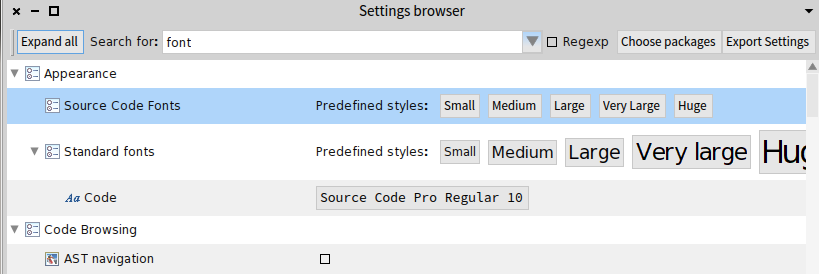
P.S. Screen shot attached. A source code font. Or put the question differently how do I add a font as a source code font? On 7/23/15, H. Hirzel <hannes.hirzel@gmail.com> wrote:
Hello
I work on an app which has some strings in the code with a considerable number of non ISO8859 symbols (e.g. IPA https://en.wikipedia.org/wiki/IPA)
How do I get / use a font which does this? The fonts provided in the settings panel did not do the job.
Thank you in advance --Hannes

On 23 Jul 2015, at 4:14 , H. Hirzel <hannes.hirzel@gmail.com> wrote:
P.S. Screen shot attached. A source code font. Or put the question differently how do I add a font as a source code font?
On 7/23/15, H. Hirzel <hannes.hirzel@gmail.com> wrote:
Hello
I work on an app which has some strings in the code with a considerable number of non ISO8859 symbols (e.g. IPA https://en.wikipedia.org/wiki/IPA)
How do I get / use a font which does this? The fonts provided in the settings panel did not do the job.
Thank you in advance --Hannes
<Pharo4.0_settings_browser_fonts_Screenshot from 2015-07-23 13:58:28.png>
Click the font name next to the Code entry to change it, press "Update" in the selection window, and then select a system font (after installing if it's not included in the OS) that has IPA coverage. Searching for "ipa font <my platform>" should give pointers to which you can use. Cheers, Herny

Hi, alternatively, you can distribute yours programs with your own fonts. you can keep them outside the image and load them on demand⦠take a look at LucidaGrandeRegular class to see how to do it. Esteban
On 24 Jul 2015, at 17:22, Henrik Johansen <henrik.s.johansen@veloxit.no> wrote:
On 23 Jul 2015, at 4:14 , H. Hirzel <hannes.hirzel@gmail.com> wrote:
P.S. Screen shot attached. A source code font. Or put the question differently how do I add a font as a source code font?
On 7/23/15, H. Hirzel <hannes.hirzel@gmail.com> wrote:
Hello
I work on an app which has some strings in the code with a considerable number of non ISO8859 symbols (e.g. IPA https://en.wikipedia.org/wiki/IPA)
How do I get / use a font which does this? The fonts provided in the settings panel did not do the job.
Thank you in advance --Hannes
<Pharo4.0_settings_browser_fonts_Screenshot from 2015-07-23 13:58:28.png>
Click the font name next to the Code entry to change it, press "Update" in the selection window, and then select a system font (after installing if it's not included in the OS) that has IPA coverage. Searching for "ipa font <my platform>" should give pointers to which you can use.
Cheers, Herny
participants (3)
-
 Esteban Lorenzano
 -
 H. Hirzel
 -
 Henrik Johansen