LibFFI/NB Cairo External Module Not Found debugging

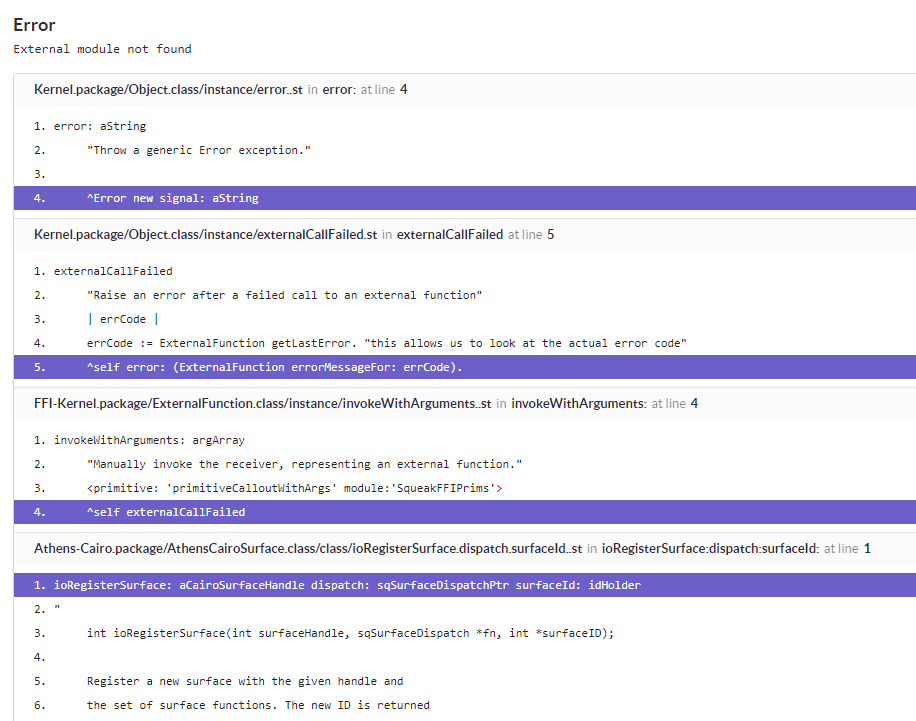
Hi, some Windows users are repeatedly running into Pharo failing to load Cairo library on Windows (see stack screenshot at the bottom). The problem is that I have no idea how to even start debugging this. Is there some documentation on how Pharo loads libraries via FFI on Windows that I can start digging into? Note that the library is definitely present, as this happens only occasionally -- it can be fixed by restarting PC. But I cannot reasonably ask users to restart just because Pharo decided it doesn't feel like loading a library. Any pointers / docs / ideas appreciated. Thanks, Peter

I've not used this, just found it poking around... https://blogs.msdn.microsoft.com/junfeng/2006/11/20/debugging-loadlibrary-fa... cheers -ben On 19 May 2018 at 19:37, Peter Uhnák <i.uhnak@gmail.com> wrote:
Hi,
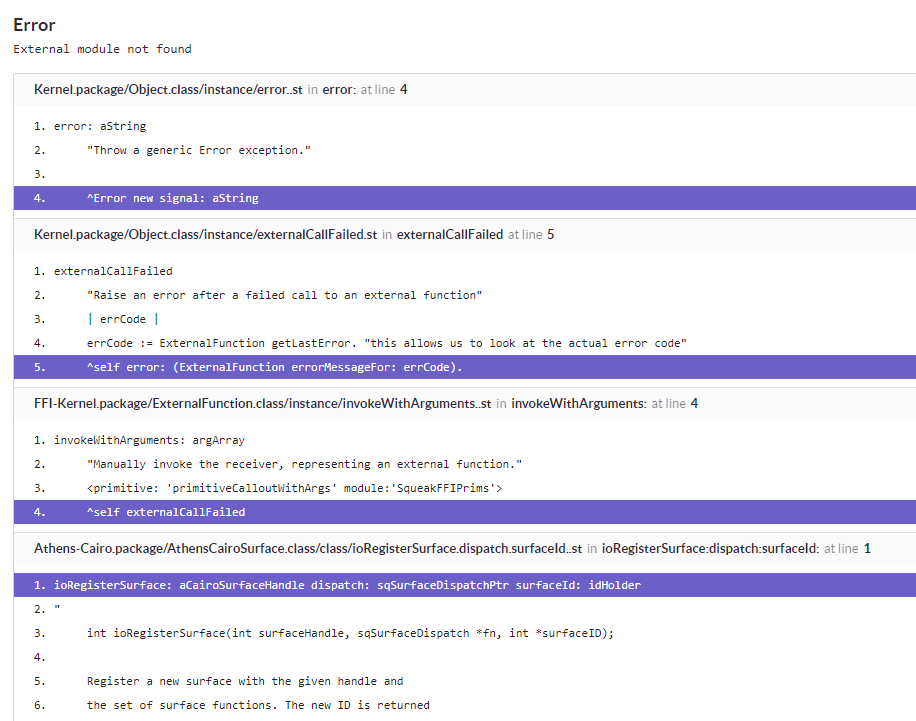
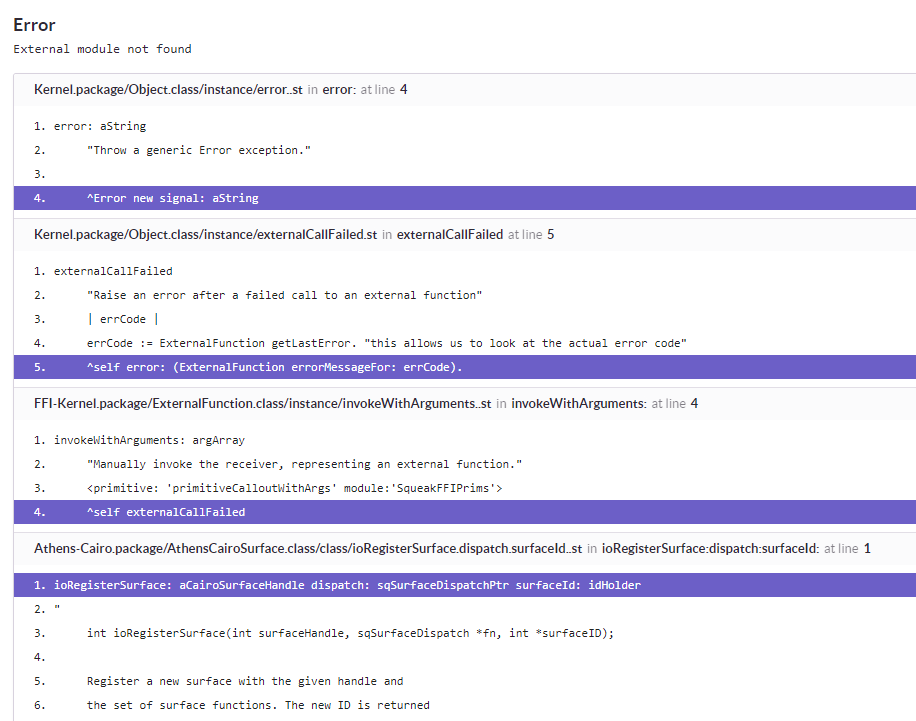
some Windows users are repeatedly running into Pharo failing to load Cairo library on Windows (see stack screenshot at the bottom).
The problem is that I have no idea how to even start debugging this.
Is there some documentation on how Pharo loads libraries via FFI on Windows that I can start digging into?
Note that the library is definitely present, as this happens only occasionally -- it can be fixed by restarting PC. But I cannot reasonably ask users to restart just because Pharo decided it doesn't feel like loading a library.
Any pointers / docs / ideas appreciated.
Thanks, Peter

On Sat, May 19, 2018 at 1:37 PM, Peter Uhnák <i.uhnak@gmail.com> wrote:
Hi,
some Windows users are repeatedly running into Pharo failing to load Cairo library on Windows (see stack screenshot at the bottom).
The problem is that I have no idea how to even start debugging this.
Is there some documentation on how Pharo loads libraries via FFI on Windows that I can start digging into?
Note that the library is definitely present, as this happens only occasionally -- it can be fixed by restarting PC. But I cannot reasonably ask users to restart just because Pharo decided it doesn't feel like loading a library.
Any pointers / docs / ideas appreciated.
You can see the actual code from https://github.com/OpenSmalltalk/opensmalltalk-vm/search?utf8=%E2%9C%93&q=fi... ?
Thanks, Peter
-- Guille Polito Research Engineer Centre de Recherche en Informatique, Signal et Automatique de Lille CRIStAL - UMR 9189 French National Center for Scientific Research - *http://www.cnrs.fr <http://www.cnrs.fr>* *Web:* *http://guillep.github.io* <http://guillep.github.io> *Phone: *+33 06 52 70 66 13
A bit further, the windows specific code is in https://github.com/OpenSmalltalk/opensmalltalk-vm/blob/e17db79411cfec767e04f... check the users of LoadLibrary, which comes form the windows std libraries. https://msdn.microsoft.com/en-us/library/windows/desktop/ms684175%28v=vs.85%... On Sun, May 20, 2018 at 9:46 PM, Guillermo Polito <guillermopolito@gmail.com
wrote:
On Sat, May 19, 2018 at 1:37 PM, Peter Uhnák <i.uhnak@gmail.com> wrote:
Hi,
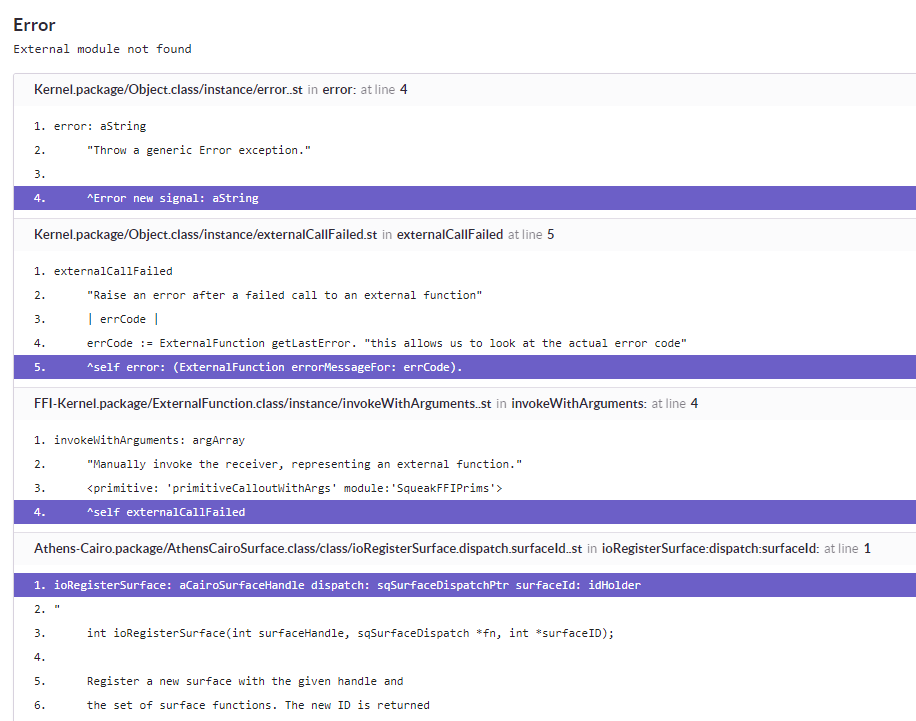
some Windows users are repeatedly running into Pharo failing to load Cairo library on Windows (see stack screenshot at the bottom).
The problem is that I have no idea how to even start debugging this.
Is there some documentation on how Pharo loads libraries via FFI on Windows that I can start digging into?
Note that the library is definitely present, as this happens only occasionally -- it can be fixed by restarting PC. But I cannot reasonably ask users to restart just because Pharo decided it doesn't feel like loading a library.
Any pointers / docs / ideas appreciated.
You can see the actual code from
https://github.com/OpenSmalltalk/opensmalltalk-vm/search?utf8=%E2%9C%93&q= findAndLoadModule%28char+*pluginName%2C+sqInt+ffiLoad%29&type=
?
Thanks, Peter
--
Guille Polito
Research Engineer
Centre de Recherche en Informatique, Signal et Automatique de Lille
CRIStAL - UMR 9189
French National Center for Scientific Research - *http://www.cnrs.fr <http://www.cnrs.fr>*
*Web:* *http://guillep.github.io* <http://guillep.github.io>
*Phone: *+33 06 52 70 66 13
-- Guille Polito Research Engineer Centre de Recherche en Informatique, Signal et Automatique de Lille CRIStAL - UMR 9189 French National Center for Scientific Research - *http://www.cnrs.fr <http://www.cnrs.fr>* *Web:* *http://guillep.github.io* <http://guillep.github.io> *Phone: *+33 06 52 70 66 13

It's not just Windows users. I have Pharo 6.0 #605.40 running under Linux Ubuntu version 17.10 and the cairo library is definitely installed. Just starting Pharo is a little concerning: ok@Herbrand:~/Smalltalk$ pharo ioLoadModule(/home/ok/Pharo.d/pharo-vm/lib/pharo/5.0-201707201942/FT2Plugin.so): libfreetype.so.6: cannot open shared object file: No such file or directory ioLoadModule(/home/ok/Pharo.d/pharo-vm/lib/pharo/5.0-201707201942/FT2Plugin.so): libfreetype.so.6: cannot open shared object file: No such file or directory Yet these files exist. /usr/lib/x86_64-linux-gnu/libfreetype.a /usr/lib/x86_64-linux-gnu/libfreetype.so /usr/lib/x86_64-linux-gnu/libfreetype.la /usr/lib/x86_64-linux-gnu/libfreetype.so.6 /usr/lib/x86_64-linux-gnu/libfreetype.so.6.14.0 When I try any Roassal examples, I get Error: cannot locate cairo library. Please check if it is installed ... CairoLibrary(Object) error: CairoLibrary unix32ModuleName Unix32Platform ffiModuleName CairoLibrayr(FFILibrary) moduleName FFICalloutMethodBuilder moduleName The 32 is the clue. Apparently I'm running a 32-bit Pharo with 64-bit libraries installed. Could this be the problem on Windows? On 21 May 2018 at 07:46, Guillermo Polito <guillermopolito@gmail.com> wrote:
On Sat, May 19, 2018 at 1:37 PM, Peter Uhnák <i.uhnak@gmail.com> wrote:
Hi,
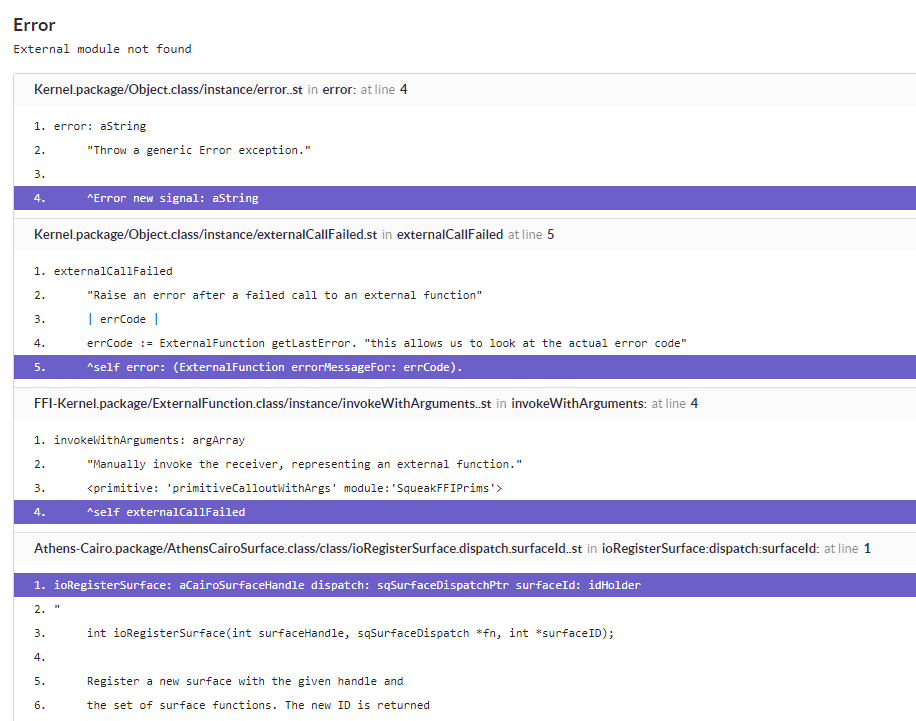
some Windows users are repeatedly running into Pharo failing to load Cairo library on Windows (see stack screenshot at the bottom).
The problem is that I have no idea how to even start debugging this.
Is there some documentation on how Pharo loads libraries via FFI on Windows that I can start digging into?
Note that the library is definitely present, as this happens only occasionally -- it can be fixed by restarting PC. But I cannot reasonably ask users to restart just because Pharo decided it doesn't feel like loading a library.
Any pointers / docs / ideas appreciated.
You can see the actual code from
https://github.com/OpenSmalltalk/opensmalltalk-vm/search?utf8=%E2%9C%93&q= findAndLoadModule%28char+*pluginName%2C+sqInt+ffiLoad%29&type=
?
Thanks, Peter
--
Guille Polito
Research Engineer
Centre de Recherche en Informatique, Signal et Automatique de Lille
CRIStAL - UMR 9189
French National Center for Scientific Research - *http://www.cnrs.fr <http://www.cnrs.fr>*
*Web:* *http://guillep.github.io* <http://guillep.github.io>
*Phone: *+33 06 52 70 66 13

If you are running a 32 bit Pharo on a 64 bit Ubuntu, there is instructions for additional steps needed at https://pharo.org/gnu-linux-installation under the âPrepare 64-bit-Linux for 32bit Pharoâ heading For encrypted mail use jgpfersich@protonmail.com Get a free account at ProtonMail.com Web: www.objectnets.net and www.objectnets.org
On May 21, 2018, at 00:18, Richard O'Keefe <raoknz@gmail.com> wrote:
It's not just Windows users. I have Pharo 6.0 #605.40 running under Linux Ubuntu version 17.10 and the cairo library is definitely installed.
Just starting Pharo is a little concerning: ok@Herbrand:~/Smalltalk$ pharo ioLoadModule(/home/ok/Pharo.d/pharo-vm/lib/pharo/5.0-201707201942/FT2Plugin.so): libfreetype.so.6: cannot open shared object file: No such file or directory ioLoadModule(/home/ok/Pharo.d/pharo-vm/lib/pharo/5.0-201707201942/FT2Plugin.so): libfreetype.so.6: cannot open shared object file: No such file or directory Yet these files exist. /usr/lib/x86_64-linux-gnu/libfreetype.a /usr/lib/x86_64-linux-gnu/libfreetype.so /usr/lib/x86_64-linux-gnu/libfreetype.la /usr/lib/x86_64-linux-gnu/libfreetype.so.6 /usr/lib/x86_64-linux-gnu/libfreetype.so.6.14.0
When I try any Roassal examples, I get Error: cannot locate cairo library. Please check if it is installed ... CairoLibrary(Object) error: CairoLibrary unix32ModuleName Unix32Platform ffiModuleName CairoLibrayr(FFILibrary) moduleName FFICalloutMethodBuilder moduleName
The 32 is the clue. Apparently I'm running a 32-bit Pharo with 64-bit libraries installed. Could this be the problem on Windows?
On 21 May 2018 at 07:46, Guillermo Polito <guillermopolito@gmail.com> wrote:
On Sat, May 19, 2018 at 1:37 PM, Peter Uhnák <i.uhnak@gmail.com> wrote: Hi,
some Windows users are repeatedly running into Pharo failing to load Cairo library on Windows (see stack screenshot at the bottom).
The problem is that I have no idea how to even start debugging this.
Is there some documentation on how Pharo loads libraries via FFI on Windows that I can start digging into?
Note that the library is definitely present, as this happens only occasionally -- it can be fixed by restarting PC. But I cannot reasonably ask users to restart just because Pharo decided it doesn't feel like loading a library.
Any pointers / docs / ideas appreciated.
You can see the actual code from
https://github.com/OpenSmalltalk/opensmalltalk-vm/search?utf8=%E2%9C%93&q=fi...
?
Thanks, Peter
<image.png>
--
Guille Polito Research Engineer Centre de Recherche en Informatique, Signal et Automatique de Lille CRIStAL - UMR 9189 French National Center for Scientific Research - http://www.cnrs.fr
Web: http://guillep.github.io Phone: +33 06 52 70 66 13
Thank you for that. The instructions there are incomplete. It is necessary to add sudo apt-get install libcairo2-dev:i386 to the script. On 21 May 2018 at 19:36, John Pfersich <jpfersich@gmail.com> wrote:
If you are running a 32 bit Pharo on a 64 bit Ubuntu, there is instructions for additional steps needed at https://pharo.org/gnu- linux-installation under the âPrepare 64-bit-Linux for 32bit Pharoâ heading
For encrypted mail use jgpfersich@protonmail.com Get a free account at ProtonMail.com Web: www.objectnets.net and www.objectnets.org
On May 21, 2018, at 00:18, Richard O'Keefe <raoknz@gmail.com> wrote:
It's not just Windows users. I have Pharo 6.0 #605.40 running under Linux Ubuntu version 17.10 and the cairo library is definitely installed.
Just starting Pharo is a little concerning: ok@Herbrand:~/Smalltalk$ pharo ioLoadModule(/home/ok/Pharo.d/pharo-vm/lib/pharo/5.0- 201707201942/FT2Plugin.so): libfreetype.so.6: cannot open shared object file: No such file or directory ioLoadModule(/home/ok/Pharo.d/pharo-vm/lib/pharo/5.0- 201707201942/FT2Plugin.so): libfreetype.so.6: cannot open shared object file: No such file or directory Yet these files exist. /usr/lib/x86_64-linux-gnu/libfreetype.a /usr/lib/x86_64-linux-gnu/libfreetype.so /usr/lib/x86_64-linux-gnu/libfreetype.la /usr/lib/x86_64-linux-gnu/libfreetype.so.6 /usr/lib/x86_64-linux-gnu/libfreetype.so.6.14.0
When I try any Roassal examples, I get Error: cannot locate cairo library. Please check if it is installed ... CairoLibrary(Object) error: CairoLibrary unix32ModuleName Unix32Platform ffiModuleName CairoLibrayr(FFILibrary) moduleName FFICalloutMethodBuilder moduleName
The 32 is the clue. Apparently I'm running a 32-bit Pharo with 64-bit libraries installed. Could this be the problem on Windows?
On 21 May 2018 at 07:46, Guillermo Polito <guillermopolito@gmail.com> wrote:
On Sat, May 19, 2018 at 1:37 PM, Peter Uhnák <i.uhnak@gmail.com> wrote:
Hi,
some Windows users are repeatedly running into Pharo failing to load Cairo library on Windows (see stack screenshot at the bottom).
The problem is that I have no idea how to even start debugging this.
Is there some documentation on how Pharo loads libraries via FFI on Windows that I can start digging into?
Note that the library is definitely present, as this happens only occasionally -- it can be fixed by restarting PC. But I cannot reasonably ask users to restart just because Pharo decided it doesn't feel like loading a library.
Any pointers / docs / ideas appreciated.
You can see the actual code from
https://github.com/OpenSmalltalk/opensmalltalk-vm/search? utf8=%E2%9C%93&q=findAndLoadModule%28char+*pluginName%2C+ sqInt+ffiLoad%29&type=
?
Thanks, Peter
<image.png>
--
Guille Polito
Research Engineer
Centre de Recherche en Informatique, Signal et Automatique de Lille
CRIStAL - UMR 9189
French National Center for Scientific Research - *http://www.cnrs.fr <http://www.cnrs.fr>*
*Web:* *http://guillep.github.io* <http://guillep.github.io>
*Phone: *+33 06 52 70 66 13

why libcairo2-dev and not just libcairo2? cheers, Esteban
On 21 May 2018, at 17:25, Richard O'Keefe <raoknz@gmail.com> wrote:
Thank you for that. The instructions there are incomplete. It is necessary to add sudo apt-get install libcairo2-dev:i386 to the script.
On 21 May 2018 at 19:36, John Pfersich <jpfersich@gmail.com <mailto:jpfersich@gmail.com>> wrote: If you are running a 32 bit Pharo on a 64 bit Ubuntu, there is instructions for additional steps needed at https://pharo.org/gnu-linux-installation <https://pharo.org/gnu-linux-installation> under the âPrepare 64-bit-Linux for 32bit Pharoâ heading
For encrypted mail use jgpfersich@protonmail.com <mailto:jgpfersich@protonmail.com> Get a free account at ProtonMail.com <http://protonmail.com/> Web: www.objectnets.net <http://www.objectnets.net/> and www.objectnets.org <http://www.objectnets.org/>
On May 21, 2018, at 00:18, Richard O'Keefe <raoknz@gmail.com <mailto:raoknz@gmail.com>> wrote:
It's not just Windows users. I have Pharo 6.0 #605.40 running under Linux Ubuntu version 17.10 and the cairo library is definitely installed.
Just starting Pharo is a little concerning: ok@Herbrand:~/Smalltalk$ pharo ioLoadModule(/home/ok/Pharo.d/pharo-vm/lib/pharo/5.0-201707201942/FT2Plugin.so): libfreetype.so.6: cannot open shared object file: No such file or directory ioLoadModule(/home/ok/Pharo.d/pharo-vm/lib/pharo/5.0-201707201942/FT2Plugin.so): libfreetype.so.6: cannot open shared object file: No such file or directory Yet these files exist. /usr/lib/x86_64-linux-gnu/libfreetype.a /usr/lib/x86_64-linux-gnu/libfreetype.so /usr/lib/x86_64-linux-gnu/libfreetype.la <http://libfreetype.la/> /usr/lib/x86_64-linux-gnu/libfreetype.so.6 /usr/lib/x86_64-linux-gnu/libfreetype.so.6.14.0
When I try any Roassal examples, I get Error: cannot locate cairo library. Please check if it is installed ... CairoLibrary(Object) error: CairoLibrary unix32ModuleName Unix32Platform ffiModuleName CairoLibrayr(FFILibrary) moduleName FFICalloutMethodBuilder moduleName
The 32 is the clue. Apparently I'm running a 32-bit Pharo with 64-bit libraries installed. Could this be the problem on Windows?
On 21 May 2018 at 07:46, Guillermo Polito <guillermopolito@gmail.com <mailto:guillermopolito@gmail.com>> wrote:
On Sat, May 19, 2018 at 1:37 PM, Peter Uhnák <i.uhnak@gmail.com <mailto:i.uhnak@gmail.com>> wrote: Hi,
some Windows users are repeatedly running into Pharo failing to load Cairo library on Windows (see stack screenshot at the bottom).
The problem is that I have no idea how to even start debugging this.
Is there some documentation on how Pharo loads libraries via FFI on Windows that I can start digging into?
Note that the library is definitely present, as this happens only occasionally -- it can be fixed by restarting PC. But I cannot reasonably ask users to restart just because Pharo decided it doesn't feel like loading a library.
Any pointers / docs / ideas appreciated.
You can see the actual code from
https://github.com/OpenSmalltalk/opensmalltalk-vm/search?utf8=%E2%9C%93&q=fi... <https://github.com/OpenSmalltalk/opensmalltalk-vm/search?utf8=%E2%9C%93&q=fi...>
?
Thanks, Peter
<image.png>
--
Guille Polito Research Engineer
Centre de Recherche en Informatique, Signal et Automatique de Lille CRIStAL - UMR 9189 French National Center for Scientific Research - http://www.cnrs.fr <http://www.cnrs.fr/>
Web: http://guillep.github.io <http://guillep.github.io/> Phone: +33 06 52 70 66 13
participants (6)
-
 Ben Coman
 -
 Esteban Lorenzano
 -
 Guillermo Polito
 -
 John Pfersich
 -
 Peter Uhnák
 -
 Richard O'Keefe