New Tool: Catalog Browser in Pharo 5.0

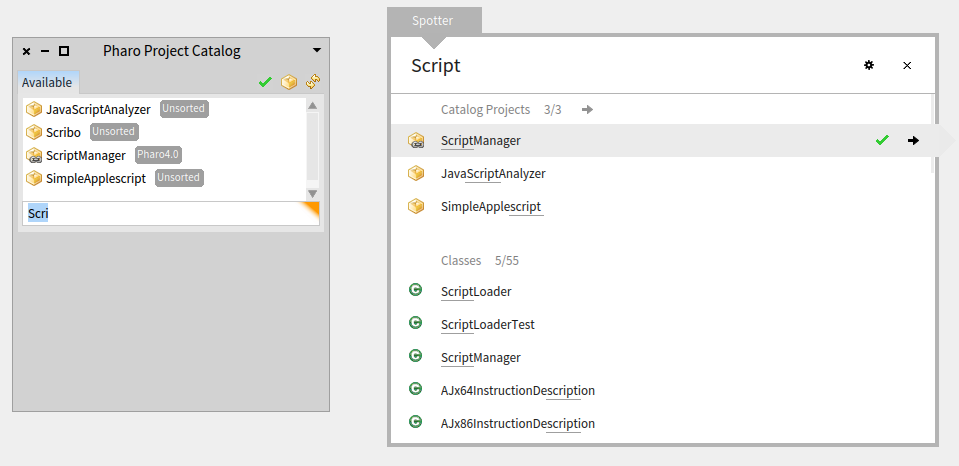
Hi, maybe you already noticed. The latest update for Pharo 5 which is 50103 (see [1]). includes a new tool called "Catalog Browser". Where to go =========== You will find it under "Tools" -> "Catalog Browser" and it will display the configs together with the catalog metadata like project description. The code is managed with a configuration similar to what we have for a few other packages/projects. The tool was written by Esteban Lorenzano with small improvements like spotter integration from my side. Feel free to contribute more features. The repository can be found on SmalltalkHub [2]. This new tool basically gives you access to all available configurations aggregated at [3]. You can use a small UI to search and load the configs (see world menu -> "Tools" -> "Catalog Browser". But you can also use Spotter to load a config. Example on how to load ScriptManager config: ============================================ - open Spotter (SHIFT + ENTER on Windows, ...) - type in "Script" and you will find a spotter category "Catalog Projects" with "ScriptManager" in it - just hit enter and the config is loaded Same for all others, so try with "Seaside", "MongoTalk", ... In the short/mid-term this new tool should replace the existing config browser as it gives more informations about the projects. What to do next: ================ - give feedback - we should update all our configs with catalog descriptions - it would be nice if the spotter integration would include also a preview of the project description - ... If you want to contribute just tell Esteban so he can add you to the project. Thanks Esteban & Torsten [1] http://lists.pharo.org/pipermail/pharo-dev_lists.pharo.org/2015-June/110964.... [2] http://www.smalltalkhub.com/#!/~estebanlm/CatalogBrowser [3] http://catalog.pharo.org/catalog/json

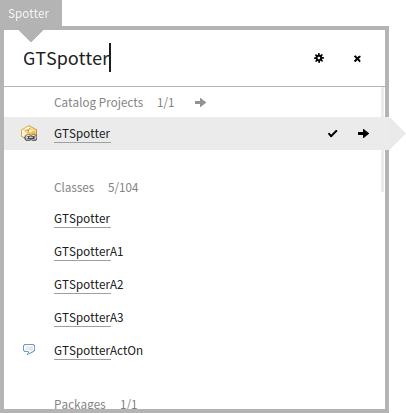
Really cool! About the spotter integration, it is really nice to be able to search and find new projects like this. Well done. But, there are two things that I would change: - Right now, the processor order is 10. If you search for GTSpotter, you will get the catalog project before the class: [image: Inline image 1] I would rather prefer the order to be next to the Metacello configurations, so I would make it 90. The reason is that the things that are in the image should take precedence because they are much more often used. - For the preview, I would put the details that we have about the project. - Also, if you are at it, it would be nice to add an inspector extension for showing all projects of a CatalogProvider and to add a load action for a CatalogProject object :) Cheers, Doru On Thu, Jun 11, 2015 at 8:55 AM, Torsten Bergmann <astares@gmx.de> wrote:
Hi,
maybe you already noticed. The latest update for Pharo 5 which is 50103 (see [1]). includes a new tool called "Catalog Browser".
Where to go ===========
You will find it under "Tools" -> "Catalog Browser" and it will display the configs together with the catalog metadata like project description.
The code is managed with a configuration similar to what we have for a few other packages/projects. The tool was written by Esteban Lorenzano with small improvements like spotter integration from my side. Feel free to contribute more features.
The repository can be found on SmalltalkHub [2].
This new tool basically gives you access to all available configurations aggregated at [3]. You can use a small UI to search and load the configs (see world menu -> "Tools" -> "Catalog Browser".
But you can also use Spotter to load a config.
Example on how to load ScriptManager config: ============================================ - open Spotter (SHIFT + ENTER on Windows, ...) - type in "Script" and you will find a spotter category "Catalog Projects" with "ScriptManager" in it - just hit enter and the config is loaded
Same for all others, so try with "Seaside", "MongoTalk", ...
In the short/mid-term this new tool should replace the existing config browser as it gives more informations about the projects.
What to do next: ================ - give feedback - we should update all our configs with catalog descriptions - it would be nice if the spotter integration would include also a preview of the project description - ...
If you want to contribute just tell Esteban so he can add you to the project.
Thanks Esteban & Torsten
[1] http://lists.pharo.org/pipermail/pharo-dev_lists.pharo.org/2015-June/110964.... [2] http://www.smalltalkhub.com/#!/~estebanlm/CatalogBrowser [3] http://catalog.pharo.org/catalog/json
-- www.tudorgirba.com "Every thing has its own flow"

Hi,
On 11 Jun 2015, at 08:55, Torsten Bergmann <astares@gmx.de> wrote:
Hi,
maybe you already noticed. The latest update for Pharo 5 which is 50103 (see [1]). includes a new tool called "Catalog Browser".
Where to go ===========
You will find it under "Tools" -> "Catalog Browser" and it will display the configs together with the catalog metadata like project description.
this is the most important, so people can actually know what a project is about :) but of course, that depends on you providing information in catalog methods!
The code is managed with a configuration similar to what we have for a few other packages/projects. The tool was written by Esteban Lorenzano with small improvements like spotter integration from my side. Feel free to contribute more features.
The repository can be found on SmalltalkHub [2].
This new tool basically gives you access to all available configurations aggregated at [3]. You can use a small UI to search and load the configs (see world menu -> "Tools" -> "Catalog Browser".
But you can also use Spotter to load a config.
Example on how to load ScriptManager config: ============================================ - open Spotter (SHIFT + ENTER on Windows, ...) - type in "Script" and you will find a spotter category "Catalog Projects" with "ScriptManager" in it - just hit enter and the config is loaded
Same for all others, so try with "Seaside", "MongoTalk", ...
In the short/mid-term this new tool should replace the existing config browser as it gives more informations about the projects.
What to do next: ================ - give feedback - we should update all our configs with catalog descriptions
please, this is vital to have a good entry point to your projects.
- it would be nice if the spotter integration would include also a preview of the project description +1
- ...
If you want to contribute just tell Esteban so he can add you to the project. well no⦠I just made it public access, so anyone can commit changes there⦠:) (And I will move it to PharoExtras team soon, thatâs the correct place once integrated in image⦠but well⦠time is tyrant :P)
Esteban ps: Thanks Torsten to look at it!
Thanks Esteban & Torsten
[1] http://lists.pharo.org/pipermail/pharo-dev_lists.pharo.org/2015-June/110964.... [2] http://www.smalltalkhub.com/#!/~estebanlm/CatalogBrowser [3] http://catalog.pharo.org/catalog/json<catalogBrowser.png>
Esteban wrote:
If you want to contribute just tell Esteban so he can add you to the project. well no⦠I just made it public access, so anyone can commit changes there⦠:) (And I will move it to PharoExtras team soon, thatâs the correct place once integrated in image⦠but well⦠time is tyrant :P)
I moved it to PharoExtras, MCZs are copied and config adopted (with a new version 0.5): http://smalltalkhub.com/#!/~PharoExtras/CatalogBrowser/ This is tracked for integration in: https://pharo.fogbugz.com/f/cases/15744/CatalogBrowser-moved-to-PharoExtras BTW: IMHO we can close https://pharo.fogbugz.com/f/cases/15703/ Thanks T.
participants (3)
-
 Esteban Lorenzano
 -
 Torsten Bergmann
 -
 Tudor Girba