Iceberg - finding deleted classes, reverting versions?

Hi - I am interested in what the future holds with Iceberg for things like finding deleted classes or reverting to older versions of things. As we tend to use lots of classes in Smalltalk (and view them as cheap) - I often create them, then move behaviour around and delete things I donât need anymore. However, if you want to recover one of those classes - with Envy there was a useful concept of âshow me deleted classes in a packageâ and you would get a list that you could then browse and recover from. Even older squeaks had some nice tools to pull this information from the .changes file (and while not quite the same as envy, it did let a solo developer work efficiently). So I was a bit surprised yesterday in Pharo 6.1 - to struggle to find a class I knew that I had deleted. There seemed to be no easy way to do this - and I thought there was somewhere that had that âAvailable/Deleted classesâ menu. Eventually I went to iceberg and browsed older versions of my package and with some riffing - managed to find what a I wanted - but it definitely seemed harder than it should be - for a concept that feels natural to us. Iâve heard it mentioned that we might get âversionsâ behaviour back via git on a method or existing class - but what about Deleted classes - is this something we will be able to do more easily? Tim

Tim Mackinnon wrote
Hi - I am interested in what the future holds with Iceberg for things like finding deleted classes or reverting to older versions of things.
Great question! It used to be in the Change Sorter that delections were logged and reversible. At some point that stopped working and then I moved to git so I don't know if it was ever fixed. Obviously, that only looks back w/in the current image which doesn't fully solve your issue. The cool thing about git is that we inherit all its functionality - the good and bad. So iot got me wondering whether we could drop down to the command line for the time being. After some googling and experimentation, I came up with the following: git log --full-history -- */{{className}}.class/properties.json NB. I had to add the properties.json because directories don't work, but that may not be needed with Tonel ----- Cheers, Sean -- Sent from: http://forum.world.st/Pharo-Smalltalk-Users-f1310670.html
Hi Sean - that is an excellent reply, I didnât quite get your fu to work - but if you look up how to find deleted classes in git they give the following: git log --diff-filter=D --summary This gives you a git list of checkins and shows you the checkin comment, along with the list of files that were deleted (this is using tonel format, so its quite clear). A bit more man help gives a better: git log --diff-filter=D --summary --pretty='format:%cd|%h|%cn%n%s%nâ Which will output something a bit more like what I think you have to use to then understand how to find your change (the %h is the short hash with the Repository explorer in the new Iceberg shows). So you then get something like this: Mon Jun 11 01:33:59 2018 +0100|65363ad|Tim Mackinnon Refactor to a more consistent design with support for a basic link resolver delete mode 100644 src/PrismicDemo/PrismicBlock.class.st delete mode 100644 src/PrismicDemo/PrismicSpan.class.st delete mode 100644 src/PrismicDemo/PrismicSpannedText.class.st delete mode 100644 src/PrismicDemo/PrismicTextSpan.class.st Wed Jun 6 19:05:07 2018 +0100|4bea74d|macta Better handling of more data types for improved demo delete mode 100644 src/PrismicDemo/Text.extension.st This does highlight a few more thing though (and possibly future things to implement) - there is no search in the Repository list, so you have to scroll down yourself. Having found the class of interest - if I want to restore it, you are a bit on your own here too, as I think the âRevert Changeâ menu option (regardless of where you click) is going to try and recover the whole checkin and not let you cherry pick the class you want. You can of course at least see the source in the middle pane, and copy paste each method (but it could be a bit tedious). Possibly you might then be able to do this: git checkout 65363ad src/PrismicDemo/PrismicBlock.class.st Iâm not sure how Pharo will then react to this command line jiggery - as I keep getting an error : error: pathspec 'PrismicDemo/PrismicBlock.class.st' did not match any file(s) known to git. But I suspect its something like that? Tim
On 13 Jun 2018, at 17:23, Sean P. DeNigris <sean@clipperadams.com> wrote:
Tim Mackinnon wrote
Hi - I am interested in what the future holds with Iceberg for things like finding deleted classes or reverting to older versions of things.
Great question! It used to be in the Change Sorter that delections were logged and reversible. At some point that stopped working and then I moved to git so I don't know if it was ever fixed. Obviously, that only looks back w/in the current image which doesn't fully solve your issue. The cool thing about git is that we inherit all its functionality - the good and bad. So iot got me wondering whether we could drop down to the command line for the time being. After some googling and experimentation, I came up with the following:
git log --full-history -- */{{className}}.class/properties.json
NB. I had to add the properties.json because directories don't work, but that may not be needed with Tonel
----- Cheers, Sean -- Sent from: http://forum.world.st/Pharo-Smalltalk-Users-f1310670.html
Tim Mackinnon wrote
I didnât quite get your fu to work
Interesting. When I searched for commits affecting the deleted class SuDebianKey: $ git log --full-history -- */SuDebianKey.class/properties.json I got back a list of commits (obviously with the last chronologically being the deletion): commit a38fbced4abec59ff9879d4c607da80dc89b6637 Author: Sean DeNigris <sean@Seans-MBP.home> Date: Mon Jan 30 17:13:58 2017 -0500 Extract Lots to ComputerWorld, Absorb Rest of Old ScriptingBase Project commit 61175745d57c60a1707d5e2f9a2fc92e6c19a6ea Author: Sean DeNigris <sean@clipperadams.com> Date: Sat Aug 20 17:14:12 2016 -0400 Basket O' Enhancements ... ----- Cheers, Sean -- Sent from: http://forum.world.st/Pharo-Smalltalk-Users-f1310670.html
Hi Sean - I tried it again, and it worked: git log --full-history -- */PrismicBlock.class* (I got my wildcard slightly wrong for tonel format) - although the beauty of the one I gave was that it shows you all deleted classes (in case you donât know the name) Iâm still confused why I canât checkout the deleted class though - damn you git, for the cryptic error: : error: pathspec 'PrismicDemo/PrismicBlock.class.st <http://prismicblock.class.st/>' did not match any file(s) known to git. I was hoping a quick hack to iceberg might be to OSProcess a few choice git commands to help us along while we work out better ways to do things. Tim
On 13 Jun 2018, at 21:53, Sean P. DeNigris <sean@clipperadams.com> wrote:
Tim Mackinnon wrote
I didnât quite get your fu to work
Interesting.
When I searched for commits affecting the deleted class SuDebianKey:
$ git log --full-history -- */SuDebianKey.class/properties.json
I got back a list of commits (obviously with the last chronologically being the deletion):
commit a38fbced4abec59ff9879d4c607da80dc89b6637 Author: Sean DeNigris <sean@Seans-MBP.home> Date: Mon Jan 30 17:13:58 2017 -0500
Extract Lots to ComputerWorld, Absorb Rest of Old ScriptingBase Project
commit 61175745d57c60a1707d5e2f9a2fc92e6c19a6ea Author: Sean DeNigris <sean@clipperadams.com> Date: Sat Aug 20 17:14:12 2016 -0400
Basket O' Enhancements ...
----- Cheers, Sean -- Sent from: http://forum.world.st/Pharo-Smalltalk-Users-f1310670.html

Hi, Regarding history, right now we have a history browser implemented as a Calypso plugin, that is open using context menu => history or the little box button on the top right of the method pane (second button from the left in the picture): [image: Screen Shot 2018-06-14 at 09.34.24.png] That button will nowadays only be shown if the method's package is linked to an iceberg repository. Once you click it, you will have the entire history of the method. [image: Screen Shot 2018-06-14 at 09.47.46.png] With the possibility to install that version of the method (among others). Now, regarding the recovery of deleted classes/methods, have you tried the repository browser? Go to Iceberg, right click on a repository and select "Repository". You can there select a commit in history and then in the tabs below see the diff between - your current version and the selected commit - the selected commit and its main parent Of course any of these can be improved, but if you have concrete requests, it is much easier :) https://github.com/pharo-vcs/iceberg Guille On Wed, Jun 13, 2018 at 11:22 PM Tim Mackinnon <tim@testit.works> wrote:
Hi Sean - I tried it again, and it worked:
git log --full-history -- */PrismicBlock.class*
(I got my wildcard slightly wrong for tonel format) - although the beauty of the one I gave was that it shows you all deleted classes (in case you donât know the name)
Iâm still confused why I canât checkout the deleted class though - damn you git, for the cryptic error: : error: pathspec 'PrismicDemo/ PrismicBlock.class.st' did not match any file(s) known to git.
I was hoping a quick hack to iceberg might be to OSProcess a few choice git commands to help us along while we work out better ways to do things.
Tim
On 13 Jun 2018, at 21:53, Sean P. DeNigris <sean@clipperadams.com> wrote:
Tim Mackinnon wrote
I didnât quite get your fu to work
Interesting.
When I searched for commits affecting the deleted class SuDebianKey:
$ git log --full-history -- */SuDebianKey.class/properties.json
I got back a list of commits (obviously with the last chronologically being the deletion):
commit a38fbced4abec59ff9879d4c607da80dc89b6637 Author: Sean DeNigris <sean@Seans-MBP.home> Date: Mon Jan 30 17:13:58 2017 -0500
Extract Lots to ComputerWorld, Absorb Rest of Old ScriptingBase Project
commit 61175745d57c60a1707d5e2f9a2fc92e6c19a6ea Author: Sean DeNigris <sean@clipperadams.com> Date: Sat Aug 20 17:14:12 2016 -0400
Basket O' Enhancements ...
----- Cheers, Sean -- Sent from: http://forum.world.st/Pharo-Smalltalk-Users-f1310670.html
-- Guille Polito Research Engineer Centre de Recherche en Informatique, Signal et Automatique de Lille CRIStAL - UMR 9189 French National Center for Scientific Research - *http://www.cnrs.fr <http://www.cnrs.fr>* *Web:* *http://guillep.github.io* <http://guillep.github.io> *Phone: *+33 06 52 70 66 13

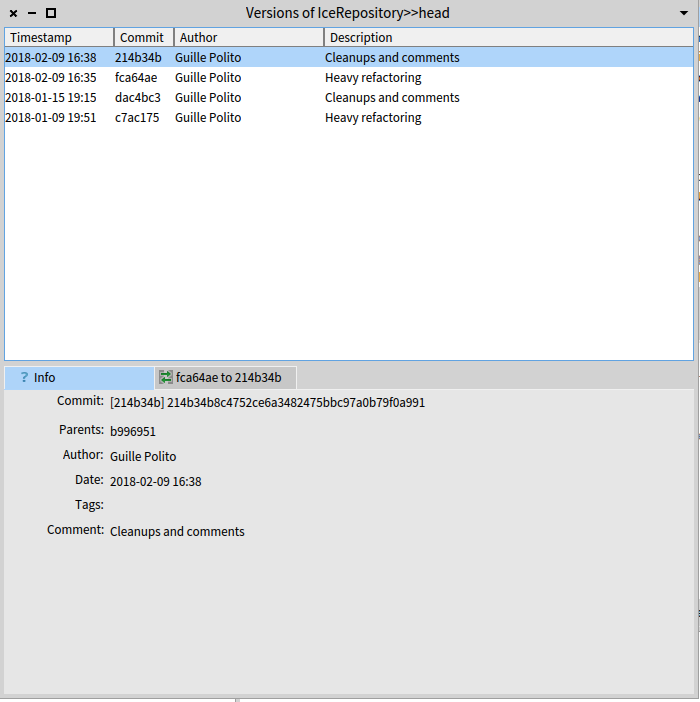
Hi Guille - I have tried the repo browser with the new iceberg loaded in Pharo 6.1 and I couldnât see how it helps me? (I will make a firm point of using 7 now as I think Iâve now got a reasonable grasp of how things should work).
From the threads below - how would I find the commit with my missing class - Sean has pointed me to a git query that helps with that (and presumablyq is something we can plug into iceberg - maybe I will even take a look).
Having identified the hash with the class I want - getting to it is awkward (there is no search - again pretty easy for us to plug in, but something to do) Having got to my commit - how can I retrieve one class? Maybe this is something only in Pharo 7 with Calypso? All I can see are diffs - so Iâd have to copy and paste 20 methods and a class def. doable, but painful. Iâm hoping there is a way to get a shadow copy of the commit from the tonel file and then use it to restore classes and methods? As this sounds like a decent chunk of work, Iâm guessing itâs not done yet? As a fallback, Any thoughts on why git wonât let me checkout a file from that commit? Something about the pathspec (is it mangled in some way)? And if I could restore a tonel file - would iceberg then recognise it to bring it back in, or Would I need to use some filestream foo to do that (as this would at least be a viable workaround for now)? Tim Sent from my iPhone Sent from my iPhone
On 14 Jun 2018, at 08:52, Guillermo Polito <guillermopolito@gmail.com> wrote:
Hi,
Regarding history, right now we have a history browser implemented as a Calypso plugin, that is open using context menu => history or the little box button on the top right of the method pane (second button from the left in the picture):
<Screen Shot 2018-06-14 at 09.34.24.png>
That button will nowadays only be shown if the method's package is linked to an iceberg repository. Once you click it, you will have the entire history of the method.
<Screen Shot 2018-06-14 at 09.47.46.png>
With the possibility to install that version of the method (among others).
Now, regarding the recovery of deleted classes/methods, have you tried the repository browser? Go to Iceberg, right click on a repository and select "Repository". You can there select a commit in history and then in the tabs below see the diff between - your current version and the selected commit - the selected commit and its main parent
Of course any of these can be improved, but if you have concrete requests, it is much easier :)
https://github.com/pharo-vcs/iceberg
Guille
On Wed, Jun 13, 2018 at 11:22 PM Tim Mackinnon <tim@testit.works> wrote: Hi Sean - I tried it again, and it worked:
git log --full-history -- */PrismicBlock.class*
(I got my wildcard slightly wrong for tonel format) - although the beauty of the one I gave was that it shows you all deleted classes (in case you donât know the name)
Iâm still confused why I canât checkout the deleted class though - damn you git, for the cryptic error: : error: pathspec 'PrismicDemo/PrismicBlock.class.st' did not match any file(s) known to git.
I was hoping a quick hack to iceberg might be to OSProcess a few choice git commands to help us along while we work out better ways to do things.
Tim
On 13 Jun 2018, at 21:53, Sean P. DeNigris <sean@clipperadams.com> wrote:
Tim Mackinnon wrote I didnât quite get your fu to work
Interesting.
When I searched for commits affecting the deleted class SuDebianKey:
$ git log --full-history -- */SuDebianKey.class/properties.json
I got back a list of commits (obviously with the last chronologically being the deletion):
commit a38fbced4abec59ff9879d4c607da80dc89b6637 Author: Sean DeNigris <sean@Seans-MBP.home> Date: Mon Jan 30 17:13:58 2017 -0500
Extract Lots to ComputerWorld, Absorb Rest of Old ScriptingBase Project
commit 61175745d57c60a1707d5e2f9a2fc92e6c19a6ea Author: Sean DeNigris <sean@clipperadams.com> Date: Sat Aug 20 17:14:12 2016 -0400
Basket O' Enhancements ...
----- Cheers, Sean -- Sent from: http://forum.world.st/Pharo-Smalltalk-Users-f1310670.html
--
Guille Polito Research Engineer Centre de Recherche en Informatique, Signal et Automatique de Lille CRIStAL - UMR 9189 French National Center for Scientific Research - http://www.cnrs.fr
Web: http://guillep.github.io Phone: +33 06 52 70 66 13
On Thu, Jun 14, 2018 at 10:17 AM Tim Mackinnon <tim@testit.works> wrote:
Hi Guille - I have tried the repo browser with the new iceberg loaded in Pharo 6.1 and I couldnât see how it helps me? (I will make a firm point of using 7 now as I think Iâve now got a reasonable grasp of how things should work).
From the threads below - how would I find the commit with my missing class - Sean has pointed me to a git query that helps with that (and presumablyq is something we can plug into iceberg - maybe I will even take a look).
git log --full-history -- */{{className}}.class/properties.json
Yes, this is definitely *doable* but nobody made the effort to do it yet. Doing it well should take into account what format the code is stored (filetree/tonel) and consider that the format would have changed in the middle of the history. If somebody wants to give it a try I can give some advice.
Having identified the hash with the class I want - getting to it is awkward (there is no search - again pretty easy for us to plug in, but something to do)
Yes, I've found this issue that also in the past. It's not common to me to be looking for a commit like that, and when it is the UI is cumbersome.
From the backend, you can always inspect the repository and do
repository lookupCommit: aCommitishString For example: repository lookupCommit: '726254360c987b9b3472a6098b5869970e819cc9'
Having got to my commit - how can I retrieve one class? Maybe this is something only in Pharo 7 with Calypso? All I can see are diffs - so Iâd have to copy and paste 20 methods and a class def. doable, but painful. Iâm hoping there is a way to get a shadow copy of the commit from the tonel file and then use it to restore classes and methods? As this sounds like a decent chunk of work, Iâm guessing itâs not done yet?
Well on the items of the diff you have a "Revert change" option. That should work on most of the cases. I know that it would be also useful to be able to easily browse a commit. I've opened an issue. https://github.com/pharo-vcs/iceberg/issues/872 For the moment what I do from the backend (inspecting): aCommit fileSystem and you'll get a file system on the commit. So you'll see the exact files of the commit but "uniterpreted". That is, packages will be seen as repositories and not as packages.
As a fallback, Any thoughts on why git wonât let me checkout a file from that commit? Something about the pathspec (is it mangled in some way)?
I don't quite understand. Can you paste here your command?
And if I could restore a tonel file - would iceberg then recognise it to bring it back in,
Nope, Iceberg never reads from the disk working copy. Iceberg reads directly from te blob.
or Would I need to use some filestream foo to do that (as this would at least be a viable workaround for now)?
You can try to read it using Tonel? I don't know exactly how to use tonel directly, I'll let others answer better.
Tim
Sent from my iPhone
Sent from my iPhone On 14 Jun 2018, at 08:52, Guillermo Polito <guillermopolito@gmail.com> wrote:
Hi,
Regarding history, right now we have a history browser implemented as a Calypso plugin, that is open using context menu => history or the little box button on the top right of the method pane (second button from the left in the picture):
<Screen Shot 2018-06-14 at 09.34.24.png>
That button will nowadays only be shown if the method's package is linked to an iceberg repository. Once you click it, you will have the entire history of the method.
<Screen Shot 2018-06-14 at 09.47.46.png>
With the possibility to install that version of the method (among others).
Now, regarding the recovery of deleted classes/methods, have you tried the repository browser? Go to Iceberg, right click on a repository and select "Repository". You can there select a commit in history and then in the tabs below see the diff between - your current version and the selected commit - the selected commit and its main parent
Of course any of these can be improved, but if you have concrete requests, it is much easier :)
https://github.com/pharo-vcs/iceberg
Guille
On Wed, Jun 13, 2018 at 11:22 PM Tim Mackinnon <tim@testit.works> wrote:
Hi Sean - I tried it again, and it worked:
git log --full-history -- */PrismicBlock.class*
(I got my wildcard slightly wrong for tonel format) - although the beauty of the one I gave was that it shows you all deleted classes (in case you donât know the name)
Iâm still confused why I canât checkout the deleted class though - damn you git, for the cryptic error: : error: pathspec 'PrismicDemo/ PrismicBlock.class.st' did not match any file(s) known to git.
I was hoping a quick hack to iceberg might be to OSProcess a few choice git commands to help us along while we work out better ways to do things.
Tim
On 13 Jun 2018, at 21:53, Sean P. DeNigris <sean@clipperadams.com> wrote:
Tim Mackinnon wrote
I didnât quite get your fu to work
Interesting.
When I searched for commits affecting the deleted class SuDebianKey:
$ git log --full-history -- */SuDebianKey.class/properties.json
I got back a list of commits (obviously with the last chronologically being the deletion):
commit a38fbced4abec59ff9879d4c607da80dc89b6637 Author: Sean DeNigris <sean@Seans-MBP.home> Date: Mon Jan 30 17:13:58 2017 -0500
Extract Lots to ComputerWorld, Absorb Rest of Old ScriptingBase Project
commit 61175745d57c60a1707d5e2f9a2fc92e6c19a6ea Author: Sean DeNigris <sean@clipperadams.com> Date: Sat Aug 20 17:14:12 2016 -0400
Basket O' Enhancements ...
----- Cheers, Sean -- Sent from: http://forum.world.st/Pharo-Smalltalk-Users-f1310670.html
--
Guille Polito
Research Engineer
Centre de Recherche en Informatique, Signal et Automatique de Lille
CRIStAL - UMR 9189
French National Center for Scientific Research - *http://www.cnrs.fr <http://www.cnrs.fr>*
*Web:* *http://guillep.github.io* <http://guillep.github.io>
*Phone: *+33 06 52 70 66 13
-- Guille Polito Research Engineer Centre de Recherche en Informatique, Signal et Automatique de Lille CRIStAL - UMR 9189 French National Center for Scientific Research - *http://www.cnrs.fr <http://www.cnrs.fr>* *Web:* *http://guillep.github.io* <http://guillep.github.io> *Phone: *+33 06 52 70 66 13
Guille - just following up on this thread as Iâd like to get more confident with this stuff. You mentioned a Calypso plugin for versions - where is that? I loaded a recentish P7 image and I donât see those icons? Is this something I can easily load to try out? As I donât have that plugin, Iâve followed up on your next suggestion (just to learn how to do this) about looking up a commit having used the command line git history to list all of my deleted classes (I think this might be a useful thing to add to Iceberg BTW). Not sure how to get a repository but I cobbled together the following? (IceLibgitRepository registry detect: [ :r | r name beginsWith: 'Prismic' ]) lookupCommit: '65363adâ. This give me an IceGitCommit - but then what can I easily do with this to try and iterate over deleted classes to try and get the one Iâve identified back? Failing all of this - I went back to the command line again (which should work) - and Iâm really wondering if we do something weird with files or paths when checking in? Having got a valid commitID (I used: git log --diff-filter=D --summary âpretty="format:%cd|%h|%cn%n%s%nâ ) if I simply run the following (with the id and pathname taken from the output of my previous command git checkout 65363ad src/PrismicDemo/PrismicBlock.class.st <http://prismicblock.class.st/> I keep getting an error : error: pathspec âsrc/PrismicDemo/PrismicBlock.class.st <http://prismicblock.class.st/>' did not match any file(s) known to git. Are you able to confirm if you can restore a deleted class from a commit? Iâve tried it on 2 different OSX machines and neither of them works - making me think we do something odd. Tim
On 14 Jun 2018, at 08:52, Guillermo Polito <guillermopolito@gmail.com> wrote:
Hi,
Regarding history, right now we have a history browser implemented as a Calypso plugin, that is open using context menu => history or the little box button on the top right of the method pane (second button from the left in the picture):
<Screen Shot 2018-06-14 at 09.34.24.png>
That button will nowadays only be shown if the method's package is linked to an iceberg repository. Once you click it, you will have the entire history of the method.
<Screen Shot 2018-06-14 at 09.47.46.png>
With the possibility to install that version of the method (among others).
Now, regarding the recovery of deleted classes/methods, have you tried the repository browser? Go to Iceberg, right click on a repository and select "Repository". You can there select a commit in history and then in the tabs below see the diff between - your current version and the selected commit - the selected commit and its main parent
Of course any of these can be improved, but if you have concrete requests, it is much easier :)
https://github.com/pharo-vcs/iceberg <https://github.com/pharo-vcs/iceberg>
Guille
On Wed, Jun 13, 2018 at 11:22 PM Tim Mackinnon <tim@testit.works> wrote: Hi Sean - I tried it again, and it worked:
git log --full-history -- */PrismicBlock.class*
(I got my wildcard slightly wrong for tonel format) - although the beauty of the one I gave was that it shows you all deleted classes (in case you donât know the name)
Iâm still confused why I canât checkout the deleted class though - damn you git, for the cryptic error: : error: pathspec 'PrismicDemo/PrismicBlock.class.st <http://prismicblock.class.st/>' did not match any file(s) known to git.
I was hoping a quick hack to iceberg might be to OSProcess a few choice git commands to help us along while we work out better ways to do things.
Tim
On 13 Jun 2018, at 21:53, Sean P. DeNigris <sean@clipperadams.com <mailto:sean@clipperadams.com>> wrote:
Tim Mackinnon wrote
I didnât quite get your fu to work
Interesting.
When I searched for commits affecting the deleted class SuDebianKey:
$ git log --full-history -- */SuDebianKey.class/properties.json
I got back a list of commits (obviously with the last chronologically being the deletion):
commit a38fbced4abec59ff9879d4c607da80dc89b6637 Author: Sean DeNigris <sean@Seans-MBP.home <mailto:sean@Seans-MBP.home>> Date: Mon Jan 30 17:13:58 2017 -0500
Extract Lots to ComputerWorld, Absorb Rest of Old ScriptingBase Project
commit 61175745d57c60a1707d5e2f9a2fc92e6c19a6ea Author: Sean DeNigris <sean@clipperadams.com <mailto:sean@clipperadams.com>> Date: Sat Aug 20 17:14:12 2016 -0400
Basket O' Enhancements ...
----- Cheers, Sean -- Sent from: http://forum.world.st/Pharo-Smalltalk-Users-f1310670.html <http://forum.world.st/Pharo-Smalltalk-Users-f1310670.html>
--
Guille Polito Research Engineer
Centre de Recherche en Informatique, Signal et Automatique de Lille CRIStAL - UMR 9189 French National Center for Scientific Research - http://www.cnrs.fr <http://www.cnrs.fr/>
Web: http://guillep.github.io <http://guillep.github.io/> Phone: +33 06 52 70 66 13
Just to add more information to this - I did try what was suggested here (it refers to a branch and not a commit id - but heck worth a shot) https://stackoverflow.com/questions/5989592/git-cannot-checkout-branch-error... <https://stackoverflow.com/questions/5989592/git-cannot-checkout-branch-error...> - but nah /refs/heads/src⦠or /origin/src⦠didnât seem to give a recognised path. Grasping at straws I also tried --ignore-skip-worktree-bits So Iâm really curious if anyone else has managed to restore a deleted Pharo class in git? Tim
On 21 Jun 2018, at 16:07, Tim Mackinnon <tim@testit.works> wrote:
Guille - just following up on this thread as Iâd like to get more confident with this stuff.
You mentioned a Calypso plugin for versions - where is that? I loaded a recentish P7 image and I donât see those icons? Is this something I can easily load to try out?
As I donât have that plugin, Iâve followed up on your next suggestion (just to learn how to do this) about looking up a commit having used the command line git history to list all of my deleted classes (I think this might be a useful thing to add to Iceberg BTW).
Not sure how to get a repository but I cobbled together the following?
(IceLibgitRepository registry detect: [ :r | r name beginsWith: 'Prismic' ]) lookupCommit: '65363adâ.
This give me an IceGitCommit - but then what can I easily do with this to try and iterate over deleted classes to try and get the one Iâve identified back?
Failing all of this - I went back to the command line again (which should work) - and Iâm really wondering if we do something weird with files or paths when checking in?
Having got a valid commitID (I used: git log --diff-filter=D --summary âpretty="format:%cd|%h|%cn%n%s%nâ )
if I simply run the following (with the id and pathname taken from the output of my previous command
git checkout 65363ad src/PrismicDemo/PrismicBlock.class.st <http://prismicblock.class.st/>
I keep getting an error : error: pathspec âsrc/PrismicDemo/PrismicBlock.class.st <http://prismicblock.class.st/>' did not match any file(s) known to git.
Are you able to confirm if you can restore a deleted class from a commit? Iâve tried it on 2 different OSX machines and neither of them works - making me think we do something odd.
Tim
On 14 Jun 2018, at 08:52, Guillermo Polito <guillermopolito@gmail.com <mailto:guillermopolito@gmail.com>> wrote:
Hi,
Regarding history, right now we have a history browser implemented as a Calypso plugin, that is open using context menu => history or the little box button on the top right of the method pane (second button from the left in the picture):
<Screen Shot 2018-06-14 at 09.34.24.png>
That button will nowadays only be shown if the method's package is linked to an iceberg repository. Once you click it, you will have the entire history of the method.
<Screen Shot 2018-06-14 at 09.47.46.png>
With the possibility to install that version of the method (among others).
Now, regarding the recovery of deleted classes/methods, have you tried the repository browser? Go to Iceberg, right click on a repository and select "Repository". You can there select a commit in history and then in the tabs below see the diff between - your current version and the selected commit - the selected commit and its main parent
Of course any of these can be improved, but if you have concrete requests, it is much easier :)
https://github.com/pharo-vcs/iceberg <https://github.com/pharo-vcs/iceberg>
Guille
On Wed, Jun 13, 2018 at 11:22 PM Tim Mackinnon <tim@testit.works <mailto:tim@testit.works>> wrote: Hi Sean - I tried it again, and it worked:
git log --full-history -- */PrismicBlock.class*
(I got my wildcard slightly wrong for tonel format) - although the beauty of the one I gave was that it shows you all deleted classes (in case you donât know the name)
Iâm still confused why I canât checkout the deleted class though - damn you git, for the cryptic error: : error: pathspec 'PrismicDemo/PrismicBlock.class.st <http://prismicblock.class.st/>' did not match any file(s) known to git.
I was hoping a quick hack to iceberg might be to OSProcess a few choice git commands to help us along while we work out better ways to do things.
Tim
On 13 Jun 2018, at 21:53, Sean P. DeNigris <sean@clipperadams.com <mailto:sean@clipperadams.com>> wrote:
Tim Mackinnon wrote
I didnât quite get your fu to work
Interesting.
When I searched for commits affecting the deleted class SuDebianKey:
$ git log --full-history -- */SuDebianKey.class/properties.json
I got back a list of commits (obviously with the last chronologically being the deletion):
commit a38fbced4abec59ff9879d4c607da80dc89b6637 Author: Sean DeNigris <sean@Seans-MBP.home <mailto:sean@Seans-MBP.home>> Date: Mon Jan 30 17:13:58 2017 -0500
Extract Lots to ComputerWorld, Absorb Rest of Old ScriptingBase Project
commit 61175745d57c60a1707d5e2f9a2fc92e6c19a6ea Author: Sean DeNigris <sean@clipperadams.com <mailto:sean@clipperadams.com>> Date: Sat Aug 20 17:14:12 2016 -0400
Basket O' Enhancements ...
----- Cheers, Sean -- Sent from: http://forum.world.st/Pharo-Smalltalk-Users-f1310670.html <http://forum.world.st/Pharo-Smalltalk-Users-f1310670.html>
--
Guille Polito Research Engineer
Centre de Recherche en Informatique, Signal et Automatique de Lille CRIStAL - UMR 9189 French National Center for Scientific Research - http://www.cnrs.fr <http://www.cnrs.fr/>
Web: http://guillep.github.io <http://guillep.github.io/> Phone: +33 06 52 70 66 13
Iâd be really interested if someone with lower level GIT knowledge might try a: git checkout <gitid> src/<proj>/<class>.class.st <http://prismicblock.class.st/> For their project - as I donât understand what Iâm doing wrong - and Iâd like the comfort of knowing that our source is in a place/state where we can rely on normal git tools in a case of emergency. At the moment, Iâm a bit nervous that we are corrupting something . Tim
On 22 Jun 2018, at 01:39, Tim Mackinnon <tim@testit.works> wrote:
Just to add more information to this - I did try what was suggested here (it refers to a branch and not a commit id - but heck worth a shot) https://stackoverflow.com/questions/5989592/git-cannot-checkout-branch-error... <https://stackoverflow.com/questions/5989592/git-cannot-checkout-branch-error...> - but nah /refs/heads/src⦠or /origin/src⦠didnât seem to give a recognised path.
Grasping at straws I also tried --ignore-skip-worktree-bits
So Iâm really curious if anyone else has managed to restore a deleted Pharo class in git?
Tim
On 21 Jun 2018, at 16:07, Tim Mackinnon <tim@testit.works <mailto:tim@testit.works>> wrote:
Guille - just following up on this thread as Iâd like to get more confident with this stuff.
You mentioned a Calypso plugin for versions - where is that? I loaded a recentish P7 image and I donât see those icons? Is this something I can easily load to try out?
As I donât have that plugin, Iâve followed up on your next suggestion (just to learn how to do this) about looking up a commit having used the command line git history to list all of my deleted classes (I think this might be a useful thing to add to Iceberg BTW).
Not sure how to get a repository but I cobbled together the following?
(IceLibgitRepository registry detect: [ :r | r name beginsWith: 'Prismic' ]) lookupCommit: '65363adâ.
This give me an IceGitCommit - but then what can I easily do with this to try and iterate over deleted classes to try and get the one Iâve identified back?
Failing all of this - I went back to the command line again (which should work) - and Iâm really wondering if we do something weird with files or paths when checking in?
Having got a valid commitID (I used: git log --diff-filter=D --summary âpretty="format:%cd|%h|%cn%n%s%nâ )
if I simply run the following (with the id and pathname taken from the output of my previous command
git checkout 65363ad src/PrismicDemo/PrismicBlock.class.st <http://prismicblock.class.st/>
I keep getting an error : error: pathspec âsrc/PrismicDemo/PrismicBlock.class.st <http://prismicblock.class.st/>' did not match any file(s) known to git.
Are you able to confirm if you can restore a deleted class from a commit? Iâve tried it on 2 different OSX machines and neither of them works - making me think we do something odd.
Tim
On 14 Jun 2018, at 08:52, Guillermo Polito <guillermopolito@gmail.com <mailto:guillermopolito@gmail.com>> wrote:
Hi,
Regarding history, right now we have a history browser implemented as a Calypso plugin, that is open using context menu => history or the little box button on the top right of the method pane (second button from the left in the picture):
<Screen Shot 2018-06-14 at 09.34.24.png>
That button will nowadays only be shown if the method's package is linked to an iceberg repository. Once you click it, you will have the entire history of the method.
<Screen Shot 2018-06-14 at 09.47.46.png>
With the possibility to install that version of the method (among others).
Now, regarding the recovery of deleted classes/methods, have you tried the repository browser? Go to Iceberg, right click on a repository and select "Repository". You can there select a commit in history and then in the tabs below see the diff between - your current version and the selected commit - the selected commit and its main parent
Of course any of these can be improved, but if you have concrete requests, it is much easier :)
https://github.com/pharo-vcs/iceberg <https://github.com/pharo-vcs/iceberg>
Guille
On Wed, Jun 13, 2018 at 11:22 PM Tim Mackinnon <tim@testit.works <mailto:tim@testit.works>> wrote: Hi Sean - I tried it again, and it worked:
git log --full-history -- */PrismicBlock.class*
(I got my wildcard slightly wrong for tonel format) - although the beauty of the one I gave was that it shows you all deleted classes (in case you donât know the name)
Iâm still confused why I canât checkout the deleted class though - damn you git, for the cryptic error: : error: pathspec 'PrismicDemo/PrismicBlock.class.st <http://prismicblock.class.st/>' did not match any file(s) known to git.
I was hoping a quick hack to iceberg might be to OSProcess a few choice git commands to help us along while we work out better ways to do things.
Tim
On 13 Jun 2018, at 21:53, Sean P. DeNigris <sean@clipperadams.com <mailto:sean@clipperadams.com>> wrote:
Tim Mackinnon wrote
I didnât quite get your fu to work
Interesting.
When I searched for commits affecting the deleted class SuDebianKey:
$ git log --full-history -- */SuDebianKey.class/properties.json
I got back a list of commits (obviously with the last chronologically being the deletion):
commit a38fbced4abec59ff9879d4c607da80dc89b6637 Author: Sean DeNigris <sean@Seans-MBP.home <mailto:sean@Seans-MBP.home>> Date: Mon Jan 30 17:13:58 2017 -0500
Extract Lots to ComputerWorld, Absorb Rest of Old ScriptingBase Project
commit 61175745d57c60a1707d5e2f9a2fc92e6c19a6ea Author: Sean DeNigris <sean@clipperadams.com <mailto:sean@clipperadams.com>> Date: Sat Aug 20 17:14:12 2016 -0400
Basket O' Enhancements ...
----- Cheers, Sean -- Sent from: http://forum.world.st/Pharo-Smalltalk-Users-f1310670.html <http://forum.world.st/Pharo-Smalltalk-Users-f1310670.html>
--
Guille Polito Research Engineer
Centre de Recherche en Informatique, Signal et Automatique de Lille CRIStAL - UMR 9189 French National Center for Scientific Research - http://www.cnrs.fr <http://www.cnrs.fr/>
Web: http://guillep.github.io <http://guillep.github.io/> Phone: +33 06 52 70 66 13

On 25 June 2018 at 19:41, Tim Mackinnon <tim@testit.works> wrote:
Iâd be really interested if someone with lower level GIT knowledge might try a:
git checkout <gitid> src/<proj>/<class>.class.st <http://prismicblock.class.st/>
For their project - as I donât understand what Iâm doing wrong - and Iâd like the comfort of knowing that our source is in a place/state where we can rely on normal git tools in a case of emergency. At the moment, Iâm a bit nervous that we are corrupting something .
Tim
I'm not sure if this is what you wanted, but I found a test case for for Pharo 7, a deleted class "MultiByteFileStreamTest.class.st" https://github.com/pharo-project/pharo/pull/1031/files#diff-750a25fb99d29cda...
From Windows 10 cmd.exe I tried the following (I can't remember which tool installed `git`)...
mkdir C:\temp\test cd C:\temp\test git clone git@github.com:pharo-project/pharo.git cd pharo\src\Deprecated70 dir Multi* no result git checkout e74308e67d9f84 MultiByteFileStreamTest.class.st dir Multi* MultiByteFileStreamTest.class.st
Then I compared the file I checked out to the raw file on github and they were identical... https://www.diffchecker.com/gVCpJzFe btw, I did get a momentary error "error: pathspec 'src/Deprecated70/ MultiByteFileStreamTest.class.st' did not match any file(s) known to git." when I incorrectly did...
cd pharo\src\Deprecated70 git git checkout e74308e67d9f84 src/Deprecated70/ MultiByteFileStreamTest.class.st
This worked with the longer path...
cd pharo git git checkout e74308e67d9f84 src/Deprecated70/ MultiByteFileStreamTest.class.st
cheers -ben
Hey thanks Ben - this still doesnât work for me⦠good idea to try on the Pharo repo itself. I have a fork of it, which I catch up periodically - so I tried a similar suggestion to you - went into my directory (underneath the src folder) and typed: log --diff-filter=D --summary --graph --pretty='format:%cd | %h | %H | %cn%n-> %s%nâ This gave me: Tue Jun 19 19:28:37 2018 +0200 | 13e81343e | 13e81343e8a23a8d6ca43f1c77b804b8134fc986 | CyrilFerlicot -> Remove now useless logs delete mode 100755 bootstrap/scripts/printFolderContent.sh Mon Jun 18 16:50:19 2018 +0200 | 0433d908d | 0433d908de2987fa0069a47dee1f0794ccbb52c2 | GitHub -> Revert "22161-Add-more-log-to-bootstrap" delete mode 100755 bootstrap/scripts/printFolderContent.sh Thu Jun 14 11:41:16 2018 +0200 | b4a285a61 | b4a285a61d3eb0cc1e642b2fcc242dac7092617f | Marcus Denker -> fix the last sender of #asIcon https://pharo.fogbugz.com/f/cases/22139/fix-the-last-sender-of-asIcon delete mode 100644 src/Polymorph-Widgets-Rules/IconShortcutRule.class.st So then I tried to recover that last one (again at root underneath the src directory) git checkout b4a285a61 src/Polymorph-Widgets-Rules/IconShortcutRule.class.st error: pathspec 'src/Polymorph-Widgets-Rules/IconShortcutRule.class.st' did not match any file(s) known to git. And I still get that dreaded pathspec error. This is on OSX (not windows) - so Iâm struggling to understand what I could be doing wrong. It must be something obvious - but damned if I can see how Iâm doing anything different to you. And it wouldnât make sense that git is broken on OSX? Tim
On 25 Jun 2018, at 14:21, Ben Coman <btc@openInWorld.com> wrote:
On 25 June 2018 at 19:41, Tim Mackinnon <tim@testit.works <mailto:tim@testit.works>> wrote: Iâd be really interested if someone with lower level GIT knowledge might try a:
git checkout <gitid> src/<proj>/<class>.class.st <http://prismicblock.class.st/>
For their project - as I donât understand what Iâm doing wrong - and Iâd like the comfort of knowing that our source is in a place/state where we can rely on normal git tools in a case of emergency. At the moment, Iâm a bit nervous that we are corrupting something .
Tim
I'm not sure if this is what you wanted, but I found a test case for for Pharo 7, a deleted class "MultiByteFileStreamTest.class.st <http://multibytefilestreamtest.class.st/>" https://github.com/pharo-project/pharo/pull/1031/files#diff-750a25fb99d29cda... <https://github.com/pharo-project/pharo/pull/1031/files#diff-750a25fb99d29cda...>
From Windows 10 cmd.exe I tried the following (I can't remember which tool installed `git`)...
mkdir C:\temp\test cd C:\temp\test git clone git@github.com:pharo-project/pharo.git cd pharo\src\Deprecated70 dir Multi* no result git checkout e74308e67d9f84 MultiByteFileStreamTest.class.st <http://multibytefilestreamtest.class.st/> dir Multi* MultiByteFileStreamTest.class.st <http://multibytefilestreamtest.class.st/>
Then I compared the file I checked out to the raw file on github and they were identical... https://www.diffchecker.com/gVCpJzFe <https://www.diffchecker.com/gVCpJzFe>
btw, I did get a momentary error "error: pathspec 'src/Deprecated70/MultiByteFileStreamTest.class.st <http://multibytefilestreamtest.class.st/>' did not match any file(s) known to git." when I incorrectly did...
cd pharo\src\Deprecated70 git git checkout e74308e67d9f84 src/Deprecated70/MultiByteFileStreamTest.class.st <http://multibytefilestreamtest.class.st/>
This worked with the longer path...
cd pharo git git checkout e74308e67d9f84 src/Deprecated70/MultiByteFileStreamTest.class.st <http://multibytefilestreamtest.class.st/> cheers -ben
And just to add to this - I just did a git clone (git clone git@github.com <mailto:git@github.com>:pharo-project/pharo.git) in a fresh directory and can see that same deleted file - and when I try to do a checkout, it gives the path spec error. This is very weird - is it some osx thing? I will try it on ubuntu - but I feel I must be missing something, like do I need a different prefix on path names (but you didnât seem to need one)? Iâd be very worried if git is acting up⦠but I still suspect user error here. Tim
On 28 Jun 2018, at 00:38, Tim Mackinnon <tim@testit.works> wrote:
Hey thanks Ben - this still doesnât work for me⦠good idea to try on the Pharo repo itself.
I have a fork of it, which I catch up periodically - so I tried a similar suggestion to you - went into my directory (underneath the src folder) and typed:
log --diff-filter=D --summary --graph --pretty='format:%cd | %h | %H | %cn%n-> %s%nâ
This gave me:
Tue Jun 19 19:28:37 2018 +0200 | 13e81343e | 13e81343e8a23a8d6ca43f1c77b804b8134fc986 | CyrilFerlicot -> Remove now useless logs
delete mode 100755 bootstrap/scripts/printFolderContent.sh
Mon Jun 18 16:50:19 2018 +0200 | 0433d908d | 0433d908de2987fa0069a47dee1f0794ccbb52c2 | GitHub -> Revert "22161-Add-more-log-to-bootstrap"
delete mode 100755 bootstrap/scripts/printFolderContent.sh
Thu Jun 14 11:41:16 2018 +0200 | b4a285a61 | b4a285a61d3eb0cc1e642b2fcc242dac7092617f | Marcus Denker -> fix the last sender of #asIcon https://pharo.fogbugz.com/f/cases/22139/fix-the-last-sender-of-asIcon <https://pharo.fogbugz.com/f/cases/22139/fix-the-last-sender-of-asIcon>
delete mode 100644 src/Polymorph-Widgets-Rules/IconShortcutRule.class.st <http://iconshortcutrule.class.st/>
So then I tried to recover that last one (again at root underneath the src directory)
git checkout b4a285a61 src/Polymorph-Widgets-Rules/IconShortcutRule.class.st <http://iconshortcutrule.class.st/> error: pathspec 'src/Polymorph-Widgets-Rules/IconShortcutRule.class.st <http://iconshortcutrule.class.st/>' did not match any file(s) known to git.
And I still get that dreaded pathspec error. This is on OSX (not windows) - so Iâm struggling to understand what I could be doing wrong. It must be something obvious - but damned if I can see how Iâm doing anything different to you. And it wouldnât make sense that git is broken on OSX?
Tim
On 25 Jun 2018, at 14:21, Ben Coman <btc@openInWorld.com <mailto:btc@openInWorld.com>> wrote:
On 25 June 2018 at 19:41, Tim Mackinnon <tim@testit.works <mailto:tim@testit.works>> wrote: Iâd be really interested if someone with lower level GIT knowledge might try a:
git checkout <gitid> src/<proj>/<class>.class.st <http://prismicblock.class.st/>
For their project - as I donât understand what Iâm doing wrong - and Iâd like the comfort of knowing that our source is in a place/state where we can rely on normal git tools in a case of emergency. At the moment, Iâm a bit nervous that we are corrupting something .
Tim
I'm not sure if this is what you wanted, but I found a test case for for Pharo 7, a deleted class "MultiByteFileStreamTest.class.st <http://multibytefilestreamtest.class.st/>" https://github.com/pharo-project/pharo/pull/1031/files#diff-750a25fb99d29cda... <https://github.com/pharo-project/pharo/pull/1031/files#diff-750a25fb99d29cda...>
From Windows 10 cmd.exe I tried the following (I can't remember which tool installed `git`)...
mkdir C:\temp\test cd C:\temp\test git clone git@github.com <mailto:git@github.com>:pharo-project/pharo.git cd pharo\src\Deprecated70 dir Multi* no result git checkout e74308e67d9f84 MultiByteFileStreamTest.class.st <http://multibytefilestreamtest.class.st/> dir Multi* MultiByteFileStreamTest.class.st <http://multibytefilestreamtest.class.st/>
Then I compared the file I checked out to the raw file on github and they were identical... https://www.diffchecker.com/gVCpJzFe <https://www.diffchecker.com/gVCpJzFe>
btw, I did get a momentary error "error: pathspec 'src/Deprecated70/MultiByteFileStreamTest.class.st <http://multibytefilestreamtest.class.st/>' did not match any file(s) known to git." when I incorrectly did...
cd pharo\src\Deprecated70 git git checkout e74308e67d9f84 src/Deprecated70/MultiByteFileStreamTest.class.st <http://multibytefilestreamtest.class.st/>
This worked with the longer path...
cd pharo git git checkout e74308e67d9f84 src/Deprecated70/MultiByteFileStreamTest.class.st <http://multibytefilestreamtest.class.st/> cheers -ben
For the record - I get the same error using those steps on Ubuntu as well. So I must be doing something wrong? (Note in my message when I pasted the command used - I neglected the git in front of: log --diff-filter=D --summary âpretty="format:%cd | %h | %H | %cn%n-> %s%nâ) Tim
On 28 Jun 2018, at 00:46, Tim Mackinnon <tim@testit.works> wrote:
And just to add to this - I just did a git clone (git clone git@github.com <mailto:git@github.com>:pharo-project/pharo.git) in a fresh directory and can see that same deleted file - and when I try to do a checkout, it gives the path spec error.
This is very weird - is it some osx thing? I will try it on ubuntu - but I feel I must be missing something, like do I need a different prefix on path names (but you didnât seem to need one)?
Iâd be very worried if git is acting up⦠but I still suspect user error here.
Tim
On 28 Jun 2018, at 00:38, Tim Mackinnon <tim@testit.works <mailto:tim@testit.works>> wrote:
Hey thanks Ben - this still doesnât work for me⦠good idea to try on the Pharo repo itself.
I have a fork of it, which I catch up periodically - so I tried a similar suggestion to you - went into my directory (underneath the src folder) and typed:
log --diff-filter=D --summary --graph --pretty='format:%cd | %h | %H | %cn%n-> %s%nâ
This gave me:
Tue Jun 19 19:28:37 2018 +0200 | 13e81343e | 13e81343e8a23a8d6ca43f1c77b804b8134fc986 | CyrilFerlicot -> Remove now useless logs
delete mode 100755 bootstrap/scripts/printFolderContent.sh
Mon Jun 18 16:50:19 2018 +0200 | 0433d908d | 0433d908de2987fa0069a47dee1f0794ccbb52c2 | GitHub -> Revert "22161-Add-more-log-to-bootstrap"
delete mode 100755 bootstrap/scripts/printFolderContent.sh
Thu Jun 14 11:41:16 2018 +0200 | b4a285a61 | b4a285a61d3eb0cc1e642b2fcc242dac7092617f | Marcus Denker -> fix the last sender of #asIcon https://pharo.fogbugz.com/f/cases/22139/fix-the-last-sender-of-asIcon <https://pharo.fogbugz.com/f/cases/22139/fix-the-last-sender-of-asIcon>
delete mode 100644 src/Polymorph-Widgets-Rules/IconShortcutRule.class.st <http://iconshortcutrule.class.st/>
So then I tried to recover that last one (again at root underneath the src directory)
git checkout b4a285a61 src/Polymorph-Widgets-Rules/IconShortcutRule.class.st <http://iconshortcutrule.class.st/> error: pathspec 'src/Polymorph-Widgets-Rules/IconShortcutRule.class.st <http://iconshortcutrule.class.st/>' did not match any file(s) known to git.
And I still get that dreaded pathspec error. This is on OSX (not windows) - so Iâm struggling to understand what I could be doing wrong. It must be something obvious - but damned if I can see how Iâm doing anything different to you. And it wouldnât make sense that git is broken on OSX?
Tim
On 25 Jun 2018, at 14:21, Ben Coman <btc@openInWorld.com <mailto:btc@openInWorld.com>> wrote:
On 25 June 2018 at 19:41, Tim Mackinnon <tim@testit.works <mailto:tim@testit.works>> wrote: Iâd be really interested if someone with lower level GIT knowledge might try a:
git checkout <gitid> src/<proj>/<class>.class.st <http://prismicblock.class.st/>
For their project - as I donât understand what Iâm doing wrong - and Iâd like the comfort of knowing that our source is in a place/state where we can rely on normal git tools in a case of emergency. At the moment, Iâm a bit nervous that we are corrupting something .
Tim
I'm not sure if this is what you wanted, but I found a test case for for Pharo 7, a deleted class "MultiByteFileStreamTest.class.st <http://multibytefilestreamtest.class.st/>" https://github.com/pharo-project/pharo/pull/1031/files#diff-750a25fb99d29cda... <https://github.com/pharo-project/pharo/pull/1031/files#diff-750a25fb99d29cda...>
From Windows 10 cmd.exe I tried the following (I can't remember which tool installed `git`)...
mkdir C:\temp\test cd C:\temp\test git clone git@github.com <mailto:git@github.com>:pharo-project/pharo.git cd pharo\src\Deprecated70 dir Multi* no result git checkout e74308e67d9f84 MultiByteFileStreamTest.class.st <http://multibytefilestreamtest.class.st/> dir Multi* MultiByteFileStreamTest.class.st <http://multibytefilestreamtest.class.st/>
Then I compared the file I checked out to the raw file on github and they were identical... https://www.diffchecker.com/gVCpJzFe <https://www.diffchecker.com/gVCpJzFe>
btw, I did get a momentary error "error: pathspec 'src/Deprecated70/MultiByteFileStreamTest.class.st <http://multibytefilestreamtest.class.st/>' did not match any file(s) known to git." when I incorrectly did...
cd pharo\src\Deprecated70 git git checkout e74308e67d9f84 src/Deprecated70/MultiByteFileStreamTest.class.st <http://multibytefilestreamtest.class.st/>
This worked with the longer path...
cd pharo git git checkout e74308e67d9f84 src/Deprecated70/MultiByteFileStreamTest.class.st <http://multibytefilestreamtest.class.st/> cheers -ben
You mentioned a Calypso plugin for versions - where is that? I loaded a recentish P7 image and I donât see those icons? Is this something I can easily load to try out?
As soon as a class is inside a package that is managed by iceberg, you should see in Calypso a new button and menu item on methods (called History, with a little box icon).
Not sure how to get a repository but I cobbled together the following?
(IceLibgitRepository registry detect: [ :r | r name beginsWith: 'Prismic' ]) lookupCommit: '65363adâ.
This give me an IceGitCommit - but then what can I easily do with this to try and iterate over deleted classes to try and get the one Iâve identified back?
Well there is no magic :). Either you walk the commits (#parent or #newCommitWalk (!! too low level)) and calculate for each a diff against its parent (#diffTo:). Other thing you can do to check how IceGitLog is implemented, using directly libgit. About the git error, I don't have time to check now but, I think it may be something easy that is going under your nose :) You got your commitish from the `git log --diff-filter=D --summary âpretty="format:%cd|%h|%cn%n%s%nâ`, didn't you? Then, this means the commitish you got has the file already deleted! So if you want to recover it, you have to check its parent! Can you try (notice the added the ~1) $ git checkout 65363ad~1 src/PrismicDemo/PrismicBlock.class.st ? On Thu, Jun 28, 2018 at 2:32 AM Tim Mackinnon <tim@testit.works> wrote:
For the record - I get the same error using those steps on Ubuntu as well. So I must be doing something wrong?
(Note in my message when I pasted the command used - I neglected the git in front of: log --diff-filter=D --summary âpretty="format:%cd | %h | %H | %cn%n-> %s%nâ)
Tim
On 28 Jun 2018, at 00:46, Tim Mackinnon <tim@testit.works> wrote:
And just to add to this - I just did a git clone (git clone git@github.com :pharo-project/pharo.git) in a fresh directory and can see that same deleted file - and when I try to do a checkout, it gives the path spec error.
This is very weird - is it some osx thing? I will try it on ubuntu - but I feel I must be missing something, like do I need a different prefix on path names (but you didnât seem to need one)?
Iâd be very worried if git is acting up⦠but I still suspect user error here.
Tim
On 28 Jun 2018, at 00:38, Tim Mackinnon <tim@testit.works> wrote:
Hey thanks Ben - this still doesnât work for me⦠good idea to try on the Pharo repo itself.
I have a fork of it, which I catch up periodically - so I tried a similar suggestion to you - went into my directory (underneath the src folder) and typed:
log --diff-filter=D --summary --graph --pretty='format:%cd | %h | %H | %cn%n-> %s%nâ
This gave me:
Tue Jun 19 19:28:37 2018 +0200 | 13e81343e | 13e81343e8a23a8d6ca43f1c77b804b8134fc986 | CyrilFerlicot -> Remove now useless logs
delete mode 100755 bootstrap/scripts/printFolderContent.sh
Mon Jun 18 16:50:19 2018 +0200 | 0433d908d | 0433d908de2987fa0069a47dee1f0794ccbb52c2 | GitHub -> Revert "22161-Add-more-log-to-bootstrap"
delete mode 100755 bootstrap/scripts/printFolderContent.sh
Thu Jun 14 11:41:16 2018 +0200 | b4a285a61 | b4a285a61d3eb0cc1e642b2fcc242dac7092617f | Marcus Denker -> fix the last sender of #asIcon https://pharo.fogbugz.com/f/cases/22139/fix-the-last-sender-of-asIcon
delete mode 100644 src/Polymorph-Widgets-Rules/IconShortcutRule.class.st <http://iconshortcutrule.class.st/>
So then I tried to recover that last one (again at root underneath the src directory)
git checkout b4a285a61 src/Polymorph-Widgets-Rules/ IconShortcutRule.class.st <http://iconshortcutrule.class.st/> error: pathspec 'src/Polymorph-Widgets-Rules/IconShortcutRule.class.st <http://iconshortcutrule.class.st/>' did not match any file(s) known to git.
And I still get that dreaded pathspec error. This is on OSX (not windows) - so Iâm struggling to understand what I could be doing wrong. It must be something obvious - but damned if I can see how Iâm doing anything different to you. And it wouldnât make sense that git is broken on OSX?
Tim
On 25 Jun 2018, at 14:21, Ben Coman <btc@openInWorld.com> wrote:
On 25 June 2018 at 19:41, Tim Mackinnon <tim@testit.works> wrote:
Iâd be really interested if someone with lower level GIT knowledge might try a:
git checkout <gitid> src/<proj>/<class>.class.st <http://prismicblock.class.st/>
For their project - as I donât understand what Iâm doing wrong - and Iâd like the comfort of knowing that our source is in a place/state where we can rely on normal git tools in a case of emergency. At the moment, Iâm a bit nervous that we are corrupting something .
Tim
I'm not sure if this is what you wanted, but I found a test case for for Pharo 7, a deleted class "MultiByteFileStreamTest.class.st <http://multibytefilestreamtest.class.st/>"
https://github.com/pharo-project/pharo/pull/1031/files#diff-750a25fb99d29cda...
From Windows 10 cmd.exe I tried the following (I can't remember which tool installed `git`)...
mkdir C:\temp\test cd C:\temp\test git clone git@github.com:pharo-project/pharo.git cd pharo\src\Deprecated70 dir Multi* no result git checkout e74308e67d9f84 MultiByteFileStreamTest.class.st <http://multibytefilestreamtest.class.st/> dir Multi* MultiByteFileStreamTest.class.st <http://multibytefilestreamtest.class.st/>
Then I compared the file I checked out to the raw file on github and they were identical... https://www.diffchecker.com/gVCpJzFe
btw, I did get a momentary error "error: pathspec 'src/Deprecated70/ MultiByteFileStreamTest.class.st <http://multibytefilestreamtest.class.st/>' did not match any file(s) known to git." when I incorrectly did...
cd pharo\src\Deprecated70 git git checkout e74308e67d9f84 src/Deprecated70/ MultiByteFileStreamTest.class.st <http://multibytefilestreamtest.class.st/>
This worked with the longer path...
cd pharo git git checkout e74308e67d9f84 src/Deprecated70/ MultiByteFileStreamTest.class.st <http://multibytefilestreamtest.class.st/>
cheers -ben
-- Guille Polito Research Engineer Centre de Recherche en Informatique, Signal et Automatique de Lille CRIStAL - UMR 9189 French National Center for Scientific Research - *http://www.cnrs.fr <http://www.cnrs.fr>* *Web:* *http://guillep.github.io* <http://guillep.github.io> *Phone: *+33 06 52 70 66 13
On 28 June 2018 at 07:38, Tim Mackinnon <tim@testit.works> wrote:
Hey thanks Ben - this still doesnât work for me⦠good idea to try on the Pharo repo itself.
I have a fork of it, which I catch up periodically - so I tried a similar suggestion to you - went into my directory (underneath the src folder) and typed:
log --diff-filter=D --summary --graph --pretty='format:%cd | %h | %H | %cn%n-> %s%nâ
This gave me:
Tue Jun 19 19:28:37 2018 +0200 | 13e81343e | 13e81343e8a23a8d6ca43f1c77b804b8134fc986 | CyrilFerlicot -> Remove now useless logs
delete mode 100755 bootstrap/scripts/printFolderContent.sh
Mon Jun 18 16:50:19 2018 +0200 | 0433d908d | 0433d908de2987fa0069a47dee1f0794ccbb52c2 | GitHub -> Revert "22161-Add-more-log-to-bootstrap"
delete mode 100755 bootstrap/scripts/printFolderContent.sh
Thu Jun 14 11:41:16 2018 +0200 | b4a285a61 | b4a285a61d3eb0cc1e642b2fcc242dac7092617f | Marcus Denker -> fix the last sender of #asIcon https://pharo.fogbugz.com/f/ cases/22139/fix-the-last-sender-of-asIcon
delete mode 100644 src/Polymorph-Widgets-Rules/IconShortcutRule.class.st
So then I tried to recover that last one (again at root underneath the src directory)
git checkout b4a285a61 src/Polymorph-Widgets-Rules/Ic onShortcutRule.class.st error: pathspec 'src/Polymorph-Widgets-Rules/IconShortcutRule.class.st' did not match any file(s) known to git.
Concrete examples help. I get the same error when I try checking that file out from b4a285a61 Now looking at https://github.com/pharo-project/pharo/tree/b4a285a61/src/Polymorph-Widgets-... there is no file IconShortcutRule.class.st <http://iconshortcutrule.class.st/> So from try clicking the <History> button, and currently at the top you'll see " b4a28" on Jun 14, and the next one down is "d4b4464". Click the "<>" button to the right of that, then browse back to .../src/Polymorph-Widgets-Rules and now you'll see IconShortcutRule.class.st <http://iconshortcutrule.class.st/> So the following works for me... git checkout d4b4464 src/Polymorph-Widgets-Rules/IconShortcutRule.class.st <http://iconshortcutrule.class.st/> In summary ;), you can't check out a file from a commit that doesn't exist in that commit. HTH cheers -ben
Thanks Ben - I hadnât really thought of using the GitHub web ui itself (so many places to choose from ;) Effectively the ~1 syntax Guille mentioned is exactly what youâve explained (so that hangs together nicely). Now looking back at the tutorial I had followed, I didnât notice the ~1 in there. This one will be firmly embedded in my brain for sure. Still, its stuff like this that helps you learn the wider toolset in play. Tim p.s. Appreciate you guys following up with me - it was bugging me in the background. I kept returning to it, annoyed that it didnât work and should (now completely explained)
On 28 Jun 2018, at 12:25, Ben Coman <btc@openInWorld.com> wrote:
On 28 June 2018 at 07:38, Tim Mackinnon <tim@testit.works <mailto:tim@testit.works>> wrote: Hey thanks Ben - this still doesnât work for me⦠good idea to try on the Pharo repo itself.
I have a fork of it, which I catch up periodically - so I tried a similar suggestion to you - went into my directory (underneath the src folder) and typed:
log --diff-filter=D --summary --graph --pretty='format:%cd | %h | %H | %cn%n-> %s%nâ
This gave me:
Tue Jun 19 19:28:37 2018 +0200 | 13e81343e | 13e81343e8a23a8d6ca43f1c77b804b8134fc986 | CyrilFerlicot -> Remove now useless logs
delete mode 100755 bootstrap/scripts/printFolderContent.sh
Mon Jun 18 16:50:19 2018 +0200 | 0433d908d | 0433d908de2987fa0069a47dee1f0794ccbb52c2 | GitHub -> Revert "22161-Add-more-log-to-bootstrap"
delete mode 100755 bootstrap/scripts/printFolderContent.sh
Thu Jun 14 11:41:16 2018 +0200 | b4a285a61 | b4a285a61d3eb0cc1e642b2fcc242dac7092617f | Marcus Denker -> fix the last sender of #asIcon https://pharo.fogbugz.com/f/cases/22139/fix-the-last-sender-of-asIcon <https://pharo.fogbugz.com/f/cases/22139/fix-the-last-sender-of-asIcon>
delete mode 100644 src/Polymorph-Widgets-Rules/IconShortcutRule.class.st <http://iconshortcutrule.class.st/>
So then I tried to recover that last one (again at root underneath the src directory)
git checkout b4a285a61 src/Polymorph-Widgets-Rules/IconShortcutRule.class.st <http://iconshortcutrule.class.st/> error: pathspec 'src/Polymorph-Widgets-Rules/IconShortcutRule.class.st <http://iconshortcutrule.class.st/>' did not match any file(s) known to git.
Concrete examples help. I get the same error when I try checking that file out from b4a285a61
Now looking at https://github.com/pharo-project/pharo/tree/b4a285a61/src/Polymorph-Widgets-... <https://github.com/pharo-project/pharo/tree/b4a285a61/src/Polymorph-Widgets-...> there is no file IconShortcutRule.class.st <http://iconshortcutrule.class.st/>
So from try clicking the <History> button, and currently at the top you'll see " b4a28" on Jun 14, and the next one down is "d4b4464". Click the "<>" button to the right of that, then browse back to .../src/Polymorph-Widgets-Rules and now you'll see IconShortcutRule.class.st <http://iconshortcutrule.class.st/>
So the following works for me... git checkout d4b4464 src/Polymorph-Widgets-Rules/IconShortcutRule.class.st <http://iconshortcutrule.class.st/>
In summary ;), you can't check out a file from a commit that doesn't exist in that commit.
HTH cheers -ben
participants (4)
-
 Ben Coman
 -
 Guillermo Polito
 -
 Sean P. DeNigris
 -
 Tim Mackinnon