
Hi, We are happy to announce a new leap of GToolkit Documenter, the tool for manipulating live documents directly in the development environment: https://github.com/feenkcom/gtoolkit-documenter Documenter is part of the second generation GToolkit project, it is based on Bloc and works with the latest Pillar. It is mainly developed by Juraj Kubelka. Attached you can see a preview of how documents look like: At its core it offers a live editor for manipulating Pillar documents. The interaction happens seamlessly directly in the text editor, and it can be combined with different types of previews to serve several classes of use cases: ⢠code documentation ⢠tutorials ⢠interactive data notebook Code documentation ---- Documenter complements the GToolkit Examples engine to redefine code documentation. When practicing example-driven development, examples get written as part of the typical development. Once examples exist, they can be quickly put together in a document to form documentation. For example, the linked picture shows the comment of a class containing a visual explanation: https://twitter.com/feenkcom/status/973899862482866176 You can see a live example of documentation by inspecting the following snippet: GtDocumenter editorForText: BrToggleExamples comment. Tutorials: ---- Documenter offers a new experience of writing tutorials for Pharo by enabling the creation and embedding of Epicea change sessions directly in the document. For example, take a look at the following animation: https://twitter.com/feenkcom/status/999975333972541440 The document shows a method on top, and a change preview at the bottom showing both the code and the associated diff to the state from the image. Applying the change updates both the change view (no more diff), and method preview. This speeds up significantly the process of going through a tutorial. Furthermore, given that now the document shows the diff to the current image, the reader can safely explore alternative scenario and come back to the tutorial at any time without losing the overview. The size of the preview can also be adjusted live: https://twitter.com/feenkcom/status/1001152789874167808 https://twitter.com/feenkcom/status/1001407762285375490 You can see a live tutorial by inspecting: IceRepository repositoriesLocation / 'feenkcom'/ 'gtoolkit-examples' / 'doc' / 'tutorial' / 'examples-tutorial.pillarâ. Interactive data notebook: ---- A Documenter document can also be used as an interactive notebook. Internally it essentially acts as a playground: ⢠it supports defining variables in code snippets, and ⢠the execution of code shows an embedded inspector. For example: https://twitter.com/feenkcom/status/996310432225820672 https://twitter.com/feenkcom/status/1002851190475026432 An example, can be seen by inspecting: IceRepository repositoriesLocation / 'feenkcom'/ 'gtoolkit' / 'doc' / 'gtoolkit' / 'gtoolkit.pillar'. As always, please do let us know what you think. Enjoy, The feenk team -- www.tudorgirba.com www.feenk.com "If you can't say why something is relevant, it probably isn't."

Cool! I hope to see how this could be integrated in Grafoscopio once Documenter is better integrated with Pharo, for example addressing the font issues already reported in the mailing list on Manjaro Linux (64 bits) and in the thread at [1] and also the Markdown integration possibilities (which are never answered). [1] https://twitter.com/feenkcom/status/996310432225820672 I think it will not part of Pharo 7 but, may be in Pharo 8 we can start to use it in a more confident day to day fashion. Keep the interesting work. Cheers, Offray On 13/06/18 15:57, Tudor Girba wrote:
Hi,
We are happy to announce a new leap of GToolkit Documenter, the tool for manipulating live documents directly in the development environment: https://github.com/feenkcom/gtoolkit-documenter
Documenter is part of the second generation GToolkit project, it is based on Bloc and works with the latest Pillar. It is mainly developed by Juraj Kubelka.
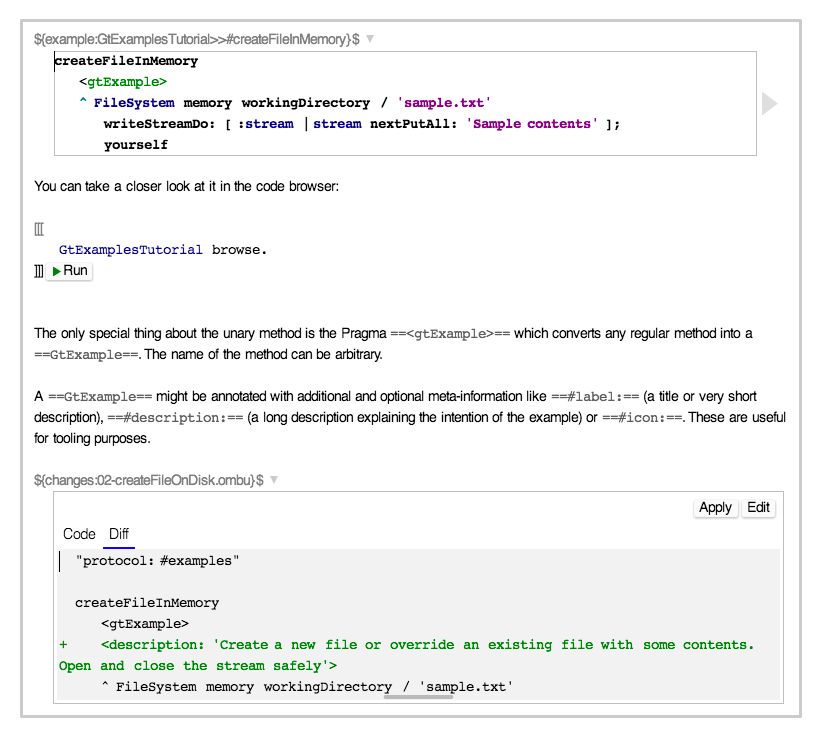
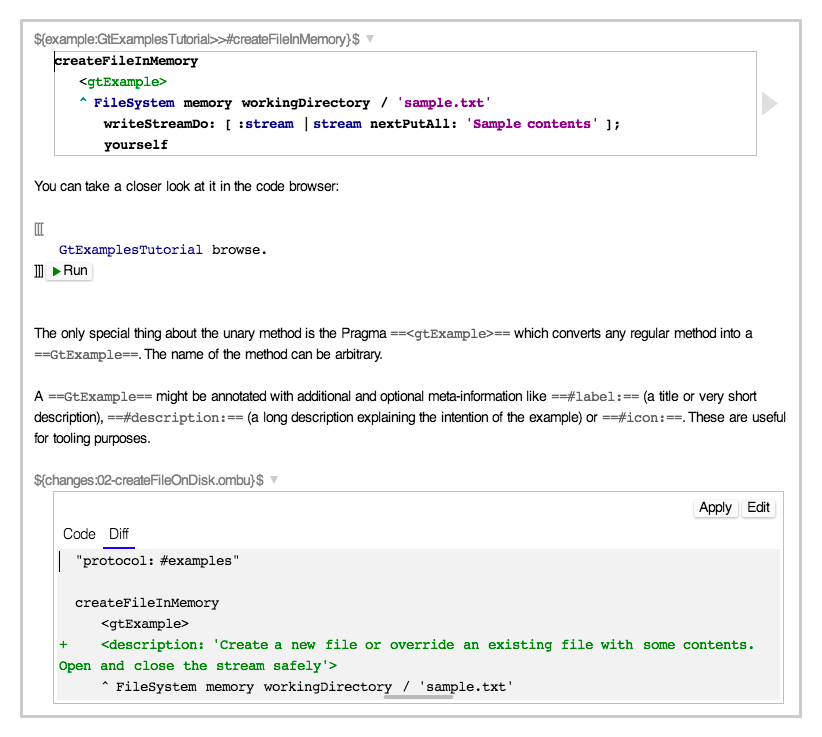
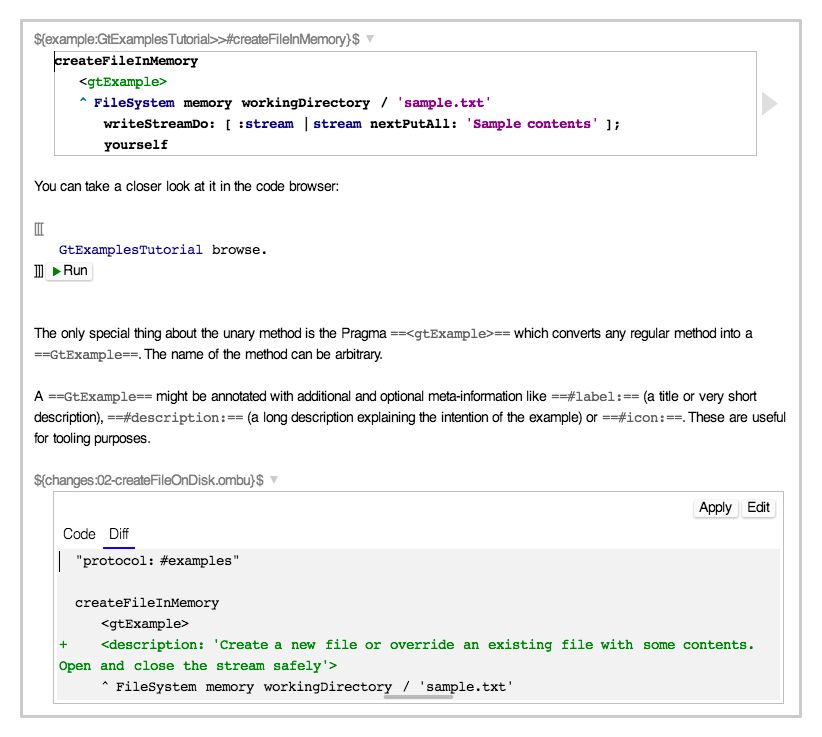
Attached you can see a preview of how documents look like:
At its core it offers a live editor for manipulating Pillar documents. The interaction happens seamlessly directly in the text editor, and it can be combined with different types of previews to serve several classes of use cases: ⢠code documentation ⢠tutorials ⢠interactive data notebook
Code documentation ---- Documenter complements the GToolkit Examples engine to redefine code documentation. When practicing example-driven development, examples get written as part of the typical development. Once examples exist, they can be quickly put together in a document to form documentation. For example, the linked picture shows the comment of a class containing a visual explanation: https://twitter.com/feenkcom/status/973899862482866176
You can see a live example of documentation by inspecting the following snippet: GtDocumenter editorForText: BrToggleExamples comment.Â
Tutorials: ---- Documenter offers a new experience of writing tutorials for Pharo by enabling the creation and embedding of Epicea change sessions directly in the document. For example, take a look at the following animation: https://twitter.com/feenkcom/status/999975333972541440
The document shows a method on top, and a change preview at the bottom showing both the code and the associated diff to the state from the image. Applying the change updates both the change view (no more diff), and method preview. This speeds up significantly the process of going through a tutorial. Furthermore, given that now the document shows the diff to the current image, the reader can safely explore alternative scenario and come back to the tutorial at any time without losing the overview.
The size of the preview can also be adjusted live: https://twitter.com/feenkcom/status/1001152789874167808 https://twitter.com/feenkcom/status/1001407762285375490
You can see a live tutorial by inspecting: IceRepository repositoriesLocation / 'feenkcom'/ 'gtoolkit-examples' / 'doc' / 'tutorial' / 'examples-tutorial.pillarâ.
Interactive data notebook: ---- A Documenter document can also be used as an interactive notebook. Internally it essentially acts as a playground: ⢠it supports defining variables in code snippets, and ⢠the execution of code shows an embedded inspector.
For example: https://twitter.com/feenkcom/status/996310432225820672 https://twitter.com/feenkcom/status/1002851190475026432
An example, can be seen by inspecting: IceRepository repositoriesLocation / 'feenkcom'/ 'gtoolkit' / 'doc' / 'gtoolkit' / 'gtoolkit.pillar'.Â
As always, please do let us know what you think.
Enjoy, The feenk team
-- www.tudorgirba.com <http://www.tudorgirba.com> www.feenk.com
"If you can't say why something is relevant, it probably isn't."
Hi, I am happy you like it. Fonts should work with a Pharo 64b installation on Linux, including Manjaro. Can you confirm that you use a Pharo 64bit and that it does not work? If yes, can you describe how you are installing Pharo and GToolkit? Markdown is certainly interesting, but it is not our focus at this point. We are building on top of Pillar. There are several reasons for it, two of them being: 1. To build the experience we want to, we need deep control over the markup language and Pillar provides that in Pharo. 2. Pillar is the de facto documentation markup used in Pharo, and our primary focus is to support new kinds of development workflows in this environment, including handling documentation. GT 2nd generation will indeed not be part of Pharo 7, but will be loadable in it. Cheers, Doru
On Jun 15, 2018, at 3:47 AM, Offray Vladimir Luna Cárdenas <offray.luna@mutabit.com> wrote:
Cool! I hope to see how this could be integrated in Grafoscopio once Documenter is better integrated with Pharo, for example addressing the font issues already reported in the mailing list on Manjaro Linux (64 bits) and in the thread at [1] and also the Markdown integration possibilities (which are never answered). [1] https://twitter.com/feenkcom/status/996310432225820672
I think it will not part of Pharo 7 but, may be in Pharo 8 we can start to use it in a more confident day to day fashion.
Keep the interesting work.
Cheers,
Offray
On 13/06/18 15:57, Tudor Girba wrote:
Hi,
We are happy to announce a new leap of GToolkit Documenter, the tool for manipulating live documents directly in the development environment: https://github.com/feenkcom/gtoolkit-documenter
Documenter is part of the second generation GToolkit project, it is based on Bloc and works with the latest Pillar. It is mainly developed by Juraj Kubelka.
Attached you can see a preview of how documents look like:
<gt-documenter.png>
At its core it offers a live editor for manipulating Pillar documents. The interaction happens seamlessly directly in the text editor, and it can be combined with different types of previews to serve several classes of use cases: ⢠code documentation ⢠tutorials ⢠interactive data notebook
Code documentation ---- Documenter complements the GToolkit Examples engine to redefine code documentation. When practicing example-driven development, examples get written as part of the typical development. Once examples exist, they can be quickly put together in a document to form documentation. For example, the linked picture shows the comment of a class containing a visual explanation: https://twitter.com/feenkcom/status/973899862482866176
You can see a live example of documentation by inspecting the following snippet: GtDocumenter editorForText: BrToggleExamples comment.
Tutorials: ---- Documenter offers a new experience of writing tutorials for Pharo by enabling the creation and embedding of Epicea change sessions directly in the document. For example, take a look at the following animation: https://twitter.com/feenkcom/status/999975333972541440
The document shows a method on top, and a change preview at the bottom showing both the code and the associated diff to the state from the image. Applying the change updates both the change view (no more diff), and method preview. This speeds up significantly the process of going through a tutorial. Furthermore, given that now the document shows the diff to the current image, the reader can safely explore alternative scenario and come back to the tutorial at any time without losing the overview.
The size of the preview can also be adjusted live: https://twitter.com/feenkcom/status/1001152789874167808 https://twitter.com/feenkcom/status/1001407762285375490
You can see a live tutorial by inspecting: IceRepository repositoriesLocation / 'feenkcom'/ 'gtoolkit-examples' / 'doc' / 'tutorial' / 'examples-tutorial.pillarâ.
Interactive data notebook: ---- A Documenter document can also be used as an interactive notebook. Internally it essentially acts as a playground: ⢠it supports defining variables in code snippets, and ⢠the execution of code shows an embedded inspector.
For example: https://twitter.com/feenkcom/status/996310432225820672 https://twitter.com/feenkcom/status/1002851190475026432
An example, can be seen by inspecting: IceRepository repositoriesLocation / 'feenkcom'/ 'gtoolkit' / 'doc' / 'gtoolkit' / 'gtoolkit.pillar'.
As always, please do let us know what you think.
Enjoy, The feenk team
-- www.tudorgirba.com www.feenk.com
"If you can't say why something is relevant, it probably isn't."
-- www.tudorgirba.com www.feenk.com "Being happy is a matter of choice."
Hi Doru, Thanks for the update in Markdown. I will try to bring better Markdown support in Pharo by developing my ideas on a Playground for Markdown with syntax highlighting, image preview and so on and maybe I can help in incorporating them in GT Documenter on Pharo 7. I can confirm that fonts didn't work on Manjaro on 64 bits installation running Pharo 64b previously, but maybe in Pharo 7 installation will be smoother, including font installation via Moz2D integration (nix package manager has been a real asset in our workshops in multiple Unix environments, including Mac and several Gnu/Linux flavors, so maybe it can help with Moz2D engine and fonts integration). Cheers, Offray On 15/06/18 00:56, Tudor Girba wrote:
Hi,
I am happy you like it.
Fonts should work with a Pharo 64b installation on Linux, including Manjaro. Can you confirm that you use a Pharo 64bit and that it does not work? If yes, can you describe how you are installing Pharo and GToolkit?
Markdown is certainly interesting, but it is not our focus at this point. We are building on top of Pillar. There are several reasons for it, two of them being: 1. To build the experience we want to, we need deep control over the markup language and Pillar provides that in Pharo. 2. Pillar is the de facto documentation markup used in Pharo, and our primary focus is to support new kinds of development workflows in this environment, including handling documentation.
GT 2nd generation will indeed not be part of Pharo 7, but will be loadable in it.
Cheers, Doru
On Jun 15, 2018, at 3:47 AM, Offray Vladimir Luna Cárdenas <offray.luna@mutabit.com> wrote:
Cool! I hope to see how this could be integrated in Grafoscopio once Documenter is better integrated with Pharo, for example addressing the font issues already reported in the mailing list on Manjaro Linux (64 bits) and in the thread at [1] and also the Markdown integration possibilities (which are never answered). [1] https://twitter.com/feenkcom/status/996310432225820672
I think it will not part of Pharo 7 but, may be in Pharo 8 we can start to use it in a more confident day to day fashion.
Keep the interesting work.
Cheers,
Offray
On 13/06/18 15:57, Tudor Girba wrote:
Hi,
We are happy to announce a new leap of GToolkit Documenter, the tool for manipulating live documents directly in the development environment: https://github.com/feenkcom/gtoolkit-documenter
Documenter is part of the second generation GToolkit project, it is based on Bloc and works with the latest Pillar. It is mainly developed by Juraj Kubelka.
Attached you can see a preview of how documents look like:
<gt-documenter.png>
At its core it offers a live editor for manipulating Pillar documents. The interaction happens seamlessly directly in the text editor, and it can be combined with different types of previews to serve several classes of use cases: ⢠code documentation ⢠tutorials ⢠interactive data notebook
Code documentation ---- Documenter complements the GToolkit Examples engine to redefine code documentation. When practicing example-driven development, examples get written as part of the typical development. Once examples exist, they can be quickly put together in a document to form documentation. For example, the linked picture shows the comment of a class containing a visual explanation: https://twitter.com/feenkcom/status/973899862482866176
You can see a live example of documentation by inspecting the following snippet: GtDocumenter editorForText: BrToggleExamples comment.
Tutorials: ---- Documenter offers a new experience of writing tutorials for Pharo by enabling the creation and embedding of Epicea change sessions directly in the document. For example, take a look at the following animation: https://twitter.com/feenkcom/status/999975333972541440
The document shows a method on top, and a change preview at the bottom showing both the code and the associated diff to the state from the image. Applying the change updates both the change view (no more diff), and method preview. This speeds up significantly the process of going through a tutorial. Furthermore, given that now the document shows the diff to the current image, the reader can safely explore alternative scenario and come back to the tutorial at any time without losing the overview.
The size of the preview can also be adjusted live: https://twitter.com/feenkcom/status/1001152789874167808 https://twitter.com/feenkcom/status/1001407762285375490
You can see a live tutorial by inspecting: IceRepository repositoriesLocation / 'feenkcom'/ 'gtoolkit-examples' / 'doc' / 'tutorial' / 'examples-tutorial.pillarâ.
Interactive data notebook: ---- A Documenter document can also be used as an interactive notebook. Internally it essentially acts as a playground: ⢠it supports defining variables in code snippets, and ⢠the execution of code shows an embedded inspector.
For example: https://twitter.com/feenkcom/status/996310432225820672 https://twitter.com/feenkcom/status/1002851190475026432
An example, can be seen by inspecting: IceRepository repositoriesLocation / 'feenkcom'/ 'gtoolkit' / 'doc' / 'gtoolkit' / 'gtoolkit.pillar'.
As always, please do let us know what you think.
Enjoy, The feenk team
-- www.tudorgirba.com www.feenk.com
"If you can't say why something is relevant, it probably isn't."
-- www.tudorgirba.com www.feenk.com
"Being happy is a matter of choice."
Hi, If Moz2D is installed, the fonts should work fine. Can you please try the installation again? And if it does not work, please let me know if in Settings Browser / Appearance / Bloc / Preferable Sparta renderering backend you see Moz2D or not. Cheers, Doru
On Jun 15, 2018, at 2:31 PM, Offray Vladimir Luna Cárdenas <offray.luna@mutabit.com> wrote:
Hi Doru,
Thanks for the update in Markdown. I will try to bring better Markdown support in Pharo by developing my ideas on a Playground for Markdown with syntax highlighting, image preview and so on and maybe I can help in incorporating them in GT Documenter on Pharo 7.
I can confirm that fonts didn't work on Manjaro on 64 bits installation running Pharo 64b previously, but maybe in Pharo 7 installation will be smoother, including font installation via Moz2D integration (nix package manager has been a real asset in our workshops in multiple Unix environments, including Mac and several Gnu/Linux flavors, so maybe it can help with Moz2D engine and fonts integration).
Cheers,
Offray
On 15/06/18 00:56, Tudor Girba wrote:
Hi,
I am happy you like it.
Fonts should work with a Pharo 64b installation on Linux, including Manjaro. Can you confirm that you use a Pharo 64bit and that it does not work? If yes, can you describe how you are installing Pharo and GToolkit?
Markdown is certainly interesting, but it is not our focus at this point. We are building on top of Pillar. There are several reasons for it, two of them being: 1. To build the experience we want to, we need deep control over the markup language and Pillar provides that in Pharo. 2. Pillar is the de facto documentation markup used in Pharo, and our primary focus is to support new kinds of development workflows in this environment, including handling documentation.
GT 2nd generation will indeed not be part of Pharo 7, but will be loadable in it.
Cheers, Doru
On Jun 15, 2018, at 3:47 AM, Offray Vladimir Luna Cárdenas <offray.luna@mutabit.com> wrote:
Cool! I hope to see how this could be integrated in Grafoscopio once Documenter is better integrated with Pharo, for example addressing the font issues already reported in the mailing list on Manjaro Linux (64 bits) and in the thread at [1] and also the Markdown integration possibilities (which are never answered). [1] https://twitter.com/feenkcom/status/996310432225820672
I think it will not part of Pharo 7 but, may be in Pharo 8 we can start to use it in a more confident day to day fashion.
Keep the interesting work.
Cheers,
Offray
On 13/06/18 15:57, Tudor Girba wrote:
Hi,
We are happy to announce a new leap of GToolkit Documenter, the tool for manipulating live documents directly in the development environment: https://github.com/feenkcom/gtoolkit-documenter
Documenter is part of the second generation GToolkit project, it is based on Bloc and works with the latest Pillar. It is mainly developed by Juraj Kubelka.
Attached you can see a preview of how documents look like:
<gt-documenter.png>
At its core it offers a live editor for manipulating Pillar documents. The interaction happens seamlessly directly in the text editor, and it can be combined with different types of previews to serve several classes of use cases: ⢠code documentation ⢠tutorials ⢠interactive data notebook
Code documentation ---- Documenter complements the GToolkit Examples engine to redefine code documentation. When practicing example-driven development, examples get written as part of the typical development. Once examples exist, they can be quickly put together in a document to form documentation. For example, the linked picture shows the comment of a class containing a visual explanation: https://twitter.com/feenkcom/status/973899862482866176
You can see a live example of documentation by inspecting the following snippet: GtDocumenter editorForText: BrToggleExamples comment.
Tutorials: ---- Documenter offers a new experience of writing tutorials for Pharo by enabling the creation and embedding of Epicea change sessions directly in the document. For example, take a look at the following animation: https://twitter.com/feenkcom/status/999975333972541440
The document shows a method on top, and a change preview at the bottom showing both the code and the associated diff to the state from the image. Applying the change updates both the change view (no more diff), and method preview. This speeds up significantly the process of going through a tutorial. Furthermore, given that now the document shows the diff to the current image, the reader can safely explore alternative scenario and come back to the tutorial at any time without losing the overview.
The size of the preview can also be adjusted live: https://twitter.com/feenkcom/status/1001152789874167808 https://twitter.com/feenkcom/status/1001407762285375490
You can see a live tutorial by inspecting: IceRepository repositoriesLocation / 'feenkcom'/ 'gtoolkit-examples' / 'doc' / 'tutorial' / 'examples-tutorial.pillarâ.
Interactive data notebook: ---- A Documenter document can also be used as an interactive notebook. Internally it essentially acts as a playground: ⢠it supports defining variables in code snippets, and ⢠the execution of code shows an embedded inspector.
For example: https://twitter.com/feenkcom/status/996310432225820672 https://twitter.com/feenkcom/status/1002851190475026432
An example, can be seen by inspecting: IceRepository repositoriesLocation / 'feenkcom'/ 'gtoolkit' / 'doc' / 'gtoolkit' / 'gtoolkit.pillar'.
As always, please do let us know what you think.
Enjoy, The feenk team
-- www.tudorgirba.com www.feenk.com
"If you can't say why something is relevant, it probably isn't."
-- www.tudorgirba.com www.feenk.com
"Being happy is a matter of choice."
-- www.tudorgirba.com www.feenk.com "Every now and then stop and ask yourself if the war you're fighting is the right one."
Hi Offray, Would you be able to retry the installation as mentioned below, and let us know if you still encounter issues? Cheers, Doru
On Jun 16, 2018, at 8:24 PM, Tudor Girba <tudor@tudorgirba.com> wrote:
Hi,
If Moz2D is installed, the fonts should work fine.
Can you please try the installation again? And if it does not work, please let me know if in Settings Browser / Appearance / Bloc / Preferable Sparta renderering backend you see Moz2D or not.
Cheers, Doru
On Jun 15, 2018, at 2:31 PM, Offray Vladimir Luna Cárdenas <offray.luna@mutabit.com> wrote:
Hi Doru,
Thanks for the update in Markdown. I will try to bring better Markdown support in Pharo by developing my ideas on a Playground for Markdown with syntax highlighting, image preview and so on and maybe I can help in incorporating them in GT Documenter on Pharo 7.
I can confirm that fonts didn't work on Manjaro on 64 bits installation running Pharo 64b previously, but maybe in Pharo 7 installation will be smoother, including font installation via Moz2D integration (nix package manager has been a real asset in our workshops in multiple Unix environments, including Mac and several Gnu/Linux flavors, so maybe it can help with Moz2D engine and fonts integration).
Cheers,
Offray
On 15/06/18 00:56, Tudor Girba wrote:
Hi,
I am happy you like it.
Fonts should work with a Pharo 64b installation on Linux, including Manjaro. Can you confirm that you use a Pharo 64bit and that it does not work? If yes, can you describe how you are installing Pharo and GToolkit?
Markdown is certainly interesting, but it is not our focus at this point. We are building on top of Pillar. There are several reasons for it, two of them being: 1. To build the experience we want to, we need deep control over the markup language and Pillar provides that in Pharo. 2. Pillar is the de facto documentation markup used in Pharo, and our primary focus is to support new kinds of development workflows in this environment, including handling documentation.
GT 2nd generation will indeed not be part of Pharo 7, but will be loadable in it.
Cheers, Doru
On Jun 15, 2018, at 3:47 AM, Offray Vladimir Luna Cárdenas <offray.luna@mutabit.com> wrote:
Cool! I hope to see how this could be integrated in Grafoscopio once Documenter is better integrated with Pharo, for example addressing the font issues already reported in the mailing list on Manjaro Linux (64 bits) and in the thread at [1] and also the Markdown integration possibilities (which are never answered). [1] https://twitter.com/feenkcom/status/996310432225820672
I think it will not part of Pharo 7 but, may be in Pharo 8 we can start to use it in a more confident day to day fashion.
Keep the interesting work.
Cheers,
Offray
On 13/06/18 15:57, Tudor Girba wrote:
Hi,
We are happy to announce a new leap of GToolkit Documenter, the tool for manipulating live documents directly in the development environment: https://github.com/feenkcom/gtoolkit-documenter
Documenter is part of the second generation GToolkit project, it is based on Bloc and works with the latest Pillar. It is mainly developed by Juraj Kubelka.
Attached you can see a preview of how documents look like:
<gt-documenter.png>
At its core it offers a live editor for manipulating Pillar documents. The interaction happens seamlessly directly in the text editor, and it can be combined with different types of previews to serve several classes of use cases: ⢠code documentation ⢠tutorials ⢠interactive data notebook
Code documentation ---- Documenter complements the GToolkit Examples engine to redefine code documentation. When practicing example-driven development, examples get written as part of the typical development. Once examples exist, they can be quickly put together in a document to form documentation. For example, the linked picture shows the comment of a class containing a visual explanation: https://twitter.com/feenkcom/status/973899862482866176
You can see a live example of documentation by inspecting the following snippet: GtDocumenter editorForText: BrToggleExamples comment.
Tutorials: ---- Documenter offers a new experience of writing tutorials for Pharo by enabling the creation and embedding of Epicea change sessions directly in the document. For example, take a look at the following animation: https://twitter.com/feenkcom/status/999975333972541440
The document shows a method on top, and a change preview at the bottom showing both the code and the associated diff to the state from the image. Applying the change updates both the change view (no more diff), and method preview. This speeds up significantly the process of going through a tutorial. Furthermore, given that now the document shows the diff to the current image, the reader can safely explore alternative scenario and come back to the tutorial at any time without losing the overview.
The size of the preview can also be adjusted live: https://twitter.com/feenkcom/status/1001152789874167808 https://twitter.com/feenkcom/status/1001407762285375490
You can see a live tutorial by inspecting: IceRepository repositoriesLocation / 'feenkcom'/ 'gtoolkit-examples' / 'doc' / 'tutorial' / 'examples-tutorial.pillarâ.
Interactive data notebook: ---- A Documenter document can also be used as an interactive notebook. Internally it essentially acts as a playground: ⢠it supports defining variables in code snippets, and ⢠the execution of code shows an embedded inspector.
For example: https://twitter.com/feenkcom/status/996310432225820672 https://twitter.com/feenkcom/status/1002851190475026432
An example, can be seen by inspecting: IceRepository repositoriesLocation / 'feenkcom'/ 'gtoolkit' / 'doc' / 'gtoolkit' / 'gtoolkit.pillar'.
As always, please do let us know what you think.
Enjoy, The feenk team
-- www.tudorgirba.com www.feenk.com
"If you can't say why something is relevant, it probably isn't."
-- www.tudorgirba.com www.feenk.com
"Being happy is a matter of choice."
-- www.tudorgirba.com www.feenk.com
"Every now and then stop and ask yourself if the war you're fighting is the right one."
-- www.tudorgirba.com www.feenk.com "Yesterday is a fact. Tomorrow is a possibility. Today is a challenge."
Hi, I will (once I have deliver my PhD thesis on upcoming June 25th). There is any place where Moz2D installation is documented? Being a such integral part of the font rendering capabilities of Documenter I couldn't find any place in its documentation dealing with Moz2D as prerequisite and addressing its installation. Cheers, Offray On 19/06/18 03:04, Tudor Girba wrote:
Hi Offray,
Would you be able to retry the installation as mentioned below, and let us know if you still encounter issues?
Cheers, Doru
On Jun 16, 2018, at 8:24 PM, Tudor Girba <tudor@tudorgirba.com> wrote:
Hi,
If Moz2D is installed, the fonts should work fine.
Can you please try the installation again? And if it does not work, please let me know if in Settings Browser / Appearance / Bloc / Preferable Sparta renderering backend you see Moz2D or not.
Cheers, Doru
On Jun 15, 2018, at 2:31 PM, Offray Vladimir Luna Cárdenas <offray.luna@mutabit.com> wrote:
Hi Doru,
Thanks for the update in Markdown. I will try to bring better Markdown support in Pharo by developing my ideas on a Playground for Markdown with syntax highlighting, image preview and so on and maybe I can help in incorporating them in GT Documenter on Pharo 7.
I can confirm that fonts didn't work on Manjaro on 64 bits installation running Pharo 64b previously, but maybe in Pharo 7 installation will be smoother, including font installation via Moz2D integration (nix package manager has been a real asset in our workshops in multiple Unix environments, including Mac and several Gnu/Linux flavors, so maybe it can help with Moz2D engine and fonts integration).
Cheers,
Offray
On 15/06/18 00:56, Tudor Girba wrote:
Hi,
I am happy you like it.
Fonts should work with a Pharo 64b installation on Linux, including Manjaro. Can you confirm that you use a Pharo 64bit and that it does not work? If yes, can you describe how you are installing Pharo and GToolkit?
Markdown is certainly interesting, but it is not our focus at this point. We are building on top of Pillar. There are several reasons for it, two of them being: 1. To build the experience we want to, we need deep control over the markup language and Pillar provides that in Pharo. 2. Pillar is the de facto documentation markup used in Pharo, and our primary focus is to support new kinds of development workflows in this environment, including handling documentation.
GT 2nd generation will indeed not be part of Pharo 7, but will be loadable in it.
Cheers, Doru
On Jun 15, 2018, at 3:47 AM, Offray Vladimir Luna Cárdenas <offray.luna@mutabit.com> wrote:
Cool! I hope to see how this could be integrated in Grafoscopio once Documenter is better integrated with Pharo, for example addressing the font issues already reported in the mailing list on Manjaro Linux (64 bits) and in the thread at [1] and also the Markdown integration possibilities (which are never answered). [1] https://twitter.com/feenkcom/status/996310432225820672
I think it will not part of Pharo 7 but, may be in Pharo 8 we can start to use it in a more confident day to day fashion.
Keep the interesting work.
Cheers,
Offray
On 13/06/18 15:57, Tudor Girba wrote:
Hi,
We are happy to announce a new leap of GToolkit Documenter, the tool for manipulating live documents directly in the development environment: https://github.com/feenkcom/gtoolkit-documenter
Documenter is part of the second generation GToolkit project, it is based on Bloc and works with the latest Pillar. It is mainly developed by Juraj Kubelka.
Attached you can see a preview of how documents look like:
<gt-documenter.png>
At its core it offers a live editor for manipulating Pillar documents. The interaction happens seamlessly directly in the text editor, and it can be combined with different types of previews to serve several classes of use cases: ⢠code documentation ⢠tutorials ⢠interactive data notebook
Code documentation ---- Documenter complements the GToolkit Examples engine to redefine code documentation. When practicing example-driven development, examples get written as part of the typical development. Once examples exist, they can be quickly put together in a document to form documentation. For example, the linked picture shows the comment of a class containing a visual explanation: https://twitter.com/feenkcom/status/973899862482866176
You can see a live example of documentation by inspecting the following snippet: GtDocumenter editorForText: BrToggleExamples comment.
Tutorials: ---- Documenter offers a new experience of writing tutorials for Pharo by enabling the creation and embedding of Epicea change sessions directly in the document. For example, take a look at the following animation: https://twitter.com/feenkcom/status/999975333972541440
The document shows a method on top, and a change preview at the bottom showing both the code and the associated diff to the state from the image. Applying the change updates both the change view (no more diff), and method preview. This speeds up significantly the process of going through a tutorial. Furthermore, given that now the document shows the diff to the current image, the reader can safely explore alternative scenario and come back to the tutorial at any time without losing the overview.
The size of the preview can also be adjusted live: https://twitter.com/feenkcom/status/1001152789874167808 https://twitter.com/feenkcom/status/1001407762285375490
You can see a live tutorial by inspecting: IceRepository repositoriesLocation / 'feenkcom'/ 'gtoolkit-examples' / 'doc' / 'tutorial' / 'examples-tutorial.pillarâ.
Interactive data notebook: ---- A Documenter document can also be used as an interactive notebook. Internally it essentially acts as a playground: ⢠it supports defining variables in code snippets, and ⢠the execution of code shows an embedded inspector.
For example: https://twitter.com/feenkcom/status/996310432225820672 https://twitter.com/feenkcom/status/1002851190475026432
An example, can be seen by inspecting: IceRepository repositoriesLocation / 'feenkcom'/ 'gtoolkit' / 'doc' / 'gtoolkit' / 'gtoolkit.pillar'.
As always, please do let us know what you think.
Enjoy, The feenk team
-- www.tudorgirba.com www.feenk.com
"If you can't say why something is relevant, it probably isn't."
-- www.tudorgirba.com www.feenk.com
"Being happy is a matter of choice."
-- www.tudorgirba.com www.feenk.com
"Every now and then stop and ask yourself if the war you're fighting is the right one."
-- www.tudorgirba.com www.feenk.com
"Yesterday is a fact. Tomorrow is a possibility. Today is a challenge."
Hi, Moz2D is one of the backends of Sparta, the canvas behind Bloc. The repository is here: https://github.com/syrel/Moz2D It comes as a VM plugin. When you load Bloc and Sparta, the loading process automatically also downloads the plugin and installs it in the VM. On Linux, this only works for Pharo 64bit installations. So, all you would need to do is to take a fresh Pharo 64 image + vm and then load: Metacello new baseline: 'GToolkit'; repository: 'github://feenkcom/gtoolkit/src'; load. If it does not work, it would be useful for us to debug that situation. Good luck with your thesis. Cheers, Doru
On Jun 19, 2018, at 3:26 PM, Offray Vladimir Luna Cárdenas <offray.luna@mutabit.com> wrote:
Hi,
I will (once I have deliver my PhD thesis on upcoming June 25th). There is any place where Moz2D installation is documented? Being a such integral part of the font rendering capabilities of Documenter I couldn't find any place in its documentation dealing with Moz2D as prerequisite and addressing its installation.
Cheers,
Offray
On 19/06/18 03:04, Tudor Girba wrote:
Hi Offray,
Would you be able to retry the installation as mentioned below, and let us know if you still encounter issues?
Cheers, Doru
On Jun 16, 2018, at 8:24 PM, Tudor Girba <tudor@tudorgirba.com> wrote:
Hi,
If Moz2D is installed, the fonts should work fine.
Can you please try the installation again? And if it does not work, please let me know if in Settings Browser / Appearance / Bloc / Preferable Sparta renderering backend you see Moz2D or not.
Cheers, Doru
On Jun 15, 2018, at 2:31 PM, Offray Vladimir Luna Cárdenas <offray.luna@mutabit.com> wrote:
Hi Doru,
Thanks for the update in Markdown. I will try to bring better Markdown support in Pharo by developing my ideas on a Playground for Markdown with syntax highlighting, image preview and so on and maybe I can help in incorporating them in GT Documenter on Pharo 7.
I can confirm that fonts didn't work on Manjaro on 64 bits installation running Pharo 64b previously, but maybe in Pharo 7 installation will be smoother, including font installation via Moz2D integration (nix package manager has been a real asset in our workshops in multiple Unix environments, including Mac and several Gnu/Linux flavors, so maybe it can help with Moz2D engine and fonts integration).
Cheers,
Offray
On 15/06/18 00:56, Tudor Girba wrote:
Hi,
I am happy you like it.
Fonts should work with a Pharo 64b installation on Linux, including Manjaro. Can you confirm that you use a Pharo 64bit and that it does not work? If yes, can you describe how you are installing Pharo and GToolkit?
Markdown is certainly interesting, but it is not our focus at this point. We are building on top of Pillar. There are several reasons for it, two of them being: 1. To build the experience we want to, we need deep control over the markup language and Pillar provides that in Pharo. 2. Pillar is the de facto documentation markup used in Pharo, and our primary focus is to support new kinds of development workflows in this environment, including handling documentation.
GT 2nd generation will indeed not be part of Pharo 7, but will be loadable in it.
Cheers, Doru
On Jun 15, 2018, at 3:47 AM, Offray Vladimir Luna Cárdenas <offray.luna@mutabit.com> wrote:
Cool! I hope to see how this could be integrated in Grafoscopio once Documenter is better integrated with Pharo, for example addressing the font issues already reported in the mailing list on Manjaro Linux (64 bits) and in the thread at [1] and also the Markdown integration possibilities (which are never answered). [1] https://twitter.com/feenkcom/status/996310432225820672
I think it will not part of Pharo 7 but, may be in Pharo 8 we can start to use it in a more confident day to day fashion.
Keep the interesting work.
Cheers,
Offray
On 13/06/18 15:57, Tudor Girba wrote:
Hi,
We are happy to announce a new leap of GToolkit Documenter, the tool for manipulating live documents directly in the development environment: https://github.com/feenkcom/gtoolkit-documenter
Documenter is part of the second generation GToolkit project, it is based on Bloc and works with the latest Pillar. It is mainly developed by Juraj Kubelka.
Attached you can see a preview of how documents look like:
<gt-documenter.png>
At its core it offers a live editor for manipulating Pillar documents. The interaction happens seamlessly directly in the text editor, and it can be combined with different types of previews to serve several classes of use cases: ⢠code documentation ⢠tutorials ⢠interactive data notebook
Code documentation ---- Documenter complements the GToolkit Examples engine to redefine code documentation. When practicing example-driven development, examples get written as part of the typical development. Once examples exist, they can be quickly put together in a document to form documentation. For example, the linked picture shows the comment of a class containing a visual explanation: https://twitter.com/feenkcom/status/973899862482866176
You can see a live example of documentation by inspecting the following snippet: GtDocumenter editorForText: BrToggleExamples comment.
Tutorials: ---- Documenter offers a new experience of writing tutorials for Pharo by enabling the creation and embedding of Epicea change sessions directly in the document. For example, take a look at the following animation: https://twitter.com/feenkcom/status/999975333972541440
The document shows a method on top, and a change preview at the bottom showing both the code and the associated diff to the state from the image. Applying the change updates both the change view (no more diff), and method preview. This speeds up significantly the process of going through a tutorial. Furthermore, given that now the document shows the diff to the current image, the reader can safely explore alternative scenario and come back to the tutorial at any time without losing the overview.
The size of the preview can also be adjusted live: https://twitter.com/feenkcom/status/1001152789874167808 https://twitter.com/feenkcom/status/1001407762285375490
You can see a live tutorial by inspecting: IceRepository repositoriesLocation / 'feenkcom'/ 'gtoolkit-examples' / 'doc' / 'tutorial' / 'examples-tutorial.pillarâ.
Interactive data notebook: ---- A Documenter document can also be used as an interactive notebook. Internally it essentially acts as a playground: ⢠it supports defining variables in code snippets, and ⢠the execution of code shows an embedded inspector.
For example: https://twitter.com/feenkcom/status/996310432225820672 https://twitter.com/feenkcom/status/1002851190475026432
An example, can be seen by inspecting: IceRepository repositoriesLocation / 'feenkcom'/ 'gtoolkit' / 'doc' / 'gtoolkit' / 'gtoolkit.pillar'.
As always, please do let us know what you think.
Enjoy, The feenk team
-- www.tudorgirba.com www.feenk.com
"If you can't say why something is relevant, it probably isn't."
-- www.tudorgirba.com www.feenk.com
"Being happy is a matter of choice."
-- www.tudorgirba.com www.feenk.com
"Every now and then stop and ask yourself if the war you're fighting is the right one."
-- www.tudorgirba.com www.feenk.com
"Yesterday is a fact. Tomorrow is a possibility. Today is a challenge."
-- www.tudorgirba.com www.feenk.com "No matter how many recipes we know, we still value a chef."

Hi Tudor. This is super impressive. What's next? Do you plan to implement IDE for writing documents, navigation, refactorings? (senders, renames should find all places in documents) 2018-06-13 21:57 GMT+01:00 Tudor Girba <tudor@tudorgirba.com>:
Hi,
We are happy to announce a new leap of GToolkit Documenter, the tool for manipulating live documents directly in the development environment: https://github.com/feenkcom/gtoolkit-documenter
Documenter is part of the second generation GToolkit project, it is based on Bloc and works with the latest Pillar. It is mainly developed by Juraj Kubelka.
Attached you can see a preview of how documents look like:
At its core it offers a live editor for manipulating Pillar documents. The interaction happens seamlessly directly in the text editor, and it can be combined with different types of previews to serve several classes of use cases: ⢠code documentation ⢠tutorials ⢠interactive data notebook
Code documentation ---- Documenter complements the GToolkit Examples engine to redefine code documentation. When practicing example-driven development, examples get written as part of the typical development. Once examples exist, they can be quickly put together in a document to form documentation. For example, the linked picture shows the comment of a class containing a visual explanation: https://twitter.com/feenkcom/status/973899862482866176
You can see a live example of documentation by inspecting the following snippet: GtDocumenter editorForText: BrToggleExamples comment.
Tutorials: ---- Documenter offers a new experience of writing tutorials for Pharo by enabling the creation and embedding of Epicea change sessions directly in the document. For example, take a look at the following animation: https://twitter.com/feenkcom/status/999975333972541440
The document shows a method on top, and a change preview at the bottom showing both the code and the associated diff to the state from the image. Applying the change updates both the change view (no more diff), and method preview. This speeds up significantly the process of going through a tutorial. Furthermore, given that now the document shows the diff to the current image, the reader can safely explore alternative scenario and come back to the tutorial at any time without losing the overview.
The size of the preview can also be adjusted live: https://twitter.com/feenkcom/status/1001152789874167808 https://twitter.com/feenkcom/status/1001407762285375490
You can see a live tutorial by inspecting: IceRepository repositoriesLocation / 'feenkcom'/ 'gtoolkit-examples' / 'doc' / 'tutorial' / 'examples-tutorial.pillarâ.
Interactive data notebook: ---- A Documenter document can also be used as an interactive notebook. Internally it essentially acts as a playground: ⢠it supports defining variables in code snippets, and ⢠the execution of code shows an embedded inspector.
For example: https://twitter.com/feenkcom/status/996310432225820672 https://twitter.com/feenkcom/status/1002851190475026432
An example, can be seen by inspecting: IceRepository repositoriesLocation / 'feenkcom'/ 'gtoolkit' / 'doc' / 'gtoolkit' / 'gtoolkit.pillar'.
As always, please do let us know what you think.
Enjoy, The feenk team
-- www.tudorgirba.com www.feenk.com
"If you can't say why something is relevant, it probably isn't."
Hi, Thanks. About the next steps: We mostly think in terms of the overall goal, and the concrete next steps somehow happen. For us the end goal is a moldable environment that integrates all workflows related to development. Documentation is one of those development activities that are both pervasive and typically disliked, so it is only natural that we want to aim to create a full experience for it within the environment. What is more interesting to us is that we could create this experience without much effort due to the flexibility of the underlying framework. There is still engineering work to do, but I think the most difficult part is to rethink the way we approach UI given these new abilities. Cheers, Doru
On Jun 17, 2018, at 3:09 PM, Denis Kudriashov <dionisiydk@gmail.com> wrote:
Hi Tudor.
This is super impressive. What's next? Do you plan to implement IDE for writing documents, navigation, refactorings? (senders, renames should find all places in documents)
2018-06-13 21:57 GMT+01:00 Tudor Girba <tudor@tudorgirba.com>: Hi,
We are happy to announce a new leap of GToolkit Documenter, the tool for manipulating live documents directly in the development environment: https://github.com/feenkcom/gtoolkit-documenter
Documenter is part of the second generation GToolkit project, it is based on Bloc and works with the latest Pillar. It is mainly developed by Juraj Kubelka.
Attached you can see a preview of how documents look like:
<gt-documenter.png>
At its core it offers a live editor for manipulating Pillar documents. The interaction happens seamlessly directly in the text editor, and it can be combined with different types of previews to serve several classes of use cases: ⢠code documentation ⢠tutorials ⢠interactive data notebook
Code documentation ---- Documenter complements the GToolkit Examples engine to redefine code documentation. When practicing example-driven development, examples get written as part of the typical development. Once examples exist, they can be quickly put together in a document to form documentation. For example, the linked picture shows the comment of a class containing a visual explanation: https://twitter.com/feenkcom/status/973899862482866176
You can see a live example of documentation by inspecting the following snippet: GtDocumenter editorForText: BrToggleExamples comment.
Tutorials: ---- Documenter offers a new experience of writing tutorials for Pharo by enabling the creation and embedding of Epicea change sessions directly in the document. For example, take a look at the following animation: https://twitter.com/feenkcom/status/999975333972541440
The document shows a method on top, and a change preview at the bottom showing both the code and the associated diff to the state from the image. Applying the change updates both the change view (no more diff), and method preview. This speeds up significantly the process of going through a tutorial. Furthermore, given that now the document shows the diff to the current image, the reader can safely explore alternative scenario and come back to the tutorial at any time without losing the overview.
The size of the preview can also be adjusted live: https://twitter.com/feenkcom/status/1001152789874167808 https://twitter.com/feenkcom/status/1001407762285375490
You can see a live tutorial by inspecting: IceRepository repositoriesLocation / 'feenkcom'/ 'gtoolkit-examples' / 'doc' / 'tutorial' / 'examples-tutorial.pillarâ.
Interactive data notebook: ---- A Documenter document can also be used as an interactive notebook. Internally it essentially acts as a playground: ⢠it supports defining variables in code snippets, and ⢠the execution of code shows an embedded inspector.
For example: https://twitter.com/feenkcom/status/996310432225820672 https://twitter.com/feenkcom/status/1002851190475026432
An example, can be seen by inspecting: IceRepository repositoriesLocation / 'feenkcom'/ 'gtoolkit' / 'doc' / 'gtoolkit' / 'gtoolkit.pillar'.
As always, please do let us know what you think.
Enjoy, The feenk team
-- www.tudorgirba.com www.feenk.com
"If you can't say why something is relevant, it probably isn't."
_______________________________________________ Moose-dev mailing list Moose-dev@list.inf.unibe.ch https://www.list.inf.unibe.ch/listinfo/moose-dev
-- www.tudorgirba.com www.feenk.com "If you can't say why something is relevant, it probably isn't."

On 17 Jun 2018, at 15:09, Denis Kudriashov <dionisiydk@gmail.com> wrote:
Hi Tudor.
This is super impressive.
+10
What's next? Do you plan to implement IDE for writing documents, navigation, refactorings? (senders, renames should find all places in documents)
2018-06-13 21:57 GMT+01:00 Tudor Girba <tudor@tudorgirba.com>: Hi,
We are happy to announce a new leap of GToolkit Documenter, the tool for manipulating live documents directly in the development environment: https://github.com/feenkcom/gtoolkit-documenter
Documenter is part of the second generation GToolkit project, it is based on Bloc and works with the latest Pillar. It is mainly developed by Juraj Kubelka.
Attached you can see a preview of how documents look like:
<gt-documenter.png>
At its core it offers a live editor for manipulating Pillar documents. The interaction happens seamlessly directly in the text editor, and it can be combined with different types of previews to serve several classes of use cases: ⢠code documentation ⢠tutorials ⢠interactive data notebook
Code documentation ---- Documenter complements the GToolkit Examples engine to redefine code documentation. When practicing example-driven development, examples get written as part of the typical development. Once examples exist, they can be quickly put together in a document to form documentation. For example, the linked picture shows the comment of a class containing a visual explanation: https://twitter.com/feenkcom/status/973899862482866176
You can see a live example of documentation by inspecting the following snippet: GtDocumenter editorForText: BrToggleExamples comment.
Tutorials: ---- Documenter offers a new experience of writing tutorials for Pharo by enabling the creation and embedding of Epicea change sessions directly in the document. For example, take a look at the following animation: https://twitter.com/feenkcom/status/999975333972541440
The document shows a method on top, and a change preview at the bottom showing both the code and the associated diff to the state from the image. Applying the change updates both the change view (no more diff), and method preview. This speeds up significantly the process of going through a tutorial. Furthermore, given that now the document shows the diff to the current image, the reader can safely explore alternative scenario and come back to the tutorial at any time without losing the overview.
The size of the preview can also be adjusted live: https://twitter.com/feenkcom/status/1001152789874167808 https://twitter.com/feenkcom/status/1001407762285375490
You can see a live tutorial by inspecting: IceRepository repositoriesLocation / 'feenkcom'/ 'gtoolkit-examples' / 'doc' / 'tutorial' / 'examples-tutorial.pillarâ.
Interactive data notebook: ---- A Documenter document can also be used as an interactive notebook. Internally it essentially acts as a playground: ⢠it supports defining variables in code snippets, and ⢠the execution of code shows an embedded inspector.
For example: https://twitter.com/feenkcom/status/996310432225820672 https://twitter.com/feenkcom/status/1002851190475026432
An example, can be seen by inspecting: IceRepository repositoriesLocation / 'feenkcom'/ 'gtoolkit' / 'doc' / 'gtoolkit' / 'gtoolkit.pillar'.
As always, please do let us know what you think.
Enjoy, The feenk team
-- www.tudorgirba.com www.feenk.com
"If you can't say why something is relevant, it probably isn't."
_______________________________________________ Moose-dev mailing list Moose-dev@list.inf.unibe.ch https://www.list.inf.unibe.ch/listinfo/moose-dev

Bump (not sure this got through , and keen to know how to load the diagramming bit) Guys this is really impressive! 2 things I noticed when going through the example in a new Pharo 6.1 image (with the latest Iceberg) - 1) The example "IceRepository repositoriesLocation / 'feenkcom'/ 'gtoolkit-examples' / 'doc' / 'tutorial' / 'examples-tutorial.pillar'. â has changed to âIceLibgitRepository â¦â in the newer iceberg - so it might be worth a note in the readme (Iâll submit a PR) 2) In a clean 6.1 image I get a walkback (GtPhlowExplicitView>>mondrian DNU) when you try any of the graphical bits , making me think either the dependencies are incorrect on the Baseline (or the instruction for the example also need to mention you need to load something else - presumably Roassal? 3) You canât scroll the Diff tabs of results, only the Code tabs Tim
On 13 Jun 2018, at 21:57, Tudor Girba <tudor@tudorgirba.com> wrote:
Hi,
We are happy to announce a new leap of GToolkit Documenter, the tool for manipulating live documents directly in the development environment: https://github.com/feenkcom/gtoolkit-documenter
Documenter is part of the second generation GToolkit project, it is based on Bloc and works with the latest Pillar. It is mainly developed by Juraj Kubelka.
Attached you can see a preview of how documents look like:
<gt-documenter.png>
At its core it offers a live editor for manipulating Pillar documents. The interaction happens seamlessly directly in the text editor, and it can be combined with different types of previews to serve several classes of use cases: ⢠code documentation ⢠tutorials ⢠interactive data notebook
Code documentation ---- Documenter complements the GToolkit Examples engine to redefine code documentation. When practicing example-driven development, examples get written as part of the typical development. Once examples exist, they can be quickly put together in a document to form documentation. For example, the linked picture shows the comment of a class containing a visual explanation: https://twitter.com/feenkcom/status/973899862482866176
You can see a live example of documentation by inspecting the following snippet: GtDocumenter editorForText: BrToggleExamples comment.
Tutorials: ---- Documenter offers a new experience of writing tutorials for Pharo by enabling the creation and embedding of Epicea change sessions directly in the document. For example, take a look at the following animation: https://twitter.com/feenkcom/status/999975333972541440
The document shows a method on top, and a change preview at the bottom showing both the code and the associated diff to the state from the image. Applying the change updates both the change view (no more diff), and method preview. This speeds up significantly the process of going through a tutorial. Furthermore, given that now the document shows the diff to the current image, the reader can safely explore alternative scenario and come back to the tutorial at any time without losing the overview.
The size of the preview can also be adjusted live: https://twitter.com/feenkcom/status/1001152789874167808 https://twitter.com/feenkcom/status/1001407762285375490
You can see a live tutorial by inspecting: IceRepository repositoriesLocation / 'feenkcom'/ 'gtoolkit-examples' / 'doc' / 'tutorial' / 'examples-tutorial.pillarâ.
Interactive data notebook: ---- A Documenter document can also be used as an interactive notebook. Internally it essentially acts as a playground: ⢠it supports defining variables in code snippets, and ⢠the execution of code shows an embedded inspector.
For example: https://twitter.com/feenkcom/status/996310432225820672 https://twitter.com/feenkcom/status/1002851190475026432
An example, can be seen by inspecting: IceRepository repositoriesLocation / 'feenkcom'/ 'gtoolkit' / 'doc' / 'gtoolkit' / 'gtoolkit.pillar'.
As always, please do let us know what you think.
Enjoy, The feenk team
-- www.tudorgirba.com www.feenk.com
"If you can't say why something is relevant, it probably isn't."
_______________________________________________ Moose-dev mailing list Moose-dev@list.inf.unibe.ch https://www.list.inf.unibe.ch/listinfo/moose-dev
Actually I realised it ended up on the be moose forum - hereâs what Doru replied (for any lurkers) Sent from my iPhone
On Jun 18, 2018, at 1:21 PM, Tim Mackinnon <tim@testit.works> wrote:
Guys this is really impressive!
Thanks.
2 things I noticed when going through the example in a new Pharo 6.1 image (with the latest Iceberg) -
1) The example "IceRepository repositoriesLocation / 'feenkcom'/ 'gtoolkit-examples' / 'doc' / 'tutorial' / 'examples-tutorial.pillar'. â has changed to âIceLibgitRepository â¦â in the newer iceberg - so it might be worth a note in the readme (Iâll submit a PR)
Show Quoted Content
2 things I noticed when going through the example in a new Pharo 6.1 image (with the latest Iceberg) -
1) The example "IceRepository repositoriesLocation / 'feenkcom'/ 'gtoolkit-examples' / 'doc' / 'tutorial' / 'examples-tutorial.pillar'. â has changed to âIceLibgitRepository â¦â in the newer iceberg - so it might be worth a note in the readme (Iâll submit a PR)
Ok.
2) In a clean 6.1 image I get a walkback (GtPhlowExplicitView>>mondrian DNU) when you try any of the graphical bits , making me think either the dependencies are incorrect on the Baseline (or the instruction for the example also need to mention you need to load something else - presumably Roassal?
Indeed, this is due to the fact that loading GToolkitDocumenter does not load GToolkitVisualizer which includes GtMondrian. We are still working on finding the right dependencies balance. Until then, please load the whole GToolkit to get the full support.
3) You canât scroll the Diff tabs of results, only the Code tabs
Good catch! Cheers, Doru Sent from my iPhone
On 20 Jun 2018, at 02:47, Tim Mackinnon <tim@testit.works> wrote:
Bump (not sure this got through , and keen to know how to load the diagramming bit)
Guys this is really impressive!
2 things I noticed when going through the example in a new Pharo 6.1 image (with the latest Iceberg) -
1) The example "IceRepository repositoriesLocation / 'feenkcom'/ 'gtoolkit-examples' / 'doc' / 'tutorial' / 'examples-tutorial.pillar'. â has changed to âIceLibgitRepository â¦â in the newer iceberg - so it might be worth a note in the readme (Iâll submit a PR)
2) In a clean 6.1 image I get a walkback (GtPhlowExplicitView>>mondrian DNU) when you try any of the graphical bits , making me think either the dependencies are incorrect on the Baseline (or the instruction for the example also need to mention you need to load something else - presumably Roassal? 3) You canât scroll the Diff tabs of results, only the Code tabs
Tim
On 13 Jun 2018, at 21:57, Tudor Girba <tudor@tudorgirba.com> wrote:
Hi,
We are happy to announce a new leap of GToolkit Documenter, the tool for manipulating live documents directly in the development environment: https://github.com/feenkcom/gtoolkit-documenter
Documenter is part of the second generation GToolkit project, it is based on Bloc and works with the latest Pillar. It is mainly developed by Juraj Kubelka.
Attached you can see a preview of how documents look like:
<gt-documenter.png>
At its core it offers a live editor for manipulating Pillar documents. The interaction happens seamlessly directly in the text editor, and it can be combined with different types of previews to serve several classes of use cases: ⢠code documentation ⢠tutorials ⢠interactive data notebook
Code documentation ---- Documenter complements the GToolkit Examples engine to redefine code documentation. When practicing example-driven development, examples get written as part of the typical development. Once examples exist, they can be quickly put together in a document to form documentation. For example, the linked picture shows the comment of a class containing a visual explanation: https://twitter.com/feenkcom/status/973899862482866176
You can see a live example of documentation by inspecting the following snippet: GtDocumenter editorForText: BrToggleExamples comment.
Tutorials: ---- Documenter offers a new experience of writing tutorials for Pharo by enabling the creation and embedding of Epicea change sessions directly in the document. For example, take a look at the following animation: https://twitter.com/feenkcom/status/999975333972541440
The document shows a method on top, and a change preview at the bottom showing both the code and the associated diff to the state from the image. Applying the change updates both the change view (no more diff), and method preview. This speeds up significantly the process of going through a tutorial. Furthermore, given that now the document shows the diff to the current image, the reader can safely explore alternative scenario and come back to the tutorial at any time without losing the overview.
The size of the preview can also be adjusted live: https://twitter.com/feenkcom/status/1001152789874167808 https://twitter.com/feenkcom/status/1001407762285375490
You can see a live tutorial by inspecting: IceRepository repositoriesLocation / 'feenkcom'/ 'gtoolkit-examples' / 'doc' / 'tutorial' / 'examples-tutorial.pillarâ.
Interactive data notebook: ---- A Documenter document can also be used as an interactive notebook. Internally it essentially acts as a playground: ⢠it supports defining variables in code snippets, and ⢠the execution of code shows an embedded inspector.
For example: https://twitter.com/feenkcom/status/996310432225820672 https://twitter.com/feenkcom/status/1002851190475026432
An example, can be seen by inspecting: IceRepository repositoriesLocation / 'feenkcom'/ 'gtoolkit' / 'doc' / 'gtoolkit' / 'gtoolkit.pillar'.
As always, please do let us know what you think.
Enjoy, The feenk team
-- www.tudorgirba.com www.feenk.com
"If you can't say why something is relevant, it probably isn't."
_______________________________________________ Moose-dev mailing list Moose-dev@list.inf.unibe.ch https://www.list.inf.unibe.ch/listinfo/moose-dev
Hi - so I managed to load up the full monty gtDocumentor into an image (a few false starts as it you try and load the full monty on top of just gtDocumentor e.g in a clean image load Metacello new baseline: 'GToolkit'; repository: 'github://feenkcom/gtoolkit/src'; load. On top of this Metacello new baseline: 'GToolkitDocumenter'; repository: 'github://feenkcom/gtoolkit-documenter/src'; load. It never completes - I gave up after 30 minutes and whining fans on a MacBook Pro. Anyway - in a completely clean image I loaded just GTookkit and then run GtDocumenter editorForText: BrToggleExamples comment. Which seemed to work fine - and showed me some buttons with different dots on them. So then I went and tried the example I really wanted to see: IceRepository repositoriesLocation / 'feenkcom'/ 'gtoolkit-examples' / 'doc' / 'tutorial' / 'examples-tutorial.pillarâ. And it just gives a blank tab in the _Pillar, _Contents and _GT tabs? The contents tab does show me pillar text unrendered. Interestingly, If I then go back to the previous editorForText example, that did work - it now also also show the same blank tabs. So it seems that something get broken? This is on OSX with the a 64bit image - labelled 6.1 - 64bit (tech preview) - so the current stable pharo for 64 bit. Is this a known issue? Tim
On 20 Jun 2018, at 02:53, Tim Mackinnon <tim@testit.works> wrote:
Actually I realised it ended up on the be moose forum - hereâs what Doru replied (for any lurkers)
Sent from my iPhone
On Jun 18, 2018, at 1:21 PM, Tim Mackinnon <tim@testit.works <mailto:tim@testit.works>> wrote:
Guys this is really impressive!
Thanks.
2 things I noticed when going through the example in a new Pharo 6.1 image (with the latest Iceberg) -
1) The example "IceRepository repositoriesLocation / 'feenkcom'/ 'gtoolkit-examples' / 'doc' / 'tutorial' / 'examples-tutorial.pillar'. â has changed to âIceLibgitRepository â¦â in the newer iceberg - so it might be worth a note in the readme (Iâll submit a PR) Show Quoted Content 2 things I noticed when going through the example in a new Pharo 6.1 image (with the latest Iceberg) -
1) The example "IceRepository repositoriesLocation / 'feenkcom'/ 'gtoolkit-examples' / 'doc' / 'tutorial' / 'examples-tutorial.pillar'. â has changed to âIceLibgitRepository â¦â in the newer iceberg - so it might be worth a note in the readme (Iâll submit a PR) <x-apple-msg-load-wk2:38#>2 things I noticed when going through the example in a new Pharo 6.1 image (with the latest Iceberg) -
1) The example "IceRepository repositoriesLocation / 'feenkcom'/ 'gtoolkit-examples' / 'doc' / 'tutorial' / 'examples-tutorial.pillar'. â has changed to âIceLibgitRepository â¦â in the newer iceberg - so it might be worth a note in the readme (Iâll submit a PR)
Show Quoted Content
2 things I noticed when going through the example in a new Pharo 6.1 image (with the latest Iceberg) -
1) The example "IceRepository repositoriesLocation / 'feenkcom'/ 'gtoolkit-examples' / 'doc' / 'tutorial' / 'examples-tutorial.pillar'. â has changed to âIceLibgitRepository â¦â in the newer iceberg - so it might be worth a note in the readme (Iâll submit a PR)
Ok.
2) In a clean 6.1 image I get a walkback (GtPhlowExplicitView>>mondrian DNU) when you try any of the graphical bits , making me think either the dependencies are incorrect on the Baseline (or the instruction for the example also need to mention you need to load something else - presumably Roassal?
Indeed, this is due to the fact that loading GToolkitDocumenter does not load GToolkitVisualizer which includes GtMondrian. We are still working on finding the right dependencies balance.
Until then, please load the whole GToolkit to get the full support.
3) You canât scroll the Diff tabs of results, only the Code tabs
Good catch!
Cheers, Doru
Sent from my iPhone
On 20 Jun 2018, at 02:47, Tim Mackinnon <tim@testit.works <mailto:tim@testit.works>> wrote:
Bump (not sure this got through , and keen to know how to load the diagramming bit)
Guys this is really impressive!
2 things I noticed when going through the example in a new Pharo 6.1 image (with the latest Iceberg) -
1) The example "IceRepository repositoriesLocation / 'feenkcom'/ 'gtoolkit-examples' / 'doc' / 'tutorial' / 'examples-tutorial.pillar'. â has changed to âIceLibgitRepository â¦â in the newer iceberg - so it might be worth a note in the readme (Iâll submit a PR)
2) In a clean 6.1 image I get a walkback (GtPhlowExplicitView>>mondrian DNU) when you try any of the graphical bits , making me think either the dependencies are incorrect on the Baseline (or the instruction for the example also need to mention you need to load something else - presumably Roassal? 3) You canât scroll the Diff tabs of results, only the Code tabs
Tim
On 13 Jun 2018, at 21:57, Tudor Girba <tudor@tudorgirba.com <mailto:tudor@tudorgirba.com>> wrote:
Hi,
We are happy to announce a new leap of GToolkit Documenter, the tool for manipulating live documents directly in the development environment: https://github.com/feenkcom/gtoolkit-documenter <https://github.com/feenkcom/gtoolkit-documenter>
Documenter is part of the second generation GToolkit project, it is based on Bloc and works with the latest Pillar. It is mainly developed by Juraj Kubelka.
Attached you can see a preview of how documents look like:
<gt-documenter.png>
At its core it offers a live editor for manipulating Pillar documents. The interaction happens seamlessly directly in the text editor, and it can be combined with different types of previews to serve several classes of use cases: ⢠code documentation ⢠tutorials ⢠interactive data notebook
Code documentation ---- Documenter complements the GToolkit Examples engine to redefine code documentation. When practicing example-driven development, examples get written as part of the typical development. Once examples exist, they can be quickly put together in a document to form documentation. For example, the linked picture shows the comment of a class containing a visual explanation: https://twitter.com/feenkcom/status/973899862482866176 <https://twitter.com/feenkcom/status/973899862482866176>
You can see a live example of documentation by inspecting the following snippet: GtDocumenter editorForText: BrToggleExamples comment.
Tutorials: ---- Documenter offers a new experience of writing tutorials for Pharo by enabling the creation and embedding of Epicea change sessions directly in the document. For example, take a look at the following animation: https://twitter.com/feenkcom/status/999975333972541440 <https://twitter.com/feenkcom/status/999975333972541440>
The document shows a method on top, and a change preview at the bottom showing both the code and the associated diff to the state from the image. Applying the change updates both the change view (no more diff), and method preview. This speeds up significantly the process of going through a tutorial. Furthermore, given that now the document shows the diff to the current image, the reader can safely explore alternative scenario and come back to the tutorial at any time without losing the overview.
The size of the preview can also be adjusted live: https://twitter.com/feenkcom/status/1001152789874167808 <https://twitter.com/feenkcom/status/1001152789874167808> https://twitter.com/feenkcom/status/1001407762285375490 <https://twitter.com/feenkcom/status/1001407762285375490>
You can see a live tutorial by inspecting: IceRepository repositoriesLocation / 'feenkcom'/ 'gtoolkit-examples' / 'doc' / 'tutorial' / 'examples-tutorial.pillarâ.
Interactive data notebook: ---- A Documenter document can also be used as an interactive notebook. Internally it essentially acts as a playground: ⢠it supports defining variables in code snippets, and ⢠the execution of code shows an embedded inspector.
For example: https://twitter.com/feenkcom/status/996310432225820672 <https://twitter.com/feenkcom/status/996310432225820672> https://twitter.com/feenkcom/status/1002851190475026432 <https://twitter.com/feenkcom/status/1002851190475026432>
An example, can be seen by inspecting: IceRepository repositoriesLocation / 'feenkcom'/ 'gtoolkit' / 'doc' / 'gtoolkit' / 'gtoolkit.pillar'.
As always, please do let us know what you think.
Enjoy, The feenk team
-- www.tudorgirba.com <http://www.tudorgirba.com/> www.feenk.com <http://www.feenk.com/>
"If you can't say why something is relevant, it probably isn't."
_______________________________________________ Moose-dev mailing list Moose-dev@list.inf.unibe.ch <mailto:Moose-dev@list.inf.unibe.ch> https://www.list.inf.unibe.ch/listinfo/moose-dev <https://www.list.inf.unibe.ch/listinfo/moose-dev>
Hi, It looks like something broke in your Bloc. You can reset Bloc from the world menu / Bloc / Reset Bloc. Please let me know if it works. Cheers, Doru
On Jun 26, 2018, at 12:54 AM, Tim Mackinnon <tim@testit.works> wrote:
Hi - so I managed to load up the full monty gtDocumentor into an image (a few false starts as it you try and load the full monty on top of just gtDocumentor e.g in a clean image load
Metacello new baseline: 'GToolkit'; repository: ' github://feenkcom/gtoolkit/src '; load.
On top of this Metacello new baseline: 'GToolkitDocumenter'; repository: ' github://feenkcom/gtoolkit-documenter/src '; load.
It never completes - I gave up after 30 minutes and whining fans on a MacBook Pro.
Anyway - in a completely clean image I loaded just GTookkit and then run
GtDocumenter editorForText: BrToggleExamples comment.
Which seemed to work fine - and showed me some buttons with different dots on them.
So then I went and tried the example I really wanted to see:
IceRepository repositoriesLocation / 'feenkcom'/ 'gtoolkit-examples' / 'doc' / 'tutorial' / 'examples-tutorial.pillarâ.
And it just gives a blank tab in the _Pillar, _Contents and _GT tabs? The contents tab does show me pillar text unrendered.
Interestingly, If I then go back to the previous editorForText example, that did work - it now also also show the same blank tabs. So it seems that something get broken?
This is on OSX with the a 64bit image - labelled 6.1 - 64bit (tech preview) - so the current stable pharo for 64 bit.
Is this a known issue?
Tim
On 20 Jun 2018, at 02:53, Tim Mackinnon <tim@testit.works> wrote:
Actually I realised it ended up on the be moose forum - hereâs what Doru replied (for any lurkers)
Sent from my iPhone
On Jun 18, 2018, at 1:21 PM, Tim Mackinnon <tim@testit.works> wrote:
Guys this is really impressive!
Thanks.
2 things I noticed when going through the example in a new Pharo 6.1 image (with the latest Iceberg) -
1) The example "IceRepository repositoriesLocation / 'feenkcom'/ 'gtoolkit-examples' / 'doc' / 'tutorial' / 'examples-tutorial.pillar'. â has changed to âIceLibgitRepository â¦â in the newer iceberg - so it might be worth a note in the readme (Iâll submit a PR) Show Quoted Content 2 things I noticed when going through the example in a new Pharo 6.1 image (with the latest Iceberg) -
1) The example "IceRepository repositoriesLocation / 'feenkcom'/ 'gtoolkit-examples' / 'doc' / 'tutorial' / 'examples-tutorial.pillar'. â has changed to âIceLibgitRepository â¦â in the newer iceberg - so it might be worth a note in the readme (Iâll submit a PR)
Ok.
2) In a clean 6.1 image I get a walkback (GtPhlowExplicitView>>mondrian DNU) when you try any of the graphical bits , making me think either the dependencies are incorrect on the Baseline (or the instruction for the example also need to mention you need to load something else - presumably Roassal?
Indeed, this is due to the fact that loading GToolkitDocumenter does not load GToolkitVisualizer which includes GtMondrian. We are still working on finding the right dependencies balance.
Until then, please load the whole GToolkit to get the full support.
3) You canât scroll the Diff tabs of results, only the Code tabs
Good catch!
Cheers, Doru
Sent from my iPhone
On 20 Jun 2018, at 02:47, Tim Mackinnon <tim@testit.works> wrote:
Bump (not sure this got through , and keen to know how to load the diagramming bit)
Guys this is really impressive!
2 things I noticed when going through the example in a new Pharo 6.1 image (with the latest Iceberg) -
1) The example "IceRepository repositoriesLocation / 'feenkcom'/ 'gtoolkit-examples' / 'doc' / 'tutorial' / 'examples-tutorial.pillar'. â has changed to âIceLibgitRepository â¦â in the newer iceberg - so it might be worth a note in the readme (Iâll submit a PR)
2) In a clean 6.1 image I get a walkback (GtPhlowExplicitView>>mondrian DNU) when you try any of the graphical bits , making me think either the dependencies are incorrect on the Baseline (or the instruction for the example also need to mention you need to load something else - presumably Roassal? 3) You canât scroll the Diff tabs of results, only the Code tabs
Tim
On 13 Jun 2018, at 21:57, Tudor Girba <tudor@tudorgirba.com> wrote:
Hi,
We are happy to announce a new leap of GToolkit Documenter, the tool for manipulating live documents directly in the development environment: https://github.com/feenkcom/gtoolkit-documenter
Documenter is part of the second generation GToolkit project, it is based on Bloc and works with the latest Pillar. It is mainly developed by Juraj Kubelka.
Attached you can see a preview of how documents look like:
<gt-documenter.png>
At its core it offers a live editor for manipulating Pillar documents. The interaction happens seamlessly directly in the text editor, and it can be combined with different types of previews to serve several classes of use cases: ⢠code documentation ⢠tutorials ⢠interactive data notebook
Code documentation ---- Documenter complements the GToolkit Examples engine to redefine code documentation. When practicing example-driven development, examples get written as part of the typical development. Once examples exist, they can be quickly put together in a document to form documentation. For example, the linked picture shows the comment of a class containing a visual explanation: https://twitter.com/feenkcom/status/973899862482866176
You can see a live example of documentation by inspecting the following snippet: GtDocumenter editorForText: BrToggleExamples comment.
Tutorials: ---- Documenter offers a new experience of writing tutorials for Pharo by enabling the creation and embedding of Epicea change sessions directly in the document. For example, take a look at the following animation: https://twitter.com/feenkcom/status/999975333972541440
The document shows a method on top, and a change preview at the bottom showing both the code and the associated diff to the state from the image. Applying the change updates both the change view (no more diff), and method preview. This speeds up significantly the process of going through a tutorial. Furthermore, given that now the document shows the diff to the current image, the reader can safely explore alternative scenario and come back to the tutorial at any time without losing the overview.
The size of the preview can also be adjusted live: https://twitter.com/feenkcom/status/1001152789874167808 https://twitter.com/feenkcom/status/1001407762285375490
You can see a live tutorial by inspecting: IceRepository repositoriesLocation / 'feenkcom'/ 'gtoolkit-examples' / 'doc' / 'tutorial' / 'examples-tutorial.pillarâ.
Interactive data notebook: ---- A Documenter document can also be used as an interactive notebook. Internally it essentially acts as a playground: ⢠it supports defining variables in code snippets, and ⢠the execution of code shows an embedded inspector.
For example: https://twitter.com/feenkcom/status/996310432225820672 https://twitter.com/feenkcom/status/1002851190475026432
An example, can be seen by inspecting: IceRepository repositoriesLocation / 'feenkcom'/ 'gtoolkit' / 'doc' / 'gtoolkit' / 'gtoolkit.pillar'.
As always, please do let us know what you think.
Enjoy, The feenk team
-- www.tudorgirba.com www.feenk.com
"If you can't say why something is relevant, it probably isn't."
_______________________________________________ Moose-dev mailing list Moose-dev@list.inf.unibe.ch https://www.list.inf.unibe.ch/listinfo/moose-dev
-- www.tudorgirba.com www.feenk.com "If you interrupt the barber while he is cutting your hair, you will end up with a messy haircut."
Hi - yes, doing the Reset Bloc did fix the problem and I can run both examples (and it doesnât appear to break after running one or the other). HOWEVER - after the reset, when I ran the example with the Mondrian views - right near the beginning where it opens a Pharo browser - the GTDocumentor window turned red with a cross (Note: I had done inspect on the example vs. a playground so I could have a bigger window. I only now noticed that the playground doesnât use a splitter to let you resize its panes?). I had to close my document and try it again - and this time it was fine - but obviously something broke in the sequence of events. Tim
On 26 Jun 2018, at 06:02, Tudor Girba <tudor@tudorgirba.com> wrote:
Hi,
It looks like something broke in your Bloc. You can reset Bloc from the world menu / Bloc / Reset Bloc. Please let me know if it works.
Cheers, Doru
On Jun 26, 2018, at 12:54 AM, Tim Mackinnon <tim@testit.works> wrote:
Hi - so I managed to load up the full monty gtDocumentor into an image (a few false starts as it you try and load the full monty on top of just gtDocumentor e.g in a clean image load
Metacello new baseline: 'GToolkit'; repository: ' github://feenkcom/gtoolkit/src '; load.
On top of this Metacello new baseline: 'GToolkitDocumenter'; repository: ' github://feenkcom/gtoolkit-documenter/src '; load.
It never completes - I gave up after 30 minutes and whining fans on a MacBook Pro.
Anyway - in a completely clean image I loaded just GTookkit and then run
GtDocumenter editorForText: BrToggleExamples comment.
Which seemed to work fine - and showed me some buttons with different dots on them.
So then I went and tried the example I really wanted to see:
IceRepository repositoriesLocation / 'feenkcom'/ 'gtoolkit-examples' / 'doc' / 'tutorial' / 'examples-tutorial.pillarâ.
And it just gives a blank tab in the _Pillar, _Contents and _GT tabs? The contents tab does show me pillar text unrendered.
Interestingly, If I then go back to the previous editorForText example, that did work - it now also also show the same blank tabs. So it seems that something get broken?
This is on OSX with the a 64bit image - labelled 6.1 - 64bit (tech preview) - so the current stable pharo for 64 bit.
Is this a known issue?
Tim
On 20 Jun 2018, at 02:53, Tim Mackinnon <tim@testit.works> wrote:
Actually I realised it ended up on the be moose forum - hereâs what Doru replied (for any lurkers)
Sent from my iPhone
On Jun 18, 2018, at 1:21 PM, Tim Mackinnon <tim@testit.works> wrote:
Guys this is really impressive!
Thanks.
2 things I noticed when going through the example in a new Pharo 6.1 image (with the latest Iceberg) -
1) The example "IceRepository repositoriesLocation / 'feenkcom'/ 'gtoolkit-examples' / 'doc' / 'tutorial' / 'examples-tutorial.pillar'. â has changed to âIceLibgitRepository â¦â in the newer iceberg - so it might be worth a note in the readme (Iâll submit a PR) Show Quoted Content 2 things I noticed when going through the example in a new Pharo 6.1 image (with the latest Iceberg) -
1) The example "IceRepository repositoriesLocation / 'feenkcom'/ 'gtoolkit-examples' / 'doc' / 'tutorial' / 'examples-tutorial.pillar'. â has changed to âIceLibgitRepository â¦â in the newer iceberg - so it might be worth a note in the readme (Iâll submit a PR)
Ok.
2) In a clean 6.1 image I get a walkback (GtPhlowExplicitView>>mondrian DNU) when you try any of the graphical bits , making me think either the dependencies are incorrect on the Baseline (or the instruction for the example also need to mention you need to load something else - presumably Roassal?
Indeed, this is due to the fact that loading GToolkitDocumenter does not load GToolkitVisualizer which includes GtMondrian. We are still working on finding the right dependencies balance.
Until then, please load the whole GToolkit to get the full support.
3) You canât scroll the Diff tabs of results, only the Code tabs
Good catch!
Cheers, Doru
Sent from my iPhone
On 20 Jun 2018, at 02:47, Tim Mackinnon <tim@testit.works> wrote:
Bump (not sure this got through , and keen to know how to load the diagramming bit)
Guys this is really impressive!
2 things I noticed when going through the example in a new Pharo 6.1 image (with the latest Iceberg) -
1) The example "IceRepository repositoriesLocation / 'feenkcom'/ 'gtoolkit-examples' / 'doc' / 'tutorial' / 'examples-tutorial.pillar'. â has changed to âIceLibgitRepository â¦â in the newer iceberg - so it might be worth a note in the readme (Iâll submit a PR)
2) In a clean 6.1 image I get a walkback (GtPhlowExplicitView>>mondrian DNU) when you try any of the graphical bits , making me think either the dependencies are incorrect on the Baseline (or the instruction for the example also need to mention you need to load something else - presumably Roassal? 3) You canât scroll the Diff tabs of results, only the Code tabs
Tim
On 13 Jun 2018, at 21:57, Tudor Girba <tudor@tudorgirba.com> wrote:
Hi,
We are happy to announce a new leap of GToolkit Documenter, the tool for manipulating live documents directly in the development environment: https://github.com/feenkcom/gtoolkit-documenter
Documenter is part of the second generation GToolkit project, it is based on Bloc and works with the latest Pillar. It is mainly developed by Juraj Kubelka.
Attached you can see a preview of how documents look like:
<gt-documenter.png>
At its core it offers a live editor for manipulating Pillar documents. The interaction happens seamlessly directly in the text editor, and it can be combined with different types of previews to serve several classes of use cases: ⢠code documentation ⢠tutorials ⢠interactive data notebook
Code documentation ---- Documenter complements the GToolkit Examples engine to redefine code documentation. When practicing example-driven development, examples get written as part of the typical development. Once examples exist, they can be quickly put together in a document to form documentation. For example, the linked picture shows the comment of a class containing a visual explanation: https://twitter.com/feenkcom/status/973899862482866176
You can see a live example of documentation by inspecting the following snippet: GtDocumenter editorForText: BrToggleExamples comment.
Tutorials: ---- Documenter offers a new experience of writing tutorials for Pharo by enabling the creation and embedding of Epicea change sessions directly in the document. For example, take a look at the following animation: https://twitter.com/feenkcom/status/999975333972541440
The document shows a method on top, and a change preview at the bottom showing both the code and the associated diff to the state from the image. Applying the change updates both the change view (no more diff), and method preview. This speeds up significantly the process of going through a tutorial. Furthermore, given that now the document shows the diff to the current image, the reader can safely explore alternative scenario and come back to the tutorial at any time without losing the overview.
The size of the preview can also be adjusted live: https://twitter.com/feenkcom/status/1001152789874167808 https://twitter.com/feenkcom/status/1001407762285375490
You can see a live tutorial by inspecting: IceRepository repositoriesLocation / 'feenkcom'/ 'gtoolkit-examples' / 'doc' / 'tutorial' / 'examples-tutorial.pillarâ.
Interactive data notebook: ---- A Documenter document can also be used as an interactive notebook. Internally it essentially acts as a playground: ⢠it supports defining variables in code snippets, and ⢠the execution of code shows an embedded inspector.
For example: https://twitter.com/feenkcom/status/996310432225820672 https://twitter.com/feenkcom/status/1002851190475026432
An example, can be seen by inspecting: IceRepository repositoriesLocation / 'feenkcom'/ 'gtoolkit' / 'doc' / 'gtoolkit' / 'gtoolkit.pillar'.
As always, please do let us know what you think.
Enjoy, The feenk team
-- www.tudorgirba.com www.feenk.com
"If you can't say why something is relevant, it probably isn't."
_______________________________________________ Moose-dev mailing list Moose-dev@list.inf.unibe.ch https://www.list.inf.unibe.ch/listinfo/moose-dev
-- www.tudorgirba.com www.feenk.com
"If you interrupt the barber while he is cutting your hair, you will end up with a messy haircut."
Hi, Thanks for trying it out. I never encountered the issue you mentioned. However, the red cross appears due to a Morphic-related problem, not a Bloc one. Cheers, Doru
On Jun 26, 2018, at 11:44 AM, Tim Mackinnon <tim@testit.works> wrote:
Hi - yes, doing the Reset Bloc did fix the problem and I can run both examples (and it doesnât appear to break after running one or the other). HOWEVER - after the reset, when I ran the example with the Mondrian views - right near the beginning where it opens a Pharo browser - the GTDocumentor window turned red with a cross (Note: I had done inspect on the example vs. a playground so I could have a bigger window. I only now noticed that the playground doesnât use a splitter to let you resize its panes?).
I had to close my document and try it again - and this time it was fine - but obviously something broke in the sequence of events.
Tim
On 26 Jun 2018, at 06:02, Tudor Girba <tudor@tudorgirba.com> wrote:
Hi,
It looks like something broke in your Bloc. You can reset Bloc from the world menu / Bloc / Reset Bloc. Please let me know if it works.
Cheers, Doru
On Jun 26, 2018, at 12:54 AM, Tim Mackinnon <tim@testit.works> wrote:
Hi - so I managed to load up the full monty gtDocumentor into an image (a few false starts as it you try and load the full monty on top of just gtDocumentor e.g in a clean image load
Metacello new baseline: 'GToolkit'; repository: ' github://feenkcom/gtoolkit/src '; load.
On top of this Metacello new baseline: 'GToolkitDocumenter'; repository: ' github://feenkcom/gtoolkit-documenter/src '; load.
It never completes - I gave up after 30 minutes and whining fans on a MacBook Pro.
Anyway - in a completely clean image I loaded just GTookkit and then run
GtDocumenter editorForText: BrToggleExamples comment.
Which seemed to work fine - and showed me some buttons with different dots on them.
So then I went and tried the example I really wanted to see:
IceRepository repositoriesLocation / 'feenkcom'/ 'gtoolkit-examples' / 'doc' / 'tutorial' / 'examples-tutorial.pillarâ.
And it just gives a blank tab in the _Pillar, _Contents and _GT tabs? The contents tab does show me pillar text unrendered.
Interestingly, If I then go back to the previous editorForText example, that did work - it now also also show the same blank tabs. So it seems that something get broken?
This is on OSX with the a 64bit image - labelled 6.1 - 64bit (tech preview) - so the current stable pharo for 64 bit.
Is this a known issue?
Tim
On 20 Jun 2018, at 02:53, Tim Mackinnon <tim@testit.works> wrote:
Actually I realised it ended up on the be moose forum - hereâs what Doru replied (for any lurkers)
Sent from my iPhone
On Jun 18, 2018, at 1:21 PM, Tim Mackinnon <tim@testit.works> wrote:
Guys this is really impressive!
Thanks.
2 things I noticed when going through the example in a new Pharo 6.1 image (with the latest Iceberg) -
1) The example "IceRepository repositoriesLocation / 'feenkcom'/ 'gtoolkit-examples' / 'doc' / 'tutorial' / 'examples-tutorial.pillar'. â has changed to âIceLibgitRepository â¦â in the newer iceberg - so it might be worth a note in the readme (Iâll submit a PR) Show Quoted Content 2 things I noticed when going through the example in a new Pharo 6.1 image (with the latest Iceberg) -
1) The example "IceRepository repositoriesLocation / 'feenkcom'/ 'gtoolkit-examples' / 'doc' / 'tutorial' / 'examples-tutorial.pillar'. â has changed to âIceLibgitRepository â¦â in the newer iceberg - so it might be worth a note in the readme (Iâll submit a PR)
Ok.
2) In a clean 6.1 image I get a walkback (GtPhlowExplicitView>>mondrian DNU) when you try any of the graphical bits , making me think either the dependencies are incorrect on the Baseline (or the instruction for the example also need to mention you need to load something else - presumably Roassal?
Indeed, this is due to the fact that loading GToolkitDocumenter does not load GToolkitVisualizer which includes GtMondrian. We are still working on finding the right dependencies balance.
Until then, please load the whole GToolkit to get the full support.
3) You canât scroll the Diff tabs of results, only the Code tabs
Good catch!
Cheers, Doru
Sent from my iPhone
On 20 Jun 2018, at 02:47, Tim Mackinnon <tim@testit.works> wrote:
Bump (not sure this got through , and keen to know how to load the diagramming bit)
Guys this is really impressive!
2 things I noticed when going through the example in a new Pharo 6.1 image (with the latest Iceberg) -
1) The example "IceRepository repositoriesLocation / 'feenkcom'/ 'gtoolkit-examples' / 'doc' / 'tutorial' / 'examples-tutorial.pillar'. â has changed to âIceLibgitRepository â¦â in the newer iceberg - so it might be worth a note in the readme (Iâll submit a PR)
2) In a clean 6.1 image I get a walkback (GtPhlowExplicitView>>mondrian DNU) when you try any of the graphical bits , making me think either the dependencies are incorrect on the Baseline (or the instruction for the example also need to mention you need to load something else - presumably Roassal? 3) You canât scroll the Diff tabs of results, only the Code tabs
Tim
On 13 Jun 2018, at 21:57, Tudor Girba <tudor@tudorgirba.com> wrote:
Hi,
We are happy to announce a new leap of GToolkit Documenter, the tool for manipulating live documents directly in the development environment: https://github.com/feenkcom/gtoolkit-documenter
Documenter is part of the second generation GToolkit project, it is based on Bloc and works with the latest Pillar. It is mainly developed by Juraj Kubelka.
Attached you can see a preview of how documents look like:
<gt-documenter.png>
At its core it offers a live editor for manipulating Pillar documents. The interaction happens seamlessly directly in the text editor, and it can be combined with different types of previews to serve several classes of use cases: ⢠code documentation ⢠tutorials ⢠interactive data notebook
Code documentation ---- Documenter complements the GToolkit Examples engine to redefine code documentation. When practicing example-driven development, examples get written as part of the typical development. Once examples exist, they can be quickly put together in a document to form documentation. For example, the linked picture shows the comment of a class containing a visual explanation: https://twitter.com/feenkcom/status/973899862482866176
You can see a live example of documentation by inspecting the following snippet: GtDocumenter editorForText: BrToggleExamples comment.
Tutorials: ---- Documenter offers a new experience of writing tutorials for Pharo by enabling the creation and embedding of Epicea change sessions directly in the document. For example, take a look at the following animation: https://twitter.com/feenkcom/status/999975333972541440
The document shows a method on top, and a change preview at the bottom showing both the code and the associated diff to the state from the image. Applying the change updates both the change view (no more diff), and method preview. This speeds up significantly the process of going through a tutorial. Furthermore, given that now the document shows the diff to the current image, the reader can safely explore alternative scenario and come back to the tutorial at any time without losing the overview.
The size of the preview can also be adjusted live: https://twitter.com/feenkcom/status/1001152789874167808 https://twitter.com/feenkcom/status/1001407762285375490
You can see a live tutorial by inspecting: IceRepository repositoriesLocation / 'feenkcom'/ 'gtoolkit-examples' / 'doc' / 'tutorial' / 'examples-tutorial.pillarâ.
Interactive data notebook: ---- A Documenter document can also be used as an interactive notebook. Internally it essentially acts as a playground: ⢠it supports defining variables in code snippets, and ⢠the execution of code shows an embedded inspector.
For example: https://twitter.com/feenkcom/status/996310432225820672 https://twitter.com/feenkcom/status/1002851190475026432
An example, can be seen by inspecting: IceRepository repositoriesLocation / 'feenkcom'/ 'gtoolkit' / 'doc' / 'gtoolkit' / 'gtoolkit.pillar'.
As always, please do let us know what you think.
Enjoy, The feenk team
-- www.tudorgirba.com www.feenk.com
"If you can't say why something is relevant, it probably isn't."
_______________________________________________ Moose-dev mailing list Moose-dev@list.inf.unibe.ch https://www.list.inf.unibe.ch/listinfo/moose-dev
-- www.tudorgirba.com www.feenk.com
"If you interrupt the barber while he is cutting your hair, you will end up with a messy haircut."
-- www.tudorgirba.com www.feenk.com "Sometimes the best solution is not the best solution."
participants (5)
-
 Denis Kudriashov
 -
 Offray Vladimir Luna Cárdenas
 -
 Sven Van Caekenberghe
 -
 Tim Mackinnon
 -
 Tudor Girba