It's been a while since I've used Pharo, and I'm having trouble with multibyte input on linux.

Until PHARO 9.0, I had no problem with XIM input on LINUX. After a long time, I heard about PHARO 11 and tested it and it doesn't accept XIM input. I tested it and it doesn't accept XIM input on PHARO 10 either. * ubuntu 22.04 * linux * fcitx xim * korean input I'm using this combination, and I'm using pharo-launcher. Maybe the community can give me a hint? -- http://lookandwalk.com http://looknw.com | http://onionmixer.net peter yoo(Jonghwa Yoo). ROK

Hi peter What is xim? What you should know is that Pharo event / input now is based on SDL 20. S
On 18 May 2023, at 18:44, peter yoo <onionmixer@gmail.com> wrote:
Until PHARO 9.0, I had no problem with XIM input on LINUX.
After a long time, I heard about PHARO 11 and tested it and it doesn't accept XIM input. I tested it and it doesn't accept XIM input on PHARO 10 either.
* ubuntu 22.04 * linux * fcitx xim * korean input
I'm using this combination, and I'm using pharo-launcher.
Maybe the community can give me a hint?
-- http://lookandwalk.com <http://lookandwalk.com/> http://looknw.com <http://looknw.com/> | http://onionmixer.net <http://onionmixer.net/> peter yoo(Jonghwa Yoo). ROK

Peter, Please try setting the env vars SDL_IM_MODULE=fcitx. I haven't tried korean inputs, but I used a japanese input on linux/pharo with a trick. (cf https://github.com/tomooda/PharoIM/issues/11#issuecomment-1042512413 ) If you want to use Pharo 10 with input method, please install https://github.com/tomooda/PharoIM . If you use Pharo 11, you don't need PharoIM. --- tomo 2023å¹´5æ19æ¥(é) 1:44 peter yoo <onionmixer@gmail.com>:
Until PHARO 9.0, I had no problem with XIM input on LINUX.
After a long time, I heard about PHARO 11 and tested it and it doesn't accept XIM input. I tested it and it doesn't accept XIM input on PHARO 10 either.
* ubuntu 22.04 * linux * fcitx xim * korean input
I'm using this combination, and I'm using pharo-launcher.
Maybe the community can give me a hint?
-- http://lookandwalk.com http://looknw.com | http://onionmixer.net peter yoo(Jonghwa Yoo). ROK
Thanks Tomohiro. S
On 19 May 2023, at 00:33, Tomohiro Oda <tomohiro.tomo.oda@gmail.com> wrote:
Peter,
Please try setting the env vars SDL_IM_MODULE=fcitx. I haven't tried korean inputs, but I used a japanese input on linux/pharo with a trick. (cf https://github.com/tomooda/PharoIM/issues/11#issuecomment-1042512413 )
If you want to use Pharo 10 with input method, please install https://github.com/tomooda/PharoIM . If you use Pharo 11, you don't need PharoIM. --- tomo
2023å¹´5æ19æ¥(é) 1:44 peter yoo <onionmixer@gmail.com>:
Until PHARO 9.0, I had no problem with XIM input on LINUX.
After a long time, I heard about PHARO 11 and tested it and it doesn't accept XIM input. I tested it and it doesn't accept XIM input on PHARO 10 either.
* ubuntu 22.04 * linux * fcitx xim * korean input
I'm using this combination, and I'm using pharo-launcher.
Maybe the community can give me a hint?
-- http://lookandwalk.com http://looknw.com | http://onionmixer.net peter yoo(Jonghwa Yoo). ROK
As oda informed us, the test was conducted as follows. 1. Download libSDL2 from ubuntu repo 2. Newly added --enable-ime --enable-fcitx options to libSDL2 build options as per the link you gave. 3. Build and install libsdl2 4. Run PharoIM's code in playgound in pharo 10. Proceed with input test after = Failed 5. Proceed input test in pharo 11 = Failed First of all, both pharo10 and pharo11 failed. When testing, the following content was added to the top of the shell script of ~/PharoLauncher-linux/pharo-vm/pharo. <code> SDL_IM_MODULE=fcitx export SDL_IM_MODULE </code> Besides libsdl2 compile, what other parts should I check? 2023ë 5ì 19ì¼ (ê¸) ì¤í 4:12, stephane ducasse <stephane.ducasse@inria.fr>ëì´ ìì±:
Thanks Tomohiro.
S
On 19 May 2023, at 00:33, Tomohiro Oda <tomohiro.tomo.oda@gmail.com> wrote:
Peter,
Please try setting the env vars SDL_IM_MODULE=fcitx. I haven't tried korean inputs, but I used a japanese input on linux/pharo with a trick. (cf https://github.com/tomooda/PharoIM/issues/11#issuecomment-1042512413 )
If you want to use Pharo 10 with input method, please install https://github.com/tomooda/PharoIM . If you use Pharo 11, you don't need PharoIM. --- tomo
2023å¹´5æ19æ¥(é) 1:44 peter yoo <onionmixer@gmail.com>:
Until PHARO 9.0, I had no problem with XIM input on LINUX.
After a long time, I heard about PHARO 11 and tested it and it doesn't
accept XIM input. I tested it and it doesn't accept XIM input on PHARO 10 either.
* ubuntu 22.04 * linux * fcitx xim * korean input
I'm using this combination, and I'm using pharo-launcher.
Maybe the community can give me a hint?
-- http://lookandwalk.com http://looknw.com | http://onionmixer.net peter yoo(Jonghwa Yoo). ROK
-- http://lookandwalk.com http://looknw.com | http://onionmixer.net peter yoo(Jonghwa Yoo). ROK
my SDL2 is ok now.. can test already. 2023ë 5ì 19ì¼ (ê¸) ì¤ì 7:34, Tomohiro Oda <tomohiro.tomo.oda@gmail.com>ëì´ ìì±:
Peter,
Please try setting the env vars SDL_IM_MODULE=fcitx. I haven't tried korean inputs, but I used a japanese input on linux/pharo with a trick. (cf https://github.com/tomooda/PharoIM/issues/11#issuecomment-1042512413 )
If you want to use Pharo 10 with input method, please install https://github.com/tomooda/PharoIM . If you use Pharo 11, you don't need PharoIM. --- tomo
2023å¹´5æ19æ¥(é) 1:44 peter yoo <onionmixer@gmail.com>:
Until PHARO 9.0, I had no problem with XIM input on LINUX.
After a long time, I heard about PHARO 11 and tested it and it doesn't
accept XIM input. I tested it and it doesn't accept XIM input on PHARO 10 either.
* ubuntu 22.04 * linux * fcitx xim * korean input
I'm using this combination, and I'm using pharo-launcher.
Maybe the community can give me a hint?
-- http://lookandwalk.com http://looknw.com | http://onionmixer.net peter yoo(Jonghwa Yoo). ROK
-- http://lookandwalk.com http://looknw.com | http://onionmixer.net peter yoo(Jonghwa Yoo). ROK
of course... ~pharo-vm/lib/libSDL2.* libraries relink to system library. 2023ë 5ì 19ì¼ (ê¸) ì¤ì 7:34, Tomohiro Oda <tomohiro.tomo.oda@gmail.com>ëì´ ìì±:
Peter,
Please try setting the env vars SDL_IM_MODULE=fcitx. I haven't tried korean inputs, but I used a japanese input on linux/pharo with a trick. (cf https://github.com/tomooda/PharoIM/issues/11#issuecomment-1042512413 )
If you want to use Pharo 10 with input method, please install https://github.com/tomooda/PharoIM . If you use Pharo 11, you don't need PharoIM. --- tomo
2023å¹´5æ19æ¥(é) 1:44 peter yoo <onionmixer@gmail.com>:
Until PHARO 9.0, I had no problem with XIM input on LINUX.
After a long time, I heard about PHARO 11 and tested it and it doesn't
accept XIM input. I tested it and it doesn't accept XIM input on PHARO 10 either.
* ubuntu 22.04 * linux * fcitx xim * korean input
I'm using this combination, and I'm using pharo-launcher.
Maybe the community can give me a hint?
-- http://lookandwalk.com http://looknw.com | http://onionmixer.net peter yoo(Jonghwa Yoo). ROK
-- http://lookandwalk.com http://looknw.com | http://onionmixer.net peter yoo(Jonghwa Yoo). ROK
Peter, Here's what I did on my Ubuntu 22.04 (Japanese Remix). $ apt install libsdl2-2.0-0 $ cd ~/Pharo/vms/110-x64/lib/ $ for f in libSDL2*; do cp /usr/lib/x86_64-linux-gnu/libSDL2-2.0.so.0.18.2 $f; done Then I launched Pharo 11 from PharoLauncher and I can type Japanese texts with IM. I also chose Japanese font to display Japanese letters. I hope this helps. --- tomo 2023å¹´5æ19æ¥(é) 17:41 peter yoo <onionmixer@gmail.com>:
of course... ~pharo-vm/lib/libSDL2.* libraries relink to system library.
2023ë 5ì 19ì¼ (ê¸) ì¤ì 7:34, Tomohiro Oda <tomohiro.tomo.oda@gmail.com>ëì´ ìì±:
Peter,
Please try setting the env vars SDL_IM_MODULE=fcitx. I haven't tried korean inputs, but I used a japanese input on linux/pharo with a trick. (cf https://github.com/tomooda/PharoIM/issues/11#issuecomment-1042512413 )
If you want to use Pharo 10 with input method, please install https://github.com/tomooda/PharoIM . If you use Pharo 11, you don't need PharoIM. --- tomo
2023å¹´5æ19æ¥(é) 1:44 peter yoo <onionmixer@gmail.com>:
Until PHARO 9.0, I had no problem with XIM input on LINUX.
After a long time, I heard about PHARO 11 and tested it and it doesn't accept XIM input. I tested it and it doesn't accept XIM input on PHARO 10 either.
* ubuntu 22.04 * linux * fcitx xim * korean input
I'm using this combination, and I'm using pharo-launcher.
Maybe the community can give me a hint?
-- http://lookandwalk.com http://looknw.com | http://onionmixer.net peter yoo(Jonghwa Yoo). ROK
-- http://lookandwalk.com http://looknw.com | http://onionmixer.net peter yoo(Jonghwa Yoo). ROK
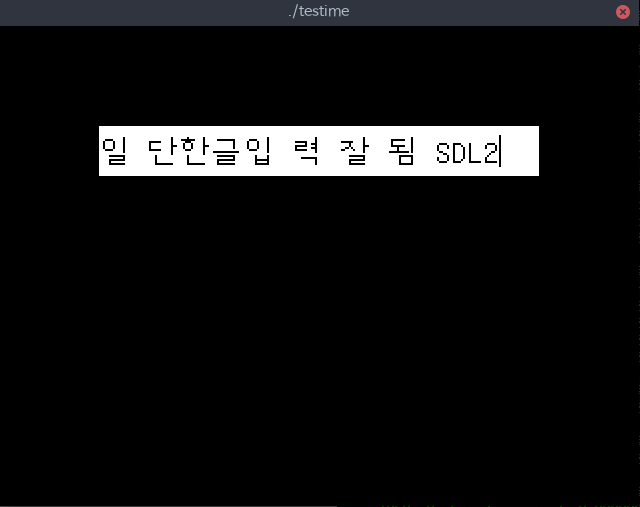
Due to personal circumstances, testing has been delayed. sorry. The environment is the same as before. 1. in SDL2 testime(SDL2 sample program). can see Korean input. (fcitx-sdl) 2. you can see SDL_IM_MODULE="fcitx" in the environment variable. AAA@BBB:~$ export | grep fcitx declare -x GTK_IM_MODULE="fcitx" declare -x QT5_IM_MODULE="fcitx" declare -x QT_IM_MODULE="fcitx" declare -x SDL_IM_MODULE="fcitx" declare -x XMODIFIERS="@im=fcitx" 3. my environment is xorg-x11 and gnome 3.(ubuntu 22.04) 4. of course, xterm can use XIM(fcitx) input. tested already. 5. I ran pharo11 from a separate command line, just in case it might be an issue with AAA /home/AAA/Pharo/vms/110-x64/lib/pharo "/home/AAA/Pharo/images/Pharo 11.0 - 64bit (stable)/Pharo 11.0 - 64bit (stable).image" I'm still not getting input using fcitx. I don't think it's going to be a one-time fix. How can I test it? Any suggestions on how to test or trace it would be very helpful.
participants (3)
-
 peter yoo
 -
 stephane ducasse
 -
 Tomohiro Oda