Learn Pharo - Not Working

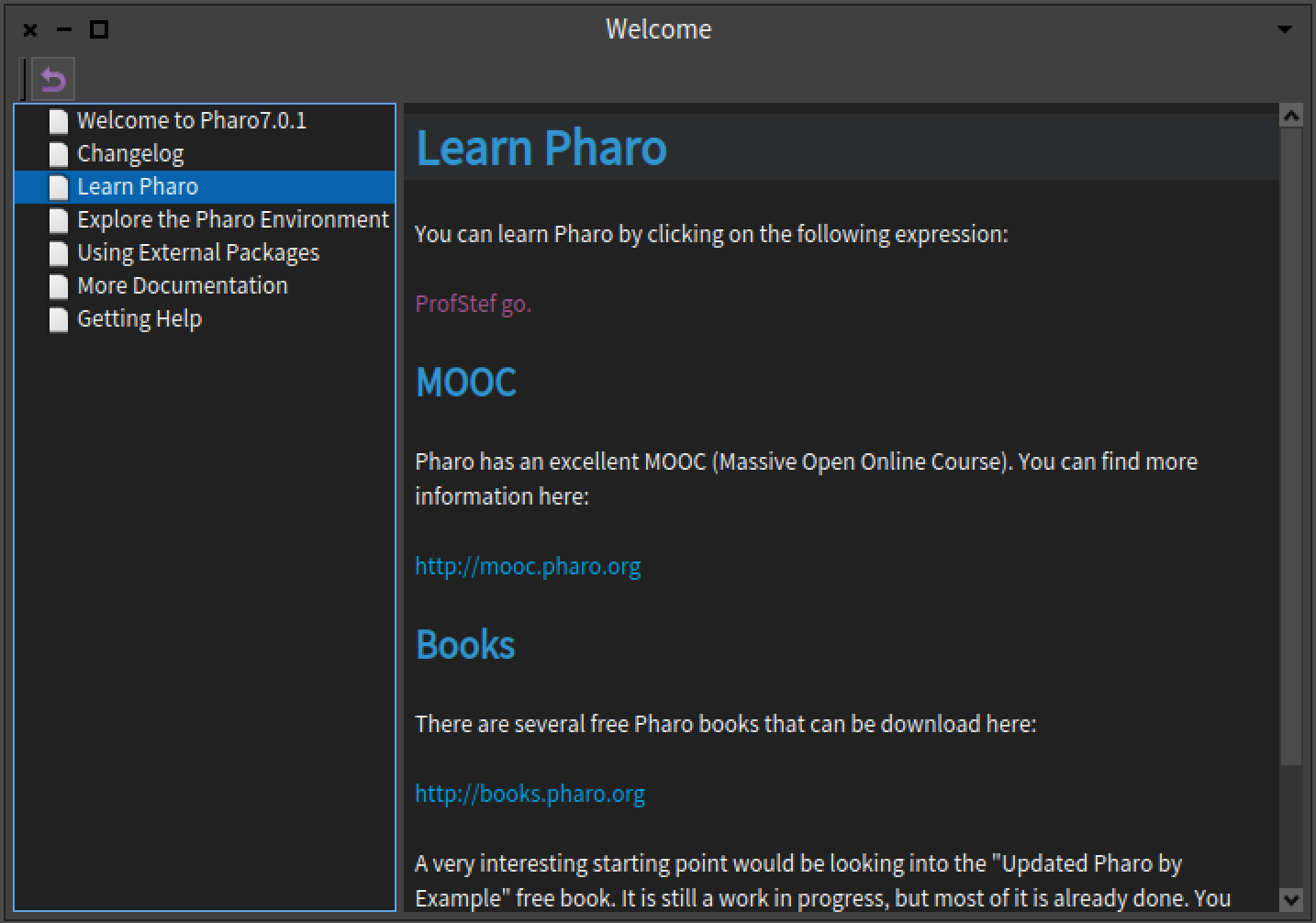
Hi, everyone. I'm an absolute newbie to Pharo, and to Smalltalk, and I'm trying to learn. I just installed Pharo 7.0.1 (on Windows 10) and I immediately got stuck. I selected "Learn Pharo" in the outline, and it gave me a screen saying: You can learn Pharo by clicking on the following expression: ProfStef go. I clicked on ProfStef go and nothing happened. There are three URL links on the same page that work like they're supposed to, but no matter how many times I try, clicking on ProfStef go appears to do nothing at all. Am I misunderstanding what I'm supposed to do or what's supposed to happen? Thanks a lot for your help. -- Sent from: http://forum.world.st/Pharo-Smalltalk-Users-f1310670.html

Did you use the 32-bit version or the 64-bit version? I just used Pharo Launcher to start a 32-bit image. I clicked on âProfStef goâ and got a separate window with the tutorial. I didnât try the 64-bit version; itâs still beta software. /*âââââââââââââââââ-*/ Sent from my iPhone https://boincstats.com/signature/-1/user/51616339056/sig.png See https://objectnets.net and https://objectnets.org
On Feb 1, 2019, at 23:34, magicspeller <pharo@magicspeller.info> wrote:
Hi, everyone.
I'm an absolute newbie to Pharo, and to Smalltalk, and I'm trying to learn. I just installed Pharo 7.0.1 (on Windows 10) and I immediately got stuck.
I selected "Learn Pharo" in the outline, and it gave me a screen saying:
You can learn Pharo by clicking on the following expression:
ProfStef go.
I clicked on ProfStef go and nothing happened. There are three URL links on the same page that work like they're supposed to, but no matter how many times I try, clicking on ProfStef go appears to do nothing at all.
Am I misunderstanding what I'm supposed to do or what's supposed to happen?
Thanks a lot for your help.
-- Sent from: http://forum.world.st/Pharo-Smalltalk-Users-f1310670.html
Thanks, John. It is the 64-bit version. I didn't know it was beta software. -- Sent from: http://forum.world.st/Pharo-Smalltalk-Users-f1310670.html
John Pfersich wrote
Did you use the 32-bit version or the 64-bit version? I just used Pharo Launcher to start a 32-bit image. I clicked on âProfStef goâ and got a separate window with the tutorial. I didnât try the 64-bit version; itâs still beta software.
Thanks again, John. I went to the download site and discovered that both 7.0 versions are labeled development versions. I downloaded and ran the 32-bit version. It works fine. -- Sent from: http://forum.world.st/Pharo-Smalltalk-Users-f1310670.html
I think they call the 64-bit stuff âexperimentalâ so it best to learn on the 32-bit stuff. Then you can help the developers debug the 64-bit stuff. /*âââââââââââââââââ-*/ Sent from my iPhone https://boincstats.com/signature/-1/user/51616339056/sig.png See https://objectnets.net and https://objectnets.org
On Feb 2, 2019, at 11:59, magicspeller <pharo@magicspeller.info> wrote:
John Pfersich wrote
Did you use the 32-bit version or the 64-bit version? I just used Pharo Launcher to start a 32-bit image. I clicked on âProfStef goâ and got a separate window with the tutorial. I didnât try the 64-bit version; itâs still beta software.
Thanks again, John. I went to the download site and discovered that both 7.0 versions are labeled development versions. I downloaded and ran the 32-bit version. It works fine.
-- Sent from: http://forum.world.st/Pharo-Smalltalk-Users-f1310670.html

magicspeller wrote
You can learn Pharo by clicking on the following expression:
ProfStef go.
I clicked on ProfStef go and nothing happened. There are three URL links on the same page that work like they're supposed to, but no matter how many times I try, clicking on ProfStef go appears to do nothing at all.
For me it works, but what you can also try is: 1) Click the menu Tools -> Playground 2) Type: ProfStef go. 3) Right click what you just typed and click "Do It" BTW, I'm also new with Pharo (not with programming) and I really enjoy the book at http://books.pharo.org/pharo-by-example/. Cheers, Richard -- Sent from: http://forum.world.st/Pharo-Smalltalk-Users-f1310670.html
Richard70NL wrote
For me it works, but what you can also try is: 1) Click the menu Tools -> Playground 2) Type: ProfStef go. 3) Right click what you just typed and click "Do It"
BTW, I'm also new with Pharo (not with programming) and I really enjoy the book at http://books.pharo.org/pharo-by-example/.
Hi Richard, Like you, I have a programming background, but Pharo and Smalltalk are quite a new experience. I downloaded /Pharo By Example/ but haven't gotten around to reading any of it yet. Thank you for the Playground suggestion! That's a great idea, and it works really well. That means I should be able to go back to the 64-bit version. Can you tell me why you don't have to select "ProfStef go." before right clicking it. I had gotten the impression that to execute any Smalltalk statement you always have to select it first. Thanks again, Keith -- Sent from: http://forum.world.st/Pharo-Smalltalk-Users-f1310670.html
In Pharo, my impression is that the cu /*âââââââââââââââââ-*/ Sent from my iPhone https://boincstats.com/signature/-1/user/51616339056/sig.png See https://objectnets.net and https://objectnets.org
On Feb 2, 2019, at 16:30, magicspeller <pharo@magicspeller.info> wrote:
Richard70NL wrote
For me it works, but what you can also try is: 1) Click the menu Tools -> Playground 2) Type: ProfStef go. 3) Right click what you just typed and click "Do It"
BTW, I'm also new with Pharo (not with programming) and I really enjoy the book at http://books.pharo.org/pharo-by-example/.
Hi Richard,
Like you, I have a programming background, but Pharo and Smalltalk are quite a new experience. I downloaded /Pharo By Example/ but haven't gotten around to reading any of it yet.
Thank you for the Playground suggestion! That's a great idea, and it works really well. That means I should be able to go back to the 64-bit version.
Can you tell me why you don't have to select "ProfStef go." before right clicking it. I had gotten the impression that to execute any Smalltalk statement you always have to select it first.
Thanks again, Keith
-- Sent from: http://forum.world.st/Pharo-Smalltalk-Users-f1310670.html

magicspeller wrote
Can you tell me why you don't have to select "ProfStef go." before right clicking it. I had gotten the impression that to execute any Smalltalk statement you always have to select it first.
I believe the default is to evaluate the whole line where the cursor is if nothing is selected. ----- Cheers, Sean -- Sent from: http://forum.world.st/Pharo-Smalltalk-Users-f1310670.html

Sent from my iPhone
On 3 Feb 2019, at 02:42, Sean P. DeNigris <sean@clipperadams.com> wrote:
believe the default is to evaluate the whole line where the cursor is if nothing is selected.
That reminds me - while I fixed the senders/implementers search commands to intelligently look for the nearest selector to the cursor (in pharo7), I forgot about workspace evaluation - doit or printit should find the nearest complete expression (even if multiline) and evaluate that - unless you specifically highlight something. It makes it much more efficient to then examine things quickly. Tim
Tim Mackinnon wrote
doit or printit should find the nearest complete expression (even if multiline) and evaluate that
That would be great! ----- Cheers, Sean -- Sent from: http://forum.world.st/Pharo-Smalltalk-Users-f1310670.html

On Sun, 3 Feb 2019 at 08:31, magicspeller <pharo@magicspeller.info> wrote:
Can you tell me why you don't have to select "ProfStef go." before right clicking it. I had gotten the impression that to execute any Smalltalk statement you always have to select it first.
In general you are correct, but newcomers are more familiar with a click paradigm that a select &doIt paradigm so this specific case is different. In the interest of teaching how to fish :), here is how you can discover these sorts of answers for yourself... Tools > Finder > Source then search for... ProfStef go and you'll see... WelcomeHelp-class>>learn which does... (self doItFrom: 'ProfStef go.') Double-clicking "doItFrom:" selects it, then hitting <Ctrl-M> does "Code search... > implementors of it" that is commented... [left as an exercise for the reader] cheers -ben
On 2/3/2019 5:01 AM, Ben Coman wrote:
In general you are correct, but newcomers are more familiar with a click paradigm that a select &doIt paradigm so this specific case is different. In the interest of teaching how to fish :), here is how you can discover these sorts of answers for yourself... Tools > Finder > Source then search for... ProfStef go and you'll see... WelcomeHelp-class>>learn which does...  (self doItFrom: 'ProfStef go.') Double-clicking "doItFrom:" selects it, then hitting <Ctrl-M> does "Code search... > implementors of it" that is commented... [left as an exercise for the reader]
Thank you. That's really helpful! Keith
On 2/3/2019 1:35 PM, Richard70nl wrote:
I just checked, the "right click -> do it" only works if at least the cursor is somewhere on the statement. I normally do a cmd-D (macOS) in these situations though. But AFAIK itâs not necessary to select the whole statement. If the cursor is somewhere else in the editor the âright click -> do itâ does not work as expected. I think the editor should maybe put the cursor in the position where you right click. But that is more of a preference. I think if you get used to that behaviour then you probably donât even think about it.
Coming from most common coding editors, I find the editors in Pharo a bit quirky. But I (we?) probably get used to it. I did check online how some people use external editors and I think itâs not worth the hassle. Itâs not as straightforward programming as Iâm used to. And, I think if you use an external editor you miss the âimmersionâ of the environment. Thanks, Richard!

Hi, I want to come back to the original issue reported. To be clear, you report that in the following screen: Clicking on the blue links like http://mooc.pharo.org or http://books.pharo.org works, but clicking the purple 'ProfStef do.' does not ? That would be very surprising, as internally, I think the mechanism behind the handling of the mouse click in the text and then doing something is the same. It would also be quite surprising if this depended on the 32/64 bits difference. In any case it works for me (macOS 64 bit): it opens a window titled 'Welcome (1/29)' containing step one of the tutorial: === "Hello! I'm Professor Stef. You must want me to help you learn Pharo. So let's go to the first lesson. Select the text below, right-click and choose 'Do it'" ProfStef next. === You are on Windows, are there any other Windows users that can confirm this either way ? Sven
On 2 Feb 2019, at 08:34, magicspeller <pharo@magicspeller.info> wrote:
Hi, everyone.
I'm an absolute newbie to Pharo, and to Smalltalk, and I'm trying to learn. I just installed Pharo 7.0.1 (on Windows 10) and I immediately got stuck.
I selected "Learn Pharo" in the outline, and it gave me a screen saying:
You can learn Pharo by clicking on the following expression:
ProfStef go.
I clicked on ProfStef go and nothing happened. There are three URL links on the same page that work like they're supposed to, but no matter how many times I try, clicking on ProfStef go appears to do nothing at all.
Am I misunderstanding what I'm supposed to do or what's supposed to happen?
Thanks a lot for your help.
-- Sent from: http://forum.world.st/Pharo-Smalltalk-Users-f1310670.html
On Sun, 3 Feb 2019 at 19:54, Sven Van Caekenberghe <sven@stfx.eu> wrote:
Hi,
It would also be quite surprising if this depended on the 32/64 bits difference.
In any case it works for me (macOS 64 bit): it opens a window titled 'Welcome (1/29)' containing step one of the tutorial:
=== "Hello! I'm Professor Stef.
You must want me to help you learn Pharo.
So let's go to the first lesson. Select the text below, right-click and choose 'Do it'"
ProfStef next. ===
You are on Windows, are there any other Windows users that can confirm this either way ?
On Win 10 and this works for me in both 32-bit and 64-bit Pharo 7.0.1 (build: 146, commit: c48755a) 64-bit VM: 201901051900 https://github.com/OpenSmalltalk/opensmalltalk-vm.git Date: Sat Jan 5 20:00:11 2019 CommitHash: 7a3c6b6 Plugins: 201901051900 cheers -ben
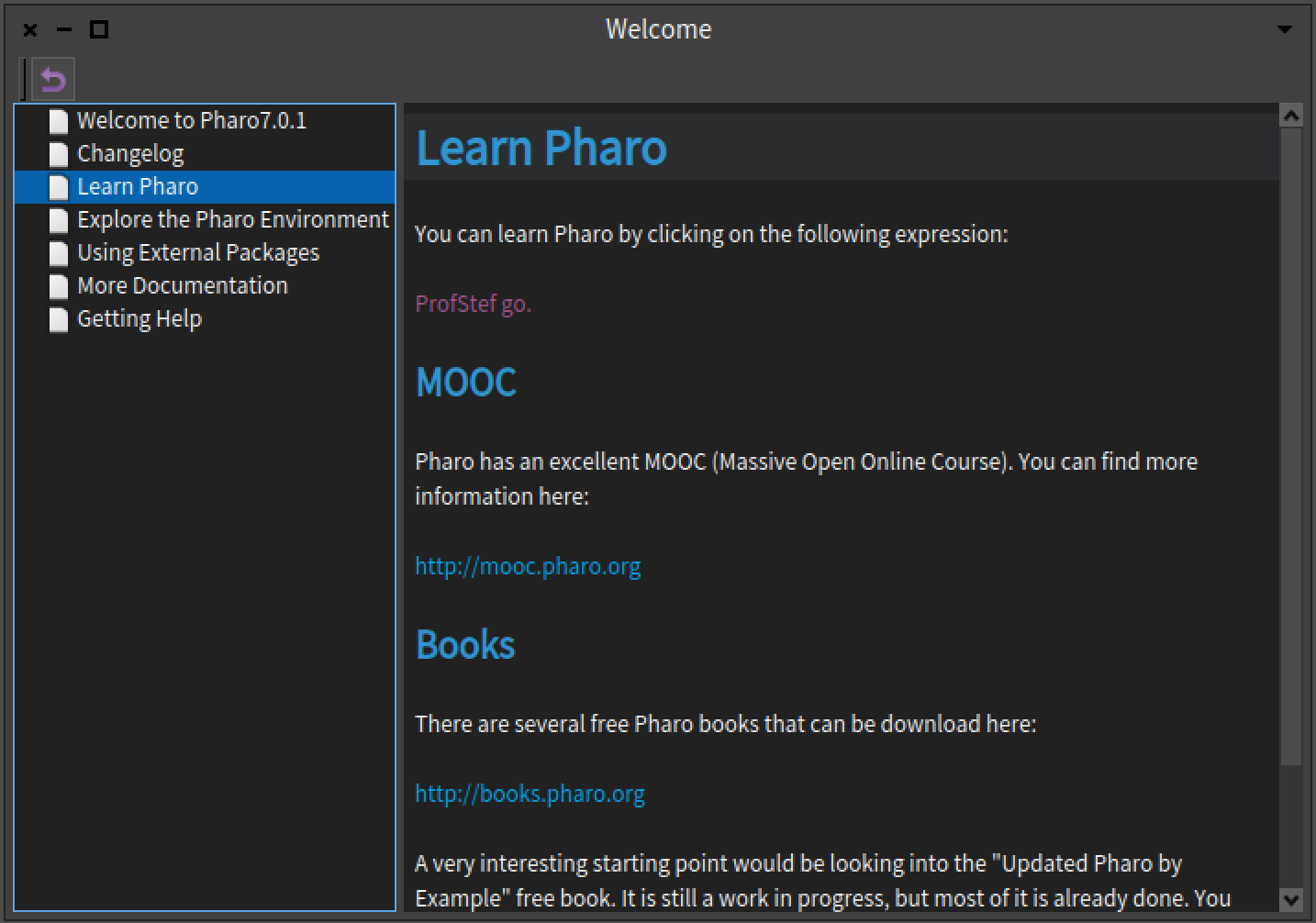

Just clicking onto ProfStef Go. works for me on both, too. Win 10, Pharo-7.0.1+build.146, VM: 201901051900 https://github.com/OpenSmalltalk/opensmalltalk-vm.git Date: Sat Jan 5 20:00:11 2019 CommitHash: 7a3c6b6 Plugins: 201901051900 -- Sent from: http://forum.world.st/Pharo-Smalltalk-Users-f1310670.html
Ben Coman wrote
On Sun, 3 Feb 2019 at 19:54, Sven Van Caekenberghe <
sven@
> wrote:
You are on Windows, are there any other Windows users that can confirm this either way ?
On Win 10 and this works for me in both 32-bit and 64-bit Pharo 7.0.1 (build: 146, commit: c48755a) 64-bit VM: 201901051900 https://github.com/OpenSmalltalk/opensmalltalk-vm.git Date: Sat Jan 5 20:00:11 2019 CommitHash: 7a3c6b6 Plugins: 201901051900
cheers -ben
Thanks, everyone. I think I owe you all an apology. I just tried the 64-bit version again and it worked perfectly. The instructions just say, "You can learn Pharo by clicking on the following expression:". I didn't expect a new window to open; I had just finished a different Pharo course in which everything stayed in the same window. You'd think I would see a new window opening anyway, but I'm wondering if it might have been hidden behind the main window. I just discovered the window tabs at the bottom as well, which would have helped if I'd thought to look there. Hope I didn't cause anyone a lot of frustration. In a way, I am glad I posed the question, because I have learned a lot in the ensuing discussion. I'll respond to a couple of the new replies, but thank you, everyone, very, very much. Warren -- Sent from: http://forum.world.st/Pharo-Smalltalk-Users-f1310670.html
On 3 Feb 2019, at 18:57, magicspeller <pharo@magicspeller.info> wrote:
Ben Coman wrote
On Sun, 3 Feb 2019 at 19:54, Sven Van Caekenberghe <
sven@
> wrote:
You are on Windows, are there any other Windows users that can confirm this either way ?
On Win 10 and this works for me in both 32-bit and 64-bit Pharo 7.0.1 (build: 146, commit: c48755a) 64-bit VM: 201901051900 https://github.com/OpenSmalltalk/opensmalltalk-vm.git Date: Sat Jan 5 20:00:11 2019 CommitHash: 7a3c6b6 Plugins: 201901051900
cheers -ben
Thanks, everyone. I think I owe you all an apology. I just tried the 64-bit version again and it worked perfectly.
The instructions just say, "You can learn Pharo by clicking on the following expression:". I didn't expect a new window to open; I had just finished a different Pharo course in which everything stayed in the same window. You'd think I would see a new window opening anyway, but I'm wondering if it might have been hidden behind the main window. I just discovered the window tabs at the bottom as well, which would have helped if I'd thought to look there.
Hope I didn't cause anyone a lot of frustration.
In a way, I am glad I posed the question, because I have learned a lot in the ensuing discussion. I'll respond to a couple of the new replies, but thank you, everyone, very, very much.
Warren
No problem, good luck with your further explorations, welcome to Pharo. Sven
On Mon, 4 Feb 2019 at 01:58, magicspeller <pharo@magicspeller.info> wrote:
Ben Coman wrote
On Sun, 3 Feb 2019 at 19:54, Sven Van Caekenberghe <
sven@
> wrote:
You are on Windows, are there any other Windows users that can confirm this either way ?
On Win 10 and this works for me in both 32-bit and 64-bit Pharo 7.0.1 (build: 146, commit: c48755a) 64-bit VM: 201901051900 https://github.com/OpenSmalltalk/opensmalltalk-vm.git Date: Sat Jan 5 20:00:11 2019 CommitHash: 7a3c6b6 Plugins: 201901051900
cheers -ben
Thanks, everyone. I think I owe you all an apology. I just tried the 64-bit version again and it worked perfectly.
If you hare learning and having fun, thats good with me.
The instructions just say, "You can learn Pharo by clicking on the following expression:". I didn't expect a new window to open; I had just finished a different Pharo course in which everything stayed in the same window. You'd think I would see a new window opening anyway, but I'm wondering if it might have been hidden behind the main window.
Its exactly this sort of little niggle that adepts just fly by without noticing. Fresh eyes are really important. I just discovered the window tabs
at the bottom as well, which would have helped if I'd thought to look there.
Hope I didn't cause anyone a lot of frustration.
In a way, I am glad I posed the question, because I have learned a lot in the ensuing discussion. I'll respond to a couple of the new replies, but thank you, everyone, very, very much.
How would you feel about stretching that learning to submit a PR updating that text to indicate a window will open? cheers -ben
Warren
-- Sent from: http://forum.world.st/Pharo-Smalltalk-Users-f1310670.html
Ben Coman wrote
On Mon, 4 Feb 2019 at 01:58, magicspeller <
pharo@
> wrote:
I just discovered the window tabs at the bottom as well, which would have helped if I'd thought to look there.
Hope I didn't cause anyone a lot of frustration.
In a way, I am glad I posed the question, because I have learned a lot in the ensuing discussion. I'll respond to a couple of the new replies, but thank you, everyone, very, very much.
How would you feel about stretching that learning to submit a PR updating that text to indicate a window will open?
Sorry, Ben, you lost me. What's a PR? Updated what text? Can you please give me an explanation an idiot (me) can understand? Thanks, Keith -- Sent from: http://forum.world.st/Pharo-Smalltalk-Users-f1310670.html
On a Win 10 Lenovo laptop with a trackpad with no mouse buttons, the 64-bit version took several clicks on âProfStef goâ to register. I suspect it might be the trackpad which isnât sending mouse messages correctly because I also have problems with other apps. /*âââââââââââââââââ-*/ Sent from my iPhone https://boincstats.com/signature/-1/user/51616339056/sig.png See https://objectnets.net and https://objectnets.org
On Feb 3, 2019, at 04:25, Ben Coman <btc@openinworld.com> wrote:
On Sun, 3 Feb 2019 at 19:54, Sven Van Caekenberghe <sven@stfx.eu> wrote: Hi,
It would also be quite surprising if this depended on the 32/64 bits difference.
In any case it works for me (macOS 64 bit): it opens a window titled 'Welcome (1/29)' containing step one of the tutorial:
=== "Hello! I'm Professor Stef.
You must want me to help you learn Pharo.
So let's go to the first lesson. Select the text below, right-click and choose 'Do it'"
ProfStef next. ===
You are on Windows, are there any other Windows users that can confirm this either way ?
On Win 10 and this works for me in both 32-bit and 64-bit Pharo 7.0.1 (build: 146, commit: c48755a) 64-bit VM: 201901051900 https://github.com/OpenSmalltalk/opensmalltalk-vm.git Date: Sat Jan 5 20:00:11 2019 CommitHash: 7a3c6b6 Plugins: 201901051900
cheers -ben
participants (10)
-
 Ben Coman
 -
 eftomi
 -
 john pfersich
 -
 magicspeller
 -
pharo@magicspeller.info
-
 Richard70NL
 -
Richard70nl
-
 Sean P. DeNigris
 -
 Sven Van Caekenberghe
 -
 Tim Mackinnon