[ann] gtspotter: a moldable interface for spotting objects

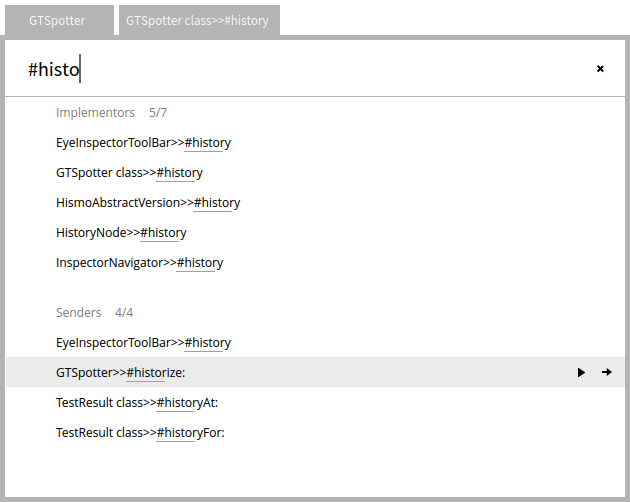
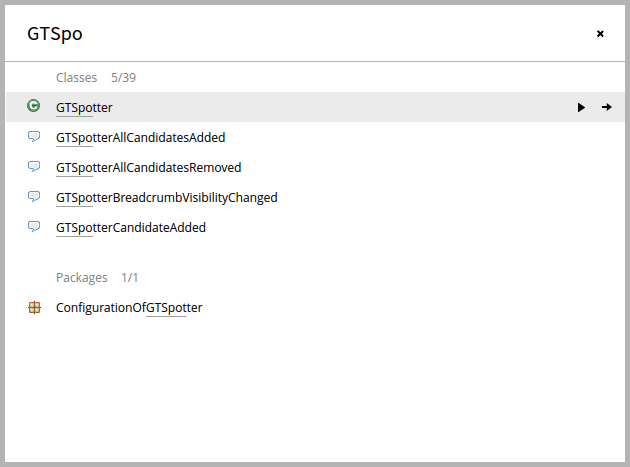
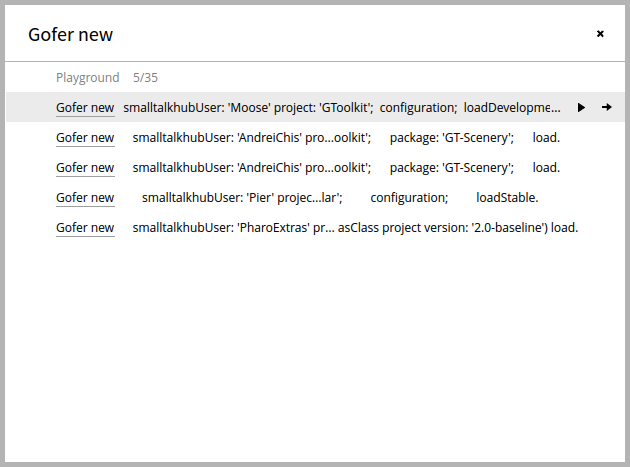
Hi, Alex Syrel, Andrei Chis and I are happy to announce a new addition to the Glamorous Toolkit: GTSpotter, a novel interface for spotting objects. GTSpotter has two goals: - Provide a uniform yet moldable interface that can work on any object, and - Handle searching through arbitrary levels of object nesting. We think this will have a significant impact on the development workflow in Pharo. Here is a couple of screenshots: [image: Inline image 2] [image: Inline image 1] [image: Inline image 3] A trailer is available here: https://www.youtube.com/watch?v=PhSmjR3NOlU A detailed description is available here: http://www.humane-assessment.com/blog/introducing-gtspotter It works already in Pharo 3.0 and can be played with by following the instructions from: http://gt.moosetechnology.org Please let us know what you think. Enjoy, The Glamorous Team

Hola, Andrei demoed it to me on friday and it is *extremely* cool. I canât wait to start using it for my next development session. I have one request though (as I already mentioned to Andrei). Since you are using a significant part of the screen, it would not be costly to (e.g. at the bottom) put a small legend of the non-obvious keystroke combinations. It would greatly increase discoverability of the features of the tool. Considering the blog post, the legend would be ( I donât understand the difference between the last 2): Cmd+Shift+ArrowUp/ArrowDown = Next/Prev category, Cmd+RightArrow = Dive into, Cmd+Shift+RightArrow = ???
On Dec 7, 2014, at 10:14, Tudor Girba <tudor@tudorgirba.com> wrote:
Hi,
Alex Syrel, Andrei Chis and I are happy to announce a new addition to the Glamorous Toolkit: GTSpotter, a novel interface for spotting objects.
GTSpotter has two goals: - Provide a uniform yet moldable interface that can work on any object, and - Handle searching through arbitrary levels of object nesting.
We think this will have a significant impact on the development workflow in Pharo.
Here is a couple of screenshots: <gtspotter-packages-classes.png> <gtspotter-dive-class-method-sender.png> <gtspotter-playground.png>
A trailer is available here: https://www.youtube.com/watch?v=PhSmjR3NOlU
A detailed description is available here: http://www.humane-assessment.com/blog/introducing-gtspotter
It works already in Pharo 3.0 and can be played with by following the instructions from: http://gt.moosetechnology.org
Please let us know what you think.
Enjoy, The Glamorous Team
---> Save our in-boxes! http://emailcharter.org <--- Johan Fabry - http://pleiad.cl/~jfabry PLEIAD lab - Computer Science Department (DCC) - University of Chile
Hi, Yes, we will still evolve the UI. At the very least you will get the shortkeys directly on the actions. The answer to your question is in the blog post: GTSpotter offers an extra action: diving in a category. Pressing Cmd+Shift+ArrowRight dives in the collection object containing only the items from that category. Thus, we can continue refining the search inside the category. So, you will open the collection of that sub-category and you will see more items at once (not just 5). Is it clearer now? Cheers, Doru On Sun, Dec 7, 2014 at 2:52 PM, Johan Fabry <jfabry@dcc.uchile.cl> wrote:
Hola,
Andrei demoed it to me on friday and it is *extremely* cool. I canât wait to start using it for my next development session.
I have one request though (as I already mentioned to Andrei). Since you are using a significant part of the screen, it would not be costly to (e.g. at the bottom) put a small legend of the non-obvious keystroke combinations. It would greatly increase discoverability of the features of the tool.
Considering the blog post, the legend would be ( I donât understand the difference between the last 2): Cmd+Shift+ArrowUp/ArrowDown = Next/Prev category, Cmd+RightArrow = Dive into, Cmd+Shift+RightArrow = ???
On Dec 7, 2014, at 10:14, Tudor Girba <tudor@tudorgirba.com> wrote:
Hi,
Alex Syrel, Andrei Chis and I are happy to announce a new addition to the Glamorous Toolkit: GTSpotter, a novel interface for spotting objects.
GTSpotter has two goals: - Provide a uniform yet moldable interface that can work on any object, and - Handle searching through arbitrary levels of object nesting.
We think this will have a significant impact on the development workflow in Pharo.
Here is a couple of screenshots: <gtspotter-packages-classes.png> <gtspotter-dive-class-method-sender.png> <gtspotter-playground.png>
A trailer is available here: https://www.youtube.com/watch?v=PhSmjR3NOlU
A detailed description is available here: http://www.humane-assessment.com/blog/introducing-gtspotter
It works already in Pharo 3.0 and can be played with by following the instructions from: http://gt.moosetechnology.org
Please let us know what you think.
Enjoy, The Glamorous Team
---> Save our in-boxes! http://emailcharter.org <---
Johan Fabry - http://pleiad.cl/~jfabry PLEIAD lab - Computer Science Department (DCC) - University of Chile
_______________________________________________ Esug-list mailing list Esug-list@lists.esug.org http://lists.esug.org/mailman/listinfo/esug-list_lists.esug.org
-- www.tudorgirba.com "Every thing has its own flow"
Sorry, but no :-( I am always confused when people say âcategoryâ because the word has so many overloaded meanings. The same happens in the blog post, it is not clear to me what category means here, and what does it have to do with the collection object?
On Dec 7, 2014, at 11:16, Tudor Girba <tudor@tudorgirba.com> wrote:
Hi,
Yes, we will still evolve the UI. At the very least you will get the shortkeys directly on the actions.
The answer to your question is in the blog post: GTSpotter offers an extra action: diving in a category. Pressing Cmd+Shift+ArrowRight dives in the collection object containing only the items from that category. Thus, we can continue refining the search inside the category.
So, you will open the collection of that sub-category and you will see more items at once (not just 5). Is it clearer now?
Cheers, Doru
---> Save our in-boxes! http://emailcharter.org <--- Johan Fabry - http://pleiad.cl/~jfabry PLEIAD lab - Computer Science Department (DCC) - University of Chile
Hi, Ok. Let's take it step by step and see if we cannot find a better way of explaining. Take a look at the first picture in the blog post. Entering GTSpo shows results both for Classes and for Packages. These "Classes" and "Packages" are what we call search categories, and they have associated a query processor that can populate them with results (see the "Spotting your objects" section from the bottom of the post). In our case, we get 39 classes (of which only 5 are shown) and 1 package that match the query. If you want to look at all those 39 classes, you can dive in the whole collection behind the category in a separate step. This is achieved through Cmd+Shift+ArrowRight. Does it make more sense now? I did not consider the category to be confusing. Would you propose another name? Cheers, Doru On Mon, Dec 8, 2014 at 4:02 PM, Johan Fabry <jfabry@dcc.uchile.cl> wrote:
Sorry, but no :-(
I am always confused when people say âcategoryâ because the word has so many overloaded meanings. The same happens in the blog post, it is not clear to me what category means here, and what does it have to do with the collection object?
On Dec 7, 2014, at 11:16, Tudor Girba <tudor@tudorgirba.com> wrote:
Hi,
Yes, we will still evolve the UI. At the very least you will get the shortkeys directly on the actions.
The answer to your question is in the blog post: GTSpotter offers an extra action: diving in a category. Pressing Cmd+Shift+ArrowRight dives in the collection object containing only the items from that category. Thus, we can continue refining the search inside the category.
So, you will open the collection of that sub-category and you will see more items at once (not just 5). Is it clearer now?
Cheers, Doru
---> Save our in-boxes! http://emailcharter.org <---
Johan Fabry - http://pleiad.cl/~jfabry PLEIAD lab - Computer Science Department (DCC) - University of Chile
-- www.tudorgirba.com "Every thing has its own flow"
OK now I get it ⦠thanks for clarifying! I think my confusion stems from the use of âcategory' and then talking about 'the collection objectâ, which made me think about collections and source code and protocols and packages and I got lost. I think that the sentence of the blog would be clearer like this (uppercase to show changes): To do this, GTSpotter offers an extra action: diving in a RESULTS category. Pressing Cmd+Shift+ArrowRight dives in the collection OF RESULTS OF that category. Thus, we can continue refining the search inside the category. So then, my suggestion for a legend at the bottom of the results list would be: Cmd+Shift+ArrowUp/ArrowDown = Next/Prev category, Cmd+RightArrow = Dive into Result, Cmd+Shift+RightArrow = Dive into Category
On Dec 8, 2014, at 12:48, Tudor Girba <tudor@tudorgirba.com> wrote:
Hi,
Ok. Let's take it step by step and see if we cannot find a better way of explaining.
Take a look at the first picture in the blog post. Entering GTSpo shows results both for Classes and for Packages. These "Classes" and "Packages" are what we call search categories, and they have associated a query processor that can populate them with results (see the "Spotting your objects" section from the bottom of the post).
In our case, we get 39 classes (of which only 5 are shown) and 1 package that match the query. If you want to look at all those 39 classes, you can dive in the whole collection behind the category in a separate step. This is achieved through Cmd+Shift+ArrowRight. Does it make more sense now?
I did not consider the category to be confusing. Would you propose another name?
Cheers, Doru
On Mon, Dec 8, 2014 at 4:02 PM, Johan Fabry <jfabry@dcc.uchile.cl> wrote: Sorry, but no :-(
I am always confused when people say âcategoryâ because the word has so many overloaded meanings. The same happens in the blog post, it is not clear to me what category means here, and what does it have to do with the collection object?
On Dec 7, 2014, at 11:16, Tudor Girba <tudor@tudorgirba.com> wrote:
Hi,
Yes, we will still evolve the UI. At the very least you will get the shortkeys directly on the actions.
The answer to your question is in the blog post: GTSpotter offers an extra action: diving in a category. Pressing Cmd+Shift+ArrowRight dives in the collection object containing only the items from that category. Thus, we can continue refining the search inside the category.
So, you will open the collection of that sub-category and you will see more items at once (not just 5). Is it clearer now?
Cheers, Doru
---> Save our in-boxes! http://emailcharter.org <---
Johan Fabry - http://pleiad.cl/~jfabry PLEIAD lab - Computer Science Department (DCC) - University of Chile
-- www.tudorgirba.com
"Every thing has its own flow"
---> Save our in-boxes! http://emailcharter.org <--- Johan Fabry - http://pleiad.cl/~jfabry PLEIAD lab - Computer Science Department (DCC) - University of Chile
Thanks for the suggestions, Johan. I will change the text and we will definitely look into making the shortcuts more apparent. Cheers, Doru On Mon, Dec 8, 2014 at 5:17 PM, Johan Fabry <jfabry@dcc.uchile.cl> wrote:
OK now I get it ⦠thanks for clarifying! I think my confusion stems from the use of âcategory' and then talking about 'the collection objectâ, which made me think about collections and source code and protocols and packages and I got lost.
I think that the sentence of the blog would be clearer like this (uppercase to show changes):
To do this, GTSpotter offers an extra action: diving in a RESULTS category. Pressing Cmd+Shift+ArrowRight dives in the collection OF RESULTS OF that category. Thus, we can continue refining the search inside the category.
So then, my suggestion for a legend at the bottom of the results list would be: Cmd+Shift+ArrowUp/ArrowDown = Next/Prev category, Cmd+RightArrow = Dive into Result, Cmd+Shift+RightArrow = Dive into Category
On Dec 8, 2014, at 12:48, Tudor Girba <tudor@tudorgirba.com> wrote:
Hi,
Ok. Let's take it step by step and see if we cannot find a better way of explaining.
Take a look at the first picture in the blog post. Entering GTSpo shows results both for Classes and for Packages. These "Classes" and "Packages" are what we call search categories, and they have associated a query processor that can populate them with results (see the "Spotting your objects" section from the bottom of the post).
In our case, we get 39 classes (of which only 5 are shown) and 1 package that match the query. If you want to look at all those 39 classes, you can dive in the whole collection behind the category in a separate step. This is achieved through Cmd+Shift+ArrowRight. Does it make more sense now?
I did not consider the category to be confusing. Would you propose another name?
Cheers, Doru
On Mon, Dec 8, 2014 at 4:02 PM, Johan Fabry <jfabry@dcc.uchile.cl> wrote: Sorry, but no :-(
I am always confused when people say âcategoryâ because the word has so many overloaded meanings. The same happens in the blog post, it is not clear to me what category means here, and what does it have to do with the collection object?
On Dec 7, 2014, at 11:16, Tudor Girba <tudor@tudorgirba.com> wrote:
Hi,
Yes, we will still evolve the UI. At the very least you will get the shortkeys directly on the actions.
The answer to your question is in the blog post: GTSpotter offers an extra action: diving in a category. Pressing Cmd+Shift+ArrowRight dives in the collection object containing only the items from that category. Thus, we can continue refining the search inside the category.
So, you will open the collection of that sub-category and you will see more items at once (not just 5). Is it clearer now?
Cheers, Doru
---> Save our in-boxes! http://emailcharter.org <---
Johan Fabry - http://pleiad.cl/~jfabry PLEIAD lab - Computer Science Department (DCC) - University of Chile
-- www.tudorgirba.com
"Every thing has its own flow"
---> Save our in-boxes! http://emailcharter.org <---
Johan Fabry - http://pleiad.cl/~jfabry PLEIAD lab - Computer Science Department (DCC) - University of Chile
-- www.tudorgirba.com "Every thing has its own flow"

Dont know if this is auto completion replacement or not, from the looks of it seem a lot more than that. Auto completion is one of the thing that annoys me in Pharo and this looks like a very good replacement. So the gui is also made with Glamour ? Look very good looking and very useful cant wait to try it :) On Tue, Dec 9, 2014 at 12:36 AM, Tudor Girba <tudor@tudorgirba.com> wrote:
Thanks for the suggestions, Johan. I will change the text and we will definitely look into making the shortcuts more apparent.
Cheers, Doru
On Mon, Dec 8, 2014 at 5:17 PM, Johan Fabry <jfabry@dcc.uchile.cl> wrote:
OK now I get it ⦠thanks for clarifying! I think my confusion stems from the use of âcategory' and then talking about 'the collection objectâ, which made me think about collections and source code and protocols and packages and I got lost.
I think that the sentence of the blog would be clearer like this (uppercase to show changes):
To do this, GTSpotter offers an extra action: diving in a RESULTS category. Pressing Cmd+Shift+ArrowRight dives in the collection OF RESULTS OF that category. Thus, we can continue refining the search inside the category.
So then, my suggestion for a legend at the bottom of the results list would be: Cmd+Shift+ArrowUp/ArrowDown = Next/Prev category, Cmd+RightArrow = Dive into Result, Cmd+Shift+RightArrow = Dive into Category
On Dec 8, 2014, at 12:48, Tudor Girba <tudor@tudorgirba.com> wrote:
Hi,
Ok. Let's take it step by step and see if we cannot find a better way of explaining.
Take a look at the first picture in the blog post. Entering GTSpo shows results both for Classes and for Packages. These "Classes" and "Packages" are what we call search categories, and they have associated a query processor that can populate them with results (see the "Spotting your objects" section from the bottom of the post).
In our case, we get 39 classes (of which only 5 are shown) and 1 package that match the query. If you want to look at all those 39 classes, you can dive in the whole collection behind the category in a separate step. This is achieved through Cmd+Shift+ArrowRight. Does it make more sense now?
I did not consider the category to be confusing. Would you propose another name?
Cheers, Doru
On Mon, Dec 8, 2014 at 4:02 PM, Johan Fabry <jfabry@dcc.uchile.cl> wrote: Sorry, but no :-(
I am always confused when people say âcategoryâ because the word has so many overloaded meanings. The same happens in the blog post, it is not clear to me what category means here, and what does it have to do with the collection object?
On Dec 7, 2014, at 11:16, Tudor Girba <tudor@tudorgirba.com> wrote:
Hi,
Yes, we will still evolve the UI. At the very least you will get the shortkeys directly on the actions.
The answer to your question is in the blog post: GTSpotter offers an extra action: diving in a category. Pressing Cmd+Shift+ArrowRight dives in the collection object containing only the items from that category. Thus, we can continue refining the search inside the category.
So, you will open the collection of that sub-category and you will see more items at once (not just 5). Is it clearer now?
Cheers, Doru
---> Save our in-boxes! http://emailcharter.org <---
Johan Fabry - http://pleiad.cl/~jfabry PLEIAD lab - Computer Science Department (DCC) - University of Chile
-- www.tudorgirba.com
"Every thing has its own flow"
---> Save our in-boxes! http://emailcharter.org <---
Johan Fabry - http://pleiad.cl/~jfabry PLEIAD lab - Computer Science Department (DCC) - University of Chile
-- www.tudorgirba.com
"Every thing has its own flow"

On Mon, Dec 8, 2014 at 8:02 PM, kilon alios <kilon.alios@gmail.com> wrote:
Dont know if this is auto completion replacement or not, from the looks of it seem a lot more than that. Auto completion is one of the thing that annoys me in Pharo and this looks like a very good replacement.
So the gui is also made with Glamour ?
No it's in Brick. Brick is a small extension that we made to Morphic to make it a little more faster and to control resizing better. So it's Morphic not Glamour :) Cheers, Andrei
Look very good looking and very useful cant wait to try it :)
On Tue, Dec 9, 2014 at 12:36 AM, Tudor Girba <tudor@tudorgirba.com> wrote:
Thanks for the suggestions, Johan. I will change the text and we will definitely look into making the shortcuts more apparent.
Cheers, Doru
On Mon, Dec 8, 2014 at 5:17 PM, Johan Fabry <jfabry@dcc.uchile.cl> wrote:
OK now I get it ⦠thanks for clarifying! I think my confusion stems from the use of âcategory' and then talking about 'the collection objectâ, which made me think about collections and source code and protocols and packages and I got lost.
I think that the sentence of the blog would be clearer like this (uppercase to show changes):
To do this, GTSpotter offers an extra action: diving in a RESULTS category. Pressing Cmd+Shift+ArrowRight dives in the collection OF RESULTS OF that category. Thus, we can continue refining the search inside the category.
So then, my suggestion for a legend at the bottom of the results list would be: Cmd+Shift+ArrowUp/ArrowDown = Next/Prev category, Cmd+RightArrow = Dive into Result, Cmd+Shift+RightArrow = Dive into Category
On Dec 8, 2014, at 12:48, Tudor Girba <tudor@tudorgirba.com> wrote:
Hi,
Ok. Let's take it step by step and see if we cannot find a better way of explaining.
Take a look at the first picture in the blog post. Entering GTSpo shows results both for Classes and for Packages. These "Classes" and "Packages" are what we call search categories, and they have associated a query processor that can populate them with results (see the "Spotting your objects" section from the bottom of the post).
In our case, we get 39 classes (of which only 5 are shown) and 1 package that match the query. If you want to look at all those 39 classes, you can dive in the whole collection behind the category in a separate step. This is achieved through Cmd+Shift+ArrowRight. Does it make more sense now?
I did not consider the category to be confusing. Would you propose another name?
Cheers, Doru
On Mon, Dec 8, 2014 at 4:02 PM, Johan Fabry <jfabry@dcc.uchile.cl> wrote: Sorry, but no :-(
I am always confused when people say âcategoryâ because the word has so many overloaded meanings. The same happens in the blog post, it is not clear to me what category means here, and what does it have to do with the collection object?
On Dec 7, 2014, at 11:16, Tudor Girba <tudor@tudorgirba.com> wrote:
Hi,
Yes, we will still evolve the UI. At the very least you will get the shortkeys directly on the actions.
The answer to your question is in the blog post: GTSpotter offers an extra action: diving in a category. Pressing Cmd+Shift+ArrowRight dives in the collection object containing only the items from that category. Thus, we can continue refining the search inside the category.
So, you will open the collection of that sub-category and you will see more items at once (not just 5). Is it clearer now?
Cheers, Doru
---> Save our in-boxes! http://emailcharter.org <---
Johan Fabry - http://pleiad.cl/~jfabry PLEIAD lab - Computer Science Department (DCC) - University of Chile
-- www.tudorgirba.com
"Every thing has its own flow"
---> Save our in-boxes! http://emailcharter.org <---
Johan Fabry - http://pleiad.cl/~jfabry PLEIAD lab - Computer Science Department (DCC) - University of Chile
-- www.tudorgirba.com
"Every thing has its own flow"
sounds very interesting cant wait to try it and take a look also at Brick. On Tue, Dec 9, 2014 at 1:35 AM, Andrei Chis <chisvasileandrei@gmail.com> wrote:
On Mon, Dec 8, 2014 at 8:02 PM, kilon alios <kilon.alios@gmail.com> wrote:
Dont know if this is auto completion replacement or not, from the looks of it seem a lot more than that. Auto completion is one of the thing that annoys me in Pharo and this looks like a very good replacement.
So the gui is also made with Glamour ?
No it's in Brick. Brick is a small extension that we made to Morphic to make it a little more faster and to control resizing better. So it's Morphic not Glamour :)
Cheers, Andrei
Look very good looking and very useful cant wait to try it :)
On Tue, Dec 9, 2014 at 12:36 AM, Tudor Girba <tudor@tudorgirba.com> wrote:
Thanks for the suggestions, Johan. I will change the text and we will definitely look into making the shortcuts more apparent.
Cheers, Doru
On Mon, Dec 8, 2014 at 5:17 PM, Johan Fabry <jfabry@dcc.uchile.cl> wrote:
OK now I get it ⦠thanks for clarifying! I think my confusion stems from the use of âcategory' and then talking about 'the collection objectâ, which made me think about collections and source code and protocols and packages and I got lost.
I think that the sentence of the blog would be clearer like this (uppercase to show changes):
To do this, GTSpotter offers an extra action: diving in a RESULTS category. Pressing Cmd+Shift+ArrowRight dives in the collection OF RESULTS OF that category. Thus, we can continue refining the search inside the category.
So then, my suggestion for a legend at the bottom of the results list would be: Cmd+Shift+ArrowUp/ArrowDown = Next/Prev category, Cmd+RightArrow = Dive into Result, Cmd+Shift+RightArrow = Dive into Category
On Dec 8, 2014, at 12:48, Tudor Girba <tudor@tudorgirba.com> wrote:
Hi,
Ok. Let's take it step by step and see if we cannot find a better way of explaining.
Take a look at the first picture in the blog post. Entering GTSpo shows results both for Classes and for Packages. These "Classes" and "Packages" are what we call search categories, and they have associated a query processor that can populate them with results (see the "Spotting your objects" section from the bottom of the post).
In our case, we get 39 classes (of which only 5 are shown) and 1 package that match the query. If you want to look at all those 39 classes, you can dive in the whole collection behind the category in a separate step. This is achieved through Cmd+Shift+ArrowRight. Does it make more sense now?
I did not consider the category to be confusing. Would you propose another name?
Cheers, Doru
On Mon, Dec 8, 2014 at 4:02 PM, Johan Fabry <jfabry@dcc.uchile.cl> wrote: Sorry, but no :-(
I am always confused when people say âcategoryâ because the word has so many overloaded meanings. The same happens in the blog post, it is not clear to me what category means here, and what does it have to do with the collection object?
On Dec 7, 2014, at 11:16, Tudor Girba <tudor@tudorgirba.com> wrote:
Hi,
Yes, we will still evolve the UI. At the very least you will get the shortkeys directly on the actions.
The answer to your question is in the blog post: GTSpotter offers an extra action: diving in a category. Pressing Cmd+Shift+ArrowRight dives in the collection object containing only the items from that category. Thus, we can continue refining the search inside the category.
So, you will open the collection of that sub-category and you will see more items at once (not just 5). Is it clearer now?
Cheers, Doru
---> Save our in-boxes! http://emailcharter.org <---
Johan Fabry - http://pleiad.cl/~jfabry PLEIAD lab - Computer Science Department (DCC) - University of Chile
-- www.tudorgirba.com
"Every thing has its own flow"
---> Save our in-boxes! http://emailcharter.org <---
Johan Fabry - http://pleiad.cl/~jfabry PLEIAD lab - Computer Science Department (DCC) - University of Chile
-- www.tudorgirba.com
"Every thing has its own flow"
So how I can give this a try, I downloaded latest moose 5.0 and there is no GTSpotter inside On Tue, Dec 9, 2014 at 10:27 AM, kilon alios <kilon.alios@gmail.com> wrote:
sounds very interesting cant wait to try it and take a look also at Brick.
On Tue, Dec 9, 2014 at 1:35 AM, Andrei Chis <chisvasileandrei@gmail.com> wrote:
On Mon, Dec 8, 2014 at 8:02 PM, kilon alios <kilon.alios@gmail.com> wrote:
Dont know if this is auto completion replacement or not, from the looks of it seem a lot more than that. Auto completion is one of the thing that annoys me in Pharo and this looks like a very good replacement.
So the gui is also made with Glamour ?
No it's in Brick. Brick is a small extension that we made to Morphic to make it a little more faster and to control resizing better. So it's Morphic not Glamour :)
Cheers, Andrei
Look very good looking and very useful cant wait to try it :)
On Tue, Dec 9, 2014 at 12:36 AM, Tudor Girba <tudor@tudorgirba.com> wrote:
Thanks for the suggestions, Johan. I will change the text and we will definitely look into making the shortcuts more apparent.
Cheers, Doru
On Mon, Dec 8, 2014 at 5:17 PM, Johan Fabry <jfabry@dcc.uchile.cl> wrote:
OK now I get it ⦠thanks for clarifying! I think my confusion stems from the use of âcategory' and then talking about 'the collection objectâ, which made me think about collections and source code and protocols and packages and I got lost.
I think that the sentence of the blog would be clearer like this (uppercase to show changes):
To do this, GTSpotter offers an extra action: diving in a RESULTS category. Pressing Cmd+Shift+ArrowRight dives in the collection OF RESULTS OF that category. Thus, we can continue refining the search inside the category.
So then, my suggestion for a legend at the bottom of the results list would be: Cmd+Shift+ArrowUp/ArrowDown = Next/Prev category, Cmd+RightArrow = Dive into Result, Cmd+Shift+RightArrow = Dive into Category
On Dec 8, 2014, at 12:48, Tudor Girba <tudor@tudorgirba.com> wrote:
Hi,
Ok. Let's take it step by step and see if we cannot find a better way of explaining.
Take a look at the first picture in the blog post. Entering GTSpo shows results both for Classes and for Packages. These "Classes" and "Packages" are what we call search categories, and they have associated a query processor that can populate them with results (see the "Spotting your objects" section from the bottom of the post).
In our case, we get 39 classes (of which only 5 are shown) and 1 package that match the query. If you want to look at all those 39 classes, you can dive in the whole collection behind the category in a separate step. This is achieved through Cmd+Shift+ArrowRight. Does it make more sense now?
I did not consider the category to be confusing. Would you propose another name?
Cheers, Doru
On Mon, Dec 8, 2014 at 4:02 PM, Johan Fabry <jfabry@dcc.uchile.cl> wrote: Sorry, but no :-(
I am always confused when people say âcategoryâ because the word has so many overloaded meanings. The same happens in the blog post, it is not clear to me what category means here, and what does it have to do with the collection object?
On Dec 7, 2014, at 11:16, Tudor Girba <tudor@tudorgirba.com> wrote:
Hi,
Yes, we will still evolve the UI. At the very least you will get the shortkeys directly on the actions.
The answer to your question is in the blog post: GTSpotter offers an extra action: diving in a category. Pressing Cmd+Shift+ArrowRight dives in the collection object containing only the items from that category. Thus, we can continue refining the search inside the category.
So, you will open the collection of that sub-category and you will see more items at once (not just 5). Is it clearer now?
Cheers, Doru
---> Save our in-boxes! http://emailcharter.org <---
Johan Fabry - http://pleiad.cl/~jfabry PLEIAD lab - Computer Science Department (DCC) - University of Chile
-- www.tudorgirba.com
"Every thing has its own flow"
---> Save our in-boxes! http://emailcharter.org <---
Johan Fabry - http://pleiad.cl/~jfabry PLEIAD lab - Computer Science Department (DCC) - University of Chile
-- www.tudorgirba.com
"Every thing has its own flow"

There is a pre-built image here http://gt.moosetechnology.org
On 09 Dec 2014, at 11:08, kilon alios <kilon.alios@gmail.com> wrote:
So how I can give this a try, I downloaded latest moose 5.0 and there is no GTSpotter inside
On Tue, Dec 9, 2014 at 10:27 AM, kilon alios <kilon.alios@gmail.com> wrote: sounds very interesting cant wait to try it and take a look also at Brick.
On Tue, Dec 9, 2014 at 1:35 AM, Andrei Chis <chisvasileandrei@gmail.com> wrote:
On Mon, Dec 8, 2014 at 8:02 PM, kilon alios <kilon.alios@gmail.com> wrote: Dont know if this is auto completion replacement or not, from the looks of it seem a lot more than that. Auto completion is one of the thing that annoys me in Pharo and this looks like a very good replacement.
So the gui is also made with Glamour ?
No it's in Brick. Brick is a small extension that we made to Morphic to make it a little more faster and to control resizing better. So it's Morphic not Glamour :)
Cheers, Andrei
Look very good looking and very useful cant wait to try it :)
On Tue, Dec 9, 2014 at 12:36 AM, Tudor Girba <tudor@tudorgirba.com> wrote: Thanks for the suggestions, Johan. I will change the text and we will definitely look into making the shortcuts more apparent.
Cheers, Doru
On Mon, Dec 8, 2014 at 5:17 PM, Johan Fabry <jfabry@dcc.uchile.cl> wrote:
OK now I get it ⦠thanks for clarifying! I think my confusion stems from the use of âcategory' and then talking about 'the collection objectâ, which made me think about collections and source code and protocols and packages and I got lost.
I think that the sentence of the blog would be clearer like this (uppercase to show changes):
To do this, GTSpotter offers an extra action: diving in a RESULTS category. Pressing Cmd+Shift+ArrowRight dives in the collection OF RESULTS OF that category. Thus, we can continue refining the search inside the category.
So then, my suggestion for a legend at the bottom of the results list would be: Cmd+Shift+ArrowUp/ArrowDown = Next/Prev category, Cmd+RightArrow = Dive into Result, Cmd+Shift+RightArrow = Dive into Category
On Dec 8, 2014, at 12:48, Tudor Girba <tudor@tudorgirba.com> wrote:
Hi,
Ok. Let's take it step by step and see if we cannot find a better way of explaining.
Take a look at the first picture in the blog post. Entering GTSpo shows results both for Classes and for Packages. These "Classes" and "Packages" are what we call search categories, and they have associated a query processor that can populate them with results (see the "Spotting your objects" section from the bottom of the post).
In our case, we get 39 classes (of which only 5 are shown) and 1 package that match the query. If you want to look at all those 39 classes, you can dive in the whole collection behind the category in a separate step. This is achieved through Cmd+Shift+ArrowRight. Does it make more sense now?
I did not consider the category to be confusing. Would you propose another name?
Cheers, Doru
On Mon, Dec 8, 2014 at 4:02 PM, Johan Fabry <jfabry@dcc.uchile.cl> wrote: Sorry, but no :-(
I am always confused when people say âcategoryâ because the word has so many overloaded meanings. The same happens in the blog post, it is not clear to me what category means here, and what does it have to do with the collection object?
On Dec 7, 2014, at 11:16, Tudor Girba <tudor@tudorgirba.com> wrote:
Hi,
Yes, we will still evolve the UI. At the very least you will get the shortkeys directly on the actions.
The answer to your question is in the blog post: GTSpotter offers an extra action: diving in a category. Pressing Cmd+Shift+ArrowRight dives in the collection object containing only the items from that category. Thus, we can continue refining the search inside the category.
So, you will open the collection of that sub-category and you will see more items at once (not just 5). Is it clearer now?
Cheers, Doru
---> Save our in-boxes! http://emailcharter.org <---
Johan Fabry - http://pleiad.cl/~jfabry PLEIAD lab - Computer Science Department (DCC) - University of Chile
-- www.tudorgirba.com
"Every thing has its own flow"
---> Save our in-boxes! http://emailcharter.org <---
Johan Fabry - http://pleiad.cl/~jfabry PLEIAD lab - Computer Science Department (DCC) - University of Chile
-- www.tudorgirba.com
"Every thing has its own flow"
It should be inside Moose 5. You should be able to press Cmd+Enter and trigger GTSpotter. Does it not work? Doru On Tue, Dec 9, 2014 at 11:14 AM, Sven Van Caekenberghe <sven@stfx.eu> wrote:
There is a pre-built image here http://gt.moosetechnology.org
On 09 Dec 2014, at 11:08, kilon alios <kilon.alios@gmail.com> wrote:
So how I can give this a try, I downloaded latest moose 5.0 and there is no GTSpotter inside
On Tue, Dec 9, 2014 at 10:27 AM, kilon alios <kilon.alios@gmail.com> wrote: sounds very interesting cant wait to try it and take a look also at Brick.
On Tue, Dec 9, 2014 at 1:35 AM, Andrei Chis <chisvasileandrei@gmail.com> wrote:
On Mon, Dec 8, 2014 at 8:02 PM, kilon alios <kilon.alios@gmail.com> wrote: Dont know if this is auto completion replacement or not, from the looks of it seem a lot more than that. Auto completion is one of the thing that annoys me in Pharo and this looks like a very good replacement.
So the gui is also made with Glamour ?
No it's in Brick. Brick is a small extension that we made to Morphic to make it a little more faster and to control resizing better. So it's Morphic not Glamour :)
Cheers, Andrei
Look very good looking and very useful cant wait to try it :)
On Tue, Dec 9, 2014 at 12:36 AM, Tudor Girba <tudor@tudorgirba.com> wrote: Thanks for the suggestions, Johan. I will change the text and we will definitely look into making the shortcuts more apparent.
Cheers, Doru
On Mon, Dec 8, 2014 at 5:17 PM, Johan Fabry <jfabry@dcc.uchile.cl> wrote:
OK now I get it ⦠thanks for clarifying! I think my confusion stems from the use of âcategory' and then talking about 'the collection objectâ, which made me think about collections and source code and protocols and packages and I got lost.
I think that the sentence of the blog would be clearer like this (uppercase to show changes):
To do this, GTSpotter offers an extra action: diving in a RESULTS category. Pressing Cmd+Shift+ArrowRight dives in the collection OF RESULTS OF that category. Thus, we can continue refining the search inside the category.
So then, my suggestion for a legend at the bottom of the results list would be: Cmd+Shift+ArrowUp/ArrowDown = Next/Prev category, Cmd+RightArrow = Dive into Result, Cmd+Shift+RightArrow = Dive into Category
On Dec 8, 2014, at 12:48, Tudor Girba <tudor@tudorgirba.com> wrote:
Hi,
Ok. Let's take it step by step and see if we cannot find a better way of explaining.
Take a look at the first picture in the blog post. Entering GTSpo shows results both for Classes and for Packages. These "Classes" and "Packages" are what we call search categories, and they have associated a query processor that can populate them with results (see the "Spotting your objects" section from the bottom of the post).
In our case, we get 39 classes (of which only 5 are shown) and 1 package that match the query. If you want to look at all those 39 classes, you can dive in the whole collection behind the category in a separate step. This is achieved through Cmd+Shift+ArrowRight. Does it make more sense now?
I did not consider the category to be confusing. Would you propose another name?
Cheers, Doru
On Mon, Dec 8, 2014 at 4:02 PM, Johan Fabry <jfabry@dcc.uchile.cl> wrote: Sorry, but no :-(
I am always confused when people say âcategoryâ because the word has so many overloaded meanings. The same happens in the blog post, it is not clear to me what category means here, and what does it have to do with the collection object?
On Dec 7, 2014, at 11:16, Tudor Girba <tudor@tudorgirba.com> wrote:
Hi,
Yes, we will still evolve the UI. At the very least you will get the shortkeys directly on the actions.
The answer to your question is in the blog post: GTSpotter offers an extra action: diving in a category. Pressing Cmd+Shift+ArrowRight dives in the collection object containing only the items from that category. Thus, we can continue refining the search inside the category.
So, you will open the collection of that sub-category and you will see more items at once (not just 5). Is it clearer now?
Cheers, Doru
---> Save our in-boxes! http://emailcharter.org <---
Johan Fabry - http://pleiad.cl/~jfabry PLEIAD lab - Computer Science Department (DCC) - University of Chile
-- www.tudorgirba.com
"Every thing has its own flow"
---> Save our in-boxes! http://emailcharter.org <---
Johan Fabry - http://pleiad.cl/~jfabry PLEIAD lab - Computer Science Department (DCC) - University of Chile
-- www.tudorgirba.com
"Every thing has its own flow"
-- www.tudorgirba.com "Every thing has its own flow"
thanks but that was not necessary, apparently GTSpotter is not added to the world menus and it can only be triggered with a shortcut that the blog post does not mention which is alt+enter. This an awesome tool. love it :) Question : how I expand the search results , for example it gives a 5/30 classes how I can see all 30 classes that are the search result ? On Tue, Dec 9, 2014 at 12:14 PM, Sven Van Caekenberghe <sven@stfx.eu> wrote:
There is a pre-built image here http://gt.moosetechnology.org
On 09 Dec 2014, at 11:08, kilon alios <kilon.alios@gmail.com> wrote:
So how I can give this a try, I downloaded latest moose 5.0 and there is no GTSpotter inside
On Tue, Dec 9, 2014 at 10:27 AM, kilon alios <kilon.alios@gmail.com> wrote: sounds very interesting cant wait to try it and take a look also at Brick.
On Tue, Dec 9, 2014 at 1:35 AM, Andrei Chis <chisvasileandrei@gmail.com> wrote:
On Mon, Dec 8, 2014 at 8:02 PM, kilon alios <kilon.alios@gmail.com> wrote: Dont know if this is auto completion replacement or not, from the looks of it seem a lot more than that. Auto completion is one of the thing that annoys me in Pharo and this looks like a very good replacement.
So the gui is also made with Glamour ?
No it's in Brick. Brick is a small extension that we made to Morphic to make it a little more faster and to control resizing better. So it's Morphic not Glamour :)
Cheers, Andrei
Look very good looking and very useful cant wait to try it :)
On Tue, Dec 9, 2014 at 12:36 AM, Tudor Girba <tudor@tudorgirba.com> wrote: Thanks for the suggestions, Johan. I will change the text and we will definitely look into making the shortcuts more apparent.
Cheers, Doru
On Mon, Dec 8, 2014 at 5:17 PM, Johan Fabry <jfabry@dcc.uchile.cl> wrote:
OK now I get it ⦠thanks for clarifying! I think my confusion stems from the use of âcategory' and then talking about 'the collection objectâ, which made me think about collections and source code and protocols and packages and I got lost.
I think that the sentence of the blog would be clearer like this (uppercase to show changes):
To do this, GTSpotter offers an extra action: diving in a RESULTS category. Pressing Cmd+Shift+ArrowRight dives in the collection OF RESULTS OF that category. Thus, we can continue refining the search inside the category.
So then, my suggestion for a legend at the bottom of the results list would be: Cmd+Shift+ArrowUp/ArrowDown = Next/Prev category, Cmd+RightArrow = Dive into Result, Cmd+Shift+RightArrow = Dive into Category
On Dec 8, 2014, at 12:48, Tudor Girba <tudor@tudorgirba.com> wrote:
Hi,
Ok. Let's take it step by step and see if we cannot find a better way of explaining.
Take a look at the first picture in the blog post. Entering GTSpo shows results both for Classes and for Packages. These "Classes" and "Packages" are what we call search categories, and they have associated a query processor that can populate them with results (see the "Spotting your objects" section from the bottom of the post).
In our case, we get 39 classes (of which only 5 are shown) and 1 package that match the query. If you want to look at all those 39 classes, you can dive in the whole collection behind the category in a separate step. This is achieved through Cmd+Shift+ArrowRight. Does it make more sense now?
I did not consider the category to be confusing. Would you propose another name?
Cheers, Doru
On Mon, Dec 8, 2014 at 4:02 PM, Johan Fabry <jfabry@dcc.uchile.cl> wrote: Sorry, but no :-(
I am always confused when people say âcategoryâ because the word has so many overloaded meanings. The same happens in the blog post, it is not clear to me what category means here, and what does it have to do with the collection object?
On Dec 7, 2014, at 11:16, Tudor Girba <tudor@tudorgirba.com> wrote:
Hi,
Yes, we will still evolve the UI. At the very least you will get the shortkeys directly on the actions.
The answer to your question is in the blog post: GTSpotter offers an extra action: diving in a category. Pressing Cmd+Shift+ArrowRight dives in the collection object containing only the items from that category. Thus, we can continue refining the search inside the category.
So, you will open the collection of that sub-category and you will see more items at once (not just 5). Is it clearer now?
Cheers, Doru
---> Save our in-boxes! http://emailcharter.org <---
Johan Fabry - http://pleiad.cl/~jfabry PLEIAD lab - Computer Science Department (DCC) - University of Chile
-- www.tudorgirba.com
"Every thing has its own flow"
---> Save our in-boxes! http://emailcharter.org <---
Johan Fabry - http://pleiad.cl/~jfabry PLEIAD lab - Computer Science Department (DCC) - University of Chile
-- www.tudorgirba.com
"Every thing has its own flow"
On 09 Dec 2014, at 11:28, kilon alios <kilon.alios@gmail.com> wrote:
Question : how I expand the search results , for example it gives a 5/30 classes how I can see all 30 classes that are the search result ?
Cmd+Shift+RightArrow will open all matches as a collection, in which you can search again !
This is described briefly in the post, but Johan had also a problem with the description. So, if you want to see all 30 classes, you dive in the category through Cmd+Shift+RightArrow. This spawns the collection with the results and you can continue searching. Let me know if it works for you. Doru On Tue, Dec 9, 2014 at 11:28 AM, kilon alios <kilon.alios@gmail.com> wrote:
thanks but that was not necessary, apparently GTSpotter is not added to the world menus and it can only be triggered with a shortcut that the blog post does not mention which is alt+enter.
This an awesome tool. love it :)
Question : how I expand the search results , for example it gives a 5/30 classes how I can see all 30 classes that are the search result ?
On Tue, Dec 9, 2014 at 12:14 PM, Sven Van Caekenberghe <sven@stfx.eu> wrote:
There is a pre-built image here http://gt.moosetechnology.org
On 09 Dec 2014, at 11:08, kilon alios <kilon.alios@gmail.com> wrote:
So how I can give this a try, I downloaded latest moose 5.0 and there is no GTSpotter inside
On Tue, Dec 9, 2014 at 10:27 AM, kilon alios <kilon.alios@gmail.com> wrote: sounds very interesting cant wait to try it and take a look also at Brick.
On Tue, Dec 9, 2014 at 1:35 AM, Andrei Chis <chisvasileandrei@gmail.com> wrote:
On Mon, Dec 8, 2014 at 8:02 PM, kilon alios <kilon.alios@gmail.com> wrote: Dont know if this is auto completion replacement or not, from the looks of it seem a lot more than that. Auto completion is one of the thing that annoys me in Pharo and this looks like a very good replacement.
So the gui is also made with Glamour ?
No it's in Brick. Brick is a small extension that we made to Morphic to make it a little more faster and to control resizing better. So it's Morphic not Glamour :)
Cheers, Andrei
Look very good looking and very useful cant wait to try it :)
On Tue, Dec 9, 2014 at 12:36 AM, Tudor Girba <tudor@tudorgirba.com> wrote: Thanks for the suggestions, Johan. I will change the text and we will definitely look into making the shortcuts more apparent.
Cheers, Doru
On Mon, Dec 8, 2014 at 5:17 PM, Johan Fabry <jfabry@dcc.uchile.cl> wrote:
OK now I get it ⦠thanks for clarifying! I think my confusion stems from the use of âcategory' and then talking about 'the collection objectâ, which made me think about collections and source code and protocols and packages and I got lost.
I think that the sentence of the blog would be clearer like this (uppercase to show changes):
To do this, GTSpotter offers an extra action: diving in a RESULTS category. Pressing Cmd+Shift+ArrowRight dives in the collection OF RESULTS OF that category. Thus, we can continue refining the search inside the category.
So then, my suggestion for a legend at the bottom of the results list would be: Cmd+Shift+ArrowUp/ArrowDown = Next/Prev category, Cmd+RightArrow = Dive into Result, Cmd+Shift+RightArrow = Dive into Category
On Dec 8, 2014, at 12:48, Tudor Girba <tudor@tudorgirba.com> wrote:
Hi,
Ok. Let's take it step by step and see if we cannot find a better way of explaining.
Take a look at the first picture in the blog post. Entering GTSpo shows results both for Classes and for Packages. These "Classes" and "Packages" are what we call search categories, and they have associated a query processor that can populate them with results (see the "Spotting your objects" section from the bottom of the post).
In our case, we get 39 classes (of which only 5 are shown) and 1 package that match the query. If you want to look at all those 39 classes, you can dive in the whole collection behind the category in a separate step. This is achieved through Cmd+Shift+ArrowRight. Does it make more sense now?
I did not consider the category to be confusing. Would you propose another name?
Cheers, Doru
On Mon, Dec 8, 2014 at 4:02 PM, Johan Fabry <jfabry@dcc.uchile.cl> wrote: Sorry, but no :-(
I am always confused when people say âcategoryâ because the word has so many overloaded meanings. The same happens in the blog post, it is not clear to me what category means here, and what does it have to do with the collection object?
On Dec 7, 2014, at 11:16, Tudor Girba <tudor@tudorgirba.com> wrote:
Hi,
Yes, we will still evolve the UI. At the very least you will get the shortkeys directly on the actions.
The answer to your question is in the blog post: GTSpotter offers an extra action: diving in a category. Pressing Cmd+Shift+ArrowRight dives in the collection object containing only the items from that category. Thus, we can continue refining the search inside the category.
So, you will open the collection of that sub-category and you will see more items at once (not just 5). Is it clearer now?
Cheers, Doru
---> Save our in-boxes! http://emailcharter.org <---
Johan Fabry - http://pleiad.cl/~jfabry PLEIAD lab - Computer Science Department (DCC) - University of Chile
-- www.tudorgirba.com
"Every thing has its own flow"
---> Save our in-boxes! http://emailcharter.org <---
Johan Fabry - http://pleiad.cl/~jfabry PLEIAD lab - Computer Science Department (DCC) - University of Chile
-- www.tudorgirba.com
"Every thing has its own flow"
-- www.tudorgirba.com "Every thing has its own flow"
no that was 100% my fault , its clear in your blog post I just did not get it at first read. It works using Ubuntu its alt+shift+rightarrow I am seriously impressed with your work guys, this takes pharo to another level. Thank you. If I could make some early requests, I would like the option to pin the GTSpotter window and also move it around if I want to keep it as reference. Since this could work as an excellent finder replacement too. On Tue, Dec 9, 2014 at 12:39 PM, Tudor Girba <tudor@tudorgirba.com> wrote:
This is described briefly in the post, but Johan had also a problem with the description.
So, if you want to see all 30 classes, you dive in the category through Cmd+Shift+RightArrow. This spawns the collection with the results and you can continue searching.
Let me know if it works for you.
Doru
On Tue, Dec 9, 2014 at 11:28 AM, kilon alios <kilon.alios@gmail.com> wrote:
thanks but that was not necessary, apparently GTSpotter is not added to the world menus and it can only be triggered with a shortcut that the blog post does not mention which is alt+enter.
This an awesome tool. love it :)
Question : how I expand the search results , for example it gives a 5/30 classes how I can see all 30 classes that are the search result ?
On Tue, Dec 9, 2014 at 12:14 PM, Sven Van Caekenberghe <sven@stfx.eu> wrote:
There is a pre-built image here http://gt.moosetechnology.org
On 09 Dec 2014, at 11:08, kilon alios <kilon.alios@gmail.com> wrote:
So how I can give this a try, I downloaded latest moose 5.0 and there is no GTSpotter inside
On Tue, Dec 9, 2014 at 10:27 AM, kilon alios <kilon.alios@gmail.com> wrote: sounds very interesting cant wait to try it and take a look also at Brick.
On Tue, Dec 9, 2014 at 1:35 AM, Andrei Chis < chisvasileandrei@gmail.com> wrote:
On Mon, Dec 8, 2014 at 8:02 PM, kilon alios <kilon.alios@gmail.com> wrote: Dont know if this is auto completion replacement or not, from the looks of it seem a lot more than that. Auto completion is one of the thing that annoys me in Pharo and this looks like a very good replacement.
So the gui is also made with Glamour ?
No it's in Brick. Brick is a small extension that we made to Morphic to make it a little more faster and to control resizing better. So it's Morphic not Glamour :)
Cheers, Andrei
Look very good looking and very useful cant wait to try it :)
On Tue, Dec 9, 2014 at 12:36 AM, Tudor Girba <tudor@tudorgirba.com> wrote: Thanks for the suggestions, Johan. I will change the text and we will definitely look into making the shortcuts more apparent.
Cheers, Doru
On Mon, Dec 8, 2014 at 5:17 PM, Johan Fabry <jfabry@dcc.uchile.cl> wrote:
OK now I get it ⦠thanks for clarifying! I think my confusion stems from the use of âcategory' and then talking about 'the collection objectâ, which made me think about collections and source code and protocols and packages and I got lost.
I think that the sentence of the blog would be clearer like this (uppercase to show changes):
To do this, GTSpotter offers an extra action: diving in a RESULTS category. Pressing Cmd+Shift+ArrowRight dives in the collection OF RESULTS OF that category. Thus, we can continue refining the search inside the category.
So then, my suggestion for a legend at the bottom of the results list would be: Cmd+Shift+ArrowUp/ArrowDown = Next/Prev category, Cmd+RightArrow = Dive into Result, Cmd+Shift+RightArrow = Dive into Category
On Dec 8, 2014, at 12:48, Tudor Girba <tudor@tudorgirba.com> wrote:
Hi,
Ok. Let's take it step by step and see if we cannot find a better way of explaining.
Take a look at the first picture in the blog post. Entering GTSpo shows results both for Classes and for Packages. These "Classes" and "Packages" are what we call search categories, and they have associated a query processor that can populate them with results (see the "Spotting your objects" section from the bottom of the post).
In our case, we get 39 classes (of which only 5 are shown) and 1 package that match the query. If you want to look at all those 39 classes, you can dive in the whole collection behind the category in a separate step. This is achieved through Cmd+Shift+ArrowRight. Does it make more sense now?
I did not consider the category to be confusing. Would you propose another name?
Cheers, Doru
On Mon, Dec 8, 2014 at 4:02 PM, Johan Fabry <jfabry@dcc.uchile.cl> wrote: Sorry, but no :-(
I am always confused when people say âcategoryâ because the word has so many overloaded meanings. The same happens in the blog post, it is not clear to me what category means here, and what does it have to do with the collection object?
On Dec 7, 2014, at 11:16, Tudor Girba <tudor@tudorgirba.com> wrote:
Hi,
Yes, we will still evolve the UI. At the very least you will get the shortkeys directly on the actions.
The answer to your question is in the blog post: GTSpotter offers an extra action: diving in a category. Pressing Cmd+Shift+ArrowRight dives in the collection object containing only the items from that category. Thus, we can continue refining the search inside the category.
So, you will open the collection of that sub-category and you will see more items at once (not just 5). Is it clearer now?
Cheers, Doru
---> Save our in-boxes! http://emailcharter.org <---
Johan Fabry - http://pleiad.cl/~jfabry PLEIAD lab - Computer Science Department (DCC) - University of Chile
-- www.tudorgirba.com
"Every thing has its own flow"
---> Save our in-boxes! http://emailcharter.org <---
Johan Fabry - http://pleiad.cl/~jfabry PLEIAD lab - Computer Science Department (DCC) - University of Chile
-- www.tudorgirba.com
"Every thing has its own flow"
-- www.tudorgirba.com
"Every thing has its own flow"
Hi, At the moment, you can easily get back to the previous context through the history category. Doru On Tue, Dec 9, 2014 at 11:51 AM, kilon alios <kilon.alios@gmail.com> wrote:
no that was 100% my fault , its clear in your blog post I just did not get it at first read.
It works using Ubuntu its alt+shift+rightarrow
I am seriously impressed with your work guys, this takes pharo to another level. Thank you.
If I could make some early requests, I would like the option to pin the GTSpotter window and also move it around if I want to keep it as reference. Since this could work as an excellent finder replacement too.
On Tue, Dec 9, 2014 at 12:39 PM, Tudor Girba <tudor@tudorgirba.com> wrote:
This is described briefly in the post, but Johan had also a problem with the description.
So, if you want to see all 30 classes, you dive in the category through Cmd+Shift+RightArrow. This spawns the collection with the results and you can continue searching.
Let me know if it works for you.
Doru
On Tue, Dec 9, 2014 at 11:28 AM, kilon alios <kilon.alios@gmail.com> wrote:
thanks but that was not necessary, apparently GTSpotter is not added to the world menus and it can only be triggered with a shortcut that the blog post does not mention which is alt+enter.
This an awesome tool. love it :)
Question : how I expand the search results , for example it gives a 5/30 classes how I can see all 30 classes that are the search result ?
On Tue, Dec 9, 2014 at 12:14 PM, Sven Van Caekenberghe <sven@stfx.eu> wrote:
There is a pre-built image here http://gt.moosetechnology.org
On 09 Dec 2014, at 11:08, kilon alios <kilon.alios@gmail.com> wrote:
So how I can give this a try, I downloaded latest moose 5.0 and there is no GTSpotter inside
On Tue, Dec 9, 2014 at 10:27 AM, kilon alios <kilon.alios@gmail.com> wrote: sounds very interesting cant wait to try it and take a look also at Brick.
On Tue, Dec 9, 2014 at 1:35 AM, Andrei Chis < chisvasileandrei@gmail.com> wrote:
On Mon, Dec 8, 2014 at 8:02 PM, kilon alios <kilon.alios@gmail.com> wrote: Dont know if this is auto completion replacement or not, from the looks of it seem a lot more than that. Auto completion is one of the thing that annoys me in Pharo and this looks like a very good replacement.
So the gui is also made with Glamour ?
No it's in Brick. Brick is a small extension that we made to Morphic to make it a little more faster and to control resizing better. So it's Morphic not Glamour :)
Cheers, Andrei
Look very good looking and very useful cant wait to try it :)
On Tue, Dec 9, 2014 at 12:36 AM, Tudor Girba <tudor@tudorgirba.com> wrote: Thanks for the suggestions, Johan. I will change the text and we will definitely look into making the shortcuts more apparent.
Cheers, Doru
On Mon, Dec 8, 2014 at 5:17 PM, Johan Fabry <jfabry@dcc.uchile.cl> wrote:
OK now I get it ⦠thanks for clarifying! I think my confusion stems from the use of âcategory' and then talking about 'the collection objectâ, which made me think about collections and source code and protocols and packages and I got lost.
I think that the sentence of the blog would be clearer like this (uppercase to show changes):
To do this, GTSpotter offers an extra action: diving in a RESULTS category. Pressing Cmd+Shift+ArrowRight dives in the collection OF RESULTS OF that category. Thus, we can continue refining the search inside the category.
So then, my suggestion for a legend at the bottom of the results list would be: Cmd+Shift+ArrowUp/ArrowDown = Next/Prev category, Cmd+RightArrow = Dive into Result, Cmd+Shift+RightArrow = Dive into Category
On Dec 8, 2014, at 12:48, Tudor Girba <tudor@tudorgirba.com> wrote:
Hi,
Ok. Let's take it step by step and see if we cannot find a better way of explaining.
Take a look at the first picture in the blog post. Entering GTSpo shows results both for Classes and for Packages. These "Classes" and "Packages" are what we call search categories, and they have associated a query processor that can populate them with results (see the "Spotting your objects" section from the bottom of the post).
In our case, we get 39 classes (of which only 5 are shown) and 1 package that match the query. If you want to look at all those 39 classes, you can dive in the whole collection behind the category in a separate step. This is achieved through Cmd+Shift+ArrowRight. Does it make more sense now?
I did not consider the category to be confusing. Would you propose another name?
Cheers, Doru
On Mon, Dec 8, 2014 at 4:02 PM, Johan Fabry <jfabry@dcc.uchile.cl> wrote: Sorry, but no :-(
I am always confused when people say âcategoryâ because the word has so many overloaded meanings. The same happens in the blog post, it is not clear to me what category means here, and what does it have to do with the collection object?
On Dec 7, 2014, at 11:16, Tudor Girba <tudor@tudorgirba.com> wrote:
Hi,
Yes, we will still evolve the UI. At the very least you will get the shortkeys directly on the actions.
The answer to your question is in the blog post: GTSpotter offers an extra action: diving in a category. Pressing Cmd+Shift+ArrowRight dives in the collection object containing only the items from that category. Thus, we can continue refining the search inside the category.
So, you will open the collection of that sub-category and you will see more items at once (not just 5). Is it clearer now?
Cheers, Doru
---> Save our in-boxes! http://emailcharter.org <---
Johan Fabry - http://pleiad.cl/~jfabry PLEIAD lab - Computer Science Department (DCC) - University of Chile
-- www.tudorgirba.com
"Every thing has its own flow"
---> Save our in-boxes! http://emailcharter.org <---
Johan Fabry - http://pleiad.cl/~jfabry PLEIAD lab - Computer Science Department (DCC) - University of Chile
-- www.tudorgirba.com
"Every thing has its own flow"
-- www.tudorgirba.com
"Every thing has its own flow"
-- www.tudorgirba.com "Every thing has its own flow"
yeap thats a great feature to have too. I would love also more info ( when you find the time I am in no rush ) about customizing GTSpotter. Now back to having fun with this tool and reading its code :) PS: makes me wonder if I could use it to search for keyboard shortcuts On Tue, Dec 9, 2014 at 12:59 PM, Tudor Girba <tudor@tudorgirba.com> wrote:
Hi,
At the moment, you can easily get back to the previous context through the history category.
Doru
On Tue, Dec 9, 2014 at 11:51 AM, kilon alios <kilon.alios@gmail.com> wrote:
no that was 100% my fault , its clear in your blog post I just did not get it at first read.
It works using Ubuntu its alt+shift+rightarrow
I am seriously impressed with your work guys, this takes pharo to another level. Thank you.
If I could make some early requests, I would like the option to pin the GTSpotter window and also move it around if I want to keep it as reference. Since this could work as an excellent finder replacement too.
On Tue, Dec 9, 2014 at 12:39 PM, Tudor Girba <tudor@tudorgirba.com> wrote:
This is described briefly in the post, but Johan had also a problem with the description.
So, if you want to see all 30 classes, you dive in the category through Cmd+Shift+RightArrow. This spawns the collection with the results and you can continue searching.
Let me know if it works for you.
Doru
On Tue, Dec 9, 2014 at 11:28 AM, kilon alios <kilon.alios@gmail.com> wrote:
thanks but that was not necessary, apparently GTSpotter is not added to the world menus and it can only be triggered with a shortcut that the blog post does not mention which is alt+enter.
This an awesome tool. love it :)
Question : how I expand the search results , for example it gives a 5/30 classes how I can see all 30 classes that are the search result ?
On Tue, Dec 9, 2014 at 12:14 PM, Sven Van Caekenberghe <sven@stfx.eu> wrote:
There is a pre-built image here http://gt.moosetechnology.org
On 09 Dec 2014, at 11:08, kilon alios <kilon.alios@gmail.com> wrote:
So how I can give this a try, I downloaded latest moose 5.0 and there is no GTSpotter inside
On Tue, Dec 9, 2014 at 10:27 AM, kilon alios <kilon.alios@gmail.com> wrote: sounds very interesting cant wait to try it and take a look also at Brick.
On Tue, Dec 9, 2014 at 1:35 AM, Andrei Chis < chisvasileandrei@gmail.com> wrote:
On Mon, Dec 8, 2014 at 8:02 PM, kilon alios <kilon.alios@gmail.com> wrote: Dont know if this is auto completion replacement or not, from the looks of it seem a lot more than that. Auto completion is one of the thing that annoys me in Pharo and this looks like a very good replacement.
So the gui is also made with Glamour ?
No it's in Brick. Brick is a small extension that we made to Morphic to make it a little more faster and to control resizing better. So it's Morphic not Glamour :)
Cheers, Andrei
Look very good looking and very useful cant wait to try it :)
On Tue, Dec 9, 2014 at 12:36 AM, Tudor Girba <tudor@tudorgirba.com> wrote: Thanks for the suggestions, Johan. I will change the text and we will definitely look into making the shortcuts more apparent.
Cheers, Doru
On Mon, Dec 8, 2014 at 5:17 PM, Johan Fabry <jfabry@dcc.uchile.cl> wrote:
OK now I get it ⦠thanks for clarifying! I think my confusion stems from the use of âcategory' and then talking about 'the collection objectâ, which made me think about collections and source code and protocols and packages and I got lost.
I think that the sentence of the blog would be clearer like this (uppercase to show changes):
To do this, GTSpotter offers an extra action: diving in a RESULTS category. Pressing Cmd+Shift+ArrowRight dives in the collection OF RESULTS OF that category. Thus, we can continue refining the search inside the category.
So then, my suggestion for a legend at the bottom of the results list would be: Cmd+Shift+ArrowUp/ArrowDown = Next/Prev category, Cmd+RightArrow = Dive into Result, Cmd+Shift+RightArrow = Dive into Category
On Dec 8, 2014, at 12:48, Tudor Girba <tudor@tudorgirba.com> wrote:
Hi,
Ok. Let's take it step by step and see if we cannot find a better way of explaining.
Take a look at the first picture in the blog post. Entering GTSpo shows results both for Classes and for Packages. These "Classes" and "Packages" are what we call search categories, and they have associated a query processor that can populate them with results (see the "Spotting your objects" section from the bottom of the post).
In our case, we get 39 classes (of which only 5 are shown) and 1 package that match the query. If you want to look at all those 39 classes, you can dive in the whole collection behind the category in a separate step. This is achieved through Cmd+Shift+ArrowRight. Does it make more sense now?
I did not consider the category to be confusing. Would you propose another name?
Cheers, Doru
On Mon, Dec 8, 2014 at 4:02 PM, Johan Fabry <jfabry@dcc.uchile.cl> wrote: Sorry, but no :-(
I am always confused when people say âcategoryâ because the word has so many overloaded meanings. The same happens in the blog post, it is not clear to me what category means here, and what does it have to do with the collection object?
On Dec 7, 2014, at 11:16, Tudor Girba <tudor@tudorgirba.com> wrote:
Hi,
Yes, we will still evolve the UI. At the very least you will get the shortkeys directly on the actions.
The answer to your question is in the blog post: GTSpotter offers an extra action: diving in a category. Pressing Cmd+Shift+ArrowRight dives in the collection object containing only the items from that category. Thus, we can continue refining the search inside the category.
So, you will open the collection of that sub-category and you will see more items at once (not just 5). Is it clearer now?
Cheers, Doru
---> Save our in-boxes! http://emailcharter.org <---
Johan Fabry - http://pleiad.cl/~jfabry PLEIAD lab - Computer Science Department (DCC) - University of Chile
-- www.tudorgirba.com
"Every thing has its own flow"
---> Save our in-boxes! http://emailcharter.org <---
Johan Fabry - http://pleiad.cl/~jfabry PLEIAD lab - Computer Science Department (DCC) - University of Chile
-- www.tudorgirba.com
"Every thing has its own flow"
-- www.tudorgirba.com
"Every thing has its own flow"
-- www.tudorgirba.com
"Every thing has its own flow"
Hi, On Tue, Dec 9, 2014 at 12:05 PM, kilon alios <kilon.alios@gmail.com> wrote:
yeap thats a great feature to have too. I would love also more info ( when you find the time I am in no rush ) about customizing GTSpotter. Now back to having fun with this tool and reading its code :)
What do you need to know. At the bottom of the post, there is an example of how the classes and methods search is done. Do you need more information? PS: makes me wonder if I could use it to search for keyboard shortcuts
Why not? Give it a try. You probably should extend Morph for that :) Cheers, Doru
On Tue, Dec 9, 2014 at 12:59 PM, Tudor Girba <tudor@tudorgirba.com> wrote:
Hi,
At the moment, you can easily get back to the previous context through the history category.
Doru
On Tue, Dec 9, 2014 at 11:51 AM, kilon alios <kilon.alios@gmail.com> wrote:
no that was 100% my fault , its clear in your blog post I just did not get it at first read.
It works using Ubuntu its alt+shift+rightarrow
I am seriously impressed with your work guys, this takes pharo to another level. Thank you.
If I could make some early requests, I would like the option to pin the GTSpotter window and also move it around if I want to keep it as reference. Since this could work as an excellent finder replacement too.
On Tue, Dec 9, 2014 at 12:39 PM, Tudor Girba <tudor@tudorgirba.com> wrote:
This is described briefly in the post, but Johan had also a problem with the description.
So, if you want to see all 30 classes, you dive in the category through Cmd+Shift+RightArrow. This spawns the collection with the results and you can continue searching.
Let me know if it works for you.
Doru
On Tue, Dec 9, 2014 at 11:28 AM, kilon alios <kilon.alios@gmail.com> wrote:
thanks but that was not necessary, apparently GTSpotter is not added to the world menus and it can only be triggered with a shortcut that the blog post does not mention which is alt+enter.
This an awesome tool. love it :)
Question : how I expand the search results , for example it gives a 5/30 classes how I can see all 30 classes that are the search result ?
On Tue, Dec 9, 2014 at 12:14 PM, Sven Van Caekenberghe <sven@stfx.eu> wrote:
There is a pre-built image here http://gt.moosetechnology.org
On 09 Dec 2014, at 11:08, kilon alios <kilon.alios@gmail.com> wrote:
So how I can give this a try, I downloaded latest moose 5.0 and there is no GTSpotter inside
On Tue, Dec 9, 2014 at 10:27 AM, kilon alios <kilon.alios@gmail.com> wrote: sounds very interesting cant wait to try it and take a look also at Brick.
On Tue, Dec 9, 2014 at 1:35 AM, Andrei Chis < chisvasileandrei@gmail.com> wrote:
On Mon, Dec 8, 2014 at 8:02 PM, kilon alios <kilon.alios@gmail.com> wrote: Dont know if this is auto completion replacement or not, from the looks of it seem a lot more than that. Auto completion is one of the thing that annoys me in Pharo and this looks like a very good replacement.
So the gui is also made with Glamour ?
No it's in Brick. Brick is a small extension that we made to Morphic to make it a little more faster and to control resizing better. So it's Morphic not Glamour :)
Cheers, Andrei
Look very good looking and very useful cant wait to try it :)
On Tue, Dec 9, 2014 at 12:36 AM, Tudor Girba <tudor@tudorgirba.com> wrote: Thanks for the suggestions, Johan. I will change the text and we will definitely look into making the shortcuts more apparent.
Cheers, Doru
On Mon, Dec 8, 2014 at 5:17 PM, Johan Fabry <jfabry@dcc.uchile.cl> wrote:
OK now I get it ⦠thanks for clarifying! I think my confusion stems from the use of âcategory' and then talking about 'the collection objectâ, which made me think about collections and source code and protocols and packages and I got lost.
I think that the sentence of the blog would be clearer like this (uppercase to show changes):
To do this, GTSpotter offers an extra action: diving in a RESULTS category. Pressing Cmd+Shift+ArrowRight dives in the collection OF RESULTS OF that category. Thus, we can continue refining the search inside the category.
So then, my suggestion for a legend at the bottom of the results list would be: Cmd+Shift+ArrowUp/ArrowDown = Next/Prev category, Cmd+RightArrow = Dive into Result, Cmd+Shift+RightArrow = Dive into Category
On Dec 8, 2014, at 12:48, Tudor Girba <tudor@tudorgirba.com> wrote:
Hi,
Ok. Let's take it step by step and see if we cannot find a better way of explaining.
Take a look at the first picture in the blog post. Entering GTSpo shows results both for Classes and for Packages. These "Classes" and "Packages" are what we call search categories, and they have associated a query processor that can populate them with results (see the "Spotting your objects" section from the bottom of the post).
In our case, we get 39 classes (of which only 5 are shown) and 1 package that match the query. If you want to look at all those 39 classes, you can dive in the whole collection behind the category in a separate step. This is achieved through Cmd+Shift+ArrowRight. Does it make more sense now?
I did not consider the category to be confusing. Would you propose another name?
Cheers, Doru
On Mon, Dec 8, 2014 at 4:02 PM, Johan Fabry <jfabry@dcc.uchile.cl> wrote: Sorry, but no :-(
I am always confused when people say âcategoryâ because the word has so many overloaded meanings. The same happens in the blog post, it is not clear to me what category means here, and what does it have to do with the collection object?
On Dec 7, 2014, at 11:16, Tudor Girba <tudor@tudorgirba.com> wrote:
Hi,
Yes, we will still evolve the UI. At the very least you will get the shortkeys directly on the actions.
The answer to your question is in the blog post: GTSpotter offers an extra action: diving in a category. Pressing Cmd+Shift+ArrowRight dives in the collection object containing only the items from that category. Thus, we can continue refining the search inside the category.
So, you will open the collection of that sub-category and you will see more items at once (not just 5). Is it clearer now?
Cheers, Doru
---> Save our in-boxes! http://emailcharter.org <---
Johan Fabry - http://pleiad.cl/~jfabry PLEIAD lab - Computer Science Department (DCC) - University of Chile
-- www.tudorgirba.com
"Every thing has its own flow"
---> Save our in-boxes! http://emailcharter.org <---
Johan Fabry - http://pleiad.cl/~jfabry PLEIAD lab - Computer Science Department (DCC) - University of Chile
-- www.tudorgirba.com
"Every thing has its own flow"
-- www.tudorgirba.com
"Every thing has its own flow"
-- www.tudorgirba.com
"Every thing has its own flow"
-- www.tudorgirba.com "Every thing has its own flow"
"What do you need to know. At the bottom of the post, there is an example of how the classes and methods search is done. Do you need more information?" Yes I noticed, give me time to really dive into the code and see what new questions I have. "Why not? Give it a try. You probably should extend Morph for that :)" I dont remember if it was Sven once offered a piece of code to return all defined shortcuts, will dig it out. On Tue, Dec 9, 2014 at 1:16 PM, Tudor Girba <tudor@tudorgirba.com> wrote:
Hi,
On Tue, Dec 9, 2014 at 12:05 PM, kilon alios <kilon.alios@gmail.com> wrote:
yeap thats a great feature to have too. I would love also more info ( when you find the time I am in no rush ) about customizing GTSpotter. Now back to having fun with this tool and reading its code :)
What do you need to know. At the bottom of the post, there is an example of how the classes and methods search is done. Do you need more information?
PS: makes me wonder if I could use it to search for keyboard shortcuts
Why not? Give it a try. You probably should extend Morph for that :)
Cheers, Doru
On Tue, Dec 9, 2014 at 12:59 PM, Tudor Girba <tudor@tudorgirba.com> wrote:
Hi,
At the moment, you can easily get back to the previous context through the history category.
Doru
On Tue, Dec 9, 2014 at 11:51 AM, kilon alios <kilon.alios@gmail.com> wrote:
no that was 100% my fault , its clear in your blog post I just did not get it at first read.
It works using Ubuntu its alt+shift+rightarrow
I am seriously impressed with your work guys, this takes pharo to another level. Thank you.
If I could make some early requests, I would like the option to pin the GTSpotter window and also move it around if I want to keep it as reference. Since this could work as an excellent finder replacement too.
On Tue, Dec 9, 2014 at 12:39 PM, Tudor Girba <tudor@tudorgirba.com> wrote:
This is described briefly in the post, but Johan had also a problem with the description.
So, if you want to see all 30 classes, you dive in the category through Cmd+Shift+RightArrow. This spawns the collection with the results and you can continue searching.
Let me know if it works for you.
Doru
On Tue, Dec 9, 2014 at 11:28 AM, kilon alios <kilon.alios@gmail.com> wrote:
thanks but that was not necessary, apparently GTSpotter is not added to the world menus and it can only be triggered with a shortcut that the blog post does not mention which is alt+enter.
This an awesome tool. love it :)
Question : how I expand the search results , for example it gives a 5/30 classes how I can see all 30 classes that are the search result ?
On Tue, Dec 9, 2014 at 12:14 PM, Sven Van Caekenberghe <sven@stfx.eu> wrote:
There is a pre-built image here http://gt.moosetechnology.org
On 09 Dec 2014, at 11:08, kilon alios <kilon.alios@gmail.com> wrote:
So how I can give this a try, I downloaded latest moose 5.0 and there is no GTSpotter inside
On Tue, Dec 9, 2014 at 10:27 AM, kilon alios < kilon.alios@gmail.com> wrote: sounds very interesting cant wait to try it and take a look also at Brick.
On Tue, Dec 9, 2014 at 1:35 AM, Andrei Chis < chisvasileandrei@gmail.com> wrote:
On Mon, Dec 8, 2014 at 8:02 PM, kilon alios <kilon.alios@gmail.com> wrote: Dont know if this is auto completion replacement or not, from the looks of it seem a lot more than that. Auto completion is one of the thing that annoys me in Pharo and this looks like a very good replacement.
So the gui is also made with Glamour ?
No it's in Brick. Brick is a small extension that we made to Morphic to make it a little more faster and to control resizing better. So it's Morphic not Glamour :)
Cheers, Andrei
Look very good looking and very useful cant wait to try it :)
On Tue, Dec 9, 2014 at 12:36 AM, Tudor Girba <tudor@tudorgirba.com> wrote: Thanks for the suggestions, Johan. I will change the text and we will definitely look into making the shortcuts more apparent.
Cheers, Doru
On Mon, Dec 8, 2014 at 5:17 PM, Johan Fabry <jfabry@dcc.uchile.cl> wrote:
OK now I get it ⦠thanks for clarifying! I think my confusion stems from the use of âcategory' and then talking about 'the collection objectâ, which made me think about collections and source code and protocols and packages and I got lost.
I think that the sentence of the blog would be clearer like this (uppercase to show changes):
To do this, GTSpotter offers an extra action: diving in a RESULTS category. Pressing Cmd+Shift+ArrowRight dives in the collection OF RESULTS OF that category. Thus, we can continue refining the search inside the category.
So then, my suggestion for a legend at the bottom of the results list would be: Cmd+Shift+ArrowUp/ArrowDown = Next/Prev category, Cmd+RightArrow = Dive into Result, Cmd+Shift+RightArrow = Dive into Category
On Dec 8, 2014, at 12:48, Tudor Girba <tudor@tudorgirba.com> wrote:
Hi,
Ok. Let's take it step by step and see if we cannot find a better way of explaining.
Take a look at the first picture in the blog post. Entering GTSpo shows results both for Classes and for Packages. These "Classes" and "Packages" are what we call search categories, and they have associated a query processor that can populate them with results (see the "Spotting your objects" section from the bottom of the post).
In our case, we get 39 classes (of which only 5 are shown) and 1 package that match the query. If you want to look at all those 39 classes, you can dive in the whole collection behind the category in a separate step. This is achieved through Cmd+Shift+ArrowRight. Does it make more sense now?
I did not consider the category to be confusing. Would you propose another name?
Cheers, Doru
On Mon, Dec 8, 2014 at 4:02 PM, Johan Fabry < jfabry@dcc.uchile.cl> wrote: Sorry, but no :-(
I am always confused when people say âcategoryâ because the word has so many overloaded meanings. The same happens in the blog post, it is not clear to me what category means here, and what does it have to do with the collection object?
On Dec 7, 2014, at 11:16, Tudor Girba <tudor@tudorgirba.com> wrote:
Hi,
Yes, we will still evolve the UI. At the very least you will get the shortkeys directly on the actions.
The answer to your question is in the blog post: GTSpotter offers an extra action: diving in a category. Pressing Cmd+Shift+ArrowRight dives in the collection object containing only the items from that category. Thus, we can continue refining the search inside the category.
So, you will open the collection of that sub-category and you will see more items at once (not just 5). Is it clearer now?
Cheers, Doru
---> Save our in-boxes! http://emailcharter.org <---
Johan Fabry - http://pleiad.cl/~jfabry PLEIAD lab - Computer Science Department (DCC) - University of Chile
-- www.tudorgirba.com
"Every thing has its own flow"
---> Save our in-boxes! http://emailcharter.org <---
Johan Fabry - http://pleiad.cl/~jfabry PLEIAD lab - Computer Science Department (DCC) - University of Chile
-- www.tudorgirba.com
"Every thing has its own flow"
-- www.tudorgirba.com
"Every thing has its own flow"
-- www.tudorgirba.com
"Every thing has its own flow"
-- www.tudorgirba.com
"Every thing has its own flow"
Look at the implementors of gtInspectorMappingsIn: Doru On Tue, Dec 9, 2014 at 12:24 PM, kilon alios <kilon.alios@gmail.com> wrote:
"What do you need to know. At the bottom of the post, there is an example of how the classes and methods search is done. Do you need more information?"
Yes I noticed, give me time to really dive into the code and see what new questions I have.
"Why not? Give it a try. You probably should extend Morph for that :)"
I dont remember if it was Sven once offered a piece of code to return all defined shortcuts, will dig it out.
On Tue, Dec 9, 2014 at 1:16 PM, Tudor Girba <tudor@tudorgirba.com> wrote:
Hi,
On Tue, Dec 9, 2014 at 12:05 PM, kilon alios <kilon.alios@gmail.com> wrote:
yeap thats a great feature to have too. I would love also more info ( when you find the time I am in no rush ) about customizing GTSpotter. Now back to having fun with this tool and reading its code :)
What do you need to know. At the bottom of the post, there is an example of how the classes and methods search is done. Do you need more information?
PS: makes me wonder if I could use it to search for keyboard shortcuts
Why not? Give it a try. You probably should extend Morph for that :)
Cheers, Doru
On Tue, Dec 9, 2014 at 12:59 PM, Tudor Girba <tudor@tudorgirba.com> wrote:
Hi,
At the moment, you can easily get back to the previous context through the history category.
Doru
On Tue, Dec 9, 2014 at 11:51 AM, kilon alios <kilon.alios@gmail.com> wrote:
no that was 100% my fault , its clear in your blog post I just did not get it at first read.
It works using Ubuntu its alt+shift+rightarrow
I am seriously impressed with your work guys, this takes pharo to another level. Thank you.
If I could make some early requests, I would like the option to pin the GTSpotter window and also move it around if I want to keep it as reference. Since this could work as an excellent finder replacement too.
On Tue, Dec 9, 2014 at 12:39 PM, Tudor Girba <tudor@tudorgirba.com> wrote:
This is described briefly in the post, but Johan had also a problem with the description.
So, if you want to see all 30 classes, you dive in the category through Cmd+Shift+RightArrow. This spawns the collection with the results and you can continue searching.
Let me know if it works for you.
Doru
On Tue, Dec 9, 2014 at 11:28 AM, kilon alios <kilon.alios@gmail.com> wrote:
thanks but that was not necessary, apparently GTSpotter is not added to the world menus and it can only be triggered with a shortcut that the blog post does not mention which is alt+enter.
This an awesome tool. love it :)
Question : how I expand the search results , for example it gives a 5/30 classes how I can see all 30 classes that are the search result ?
On Tue, Dec 9, 2014 at 12:14 PM, Sven Van Caekenberghe <sven@stfx.eu
wrote:
There is a pre-built image here http://gt.moosetechnology.org
On 09 Dec 2014, at 11:08, kilon alios <kilon.alios@gmail.com> wrote:
So how I can give this a try, I downloaded latest moose 5.0 and there is no GTSpotter inside
On Tue, Dec 9, 2014 at 10:27 AM, kilon alios < kilon.alios@gmail.com> wrote: sounds very interesting cant wait to try it and take a look also at Brick.
On Tue, Dec 9, 2014 at 1:35 AM, Andrei Chis < chisvasileandrei@gmail.com> wrote:
On Mon, Dec 8, 2014 at 8:02 PM, kilon alios < kilon.alios@gmail.com> wrote: Dont know if this is auto completion replacement or not, from the looks of it seem a lot more than that. Auto completion is one of the thing that annoys me in Pharo and this looks like a very good replacement.
So the gui is also made with Glamour ?
No it's in Brick. Brick is a small extension that we made to Morphic to make it a little more faster and to control resizing better. So it's Morphic not Glamour :)
Cheers, Andrei
Look very good looking and very useful cant wait to try it :)
On Tue, Dec 9, 2014 at 12:36 AM, Tudor Girba < tudor@tudorgirba.com> wrote: Thanks for the suggestions, Johan. I will change the text and we will definitely look into making the shortcuts more apparent.
Cheers, Doru
On Mon, Dec 8, 2014 at 5:17 PM, Johan Fabry <jfabry@dcc.uchile.cl> wrote:
OK now I get it ⦠thanks for clarifying! I think my confusion stems from the use of âcategory' and then talking about 'the collection objectâ, which made me think about collections and source code and protocols and packages and I got lost.
I think that the sentence of the blog would be clearer like this (uppercase to show changes):
To do this, GTSpotter offers an extra action: diving in a RESULTS category. Pressing Cmd+Shift+ArrowRight dives in the collection OF RESULTS OF that category. Thus, we can continue refining the search inside the category.
So then, my suggestion for a legend at the bottom of the results list would be: Cmd+Shift+ArrowUp/ArrowDown = Next/Prev category, Cmd+RightArrow = Dive into Result, Cmd+Shift+RightArrow = Dive into Category
On Dec 8, 2014, at 12:48, Tudor Girba <tudor@tudorgirba.com> wrote:
Hi,
Ok. Let's take it step by step and see if we cannot find a better way of explaining.
Take a look at the first picture in the blog post. Entering GTSpo shows results both for Classes and for Packages. These "Classes" and "Packages" are what we call search categories, and they have associated a query processor that can populate them with results (see the "Spotting your objects" section from the bottom of the post).
In our case, we get 39 classes (of which only 5 are shown) and 1 package that match the query. If you want to look at all those 39 classes, you can dive in the whole collection behind the category in a separate step. This is achieved through Cmd+Shift+ArrowRight. Does it make more sense now?
I did not consider the category to be confusing. Would you propose another name?
Cheers, Doru
On Mon, Dec 8, 2014 at 4:02 PM, Johan Fabry < jfabry@dcc.uchile.cl> wrote: Sorry, but no :-(
I am always confused when people say âcategoryâ because the word has so many overloaded meanings. The same happens in the blog post, it is not clear to me what category means here, and what does it have to do with the collection object?
On Dec 7, 2014, at 11:16, Tudor Girba <tudor@tudorgirba.com> wrote:
Hi,
Yes, we will still evolve the UI. At the very least you will get the shortkeys directly on the actions.
The answer to your question is in the blog post: GTSpotter offers an extra action: diving in a category. Pressing Cmd+Shift+ArrowRight dives in the collection object containing only the items from that category. Thus, we can continue refining the search inside the category.
So, you will open the collection of that sub-category and you will see more items at once (not just 5). Is it clearer now?
Cheers, Doru
---> Save our in-boxes! http://emailcharter.org <---
Johan Fabry - http://pleiad.cl/~jfabry PLEIAD lab - Computer Science Department (DCC) - University of Chile
-- www.tudorgirba.com
"Every thing has its own flow"
---> Save our in-boxes! http://emailcharter.org <---
Johan Fabry - http://pleiad.cl/~jfabry PLEIAD lab - Computer Science Department (DCC) - University of Chile
-- www.tudorgirba.com
"Every thing has its own flow"
-- www.tudorgirba.com
"Every thing has its own flow"
-- www.tudorgirba.com
"Every thing has its own flow"
-- www.tudorgirba.com
"Every thing has its own flow"
-- www.tudorgirba.com "Every thing has its own flow"
cant find such method , i tried spotter and finder . On Tue, Dec 9, 2014 at 1:26 PM, Tudor Girba <tudor@tudorgirba.com> wrote:
Look at the implementors of
gtInspectorMappingsIn:
Doru
On Tue, Dec 9, 2014 at 12:24 PM, kilon alios <kilon.alios@gmail.com> wrote:
"What do you need to know. At the bottom of the post, there is an example of how the classes and methods search is done. Do you need more information?"
Yes I noticed, give me time to really dive into the code and see what new questions I have.
"Why not? Give it a try. You probably should extend Morph for that :)"
I dont remember if it was Sven once offered a piece of code to return all defined shortcuts, will dig it out.
On Tue, Dec 9, 2014 at 1:16 PM, Tudor Girba <tudor@tudorgirba.com> wrote:
Hi,
On Tue, Dec 9, 2014 at 12:05 PM, kilon alios <kilon.alios@gmail.com> wrote:
yeap thats a great feature to have too. I would love also more info ( when you find the time I am in no rush ) about customizing GTSpotter. Now back to having fun with this tool and reading its code :)
What do you need to know. At the bottom of the post, there is an example of how the classes and methods search is done. Do you need more information?
PS: makes me wonder if I could use it to search for keyboard shortcuts
Why not? Give it a try. You probably should extend Morph for that :)
Cheers, Doru
On Tue, Dec 9, 2014 at 12:59 PM, Tudor Girba <tudor@tudorgirba.com> wrote:
Hi,
At the moment, you can easily get back to the previous context through the history category.
Doru
On Tue, Dec 9, 2014 at 11:51 AM, kilon alios <kilon.alios@gmail.com> wrote:
no that was 100% my fault , its clear in your blog post I just did not get it at first read.
It works using Ubuntu its alt+shift+rightarrow
I am seriously impressed with your work guys, this takes pharo to another level. Thank you.
If I could make some early requests, I would like the option to pin the GTSpotter window and also move it around if I want to keep it as reference. Since this could work as an excellent finder replacement too.
On Tue, Dec 9, 2014 at 12:39 PM, Tudor Girba <tudor@tudorgirba.com> wrote:
This is described briefly in the post, but Johan had also a problem with the description.
So, if you want to see all 30 classes, you dive in the category through Cmd+Shift+RightArrow. This spawns the collection with the results and you can continue searching.
Let me know if it works for you.
Doru
On Tue, Dec 9, 2014 at 11:28 AM, kilon alios <kilon.alios@gmail.com> wrote:
thanks but that was not necessary, apparently GTSpotter is not added to the world menus and it can only be triggered with a shortcut that the blog post does not mention which is alt+enter.
This an awesome tool. love it :)
Question : how I expand the search results , for example it gives a 5/30 classes how I can see all 30 classes that are the search result ?
On Tue, Dec 9, 2014 at 12:14 PM, Sven Van Caekenberghe < sven@stfx.eu> wrote:
There is a pre-built image here http://gt.moosetechnology.org
On 09 Dec 2014, at 11:08, kilon alios <kilon.alios@gmail.com> wrote:
So how I can give this a try, I downloaded latest moose 5.0 and there is no GTSpotter inside
On Tue, Dec 9, 2014 at 10:27 AM, kilon alios < kilon.alios@gmail.com> wrote: sounds very interesting cant wait to try it and take a look also at Brick.
On Tue, Dec 9, 2014 at 1:35 AM, Andrei Chis < chisvasileandrei@gmail.com> wrote:
On Mon, Dec 8, 2014 at 8:02 PM, kilon alios < kilon.alios@gmail.com> wrote: Dont know if this is auto completion replacement or not, from the looks of it seem a lot more than that. Auto completion is one of the thing that annoys me in Pharo and this looks like a very good replacement.
So the gui is also made with Glamour ?
No it's in Brick. Brick is a small extension that we made to Morphic to make it a little more faster and to control resizing better. So it's Morphic not Glamour :)
Cheers, Andrei
Look very good looking and very useful cant wait to try it :)
On Tue, Dec 9, 2014 at 12:36 AM, Tudor Girba < tudor@tudorgirba.com> wrote: Thanks for the suggestions, Johan. I will change the text and we will definitely look into making the shortcuts more apparent.
Cheers, Doru
On Mon, Dec 8, 2014 at 5:17 PM, Johan Fabry < jfabry@dcc.uchile.cl> wrote:
OK now I get it ⦠thanks for clarifying! I think my confusion stems from the use of âcategory' and then talking about 'the collection objectâ, which made me think about collections and source code and protocols and packages and I got lost.
I think that the sentence of the blog would be clearer like this (uppercase to show changes):
To do this, GTSpotter offers an extra action: diving in a RESULTS category. Pressing Cmd+Shift+ArrowRight dives in the collection OF RESULTS OF that category. Thus, we can continue refining the search inside the category.
So then, my suggestion for a legend at the bottom of the results list would be: Cmd+Shift+ArrowUp/ArrowDown = Next/Prev category, Cmd+RightArrow = Dive into Result, Cmd+Shift+RightArrow = Dive into Category
On Dec 8, 2014, at 12:48, Tudor Girba <tudor@tudorgirba.com> wrote:
Hi,
Ok. Let's take it step by step and see if we cannot find a better way of explaining.
Take a look at the first picture in the blog post. Entering GTSpo shows results both for Classes and for Packages. These "Classes" and "Packages" are what we call search categories, and they have associated a query processor that can populate them with results (see the "Spotting your objects" section from the bottom of the post).
In our case, we get 39 classes (of which only 5 are shown) and 1 package that match the query. If you want to look at all those 39 classes, you can dive in the whole collection behind the category in a separate step. This is achieved through Cmd+Shift+ArrowRight. Does it make more sense now?
I did not consider the category to be confusing. Would you propose another name?
Cheers, Doru
On Mon, Dec 8, 2014 at 4:02 PM, Johan Fabry < jfabry@dcc.uchile.cl> wrote: Sorry, but no :-(
I am always confused when people say âcategoryâ because the word has so many overloaded meanings. The same happens in the blog post, it is not clear to me what category means here, and what does it have to do with the collection object?
On Dec 7, 2014, at 11:16, Tudor Girba <tudor@tudorgirba.com> wrote:
Hi,
Yes, we will still evolve the UI. At the very least you will get the shortkeys directly on the actions.
The answer to your question is in the blog post: GTSpotter offers an extra action: diving in a category. Pressing Cmd+Shift+ArrowRight dives in the collection object containing only the items from that category. Thus, we can continue refining the search inside the category.
So, you will open the collection of that sub-category and you will see more items at once (not just 5). Is it clearer now?
Cheers, Doru
---> Save our in-boxes! http://emailcharter.org <---
Johan Fabry - http://pleiad.cl/~jfabry PLEIAD lab - Computer Science Department (DCC) - University of Chile
-- www.tudorgirba.com
"Every thing has its own flow"
---> Save our in-boxes! http://emailcharter.org <---
Johan Fabry - http://pleiad.cl/~jfabry PLEIAD lab - Computer Science Department (DCC) - University of Chile
-- www.tudorgirba.com
"Every thing has its own flow"
-- www.tudorgirba.com
"Every thing has its own flow"
-- www.tudorgirba.com
"Every thing has its own flow"
-- www.tudorgirba.com
"Every thing has its own flow"
-- www.tudorgirba.com
"Every thing has its own flow"
In the Moose image, you should have 4 implementors. They represent the underlying implementation for the keymapping overview in GTInspector: http://www.humane-assessment.com/blog/managing-morph-keybindings-with-gtinsp... Doru On Tue, Dec 9, 2014 at 12:44 PM, kilon alios <kilon.alios@gmail.com> wrote:
cant find such method , i tried spotter and finder .
On Tue, Dec 9, 2014 at 1:26 PM, Tudor Girba <tudor@tudorgirba.com> wrote:
Look at the implementors of
gtInspectorMappingsIn:
Doru
On Tue, Dec 9, 2014 at 12:24 PM, kilon alios <kilon.alios@gmail.com> wrote:
"What do you need to know. At the bottom of the post, there is an example of how the classes and methods search is done. Do you need more information?"
Yes I noticed, give me time to really dive into the code and see what new questions I have.
"Why not? Give it a try. You probably should extend Morph for that :)"
I dont remember if it was Sven once offered a piece of code to return all defined shortcuts, will dig it out.
On Tue, Dec 9, 2014 at 1:16 PM, Tudor Girba <tudor@tudorgirba.com> wrote:
Hi,
On Tue, Dec 9, 2014 at 12:05 PM, kilon alios <kilon.alios@gmail.com> wrote:
yeap thats a great feature to have too. I would love also more info ( when you find the time I am in no rush ) about customizing GTSpotter. Now back to having fun with this tool and reading its code :)
What do you need to know. At the bottom of the post, there is an example of how the classes and methods search is done. Do you need more information?
PS: makes me wonder if I could use it to search for keyboard shortcuts
Why not? Give it a try. You probably should extend Morph for that :)
Cheers, Doru
On Tue, Dec 9, 2014 at 12:59 PM, Tudor Girba <tudor@tudorgirba.com> wrote:
Hi,
At the moment, you can easily get back to the previous context through the history category.
Doru
On Tue, Dec 9, 2014 at 11:51 AM, kilon alios <kilon.alios@gmail.com> wrote:
no that was 100% my fault , its clear in your blog post I just did not get it at first read.
It works using Ubuntu its alt+shift+rightarrow
I am seriously impressed with your work guys, this takes pharo to another level. Thank you.
If I could make some early requests, I would like the option to pin the GTSpotter window and also move it around if I want to keep it as reference. Since this could work as an excellent finder replacement too.
On Tue, Dec 9, 2014 at 12:39 PM, Tudor Girba <tudor@tudorgirba.com> wrote:
This is described briefly in the post, but Johan had also a problem with the description.
So, if you want to see all 30 classes, you dive in the category through Cmd+Shift+RightArrow. This spawns the collection with the results and you can continue searching.
Let me know if it works for you.
Doru
On Tue, Dec 9, 2014 at 11:28 AM, kilon alios <kilon.alios@gmail.com
wrote:
thanks but that was not necessary, apparently GTSpotter is not added to the world menus and it can only be triggered with a shortcut that the blog post does not mention which is alt+enter.
This an awesome tool. love it :)
Question : how I expand the search results , for example it gives a 5/30 classes how I can see all 30 classes that are the search result ?
On Tue, Dec 9, 2014 at 12:14 PM, Sven Van Caekenberghe < sven@stfx.eu> wrote:
There is a pre-built image here http://gt.moosetechnology.org
On 09 Dec 2014, at 11:08, kilon alios <kilon.alios@gmail.com> wrote:
So how I can give this a try, I downloaded latest moose 5.0 and there is no GTSpotter inside
On Tue, Dec 9, 2014 at 10:27 AM, kilon alios < kilon.alios@gmail.com> wrote: sounds very interesting cant wait to try it and take a look also at Brick.
On Tue, Dec 9, 2014 at 1:35 AM, Andrei Chis < chisvasileandrei@gmail.com> wrote:
On Mon, Dec 8, 2014 at 8:02 PM, kilon alios < kilon.alios@gmail.com> wrote: Dont know if this is auto completion replacement or not, from the looks of it seem a lot more than that. Auto completion is one of the thing that annoys me in Pharo and this looks like a very good replacement.
So the gui is also made with Glamour ?
No it's in Brick. Brick is a small extension that we made to Morphic to make it a little more faster and to control resizing better. So it's Morphic not Glamour :)
Cheers, Andrei
Look very good looking and very useful cant wait to try it :)
On Tue, Dec 9, 2014 at 12:36 AM, Tudor Girba < tudor@tudorgirba.com> wrote: Thanks for the suggestions, Johan. I will change the text and we will definitely look into making the shortcuts more apparent.
Cheers, Doru
On Mon, Dec 8, 2014 at 5:17 PM, Johan Fabry < jfabry@dcc.uchile.cl> wrote:
OK now I get it ⦠thanks for clarifying! I think my confusion stems from the use of âcategory' and then talking about 'the collection objectâ, which made me think about collections and source code and protocols and packages and I got lost.
I think that the sentence of the blog would be clearer like this (uppercase to show changes):
To do this, GTSpotter offers an extra action: diving in a RESULTS category. Pressing Cmd+Shift+ArrowRight dives in the collection OF RESULTS OF that category. Thus, we can continue refining the search inside the category.
So then, my suggestion for a legend at the bottom of the results list would be: Cmd+Shift+ArrowUp/ArrowDown = Next/Prev category, Cmd+RightArrow = Dive into Result, Cmd+Shift+RightArrow = Dive into Category
On Dec 8, 2014, at 12:48, Tudor Girba <tudor@tudorgirba.com> wrote:
Hi,
Ok. Let's take it step by step and see if we cannot find a better way of explaining.
Take a look at the first picture in the blog post. Entering GTSpo shows results both for Classes and for Packages. These "Classes" and "Packages" are what we call search categories, and they have associated a query processor that can populate them with results (see the "Spotting your objects" section from the bottom of the post).
In our case, we get 39 classes (of which only 5 are shown) and 1 package that match the query. If you want to look at all those 39 classes, you can dive in the whole collection behind the category in a separate step. This is achieved through Cmd+Shift+ArrowRight. Does it make more sense now?
I did not consider the category to be confusing. Would you propose another name?
Cheers, Doru
On Mon, Dec 8, 2014 at 4:02 PM, Johan Fabry < jfabry@dcc.uchile.cl> wrote: Sorry, but no :-(
I am always confused when people say âcategoryâ because the word has so many overloaded meanings. The same happens in the blog post, it is not clear to me what category means here, and what does it have to do with the collection object?
On Dec 7, 2014, at 11:16, Tudor Girba <tudor@tudorgirba.com> wrote:
Hi,
Yes, we will still evolve the UI. At the very least you will get the shortkeys directly on the actions.
The answer to your question is in the blog post: GTSpotter offers an extra action: diving in a category. Pressing Cmd+Shift+ArrowRight dives in the collection object containing only the items from that category. Thus, we can continue refining the search inside the category.
So, you will open the collection of that sub-category and you will see more items at once (not just 5). Is it clearer now?
Cheers, Doru
---> Save our in-boxes! http://emailcharter.org <---
Johan Fabry - http://pleiad.cl/~jfabry PLEIAD lab - Computer Science Department (DCC) - University of Chile
-- www.tudorgirba.com
"Every thing has its own flow"
---> Save our in-boxes! http://emailcharter.org <---
Johan Fabry - http://pleiad.cl/~jfabry PLEIAD lab - Computer Science Department (DCC) - University of Chile
-- www.tudorgirba.com
"Every thing has its own flow"
-- www.tudorgirba.com
"Every thing has its own flow"
-- www.tudorgirba.com
"Every thing has its own flow"
-- www.tudorgirba.com
"Every thing has its own flow"
-- www.tudorgirba.com
"Every thing has its own flow"
-- www.tudorgirba.com "Every thing has its own flow"
yes I must mistyped it or something. I can find the method now and the 4 implementors. Bad day I guess. ah yes of course gtinspector can already find those shortcuts and display them nicely. So that means that we can already do that , nice. I am really impressed. Great work, I am back to exploring. On Tue, Dec 9, 2014 at 2:23 PM, Tudor Girba <tudor@tudorgirba.com> wrote:
In the Moose image, you should have 4 implementors. They represent the underlying implementation for the keymapping overview in GTInspector:
http://www.humane-assessment.com/blog/managing-morph-keybindings-with-gtinsp...
Doru
On Tue, Dec 9, 2014 at 12:44 PM, kilon alios <kilon.alios@gmail.com> wrote:
cant find such method , i tried spotter and finder .
On Tue, Dec 9, 2014 at 1:26 PM, Tudor Girba <tudor@tudorgirba.com> wrote:
Look at the implementors of
gtInspectorMappingsIn:
Doru
On Tue, Dec 9, 2014 at 12:24 PM, kilon alios <kilon.alios@gmail.com> wrote:
"What do you need to know. At the bottom of the post, there is an example of how the classes and methods search is done. Do you need more information?"
Yes I noticed, give me time to really dive into the code and see what new questions I have.
"Why not? Give it a try. You probably should extend Morph for that :)"
I dont remember if it was Sven once offered a piece of code to return all defined shortcuts, will dig it out.
On Tue, Dec 9, 2014 at 1:16 PM, Tudor Girba <tudor@tudorgirba.com> wrote:
Hi,
On Tue, Dec 9, 2014 at 12:05 PM, kilon alios <kilon.alios@gmail.com> wrote:
yeap thats a great feature to have too. I would love also more info ( when you find the time I am in no rush ) about customizing GTSpotter. Now back to having fun with this tool and reading its code :)
What do you need to know. At the bottom of the post, there is an example of how the classes and methods search is done. Do you need more information?
PS: makes me wonder if I could use it to search for keyboard shortcuts
Why not? Give it a try. You probably should extend Morph for that :)
Cheers, Doru
On Tue, Dec 9, 2014 at 12:59 PM, Tudor Girba <tudor@tudorgirba.com> wrote:
Hi,
At the moment, you can easily get back to the previous context through the history category.
Doru
On Tue, Dec 9, 2014 at 11:51 AM, kilon alios <kilon.alios@gmail.com> wrote:
no that was 100% my fault , its clear in your blog post I just did not get it at first read.
It works using Ubuntu its alt+shift+rightarrow
I am seriously impressed with your work guys, this takes pharo to another level. Thank you.
If I could make some early requests, I would like the option to pin the GTSpotter window and also move it around if I want to keep it as reference. Since this could work as an excellent finder replacement too.
On Tue, Dec 9, 2014 at 12:39 PM, Tudor Girba <tudor@tudorgirba.com> wrote:
This is described briefly in the post, but Johan had also a problem with the description.
So, if you want to see all 30 classes, you dive in the category through Cmd+Shift+RightArrow. This spawns the collection with the results and you can continue searching.
Let me know if it works for you.
Doru
On Tue, Dec 9, 2014 at 11:28 AM, kilon alios < kilon.alios@gmail.com> wrote:
thanks but that was not necessary, apparently GTSpotter is not added to the world menus and it can only be triggered with a shortcut that the blog post does not mention which is alt+enter.
This an awesome tool. love it :)
Question : how I expand the search results , for example it gives a 5/30 classes how I can see all 30 classes that are the search result ?
On Tue, Dec 9, 2014 at 12:14 PM, Sven Van Caekenberghe < sven@stfx.eu> wrote:
There is a pre-built image here http://gt.moosetechnology.org
On 09 Dec 2014, at 11:08, kilon alios <kilon.alios@gmail.com> wrote:
So how I can give this a try, I downloaded latest moose 5.0 and there is no GTSpotter inside
On Tue, Dec 9, 2014 at 10:27 AM, kilon alios < kilon.alios@gmail.com> wrote: sounds very interesting cant wait to try it and take a look also at Brick.
On Tue, Dec 9, 2014 at 1:35 AM, Andrei Chis < chisvasileandrei@gmail.com> wrote:
On Mon, Dec 8, 2014 at 8:02 PM, kilon alios < kilon.alios@gmail.com> wrote: Dont know if this is auto completion replacement or not, from the looks of it seem a lot more than that. Auto completion is one of the thing that annoys me in Pharo and this looks like a very good replacement.
So the gui is also made with Glamour ?
No it's in Brick. Brick is a small extension that we made to Morphic to make it a little more faster and to control resizing better. So it's Morphic not Glamour :)
Cheers, Andrei
Look very good looking and very useful cant wait to try it :)
On Tue, Dec 9, 2014 at 12:36 AM, Tudor Girba < tudor@tudorgirba.com> wrote: Thanks for the suggestions, Johan. I will change the text and we will definitely look into making the shortcuts more apparent.
Cheers, Doru
On Mon, Dec 8, 2014 at 5:17 PM, Johan Fabry < jfabry@dcc.uchile.cl> wrote:
OK now I get it ⦠thanks for clarifying! I think my confusion stems from the use of âcategory' and then talking about 'the collection objectâ, which made me think about collections and source code and protocols and packages and I got lost.
I think that the sentence of the blog would be clearer like this (uppercase to show changes):
To do this, GTSpotter offers an extra action: diving in a RESULTS category. Pressing Cmd+Shift+ArrowRight dives in the collection OF RESULTS OF that category. Thus, we can continue refining the search inside the category.
So then, my suggestion for a legend at the bottom of the results list would be: Cmd+Shift+ArrowUp/ArrowDown = Next/Prev category, Cmd+RightArrow = Dive into Result, Cmd+Shift+RightArrow = Dive into Category
On Dec 8, 2014, at 12:48, Tudor Girba <tudor@tudorgirba.com> wrote:
Hi,
Ok. Let's take it step by step and see if we cannot find a better way of explaining.
Take a look at the first picture in the blog post. Entering GTSpo shows results both for Classes and for Packages. These "Classes" and "Packages" are what we call search categories, and they have associated a query processor that can populate them with results (see the "Spotting your objects" section from the bottom of the post).
In our case, we get 39 classes (of which only 5 are shown) and 1 package that match the query. If you want to look at all those 39 classes, you can dive in the whole collection behind the category in a separate step. This is achieved through Cmd+Shift+ArrowRight. Does it make more sense now?
I did not consider the category to be confusing. Would you propose another name?
Cheers, Doru
On Mon, Dec 8, 2014 at 4:02 PM, Johan Fabry < jfabry@dcc.uchile.cl> wrote: Sorry, but no :-(
I am always confused when people say âcategoryâ because the word has so many overloaded meanings. The same happens in the blog post, it is not clear to me what category means here, and what does it have to do with the collection object?
On Dec 7, 2014, at 11:16, Tudor Girba < tudor@tudorgirba.com> wrote:
Hi,
Yes, we will still evolve the UI. At the very least you will get the shortkeys directly on the actions.
The answer to your question is in the blog post: GTSpotter offers an extra action: diving in a category. Pressing Cmd+Shift+ArrowRight dives in the collection object containing only the items from that category. Thus, we can continue refining the search inside the category.
So, you will open the collection of that sub-category and you will see more items at once (not just 5). Is it clearer now?
Cheers, Doru
---> Save our in-boxes! http://emailcharter.org <---
Johan Fabry - http://pleiad.cl/~jfabry PLEIAD lab - Computer Science Department (DCC) - University of Chile
-- www.tudorgirba.com
"Every thing has its own flow"
---> Save our in-boxes! http://emailcharter.org <---
Johan Fabry - http://pleiad.cl/~jfabry PLEIAD lab - Computer Science Department (DCC) - University of Chile
-- www.tudorgirba.com
"Every thing has its own flow"
-- www.tudorgirba.com
"Every thing has its own flow"
-- www.tudorgirba.com
"Every thing has its own flow"
-- www.tudorgirba.com
"Every thing has its own flow"
-- www.tudorgirba.com
"Every thing has its own flow"
-- www.tudorgirba.com
"Every thing has its own flow"

Cool. Interesting. I recognize some of the patterns I use, but in a slightly different form. The widget look very nice and clean. I'd worry about having a very long top-level list, and I know that some of the search patterns are a bit less efficient than what I use today. I'm impressed by the amount of work going into that. Thierry 2014-12-07 14:14 GMT+01:00 Tudor Girba <tudor@tudorgirba.com>:
Hi,
Alex Syrel, Andrei Chis and I are happy to announce a new addition to the Glamorous Toolkit: GTSpotter, a novel interface for spotting objects.
GTSpotter has two goals: - Provide a uniform yet moldable interface that can work on any object, and - Handle searching through arbitrary levels of object nesting.
We think this will have a significant impact on the development workflow in Pharo.
Here is a couple of screenshots: [image: Inline image 2] [image: Inline image 1] [image: Inline image 3]
A trailer is available here: https://www.youtube.com/watch?v=PhSmjR3NOlU
A detailed description is available here: http://www.humane-assessment.com/blog/introducing-gtspotter
It works already in Pharo 3.0 and can be played with by following the instructions from: http://gt.moosetechnology.org
Please let us know what you think.
Enjoy, The Glamorous Team
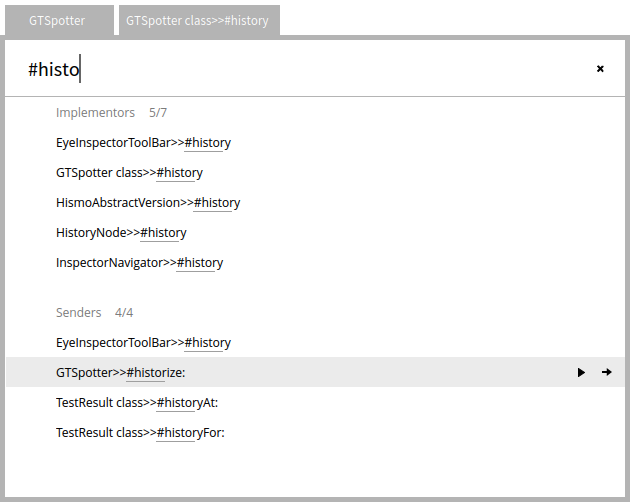
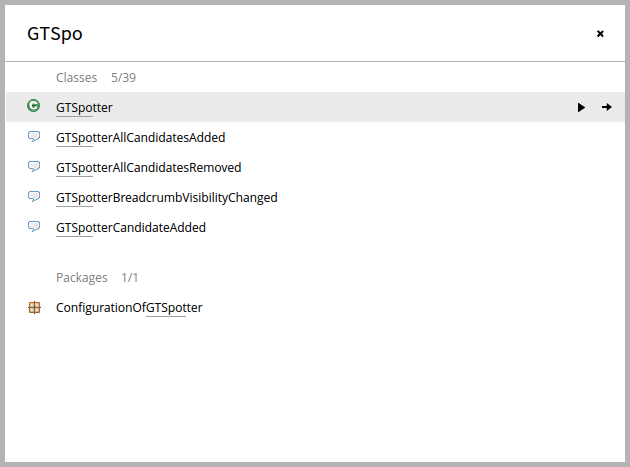
Hi, On Sun, Dec 7, 2014 at 3:52 PM, Thierry Goubier <thierry.goubier@gmail.com> wrote:
Cool.
Interesting. I recognize some of the patterns I use, but in a slightly different form.
Could you detail? I am asking because I am interesting in search use cases to see if they can be expressed in terms of Spotter of if we need to extend the interface in some way. GTSpotter is supposed to be moldable thus, it is important for it to handle as many use cases as possible.
The widget look very nice and clean. I'd worry about having a very long top-level list, and I know that some of the search patterns are a bit less efficient than what I use today.
What do you mean by long top-level lists? Do you refer to categories for which a query can show many results? In this case, our interface always limits the amount per category to 5. After reaching 5 items, the rest is being computed in a process with lower priority so as not to mess too much with the responsiveness of the UI. If you want to see more than 5, you can always dive in the category and then you focus only on that category. It seems to work well enough. You should also take into account that most widgets you see are hand-made in a lighter Morphic (called Brick) created by Alex Syrel. The goal of this one is to be fast and scalable. Does that answer the question? I'm impressed by the amount of work going into that.
Thanks. Indeed, the work was quite intensive and we went through 3 major variations of the implementations. Cheers, Doru
Thierry
2014-12-07 14:14 GMT+01:00 Tudor Girba <tudor@tudorgirba.com>:
Hi,
Alex Syrel, Andrei Chis and I are happy to announce a new addition to the Glamorous Toolkit: GTSpotter, a novel interface for spotting objects.
GTSpotter has two goals: - Provide a uniform yet moldable interface that can work on any object, and - Handle searching through arbitrary levels of object nesting.
We think this will have a significant impact on the development workflow in Pharo.
Here is a couple of screenshots: [image: Inline image 2] [image: Inline image 1] [image: Inline image 3]
A trailer is available here: https://www.youtube.com/watch?v=PhSmjR3NOlU
A detailed description is available here: http://www.humane-assessment.com/blog/introducing-gtspotter
It works already in Pharo 3.0 and can be played with by following the instructions from: http://gt.moosetechnology.org
Please let us know what you think.
Enjoy, The Glamorous Team
-- www.tudorgirba.com "Every thing has its own flow"
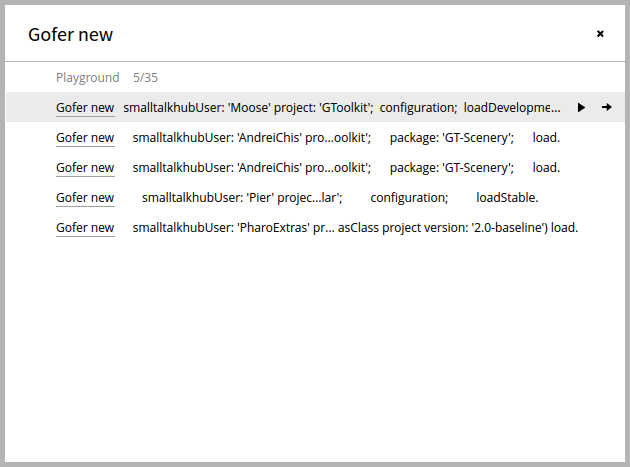
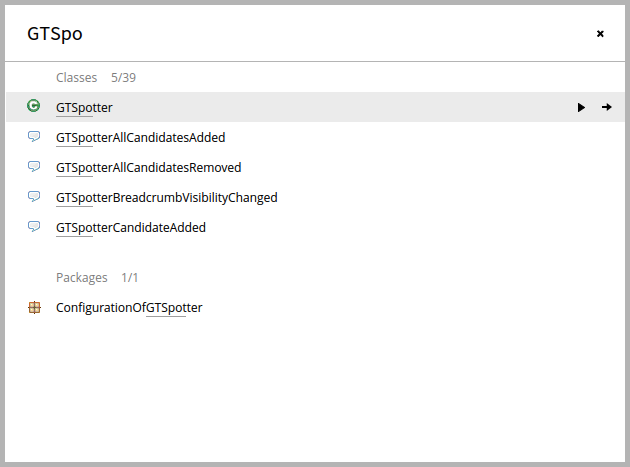
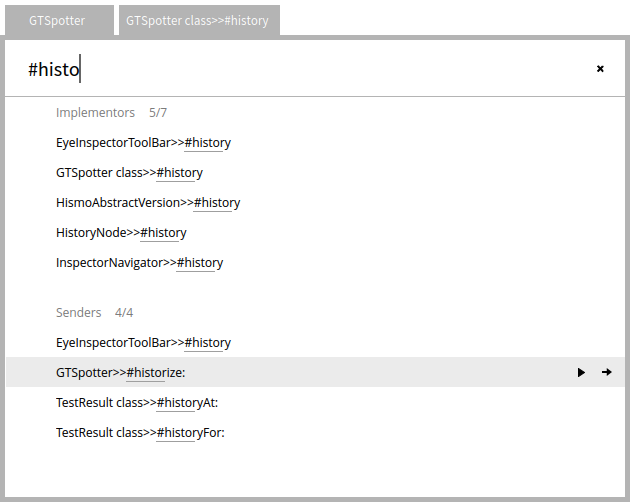
2014-12-07 20:19 GMT+01:00 Tudor Girba <tudor@tudorgirba.com>:
Hi,
On Sun, Dec 7, 2014 at 3:52 PM, Thierry Goubier <thierry.goubier@gmail.com
wrote:
Cool.
Interesting. I recognize some of the patterns I use, but in a slightly different form.
Could you detail? I am asking because I am interesting in search use cases to see if they can be expressed in terms of Spotter of if we need to extend the interface in some way. GTSpotter is supposed to be moldable thus, it is important for it to handle as many use cases as possible.
Well, the hierarchical, drill-down type of recursive searches is something I do regularly, so I can relate. They are not as general; they revolve as a cascading sequence of implementors/finder/senders/accesses/package/class searches, but from inside the browser (but, since a search result is given in a browser, then you can keep drilling down).
The widget look very nice and clean. I'd worry about having a very long top-level list, and I know that some of the search patterns are a bit less efficient than what I use today.
What do you mean by long top-level lists? Do you refer to categories for which a query can show many results? In this case, our interface always limits the amount per category to 5. After reaching 5 items, the rest is being computed in a process with lower priority so as not to mess too much with the responsiveness of the UI. If you want to see more than 5, you can always dive in the category and then you focus only on that category. It seems to work well enough.
Ok. I see how you are targetting that. I was thinking of what would happen if you have many extensions going into the root items.
You should also take into account that most widgets you see are hand-made in a lighter Morphic (called Brick) created by Alex Syrel. The goal of this one is to be fast and scalable.
Cool. It's an issue for many things, and its great to see someone tackling speed issues. I dropped some type of Morphs for that reason.
Does that answer the question?
Yes, it did.
I'm impressed by the amount of work going into that.
Thanks. Indeed, the work was quite intensive and we went through 3 major variations of the implementations.
What was I told about Smalltalk the very first time I had to use it as a student? "the language where you can break and redo all your code in a very short time.". Thierry
Cheers, Doru
Thierry
2014-12-07 14:14 GMT+01:00 Tudor Girba <tudor@tudorgirba.com>:
Hi,
Alex Syrel, Andrei Chis and I are happy to announce a new addition to the Glamorous Toolkit: GTSpotter, a novel interface for spotting objects.
GTSpotter has two goals: - Provide a uniform yet moldable interface that can work on any object, and - Handle searching through arbitrary levels of object nesting.
We think this will have a significant impact on the development workflow in Pharo.
Here is a couple of screenshots: [image: Inline image 2] [image: Inline image 1] [image: Inline image 3]
A trailer is available here: https://www.youtube.com/watch?v=PhSmjR3NOlU
A detailed description is available here: http://www.humane-assessment.com/blog/introducing-gtspotter
It works already in Pharo 3.0 and can be played with by following the instructions from: http://gt.moosetechnology.org
Please let us know what you think.
Enjoy, The Glamorous Team
-- www.tudorgirba.com
"Every thing has its own flow"
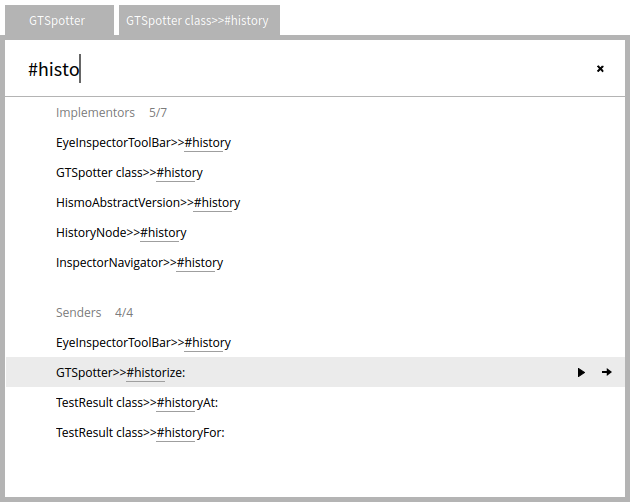
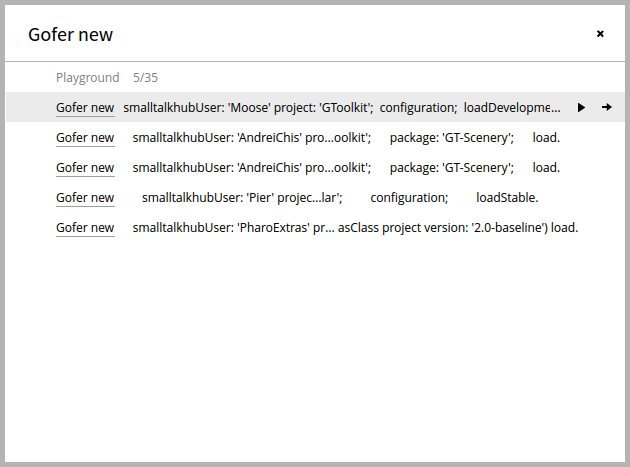
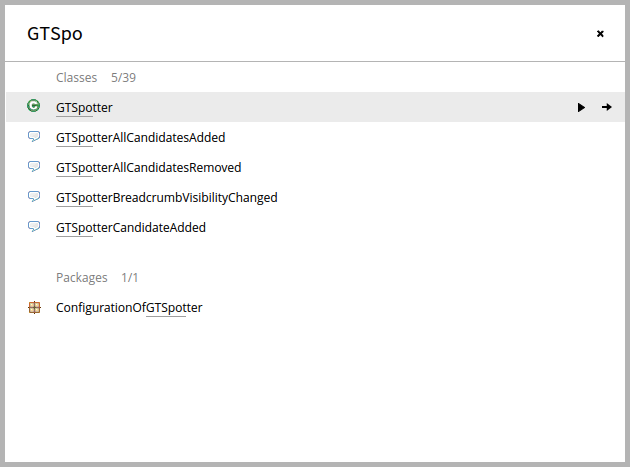
Hi, On Mon, Dec 8, 2014 at 12:29 AM, Thierry Goubier <thierry.goubier@gmail.com> wrote:
2014-12-07 20:19 GMT+01:00 Tudor Girba <tudor@tudorgirba.com>:
Hi,
On Sun, Dec 7, 2014 at 3:52 PM, Thierry Goubier < thierry.goubier@gmail.com> wrote:
Cool.
Interesting. I recognize some of the patterns I use, but in a slightly different form.
Could you detail? I am asking because I am interesting in search use cases to see if they can be expressed in terms of Spotter of if we need to extend the interface in some way. GTSpotter is supposed to be moldable thus, it is important for it to handle as many use cases as possible.
Well, the hierarchical, drill-down type of recursive searches is something I do regularly, so I can relate. They are not as general; they revolve as a cascading sequence of implementors/finder/senders/accesses/package/class searches, but from inside the browser (but, since a search result is given in a browser, then you can keep drilling down).
The widget look very nice and clean. I'd worry about having a very long top-level list, and I know that some of the search patterns are a bit less efficient than what I use today.
What do you mean by long top-level lists? Do you refer to categories for which a query can show many results? In this case, our interface always limits the amount per category to 5. After reaching 5 items, the rest is being computed in a process with lower priority so as not to mess too much with the responsiveness of the UI. If you want to see more than 5, you can always dive in the category and then you focus only on that category. It seems to work well enough.
Ok. I see how you are targetting that. I was thinking of what would happen if you have many extensions going into the root items.
I see. We put quite some work in this issue actually. Originally, we showed the list of categories like in Spotlight on Mac, but then we noticed we do not know what categories actually provide a match. So, if you look closely, the widget shows all categories that are at the top and at the bottom of the visible items. As you scroll they scroll in and out of the main list. If there are too many on a row, the labels trim down nicely. We tried with a couple of dozens and it scales reasonably well. I think this widget is quite cool and rather unique (I have not seen this design anywhere else). I will try to describe these design decisions in a future post.
You should also take into account that most widgets you see are hand-made in a lighter Morphic (called Brick) created by Alex Syrel. The goal of this one is to be fast and scalable.
Cool. It's an issue for many things, and its great to see someone tackling speed issues.
I dropped some type of Morphs for that reason.
Does that answer the question?
Yes, it did.
I'm impressed by the amount of work going into that.
Thanks. Indeed, the work was quite intensive and we went through 3 major variations of the implementations.
What was I told about Smalltalk the very first time I had to use it as a student? "the language where you can break and redo all your code in a very short time.".
Indeed. For us, that time was less than 2 months and we started from scratch. Cheers, Doru
Thierry
Cheers, Doru
Thierry
2014-12-07 14:14 GMT+01:00 Tudor Girba <tudor@tudorgirba.com>:
Hi,
Alex Syrel, Andrei Chis and I are happy to announce a new addition to the Glamorous Toolkit: GTSpotter, a novel interface for spotting objects.
GTSpotter has two goals: - Provide a uniform yet moldable interface that can work on any object, and - Handle searching through arbitrary levels of object nesting.
We think this will have a significant impact on the development workflow in Pharo.
Here is a couple of screenshots: [image: Inline image 2] [image: Inline image 1] [image: Inline image 3]
A trailer is available here: https://www.youtube.com/watch?v=PhSmjR3NOlU
A detailed description is available here: http://www.humane-assessment.com/blog/introducing-gtspotter
It works already in Pharo 3.0 and can be played with by following the instructions from: http://gt.moosetechnology.org
Please let us know what you think.
Enjoy, The Glamorous Team
-- www.tudorgirba.com
"Every thing has its own flow"
-- www.tudorgirba.com "Every thing has its own flow"
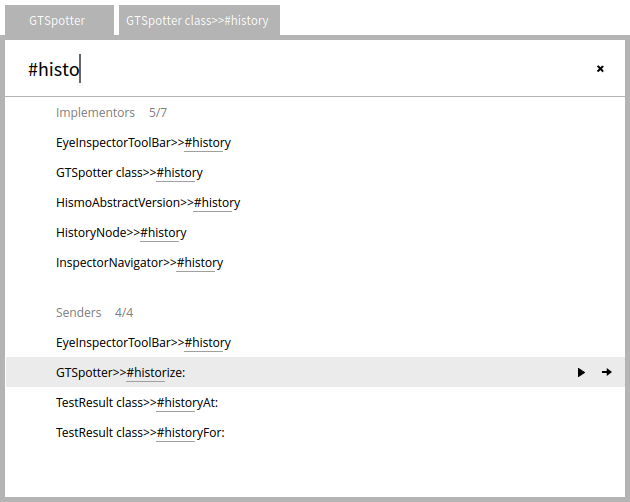
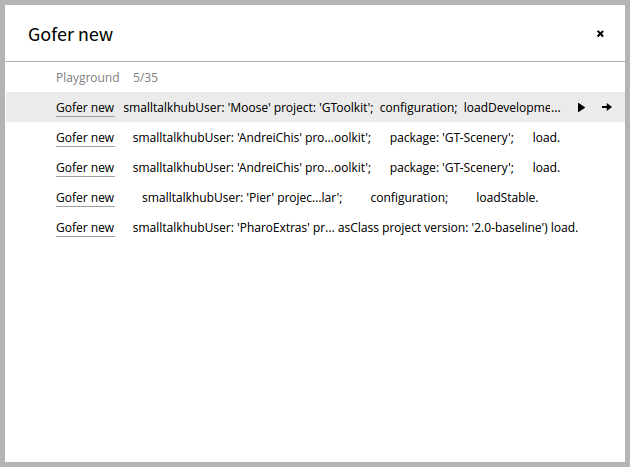
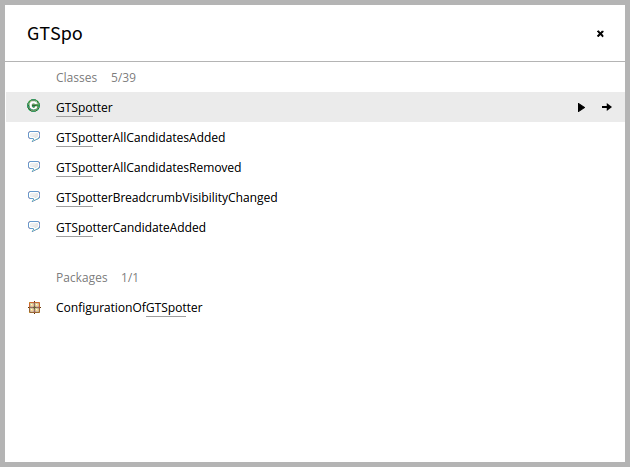
On 07 Dec 2014, at 14:14, Tudor Girba <tudor@tudorgirba.com> wrote:
Alex Syrel, Andrei Chis and I are happy to announce a new addition to the Glamorous Toolkit: GTSpotter, a novel interface for spotting objects.
Excellent work, all around. Congratulations to the team. Thank you for pushing things like this, for thinking differently. Yes, I want this in Pharo 4 too, ASAP (especially since the main shortcut is different from the old one, cmd+Enter vs. shift+Enter). The presentation is again very well done too: excellent article, super movie. You are putting the bar very high for the rest of us ;-) A suggestion/idea: would it be possible to take the current selection anywhere and feed it into Spotter ? That way there would be very good way to make it replace all the other shortcuts: you would get implementers, senders, references almost for free. Sven
Hi Sven, Thanks for the kind words. Indeed, having the current selection is one of the things we should keep in mind. For that we need to go to the next step and integrate the interface in the overall environment. This will certainly come. Cheers, Doru On Sun, Dec 7, 2014 at 6:57 PM, Sven Van Caekenberghe <sven@stfx.eu> wrote:
On 07 Dec 2014, at 14:14, Tudor Girba <tudor@tudorgirba.com> wrote:
Alex Syrel, Andrei Chis and I are happy to announce a new addition to the Glamorous Toolkit: GTSpotter, a novel interface for spotting objects.
Excellent work, all around. Congratulations to the team. Thank you for pushing things like this, for thinking differently.
Yes, I want this in Pharo 4 too, ASAP (especially since the main shortcut is different from the old one, cmd+Enter vs. shift+Enter).
The presentation is again very well done too: excellent article, super movie. You are putting the bar very high for the rest of us ;-)
A suggestion/idea: would it be possible to take the current selection anywhere and feed it into Spotter ? That way there would be very good way to make it replace all the other shortcuts: you would get implementers, senders, references almost for free.
Sven
-- www.tudorgirba.com "Every thing has its own flow"
Doru, One of the things/aspects that I miss a bit is the 'objects' part. In your overall description/presentation you talk about 'objects', but right now I would say it are mainly 'code objects' like classes & methods and friends, and some IDE artefacts, like menus. What about arbitrary (user) objects ? Literal constants, like 123, 'some string' ? Globals like the Transcript ? Singletons accessible by class side accessors, like announcers ? An evaluation functionality, just type an expression ? Examples ? The clipboard (contents), open windows, processes, ... Anyway, I am sure you get the idea ;-) Sven
On 07 Dec 2014, at 19:07, Tudor Girba <tudor@tudorgirba.com> wrote:
Hi Sven,
Thanks for the kind words. Indeed, having the current selection is one of the things we should keep in mind. For that we need to go to the next step and integrate the interface in the overall environment. This will certainly come.
Cheers, Doru
On Sun, Dec 7, 2014 at 6:57 PM, Sven Van Caekenberghe <sven@stfx.eu> wrote:
On 07 Dec 2014, at 14:14, Tudor Girba <tudor@tudorgirba.com> wrote:
Alex Syrel, Andrei Chis and I are happy to announce a new addition to the Glamorous Toolkit: GTSpotter, a novel interface for spotting objects.
Excellent work, all around. Congratulations to the team. Thank you for pushing things like this, for thinking differently.
Yes, I want this in Pharo 4 too, ASAP (especially since the main shortcut is different from the old one, cmd+Enter vs. shift+Enter).
The presentation is again very well done too: excellent article, super movie. You are putting the bar very high for the rest of us ;-)
A suggestion/idea: would it be possible to take the current selection anywhere and feed it into Spotter ? That way there would be very good way to make it replace all the other shortcuts: you would get implementers, senders, references almost for free.
Sven
-- www.tudorgirba.com
"Every thing has its own flow"
Hi Sven, Exactly! :) To be relevant, we had to show how it solves existing use cases (plus a bit more :)). Next we will focus on objects that are less "code". The hard part of actually getting the interface smooth and performant was kind of done. It's play time now :). As I noted in the post, we already have some 30 extensions for handling these cases. This was actually easy. The menu is an example of how we used this concept to approach a problem that is classically dealt with in a completely different way. There are a couple of things we did not show yet. For example, we already have a simple implementation of how to make a Moose model completely browseable through this interface. But, as with the inspector, the coolest thing is that if someone has a specific need, it is even simpler than with the inspector to hook that need in the system and make it searchable. Your list is definitely exciting, and I am hoping that people will start playing a bit and discover things we otherwise would not consider. It should be easier than with the inspector (because there are less things to specify, hence less variation). And wait to see what happens when we start to combine this interface with others. For example, the interesting thing about being able to search a menu is that you can actually open any menu with a spotter, which essentially has the potential of changing the way we deal with contextual actions (all through keybindings without shortcuts). I am quite sure we are just scratching the surface of what is possible. So, let's play together :). Cheers, Doru On Sun, Dec 7, 2014 at 10:35 PM, Sven Van Caekenberghe <sven@stfx.eu> wrote:
Doru,
One of the things/aspects that I miss a bit is the 'objects' part. In your overall description/presentation you talk about 'objects', but right now I would say it are mainly 'code objects' like classes & methods and friends, and some IDE artefacts, like menus.
What about arbitrary (user) objects ?
Literal constants, like 123, 'some string' ? Globals like the Transcript ? Singletons accessible by class side accessors, like announcers ? An evaluation functionality, just type an expression ? Examples ? The clipboard (contents), open windows, processes, ...
Anyway, I am sure you get the idea ;-)
Sven
On 07 Dec 2014, at 19:07, Tudor Girba <tudor@tudorgirba.com> wrote:
Hi Sven,
Thanks for the kind words. Indeed, having the current selection is one of the things we should keep in mind. For that we need to go to the next step and integrate the interface in the overall environment. This will certainly come.
Cheers, Doru
On Sun, Dec 7, 2014 at 6:57 PM, Sven Van Caekenberghe <sven@stfx.eu> wrote:
On 07 Dec 2014, at 14:14, Tudor Girba <tudor@tudorgirba.com> wrote:
Alex Syrel, Andrei Chis and I are happy to announce a new addition to the Glamorous Toolkit: GTSpotter, a novel interface for spotting objects.
Excellent work, all around. Congratulations to the team. Thank you for pushing things like this, for thinking differently.
Yes, I want this in Pharo 4 too, ASAP (especially since the main shortcut is different from the old one, cmd+Enter vs. shift+Enter).
The presentation is again very well done too: excellent article, super movie. You are putting the bar very high for the rest of us ;-)
A suggestion/idea: would it be possible to take the current selection anywhere and feed it into Spotter ? That way there would be very good way to make it replace all the other shortcuts: you would get implementers, senders, references almost for free.
Sven
-- www.tudorgirba.com
"Every thing has its own flow"
-- www.tudorgirba.com "Every thing has its own flow"

Hi Doru and all, Great work. All these tools are really moving the development experience a step forward :) I will try it ASAP. At this time, I just wonder if it is possible to search text in method sources. It is often useful. Another related thing I don't know how to do, is to refactor a set of methods (could be some methods to 20 or more). In these methods, I send a specific message. Now, I just want to remove the message implementation (it is not a rename) and I have to update the code accordingly. Sometimes, I could do that by just a search/replace (text) functionality (would be cool to use patterns there) in methods source code but I cannot find a way do that for now. So I do it by hand. I wonder if it already exists a way to do that or if GTSpotter could address this issue. Christophe. Le 7 déc. 2014 à 14:14, Tudor Girba a écrit :
Hi,
Alex Syrel, Andrei Chis and I are happy to announce a new addition to the Glamorous Toolkit: GTSpotter, a novel interface for spotting objects.
GTSpotter has two goals: - Provide a uniform yet moldable interface that can work on any object, and - Handle searching through arbitrary levels of object nesting.
We think this will have a significant impact on the development workflow in Pharo.
Here is a couple of screenshots: <gtspotter-packages-classes.png> <gtspotter-dive-class-method-sender.png> <gtspotter-playground.png>
A trailer is available here: https://www.youtube.com/watch?v=PhSmjR3NOlU
A detailed description is available here: http://www.humane-assessment.com/blog/introducing-gtspotter
It works already in Pharo 3.0 and can be played with by following the instructions from: http://gt.moosetechnology.org
Please let us know what you think.
Enjoy, The Glamorous Team
Hi Christophe, On Mon, Dec 8, 2014 at 10:43 AM, Christophe Demarey < Christophe.Demarey@inria.fr> wrote:
Hi Doru and all,
Great work. All these tools are really moving the development experience a step forward :) I will try it ASAP. At this time, I just wonder if it is possible to search text in method sources. It is often useful.
It's not done now, but you can just add it. It should probably take you a couple of minutes :). Just try to follow the instructions from the end of the post and let us know how it goes.
Another related thing I don't know how to do, is to refactor a set of methods (could be some methods to 20 or more). In these methods, I send a specific message. Now, I just want to remove the message implementation (it is not a rename) and I have to update the code accordingly. Sometimes, I could do that by just a search/replace (text) functionality (would be cool to use patterns there) in methods source code but I cannot find a way do that for now. So I do it by hand. I wonder if it already exists a way to do that or if GTSpotter could address this issue.
I think this is out of the direct realm of GTSpotter. But, it would be an interesting area nevertheless. We would likely be able to benefit from combining somehow RB rules with spotter. Cheers, Doru
Christophe.
Le 7 déc. 2014 à 14:14, Tudor Girba a écrit :
Hi,
Alex Syrel, Andrei Chis and I are happy to announce a new addition to the Glamorous Toolkit: GTSpotter, a novel interface for spotting objects.
GTSpotter has two goals: - Provide a uniform yet moldable interface that can work on any object, and - Handle searching through arbitrary levels of object nesting.
We think this will have a significant impact on the development workflow in Pharo.
Here is a couple of screenshots: <gtspotter-packages-classes.png> <gtspotter-dive-class-method-sender.png> <gtspotter-playground.png>
A trailer is available here: https://www.youtube.com/watch?v=PhSmjR3NOlU
A detailed description is available here: http://www.humane-assessment.com/blog/introducing-gtspotter
It works already in Pharo 3.0 and can be played with by following the instructions from: http://gt.moosetechnology.org
Please let us know what you think.
Enjoy, The Glamorous Team
-- www.tudorgirba.com "Every thing has its own flow"

Hi, This is really great - one minor thing - I didnât know how to launch the search screen until I accidentally hit cmd+enter (muscle memory from another IDE). Would be nice to explain cmd+enter to launch in the description page. Cheers, -Ed On Dec 7, 2014, at 5:14 AM, Tudor Girba <tudor@tudorgirba.com> wrote:
Hi,
Alex Syrel, Andrei Chis and I are happy to announce a new addition to the Glamorous Toolkit: GTSpotter, a novel interface for spotting objects.
GTSpotter has two goals: - Provide a uniform yet moldable interface that can work on any object, and - Handle searching through arbitrary levels of object nesting.
We think this will have a significant impact on the development workflow in Pharo.
Here is a couple of screenshots: <gtspotter-packages-classes.png> <gtspotter-dive-class-method-sender.png> <gtspotter-playground.png>
A trailer is available here: https://www.youtube.com/watch?v=PhSmjR3NOlU
A detailed description is available here: http://www.humane-assessment.com/blog/introducing-gtspotter
It works already in Pharo 3.0 and can be played with by following the instructions from: http://gt.moosetechnology.org
Please let us know what you think.
Enjoy, The Glamorous Team
Hi, Thanks. Indeed, I noticed that too. I added a mentioning of the shortcut at the beginning of the post. Cheers, Doru On Mon, Dec 8, 2014 at 11:34 PM, Edward Povazan <empovazan@gmail.com> wrote:
Hi,
This is really great - one minor thing - I didnât know how to launch the search screen until I accidentally hit cmd+enter (muscle memory from another IDE). Would be nice to explain cmd+enter to launch in the description page.
Cheers, -Ed
On Dec 7, 2014, at 5:14 AM, Tudor Girba <tudor@tudorgirba.com> wrote:
Hi,
Alex Syrel, Andrei Chis and I are happy to announce a new addition to the Glamorous Toolkit: GTSpotter, a novel interface for spotting objects.
GTSpotter has two goals: - Provide a uniform yet moldable interface that can work on any object, and - Handle searching through arbitrary levels of object nesting.
We think this will have a significant impact on the development workflow in Pharo.
Here is a couple of screenshots: <gtspotter-packages-classes.png> <gtspotter-dive-class-method-sender.png> <gtspotter-playground.png>
A trailer is available here: https://www.youtube.com/watch?v=PhSmjR3NOlU
A detailed description is available here: http://www.humane-assessment.com/blog/introducing-gtspotter
It works already in Pharo 3.0 and can be played with by following the instructions from: http://gt.moosetechnology.org
Please let us know what you think.
Enjoy, The Glamorous Team
-- www.tudorgirba.com "Every thing has its own flow"
participants (8)
-
 Andrei Chis
 -
 Christophe Demarey
 -
 Edward Povazan
 -
 Johan Fabry
 -
 kilon alios
 -
 Sven Van Caekenberghe
 -
 Thierry Goubier
 -
 Tudor Girba