Pharo 4 Playground open file menu

Since the workspace is hidden (*)... what's the recommended procedure to open a smalltalk script file (.st or .ws) without having to open the FileBrowser?(**) Regards, Esteban A. Maringolo (*) I had to run "Workspace open" in a playground. (**) Which in fact doesn't open the file, but a workspace with its contents.

2015-04-30 20:36 GMT+02:00 Esteban A. Maringolo <emaringolo@gmail.com>:
Since the workspace is hidden (*)... what's the recommended procedure to open a smalltalk script file (.st or .ws) without having to open the FileBrowser?(**)
Regards,
Esteban A. Maringolo
(*) I had to run "Workspace open" in a playground. (**) Which in fact doesn't open the file, but a workspace with its contents.
you can use inspector to open the directory. 'directory_with_your_st_file' asFileReference inspect. in the inspector you can navigate through the directory or select a file and for example for a .st file the menu offers a "do it and open" entry, this will execute the selected code and open an inspector tab on the result.
2015-04-30 16:14 GMT-03:00 Nicolai Hess <nicolaihess@web.de>:
2015-04-30 20:36 GMT+02:00 Esteban A. Maringolo <emaringolo@gmail.com>:
Since the workspace is hidden (*)... what's the recommended procedure to open a smalltalk script file (.st or .ws) without having to open the FileBrowser?(**)
you can use inspector to open the directory. 'directory_with_your_st_file' asFileReference inspect.
in the inspector you can navigate through the directory or select a file and for example for a .st file the menu offers a "do it and open" entry, this will execute the selected code and open an inspector tab on the result.
So basically there is no way to "File -> Open" from the Playground. :) (nor a a way "File -> Save" its contents either [1]) I guess I'll keep opening a Workspace and continue the old way from there. Regards! Esteban A. Maringolo [1]: IMO this is taking the "no-files based" concept to the extreme. A step back if I could add.

Just for info: you can get back the workspace into the settings (uncheck the playground button) Le jeudi 30 avril 2015, Esteban A. Maringolo <emaringolo@gmail.com> a écrit :
2015-04-30 16:14 GMT-03:00 Nicolai Hess <nicolaihess@web.de <javascript:;>
: 2015-04-30 20:36 GMT+02:00 Esteban A. Maringolo <emaringolo@gmail.com <javascript:;>>:
Since the workspace is hidden (*)... what's the recommended procedure to open a smalltalk script file (.st or .ws) without having to open the FileBrowser?(**)
you can use inspector to open the directory. 'directory_with_your_st_file' asFileReference inspect.
in the inspector you can navigate through the directory or select a file and for example for a .st file the menu offers a "do it and open" entry, this will execute the selected code and open an inspector tab on the result.
So basically there is no way to "File -> Open" from the Playground. :) (nor a a way "File -> Save" its contents either [1])
I guess I'll keep opening a Workspace and continue the old way from there.
Regards!
Esteban A. Maringolo
[1]: IMO this is taking the "no-files based" concept to the extreme. A step back if I could add.
-- Cheers Cyril Ferlicot
2015-04-30 16:29 GMT-03:00 Cyril Ferlicot <cyril.ferlicot@gmail.com>:
Just for info: you can get back the workspace into the settings (uncheck the playground button)
Thanks, but that is an either-or choice. I do love Playground, but for exploratory coding and or interactions. If it is meant to replace the Workspace I want to preserve its basic features (open/save at least). Regards, Esteban.
There is a way to have both I think but I don't have my laptop now to check Le jeudi 30 avril 2015, Esteban A. Maringolo <emaringolo@gmail.com> a écrit :
2015-04-30 16:29 GMT-03:00 Cyril Ferlicot <cyril.ferlicot@gmail.com <javascript:;>>:
Just for info: you can get back the workspace into the settings (uncheck the playground button)
Thanks, but that is an either-or choice.
I do love Playground, but for exploratory coding and or interactions. If it is meant to replace the Workspace I want to preserve its basic features (open/save at least).
Regards,
Esteban.
-- Cheers Cyril Ferlicot

Depending on what you want to do playground has a way to manage external files with smalltalk scripts. If you double click in the Page tab in the playground you will be able to rename it. If you rename it to 'customScript' and hit enter a file is created in the folder play-stash from the current image directory. Then whatever you type in the playground is saved in that file. If you then open spotter and search for 'customScript' you will see the file. Select the file and hit enter and then a playground is opened linked again with that file. Cheers, Andrei On Thu, Apr 30, 2015 at 9:49 PM, Cyril Ferlicot <cyril.ferlicot@gmail.com> wrote:
There is a way to have both I think but I don't have my laptop now to check
Le jeudi 30 avril 2015, Esteban A. Maringolo <emaringolo@gmail.com> a écrit :
2015-04-30 16:29 GMT-03:00 Cyril Ferlicot <cyril.ferlicot@gmail.com>:
Just for info: you can get back the workspace into the settings (uncheck the playground button)
Thanks, but that is an either-or choice.
I do love Playground, but for exploratory coding and or interactions. If it is meant to replace the Workspace I want to preserve its basic features (open/save at least).
Regards,
Esteban.
-- Cheers Cyril Ferlicot
Oh, I didn't knew that. Is there other features like this ? Le jeudi 30 avril 2015, Andrei Chis <chisvasileandrei@gmail.com> a écrit :
Depending on what you want to do playground has a way to manage external files with smalltalk scripts. If you double click in the Page tab in the playground you will be able to rename it. If you rename it to 'customScript' and hit enter a file is created in the folder play-stash from the current image directory. Then whatever you type in the playground is saved in that file.
If you then open spotter and search for 'customScript' you will see the file. Select the file and hit enter and then a playground is opened linked again with that file.
Cheers, Andrei
On Thu, Apr 30, 2015 at 9:49 PM, Cyril Ferlicot <cyril.ferlicot@gmail.com <javascript:_e(%7B%7D,'cvml','cyril.ferlicot@gmail.com');>> wrote:
There is a way to have both I think but I don't have my laptop now to check
Le jeudi 30 avril 2015, Esteban A. Maringolo <emaringolo@gmail.com <javascript:_e(%7B%7D,'cvml','emaringolo@gmail.com');>> a écrit :
2015-04-30 16:29 GMT-03:00 Cyril Ferlicot <cyril.ferlicot@gmail.com>:
Just for info: you can get back the workspace into the settings (uncheck the playground button)
Thanks, but that is an either-or choice.
I do love Playground, but for exploratory coding and or interactions. If it is meant to replace the Workspace I want to preserve its basic features (open/save at least).
Regards,
Esteban.
-- Cheers Cyril Ferlicot
-- Cheers Cyril Ferlicot

Exactly. There are two ways to discover a past workspace: - If you simply search in Spotter for contents, you will get a category with Playground pages in there. - If you want to label your page, you can give it a name by double clicking on the "Page" tab and entering your name (like Andrei said). Afterwards, you can search in Spotter by that name and you will get a Named playground pages category. We want to move away from managing files because the information should be where you need it without requiring you to deal with low level details such as managing a script on the disk. Cheers, Doru On Thu, Apr 30, 2015 at 9:57 PM, Andrei Chis <chisvasileandrei@gmail.com> wrote:
Depending on what you want to do playground has a way to manage external files with smalltalk scripts. If you double click in the Page tab in the playground you will be able to rename it. If you rename it to 'customScript' and hit enter a file is created in the folder play-stash from the current image directory. Then whatever you type in the playground is saved in that file.
If you then open spotter and search for 'customScript' you will see the file. Select the file and hit enter and then a playground is opened linked again with that file.
Cheers, Andrei
On Thu, Apr 30, 2015 at 9:49 PM, Cyril Ferlicot <cyril.ferlicot@gmail.com> wrote:
There is a way to have both I think but I don't have my laptop now to check
Le jeudi 30 avril 2015, Esteban A. Maringolo <emaringolo@gmail.com> a écrit :
2015-04-30 16:29 GMT-03:00 Cyril Ferlicot <cyril.ferlicot@gmail.com>:
Just for info: you can get back the workspace into the settings (uncheck the playground button)
Thanks, but that is an either-or choice.
I do love Playground, but for exploratory coding and or interactions. If it is meant to replace the Workspace I want to preserve its basic features (open/save at least).
Regards,
Esteban.
-- Cheers Cyril Ferlicot
-- www.tudorgirba.com "Every thing has its own flow"

I used to think like you (same names think alike ;) ) But Doru and Andrei convinced me that this way is better: 1) you actually have a save of everything you do in your Playground in play-cache subdirectory. You can even change the place your play-cache is, then you can share scripts between your images. You access them with the elipsis button (super cool, I never wrote an external file again after learning this). 2) you can name your playgrounds by double clicking the âPageâ tab. Then they can be found with spotter easily. Some observations here: - would be cool if this named page appears also in the elipsis list (it doesnât) - as I said to Doru, the fact that you can double click and change name is not obvious and I do not thing anyone has realised they can. Adding an edit icon or something that indicates the field is editable would be cool. please, before rejecting it and came back to older ways, give this a try⦠I thought as you (Doru can testify how strong I was on it) and now Iâm convinced this is a lot better and GTools team has a point here :) cheers, Esteban
On 30 Apr 2015, at 21:24, Esteban A. Maringolo <emaringolo@gmail.com> wrote:
2015-04-30 16:14 GMT-03:00 Nicolai Hess <nicolaihess@web.de>:
2015-04-30 20:36 GMT+02:00 Esteban A. Maringolo <emaringolo@gmail.com>:
Since the workspace is hidden (*)... what's the recommended procedure to open a smalltalk script file (.st or .ws) without having to open the FileBrowser?(**)
you can use inspector to open the directory. 'directory_with_your_st_file' asFileReference inspect.
in the inspector you can navigate through the directory or select a file and for example for a .st file the menu offers a "do it and open" entry, this will execute the selected code and open an inspector tab on the result.
So basically there is no way to "File -> Open" from the Playground. :) (nor a a way "File -> Save" its contents either [1])
I guess I'll keep opening a Workspace and continue the old way from there.
Regards!
Esteban A. Maringolo
[1]: IMO this is taking the "no-files based" concept to the extreme. A step back if I could add.

As a new user of Pharo, I can say that the use of Playground is not obvious at all (among other tools). Things that should be more clear: Why there's not a Workspace? -> Playground replaces it What usual practices with old Workspaces have been changed/improved on Playground and how What new practices does Playground support I could provide the text and program the help if someone points me to where to do the changes (i.e. which methods/files/settings to modify or which functionality to implement or change).

Sergio Fedi wrote
As a new user of Pharo, I can say that the use of Playground is not obvious at all (among other tools). ... Why there's not a Workspace?
I find this intriguing. I would think that Playground would only be confusing to longtime Smalltalkers, not new users who haven't gotten used to workspaces. Where does your workspace info come from - are you coming from another Smalltalk? Or is it because the documentation is out of date? ----- Cheers, Sean -- View this message in context: http://forum.world.st/Pharo-4-Playground-open-file-menu-tp4823334p4823667.ht... Sent from the Pharo Smalltalk Users mailing list archive at Nabble.com.
Yes, I am a longtime smalltalker (since 2001) but new to Pharo On Fri, May 1, 2015 at 10:53 PM, Sean P. DeNigris <sean@clipperadams.com> wrote:
Sergio Fedi wrote
As a new user of Pharo, I can say that the use of Playground is not obvious at all (among other tools). ... Why there's not a Workspace?
I find this intriguing. I would think that Playground would only be confusing to longtime Smalltalkers, not new users who haven't gotten used to workspaces. Where does your workspace info come from - are you coming from another Smalltalk? Or is it because the documentation is out of date?
----- Cheers, Sean -- View this message in context: http://forum.world.st/Pharo-4-Playground-open-file-menu-tp4823334p4823667.ht... Sent from the Pharo Smalltalk Users mailing list archive at Nabble.com.
My previous smalltalks are Express, VisualAge and Pharo 1.2 but most of all Dolphin,
Sergio Fedi wrote
My previous smalltalks are Express, VisualAge and Pharo 1.2 but most of all Dolphin
Cool! From that unique perspective, how do you think we can balance prodding users to evolve without confusing users from other Smalltalks? The theory goes that if we just put Workspace back in the world menu, we will all stay happy and safe in 1980 instead of using the revolutionary GT tools. Would an explanation in the Welcome window help? Do people actually read those? If so, what would you write there to explain the situation? ----- Cheers, Sean -- View this message in context: http://forum.world.st/Pharo-4-Playground-open-file-menu-tp4823334p4823673.ht... Sent from the Pharo Smalltalk Users mailing list archive at Nabble.com.
Sean P. DeNigris wrote
If so, what would you write there to explain the situation?
And maybe after that snippet we can put the link to http://www.humane-assessment.com/blog/introducing-the-gtplayground/ ----- Cheers, Sean -- View this message in context: http://forum.world.st/Pharo-4-Playground-open-file-menu-tp4823334p4823674.ht... Sent from the Pharo Smalltalk Users mailing list archive at Nabble.com.
Oh! That link gives a GREAT explanation! Thanks. On the subject of how to show it better, I'm not a graphic designer (although I'm working with one) so I'll ask him for some insights on the matter. For now, he pointed out some issues like lack of consistency on some interfaces and some other details.

playground cache is actually not nice when scripts are to be part of a project with a name etc. And I have a ton of files in it. I can't remember which is which. I have scripts to do lots of cli things and I like the save as of the workspace. But I have done extra key bindings for getting the ws or the playground. Phil Le 2 mai 2015 06:49, "Sergio Fedi" <sergio.fedi@gmail.com> a écrit :
Oh! That link gives a GREAT explanation! Thanks.
On the subject of how to show it better, I'm not a graphic designer (although I'm working with one) so I'll ask him for some insights on the matter.
For now, he pointed out some issues like lack of consistency on some interfaces and some other details.
Ditto here. I have cron tasks that fire a smalltak script, the startup script itself or a small import script that doesn't belong to a class. All those are my cases for the workspace. El may 2, 2015 4:38 AM, "phil@highoctane.be" <phil@highoctane.be> escribió:
playground cache is actually not nice when scripts are to be part of a project with a name etc. And I have a ton of files in it. I can't remember which is which.
I have scripts to do lots of cli things and I like the save as of the workspace.
But I have done extra key bindings for getting the ws or the playground.
Phil Le 2 mai 2015 06:49, "Sergio Fedi" <sergio.fedi@gmail.com> a écrit :
Oh! That link gives a GREAT explanation! Thanks.
On the subject of how to show it better, I'm not a graphic designer (although I'm working with one) so I'll ask him for some insights on the matter.
For now, he pointed out some issues like lack of consistency on some interfaces and some other details.
Esteban, Nice to see we are in the same boat :-) Phil Le 2 mai 2015 15:17, "Esteban A. Maringolo" <emaringolo@gmail.com> a écrit :
Ditto here.
I have cron tasks that fire a smalltak script, the startup script itself or a small import script that doesn't belong to a class. All those are my cases for the workspace. El may 2, 2015 4:38 AM, "phil@highoctane.be" <phil@highoctane.be> escribió:
playground cache is actually not nice when scripts are to be part of a project with a name etc. And I have a ton of files in it. I can't remember which is which.
I have scripts to do lots of cli things and I like the save as of the workspace.
But I have done extra key bindings for getting the ws or the playground.
Phil Le 2 mai 2015 06:49, "Sergio Fedi" <sergio.fedi@gmail.com> a écrit :
Oh! That link gives a GREAT explanation! Thanks.
On the subject of how to show it better, I'm not a graphic designer (although I'm working with one) so I'll ask him for some insights on the matter.
For now, he pointed out some issues like lack of consistency on some interfaces and some other details.
well⦠IMO those scripts also should be in a method. Probably under a class named: MyCoolProjectRunScripts or something like that⦠but in a class. If they are in a class you can: - save them with your project - version them - if you add <script> pragma, you can even execute them by clicking on it (Pharo 4). so⦠even if you might have a case where you want the save/load⦠you actually have (what I consider) a better option. Esteban
On 02 May 2015, at 15:17, Esteban A. Maringolo <emaringolo@gmail.com> wrote:
Ditto here.
I have cron tasks that fire a smalltak script, the startup script itself or a small import script that doesn't belong to a class. All those are my cases for the workspace.
El may 2, 2015 4:38 AM, "phil@highoctane.be <mailto:phil@highoctane.be>" <phil@highoctane.be <mailto:phil@highoctane.be>> escribió: playground cache is actually not nice when scripts are to be part of a project with a name etc. And I have a ton of files in it. I can't remember which is which.
I have scripts to do lots of cli things and I like the save as of the workspace.
But I have done extra key bindings for getting the ws or the playground.
Phil Le 2 mai 2015 06:49, "Sergio Fedi" <sergio.fedi@gmail.com <mailto:sergio.fedi@gmail.com>> a écrit : Oh! That link gives a GREAT explanation! Thanks.
On the subject of how to show it better, I'm not a graphic designer (although I'm working with one) so I'll ask him for some insights on the matter.
For now, he pointed out some issues like lack of consistency on some interfaces and some other details.

Those links turned out a bit ugly. What about trying a tiny url via a HTTP level redirect [1]? [1] http://www.web-source.net/html_redirect.htm#.VUT0c9qqpBd So it would look like... GTools - a revolutionary suite of moldable development tools Playground - one tool, with all the features of and Inspector and a Workspace, which manages an entire workflow in a single window showing custom domain presentations for each object ( http://pharo.org/link/4/playground) Inspector (http://pharo.org/link/4/inspector) Spotter - a uniform yet moldable search interface that works on any object, through arbitrary levels of nesting (http://pharo.org/link/4/spotter ) Slots - model instance variables as first class enities and enable meta-programming on this level. Read the paper at ( http://pharo.org/link/4/slots) ShoreLine reporter - submit information automatically when errors happen (http://pharo.org/link/4/shoreline) [Preview] TxText - a modern text model which works with Athens [Preview] OSWindow - a new way to handle windows and input events (http://pharo.org/link/4/shoreline) Glamour - a mature declarative browser builder ( http://pharo.org/link/4/glamour) Dark theme (http://pharo.org/link/4/darktheme) Disclaimer - I haven't tried this in practice. cheers -ben On Sat, May 2, 2015 at 11:56 PM, Esteban Lorenzano <estebanlm@gmail.com> wrote:
well⦠IMO those scripts also should be in a method. Probably under a class named: MyCoolProjectRunScripts or something like that⦠but in a class. If they are in a class you can: - save them with your project - version them - if you add <script> pragma, you can even execute them by clicking on it (Pharo 4).
so⦠even if you might have a case where you want the save/load⦠you actually have (what I consider) a better option.
Esteban
On 02 May 2015, at 15:17, Esteban A. Maringolo <emaringolo@gmail.com> wrote:
Ditto here.
I have cron tasks that fire a smalltak script, the startup script itself or a small import script that doesn't belong to a class. All those are my cases for the workspace. El may 2, 2015 4:38 AM, "phil@highoctane.be" <phil@highoctane.be> escribió:
playground cache is actually not nice when scripts are to be part of a project with a name etc. And I have a ton of files in it. I can't remember which is which.
I have scripts to do lots of cli things and I like the save as of the workspace.
But I have done extra key bindings for getting the ws or the playground.
Phil Le 2 mai 2015 06:49, "Sergio Fedi" <sergio.fedi@gmail.com> a écrit :
Oh! That link gives a GREAT explanation! Thanks.
On the subject of how to show it better, I'm not a graphic designer (although I'm working with one) so I'll ask him for some insights on the matter.
For now, he pointed out some issues like lack of consistency on some interfaces and some other details.
Ben Coman wrote
Those links turned out a bit ugly. What about trying a tiny url via a HTTP level redirect [1]?
That looks cool but I wouldn't hold it up unless we can implement that immediately. Ugly links are better than no links. Of course for Pharo 5.0 with Tx and Pillar we can have pretty contextual links instead of raw text anyway ;) ----- Cheers, Sean -- View this message in context: http://forum.world.st/Pharo-4-Playground-open-file-menu-tp4823334p4823783.ht... Sent from the Pharo Smalltalk Users mailing list archive at Nabble.com.
When some sysadmin has to edit them on servers, you want them in .st files. No class. No IDE. Not too much Smalltalk. Just the DSL on an as needed to know basis to configure things. That's better that XML/YAML/JSON... So, that's the case. Startup scripts same story. Phil Le 2 mai 2015 17:56, "Esteban Lorenzano" <estebanlm@gmail.com> a écrit :
well⦠IMO those scripts also should be in a method. Probably under a class named: MyCoolProjectRunScripts or something like that⦠but in a class. If they are in a class you can: - save them with your project - version them - if you add <script> pragma, you can even execute them by clicking on it (Pharo 4).
so⦠even if you might have a case where you want the save/load⦠you actually have (what I consider) a better option.
Esteban
On 02 May 2015, at 15:17, Esteban A. Maringolo <emaringolo@gmail.com> wrote:
Ditto here.
I have cron tasks that fire a smalltak script, the startup script itself or a small import script that doesn't belong to a class. All those are my cases for the workspace. El may 2, 2015 4:38 AM, "phil@highoctane.be" <phil@highoctane.be> escribió:
playground cache is actually not nice when scripts are to be part of a project with a name etc. And I have a ton of files in it. I can't remember which is which.
I have scripts to do lots of cli things and I like the save as of the workspace.
But I have done extra key bindings for getting the ws or the playground.
Phil Le 2 mai 2015 06:49, "Sergio Fedi" <sergio.fedi@gmail.com> a écrit :
Oh! That link gives a GREAT explanation! Thanks.
On the subject of how to show it better, I'm not a graphic designer (although I'm working with one) so I'll ask him for some insights on the matter.
For now, he pointed out some issues like lack of consistency on some interfaces and some other details.

Am 02.05.2015 um 23:28 schrieb phil@highoctane.be:
When some sysadmin has to edit them on servers, you want them in .st files.
No class. No IDE. Not too much Smalltalk.
Just the DSL on an as needed to know basis to configure things.
That's better that XML/YAML/JSON...
So, that's the case.
Startup scripts same story.
More or less the same use case as I have .... Marten -- Marten Feldtmann
On 02 May 2015, at 23:28, phil@highoctane.be wrote:
When some sysadmin has to edit them on servers, you want them in .st files.
No class. No IDE. Not too much Smalltalk.
but then - if not smalltalk, the scripts should not be in the image⦠even in workspaces - if the sysadmin has to edit them, he can always do something like: #! /bin/bash pharo MyImage.image eval â my multilined more or less smalltalk scriptâ - you can always see and edit your scripts by doing: 'play-cache' asFileReference inspect (instead âplay-cacheâ you can put: âmy-script-folderâ, whatever) and you will have a complete inspector that allows you to see and edit your scripts (who are in the file system, where a sysadmin can find them, and not in an obscure workspace). also I bet you would take no more than 5â to add functionality to gtinspector (it is designed to be moldable, after all) to add new scripts, and no matter what other functionality you need⦠and the result will be a lot more âpharoishâ than storing it in a workspace. Esteban
Just the DSL on an as needed to know basis to configure things.
That's better that XML/YAML/JSON...
So, that's the case.
Startup scripts same story.
Phil
Le 2 mai 2015 17:56, "Esteban Lorenzano" <estebanlm@gmail.com <mailto:estebanlm@gmail.com>> a écrit : well⦠IMO those scripts also should be in a method. Probably under a class named: MyCoolProjectRunScripts or something like that⦠but in a class. If they are in a class you can: - save them with your project - version them - if you add <script> pragma, you can even execute them by clicking on it (Pharo 4).
so⦠even if you might have a case where you want the save/load⦠you actually have (what I consider) a better option.
Esteban
On 02 May 2015, at 15:17, Esteban A. Maringolo <emaringolo@gmail.com <mailto:emaringolo@gmail.com>> wrote:
Ditto here.
I have cron tasks that fire a smalltak script, the startup script itself or a small import script that doesn't belong to a class. All those are my cases for the workspace.
El may 2, 2015 4:38 AM, "phil@highoctane.be <mailto:phil@highoctane.be>" <phil@highoctane.be <mailto:phil@highoctane.be>> escribió: playground cache is actually not nice when scripts are to be part of a project with a name etc. And I have a ton of files in it. I can't remember which is which.
I have scripts to do lots of cli things and I like the save as of the workspace.
But I have done extra key bindings for getting the ws or the playground.
Phil Le 2 mai 2015 06:49, "Sergio Fedi" <sergio.fedi@gmail.com <mailto:sergio.fedi@gmail.com>> a écrit : Oh! That link gives a GREAT explanation! Thanks.
On the subject of how to show it better, I'm not a graphic designer (although I'm working with one) so I'll ask him for some insights on the matter.
For now, he pointed out some issues like lack of consistency on some interfaces and some other details.
Le 3 mai 2015 12:28, "Esteban Lorenzano" <estebanlm@gmail.com> a écrit :
On 02 May 2015, at 23:28, phil@highoctane.be wrote:
When some sysadmin has to edit them on servers, you want them in .st
files.
No class. No IDE. Not too much Smalltalk.
but then - if not smalltalk, the scripts should not be in the image⦠even in workspaces - if the sysadmin has to edit them, he can always do something like:
#! /bin/bash
pharo MyImage.image eval â my multilined more or less smalltalk scriptâ
- you can always see and edit your scripts by doing:
'play-cache' asFileReference inspect
(instead âplay-cacheâ you can put: âmy-script-folderâ, whatever)
and you will have a complete inspector that allows you to see and edit your scripts (who are in the file system, where a sysadmin can find them, and not in an obscure workspace).
also I bet you would take no more than 5â to add functionality to gtinspector (it is designed to be moldable, after all) to add new scripts, and no matter what other functionality you need⦠and the result will be a lot more âpharoishâ than storing it in a workspace.
I agree to these things for the Pharoish experience. Just that those scripts are to be edited with Vim on remote boxes. I don't want to convert a sysadmin to pharo. I want pharo to be used as any other tool in the lineup. My image builder is fullly in a class etc. Also I am using Sebastian Sastre's ConfigurationFiles that do load conf/SomeConfFile.st I have several such files: - email addresses - mongodb conf - seaside ports, debug level.. - API config - configuration file for a tree structure - preferences These are using code that get eval'd because it is practical to use variables etc. e.g. defaultBandwidth := 50 megabitsPerSecond. .... #(10 20 30 40) do: [:id | config add: SomeModule new bandwidth: defaultBandwidth; id: id asString; label: 'SomeLab', is asString; picture:'some.jpg'; geoLocation: 45.55@44.42; yourself] .... ^config I am preparing them in with Playground etc. So nothing wrong with Playground. I just like the simple workspace too. I also added a : prefix in Spotlight to execute what I do type. Going 4.0 is not yet done here. I am using 3.0 with GToolkit. Phil
Esteban
Just the DSL on an as needed to know basis to configure things.
That's better that XML/YAML/JSON...
So, that's the case.
Startup scripts same story.
Phil
Le 2 mai 2015 17:56, "Esteban Lorenzano" <estebanlm@gmail.com> a écrit :
well⦠IMO those scripts also should be in a method. Probably under a class named: MyCoolProjectRunScripts or something like
that⦠but in a class.
If they are in a class you can: - save them with your project - version them - if you add <script> pragma, you can even execute them by clicking on it (Pharo 4).
so⦠even if you might have a case where you want the save/load⦠you actually have (what I consider) a better option.
Esteban
On 02 May 2015, at 15:17, Esteban A. Maringolo <emaringolo@gmail.com> wrote:
Ditto here.
I have cron tasks that fire a smalltak script, the startup script itself or a small import script that doesn't belong to a class. All those are my cases for the workspace.
El may 2, 2015 4:38 AM, "phil@highoctane.be" <phil@highoctane.be> escribió:
playground cache is actually not nice when scripts are to be part of
a project with a name etc. And I have a ton of files in it. I can't remember which is which.
I have scripts to do lots of cli things and I like the save as of the
workspace.
But I have done extra key bindings for getting the ws or the
playground.
Phil
Le 2 mai 2015 06:49, "Sergio Fedi" <sergio.fedi@gmail.com> a écrit :
Oh! That link gives a GREAT explanation! Thanks.
On the subject of how to show it better, I'm not a graphic designer
(although I'm working with one)
so I'll ask him for some insights on the matter.
For now, he pointed out some issues like lack of consistency on some interfaces and some other details.
Hi, I think this is an interesting use case, and it is already supported only in a less classic way :). I just wrote a blog post about it: http://www.humane-assessment.com/blog/managing-external-pharo-scripts-with-g... Let me know if this works for you. Cheers, Doru On Sun, May 3, 2015 at 3:02 PM, phil@highoctane.be <phil@highoctane.be> wrote:
Le 3 mai 2015 12:28, "Esteban Lorenzano" <estebanlm@gmail.com> a écrit :
On 02 May 2015, at 23:28, phil@highoctane.be wrote:
When some sysadmin has to edit them on servers, you want them in .st
files.
No class. No IDE. Not too much Smalltalk.
but then - if not smalltalk, the scripts should not be in the image⦠even in workspaces - if the sysadmin has to edit them, he can always do something like:
#! /bin/bash
pharo MyImage.image eval â my multilined more or less smalltalk scriptâ
- you can always see and edit your scripts by doing:
'play-cache' asFileReference inspect
(instead âplay-cacheâ you can put: âmy-script-folderâ, whatever)
and you will have a complete inspector that allows you to see and edit your scripts (who are in the file system, where a sysadmin can find them, and not in an obscure workspace).
also I bet you would take no more than 5â to add functionality to gtinspector (it is designed to be moldable, after all) to add new scripts, and no matter what other functionality you need⦠and the result will be a lot more âpharoishâ than storing it in a workspace.
I agree to these things for the Pharoish experience.
Just that those scripts are to be edited with Vim on remote boxes.
I don't want to convert a sysadmin to pharo.
I want pharo to be used as any other tool in the lineup.
My image builder is fullly in a class etc.
Also I am using Sebastian Sastre's ConfigurationFiles that do load conf/SomeConfFile.st
I have several such files:
- email addresses - mongodb conf - seaside ports, debug level.. - API config - configuration file for a tree structure - preferences
These are using code that get eval'd because it is practical to use variables etc.
e.g.
defaultBandwidth := 50 megabitsPerSecond.
....
#(10 20 30 40) do: [:id | config add: SomeModule new bandwidth: defaultBandwidth; id: id asString; label: 'SomeLab', is asString; picture:'some.jpg'; geoLocation: 45.55@44.42; yourself]
....
^config
I am preparing them in with Playground etc.
So nothing wrong with Playground.
I just like the simple workspace too.
I also added a : prefix in Spotlight to execute what I do type.
Going 4.0 is not yet done here. I am using 3.0 with GToolkit.
Phil
Esteban
Just the DSL on an as needed to know basis to configure things.
That's better that XML/YAML/JSON...
So, that's the case.
Startup scripts same story.
Phil
Le 2 mai 2015 17:56, "Esteban Lorenzano" <estebanlm@gmail.com> a
écrit :
well⦠IMO those scripts also should be in a method. Probably under a class named: MyCoolProjectRunScripts or something
like that⦠but in a class.
If they are in a class you can: - save them with your project - version them - if you add <script> pragma, you can even execute them by clicking on it (Pharo 4).
so⦠even if you might have a case where you want the save/load⦠you actually have (what I consider) a better option.
Esteban
On 02 May 2015, at 15:17, Esteban A. Maringolo <emaringolo@gmail.com> wrote:
Ditto here.
I have cron tasks that fire a smalltak script, the startup script itself or a small import script that doesn't belong to a class. All those are my cases for the workspace.
El may 2, 2015 4:38 AM, "phil@highoctane.be" <phil@highoctane.be> escribió:
playground cache is actually not nice when scripts are to be part of
a project with a name etc. And I have a ton of files in it. I can't remember which is which.
I have scripts to do lots of cli things and I like the save as of
the workspace.
But I have done extra key bindings for getting the ws or the
playground.
Phil
Le 2 mai 2015 06:49, "Sergio Fedi" <sergio.fedi@gmail.com> a écrit :
Oh! That link gives a GREAT explanation! Thanks.
On the subject of how to show it better, I'm not a graphic designer
(although I'm working with one)
so I'll ask him for some insights on the matter.
For now, he pointed out some issues like lack of consistency on some interfaces and some other details.
-- www.tudorgirba.com "Every thing has its own flow"
On Sun, May 3, 2015 at 10:34 PM, Tudor Girba <tudor@tudorgirba.com> wrote:
Hi,
I think this is an interesting use case, and it is already supported only in a less classic way :).
I just wrote a blog post about it:
http://www.humane-assessment.com/blog/managing-external-pharo-scripts-with-g...
Let me know if this works for you.
Nice, I need to go to 4.0 to get that Spotter thing :-) One note: scripts are saved with the CR (or ^M) line ending by Pharo. Now, vim in Linux positively hates that (showing a single line with ^M s all over). This also makes diffing files a pain (meld is not recognizing any lines etc). So, I have to mac2unix convert them after they have been saved. I think we should be much better LF (\n) citizens in the Linux world. Phil
Cheers, Doru
On Sun, May 3, 2015 at 3:02 PM, phil@highoctane.be <phil@highoctane.be> wrote:
Le 3 mai 2015 12:28, "Esteban Lorenzano" <estebanlm@gmail.com> a écrit :
On 02 May 2015, at 23:28, phil@highoctane.be wrote:
When some sysadmin has to edit them on servers, you want them in .st
files.
No class. No IDE. Not too much Smalltalk.
but then - if not smalltalk, the scripts should not be in the image⦠even in workspaces - if the sysadmin has to edit them, he can always do something like:
#! /bin/bash
pharo MyImage.image eval â my multilined more or less smalltalk scriptâ
- you can always see and edit your scripts by doing:
'play-cache' asFileReference inspect
(instead âplay-cacheâ you can put: âmy-script-folderâ, whatever)
and you will have a complete inspector that allows you to see and edit your scripts (who are in the file system, where a sysadmin can find them, and not in an obscure workspace).
also I bet you would take no more than 5â to add functionality to gtinspector (it is designed to be moldable, after all) to add new scripts, and no matter what other functionality you need⦠and the result will be a lot more âpharoishâ than storing it in a workspace.
I agree to these things for the Pharoish experience.
Just that those scripts are to be edited with Vim on remote boxes.
I don't want to convert a sysadmin to pharo.
I want pharo to be used as any other tool in the lineup.
My image builder is fullly in a class etc.
Also I am using Sebastian Sastre's ConfigurationFiles that do load conf/SomeConfFile.st
I have several such files:
- email addresses - mongodb conf - seaside ports, debug level.. - API config - configuration file for a tree structure - preferences
These are using code that get eval'd because it is practical to use variables etc.
e.g.
defaultBandwidth := 50 megabitsPerSecond.
....
#(10 20 30 40) do: [:id | config add: SomeModule new bandwidth: defaultBandwidth; id: id asString; label: 'SomeLab', is asString; picture:'some.jpg'; geoLocation: 45.55@44.42; yourself]
....
^config
I am preparing them in with Playground etc.
So nothing wrong with Playground.
I just like the simple workspace too.
I also added a : prefix in Spotlight to execute what I do type.
Going 4.0 is not yet done here. I am using 3.0 with GToolkit.
Phil
Esteban
Just the DSL on an as needed to know basis to configure things.
That's better that XML/YAML/JSON...
So, that's the case.
Startup scripts same story.
Phil
Le 2 mai 2015 17:56, "Esteban Lorenzano" <estebanlm@gmail.com> a
écrit :
well⦠IMO those scripts also should be in a method. Probably under a class named: MyCoolProjectRunScripts or something
like that⦠but in a class.
If they are in a class you can: - save them with your project - version them - if you add <script> pragma, you can even execute them by clicking on it (Pharo 4).
so⦠even if you might have a case where you want the save/load⦠you actually have (what I consider) a better option.
Esteban
On 02 May 2015, at 15:17, Esteban A. Maringolo <emaringolo@gmail.com> wrote:
Ditto here.
I have cron tasks that fire a smalltak script, the startup script itself or a small import script that doesn't belong to a class. All those are my cases for the workspace.
El may 2, 2015 4:38 AM, "phil@highoctane.be" <phil@highoctane.be> escribió:
playground cache is actually not nice when scripts are to be part
of a project with a name etc. And I have a ton of files in it. I can't remember which is which.
I have scripts to do lots of cli things and I like the save as of
the workspace.
But I have done extra key bindings for getting the ws or the
playground.
Phil
Le 2 mai 2015 06:49, "Sergio Fedi" <sergio.fedi@gmail.com> a
écrit :
Oh! That link gives a GREAT explanation! Thanks.
On the subject of how to show it better, I'm not a graphic
designer (although I'm working with one)
so I'll ask him for some insights on the matter.
For now, he pointed out some issues like lack of consistency on some interfaces and some other details.
-- www.tudorgirba.com
"Every thing has its own flow"
philippeback wrote
One note: scripts are saved with the CR (or ^M) line ending by Pharo. Now, vim in Linux positively hates that (showing a single line with ^M s all over). I think we should be much better LF (\n) citizens in the Linux world.
Yes! Same with fileouts on Mac via MacVim - one long incomprehensible line strewn with special characters. Should we save using the line ending of the underlying platform? Or is there one that's, if not universal, workable (i.e. least offensive) on all major platforms? ----- Cheers, Sean -- View this message in context: http://forum.world.st/Pharo-4-Playground-open-file-menu-tp4823334p4824088.ht... Sent from the Pharo Smalltalk Users mailing list archive at Nabble.com.

On 04 May 2015, at 01:03, Sean P. DeNigris <sean@clipperadams.com> wrote:
philippeback wrote
One note: scripts are saved with the CR (or ^M) line ending by Pharo. Now, vim in Linux positively hates that (showing a single line with ^M s all over). I think we should be much better LF (\n) citizens in the Linux world.
Yes! Same with fileouts on Mac via MacVim - one long incomprehensible line strewn with special characters. Should we save using the line ending of the underlying platform? Or is there one that's, if not universal, workable (i.e. least offensive) on all major platforms?
NeoCSV, NeoJSON and STON all can output using any EOL convention, but they traditionally use CR like the rest of Pharo. Maybe we should make the default LF like I believe they did in Cuis ?

The same as Phil mentioned, but with Emacs on Debian Wheezy you get a lot of ^M and Emacs says this about the coding system: - -- undecided-unix (alias: unix) No conversion on encoding, automatic conversion on decoding. Type: undecided (do automatic conversion) On Sun, May 3, 2015 at 5:46 PM, phil@highoctane.be <phil@highoctane.be> wrote:
On Sun, May 3, 2015 at 10:34 PM, Tudor Girba <tudor@tudorgirba.com> wrote:
Hi,
I think this is an interesting use case, and it is already supported only in a less classic way :).
I just wrote a blog post about it:
http://www.humane-assessment.com/blog/managing-external-pharo-scripts-with-g...
Let me know if this works for you.
Nice, I need to go to 4.0 to get that Spotter thing :-)
One note: scripts are saved with the CR (or ^M) line ending by Pharo. Now, vim in Linux positively hates that (showing a single line with ^M s all over).
This also makes diffing files a pain (meld is not recognizing any lines etc).
So, I have to mac2unix convert them after they have been saved.
I think we should be much better LF (\n) citizens in the Linux world.
Phil
Cheers, Doru
On Sun, May 3, 2015 at 3:02 PM, phil@highoctane.be <phil@highoctane.be> wrote:
Le 3 mai 2015 12:28, "Esteban Lorenzano" <estebanlm@gmail.com> a écrit :
On 02 May 2015, at 23:28, phil@highoctane.be wrote:
When some sysadmin has to edit them on servers, you want them in .st
files.
No class. No IDE. Not too much Smalltalk.
but then - if not smalltalk, the scripts should not be in the image⦠even in workspaces - if the sysadmin has to edit them, he can always do something like:
#! /bin/bash
pharo MyImage.image eval â my multilined more or less smalltalk scriptâ
- you can always see and edit your scripts by doing:
'play-cache' asFileReference inspect
(instead âplay-cacheâ you can put: âmy-script-folderâ, whatever)
and you will have a complete inspector that allows you to see and edit your scripts (who are in the file system, where a sysadmin can find them, and not in an obscure workspace).
also I bet you would take no more than 5â to add functionality to gtinspector (it is designed to be moldable, after all) to add new scripts, and no matter what other functionality you need⦠and the result will be a lot more âpharoishâ than storing it in a workspace.
I agree to these things for the Pharoish experience.
Just that those scripts are to be edited with Vim on remote boxes.
I don't want to convert a sysadmin to pharo.
I want pharo to be used as any other tool in the lineup.
My image builder is fullly in a class etc.
Also I am using Sebastian Sastre's ConfigurationFiles that do load conf/SomeConfFile.st
I have several such files:
- email addresses - mongodb conf - seaside ports, debug level.. - API config - configuration file for a tree structure - preferences
These are using code that get eval'd because it is practical to use variables etc.
e.g.
defaultBandwidth := 50 megabitsPerSecond.
....
#(10 20 30 40) do: [:id | config add: SomeModule new bandwidth: defaultBandwidth; id: id asString; label: 'SomeLab', is asString; picture:'some.jpg'; geoLocation: 45.55@44.42; yourself]
....
^config
I am preparing them in with Playground etc.
So nothing wrong with Playground.
I just like the simple workspace too.
I also added a : prefix in Spotlight to execute what I do type.
Going 4.0 is not yet done here. I am using 3.0 with GToolkit.
Phil
Esteban
Just the DSL on an as needed to know basis to configure things.
That's better that XML/YAML/JSON...
So, that's the case.
Startup scripts same story.
Phil
Le 2 mai 2015 17:56, "Esteban Lorenzano" <estebanlm@gmail.com> a
écrit :
well⦠IMO those scripts also should be in a method. Probably under a class named: MyCoolProjectRunScripts or something
like that⦠but in a class.
If they are in a class you can: - save them with your project - version them - if you add <script> pragma, you can even execute them by clicking on it (Pharo 4).
so⦠even if you might have a case where you want the save/load⦠you actually have (what I consider) a better option.
Esteban
On 02 May 2015, at 15:17, Esteban A. Maringolo < emaringolo@gmail.com> wrote:
Ditto here.
I have cron tasks that fire a smalltak script, the startup script itself or a small import script that doesn't belong to a class. All those are my cases for the workspace.
El may 2, 2015 4:38 AM, "phil@highoctane.be" <phil@highoctane.be> escribió:
playground cache is actually not nice when scripts are to be part
of a project with a name etc. And I have a ton of files in it. I can't remember which is which.
I have scripts to do lots of cli things and I like the save as of
the workspace.
But I have done extra key bindings for getting the ws or the
playground.
Phil
Le 2 mai 2015 06:49, "Sergio Fedi" <sergio.fedi@gmail.com> a
écrit :
Oh! That link gives a GREAT explanation! Thanks.
On the subject of how to show it better, I'm not a graphic
designer (although I'm working with one)
so I'll ask him for some insights on the matter.
For now, he pointed out some issues like lack of consistency on some interfaces and some other details.
-- www.tudorgirba.com
"Every thing has its own flow"
-- Bernardo E.C. Sent from a cheap desktop computer in South America.
Tudor Girba-2 wrote
I just wrote a blog post about it: http://www.humane-assessment.com/blog/managing-external-pharo-scripts-with-g...
Cool! I made a few edits to the copy https://gist.github.com/seandenigris/d873780236bcbd45b933/revisions The last sentence sounds weird: "At the same time the global Playground is freed by the quaint constraint of saving and loading files." but I don't understand the intention well enough to improve it. ----- Cheers, Sean -- View this message in context: http://forum.world.st/Pharo-4-Playground-open-file-menu-tp4823334p4824091.ht... Sent from the Pharo Smalltalk Users mailing list archive at Nabble.com.

Hi, I didn't thought about sysadmin jobs on Smalltalk, like Ben, but seems like a good case for having stuff outside the image, but being image friendly. The options explained by Tudor[0] could be a good approach and may be the "..." button on the playground could have a dialog to rename page as file or something that makes the procedure of doble clicking the page name as a way to "communicate" with file system more explicit. [0] http://www.humane-assessment.com/blog/managing-external-pharo-scripts-with-g... My approach to give persistence to what I was doing on the workspace/playground was pretty different: After years of using Leo [1] I was very used to its tree-like interface, but I was thinking in something more interactive (like the IPython[2] notebook, but without loosing the trees, that gives context[3]) and more document oriented, like TeXmacs[4] and pandoc. From this kind of sources of inspiration I'm making grafoscopio[5], which is still pretty alpha, but let's you save scripts with context and mix them with documentation or write interactive documentation. The storage format is STON[6] [1] http://leoeditor.com/ [2] http://ipython.org/notebook.html [3] http://mutabit.com/mutabit/default/wiki/ipython-deepness [4] http://texmacs.org/ [5] http://smalltalkhub.com/#!/~Offray/Grafoscopio [6] https://github.com/svenvc/ston/blob/master/ston-paper.md So, it will not let you edit code from vim (by the way, I'm with Ben about more Unix/Internet friendly line endings for storage/exporting on external files), but It will bridge the document/script world, with the object world. Making such bridges with the external world is important for delivering the promises of the dynabook and pharo to more people. Cheers, Offray Ps: I have attached and screenshot of my "apprentice notes" grafoscopio notebook, to illustrate my point :-) El 02/05/15 a las 16:28, phil@highoctane.be escribió:
When some sysadmin has to edit them on servers, you want them in .st files.
No class. No IDE. Not too much Smalltalk.
Just the DSL on an as needed to know basis to configure things.
That's better that XML/YAML/JSON...
So, that's the case.
Startup scripts same story.
Phil
Le 2 mai 2015 17:56, "Esteban Lorenzano" <estebanlm@gmail.com <mailto:estebanlm@gmail.com>> a écrit :
well⦠IMO those scripts also should be in a method. Probably under a class named: MyCoolProjectRunScripts or something like that⦠but in a class. If they are in a class you can: - save them with your project - version them - if you add <script> pragma, you can even execute them by clicking on it (Pharo 4).
so⦠even if you might have a case where you want the save/load⦠you actually have (what I consider) a better option.
Esteban
On 02 May 2015, at 15:17, Esteban A. Maringolo <emaringolo@gmail.com <mailto:emaringolo@gmail.com>> wrote:
Ditto here.
I have cron tasks that fire a smalltak script, the startup script itself or a small import script that doesn't belong to a class. All those are my cases for the workspace.
El may 2, 2015 4:38 AM, "phil@highoctane.be <mailto:phil@highoctane.be>" <phil@highoctane.be <mailto:phil@highoctane.be>> escribió:
playground cache is actually not nice when scripts are to be part of a project with a name etc. And I have a ton of files in it. I can't remember which is which.
I have scripts to do lots of cli things and I like the save as of the workspace.
But I have done extra key bindings for getting the ws or the playground.
Phil
Le 2 mai 2015 06:49, "Sergio Fedi" <sergio.fedi@gmail.com <mailto:sergio.fedi@gmail.com>> a écrit :
Oh! That link gives a GREAT explanation! Thanks.
On the subject of how to show it better, I'm not a graphic designer (although I'm working with one) so I'll ask him for some insights on the matter.
For now, he pointed out some issues like lack of consistency on some interfaces and some other details.
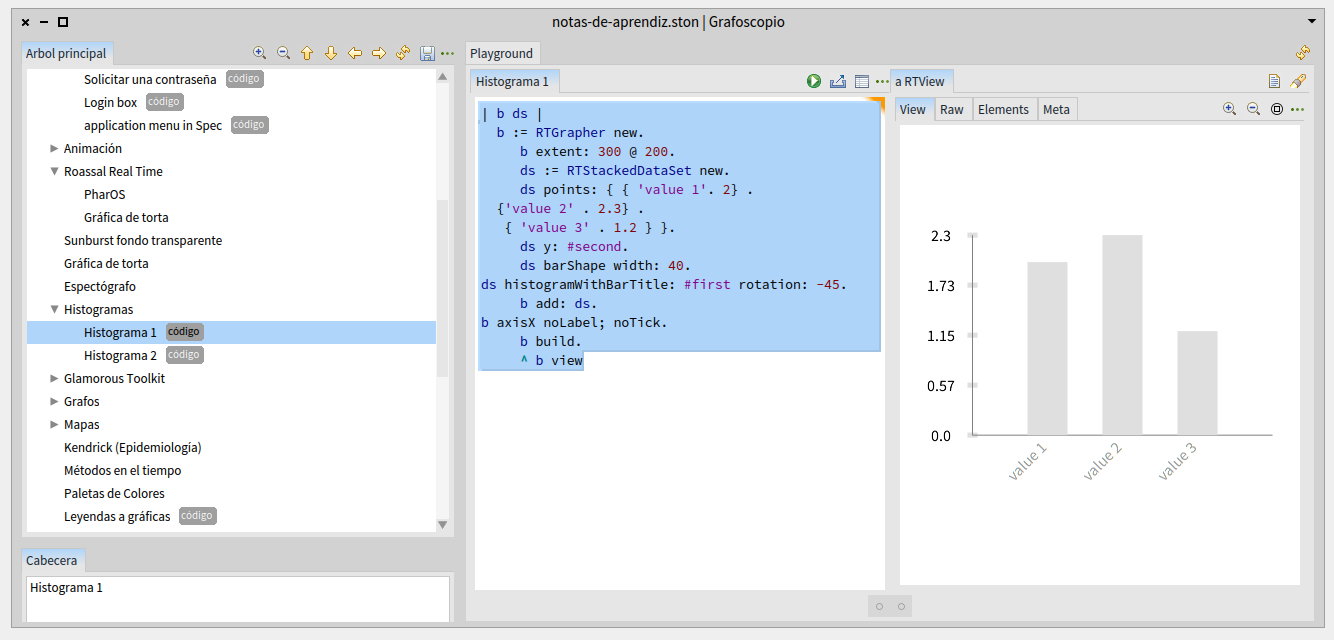
Hi, Did you try renaming the playground page as explained before? If yes, besides the fact that in order to open it you have to search it by the name, is there something else that is not working for you? Cheers, Doru On Sat, May 2, 2015 at 3:17 PM, Esteban A. Maringolo <emaringolo@gmail.com> wrote:
Ditto here.
I have cron tasks that fire a smalltak script, the startup script itself or a small import script that doesn't belong to a class. All those are my cases for the workspace. El may 2, 2015 4:38 AM, "phil@highoctane.be" <phil@highoctane.be> escribió:
playground cache is actually not nice when scripts are to be part of a project with a name etc. And I have a ton of files in it. I can't remember which is which.
I have scripts to do lots of cli things and I like the save as of the workspace.
But I have done extra key bindings for getting the ws or the playground.
Phil Le 2 mai 2015 06:49, "Sergio Fedi" <sergio.fedi@gmail.com> a écrit :
Oh! That link gives a GREAT explanation! Thanks.
On the subject of how to show it better, I'm not a graphic designer (although I'm working with one) so I'll ask him for some insights on the matter.
For now, he pointed out some issues like lack of consistency on some interfaces and some other details.
-- www.tudorgirba.com "Every thing has its own flow"
never tought of renaming the tab. I was somewhat aware of the feature. But I have the cache in my .gitignore Phil Le 2 mai 2015 22:10, "Tudor Girba" <tudor@tudorgirba.com> a écrit :
Hi,
Did you try renaming the playground page as explained before? If yes, besides the fact that in order to open it you have to search it by the name, is there something else that is not working for you?
Cheers, Doru
On Sat, May 2, 2015 at 3:17 PM, Esteban A. Maringolo <emaringolo@gmail.com
wrote:
Ditto here.
I have cron tasks that fire a smalltak script, the startup script itself or a small import script that doesn't belong to a class. All those are my cases for the workspace. El may 2, 2015 4:38 AM, "phil@highoctane.be" <phil@highoctane.be> escribió:
playground cache is actually not nice when scripts are to be part of a project with a name etc. And I have a ton of files in it. I can't remember which is which.
I have scripts to do lots of cli things and I like the save as of the workspace.
But I have done extra key bindings for getting the ws or the playground.
Phil Le 2 mai 2015 06:49, "Sergio Fedi" <sergio.fedi@gmail.com> a écrit :
Oh! That link gives a GREAT explanation! Thanks.
On the subject of how to show it better, I'm not a graphic designer (although I'm working with one) so I'll ask him for some insights on the matter.
For now, he pointed out some issues like lack of consistency on some interfaces and some other details.
-- www.tudorgirba.com
"Every thing has its own flow"
As explained before by Andrei and I, if you rename the tab, you will get a named file in play-stash and you can find this file afterwards by name via Spotter. You can also choose a custom location for play-stash in the settings browser. Cheers, Doru On Sat, May 2, 2015 at 11:30 PM, phil@highoctane.be <phil@highoctane.be> wrote:
never tought of renaming the tab. I was somewhat aware of the feature.
But I have the cache in my .gitignore
Phil Le 2 mai 2015 22:10, "Tudor Girba" <tudor@tudorgirba.com> a écrit :
Hi,
Did you try renaming the playground page as explained before? If yes, besides the fact that in order to open it you have to search it by the name, is there something else that is not working for you?
Cheers, Doru
On Sat, May 2, 2015 at 3:17 PM, Esteban A. Maringolo < emaringolo@gmail.com> wrote:
Ditto here.
I have cron tasks that fire a smalltak script, the startup script itself or a small import script that doesn't belong to a class. All those are my cases for the workspace. El may 2, 2015 4:38 AM, "phil@highoctane.be" <phil@highoctane.be> escribió:
playground cache is actually not nice when scripts are to be part of a project with a name etc. And I have a ton of files in it. I can't remember which is which.
I have scripts to do lots of cli things and I like the save as of the workspace.
But I have done extra key bindings for getting the ws or the playground.
Phil Le 2 mai 2015 06:49, "Sergio Fedi" <sergio.fedi@gmail.com> a écrit :
Oh! That link gives a GREAT explanation! Thanks.
On the subject of how to show it better, I'm not a graphic designer (although I'm working with one) so I'll ask him for some insights on the matter.
For now, he pointed out some issues like lack of consistency on some interfaces and some other details.
-- www.tudorgirba.com
"Every thing has its own flow"
-- www.tudorgirba.com "Every thing has its own flow"
Bit I use GToolkit all the time :-) Found it cool to see that it displays configurations very well for example!! Le 2 mai 2015 22:10, "Tudor Girba" <tudor@tudorgirba.com> a écrit :
Hi,
Did you try renaming the playground page as explained before? If yes, besides the fact that in order to open it you have to search it by the name, is there something else that is not working for you?
Cheers, Doru
On Sat, May 2, 2015 at 3:17 PM, Esteban A. Maringolo <emaringolo@gmail.com
wrote:
Ditto here.
I have cron tasks that fire a smalltak script, the startup script itself or a small import script that doesn't belong to a class. All those are my cases for the workspace. El may 2, 2015 4:38 AM, "phil@highoctane.be" <phil@highoctane.be> escribió:
playground cache is actually not nice when scripts are to be part of a project with a name etc. And I have a ton of files in it. I can't remember which is which.
I have scripts to do lots of cli things and I like the save as of the workspace.
But I have done extra key bindings for getting the ws or the playground.
Phil Le 2 mai 2015 06:49, "Sergio Fedi" <sergio.fedi@gmail.com> a écrit :
Oh! That link gives a GREAT explanation! Thanks.
On the subject of how to show it better, I'm not a graphic designer (although I'm working with one) so I'll ask him for some insights on the matter.
For now, he pointed out some issues like lack of consistency on some interfaces and some other details.
-- www.tudorgirba.com
"Every thing has its own flow"
15468: Add links to Welcome window https://pharo.fogbugz.com/default.asp?15468 ----- Cheers, Sean -- View this message in context: http://forum.world.st/Pharo-4-Playground-open-file-menu-tp4823334p4823727.ht... Sent from the Pharo Smalltalk Users mailing list archive at Nabble.com.
Sean P. DeNigris wrote
15468: Enhance the Welcome window
I changed the title since online descriptions in addition to links would be nice. Also, I copied the text to https://github.com/pharo-project/pharo-workingRoadmaps/blob/master/Pharo40We... to make it wasy to edit and version until it is ready ----- Cheers, Sean -- View this message in context: http://forum.world.st/Pharo-4-Playground-open-file-menu-tp4823334p4823730.ht... Sent from the Pharo Smalltalk Users mailing list archive at Nabble.com.
Sean P. DeNigris wrote
https://github.com/pharo-project/pharo-workingRoadmaps/blob/master/Pharo40We...
I added some one-liners and links... New stuff GTools - a revolutionary suite of moldable development tools Playground - one tool, with all the features of and Inspector and a Workspace, which manages an entire workflow in a single window showing custom domain presentations for each object (https://www.google.com/search?q=allinurl:+GTPlayground+site:humane-assessmen...) Inspector (https://www.google.com/search?q=allinurl:+GTInspector+site:humane-assessment...) Spotter - a uniform yet moldable search interface that works on any object, through arbitrary levels of nesting (https://www.google.com/search?q=allinurl:+GTSpotter+site:humane-assessment.c...) Slots - model instance variables as first class enities and enable meta-programming on this level. Read the paper at http://rmod.lille.inria.fr/archives/papers/Verw11a-OOSPLA11-FlexibleObjectLa... ShoreLine reporter - submit information automatically when errors happen (http://forum.world.st/ShoreLine-Reporter-is-in-Pharo-4-td4794723.html) [Preview] TxText - a modern text model which works with Athens [Preview] OSWindow - a new way to handle windows and input events (http://forum.world.st/Initial-versions-for-OSWindow-and-Woden-td4761069.html) Glamour - a mature declarative browser builder (http://pharobooks.gforge.inria.fr/PharoByExampleTwo-Eng/latest/Glamour.pdf) Dark theme (https://d262ilb51hltx0.cloudfront.net/max/2000/1*ezJrwvvvCaLCMumPQTKU1Q.png) Updated stuff Zinc/Zodiac - a mature HTTP toolkit (http://zn.stfx.eu/zn/index.html) Fuel - a fast object serializer (http://rmod.lille.inria.fr/archives/papers/Dias12a-SPE-Fuel.pdf) Versionner - a GUI tool for Metacello, our package management tool (https://www.youtube.com/watch?v=cFRJDuWL-Q0) ----- Cheers, Sean -- View this message in context: http://forum.world.st/Pharo-4-Playground-open-file-menu-tp4823334p4823737.ht... Sent from the Pharo Smalltalk Users mailing list archive at Nabble.com.
Sean P. DeNigris wrote
I added some one-liners and links...
It seems like a good improvement and reasonably complete. Please review https://github.com/pharo-project/pharo-workingRoadmaps/blob/master/Pharo40We... so we can support these new users we've attracted! ----- Cheers, Sean -- View this message in context: http://forum.world.st/Pharo-4-Playground-open-file-menu-tp4823334p4823752.ht... Sent from the Pharo Smalltalk Users mailing list archive at Nabble.com.
âFrom a usability and design point of view adding more elements to something does not necessarily improve it (i.e. the famous "less is more") The human attention is a limited resource and it has to be managed accordingly. The "About" option in the Playground (and in another tools) is a good place to put information about the tool it's purpose, how to use it, how it is related to other tools and external links. But it is an option that is not immediately obvious to access. So one thing I would do is give it more exposition, more readily access. Another typical feature in introducing new features to a user is to make it glow/shine/animate/pop up a message the first time it opens, introducing it's purpose and usage and allowing the user to bypass the message or let it keep coming back (later this information could be accessed via the About or Help option, as it is now)
"A good UI is like a joke, if you have to explain it then you did something wrong." El may 2, 2015 1:49 AM, "Sergio Fedi" <sergio.fedi@gmail.com> escribió:
Oh! That link gives a GREAT explanation! Thanks.
On the subject of how to show it better, I'm not a graphic designer (although I'm working with one) so I'll ask him for some insights on the matter.
For now, he pointed out some issues like lack of consistency on some interfaces and some other details.
On Sat, May 2, 2015 at 11:46 AM, Sean P. DeNigris <sean@clipperadams.com> wrote:
Sean P. DeNigris wrote
If so, what would you write there to explain the situation?
And maybe after that snippet we can put the link to http://www.humane-assessment.com/blog/introducing-the-gtplayground/
Putting more links in the Welcome message to significant introductory videos would be a great idea. Even better if you could click on them and it spawns the host OS web browser. cheers -ben
Esteban A. Maringolo wrote
Since the workspace is hidden (*)
If you just want it for your own personal use, why not just add it back to the world menu via a startup script? ----- Cheers, Sean -- View this message in context: http://forum.world.st/Pharo-4-Playground-open-file-menu-tp4823334p4823401.ht... Sent from the Pharo Smalltalk Users mailing list archive at Nabble.com.
2015-04-30 19:08 GMT-03:00 Sean P. DeNigris <sean@clipperadams.com>:
Esteban A. Maringolo wrote
Since the workspace is hidden (*)
If you just want it for your own personal use, why not just add it back to the world menu via a startup script?
Truth is because I don't know how. I could look, but I know myself, and I'll type "Workspace open" a thousand times before doing it. There are 978 to go... :P However now it is confirmed that this omission was "by design", I think it was a bad decision, whatever is the rationale behind it. I'll get used to it, but I can bet really hard that newcomers won't. Regards! Esteban A. Maringolo
participants (14)
-
 Andrei Chis
 -
 Ben Coman
 -
 Bernardo Ezequiel Contreras
 -
 Cyril Ferlicot
 -
 Esteban A. Maringolo
 -
 Esteban Lorenzano
 -
 itlists@schrievkrom.de
 -
 Nicolai Hess
 -
 Offray Vladimir Luna Cárdenas
 -
 phil@highoctane.be
 -
 Sean P. DeNigris
 -
 Sergio Fedi
 -
 Sven Van Caekenberghe
 -
 Tudor Girba