Glamour: update presenter with new text

Hi, In the method bellow, when the method is recompiled, the presenter's text is still the same (i.e. select another method, then the modified method: the former source code is still presented). How to request an update of the presenter's text with the newer method source? sourceIn: composite ^ composite text title: 'Source code' translated; display: [ :aCompiledMethod | aCompiledMethod sourceCode ]; act: [ :presentation :compiledMethod | compiledMethod methodClass compile: presentation text] on: $s entitled: 'Save' translated Thanks Hilaire -- Dr. Geo http://drgeo.eu

Hi, You should send #update to the presentation. By default the presentation does not update when an action is executed, as the action could be anything. sourceIn: composite ^ composite text title: 'Source code' translated; display: [ :aCompiledMethod | aCompiledMethod sourceCode ]; act: [ :presentation :compiledMethod | compiledMethod methodClass compile: presentation text. presentation update ] on: $s entitled: 'Save' translated Cheers, Andrei On Sun, Jul 2, 2017 at 7:47 PM, Hilaire <hilaire@drgeo.eu> wrote:
Hi,
In the method bellow, when the method is recompiled, the presenter's text is still the same (i.e. select another method, then the modified method: the former source code is still presented).
How to request an update of the presenter's text with the newer method source?
sourceIn: composite ^ composite text title: 'Source code' translated; display: [ :aCompiledMethod | aCompiledMethod sourceCode ]; act: [ :presentation :compiledMethod | compiledMethod methodClass compile: presentation text] on: $s entitled: 'Save' translated
Thanks
Hilaire
-- Dr. Geo http://drgeo.eu
Thanks Le 02/07/2017 à 20:21, Andrei Chis a écrit :
You should send #update to the presentation. By default the presentation does not update when an action is executed, as the action could be anything.
-- Dr. Geo http://drgeo.eu
Ah sorry no it is not working as expected. When I saved a modified method, the presenter got its source text updated (good), but the morph view is reversed to its previous content. Here is the code I use, anything wrong in the code bellow? Thanks Hilaire sourceIn: composite ^ composite pharoMethod title: 'Source code' translated; smalltalkClass: [ :each | each methodClass]; display: [ :aCompiledMethod | aCompiledMethod sourceCode ]; act: [ :presentation :compiledMethod | compiledMethod methodClass compile: presentation text. presentation update.] on: $s entitled: 'Save' translated -- Dr. Geo http://drgeo.eu
Sorry for the text formating, it was wrong, hope it is better now: || || |sourceIn: composite| | ^ composite pharoMethod| | title: 'Source code' translated;| | smalltalkClass: [ :each | each methodClass];| | display: [ :aCompiledMethod | aCompiledMethod sourceCode ];| | act: [ :presentation :compiledMethod || | compiledMethod methodClass compile: presentation text.| | presentation update.] | | on: $s | | entitled: 'Save' translated| -- Dr. Geo http://drgeo.eu -- Dr. Geo http://drgeo.eu
If I'm not mistaken CompiledMethod instances are immutable. When you run 'compiledMethod methodClass compile: presentation text' another CompiledMethod object is created and installed in the methods dictionary. So in the display block 'aCompiledMethod' references the old method. To make this work you'll need to not reference the compiled method object directly or also refresh the list of methods. Cheers, Andrei On Mon, Jul 3, 2017 at 5:48 PM, Hilaire <hilaire@drgeo.eu> wrote:
Ah sorry no it is not working as expected.
When I saved a modified method, the presenter got its source text updated (good), but the morph view is reversed to its previous content.
Here is the code I use, anything wrong in the code bellow?
Thanks
Hilaire
sourceIn: composite ^ composite pharoMethod title: 'Source code' translated; smalltalkClass: [ :each | each methodClass]; display: [ :aCompiledMethod | aCompiledMethod sourceCode ]; act: [ :presentation :compiledMethod | compiledMethod methodClass compile: presentation text. presentation update.] on: $s entitled: 'Save' translated
-- Dr. Geo http://drgeo.eu
I will be curious to know how to do that... Le 03/07/2017 à 18:08, Andrei Chis a écrit :
'aCompiledMethod' references the old method. To make this work you'll need to not reference the compiled method object directly or also refresh the list of methods.
-- Dr. Geo http://drgeo.eu

El 03-07-2017, a las 22:28, Hilaire <hilaire@drgeo.eu> escribió:
I will be curious to know how to do thatâ¦
You may have a wrapper that holds the compiled method. So, the method list can hold your wrappers instead of compiled methods. Than your wrapper could listen to the system announcer for changes and updates its value accordingly. Or you can update your method list on according to changes in the system announcer. Check, SystemAnnouncer uniqueInstance on: MethodModified do: [ :ann | self inform: ann method printString, â changedâ ]. Juraj
Le 03/07/2017 à 18:08, Andrei Chis a écrit :
'aCompiledMethod' references the old method. To make this work you'll need to not reference the compiled method object directly or also refresh the list of methods.
-- Dr. Geo http://drgeo.eu
Le 03/07/2017 à 23:20, Juraj Kubelka a écrit :
You may have a wrapper that holds the compiled method. So, the method list can hold your wrappers instead of compiled methods. Than your wrapper could listen to the system announcer for changes and updates its value accordingly. Or you can update your method list on according to changes in the system announcer.
I really don't know how to hook this in the DrGeo script browser. The methods are displayed with this code. How to add a listener to update it? methodsIn: composite composite wrapper title: 'Methods' translated; show: [ :wrapper | wrapper fastList display: [ :aClass | aClass methods ]; format: [ :aCompiledMethod | aCompiledMethod selector asString ] ]. composite wrapper title: 'Script data' translated; show: [ :wrapper | wrapper fastList display: [ :aClass | aClass class methods ]; format: [ :aCompiledMethod | aCompiledMethod selector asString ] ]. composite onChangeOfPort: #activePresentation act: [ :presentation | (presentation pane port: #activePresentation) value ifNotNil: [ :activePresentation | ((browser paneNamed: #methods) port: #selection) value: (activePresentation defaultPane port: #selection) value ] ]
Check, SystemAnnouncer uniqueInstance on: MethodModified do: [ :ann | self inform: ann method printString, â changedâ ].
In Pharo6, it should be written: SystemAnnouncer uniqueInstance *when:* MethodModified do: [ :ann | self inform: ann method printString, â changedâ ]. -- Dr. Geo http://drgeo.eu
I added these lines of code, but it is not that yet: browser updateOn: GLMItemAdded from: #yourself; updateOn: GLMItemRemoved from: #yourself. -- Dr. Geo http://drgeo.eu
May be my use case does not fit to Glamour, but I am tempted to think it does. I really need help on that to make progress. Thanks Hilaire Le 04/07/2017 à 23:08, Hilaire a écrit :
I added these lines of code, but it is not that yet:
browser updateOn: GLMItemAdded from: #yourself; updateOn: GLMItemRemoved from: #yourself.
-- Dr. Geo http://drgeo.eu

Hi Hilaire, I think it does fit your problem. However, I am not sure what the current problem is. Could you describe it again in more details? Cheers, Doru
On Jul 5, 2017, at 5:10 PM, Hilaire <hilaire@drgeo.eu> wrote:
May be my use case does not fit to Glamour, but I am tempted to think it does. I really need help on that to make progress.
Thanks
Hilaire
Le 04/07/2017 à 23:08, Hilaire a écrit :
I added these lines of code, but it is not that yet:
browser updateOn: GLMItemAdded from: #yourself; updateOn: GLMItemRemoved from: #yourself.
-- Dr. Geo
-- www.tudorgirba.com www.feenk.com "It's not how it is, it is how we see it."
I think the issue is how to update a browser when a method is modified. There is a script: -=-=-=-=- browser := GLMTabulator new column: #one; column: #two; column: #three; yourself. browser transmit to: #one; andShow: [ :composite | composite fastList ]. browser transmit from: #one; to: #two; andShow: [ :composite | composite wrapper title: [ 'Instance' translated ]; show: [ :wrapper | wrapper fastList display: [ :aClass | aClass methods ]; format: [ :aCompiledMethod | aCompiledMethod selector asString ] ]. composite wrapper title: [ 'Class side' translated ]; show: [ :wrapper | wrapper fastList display: [ :aClass | aClass class methods ]; format: [ :aCompiledMethod | aCompiledMethod selector asString ] ]. composite updateOn: MethodModified from: [ SystemAnnouncer uniqueInstance ]. composite onChangeOfPort: #activePresentation act: [ :presentation | (presentation pane port: #activePresentation) value ifNotNil: [ :activePresentation | ((browser paneNamed: #two) port: #selection) value: (activePresentation defaultPane port: #selection) value ] ] ]. browser transmit from: #two; to: #three; andShow: [ :composite | composite text display: [ :aCompiledMethod | aCompiledMethod sourceCode ]; updateOn: MethodModified from: [ SystemAnnouncer uniqueInstance ]. ]. browser openOn: Collection allSubclasses. -=-=-=-=- I have added the bold line from the previous post: http://forum.world.st/Custom-Glamour-browser-for-Dr-Geo-scripting-tp4952920p... <http://forum.world.st/Custom-Glamour-browser-for-Dr-Geo-scripting-tp4952920p...> But it is not perfect, because it does not keep the selection. Hilaire, it looks like you are going to end up with a simplified Nautilus/Calypso system editor. Maybe it is possible to take Calypso and find out how to simplify it for your needs? Well, I am writing it without understanding your goal :-) Cheers, Juraj
El 05-07-2017, a las 19:24, Tudor Girba <tudor@tudorgirba.com> escribió:
Hi Hilaire,
I think it does fit your problem.
However, I am not sure what the current problem is. Could you describe it again in more details?
Cheers, Doru
On Jul 5, 2017, at 5:10 PM, Hilaire <hilaire@drgeo.eu> wrote:
May be my use case does not fit to Glamour, but I am tempted to think it does. I really need help on that to make progress.
Thanks
Hilaire
Le 04/07/2017 à 23:08, Hilaire a écrit :
I added these lines of code, but it is not that yet:
browser updateOn: GLMItemAdded from: #yourself; updateOn: GLMItemRemoved from: #yourself.
-- Dr. Geo
-- www.tudorgirba.com www.feenk.com
"It's not how it is, it is how we see it."

2017-07-05 19:43 GMT+02:00 Juraj Kubelka <juraj.kubelka@icloud.com>:
I think the issue is how to update a browser when a method is modified. There is a script:
-=-=-=-=- browser := GLMTabulator new column: #one; column: #two; column: #three; yourself. browser transmit to: #one; andShow: [ :composite | composite fastList ].
browser transmit from: #one; to: #two; andShow: [ :composite | composite wrapper title: [ 'Instance' translated ]; show: [ :wrapper | wrapper fastList display: [ :aClass | aClass methods ]; format: [ :aCompiledMethod | aCompiledMethod selector asString ] ]. composite wrapper title: [ 'Class side' translated ]; show: [ :wrapper | wrapper fastList display: [ :aClass | aClass class methods ]; format: [ :aCompiledMethod | aCompiledMethod selector asString ] ]. *composite updateOn: MethodModified from: [ SystemAnnouncer uniqueInstance ].* composite onChangeOfPort: #activePresentation act: [ :presentation | (presentation pane port: #activePresentation) value ifNotNil: [ :activePresentation | ((browser paneNamed: #two) port: #selection) value: (activePresentation defaultPane port: #selection) value ] ] ].
browser transmit from: #two; to: #three; andShow: [ :composite | composite text display: [ :aCompiledMethod | aCompiledMethod sourceCode ]; updateOn: MethodModified from: [ SystemAnnouncer uniqueInstance ]. ].
browser openOn: Collection allSubclasses. -=-=-=-=-
I have some strange behavior with this example. Saving the edited method in this browser does not actually change the code shown in a "real" browser. Saving the edited method in a "real" browser may update the code in this browser, but sometimes not, and sometimes it even shows the code from a different method.
I have added the bold line from the previous post: http://forum.world.st/ Custom-Glamour-browser-for-Dr-Geo-scripting-tp4952920p4953209.html
But it is not perfect, because it does not keep the selection.
Hilaire, it looks like you are going to end up with a simplified Nautilus/Calypso system editor. Maybe it is possible to take Calypso and find out how to simplify it for your needs? Well, I am writing it without understanding your goal :-)
Cheers, Juraj
El 05-07-2017, a las 19:24, Tudor Girba <tudor@tudorgirba.com> escribió:
Hi Hilaire,
I think it does fit your problem.
However, I am not sure what the current problem is. Could you describe it again in more details?
Cheers, Doru
On Jul 5, 2017, at 5:10 PM, Hilaire <hilaire@drgeo.eu> wrote:
May be my use case does not fit to Glamour, but I am tempted to think it does. I really need help on that to make progress.
Thanks
Hilaire
Le 04/07/2017 à 23:08, Hilaire a écrit :
I added these lines of code, but it is not that yet:
browser updateOn: GLMItemAdded from: #yourself; updateOn: GLMItemRemoved from: #yourself.
-- Dr. Geo
-- www.tudorgirba.com www.feenk.com
"It's not how it is, it is how we see it."
For me it unselects the method, and it still reverts the source code view with the previous source code method Le 05/07/2017 à 19:43, Juraj Kubelka a écrit :
*composite updateOn: MethodModified from: [ SystemAnnouncer uniqueInstance ].*
-- Dr. Geo http://drgeo.eu
Le 05/07/2017 à 19:43, Juraj Kubelka a écrit :
I have added the bold line from the previous post: http://forum.world.st/Custom-Glamour-browser-for-Dr-Geo-scripting-tp4952920p...
But it is not perfect, because it does not keep the selection.
Hilaire, it looks like you are going to end up with a simplified Nautilus/Calypso system editor. Maybe it is possible to take Calypso and find out how to simplify it for your needs? Well, I am writing it without understanding your goal :-)
I read again carrefully your example and applied it to my case, and it does not work as I explained one week ago. And I am not sure I want to mess arround with Nautilus. I don't know what to do? Do you want a copy of my image to test it? Hilaire -- Dr. Geo http://drgeo.eu
Hi, I will try to follow up tomorrow. Cheers, Doru
On Jul 12, 2017, at 6:01 PM, Hilaire <hilaire@drgeo.eu> wrote:
Le 05/07/2017 à 19:43, Juraj Kubelka a écrit :
I have added the bold line from the previous post: http://forum.world.st/Custom-Glamour-browser-for-Dr-Geo-scripting-tp4952920p...
But it is not perfect, because it does not keep the selection.
Hilaire, it looks like you are going to end up with a simplified Nautilus/Calypso system editor. Maybe it is possible to take Calypso and find out how to simplify it for your needs? Well, I am writing it without understanding your goal :-)
I read again carrefully your example and applied it to my case, and it does not work as I explained one week ago. And I am not sure I want to mess arround with Nautilus. I don't know what to do? Do you want a copy of my image to test it?
Hilaire
-- Dr. Geo http://drgeo.eu
-- www.tudorgirba.com www.feenk.com "Problem solving should be focused on describing the problem in a way that makes the solution obvious."
Ok, thanks Doru. In case it can helpm I upload a DrGeo image[1] with all the involved code. Thanks Hilaire [1] https://www.dropbox.com/s/q06jihslvkzye8r/DrGeoBrowser.zip?dl=0 Le 12/07/2017 à 19:19, Tudor Girba a écrit :
Hi,
I will try to follow up tomorrow.
Cheers, Doru
-- Dr. Geo http://drgeo.eu

I can tell you that you do not want to play with nautilus :). Stef On Wed, Jul 12, 2017 at 6:01 PM, Hilaire <hilaire@drgeo.eu> wrote:
Le 05/07/2017 à 19:43, Juraj Kubelka a écrit :
I have added the bold line from the previous post: http://forum.world.st/Custom-Glamour-browser-for-Dr-Geo-scripting-tp4952920p...
But it is not perfect, because it does not keep the selection.
Hilaire, it looks like you are going to end up with a simplified Nautilus/Calypso system editor. Maybe it is possible to take Calypso and find out how to simplify it for your needs? Well, I am writing it without understanding your goal :-)
I read again carrefully your example and applied it to my case, and it does not work as I explained one week ago. And I am not sure I want to mess arround with Nautilus. I don't know what to do? Do you want a copy of my image to test it?
Hilaire
-- Dr. Geo http://drgeo.eu
Plus I understood it will be replace by Calypso, right? May be hacking on Calypso would make sense, but there are several use cases I want to explore with Glamour, so... Le 12/07/2017 à 22:24, Stephane Ducasse a écrit :
I can tell you that you do not want to play with nautilus :).
Stef
-- Dr. Geo http://drgeo.eu

Le 13/07/2017 à 10:01, Denis Kudriashov a écrit :
What exactly you are implementing? Browsers to edit Dr. Geo user script. Explained in a previous mail of this thread. The idea is to show the user the strict minimum, to reduce confusion.
Hilaire -- Dr. Geo http://drgeo.eu
Hi, I took a quick look. To get the methods properly update and selected when modifying code, you should use the reference to the method, and the not the compiled method. Try this: methodsIn: composite composite wrapper title: 'Methods' translated; show: [ :wrapper | wrapper fastList display: [ :aClass | aClass methods collect: [ :m | m asRingDefinition ] ]; format: [ :aCompiledMethod | aCompiledMethod selector asString ] ]. composite wrapper title: 'Script data' translated; show: [ :wrapper | wrapper fastList display: [ :aClass | aClass class methods collect: [ :m | m asRingDefinition ] ]; format: [ :aCompiledMethod | aCompiledMethod selector asString ] ]. composite updateOn: MethodModified from: [ SystemAnnouncer uniqueInstance ]. composite onChangeOfPort: #activePresentation act: [ :presentation | (presentation pane port: #activePresentation) value ifNotNil: [ :activePresentation | ((browser paneNamed: #methods) port: #selection) value: (activePresentation defaultPane port: #selection) value ] ]. Cheers, Doru
On Jul 13, 2017, at 10:21 AM, Hilaire <hilaire@drgeo.eu> wrote:
Le 13/07/2017 à 10:01, Denis Kudriashov a écrit :
What exactly you are implementing? Browsers to edit Dr. Geo user script. Explained in a previous mail of this thread. The idea is to show the user the strict minimum, to reduce confusion.
Hilaire
-- Dr. Geo http://drgeo.eu
-- www.tudorgirba.com www.feenk.com "From an abstract enough point of view, any two things are similar."
Thanks Doru, it works as a charm! I don't think I could find it by myself, or I will have to become a Glamour expert. To make it perfect, there is still a fix needed for the DrGeo script browser: The class method 'scriptName' of each Dr. Geo script class returns a string, it used in the browser (and other place) to list meaningfully the script (and not use the generic class name). Therefore, when the user edit this method, the script name listed in the left panel should be updated accordingly. I edit the code as bellow: scriptsIn: constructor constructor fastList title: 'Scripts' translated; display: [ :organiser | organiser ]; format: #scriptName. * constructor updateOn: MethodModified from: [ SystemAnnouncer uniqueInstance ].* It gives the expected behaviour. Is it the right way to do it? Thanks Hilaire Le 13/07/2017 à 11:50, Tudor Girba a écrit :
I took a quick look. To get the methods properly update and selected when modifying code, you should use the reference to the method, and the not the compiled method.
-- Dr. Geo http://drgeo.eu
Hi,
On Jul 14, 2017, at 9:52 AM, Hilaire <hilaire@drgeo.eu> wrote:
Thanks Doru, it works as a charm!
Great.
I don't think I could find it by myself, or I will have to become a Glamour expert.
Actually, this is not really related to Glamour, but to how CompiledMethods are dealt with by the system. A CompiledMethod is immutable, so every time you change a method, a new CompiledMethod object gets created. So, if the browser shows CompiledMethods, you will always see the old version. This would have been the same without Glamour as well. That is why you need to show a RingMethodDefinition which only holds a reference made by the name of the method that is resolved dynamically.
To make it perfect, there is still a fix needed for the DrGeo script browser:
The class method 'scriptName' of each Dr. Geo script class returns a string, it used in the browser (and other place) to list meaningfully the script (and not use the generic class name).
Therefore, when the user edit this method, the script name listed in the left panel should be updated accordingly. I edit the code as bellow:
scriptsIn: constructor constructor fastList title: 'Scripts' translated; display: [ :organiser | organiser ]; format: #scriptName. constructor updateOn: MethodModified from: [ SystemAnnouncer uniqueInstance ].
It gives the expected behaviour. Is it the right way to do it?
constructor fastList creates a CompositePresentation that holds a ListPresentation. Think of a CompositePresentation as a morphic pane: it is a holder without much logic. The data you want to update is dealt with by ListPresentation. Thus, what you want to update is the list, not the whole composite. scriptsIn: constructor constructor fastList title: 'Scripts' translated; display: [ :organiser | organiser ]; format: #scriptName; updateOn: MethodModified from: [ SystemAnnouncer uniqueInstance ]. Cheers, Doru
Thanks
Hilaire
Le 13/07/2017 à 11:50, Tudor Girba a écrit :
I took a quick look. To get the methods properly update and selected when modifying code, you should use the reference to the method, and the not the compiled method.
-- Dr. Geo
-- www.tudorgirba.com www.feenk.com "Every successful trip needs a suitable vehicle."
Thanks for the updates on both the internal dependencies and the ListPresentation.
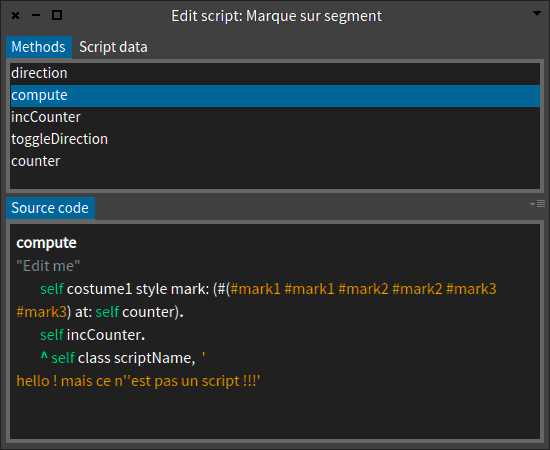
From this browser, I deduced a second simpler browser for only one script. It was easy to do so thanks to your tips (attached pic).
With this simpler script editor, when I open a script, I like it opens on the compute method, because it is a mandatory method in a script. I was doing it like browser := Nautilus openOnClass: scriptClass selector: #compute. I guess, there is a way to do so with the Glamour browser ? Thanks Hilaire -- Dr. Geo http://drgeo.eu
Hi Hilaire, Sorry for the late reply. Indeed, it should be possible to do this, but we have to look closer at your concrete code. Here is an example: browser := GLMTabulator new. browser column: #one; column: #two. browser transmit to: #one; andShow: [ :a | a list display: [ :x | 1 to: x ] ]. browser transmit from: #one; to: #two; andShow: [ :a | a text ]. browser transmit fromOutsidePort: #explicitSelection; to: #one port: #selection. browser openOn: 42. (browser pane port: #explicitSelection) value: 41 Essentially, you need to transmit the selection from the outside to the inside pane. Please note that once you pass the #explicitSelection to the #selection of pane #one, you also trigger the transmission from #one to #two, and this is why the 41 also appears in the text on the right hand side. Does this help? In the meantime, have you read this chapter: http://www.themoosebook.org/book/index.html#h1buildingbrowserswithglamour ? Cheers, Doru
On Jul 15, 2017, at 10:38 AM, Hilaire <hilaire@drgeo.eu> wrote:
Thanks for the updates on both the internal dependencies and the ListPresentation.
From this browser, I deduced a second simpler browser for only one script. It was easy to do so thanks to your tips (attached pic).
With this simpler script editor, when I open a script, I like it opens on the compute method, because it is a mandatory method in a script.
I was doing it like
browser := Nautilus openOnClass: scriptClass selector: #compute.
I guess, there is a way to do so with the Glamour browser ?
Thanks
Hilaire
-- Dr. Geo
http://drgeo.eu <Edit script: Marque sur segment.gif>
-- www.tudorgirba.com www.feenk.com "Every now and then stop and ask yourself if the war you're fighting is the right one."
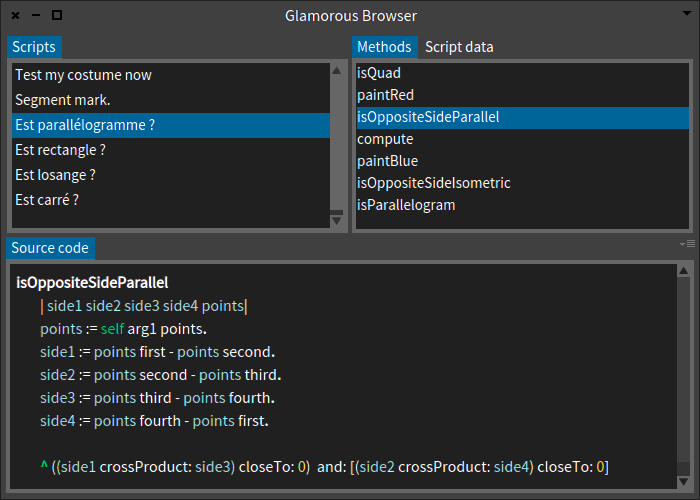
Okay, I will try to describe it: First in Dr. Geo there is user scripting. The idea is to let the user define a computing object he can plug on a sketch. This object receive an arbitrary number of objects as arguments selected from the sketch by mouse. This script object is a class, subclass of DrGeoUserScript, and each use in a geometric canvas create an instance. This video exposes this: http://www.dailymotion.com/video/x30amxd_introduction-to-scripting_tech Now, the script editing is done with Nautilus and it is a bit too overload for average user. What I want is a dedicated browser with more targeted information: * Two vertical panes: 1. at the left, the script classes, but it is the script name (as given by the user) displayed 2. at the right, the methods of the selected script * A large horizontal pane with the source of selected pane. The attached screenshot shows the wished user interface as writen with Glamour. Hilaire Le 05/07/2017 à 19:24, Tudor Girba a écrit :
However, I am not sure what the current problem is. Could you describe it again in more details?
-- Dr. Geo http://drgeo.eu
participants (7)
-
 Andrei Chis
 -
 Denis Kudriashov
 -
 Hilaire
 -
 Juraj Kubelka
 -
 Nicolai Hess
 -
 Stephane Ducasse
 -
 Tudor Girba