PharoLauncher image loading error

Hi, On Mac OSX 10.12.6, when asking to load an image from the pharo launcher there is an error. see log Hilaire

Hilaire can you tell us which image? or which version of Pharo? Old versions of Pharo are not supported by Pharo Launcher because of obvious lack of manpower. Stef On Mon, Mar 26, 2018 at 2:12 PM, H. Fernandes <hilaire@drgeo.eu> wrote:
Hi,
On Mac OSX 10.12.6, when asking to load an image from the pharo launcher there is an error. see log
Hilaire
Hi, The Pharo Launcher I tried is the newset one from the pharo web site (32bits, P6, MacOSX), When I asked for a 6.1 image, I got this error. May be I did something wrong because it was the 1st time I tried pharolauncher. Hilaire Le 26/03/2018 à 20:02, Stephane Ducasse a écrit :
Hilaire
can you tell us which image? or which version of Pharo? Old versions of Pharo are not supported by Pharo Launcher because of obvious lack of manpower. Stef
-- Dr. Geo http://drgeo.eu
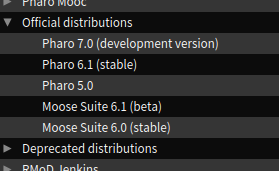
And you are on MacOSX? Can you describe what you did? Because with the Launcher you can also open old images and ask it to sort them. You just double click on the left pane on the Pharo6.1(stable) item (as attached?) On Mon, Mar 26, 2018 at 8:21 PM, Hilaire <hilaire@drgeo.eu> wrote:
Hi,
The Pharo Launcher I tried is the newset one from the pharo web site (32bits, P6, MacOSX), When I asked for a 6.1 image, I got this error. May be I did something wrong because it was the 1st time I tried pharolauncher.
Hilaire
Le 26/03/2018 à 20:02, Stephane Ducasse a écrit :
Hilaire
can you tell us which image? or which version of Pharo? Old versions of Pharo are not supported by Pharo Launcher because of obvious lack of manpower. Stef
-- Dr. Geo http://drgeo.eu
Le 26/03/2018 à 22:17, Stephane Ducasse a écrit :
And you are on MacOSX? No, I am not. Just some testing on school computers. Can you describe what you did? Because with the Launcher you can also I open the "Official distributions" subtree, select Pharo6.1 then click on the icon with the play symbol, on the top of the window. open old images and ask it to sort them. You just double click on the left pane on the Pharo6.1(stable) item (as attached?)
-- Dr. Geo http://drgeo.eu
And you are on MacOSX?
No, I am not. Just some testing on school computers.
Can you tell us then on which os? which version?
Can you describe what you did? Because with the Launcher you can also
I open the "Official distributions" subtree, select Pharo6.1 then click on the icon with the play symbol, on the top of the window.
Is the disc where the launcher is located in read write mode? Stef
Le 31/03/2018 à 16:03, Stephane Ducasse a écrit :
And you are on MacOSX? No, I am not. Just some testing on school computers. Can you tell us then on which os? which version? Mentioned earlier on this thread
Can you describe what you did? Because with the Launcher you can also I open the "Official distributions" subtree, select Pharo6.1 then click on the icon with the play symbol, on the top of the window. Is the disc where the launcher is located in read write mode? I guess so as it was copied there on the first place, the hard disk, on the dekstop.
Stef
-- Dr. Geo http://drgeo.eu
participants (3)
-
 H. Fernandes
 -
Hilaire
-
 Stephane Ducasse