
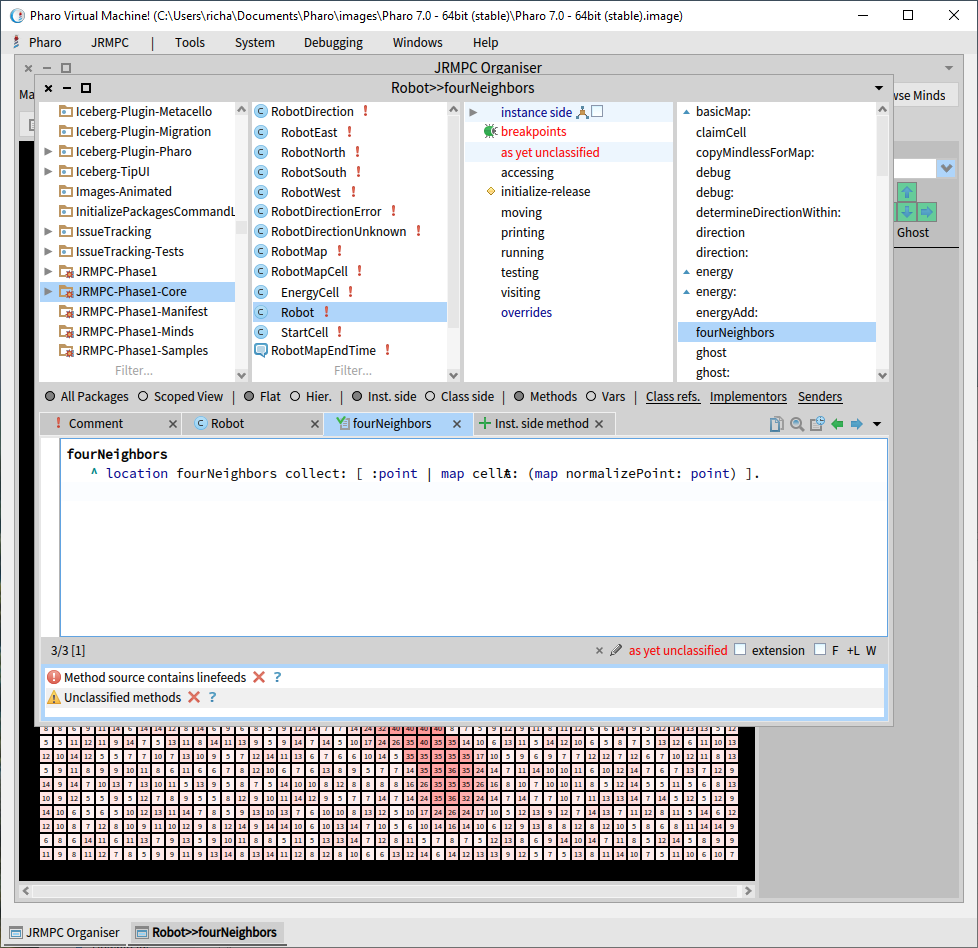
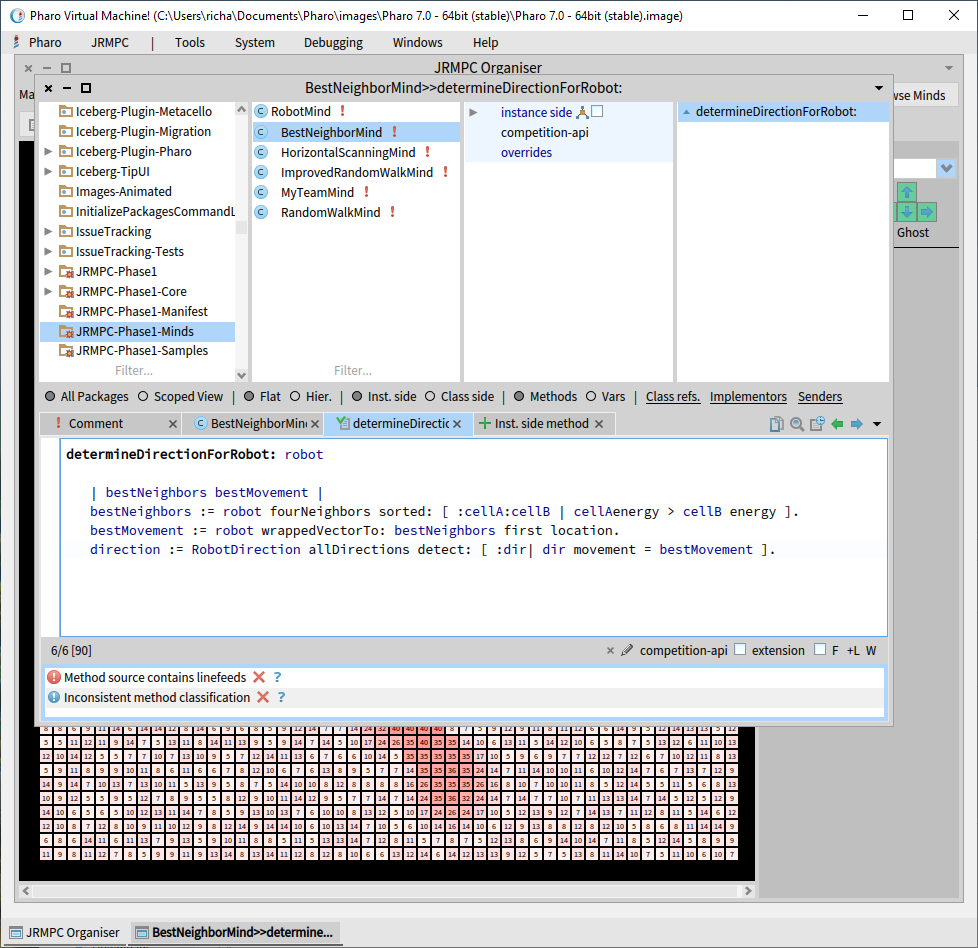
I don't know how to report Pharo bugs, so I'll just mention that the Pharo IDE isn't displaying code properly. For example: [image: image.png] Look at "map cellAt: ". The 'A' and 't" are mashed together. Another example: [image: image.png] Look at ":cellA:cellB | cellA energy ". It's not displaying the space between "cellA" and "energy". This is more than just a display bug because how the hell are you supposed to edit this code??? Richard

Richard, It's pretty easy. Surf to the 'issues' page of the Pharo repo, which is in the 'pharo-project' organization in GitHub: https://github.com/pharo-project/pharo/issues Click the bright green "New issue" button, then describe away... -Ted -- Sent from: http://forum.world.st/Pharo-Smalltalk-Users-f1310670.html

This is a known issue with FreeType - it happens in some images and in next automatically built image it is gone. See all details in: https://github.com/pharo-project/pharo/issues/2336 Workaround: Just go to the WorldMenu Pharo -> Settings (to open the SettingsBrowser) -> Appearance -> Switch the "Use Free Type" checkbox twice and fonts will be OK again Thx T.
Gesendet: Samstag, 18. Januar 2020 um 19:29 Uhr Von: "tbrunz" <wild.ideas@gmail.com> An: pharo-users@lists.pharo.org Betreff: Re: [Pharo-users] Pharo display bug
Richard,
It's pretty easy. Surf to the 'issues' page of the Pharo repo, which is in the 'pharo-project' organization in GitHub:
https://github.com/pharo-project/pharo/issues
Click the bright green "New issue" button, then describe away...
-Ted
-- Sent from: http://forum.world.st/Pharo-Smalltalk-Users-f1310670.html

I find that pressing save fixes it (itâs a cache corruption thing and very annoying - but itâs been hard to fix). Itâs certainly improved since the last round of fixes but I still get it, and some things loaded in your image seem to trigger it more frequently (mirage was one of them) Tim Sent from my iPhone
On 18 Jan 2020, at 18:48, Torsten Bergmann <astares@gmx.de> wrote:
This is a known issue with FreeType - it happens in some images and in next automatically built image it is gone. See all details in:
https://github.com/pharo-project/pharo/issues/2336
Workaround:
Just go to the WorldMenu Pharo -> Settings (to open the SettingsBrowser) -> Appearance -> Switch the "Use Free Type" checkbox twice and fonts will be OK again
Thx T.
Gesendet: Samstag, 18. Januar 2020 um 19:29 Uhr Von: "tbrunz" <wild.ideas@gmail.com> An: pharo-users@lists.pharo.org Betreff: Re: [Pharo-users] Pharo display bug
Richard,
It's pretty easy. Surf to the 'issues' page of the Pharo repo, which is in the 'pharo-project' organization in GitHub:
https://github.com/pharo-project/pharo/issues
Click the bright green "New issue" button, then describe away...
-Ted
-- Sent from: http://forum.world.st/Pharo-Smalltalk-Users-f1310670.html
Thanks! Works perfectly. Torsten Bergmann wrote
This is a known issue with FreeType - it happens in some images and in next automatically built image it is gone. See all details in:
https://github.com/pharo-project/pharo/issues/2336
Workaround:
Just go to the WorldMenu Pharo -> Settings (to open the SettingsBrowser) -> Appearance -> Switch the "Use Free Type" checkbox twice and fonts will be OK again
Thx T.
Gesendet: Samstag, 18. Januar 2020 um 19:29 Uhr Von: "tbrunz" <
wild.ideas@
>
An:
pharo-users@.pharo
Betreff: Re: [Pharo-users] Pharo display bug
Richard,
It's pretty easy. Surf to the 'issues' page of the Pharo repo, which is in the 'pharo-project' organization in GitHub:
https://github.com/pharo-project/pharo/issues
Click the bright green "New issue" button, then describe away...
-Ted
-- Sent from: http://forum.world.st/Pharo-Smalltalk-Users-f1310670.html
-- Sent from: http://forum.world.st/Pharo-Smalltalk-Users-f1310670.html

Didnât you know pharo has a website? Did you have trouble finding the âReporting issuesâ section on the website? What went wrong with you and the available information? Norbert
Am 18.01.2020 um 19:16 schrieb Richard Kenneth Eng <horrido.hobbies@gmail.com>:
 I don't know how to report Pharo bugs, so I'll just mention that the Pharo IDE isn't displaying code properly. For example:
<image.png>
Look at "map cellAt: ". The 'A' and 't" are mashed together.
Another example:
<image.png>
Look at ":cellA:cellB | cellA energy ". It's not displaying the space between "cellA" and "energy".
This is more than just a display bug because how the hell are you supposed to edit this code???
Richard
participants (6)
-
 horrido
 -
 Norbert Hartl
 -
Richard Kenneth Eng
-
 tbrunz
 -
 Tim Mackinnon
 -
 Torsten Bergmann