System Windows not closing on using #close

Hi I am using *SystemWindow* to open a Morph in my application *searchQuick*. ( https://github.com/jig08/sQuick_new ) On clicking a button, a new screen opens up but the prev window fails to close, though I have tried using #close methods. The code snippets are as: *------------------------------------------------------------------------------------------------------------------* *IndexInterface>>**#initialize* *. . . . . .* * boxWindow := SystemWindow new.* * box position: 150@0.* * boxWindow addMorph: box.* * boxWindow extent: World extent.* * boxWindow openInWindowLabeled: 'searchQuick'.* * boxWindow fullscreen.* * boxWindow color: Color black.* *. . . . . . .* browseBtn on: #click send: #value to: [self boxWindow window close. IndexInterface delete. BrowseFiles open]. *-------------------------------------------------------------------------------------------------------------------* *IndexInterface>>#delete* * box isNil ifFalse: [ self boxWindow window close. * * self boxWindow window delete . * * self boxWindow close. * * box window close .* * self boxWindow delete. * * box delete.].* * box := nil.* * self boxWindow window close. * * self boxWindow window delete .* * self boxWindow close. * * self boxWindow delete.* * boxWindow := nil.* *-------------------------------------------------------------------------------------------------------------------* Help appreciated. Regards Jigyasa

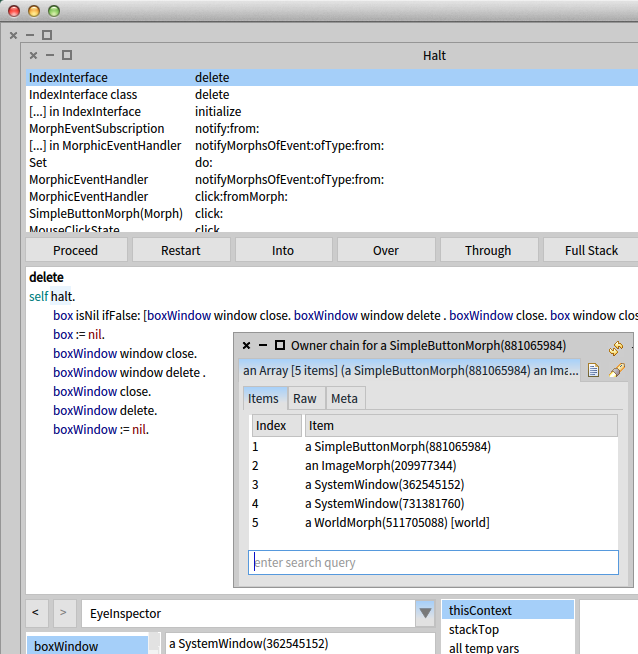
If you put a "self halt" at the top of IndexInterface>>#delete, then after opening the app, on one of the buttons (e.g. Browse Files) bring up its halos and click the Spanner/Debug icon, then "Inspect owner chain", and you will see a SystemWindow within a SystemWindow. Now click that button and the debugger will show that boxWindow is the inner SystemWindow, so when you close that you leave the outer SystemWindow. Actually the nested SystemWindows are apparent from the close-minimise-maximise icons in the top-left of each. This seems wrong. Putting a "self halt" in IndexInterface>>#initialize and stepping into "boxWindow openInWindowLabeled: 'searchQuick' " shows how you end up with nested SystemWindows. As you trace through, notice that SystemWindow>>openInWindowLabeled:inWorld: returns the window it creates, so maybe you instead want "boxWindow := box openInWindowLabeled: 'searchQuick' " A few other things: * SystemWindow>>close simply calls "self delete" so there seems no need to call both, just #delete. * From the debugger evaluating "boxWindow" and "boxWindow window" return the identical object (per identical number in brackets), so there seems no need to delete both. cheers -ben On Sat, Aug 8, 2015 at 1:47 PM, Jigyasa Grover <grover.jigyasa1@gmail.com> wrote:
Hi I am using SystemWindow to open a Morph in my application searchQuick. ( https://github.com/jig08/sQuick_new ) On clicking a button, a new screen opens up but the prev window fails to close, though I have tried using #close methods.
The code snippets are as:
------------------------------------------------------------------------------------------------------------------ IndexInterface>>#initialize . . . . . . boxWindow := SystemWindow new. box position: 150@0. boxWindow addMorph: box. boxWindow extent: World extent. boxWindow openInWindowLabeled: 'searchQuick'. boxWindow fullscreen. boxWindow color: Color black. . . . . . . .
browseBtn on: #click send: #value to: [self boxWindow window close. IndexInterface delete. BrowseFiles open].
------------------------------------------------------------------------------------------------------------------- IndexInterface>>#delete box isNil ifFalse: [ self boxWindow window close. self boxWindow window delete . self boxWindow close. box window close . self boxWindow delete. box delete.]. box := nil. self boxWindow window close. self boxWindow window delete . self boxWindow close. self boxWindow delete. boxWindow := nil.
-------------------------------------------------------------------------------------------------------------------
Help appreciated.
Regards Jigyasa
Oh Thank You Ben. It was indeed a very nice explanation. :) I was able to resolve my issue perfectly. But changing the code snippet to: *--------------------------------------------------------------------------- #initialize . . . boxWindow := box openInWindow. boxWindow setLabel: 'searchQuick - Browse Files'. box position: 150@0. boxWindow fullscreen. boxWindow color: Color black. ---------------------------------------------------------------------------* I can no longer position 'box' within 'boxWindow'. Any clue regarding this ? Regards Jigyasa -- View this message in context: http://forum.world.st/System-Windows-not-closing-on-using-close-tp4841568p48... Sent from the Pharo Smalltalk Users mailing list archive at Nabble.com.

On 08/08/15 20:43, Jigyasa Grover wrote:
Oh Thank You Ben. It was indeed a very nice explanation. :) I was able to resolve my issue perfectly.
But changing the code snippet to:
*--------------------------------------------------------------------------- #initialize . . . boxWindow := box openInWindow. boxWindow setLabel: 'searchQuick - Browse Files'. box position: 150@0. boxWindow fullscreen. boxWindow color: Color black. ---------------------------------------------------------------------------*
I can no longer position 'box' within 'boxWindow'. Any clue regarding this ?
If you take a look at Morph>>openInWindowLabeled: aString inWorld: aWorld you'll see that the morph itself is added with a LayoutFrame taking up the whole window (0@0 extent: 1@1). Making that then fullScreen results in the box getting resized to take the whole screen. If you give the box a different frame after adding it you should be able to position it differently. Stephan
Hi Stephan I got your point, I think. I tried searching for the such methods which would help me make a separate frame for 'box' so as to re-position 'box' within 'boxWindow' but in vain. Any pointers pls ? Thanks Jigyasa -- View this message in context: http://forum.world.st/System-Windows-not-closing-on-using-close-tp4841568p48... Sent from the Pharo Smalltalk Users mailing list archive at Nabble.com.
*Steps to reproduce:* 1. Open a fresh image 2. Load Configuration : World > Tools > Configuration Browser > sQuick_new 3. Do It "IndexInterface open" in playground The box (ImageMorph) is aligned to the left in its window, I would like it to be center aligned. /Kindly look into the issue on github (LINK: https://github.com/jig08/sQuick_new/issues/19)/ Help appreciated Thanks -- View this message in context: http://forum.world.st/System-Windows-not-closing-on-using-close-tp4841568p48... Sent from the Pharo Smalltalk Users mailing list archive at Nabble.com.
participants (3)
-
 Ben Coman
 -
 Jigyasa Grover
 -
 Stephan Eggermont