im using pharo 7 with linux env. but cannot input korean.

hello~.. im using pharo 7 with linux env. but cannot input korean. and.. already start shell script file open and add "--compositioninput". but any receive data from XIM(fcitx). who know for this issue? thanks. -- http://lookandwalk.com http://looknw.com | http://onionmixer.net peter yoo(Jonghwa Yoo). ROK

peter yoo wrote
cannot input korean.
Will you say more about your issue (e.g. steps to reproduce)? Make sure you use a font that contains Korean characters. When I wrote a Chinese (traditional) app, the default Pharo font did not and I had to change to "Arial Unicode MS" ----- Cheers, Sean -- Sent from: http://forum.world.st/Pharo-Smalltalk-Users-f1310670.html

In your trad. chinese app were you able to key in chinese? A taiwanese friend of mine will be interested to know. Hilaire Le 15/02/2019 à 19:06, Sean P. DeNigris a écrit :
Will you say more about your issue (e.g. steps to reproduce)? Make sure you use a font that contains Korean characters. When I wrote a Chinese (traditional) app, the default Pharo font did not and I had to change to "Arial Unicode MS"
-- Dr. Geo http://drgeo.eu
HilaireFernandes wrote
In your trad. chinese app were you able to key in chinese?
I didn't try because the characters were pulled in from an external data source. I only needed to display them. ----- Cheers, Sean -- Sent from: http://forum.world.st/Pharo-Smalltalk-Users-f1310670.html

On Fri, Feb 15, 2019 at 10:42:42PM +0900, peter yoo wrote:
hello~.. im using pharo 7 with linux env. but cannot input korean. and.. already start shell script file open and add "--compositioninput".
I start Pharo with -compositioninput (one dash, didn't try two dashes for the option). Chinese and Japanese input works for me. In Pharo I use Noto Sans font loaded from system. OS is Xubuntu 18.04. Input system is fcitx and mozc for Japanese. In Pharo playground, press alt-space to enable Chinese/Japanese input, and just type.
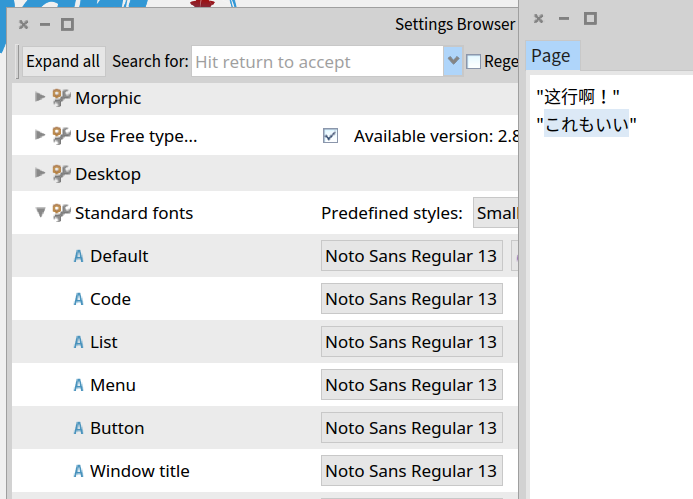
maybe my linux env is fail now. because xterm cannot use korean input. more check after report this thread. thanks for all. :D
Hi Pierce, Yes, this option worked to key in Chinese. By the way, do you know if any option is needed on Windows? I checked for the options but I did not see anything relevant: hilaire@PCHome:~/Travaux/Developpement/DrGeoII/trunk/build/bundles/windows/DrGeo$ wine Contents/vm/DrGeo.exe --help Usage: Pharo Virtual Machine [vmOptions] imageFile [imageOptions] vmOptions: -service: ServiceName (install VM as NT service) -headless (force VM to run headless) -timephases (print start load and run times) -log: LogFile (use LogFile for VM messages) -memory: megaByte (set memory to megaByte MB) -breaksel: string (call warning on send of sel for debug) -breakmnu: string (call warning on MNU of sel for debug) -leakcheck: n (leak check on GC (1=full,2=incr,3=both)) -eden: bytes (set eden memory size to bytes) -stackpages: n (use n stack pages) -numextsems: n (allow up to n external semaphores) -checkpluginwrites (check for writes past end of object in plugins -noheartbeat (no heartbeat for debug) -trace[=num] enable tracing (optionally to a specific value) -warnpid (print pid in warnings) -[no]failonffiexception ([never]always catch exceptions in FFI calls) -codesize: bytes (set machine-code memory size to bytes) -cogmaxlits: n (set max number of literals for methods to be compiled to machine code) -cogminjumps: n (set min number of backward jumps for interpreted methods to be considered for compilation to machine code) -tracestores (assert-check stores for debug) -reportheadroom (report unused stack headroom on exit) -dpcso: bytes (stack offset for prim calls for debug) -maxoldspace: bytes (set max size of old space memory to bytes) -logscavenge (log scavenging to scavenge.log) Options begin with single -, but -- prefix is silently accepted Options with arguments -opt:n are also accepted with separators -opt n Le 16/02/2019 à 04:54, Pierce Ng a écrit :
I start Pharo with -compositioninput (one dash, didn't try two dashes
-- Dr. Geo http://drgeo.eu
On Tue, Feb 19, 2019 at 09:42:18AM +0100, Hilaire wrote:
Hi Pierce, Yes, this option worked to key in Chinese.
By the way, do you know if any option is needed on Windows? I checked for the options but I did not see anything relevant:
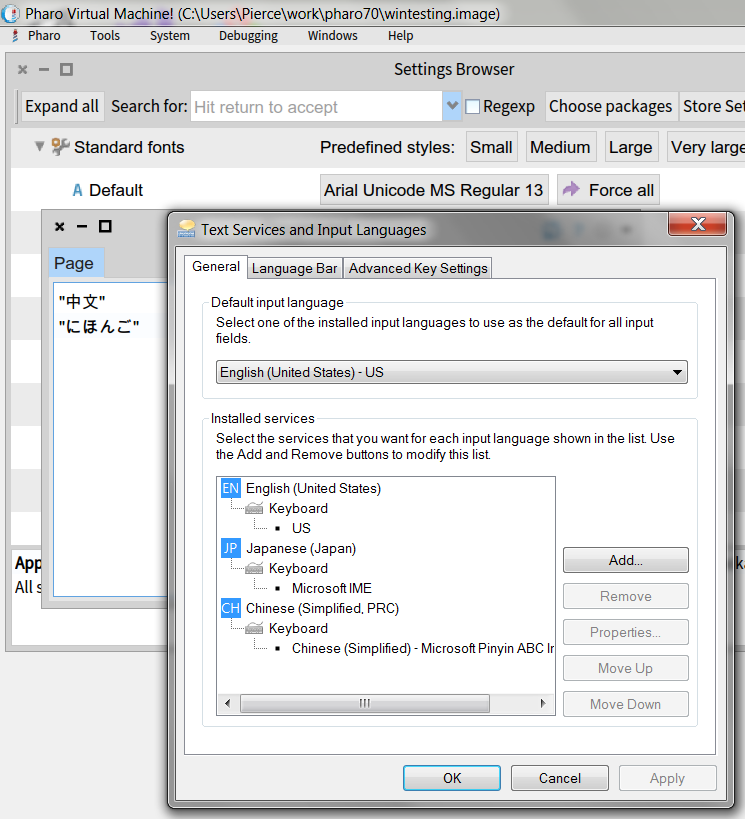
Hi Hilaire, My self-built VM on Windows 7 doesn't have the option either. But, multilingual input into Pharo works. Outside of Pharo, configure Windows multilingual input. Within Pharo, choose a font like Arial Unicode MS. Then just switch Windows input system using hot-key or mouse click, and type. See screenshot. Pierce
Thanks Pierce. So kind of work out of the box as long as the appropriate font is selected. Hilaire Le 22/02/2019 à 04:34, Pierce Ng a écrit :
Hi Hilaire,
My self-built VM on Windows 7 doesn't have the option either. But, multilingual input into Pharo works.
Outside of Pharo, configure Windows multilingual input. Within Pharo, choose a font like Arial Unicode MS. Then just switch Windows input system using hot-key or mouse click, and type. See screenshot.
Pierce
-- Dr. Geo http://drgeo.eu
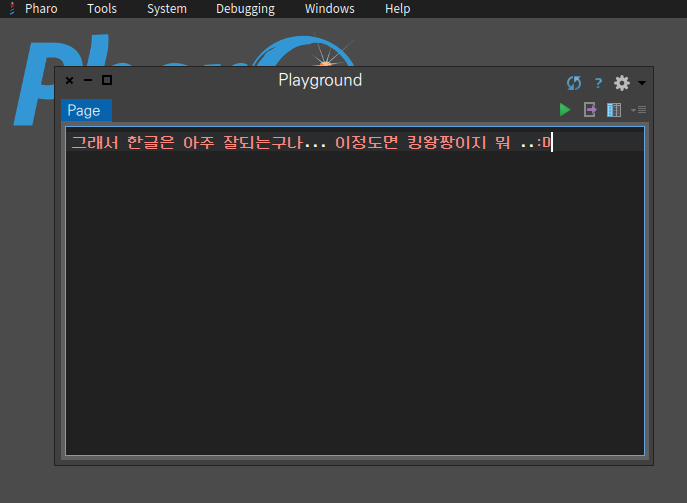
ok. today me tested again. maybe my XIM env is bad before. is ok now. thanks to all. all fcitx package remove and re-install. and ok... ê°ì¬í©ëë¤. for pharo users. :D
Cool. Le 05/03/2019 à 18:04, peter yoo a écrit :
ok. today me tested again. maybe my XIM env is bad before. is ok now. thanks to all. all fcitx package remove and re-install. and ok...
ê°ì¬í©ëë¤. for pharo users. :D
-- Dr. Geo http://drgeo.eu
participants (4)
-
 Hilaire
 -
 peter yoo
 -
 Pierce Ng
 -
 Sean P. DeNigris