Can GitHubcello be used against BitBucket?

Hi, The git repository they are setting up is using Bitbucket part of the JIRA toolsets. Or do I need to publish to GitHub and the import? Is there a Monticello tool for publishing directly to the bitbucket git repository? Forgive my ignorance in this. I have looked over dale slideshow on the subject at ESUG. I am wondering what my workflow needs to be. Kind Regards, Sean Glazier

Hi, to my knowledge GitHubcello[1] is my project for loading filetree projects from GitHub via Spotter. Are you asking about it, or there is something else with the same name? Cheers. Uko [1]: https://github.com/Uko/GitHubcello
On 21 Jul 2016, at 21:16, Sean Glazier <sglazier456@gmail.com> wrote:
Hi,
The git repository they are setting up is using Bitbucket part of the JIRA toolsets. Or do I need to publish to GitHub and the import?
Is there a Monticello tool for publishing directly to the bitbucket git repository?
Forgive my ignorance in this. I have looked over dale slideshow on the subject at ESUG.
I am wondering what my workflow needs to be.
Kind Regards,
Sean Glazier
Yes bit bucket is the JIRA tools repo manager and you can create git repositories there. I am wondering if I can publish directly to it or have to first publish to GitHub and then import or pull my changes into bitbucket that does have an import feature for GitHub Kind Regards, Sean Glazier On Thu, Jul 21, 2016 at 3:38 PM, Yuriy Tymchuk <yuriy.tymchuk@me.com> wrote:
Hi,
to my knowledge GitHubcello[1] is my project for loading filetree projects from GitHub via Spotter. Are you asking about it, or there is something else with the same name?
Cheers. Uko
[1]: https://github.com/Uko/GitHubcello
On 21 Jul 2016, at 21:16, Sean Glazier <sglazier456@gmail.com> wrote:
Hi,
The git repository they are setting up is using Bitbucket part of the JIRA toolsets. Or do I need to publish to GitHub and the import?
Is there a Monticello tool for publishing directly to the bitbucket git repository?
Forgive my ignorance in this. I have looked over dale slideshow on the subject at ESUG.
I am wondering what my workflow needs to be.
Kind Regards,
Sean Glazier
Well, AFAIK bitbucket is supported by Metacello, so if there is API good enough to get the directory tree of a repo it should be possible to create some kind of BitBucketcello
On 21 Jul 2016, at 22:10, Sean Glazier <sglazier456@gmail.com> wrote:
Yes bit bucket is the JIRA tools repo manager and you can create git repositories there. I am wondering if I can publish directly to it or have to first publish to GitHub and then import or pull my changes into bitbucket that does have an import feature for GitHub
Kind Regards,
Sean Glazier
On Thu, Jul 21, 2016 at 3:38 PM, Yuriy Tymchuk <yuriy.tymchuk@me.com <mailto:yuriy.tymchuk@me.com>> wrote: Hi,
to my knowledge GitHubcello[1] is my project for loading filetree projects from GitHub via Spotter. Are you asking about it, or there is something else with the same name?
Cheers. Uko
[1]: https://github.com/Uko/GitHubcello <https://github.com/Uko/GitHubcello>
On 21 Jul 2016, at 21:16, Sean Glazier <sglazier456@gmail.com <mailto:sglazier456@gmail.com>> wrote:
Hi,
The git repository they are setting up is using Bitbucket part of the JIRA toolsets. Or do I need to publish to GitHub and the import?
Is there a Monticello tool for publishing directly to the bitbucket git repository?
Forgive my ignorance in this. I have looked over dale slideshow on the subject at ESUG.
I am wondering what my workflow needs to be.
Kind Regards,
Sean Glazier

Dale Henrichs-3 wrote
Yes, Metacello supports bitbucket:// repos...
N.B. IIRC I wasn't able to use it for my private projects because it doesn't work with private repos accessed via SSH ----- Cheers, Sean -- View this message in context: http://forum.world.st/Can-GitHubcello-be-used-against-BitBucket-tp4907386p49... Sent from the Pharo Smalltalk Users mailing list archive at Nabble.com.

I'd be interested in making this work ... could you supply additional details about the problems you are seeing perhaps we can fix the problems? Dale On 7/24/16 6:42 PM, Sean P. DeNigris wrote:
Dale Henrichs-3 wrote
Yes, Metacello supports bitbucket:// repos... N.B. IIRC I wasn't able to use it for my private projects because it doesn't work with private repos accessed via SSH
----- Cheers, Sean -- View this message in context: http://forum.world.st/Can-GitHubcello-be-used-against-BitBucket-tp4907386p49... Sent from the Pharo Smalltalk Users mailing list archive at Nabble.com.
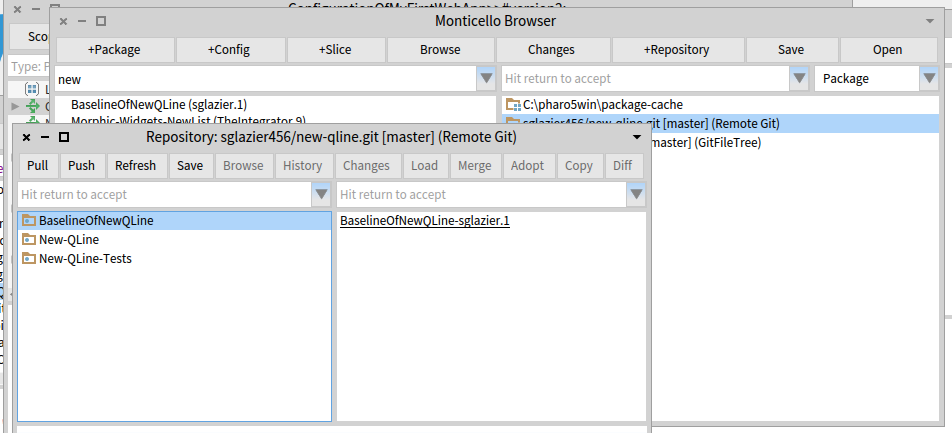
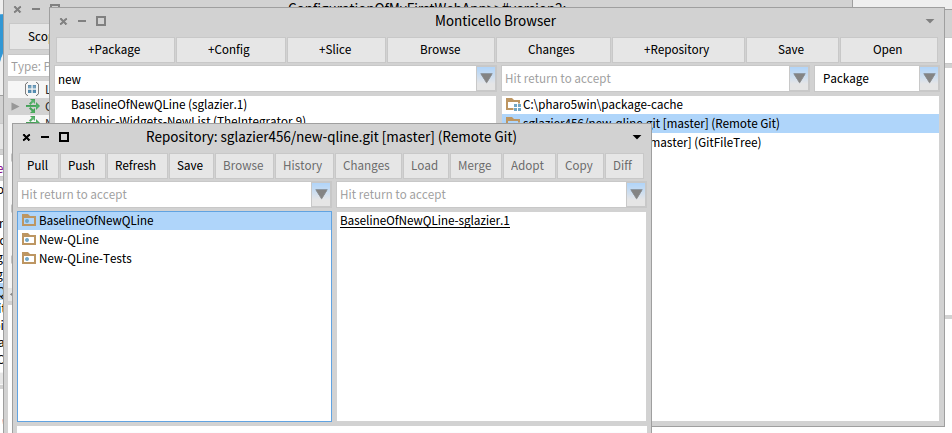
Yes, I created in Bitbucket a repository named New-QLine. I created aBaselinOfNewQLine which just has stubs. I created 2 Packages. New-Qline and New-Qline-Tests each of these have 3 tags underneath and no classes defined since I wanted to ensure I would have no loading issue and so I can verify committing code and then doing a push and then I also wanted to verify doing a Pull. The picture below is clipped from my pharo5 image. In the window Respository:sglazier456/new-qline.git [master] (Remote Git) shown below. The code at this point has been committed successfully and now I want to Push it to the repository. Once I hit the Push button the image freezes. I can press the x button on the main Pharo 5 window and I get the dialog do you want to quit with out saving. I am assuming that the push is using a git command. I am not familiar with the Pharo 5 keyboard shortcuts. I tried control b along with some others in hopes of interrupting this process and bringing the image back and being able to debug. However, I was unsuccessful in that. I was thinking that I might need to supply a setting so the ssh session can use the privateKey I generated and then I can be verified and the command continues. I am not sure what is going on yet. I thought I would ask to see if it is something simple I am missing. If you need to I can email you my privateKey so you can try it against the same repository I am using. git@bitbucket.org:sglazier456/new-qline.git Partial sceen shot showing the repository window is below. [image: Inline image 1] Thank you for your help and if you can point me to where I need to added a break point I can provide more information :-) Kind Regards, Sean Glazier On Mon, Jul 25, 2016 at 12:37 AM, Dale Henrichs < dale.henrichs@gemtalksystems.com> wrote:
I'd be interested in making this work ... could you supply additional details about the problems you are seeing perhaps we can fix the problems?
Dale
On 7/24/16 6:42 PM, Sean P. DeNigris wrote:
Dale Henrichs-3 wrote
Yes, Metacello supports bitbucket:// repos...
N.B. IIRC I wasn't able to use it for my private projects because it doesn't work with private repos accessed via SSH
----- Cheers, Sean -- View this message in context: http://forum.world.st/Can-GitHubcello-be-used-against-BitBucket-tp4907386p49... Sent from the Pharo Smalltalk Users mailing list archive at Nabble.com.
some more information the git command that it runs is git -C "C:\pharo5win\new-qline" This is run in the method MCFileTreeGitRemoteRepository>>runProcessWrapperGitCommand: anArrayOfStrings in: aDirectory. It is stuck on the line: command waitForExit. this wait for exit has no timeout to it and you wait forever. I found out on windows the user interrupt is alt . Just like the Mac ;-) I have no error in the error stream at all.
From the source tree tool the command should look more like this: git -c diff.mnemonicprefix=false -c core.quotepath=false push -v --tags origin master:master
and then followed by the -C "C:\pharo5win\new-qline" git -C "C:\pharo5win\new-qline" -c diff.mnemonicprefix=false -c core.quotepath=false push -v --tags origin master:master However doing this from a command line it asks for the users password like thus C:\pharo5win\New-Qline>git -C "C:\pharo5win\new-qline" -c diff.mnemonicprefix=false -c core.quotepath=false push -v --tags origin master:master Pushing to https://sglazier456@bitbucket.org/sglazier456/new-qline.git Password for 'https://sglazier456@bitbucket.org': to avoid the password prompt you can do this git -C "C:\pharo5win\new-qline" -c diff.mnemonicprefix=false -c core.quotepath=false push https://username:password@myrepository.biz/file.git -v --tags origin master:master you can also replace -v --tags origin master:master with --all as well in my case it would look like git -C "C:\pharo5win\new-qline" -c diff.mnemonicprefix=false -c core.quotepath=false push https://sglazier456:MY_PASSWORD@bitbucket.org/sglazier456/new-qline.git -v --tags origin master:master OR git -C "C:\pharo5win\new-qline" -c diff.mnemonicprefix=false -c core.quotepath=false push https://sglazier456:MY_PASSWORD@bitbucket.org/sglazier456/new-qline.git -all and that works with out the system waiting for a password. I notice that there is a class that has the username password for bit bucket in the method MCGitBasedNetworkRepository >> siteUsername: username sitePassword: pass "MCBitbucketRepository siteUsername: '' sitePassword: ''" "MCGitHubRepository siteUsername: '' sitePassword: ''" self siteUsername: username; sitePassword: pass I tried setting it up with the username and password in the url for the remote repository and no luck. the class MCFileTreeGitRemoteRepository should override the getPull and gitPush so as to include the url with the site name and password or there might be a need for a different creation class for the bitbucket remote repositories. However it is a standrad git command to be able to include the username password in the url. when one does a pull as well there is a hang as well for the same reasons. I am not attempting to hack this at the moment because I can use source tree to do the commits and pushes and pulls. I do think though since we have those commands available on the remote repos and people can mark it private requiring a username password. Also we should consider a repository configuration that specifys the SSH kaey and then run the command in the context of SSH. this would eliminate the username password issue and it is much more secure. SO since you are more experienced than I in this area of the code, I should ask how should we go about fixing the issue. Also were should I report this issue as well? running the command from a cmd line produced the following: C:\pharo5win\New-Qline>git -C "C:\pharo5win\new-qline" usage: git [--version] [--help] [-C <path>] [-c name=value] [--exec-path[=<path>]] [--html-path] [--man-path] [--info-path] [-p|--paginate|--no-pager] [--no-replace-objects] [--bare] [--git-dir=<path>] [--work-tree=<path>] [--namespace=<name>] <command> [<args>] The most commonly used git commands are: add Add file contents to the index bisect Find by binary search the change that introduced a bug branch List, create, or delete branches checkout Checkout a branch or paths to the working tree clone Clone a repository into a new directory commit Record changes to the repository diff Show changes between commits, commit and working tree, etc fetch Download objects and refs from another repository grep Print lines matching a pattern init Create an empty Git repository or reinitialize an existing one log Show commit logs merge Join two or more development histories together mv Move or rename a file, a directory, or a symlink pull Fetch from and integrate with another repository or a local branch push Update remote refs along with associated objects rebase Forward-port local commits to the updated upstream head reset Reset current HEAD to the specified state rm Remove files from the working tree and from the index show Show various types of objects status Show the working tree status tag Create, list, delete or verify a tag object signed with GPG 'git help -a' and 'git help -g' lists available subcommands and some concept guides. See 'git help <command>' or 'git help <concept>' to read about a specific subcommand or concept. C:\pharo5win\New-Qline> So according to the help the command it self is formulated incorrectly. runProcessWrapperGitCommand: anArrayOfStrings in: aDirectory "Enclose all parameters with double quotes to protect." | r aCommandString | aCommandString := String streamContents: [ :stream | anArrayOfStrings do: [ :e | stream nextPut: $"; nextPutAll: e; nextPutAll: '" ' ] ]. (Smalltalk at: #ProcessWrapper ifAbsent: [ self error: 'Please load ProcessWrapper' ]) ifNotNil: [ :pW | | command | command := pW new useStdout; useStderr; startWithCommand: self gitCommand , ' -C "' , (MCFileTreeFileUtils current directoryPathString: aDirectory) , '" ' , aCommandString; yourself. command waitForExit. self assert: command isRunning not. r := command upToEnd. command exitCode > 0 ifTrue: [ | errorString | errorString := command errorUpToEnd. errorString notEmpty ifTrue: [ MCFileTreeGitError new signal: 'Git error: ' , errorString ]. r := '' ] ]. ^ r Kind Regards, Sean Glazier On Mon, Jul 25, 2016 at 1:01 AM, Sean Glazier <sglazier456@gmail.com> wrote:
Yes,
I created in Bitbucket a repository named New-QLine. I created aBaselinOfNewQLine which just has stubs. I created 2 Packages. New-Qline and New-Qline-Tests each of these have 3 tags underneath and no classes defined since I wanted to ensure I would have no loading issue and so I can verify committing code and then doing a push and then I also wanted to verify doing a Pull. The picture below is clipped from my pharo5 image.
In the window Respository:sglazier456/new-qline.git [master] (Remote Git) shown below. The code at this point has been committed successfully and now I want to Push it to the repository. Once I hit the Push button the image freezes. I can press the x button on the main Pharo 5 window and I get the dialog do you want to quit with out saving.
I am assuming that the push is using a git command. I am not familiar with the Pharo 5 keyboard shortcuts. I tried control b along with some others in hopes of interrupting this process and bringing the image back and being able to debug. However, I was unsuccessful in that. I was thinking that I might need to supply a setting so the ssh session can use the privateKey I generated and then I can be verified and the command continues.
I am not sure what is going on yet. I thought I would ask to see if it is something simple I am missing.
If you need to I can email you my privateKey so you can try it against the same repository I am using. git@bitbucket.org:sglazier456/new-qline.git
Partial sceen shot showing the repository window is below.
[image: Inline image 1]
Thank you for your help and if you can point me to where I need to added a break point I can provide more information :-)
Kind Regards,
Sean Glazier
On Mon, Jul 25, 2016 at 12:37 AM, Dale Henrichs < dale.henrichs@gemtalksystems.com> wrote:
I'd be interested in making this work ... could you supply additional details about the problems you are seeing perhaps we can fix the problems?
Dale
On 7/24/16 6:42 PM, Sean P. DeNigris wrote:
Dale Henrichs-3 wrote
Yes, Metacello supports bitbucket:// repos...
N.B. IIRC I wasn't able to use it for my private projects because it doesn't work with private repos accessed via SSH
----- Cheers, Sean -- View this message in context: http://forum.world.st/Can-GitHubcello-be-used-against-BitBucket-tp4907386p49... Sent from the Pharo Smalltalk Users mailing list archive at Nabble.com.

Hi Sean, I think the issue is simply that GitFileTree does not support https with authentification. You need to switch to ssh with keys. Now, about the various options you add on the git push command line (diff.mnemonicprefix, core.quotepath), could you detail them? The seems to be unnecessary in the git development scenarios I've seen so far. Also note that master:master may be wrong, because you could be switching to another branch. I expect all those issues to be taken care of through the new tools in development for Pharo6. Regards, Thierry 2016-07-25 10:04 GMT+02:00 Sean Glazier <sglazier456@gmail.com>:
some more information the git command that it runs is git -C "C:\pharo5win\new-qline" This is run in the method MCFileTreeGitRemoteRepository>>runProcessWrapperGitCommand: anArrayOfStrings in: aDirectory.
It is stuck on the line: command waitForExit.
this wait for exit has no timeout to it and you wait forever. I found out on windows the user interrupt is alt . Just like the Mac ;-)
I have no error in the error stream at all.
From the source tree tool the command should look more like this: git -c diff.mnemonicprefix=false -c core.quotepath=false push -v --tags origin master:master
and then followed by the -C "C:\pharo5win\new-qline"
git -C "C:\pharo5win\new-qline" -c diff.mnemonicprefix=false -c core.quotepath=false push -v --tags origin master:master
However doing this from a command line it asks for the users password like thus C:\pharo5win\New-Qline>git -C "C:\pharo5win\new-qline" -c diff.mnemonicprefix=false -c core.quotepath=false push -v --tags origin master:master Pushing to https://sglazier456@bitbucket.org/sglazier456/new-qline.git Password for 'https://sglazier456@bitbucket.org':
to avoid the password prompt you can do this
git -C "C:\pharo5win\new-qline" -c diff.mnemonicprefix=false -c core.quotepath=false push https://username:password@myrepository.biz/file.git -v --tags origin master:master
you can also replace -v --tags origin master:master with --all as well
in my case it would look like
git -C "C:\pharo5win\new-qline" -c diff.mnemonicprefix=false -c core.quotepath=false push https://sglazier456:MY_PASSWORD@bitbucket.org/sglazier456/new-qline.git -v --tags origin master:master
OR git -C "C:\pharo5win\new-qline" -c diff.mnemonicprefix=false -c core.quotepath=false push https://sglazier456:MY_PASSWORD@bitbucket.org/sglazier456/new-qline.git -all
and that works with out the system waiting for a password.
I notice that there is a class that has the username password for bit bucket in the method MCGitBasedNetworkRepository >> siteUsername: username sitePassword: pass "MCBitbucketRepository siteUsername: '' sitePassword: ''" "MCGitHubRepository siteUsername: '' sitePassword: ''" self siteUsername: username; sitePassword: pass
I tried setting it up with the username and password in the url for the remote repository and no luck. the class MCFileTreeGitRemoteRepository should override the getPull and gitPush so as to include the url with the site name and password or there might be a need for a different creation class for the bitbucket remote repositories. However it is a standrad git command to be able to include the username password in the url.
when one does a pull as well there is a hang as well for the same reasons.
I am not attempting to hack this at the moment because I can use source tree to do the commits and pushes and pulls. I do think though since we have those commands available on the remote repos and people can mark it private requiring a username password.
Also we should consider a repository configuration that specifys the SSH kaey and then run the command in the context of SSH. this would eliminate the username password issue and it is much more secure.
SO since you are more experienced than I in this area of the code, I should ask how should we go about fixing the issue. Also were should I report this issue as well?
running the command from a cmd line produced the following: C:\pharo5win\New-Qline>git -C "C:\pharo5win\new-qline" usage: git [--version] [--help] [-C <path>] [-c name=value] [--exec-path[=<path>]] [--html-path] [--man-path] [--info-path] [-p|--paginate|--no-pager] [--no-replace-objects] [--bare] [--git-dir=<path>] [--work-tree=<path>] [--namespace=<name>] <command> [<args>]
The most commonly used git commands are: add Add file contents to the index bisect Find by binary search the change that introduced a bug branch List, create, or delete branches checkout Checkout a branch or paths to the working tree clone Clone a repository into a new directory commit Record changes to the repository diff Show changes between commits, commit and working tree, etc fetch Download objects and refs from another repository grep Print lines matching a pattern init Create an empty Git repository or reinitialize an existing one log Show commit logs merge Join two or more development histories together mv Move or rename a file, a directory, or a symlink pull Fetch from and integrate with another repository or a local branch push Update remote refs along with associated objects rebase Forward-port local commits to the updated upstream head reset Reset current HEAD to the specified state rm Remove files from the working tree and from the index show Show various types of objects status Show the working tree status tag Create, list, delete or verify a tag object signed with GPG
'git help -a' and 'git help -g' lists available subcommands and some concept guides. See 'git help <command>' or 'git help <concept>' to read about a specific subcommand or concept.
C:\pharo5win\New-Qline>
So according to the help the command it self is formulated incorrectly.
runProcessWrapperGitCommand: anArrayOfStrings in: aDirectory "Enclose all parameters with double quotes to protect."
| r aCommandString | aCommandString := String streamContents: [ :stream | anArrayOfStrings do: [ :e | stream nextPut: $"; nextPutAll: e; nextPutAll: '" ' ] ]. (Smalltalk at: #ProcessWrapper ifAbsent: [ self error: 'Please load ProcessWrapper' ]) ifNotNil: [ :pW | | command | command := pW new useStdout; useStderr; startWithCommand: self gitCommand , ' -C "' , (MCFileTreeFileUtils current directoryPathString: aDirectory) , '" ' , aCommandString; yourself. command waitForExit. self assert: command isRunning not. r := command upToEnd. command exitCode > 0 ifTrue: [ | errorString | errorString := command errorUpToEnd. errorString notEmpty ifTrue: [ MCFileTreeGitError new signal: 'Git error: ' , errorString ]. r := '' ] ]. ^ r
Kind Regards,
Sean Glazier
On Mon, Jul 25, 2016 at 1:01 AM, Sean Glazier <sglazier456@gmail.com> wrote:
Yes,
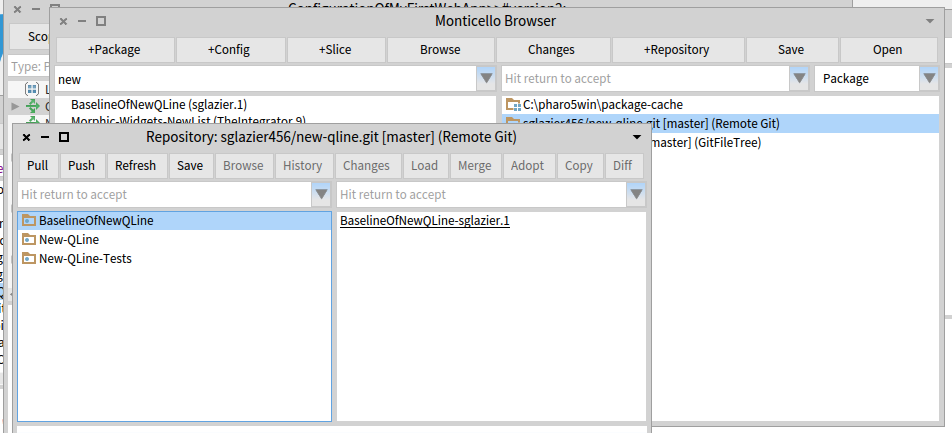
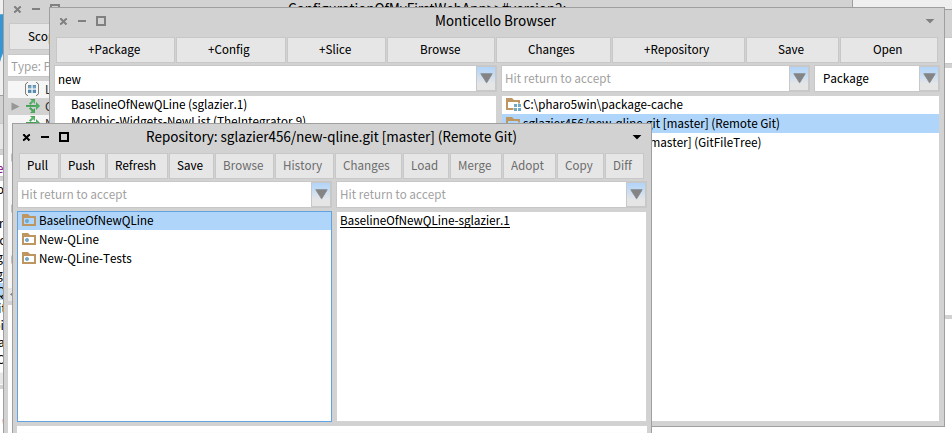
I created in Bitbucket a repository named New-QLine. I created aBaselinOfNewQLine which just has stubs. I created 2 Packages. New-Qline and New-Qline-Tests each of these have 3 tags underneath and no classes defined since I wanted to ensure I would have no loading issue and so I can verify committing code and then doing a push and then I also wanted to verify doing a Pull. The picture below is clipped from my pharo5 image.
In the window Respository:sglazier456/new-qline.git [master] (Remote Git) shown below. The code at this point has been committed successfully and now I want to Push it to the repository. Once I hit the Push button the image freezes. I can press the x button on the main Pharo 5 window and I get the dialog do you want to quit with out saving.
I am assuming that the push is using a git command. I am not familiar with the Pharo 5 keyboard shortcuts. I tried control b along with some others in hopes of interrupting this process and bringing the image back and being able to debug. However, I was unsuccessful in that. I was thinking that I might need to supply a setting so the ssh session can use the privateKey I generated and then I can be verified and the command continues.
I am not sure what is going on yet. I thought I would ask to see if it is something simple I am missing.
If you need to I can email you my privateKey so you can try it against the same repository I am using. git@bitbucket.org:sglazier456/new-qline.git
Partial sceen shot showing the repository window is below.
[image: Inline image 1]
Thank you for your help and if you can point me to where I need to added a break point I can provide more information :-)
Kind Regards,
Sean Glazier
On Mon, Jul 25, 2016 at 12:37 AM, Dale Henrichs < dale.henrichs@gemtalksystems.com> wrote:
I'd be interested in making this work ... could you supply additional details about the problems you are seeing perhaps we can fix the problems?
Dale
On 7/24/16 6:42 PM, Sean P. DeNigris wrote:
Dale Henrichs-3 wrote
Yes, Metacello supports bitbucket:// repos...
N.B. IIRC I wasn't able to use it for my private projects because it doesn't work with private repos accessed via SSH
----- Cheers, Sean -- View this message in context: http://forum.world.st/Can-GitHubcello-be-used-against-BitBucket-tp4907386p49... Sent from the Pharo Smalltalk Users mailing list archive at Nabble.com.
yes I was using the command generated by the source tree tool. The code generates a command line command and that can use https if you form the commands as I detailed. I also indicated where the master:master and related switches can be replaced with what most people use which is just --all. the class forming the command can be extended to parse out the username password from the url you set it up with provided you include it or it could be extra parameters provided and stored. This is so that when the push and pull commands put together the url can be formed and placed on the command line as well. GITI will take care of using https etc. it just needs the url with the username password on it so that the command line does not ask for a password and hangs the image because Pharo is waiting for a response and the command line is waiting for the password to be inputted and you have a deadlock as I detailed in the method. The command line git command that worked for me was: git -C "C:\pharo5win\new-qline" -c diff.mnemonicprefix=false -c core.quotepath=false push https://sglazier456:MY_PASSWORD@bitbucket.org/sglazier456/new-qline.git --all I am sure some of the other options are not really needed. As I indicated I used what source tree built as its command that it executed. So with a git repository that needs a username password you can form the git push and pull commands as indicated. to use ssh I did not see how that could be done from the command line on windows unless to were able to tell git to use ssh or the putty running on windows. Linux of course, is probably more straightforward to get working. Right now the current version of the git remote repository is broken because it is using either old commands or an incorrect command. The push was sent to the command line as follows: git -C "C:\pharo5win\new-qline" This as far as I know is not a proper push command because it needs the push keyword followed by at least I think by the --all . I tried it from the windows command line and it worked for a repository that was not password protected. If it is, the command line will ask for the password and will not time out which deadlocks the push since pharo is waiting for the command to finish, which it cannot. So the image is locked until you give it a user interrupt to get the debugger. I hope this helps in understanding what I ran into... Kind Regards, Sean Glazier On Mon, Jul 25, 2016 at 7:20 AM, Thierry Goubier <thierry.goubier@gmail.com> wrote:
Hi Sean,
I think the issue is simply that GitFileTree does not support https with authentification. You need to switch to ssh with keys.
Now, about the various options you add on the git push command line (diff.mnemonicprefix, core.quotepath), could you detail them? The seems to be unnecessary in the git development scenarios I've seen so far.
Also note that master:master may be wrong, because you could be switching to another branch.
I expect all those issues to be taken care of through the new tools in development for Pharo6.
Regards,
Thierry
2016-07-25 10:04 GMT+02:00 Sean Glazier <sglazier456@gmail.com>:
some more information the git command that it runs is git -C "C:\pharo5win\new-qline" This is run in the method MCFileTreeGitRemoteRepository>>runProcessWrapperGitCommand: anArrayOfStrings in: aDirectory.
It is stuck on the line: command waitForExit.
this wait for exit has no timeout to it and you wait forever. I found out on windows the user interrupt is alt . Just like the Mac ;-)
I have no error in the error stream at all.
From the source tree tool the command should look more like this: git -c diff.mnemonicprefix=false -c core.quotepath=false push -v --tags origin master:master
and then followed by the -C "C:\pharo5win\new-qline"
git -C "C:\pharo5win\new-qline" -c diff.mnemonicprefix=false -c core.quotepath=false push -v --tags origin master:master
However doing this from a command line it asks for the users password like thus C:\pharo5win\New-Qline>git -C "C:\pharo5win\new-qline" -c diff.mnemonicprefix=false -c core.quotepath=false push -v --tags origin master:master Pushing to https://sglazier456@bitbucket.org/sglazier456/new-qline.git Password for 'https://sglazier456@bitbucket.org':
to avoid the password prompt you can do this
git -C "C:\pharo5win\new-qline" -c diff.mnemonicprefix=false -c core.quotepath=false push https://username:password@myrepository.biz/file.git -v --tags origin master:master
you can also replace -v --tags origin master:master with --all as well
in my case it would look like
git -C "C:\pharo5win\new-qline" -c diff.mnemonicprefix=false -c core.quotepath=false push https://sglazier456:MY_PASSWORD@bitbucket.org/sglazier456/new-qline.git -v --tags origin master:master
OR git -C "C:\pharo5win\new-qline" -c diff.mnemonicprefix=false -c core.quotepath=false push https://sglazier456:MY_PASSWORD@bitbucket.org/sglazier456/new-qline.git -all
and that works with out the system waiting for a password.
I notice that there is a class that has the username password for bit bucket in the method MCGitBasedNetworkRepository >> siteUsername: username sitePassword: pass "MCBitbucketRepository siteUsername: '' sitePassword: ''" "MCGitHubRepository siteUsername: '' sitePassword: ''" self siteUsername: username; sitePassword: pass
I tried setting it up with the username and password in the url for the remote repository and no luck. the class MCFileTreeGitRemoteRepository should override the getPull and gitPush so as to include the url with the site name and password or there might be a need for a different creation class for the bitbucket remote repositories. However it is a standrad git command to be able to include the username password in the url.
when one does a pull as well there is a hang as well for the same reasons.
I am not attempting to hack this at the moment because I can use source tree to do the commits and pushes and pulls. I do think though since we have those commands available on the remote repos and people can mark it private requiring a username password.
Also we should consider a repository configuration that specifys the SSH kaey and then run the command in the context of SSH. this would eliminate the username password issue and it is much more secure.
SO since you are more experienced than I in this area of the code, I should ask how should we go about fixing the issue. Also were should I report this issue as well?
running the command from a cmd line produced the following: C:\pharo5win\New-Qline>git -C "C:\pharo5win\new-qline" usage: git [--version] [--help] [-C <path>] [-c name=value] [--exec-path[=<path>]] [--html-path] [--man-path] [--info-path] [-p|--paginate|--no-pager] [--no-replace-objects] [--bare] [--git-dir=<path>] [--work-tree=<path>] [--namespace=<name>] <command> [<args>]
The most commonly used git commands are: add Add file contents to the index bisect Find by binary search the change that introduced a bug branch List, create, or delete branches checkout Checkout a branch or paths to the working tree clone Clone a repository into a new directory commit Record changes to the repository diff Show changes between commits, commit and working tree, etc fetch Download objects and refs from another repository grep Print lines matching a pattern init Create an empty Git repository or reinitialize an existing one log Show commit logs merge Join two or more development histories together mv Move or rename a file, a directory, or a symlink pull Fetch from and integrate with another repository or a local branch push Update remote refs along with associated objects rebase Forward-port local commits to the updated upstream head reset Reset current HEAD to the specified state rm Remove files from the working tree and from the index show Show various types of objects status Show the working tree status tag Create, list, delete or verify a tag object signed with GPG
'git help -a' and 'git help -g' lists available subcommands and some concept guides. See 'git help <command>' or 'git help <concept>' to read about a specific subcommand or concept.
C:\pharo5win\New-Qline>
So according to the help the command it self is formulated incorrectly.
runProcessWrapperGitCommand: anArrayOfStrings in: aDirectory "Enclose all parameters with double quotes to protect."
| r aCommandString | aCommandString := String streamContents: [ :stream | anArrayOfStrings do: [ :e | stream nextPut: $"; nextPutAll: e; nextPutAll: '" ' ] ]. (Smalltalk at: #ProcessWrapper ifAbsent: [ self error: 'Please load ProcessWrapper' ]) ifNotNil: [ :pW | | command | command := pW new useStdout; useStderr; startWithCommand: self gitCommand , ' -C "' , (MCFileTreeFileUtils current directoryPathString: aDirectory) , '" ' , aCommandString; yourself. command waitForExit. self assert: command isRunning not. r := command upToEnd. command exitCode > 0 ifTrue: [ | errorString | errorString := command errorUpToEnd. errorString notEmpty ifTrue: [ MCFileTreeGitError new signal: 'Git error: ' , errorString ]. r := '' ] ]. ^ r
Kind Regards,
Sean Glazier
On Mon, Jul 25, 2016 at 1:01 AM, Sean Glazier <sglazier456@gmail.com> wrote:
Yes,
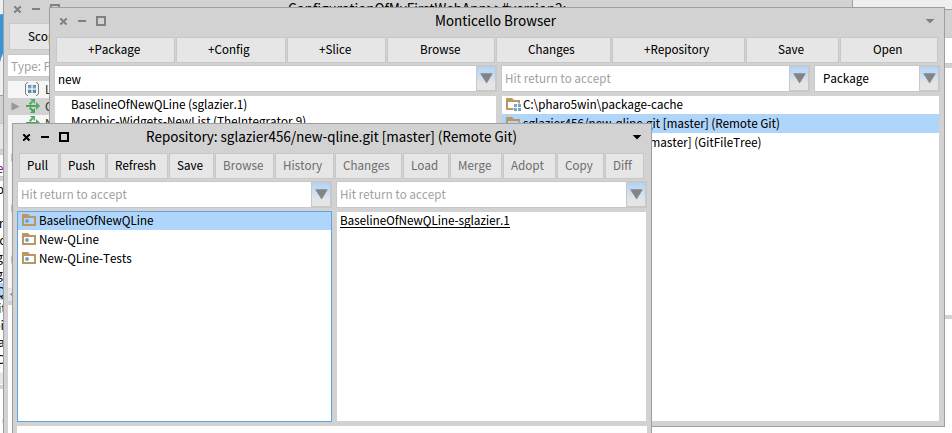
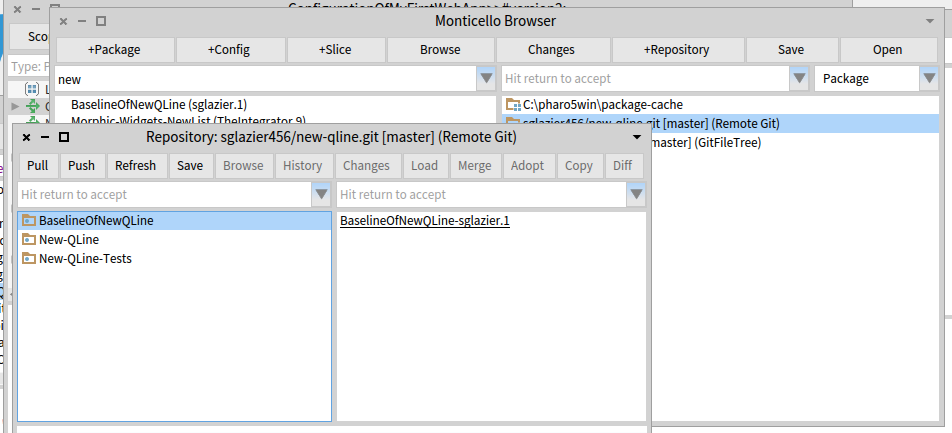
I created in Bitbucket a repository named New-QLine. I created aBaselinOfNewQLine which just has stubs. I created 2 Packages. New-Qline and New-Qline-Tests each of these have 3 tags underneath and no classes defined since I wanted to ensure I would have no loading issue and so I can verify committing code and then doing a push and then I also wanted to verify doing a Pull. The picture below is clipped from my pharo5 image.
In the window Respository:sglazier456/new-qline.git [master] (Remote Git) shown below. The code at this point has been committed successfully and now I want to Push it to the repository. Once I hit the Push button the image freezes. I can press the x button on the main Pharo 5 window and I get the dialog do you want to quit with out saving.
I am assuming that the push is using a git command. I am not familiar with the Pharo 5 keyboard shortcuts. I tried control b along with some others in hopes of interrupting this process and bringing the image back and being able to debug. However, I was unsuccessful in that. I was thinking that I might need to supply a setting so the ssh session can use the privateKey I generated and then I can be verified and the command continues.
I am not sure what is going on yet. I thought I would ask to see if it is something simple I am missing.
If you need to I can email you my privateKey so you can try it against the same repository I am using. git@bitbucket.org:sglazier456/new-qline.git
Partial sceen shot showing the repository window is below.
[image: Inline image 1]
Thank you for your help and if you can point me to where I need to added a break point I can provide more information :-)
Kind Regards,
Sean Glazier
On Mon, Jul 25, 2016 at 12:37 AM, Dale Henrichs < dale.henrichs@gemtalksystems.com> wrote:
I'd be interested in making this work ... could you supply additional details about the problems you are seeing perhaps we can fix the problems?
Dale
On 7/24/16 6:42 PM, Sean P. DeNigris wrote:
Dale Henrichs-3 wrote
Yes, Metacello supports bitbucket:// repos...
N.B. IIRC I wasn't able to use it for my private projects because it doesn't work with private repos accessed via SSH
----- Cheers, Sean -- View this message in context: http://forum.world.st/Can-GitHubcello-be-used-against-BitBucket-tp4907386p49... Sent from the Pharo Smalltalk Users mailing list archive at Nabble.com.
2016-07-25 14:49 GMT+02:00 Sean Glazier <sglazier456@gmail.com>:
yes I was using the command generated by the source tree tool. The code generates a command line command and that can use https if you form the commands as I detailed. I also indicated where the master:master and related switches can be replaced with what most people use which is just --all. the class forming the command can be extended to parse out the username password from the url you set it up with provided you include it or it could be extra parameters provided and stored. This is so that when the push and pull commands put together the url can be formed and placed on the command line as well. GITI will take care of using https etc. it just needs the url with the username password on it so that the command line does not ask for a password and hangs the image because Pharo is waiting for a response and the command line is waiting for the password to be inputted and you have a deadlock as I detailed in the method.
Yes, I understand that.
The command line git command that worked for me was: git -C "C:\pharo5win\new-qline" -c diff.mnemonicprefix=false -c core.quotepath=false push https://sglazier456:MY_PASSWORD@bitbucket.org/sglazier456/new-qline.git --all I am sure some of the other options are not really needed. As I indicated I used what source tree built as its command that it executed.
So with a git repository that needs a username password you can form the git push and pull commands as indicated.
to use ssh I did not see how that could be done from the command line on windows unless to were able to tell git to use ssh or the putty running on windows. Linux of course, is probably more straightforward to get working.
I know that there is a kind of special way to use ssh-agent in Windows, and get this to work. I did not implement the https username and password support, because I was a bit unsure of writing in clear the username and password, and I didn't want to handle the terminal interaction to inject username and password into the git command upon request.
Right now the current version of the git remote repository is broken because it is using either old commands or an incorrect command. The push was sent to the command line as follows:
git -C "C:\pharo5win\new-qline"
I'm sure there is a push in the command otherwise none of the git support would work; I use that code every day professionnally for as long as GitFileTree existed. The git command has been complete for the past few years, so it will stay this way unless harm is proven with the lack of certain options.
This as far as I know is not a proper push command because it needs the push keyword followed by at least I think by the --all . I tried it from the windows command line and it worked for a repository that was not password protected. If it is, the command line will ask for the password and will not time out which deadlocks the push since pharo is waiting for the command to finish, which it cannot. So the image is locked until you give it a user interrupt to get the debugger.
I hope this helps in understanding what I ran into...
Windows is a hard platform for me to test on; I'll fetch a past discussion on ssh-agent on windows and I may create a branch for you to test. On which version of Pharo are you? Regards, Thierry
Kind Regards,
Sean Glazier
On Mon, Jul 25, 2016 at 7:20 AM, Thierry Goubier < thierry.goubier@gmail.com> wrote:
Hi Sean,
I think the issue is simply that GitFileTree does not support https with authentification. You need to switch to ssh with keys.
Now, about the various options you add on the git push command line (diff.mnemonicprefix, core.quotepath), could you detail them? The seems to be unnecessary in the git development scenarios I've seen so far.
Also note that master:master may be wrong, because you could be switching to another branch.
I expect all those issues to be taken care of through the new tools in development for Pharo6.
Regards,
Thierry
2016-07-25 10:04 GMT+02:00 Sean Glazier <sglazier456@gmail.com>:
some more information the git command that it runs is git -C "C:\pharo5win\new-qline" This is run in the method MCFileTreeGitRemoteRepository>>runProcessWrapperGitCommand: anArrayOfStrings in: aDirectory.
It is stuck on the line: command waitForExit.
this wait for exit has no timeout to it and you wait forever. I found out on windows the user interrupt is alt . Just like the Mac ;-)
I have no error in the error stream at all.
From the source tree tool the command should look more like this: git -c diff.mnemonicprefix=false -c core.quotepath=false push -v --tags origin master:master
and then followed by the -C "C:\pharo5win\new-qline"
git -C "C:\pharo5win\new-qline" -c diff.mnemonicprefix=false -c core.quotepath=false push -v --tags origin master:master
However doing this from a command line it asks for the users password like thus C:\pharo5win\New-Qline>git -C "C:\pharo5win\new-qline" -c diff.mnemonicprefix=false -c core.quotepath=false push -v --tags origin master:master Pushing to https://sglazier456@bitbucket.org/sglazier456/new-qline.git Password for 'https://sglazier456@bitbucket.org':
to avoid the password prompt you can do this
git -C "C:\pharo5win\new-qline" -c diff.mnemonicprefix=false -c core.quotepath=false push https://username:password@myrepository.biz/file.git -v --tags origin master:master
you can also replace -v --tags origin master:master with --all as well
in my case it would look like
git -C "C:\pharo5win\new-qline" -c diff.mnemonicprefix=false -c core.quotepath=false push https://sglazier456:MY_PASSWORD@bitbucket.org/sglazier456/new-qline.git -v --tags origin master:master
OR git -C "C:\pharo5win\new-qline" -c diff.mnemonicprefix=false -c core.quotepath=false push https://sglazier456:MY_PASSWORD@bitbucket.org/sglazier456/new-qline.git -all
and that works with out the system waiting for a password.
I notice that there is a class that has the username password for bit bucket in the method MCGitBasedNetworkRepository >> siteUsername: username sitePassword: pass "MCBitbucketRepository siteUsername: '' sitePassword: ''" "MCGitHubRepository siteUsername: '' sitePassword: ''" self siteUsername: username; sitePassword: pass
I tried setting it up with the username and password in the url for the remote repository and no luck. the class MCFileTreeGitRemoteRepository should override the getPull and gitPush so as to include the url with the site name and password or there might be a need for a different creation class for the bitbucket remote repositories. However it is a standrad git command to be able to include the username password in the url.
when one does a pull as well there is a hang as well for the same reasons.
I am not attempting to hack this at the moment because I can use source tree to do the commits and pushes and pulls. I do think though since we have those commands available on the remote repos and people can mark it private requiring a username password.
Also we should consider a repository configuration that specifys the SSH kaey and then run the command in the context of SSH. this would eliminate the username password issue and it is much more secure.
SO since you are more experienced than I in this area of the code, I should ask how should we go about fixing the issue. Also were should I report this issue as well?
running the command from a cmd line produced the following: C:\pharo5win\New-Qline>git -C "C:\pharo5win\new-qline" usage: git [--version] [--help] [-C <path>] [-c name=value] [--exec-path[=<path>]] [--html-path] [--man-path] [--info-path] [-p|--paginate|--no-pager] [--no-replace-objects] [--bare] [--git-dir=<path>] [--work-tree=<path>] [--namespace=<name>] <command> [<args>]
The most commonly used git commands are: add Add file contents to the index bisect Find by binary search the change that introduced a bug branch List, create, or delete branches checkout Checkout a branch or paths to the working tree clone Clone a repository into a new directory commit Record changes to the repository diff Show changes between commits, commit and working tree, etc fetch Download objects and refs from another repository grep Print lines matching a pattern init Create an empty Git repository or reinitialize an existing one log Show commit logs merge Join two or more development histories together mv Move or rename a file, a directory, or a symlink pull Fetch from and integrate with another repository or a local branch push Update remote refs along with associated objects rebase Forward-port local commits to the updated upstream head reset Reset current HEAD to the specified state rm Remove files from the working tree and from the index show Show various types of objects status Show the working tree status tag Create, list, delete or verify a tag object signed with GPG
'git help -a' and 'git help -g' lists available subcommands and some concept guides. See 'git help <command>' or 'git help <concept>' to read about a specific subcommand or concept.
C:\pharo5win\New-Qline>
So according to the help the command it self is formulated incorrectly.
runProcessWrapperGitCommand: anArrayOfStrings in: aDirectory "Enclose all parameters with double quotes to protect."
| r aCommandString | aCommandString := String streamContents: [ :stream | anArrayOfStrings do: [ :e | stream nextPut: $"; nextPutAll: e; nextPutAll: '" ' ] ]. (Smalltalk at: #ProcessWrapper ifAbsent: [ self error: 'Please load ProcessWrapper' ]) ifNotNil: [ :pW | | command | command := pW new useStdout; useStderr; startWithCommand: self gitCommand , ' -C "' , (MCFileTreeFileUtils current directoryPathString: aDirectory) , '" ' , aCommandString; yourself. command waitForExit. self assert: command isRunning not. r := command upToEnd. command exitCode > 0 ifTrue: [ | errorString | errorString := command errorUpToEnd. errorString notEmpty ifTrue: [ MCFileTreeGitError new signal: 'Git error: ' , errorString ]. r := '' ] ]. ^ r
Kind Regards,
Sean Glazier
On Mon, Jul 25, 2016 at 1:01 AM, Sean Glazier <sglazier456@gmail.com> wrote:
Yes,
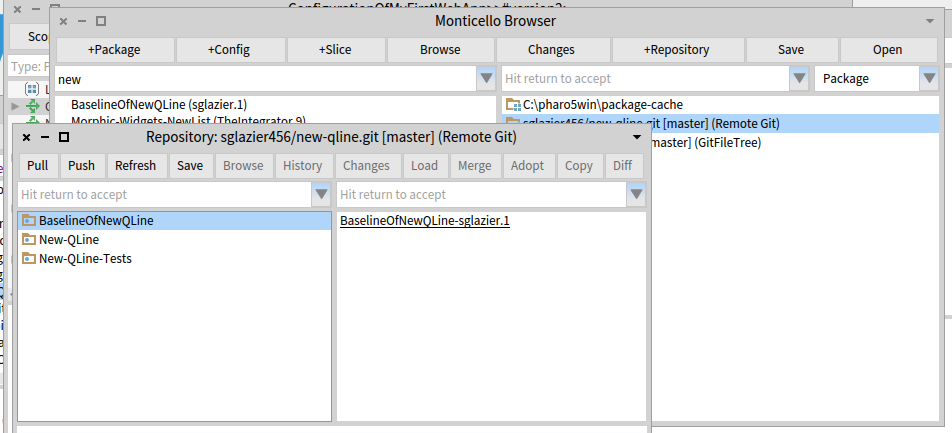
I created in Bitbucket a repository named New-QLine. I created aBaselinOfNewQLine which just has stubs. I created 2 Packages. New-Qline and New-Qline-Tests each of these have 3 tags underneath and no classes defined since I wanted to ensure I would have no loading issue and so I can verify committing code and then doing a push and then I also wanted to verify doing a Pull. The picture below is clipped from my pharo5 image.
In the window Respository:sglazier456/new-qline.git [master] (Remote Git) shown below. The code at this point has been committed successfully and now I want to Push it to the repository. Once I hit the Push button the image freezes. I can press the x button on the main Pharo 5 window and I get the dialog do you want to quit with out saving.
I am assuming that the push is using a git command. I am not familiar with the Pharo 5 keyboard shortcuts. I tried control b along with some others in hopes of interrupting this process and bringing the image back and being able to debug. However, I was unsuccessful in that. I was thinking that I might need to supply a setting so the ssh session can use the privateKey I generated and then I can be verified and the command continues.
I am not sure what is going on yet. I thought I would ask to see if it is something simple I am missing.
If you need to I can email you my privateKey so you can try it against the same repository I am using. git@bitbucket.org:sglazier456/new-qline.git
Partial sceen shot showing the repository window is below.
[image: Inline image 1]
Thank you for your help and if you can point me to where I need to added a break point I can provide more information :-)
Kind Regards,
Sean Glazier
On Mon, Jul 25, 2016 at 12:37 AM, Dale Henrichs < dale.henrichs@gemtalksystems.com> wrote:
I'd be interested in making this work ... could you supply additional details about the problems you are seeing perhaps we can fix the problems?
Dale
On 7/24/16 6:42 PM, Sean P. DeNigris wrote:
Dale Henrichs-3 wrote
Yes, Metacello supports bitbucket:// repos...
N.B. IIRC I wasn't able to use it for my private projects because it doesn't work with private repos accessed via SSH
----- Cheers, Sean -- View this message in context: http://forum.world.st/Can-GitHubcello-be-used-against-BitBucket-tp4907386p49... Sent from the Pharo Smalltalk Users mailing list archive at Nabble.com.
Hi, Thank you for all your help. Yes, windows is a pain. I am using Pharo 5. I would love to know how to get the ssh part working on Linux as well since the other team member is a Linux user and it is his first time using Smalltalk. I think he saw it in college but that was about it. I have shared the sort of things you can do in Smalltalk compared to other languages. However, The tool set can be a bit intimidating at times. There is a learning curve even for experienced small talkers coming from a different toolset. So when I set it up for myself I want to set his up as well. I think while it is insecure the https version is useful especially when tearing your hair out just trying to get source tree and bit bucket on speaking terms using ssh. I just spent the better part of a day and night trying to figure out why when both sides have the right key the server was still rejecting. It is windoze 10 of course. It should be a crime to sell that operating system! I have had more fun kicking cinder blocks with my feet. I mean that literally too, as I used to do that in the Okinawa Kempo classes. A broken toe is far more pleasant by comparison. By the time morning rolled around I was having fantasies of making Bill Gates condemned to rolling a boulder uphill only to have it to always fall down and he would have to repeat for eternity . :-) But I digress... If you could point me in the right direction it would help. Thank you in advance :-) Kind Regards, Sean Glazier On Mon, Jul 25, 2016 at 9:33 AM, Thierry Goubier <thierry.goubier@gmail.com> wrote:
2016-07-25 14:49 GMT+02:00 Sean Glazier <sglazier456@gmail.com>:
yes I was using the command generated by the source tree tool. The code generates a command line command and that can use https if you form the commands as I detailed. I also indicated where the master:master and related switches can be replaced with what most people use which is just --all. the class forming the command can be extended to parse out the username password from the url you set it up with provided you include it or it could be extra parameters provided and stored. This is so that when the push and pull commands put together the url can be formed and placed on the command line as well. GITI will take care of using https etc. it just needs the url with the username password on it so that the command line does not ask for a password and hangs the image because Pharo is waiting for a response and the command line is waiting for the password to be inputted and you have a deadlock as I detailed in the method.
Yes, I understand that.
The command line git command that worked for me was: git -C "C:\pharo5win\new-qline" -c diff.mnemonicprefix=false -c core.quotepath=false push https://sglazier456:MY_PASSWORD@bitbucket.org/sglazier456/new-qline.git --all I am sure some of the other options are not really needed. As I indicated I used what source tree built as its command that it executed.
So with a git repository that needs a username password you can form the git push and pull commands as indicated.
to use ssh I did not see how that could be done from the command line on windows unless to were able to tell git to use ssh or the putty running on windows. Linux of course, is probably more straightforward to get working.
I know that there is a kind of special way to use ssh-agent in Windows, and get this to work.
I did not implement the https username and password support, because I was a bit unsure of writing in clear the username and password, and I didn't want to handle the terminal interaction to inject username and password into the git command upon request.
Right now the current version of the git remote repository is broken because it is using either old commands or an incorrect command. The push was sent to the command line as follows:
git -C "C:\pharo5win\new-qline"
I'm sure there is a push in the command otherwise none of the git support would work; I use that code every day professionnally for as long as GitFileTree existed. The git command has been complete for the past few years, so it will stay this way unless harm is proven with the lack of certain options.
This as far as I know is not a proper push command because it needs the push keyword followed by at least I think by the --all . I tried it from the windows command line and it worked for a repository that was not password protected. If it is, the command line will ask for the password and will not time out which deadlocks the push since pharo is waiting for the command to finish, which it cannot. So the image is locked until you give it a user interrupt to get the debugger.
I hope this helps in understanding what I ran into...
Windows is a hard platform for me to test on; I'll fetch a past discussion on ssh-agent on windows and I may create a branch for you to test. On which version of Pharo are you?
Regards,
Thierry
Kind Regards,
Sean Glazier
On Mon, Jul 25, 2016 at 7:20 AM, Thierry Goubier < thierry.goubier@gmail.com> wrote:
Hi Sean,
I think the issue is simply that GitFileTree does not support https with authentification. You need to switch to ssh with keys.
Now, about the various options you add on the git push command line (diff.mnemonicprefix, core.quotepath), could you detail them? The seems to be unnecessary in the git development scenarios I've seen so far.
Also note that master:master may be wrong, because you could be switching to another branch.
I expect all those issues to be taken care of through the new tools in development for Pharo6.
Regards,
Thierry
2016-07-25 10:04 GMT+02:00 Sean Glazier <sglazier456@gmail.com>:
some more information the git command that it runs is git -C "C:\pharo5win\new-qline" This is run in the method MCFileTreeGitRemoteRepository>>runProcessWrapperGitCommand: anArrayOfStrings in: aDirectory.
It is stuck on the line: command waitForExit.
this wait for exit has no timeout to it and you wait forever. I found out on windows the user interrupt is alt . Just like the Mac ;-)
I have no error in the error stream at all.
From the source tree tool the command should look more like this: git -c diff.mnemonicprefix=false -c core.quotepath=false push -v --tags origin master:master
and then followed by the -C "C:\pharo5win\new-qline"
git -C "C:\pharo5win\new-qline" -c diff.mnemonicprefix=false -c core.quotepath=false push -v --tags origin master:master
However doing this from a command line it asks for the users password like thus C:\pharo5win\New-Qline>git -C "C:\pharo5win\new-qline" -c diff.mnemonicprefix=false -c core.quotepath=false push -v --tags origin master:master Pushing to https://sglazier456@bitbucket.org/sglazier456/new-qline.git Password for 'https://sglazier456@bitbucket.org':
to avoid the password prompt you can do this
git -C "C:\pharo5win\new-qline" -c diff.mnemonicprefix=false -c core.quotepath=false push https://username:password@myrepository.biz/file.git -v --tags origin master:master
you can also replace -v --tags origin master:master with --all as well
in my case it would look like
git -C "C:\pharo5win\new-qline" -c diff.mnemonicprefix=false -c core.quotepath=false push https://sglazier456:MY_PASSWORD@bitbucket.org/sglazier456/new-qline.git -v --tags origin master:master
OR git -C "C:\pharo5win\new-qline" -c diff.mnemonicprefix=false -c core.quotepath=false push https://sglazier456:MY_PASSWORD@bitbucket.org/sglazier456/new-qline.git -all
and that works with out the system waiting for a password.
I notice that there is a class that has the username password for bit bucket in the method MCGitBasedNetworkRepository >> siteUsername: username sitePassword: pass "MCBitbucketRepository siteUsername: '' sitePassword: ''" "MCGitHubRepository siteUsername: '' sitePassword: ''" self siteUsername: username; sitePassword: pass
I tried setting it up with the username and password in the url for the remote repository and no luck. the class MCFileTreeGitRemoteRepository should override the getPull and gitPush so as to include the url with the site name and password or there might be a need for a different creation class for the bitbucket remote repositories. However it is a standrad git command to be able to include the username password in the url.
when one does a pull as well there is a hang as well for the same reasons.
I am not attempting to hack this at the moment because I can use source tree to do the commits and pushes and pulls. I do think though since we have those commands available on the remote repos and people can mark it private requiring a username password.
Also we should consider a repository configuration that specifys the SSH kaey and then run the command in the context of SSH. this would eliminate the username password issue and it is much more secure.
SO since you are more experienced than I in this area of the code, I should ask how should we go about fixing the issue. Also were should I report this issue as well?
running the command from a cmd line produced the following: C:\pharo5win\New-Qline>git -C "C:\pharo5win\new-qline" usage: git [--version] [--help] [-C <path>] [-c name=value] [--exec-path[=<path>]] [--html-path] [--man-path] [--info-path] [-p|--paginate|--no-pager] [--no-replace-objects] [--bare] [--git-dir=<path>] [--work-tree=<path>] [--namespace=<name>] <command> [<args>]
The most commonly used git commands are: add Add file contents to the index bisect Find by binary search the change that introduced a bug branch List, create, or delete branches checkout Checkout a branch or paths to the working tree clone Clone a repository into a new directory commit Record changes to the repository diff Show changes between commits, commit and working tree, etc fetch Download objects and refs from another repository grep Print lines matching a pattern init Create an empty Git repository or reinitialize an existing one log Show commit logs merge Join two or more development histories together mv Move or rename a file, a directory, or a symlink pull Fetch from and integrate with another repository or a local branch push Update remote refs along with associated objects rebase Forward-port local commits to the updated upstream head reset Reset current HEAD to the specified state rm Remove files from the working tree and from the index show Show various types of objects status Show the working tree status tag Create, list, delete or verify a tag object signed with GPG
'git help -a' and 'git help -g' lists available subcommands and some concept guides. See 'git help <command>' or 'git help <concept>' to read about a specific subcommand or concept.
C:\pharo5win\New-Qline>
So according to the help the command it self is formulated incorrectly.
runProcessWrapperGitCommand: anArrayOfStrings in: aDirectory "Enclose all parameters with double quotes to protect."
| r aCommandString | aCommandString := String streamContents: [ :stream | anArrayOfStrings do: [ :e | stream nextPut: $"; nextPutAll: e; nextPutAll: '" ' ] ]. (Smalltalk at: #ProcessWrapper ifAbsent: [ self error: 'Please load ProcessWrapper' ]) ifNotNil: [ :pW | | command | command := pW new useStdout; useStderr; startWithCommand: self gitCommand , ' -C "' , (MCFileTreeFileUtils current directoryPathString: aDirectory) , '" ' , aCommandString; yourself. command waitForExit. self assert: command isRunning not. r := command upToEnd. command exitCode > 0 ifTrue: [ | errorString | errorString := command errorUpToEnd. errorString notEmpty ifTrue: [ MCFileTreeGitError new signal: 'Git error: ' , errorString ]. r := '' ] ]. ^ r
Kind Regards,
Sean Glazier
On Mon, Jul 25, 2016 at 1:01 AM, Sean Glazier <sglazier456@gmail.com> wrote:
Yes,
I created in Bitbucket a repository named New-QLine. I created aBaselinOfNewQLine which just has stubs. I created 2 Packages. New-Qline and New-Qline-Tests each of these have 3 tags underneath and no classes defined since I wanted to ensure I would have no loading issue and so I can verify committing code and then doing a push and then I also wanted to verify doing a Pull. The picture below is clipped from my pharo5 image.
In the window Respository:sglazier456/new-qline.git [master] (Remote Git) shown below. The code at this point has been committed successfully and now I want to Push it to the repository. Once I hit the Push button the image freezes. I can press the x button on the main Pharo 5 window and I get the dialog do you want to quit with out saving.
I am assuming that the push is using a git command. I am not familiar with the Pharo 5 keyboard shortcuts. I tried control b along with some others in hopes of interrupting this process and bringing the image back and being able to debug. However, I was unsuccessful in that. I was thinking that I might need to supply a setting so the ssh session can use the privateKey I generated and then I can be verified and the command continues.
I am not sure what is going on yet. I thought I would ask to see if it is something simple I am missing.
If you need to I can email you my privateKey so you can try it against the same repository I am using. git@bitbucket.org:sglazier456/new-qline.git
Partial sceen shot showing the repository window is below.
[image: Inline image 1]
Thank you for your help and if you can point me to where I need to added a break point I can provide more information :-)
Kind Regards,
Sean Glazier
On Mon, Jul 25, 2016 at 12:37 AM, Dale Henrichs < dale.henrichs@gemtalksystems.com> wrote:
I'd be interested in making this work ... could you supply additional details about the problems you are seeing perhaps we can fix the problems?
Dale
On 7/24/16 6:42 PM, Sean P. DeNigris wrote:
Dale Henrichs-3 wrote
Yes, Metacello supports bitbucket:// repos...
N.B. IIRC I wasn't able to use it for my private projects because it doesn't work with private repos accessed via SSH
----- Cheers, Sean -- View this message in context: http://forum.world.st/Can-GitHubcello-be-used-against-BitBucket-tp4907386p49... Sent from the Pharo Smalltalk Users mailing list archive at Nabble.com.
2016-07-25 15:58 GMT+02:00 Sean Glazier <sglazier456@gmail.com>:
Hi,
Thank you for all your help. Yes, windows is a pain. I am using Pharo 5. I would love to know how to get the ssh part working on Linux as well since the other team member is a Linux user and it is his first time using Smalltalk. I think he saw it in college but that was about it. I have shared the sort of things you can do in Smalltalk compared to other languages. However, The tool set can be a bit intimidating at times. There is a learning curve even for experienced small talkers coming from a different toolset. So when I set it up for myself I want to set his up as well.
I understand. I did the VW to Pharo a while back (around 2010 I think). The linux setup is very simple, in fact. You generate a ssh key (with ssh-keygen), add the .pub part of the key into your profile on bitbucket, and git over ssh will work, including from Pharo. But, as you point out below, if setting up the ssh key in windows causes that much pain, then adding https support is necessary. I'll try to find the time tonight to do that and tell you how to try it. I do have already bitbucket repos to try that. Thierry
I think while it is insecure the https version is useful especially when tearing your hair out just trying to get source tree and bit bucket on speaking terms using ssh. I just spent the better part of a day and night trying to figure out why when both sides have the right key the server was still rejecting. It is windoze 10 of course. It should be a crime to sell that operating system! I have had more fun kicking cinder blocks with my feet. I mean that literally too, as I used to do that in the Okinawa Kempo classes. A broken toe is far more pleasant by comparison.
By the time morning rolled around I was having fantasies of making Bill Gates condemned to rolling a boulder uphill only to have it to always fall down and he would have to repeat for eternity . :-) But I digress...
If you could point me in the right direction it would help.
Thank you in advance :-)
Kind Regards,
Sean Glazier
On Mon, Jul 25, 2016 at 9:33 AM, Thierry Goubier < thierry.goubier@gmail.com> wrote:
2016-07-25 14:49 GMT+02:00 Sean Glazier <sglazier456@gmail.com>:
yes I was using the command generated by the source tree tool. The code generates a command line command and that can use https if you form the commands as I detailed. I also indicated where the master:master and related switches can be replaced with what most people use which is just --all. the class forming the command can be extended to parse out the username password from the url you set it up with provided you include it or it could be extra parameters provided and stored. This is so that when the push and pull commands put together the url can be formed and placed on the command line as well. GITI will take care of using https etc. it just needs the url with the username password on it so that the command line does not ask for a password and hangs the image because Pharo is waiting for a response and the command line is waiting for the password to be inputted and you have a deadlock as I detailed in the method.
Yes, I understand that.
The command line git command that worked for me was: git -C "C:\pharo5win\new-qline" -c diff.mnemonicprefix=false -c core.quotepath=false push https://sglazier456:MY_PASSWORD@bitbucket.org/sglazier456/new-qline.git --all I am sure some of the other options are not really needed. As I indicated I used what source tree built as its command that it executed.
So with a git repository that needs a username password you can form the git push and pull commands as indicated.
to use ssh I did not see how that could be done from the command line on windows unless to were able to tell git to use ssh or the putty running on windows. Linux of course, is probably more straightforward to get working.
I know that there is a kind of special way to use ssh-agent in Windows, and get this to work.
I did not implement the https username and password support, because I was a bit unsure of writing in clear the username and password, and I didn't want to handle the terminal interaction to inject username and password into the git command upon request.
Right now the current version of the git remote repository is broken because it is using either old commands or an incorrect command. The push was sent to the command line as follows:
git -C "C:\pharo5win\new-qline"
I'm sure there is a push in the command otherwise none of the git support would work; I use that code every day professionnally for as long as GitFileTree existed. The git command has been complete for the past few years, so it will stay this way unless harm is proven with the lack of certain options.
This as far as I know is not a proper push command because it needs the push keyword followed by at least I think by the --all . I tried it from the windows command line and it worked for a repository that was not password protected. If it is, the command line will ask for the password and will not time out which deadlocks the push since pharo is waiting for the command to finish, which it cannot. So the image is locked until you give it a user interrupt to get the debugger.
I hope this helps in understanding what I ran into...
Windows is a hard platform for me to test on; I'll fetch a past discussion on ssh-agent on windows and I may create a branch for you to test. On which version of Pharo are you?
Regards,
Thierry
Kind Regards,
Sean Glazier
On Mon, Jul 25, 2016 at 7:20 AM, Thierry Goubier < thierry.goubier@gmail.com> wrote:
Hi Sean,
I think the issue is simply that GitFileTree does not support https with authentification. You need to switch to ssh with keys.
Now, about the various options you add on the git push command line (diff.mnemonicprefix, core.quotepath), could you detail them? The seems to be unnecessary in the git development scenarios I've seen so far.
Also note that master:master may be wrong, because you could be switching to another branch.
I expect all those issues to be taken care of through the new tools in development for Pharo6.
Regards,
Thierry
2016-07-25 10:04 GMT+02:00 Sean Glazier <sglazier456@gmail.com>:
some more information the git command that it runs is git -C "C:\pharo5win\new-qline" This is run in the method MCFileTreeGitRemoteRepository>>runProcessWrapperGitCommand: anArrayOfStrings in: aDirectory.
It is stuck on the line: command waitForExit.
this wait for exit has no timeout to it and you wait forever. I found out on windows the user interrupt is alt . Just like the Mac ;-)
I have no error in the error stream at all.
From the source tree tool the command should look more like this: git -c diff.mnemonicprefix=false -c core.quotepath=false push -v --tags origin master:master
and then followed by the -C "C:\pharo5win\new-qline"
git -C "C:\pharo5win\new-qline" -c diff.mnemonicprefix=false -c core.quotepath=false push -v --tags origin master:master
However doing this from a command line it asks for the users password like thus C:\pharo5win\New-Qline>git -C "C:\pharo5win\new-qline" -c diff.mnemonicprefix=false -c core.quotepath=false push -v --tags origin master:master Pushing to https://sglazier456@bitbucket.org/sglazier456/new-qline.git Password for 'https://sglazier456@bitbucket.org':
to avoid the password prompt you can do this
git -C "C:\pharo5win\new-qline" -c diff.mnemonicprefix=false -c core.quotepath=false push https://username:password@myrepository.biz/file.git -v --tags origin master:master
you can also replace -v --tags origin master:master with --all as well
in my case it would look like
git -C "C:\pharo5win\new-qline" -c diff.mnemonicprefix=false -c core.quotepath=false push https://sglazier456:MY_PASSWORD@bitbucket.org/sglazier456/new-qline.git -v --tags origin master:master
OR git -C "C:\pharo5win\new-qline" -c diff.mnemonicprefix=false -c core.quotepath=false push https://sglazier456:MY_PASSWORD@bitbucket.org/sglazier456/new-qline.git -all
and that works with out the system waiting for a password.
I notice that there is a class that has the username password for bit bucket in the method MCGitBasedNetworkRepository >> siteUsername: username sitePassword: pass "MCBitbucketRepository siteUsername: '' sitePassword: ''" "MCGitHubRepository siteUsername: '' sitePassword: ''" self siteUsername: username; sitePassword: pass
I tried setting it up with the username and password in the url for the remote repository and no luck. the class MCFileTreeGitRemoteRepository should override the getPull and gitPush so as to include the url with the site name and password or there might be a need for a different creation class for the bitbucket remote repositories. However it is a standrad git command to be able to include the username password in the url.
when one does a pull as well there is a hang as well for the same reasons.
I am not attempting to hack this at the moment because I can use source tree to do the commits and pushes and pulls. I do think though since we have those commands available on the remote repos and people can mark it private requiring a username password.
Also we should consider a repository configuration that specifys the SSH kaey and then run the command in the context of SSH. this would eliminate the username password issue and it is much more secure.
SO since you are more experienced than I in this area of the code, I should ask how should we go about fixing the issue. Also were should I report this issue as well?
running the command from a cmd line produced the following: C:\pharo5win\New-Qline>git -C "C:\pharo5win\new-qline" usage: git [--version] [--help] [-C <path>] [-c name=value] [--exec-path[=<path>]] [--html-path] [--man-path] [--info-path] [-p|--paginate|--no-pager] [--no-replace-objects] [--bare] [--git-dir=<path>] [--work-tree=<path>] [--namespace=<name>] <command> [<args>]
The most commonly used git commands are: add Add file contents to the index bisect Find by binary search the change that introduced a bug branch List, create, or delete branches checkout Checkout a branch or paths to the working tree clone Clone a repository into a new directory commit Record changes to the repository diff Show changes between commits, commit and working tree, etc fetch Download objects and refs from another repository grep Print lines matching a pattern init Create an empty Git repository or reinitialize an existing one log Show commit logs merge Join two or more development histories together mv Move or rename a file, a directory, or a symlink pull Fetch from and integrate with another repository or a local branch push Update remote refs along with associated objects rebase Forward-port local commits to the updated upstream head reset Reset current HEAD to the specified state rm Remove files from the working tree and from the index show Show various types of objects status Show the working tree status tag Create, list, delete or verify a tag object signed with GPG
'git help -a' and 'git help -g' lists available subcommands and some concept guides. See 'git help <command>' or 'git help <concept>' to read about a specific subcommand or concept.
C:\pharo5win\New-Qline>
So according to the help the command it self is formulated incorrectly.
runProcessWrapperGitCommand: anArrayOfStrings in: aDirectory "Enclose all parameters with double quotes to protect."
| r aCommandString | aCommandString := String streamContents: [ :stream | anArrayOfStrings do: [ :e | stream nextPut: $"; nextPutAll: e; nextPutAll: '" ' ] ]. (Smalltalk at: #ProcessWrapper ifAbsent: [ self error: 'Please load ProcessWrapper' ]) ifNotNil: [ :pW | | command | command := pW new useStdout; useStderr; startWithCommand: self gitCommand , ' -C "' , (MCFileTreeFileUtils current directoryPathString: aDirectory) , '" ' , aCommandString; yourself. command waitForExit. self assert: command isRunning not. r := command upToEnd. command exitCode > 0 ifTrue: [ | errorString | errorString := command errorUpToEnd. errorString notEmpty ifTrue: [ MCFileTreeGitError new signal: 'Git error: ' , errorString ]. r := '' ] ]. ^ r
Kind Regards,
Sean Glazier
On Mon, Jul 25, 2016 at 1:01 AM, Sean Glazier <sglazier456@gmail.com> wrote:
Yes,
I created in Bitbucket a repository named New-QLine. I created aBaselinOfNewQLine which just has stubs. I created 2 Packages. New-Qline and New-Qline-Tests each of these have 3 tags underneath and no classes defined since I wanted to ensure I would have no loading issue and so I can verify committing code and then doing a push and then I also wanted to verify doing a Pull. The picture below is clipped from my pharo5 image.
In the window Respository:sglazier456/new-qline.git [master] (Remote Git) shown below. The code at this point has been committed successfully and now I want to Push it to the repository. Once I hit the Push button the image freezes. I can press the x button on the main Pharo 5 window and I get the dialog do you want to quit with out saving.
I am assuming that the push is using a git command. I am not familiar with the Pharo 5 keyboard shortcuts. I tried control b along with some others in hopes of interrupting this process and bringing the image back and being able to debug. However, I was unsuccessful in that. I was thinking that I might need to supply a setting so the ssh session can use the privateKey I generated and then I can be verified and the command continues.
I am not sure what is going on yet. I thought I would ask to see if it is something simple I am missing.
If you need to I can email you my privateKey so you can try it against the same repository I am using. git@bitbucket.org:sglazier456/new-qline.git
Partial sceen shot showing the repository window is below.
[image: Inline image 1]
Thank you for your help and if you can point me to where I need to added a break point I can provide more information :-)
Kind Regards,
Sean Glazier
On Mon, Jul 25, 2016 at 12:37 AM, Dale Henrichs < dale.henrichs@gemtalksystems.com> wrote:
I'd be interested in making this work ... could you supply additional details about the problems you are seeing perhaps we can fix the problems?
Dale
On 7/24/16 6:42 PM, Sean P. DeNigris wrote:
Dale Henrichs-3 wrote
Yes, Metacello supports bitbucket:// repos...
N.B. IIRC I wasn't able to use it for my private projects because it doesn't work with private repos accessed via SSH
----- Cheers, Sean -- View this message in context: http://forum.world.st/Can-GitHubcello-be-used-against-BitBucket-tp4907386p49... Sent from the Pharo Smalltalk Users mailing list archive at Nabble.com.

I think that the ssh agent configuration is very clearly explained in the github site itself: https://help.github.com/articles/generating-an-ssh-key/ At least for linux/mac it should work easily. I do not have experience in using it on windows. If you intend to use it in bitbucket, the ssh agent configuration should be the same, but you have to inform your ssh key to bitbucket... it shouldn't be a problem. On Mon, Jul 25, 2016 at 4:21 PM, Thierry Goubier <thierry.goubier@gmail.com> wrote:
2016-07-25 15:58 GMT+02:00 Sean Glazier <sglazier456@gmail.com>:
Hi,
Thank you for all your help. Yes, windows is a pain. I am using Pharo 5. I would love to know how to get the ssh part working on Linux as well since the other team member is a Linux user and it is his first time using Smalltalk. I think he saw it in college but that was about it. I have shared the sort of things you can do in Smalltalk compared to other languages. However, The tool set can be a bit intimidating at times. There is a learning curve even for experienced small talkers coming from a different toolset. So when I set it up for myself I want to set his up as well.
I understand. I did the VW to Pharo a while back (around 2010 I think).
The linux setup is very simple, in fact. You generate a ssh key (with ssh-keygen), add the .pub part of the key into your profile on bitbucket, and git over ssh will work, including from Pharo.
But, as you point out below, if setting up the ssh key in windows causes that much pain, then adding https support is necessary. I'll try to find the time tonight to do that and tell you how to try it. I do have already bitbucket repos to try that.
Thierry
I think while it is insecure the https version is useful especially when tearing your hair out just trying to get source tree and bit bucket on speaking terms using ssh. I just spent the better part of a day and night trying to figure out why when both sides have the right key the server was still rejecting. It is windoze 10 of course. It should be a crime to sell that operating system! I have had more fun kicking cinder blocks with my feet. I mean that literally too, as I used to do that in the Okinawa Kempo classes. A broken toe is far more pleasant by comparison.
By the time morning rolled around I was having fantasies of making Bill Gates condemned to rolling a boulder uphill only to have it to always fall down and he would have to repeat for eternity . :-) But I digress...
If you could point me in the right direction it would help.
Thank you in advance :-)
Kind Regards,
Sean Glazier
On Mon, Jul 25, 2016 at 9:33 AM, Thierry Goubier < thierry.goubier@gmail.com> wrote:
2016-07-25 14:49 GMT+02:00 Sean Glazier <sglazier456@gmail.com>:
yes I was using the command generated by the source tree tool. The code generates a command line command and that can use https if you form the commands as I detailed. I also indicated where the master:master and related switches can be replaced with what most people use which is just --all. the class forming the command can be extended to parse out the username password from the url you set it up with provided you include it or it could be extra parameters provided and stored. This is so that when the push and pull commands put together the url can be formed and placed on the command line as well. GITI will take care of using https etc. it just needs the url with the username password on it so that the command line does not ask for a password and hangs the image because Pharo is waiting for a response and the command line is waiting for the password to be inputted and you have a deadlock as I detailed in the method.
Yes, I understand that.
The command line git command that worked for me was: git -C "C:\pharo5win\new-qline" -c diff.mnemonicprefix=false -c core.quotepath=false push https://sglazier456:MY_PASSWORD@bitbucket.org/sglazier456/new-qline.git --all I am sure some of the other options are not really needed. As I indicated I used what source tree built as its command that it executed.
So with a git repository that needs a username password you can form the git push and pull commands as indicated.
to use ssh I did not see how that could be done from the command line on windows unless to were able to tell git to use ssh or the putty running on windows. Linux of course, is probably more straightforward to get working.
I know that there is a kind of special way to use ssh-agent in Windows, and get this to work.
I did not implement the https username and password support, because I was a bit unsure of writing in clear the username and password, and I didn't want to handle the terminal interaction to inject username and password into the git command upon request.
Right now the current version of the git remote repository is broken because it is using either old commands or an incorrect command. The push was sent to the command line as follows:
git -C "C:\pharo5win\new-qline"
I'm sure there is a push in the command otherwise none of the git support would work; I use that code every day professionnally for as long as GitFileTree existed. The git command has been complete for the past few years, so it will stay this way unless harm is proven with the lack of certain options.
This as far as I know is not a proper push command because it needs the push keyword followed by at least I think by the --all . I tried it from the windows command line and it worked for a repository that was not password protected. If it is, the command line will ask for the password and will not time out which deadlocks the push since pharo is waiting for the command to finish, which it cannot. So the image is locked until you give it a user interrupt to get the debugger.
I hope this helps in understanding what I ran into...
Windows is a hard platform for me to test on; I'll fetch a past discussion on ssh-agent on windows and I may create a branch for you to test. On which version of Pharo are you?
Regards,
Thierry
Kind Regards,
Sean Glazier
On Mon, Jul 25, 2016 at 7:20 AM, Thierry Goubier < thierry.goubier@gmail.com> wrote:
Hi Sean,
I think the issue is simply that GitFileTree does not support https with authentification. You need to switch to ssh with keys.
Now, about the various options you add on the git push command line (diff.mnemonicprefix, core.quotepath), could you detail them? The seems to be unnecessary in the git development scenarios I've seen so far.
Also note that master:master may be wrong, because you could be switching to another branch.
I expect all those issues to be taken care of through the new tools in development for Pharo6.
Regards,
Thierry
2016-07-25 10:04 GMT+02:00 Sean Glazier <sglazier456@gmail.com>:
some more information the git command that it runs is git -C "C:\pharo5win\new-qline" This is run in the method MCFileTreeGitRemoteRepository>>runProcessWrapperGitCommand: anArrayOfStrings in: aDirectory.
It is stuck on the line: command waitForExit.
this wait for exit has no timeout to it and you wait forever. I found out on windows the user interrupt is alt . Just like the Mac ;-)
I have no error in the error stream at all.
From the source tree tool the command should look more like this: git -c diff.mnemonicprefix=false -c core.quotepath=false push -v --tags origin master:master
and then followed by the -C "C:\pharo5win\new-qline"
git -C "C:\pharo5win\new-qline" -c diff.mnemonicprefix=false -c core.quotepath=false push -v --tags origin master:master
However doing this from a command line it asks for the users password like thus C:\pharo5win\New-Qline>git -C "C:\pharo5win\new-qline" -c diff.mnemonicprefix=false -c core.quotepath=false push -v --tags origin master:master Pushing to https://sglazier456@bitbucket.org/sglazier456/new-qline.git Password for 'https://sglazier456@bitbucket.org':
to avoid the password prompt you can do this
git -C "C:\pharo5win\new-qline" -c diff.mnemonicprefix=false -c core.quotepath=false push https://username:password@myrepository.biz/file.git -v --tags origin master:master
you can also replace -v --tags origin master:master with --all as well
in my case it would look like
git -C "C:\pharo5win\new-qline" -c diff.mnemonicprefix=false -c core.quotepath=false push https://sglazier456:MY_PASSWORD@bitbucket.org/sglazier456/new-qline.git -v --tags origin master:master
OR git -C "C:\pharo5win\new-qline" -c diff.mnemonicprefix=false -c core.quotepath=false push https://sglazier456:MY_PASSWORD@bitbucket.org/sglazier456/new-qline.git -all
and that works with out the system waiting for a password.
I notice that there is a class that has the username password for bit bucket in the method MCGitBasedNetworkRepository >> siteUsername: username sitePassword: pass "MCBitbucketRepository siteUsername: '' sitePassword: ''" "MCGitHubRepository siteUsername: '' sitePassword: ''" self siteUsername: username; sitePassword: pass
I tried setting it up with the username and password in the url for the remote repository and no luck. the class MCFileTreeGitRemoteRepository should override the getPull and gitPush so as to include the url with the site name and password or there might be a need for a different creation class for the bitbucket remote repositories. However it is a standrad git command to be able to include the username password in the url.
when one does a pull as well there is a hang as well for the same reasons.
I am not attempting to hack this at the moment because I can use source tree to do the commits and pushes and pulls. I do think though since we have those commands available on the remote repos and people can mark it private requiring a username password.
Also we should consider a repository configuration that specifys the SSH kaey and then run the command in the context of SSH. this would eliminate the username password issue and it is much more secure.
SO since you are more experienced than I in this area of the code, I should ask how should we go about fixing the issue. Also were should I report this issue as well?
running the command from a cmd line produced the following: C:\pharo5win\New-Qline>git -C "C:\pharo5win\new-qline" usage: git [--version] [--help] [-C <path>] [-c name=value] [--exec-path[=<path>]] [--html-path] [--man-path] [--info-path] [-p|--paginate|--no-pager] [--no-replace-objects] [--bare] [--git-dir=<path>] [--work-tree=<path>] [--namespace=<name>] <command> [<args>]
The most commonly used git commands are: add Add file contents to the index bisect Find by binary search the change that introduced a bug branch List, create, or delete branches checkout Checkout a branch or paths to the working tree clone Clone a repository into a new directory commit Record changes to the repository diff Show changes between commits, commit and working tree, etc fetch Download objects and refs from another repository grep Print lines matching a pattern init Create an empty Git repository or reinitialize an existing one log Show commit logs merge Join two or more development histories together mv Move or rename a file, a directory, or a symlink pull Fetch from and integrate with another repository or a local branch push Update remote refs along with associated objects rebase Forward-port local commits to the updated upstream head reset Reset current HEAD to the specified state rm Remove files from the working tree and from the index show Show various types of objects status Show the working tree status tag Create, list, delete or verify a tag object signed with GPG
'git help -a' and 'git help -g' lists available subcommands and some concept guides. See 'git help <command>' or 'git help <concept>' to read about a specific subcommand or concept.
C:\pharo5win\New-Qline>
So according to the help the command it self is formulated incorrectly.
runProcessWrapperGitCommand: anArrayOfStrings in: aDirectory "Enclose all parameters with double quotes to protect."
| r aCommandString | aCommandString := String streamContents: [ :stream | anArrayOfStrings do: [ :e | stream nextPut: $"; nextPutAll: e; nextPutAll: '" ' ] ]. (Smalltalk at: #ProcessWrapper ifAbsent: [ self error: 'Please load ProcessWrapper' ]) ifNotNil: [ :pW | | command | command := pW new useStdout; useStderr; startWithCommand: self gitCommand , ' -C "' , (MCFileTreeFileUtils current directoryPathString: aDirectory) , '" ' , aCommandString; yourself. command waitForExit. self assert: command isRunning not. r := command upToEnd. command exitCode > 0 ifTrue: [ | errorString | errorString := command errorUpToEnd. errorString notEmpty ifTrue: [ MCFileTreeGitError new signal: 'Git error: ' , errorString ]. r := '' ] ]. ^ r
Kind Regards,
Sean Glazier
On Mon, Jul 25, 2016 at 1:01 AM, Sean Glazier <sglazier456@gmail.com> wrote:
Yes,
I created in Bitbucket a repository named New-QLine. I created aBaselinOfNewQLine which just has stubs. I created 2 Packages. New-Qline and New-Qline-Tests each of these have 3 tags underneath and no classes defined since I wanted to ensure I would have no loading issue and so I can verify committing code and then doing a push and then I also wanted to verify doing a Pull. The picture below is clipped from my pharo5 image.
In the window Respository:sglazier456/new-qline.git [master] (Remote Git) shown below. The code at this point has been committed successfully and now I want to Push it to the repository. Once I hit the Push button the image freezes. I can press the x button on the main Pharo 5 window and I get the dialog do you want to quit with out saving.
I am assuming that the push is using a git command. I am not familiar with the Pharo 5 keyboard shortcuts. I tried control b along with some others in hopes of interrupting this process and bringing the image back and being able to debug. However, I was unsuccessful in that. I was thinking that I might need to supply a setting so the ssh session can use the privateKey I generated and then I can be verified and the command continues.
I am not sure what is going on yet. I thought I would ask to see if it is something simple I am missing.
If you need to I can email you my privateKey so you can try it against the same repository I am using. git@bitbucket.org:sglazier456/new-qline.git
Partial sceen shot showing the repository window is below.
[image: Inline image 1]
Thank you for your help and if you can point me to where I need to added a break point I can provide more information :-)
Kind Regards,
Sean Glazier
On Mon, Jul 25, 2016 at 12:37 AM, Dale Henrichs < dale.henrichs@gemtalksystems.com> wrote:
I'd be interested in making this work ... could you supply additional details about the problems you are seeing perhaps we can fix the problems?
Dale
On 7/24/16 6:42 PM, Sean P. DeNigris wrote:
Dale Henrichs-3 wrote
Yes, Metacello supports bitbucket:// repos...
N.B. IIRC I wasn't able to use it for my private projects because it doesn't work with private repos accessed via SSH
----- Cheers, Sean -- View this message in context: http://forum.world.st/Can-GitHubcello-be-used-against-BitBucket-tp4907386p49... Sent from the Pharo Smalltalk Users mailing list archive at Nabble.com.
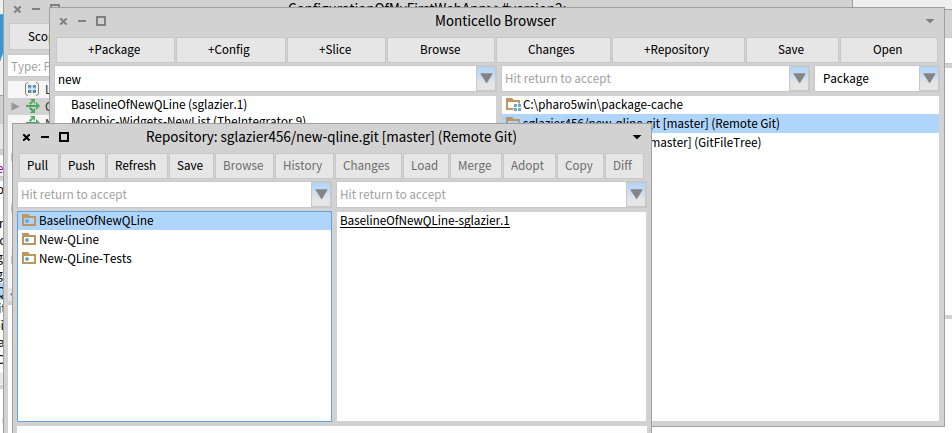
Hi Sean, it seems there is a way to handle that with git directly. Can you try to use git credentials-store? The following commands should be enough: $ git config credential.helper store and try a git push from the command line. Once the username and password given, then they should not be asked again. I'll also try writing the credentials into a .git-credentials file to see if that works. Thierry 2016-07-25 15:58 GMT+02:00 Sean Glazier <sglazier456@gmail.com>:
Hi,
Thank you for all your help. Yes, windows is a pain. I am using Pharo 5. I would love to know how to get the ssh part working on Linux as well since the other team member is a Linux user and it is his first time using Smalltalk. I think he saw it in college but that was about it. I have shared the sort of things you can do in Smalltalk compared to other languages. However, The tool set can be a bit intimidating at times. There is a learning curve even for experienced small talkers coming from a different toolset. So when I set it up for myself I want to set his up as well.
I think while it is insecure the https version is useful especially when tearing your hair out just trying to get source tree and bit bucket on speaking terms using ssh. I just spent the better part of a day and night trying to figure out why when both sides have the right key the server was still rejecting. It is windoze 10 of course. It should be a crime to sell that operating system! I have had more fun kicking cinder blocks with my feet. I mean that literally too, as I used to do that in the Okinawa Kempo classes. A broken toe is far more pleasant by comparison.
By the time morning rolled around I was having fantasies of making Bill Gates condemned to rolling a boulder uphill only to have it to always fall down and he would have to repeat for eternity . :-) But I digress...
If you could point me in the right direction it would help.
Thank you in advance :-)
Kind Regards,
Sean Glazier
On Mon, Jul 25, 2016 at 9:33 AM, Thierry Goubier < thierry.goubier@gmail.com> wrote:
2016-07-25 14:49 GMT+02:00 Sean Glazier <sglazier456@gmail.com>:
yes I was using the command generated by the source tree tool. The code generates a command line command and that can use https if you form the commands as I detailed. I also indicated where the master:master and related switches can be replaced with what most people use which is just --all. the class forming the command can be extended to parse out the username password from the url you set it up with provided you include it or it could be extra parameters provided and stored. This is so that when the push and pull commands put together the url can be formed and placed on the command line as well. GITI will take care of using https etc. it just needs the url with the username password on it so that the command line does not ask for a password and hangs the image because Pharo is waiting for a response and the command line is waiting for the password to be inputted and you have a deadlock as I detailed in the method.
Yes, I understand that.
The command line git command that worked for me was: git -C "C:\pharo5win\new-qline" -c diff.mnemonicprefix=false -c core.quotepath=false push https://sglazier456:MY_PASSWORD@bitbucket.org/sglazier456/new-qline.git --all I am sure some of the other options are not really needed. As I indicated I used what source tree built as its command that it executed.
So with a git repository that needs a username password you can form the git push and pull commands as indicated.
to use ssh I did not see how that could be done from the command line on windows unless to were able to tell git to use ssh or the putty running on windows. Linux of course, is probably more straightforward to get working.
I know that there is a kind of special way to use ssh-agent in Windows, and get this to work.
I did not implement the https username and password support, because I was a bit unsure of writing in clear the username and password, and I didn't want to handle the terminal interaction to inject username and password into the git command upon request.
Right now the current version of the git remote repository is broken because it is using either old commands or an incorrect command. The push was sent to the command line as follows:
git -C "C:\pharo5win\new-qline"
I'm sure there is a push in the command otherwise none of the git support would work; I use that code every day professionnally for as long as GitFileTree existed. The git command has been complete for the past few years, so it will stay this way unless harm is proven with the lack of certain options.
This as far as I know is not a proper push command because it needs the push keyword followed by at least I think by the --all . I tried it from the windows command line and it worked for a repository that was not password protected. If it is, the command line will ask for the password and will not time out which deadlocks the push since pharo is waiting for the command to finish, which it cannot. So the image is locked until you give it a user interrupt to get the debugger.
I hope this helps in understanding what I ran into...
Windows is a hard platform for me to test on; I'll fetch a past discussion on ssh-agent on windows and I may create a branch for you to test. On which version of Pharo are you?
Regards,
Thierry
Kind Regards,
Sean Glazier
On Mon, Jul 25, 2016 at 7:20 AM, Thierry Goubier < thierry.goubier@gmail.com> wrote:
Hi Sean,
I think the issue is simply that GitFileTree does not support https with authentification. You need to switch to ssh with keys.
Now, about the various options you add on the git push command line (diff.mnemonicprefix, core.quotepath), could you detail them? The seems to be unnecessary in the git development scenarios I've seen so far.
Also note that master:master may be wrong, because you could be switching to another branch.
I expect all those issues to be taken care of through the new tools in development for Pharo6.
Regards,
Thierry
2016-07-25 10:04 GMT+02:00 Sean Glazier <sglazier456@gmail.com>:
some more information the git command that it runs is git -C "C:\pharo5win\new-qline" This is run in the method MCFileTreeGitRemoteRepository>>runProcessWrapperGitCommand: anArrayOfStrings in: aDirectory.
It is stuck on the line: command waitForExit.
this wait for exit has no timeout to it and you wait forever. I found out on windows the user interrupt is alt . Just like the Mac ;-)
I have no error in the error stream at all.
From the source tree tool the command should look more like this: git -c diff.mnemonicprefix=false -c core.quotepath=false push -v --tags origin master:master
and then followed by the -C "C:\pharo5win\new-qline"
git -C "C:\pharo5win\new-qline" -c diff.mnemonicprefix=false -c core.quotepath=false push -v --tags origin master:master
However doing this from a command line it asks for the users password like thus C:\pharo5win\New-Qline>git -C "C:\pharo5win\new-qline" -c diff.mnemonicprefix=false -c core.quotepath=false push -v --tags origin master:master Pushing to https://sglazier456@bitbucket.org/sglazier456/new-qline.git Password for 'https://sglazier456@bitbucket.org':
to avoid the password prompt you can do this
git -C "C:\pharo5win\new-qline" -c diff.mnemonicprefix=false -c core.quotepath=false push https://username:password@myrepository.biz/file.git -v --tags origin master:master
you can also replace -v --tags origin master:master with --all as well
in my case it would look like
git -C "C:\pharo5win\new-qline" -c diff.mnemonicprefix=false -c core.quotepath=false push https://sglazier456:MY_PASSWORD@bitbucket.org/sglazier456/new-qline.git -v --tags origin master:master
OR git -C "C:\pharo5win\new-qline" -c diff.mnemonicprefix=false -c core.quotepath=false push https://sglazier456:MY_PASSWORD@bitbucket.org/sglazier456/new-qline.git -all
and that works with out the system waiting for a password.
I notice that there is a class that has the username password for bit bucket in the method MCGitBasedNetworkRepository >> siteUsername: username sitePassword: pass "MCBitbucketRepository siteUsername: '' sitePassword: ''" "MCGitHubRepository siteUsername: '' sitePassword: ''" self siteUsername: username; sitePassword: pass
I tried setting it up with the username and password in the url for the remote repository and no luck. the class MCFileTreeGitRemoteRepository should override the getPull and gitPush so as to include the url with the site name and password or there might be a need for a different creation class for the bitbucket remote repositories. However it is a standrad git command to be able to include the username password in the url.
when one does a pull as well there is a hang as well for the same reasons.
I am not attempting to hack this at the moment because I can use source tree to do the commits and pushes and pulls. I do think though since we have those commands available on the remote repos and people can mark it private requiring a username password.
Also we should consider a repository configuration that specifys the SSH kaey and then run the command in the context of SSH. this would eliminate the username password issue and it is much more secure.
SO since you are more experienced than I in this area of the code, I should ask how should we go about fixing the issue. Also were should I report this issue as well?
running the command from a cmd line produced the following: C:\pharo5win\New-Qline>git -C "C:\pharo5win\new-qline" usage: git [--version] [--help] [-C <path>] [-c name=value] [--exec-path[=<path>]] [--html-path] [--man-path] [--info-path] [-p|--paginate|--no-pager] [--no-replace-objects] [--bare] [--git-dir=<path>] [--work-tree=<path>] [--namespace=<name>] <command> [<args>]
The most commonly used git commands are: add Add file contents to the index bisect Find by binary search the change that introduced a bug branch List, create, or delete branches checkout Checkout a branch or paths to the working tree clone Clone a repository into a new directory commit Record changes to the repository diff Show changes between commits, commit and working tree, etc fetch Download objects and refs from another repository grep Print lines matching a pattern init Create an empty Git repository or reinitialize an existing one log Show commit logs merge Join two or more development histories together mv Move or rename a file, a directory, or a symlink pull Fetch from and integrate with another repository or a local branch push Update remote refs along with associated objects rebase Forward-port local commits to the updated upstream head reset Reset current HEAD to the specified state rm Remove files from the working tree and from the index show Show various types of objects status Show the working tree status tag Create, list, delete or verify a tag object signed with GPG
'git help -a' and 'git help -g' lists available subcommands and some concept guides. See 'git help <command>' or 'git help <concept>' to read about a specific subcommand or concept.
C:\pharo5win\New-Qline>
So according to the help the command it self is formulated incorrectly.
runProcessWrapperGitCommand: anArrayOfStrings in: aDirectory "Enclose all parameters with double quotes to protect."
| r aCommandString | aCommandString := String streamContents: [ :stream | anArrayOfStrings do: [ :e | stream nextPut: $"; nextPutAll: e; nextPutAll: '" ' ] ]. (Smalltalk at: #ProcessWrapper ifAbsent: [ self error: 'Please load ProcessWrapper' ]) ifNotNil: [ :pW | | command | command := pW new useStdout; useStderr; startWithCommand: self gitCommand , ' -C "' , (MCFileTreeFileUtils current directoryPathString: aDirectory) , '" ' , aCommandString; yourself. command waitForExit. self assert: command isRunning not. r := command upToEnd. command exitCode > 0 ifTrue: [ | errorString | errorString := command errorUpToEnd. errorString notEmpty ifTrue: [ MCFileTreeGitError new signal: 'Git error: ' , errorString ]. r := '' ] ]. ^ r
Kind Regards,
Sean Glazier
On Mon, Jul 25, 2016 at 1:01 AM, Sean Glazier <sglazier456@gmail.com> wrote:
Yes,
I created in Bitbucket a repository named New-QLine. I created aBaselinOfNewQLine which just has stubs. I created 2 Packages. New-Qline and New-Qline-Tests each of these have 3 tags underneath and no classes defined since I wanted to ensure I would have no loading issue and so I can verify committing code and then doing a push and then I also wanted to verify doing a Pull. The picture below is clipped from my pharo5 image.
In the window Respository:sglazier456/new-qline.git [master] (Remote Git) shown below. The code at this point has been committed successfully and now I want to Push it to the repository. Once I hit the Push button the image freezes. I can press the x button on the main Pharo 5 window and I get the dialog do you want to quit with out saving.
I am assuming that the push is using a git command. I am not familiar with the Pharo 5 keyboard shortcuts. I tried control b along with some others in hopes of interrupting this process and bringing the image back and being able to debug. However, I was unsuccessful in that. I was thinking that I might need to supply a setting so the ssh session can use the privateKey I generated and then I can be verified and the command continues.
I am not sure what is going on yet. I thought I would ask to see if it is something simple I am missing.
If you need to I can email you my privateKey so you can try it against the same repository I am using. git@bitbucket.org:sglazier456/new-qline.git
Partial sceen shot showing the repository window is below.
[image: Inline image 1]
Thank you for your help and if you can point me to where I need to added a break point I can provide more information :-)
Kind Regards,
Sean Glazier
On Mon, Jul 25, 2016 at 12:37 AM, Dale Henrichs < dale.henrichs@gemtalksystems.com> wrote:
I'd be interested in making this work ... could you supply additional details about the problems you are seeing perhaps we can fix the problems?
Dale
On 7/24/16 6:42 PM, Sean P. DeNigris wrote:
Dale Henrichs-3 wrote
Yes, Metacello supports bitbucket:// repos...
N.B. IIRC I wasn't able to use it for my private projects because it doesn't work with private repos accessed via SSH
----- Cheers, Sean -- View this message in context: http://forum.world.st/Can-GitHubcello-be-used-against-BitBucket-tp4907386p49... Sent from the Pharo Smalltalk Users mailing list archive at Nabble.com.
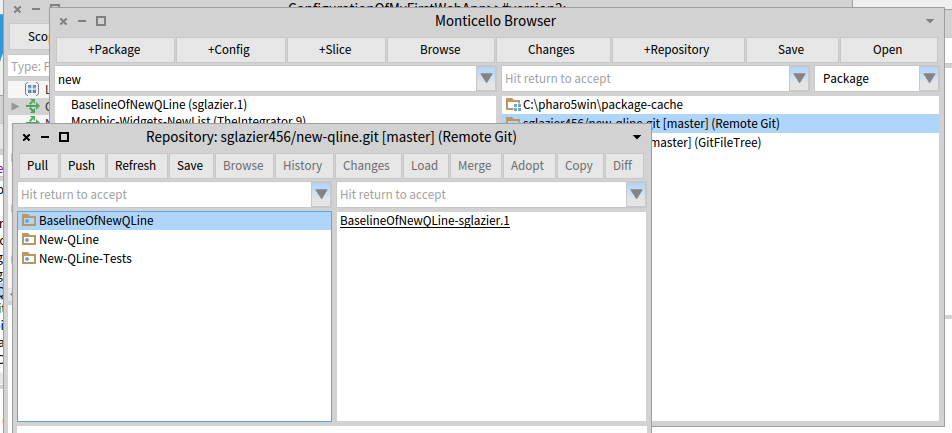
Sean, For GsDevKit_home[1] users on Windows, I recommend that users install GitHub DeskTop for Windows[2]. You get a bash shell installed that allows you to use git on windows in a reasonable environment ... I assume that at the bash shell level, you can work with local clones of bitbucket git repositories ... Dale [1] https://github.com/GsDevKit/GsDevKit_home/blob/master/docs/installation/conf... [2] https://desktop.github.com/ On 7/25/16 6:58 AM, Sean Glazier wrote:
Hi,
Thank you for all your help. Yes, windows is a pain. I am using Pharo 5. I would love to know how to get the ssh part working on Linux as well since the other team member is a Linux user and it is his first time using Smalltalk. I think he saw it in college but that was about it. I have shared the sort of things you can do in Smalltalk compared to other languages. However, The tool set can be a bit intimidating at times. There is a learning curve even for experienced small talkers coming from a different toolset. So when I set it up for myself I want to set his up as well.
I think while it is insecure the https version is useful especially when tearing your hair out just trying to get source tree and bit bucket on speaking terms using ssh. I just spent the better part of a day and night trying to figure out why when both sides have the right key the server was still rejecting. It is windoze 10 of course. It should be a crime to sell that operating system! I have had more fun kicking cinder blocks with my feet. I mean that literally too, as I used to do that in the Okinawa Kempo classes. A broken toe is far more pleasant by comparison.
By the time morning rolled around I was having fantasies of making Bill Gates condemned to rolling a boulder uphill only to have it to always fall down and he would have to repeat for eternity . :-) But I digress...
If you could point me in the right direction it would help.
Thank you in advance :-)
Kind Regards, Sean Glazier
On Mon, Jul 25, 2016 at 9:33 AM, Thierry Goubier <thierry.goubier@gmail.com <mailto:thierry.goubier@gmail.com>> wrote:
2016-07-25 14:49 GMT+02:00 Sean Glazier <sglazier456@gmail.com <mailto:sglazier456@gmail.com>>:
yes I was using the command generated by the source tree tool. The code generates a command line command and that can use https if you form the commands as I detailed. I also indicated where the master:master and related switches can be replaced with what most people use which is just --all. the class forming the command can be extended to parse out the username password from the url you set it up with provided you include it or it could be extra parameters provided and stored. This is so that when the push and pull commands put together the url can be formed and placed on the command line as well. GITI will take care of using https etc. it just needs the url with the username password on it so that the command line does not ask for a password and hangs the image because Pharo is waiting for a response and the command line is waiting for the password to be inputted and you have a deadlock as I detailed in the method.
Yes, I understand that.
The command line git command that worked for me was: git -C "C:\pharo5win\new-qline" -c diff.mnemonicprefix=false -c core.quotepath=false push https://sglazier456:MY_PASSWORD@bitbucket.org/sglazier456/new-qline.git --all I am sure some of the other options are not really needed. As I indicated I used what source tree built as its command that it executed.
So with a git repository that needs a username password you can form the git push and pull commands as indicated.
to use ssh I did not see how that could be done from the command line on windows unless to were able to tell git to use ssh or the putty running on windows. Linux of course, is probably more straightforward to get working.
I know that there is a kind of special way to use ssh-agent in Windows, and get this to work.
I did not implement the https username and password support, because I was a bit unsure of writing in clear the username and password, and I didn't want to handle the terminal interaction to inject username and password into the git command upon request.
Right now the current version of the git remote repository is broken because it is using either old commands or an incorrect command. The push was sent to the command line as follows:
git -C "C:\pharo5win\new-qline"
I'm sure there is a push in the command otherwise none of the git support would work; I use that code every day professionnally for as long as GitFileTree existed. The git command has been complete for the past few years, so it will stay this way unless harm is proven with the lack of certain options.
This as far as I know is not a proper push command because it needs the push keyword followed by at least I think by the --all . I tried it from the windows command line and it worked for a repository that was not password protected. If it is, the command line will ask for the password and will not time out which deadlocks the push since pharo is waiting for the command to finish, which it cannot. So the image is locked until you give it a user interrupt to get the debugger.
I hope this helps in understanding what I ran into...
Windows is a hard platform for me to test on; I'll fetch a past discussion on ssh-agent on windows and I may create a branch for you to test. On which version of Pharo are you?
Regards,
Thierry
Kind Regards, Sean Glazier
On Mon, Jul 25, 2016 at 7:20 AM, Thierry Goubier <thierry.goubier@gmail.com <mailto:thierry.goubier@gmail.com>> wrote:
Hi Sean,
I think the issue is simply that GitFileTree does not support https with authentification. You need to switch to ssh with keys.
Now, about the various options you add on the git push command line (diff.mnemonicprefix, core.quotepath), could you detail them? The seems to be unnecessary in the git development scenarios I've seen so far.
Also note that master:master may be wrong, because you could be switching to another branch.
I expect all those issues to be taken care of through the new tools in development for Pharo6.
Regards,
Thierry
2016-07-25 10:04 GMT+02:00 Sean Glazier <sglazier456@gmail.com <mailto:sglazier456@gmail.com>>:
some more information the git command that it runs is git -C "C:\pharo5win\new-qline" This is run in the method MCFileTreeGitRemoteRepository>>runProcessWrapperGitCommand: anArrayOfStrings in: aDirectory.
It is stuck on the line: command waitForExit.
this wait for exit has no timeout to it and you wait forever. I found out on windows the user interrupt is alt . Just like the Mac ;-)
I have no error in the error stream at all.
From the source tree tool the command should look more like this: git -c diff.mnemonicprefix=false -c core.quotepath=false push -v --tags origin master:master
and then followed by the -C "C:\pharo5win\new-qline"
git -C "C:\pharo5win\new-qline" -c diff.mnemonicprefix=false -c core.quotepath=false push -v --tags origin master:master
However doing this from a command line it asks for the users password like thus C:\pharo5win\New-Qline>git -C "C:\pharo5win\new-qline" -c diff.mnemonicprefix=false -c core.quotepath=false push -v --tags origin master:master Pushing to https://sglazier456@bitbucket.org/sglazier456/new-qline.git Password for 'https://sglazier456@bitbucket.org':
to avoid the password prompt you can do this
git -C "C:\pharo5win\new-qline" -c diff.mnemonicprefix=false -c core.quotepath=false push https://username:password@myrepository.biz/file.git -v --tags origin master:master
you can also replace -v --tags origin master:master with --all as well in my case it would look like git -C "C:\pharo5win\new-qline" -c diff.mnemonicprefix=false -c core.quotepath=false push https://sglazier456:MY_PASSWORD@bitbucket.org/sglazier456/new-qline.git -v --tags origin master:master
OR git -C "C:\pharo5win\new-qline" -c diff.mnemonicprefix=false -c core.quotepath=false push https://sglazier456:MY_PASSWORD@bitbucket.org/sglazier456/new-qline.git -all and that works with out the system waiting for a password. I notice that there is a class that has the username password for bit bucket in the method MCGitBasedNetworkRepository >> siteUsername: username sitePassword: pass "MCBitbucketRepository siteUsername: '' sitePassword: ''" "MCGitHubRepository siteUsername: '' sitePassword: ''" self siteUsername: username; sitePassword: pass I tried setting it up with the username and password in the url for the remote repository and no luck. the class MCFileTreeGitRemoteRepository should override the getPull and gitPush so as to include the url with the site name and password or there might be a need for a different creation class for the bitbucket remote repositories. However it is a standrad git command to be able to include the username password in the url. when one does a pull as well there is a hang as well for the same reasons. I am not attempting to hack this at the moment because I can use source tree to do the commits and pushes and pulls. I do think though since we have those commands available on the remote repos and people can mark it private requiring a username password. Also we should consider a repository configuration that specifys the SSH kaey and then run the command in the context of SSH. this would eliminate the username password issue and it is much more secure. SO since you are more experienced than I in this area of the code, I should ask how should we go about fixing the issue. Also were should I report this issue as well?
running the command from a cmd line produced the following: C:\pharo5win\New-Qline>git -C "C:\pharo5win\new-qline" usage: git [--version] [--help] [-C <path>] [-c name=value] [--exec-path[=<path>]] [--html-path] [--man-path] [--info-path] [-p|--paginate|--no-pager] [--no-replace-objects] [--bare] [--git-dir=<path>] [--work-tree=<path>] [--namespace=<name>] <command> [<args>]
The most commonly used git commands are: add Add file contents to the index bisect Find by binary search the change that introduced a bug branch List, create, or delete branches checkout Checkout a branch or paths to the working tree clone Clone a repository into a new directory commit Record changes to the repository diff Show changes between commits, commit and working tree, etc fetch Download objects and refs from another repository grep Print lines matching a pattern init Create an empty Git repository or reinitialize an existing one log Show commit logs merge Join two or more development histories together mv Move or rename a file, a directory, or a symlink pull Fetch from and integrate with another repository or a local branch push Update remote refs along with associated objects rebase Forward-port local commits to the updated upstream head reset Reset current HEAD to the specified state rm Remove files from the working tree and from the index show Show various types of objects status Show the working tree status tag Create, list, delete or verify a tag object signed with GPG
'git help -a' and 'git help -g' lists available subcommands and some concept guides. See 'git help <command>' or 'git help <concept>' to read about a specific subcommand or concept.
C:\pharo5win\New-Qline>
So according to the help the command it self is formulated incorrectly.
runProcessWrapperGitCommand: anArrayOfStrings in: aDirectory "Enclose all parameters with double quotes to protect."
| r aCommandString | aCommandString := String streamContents: [ :stream | anArrayOfStrings do: [ :e | stream nextPut: $"; nextPutAll: e; nextPutAll: '" ' ] ]. (Smalltalk at: #ProcessWrapper ifAbsent: [ self error: 'Please load ProcessWrapper' ]) ifNotNil: [ :pW | | command | command := pW new useStdout; useStderr; startWithCommand: self gitCommand , ' -C "' , (MCFileTreeFileUtils current directoryPathString: aDirectory) , '" ' , aCommandString; yourself. command waitForExit. self assert: command isRunning not. r := command upToEnd. command exitCode > 0 ifTrue: [ | errorString | errorString := command errorUpToEnd. errorString notEmpty ifTrue: [ MCFileTreeGitError new signal: 'Git error: ' , errorString ]. r := '' ] ]. ^ r
Kind Regards, Sean Glazier
On Mon, Jul 25, 2016 at 1:01 AM, Sean Glazier <sglazier456@gmail.com <mailto:sglazier456@gmail.com>> wrote:
Yes,
I created in Bitbucket a repository named New-QLine. I created aBaselinOfNewQLine which just has stubs. I created 2 Packages. New-Qline and New-Qline-Tests each of these have 3 tags underneath and no classes defined since I wanted to ensure I would have no loading issue and so I can verify committing code and then doing a push and then I also wanted to verify doing a Pull. The picture below is clipped from my pharo5 image.
In the window Respository:sglazier456/new-qline.git [master] (Remote Git) shown below. The code at this point has been committed successfully and now I want to Push it to the repository. Once I hit the Push button the image freezes. I can press the x button on the main Pharo 5 window and I get the dialog do you want to quit with out saving.
I am assuming that the push is using a git command. I am not familiar with the Pharo 5 keyboard shortcuts. I tried control b along with some others in hopes of interrupting this process and bringing the image back and being able to debug. However, I was unsuccessful in that. I was thinking that I might need to supply a setting so the ssh session can use the privateKey I generated and then I can be verified and the command continues.
I am not sure what is going on yet. I thought I would ask to see if it is something simple I am missing.
If you need to I can email you my privateKey so you can try it against the same repository I am using. git@bitbucket.org:sglazier456/new-qline.git
Partial sceen shot showing the repository window is below.
Inline image 1
Thank you for your help and if you can point me to where I need to added a break point I can provide more information :-)
Kind Regards, Sean Glazier
On Mon, Jul 25, 2016 at 12:37 AM, Dale Henrichs <dale.henrichs@gemtalksystems.com <mailto:dale.henrichs@gemtalksystems.com>> wrote:
I'd be interested in making this work ... could you supply additional details about the problems you are seeing perhaps we can fix the problems?
Dale
On 7/24/16 6:42 PM, Sean P. DeNigris wrote:
Dale Henrichs-3 wrote
Yes, Metacello supports bitbucket:// repos...
N.B. IIRC I wasn't able to use it for my private projects because it doesn't work with private repos accessed via SSH
----- Cheers, Sean -- View this message in context: http://forum.world.st/Can-GitHubcello-be-used-against-BitBucket-tp4907386p49... Sent from the Pharo Smalltalk Users mailing list archive at Nabble.com.
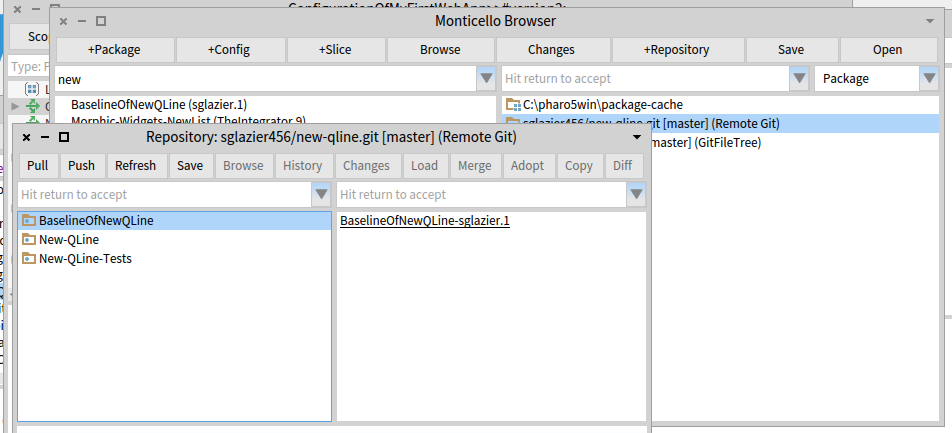
I do have the git hub desktop installed for windows as well. I aws thinking that in a command shell cmd.exe that if you have the ssl-agent running which I do that running the git command should just use the keys. Some where I think windows gets confused. when using source tree I imported the key and also imported the key for the running ssl agent pageant as well. I could see it select the right sll key and it was the same one used and upload to the bitbucket server (public key of course using copy paste. I removed or backed up rather all previous sshssl keys I have used for SSH tunnels etc into other systems etc. I finally got source tree to push. But after a while, it seems to lose track of the key or something. I think it might have to do with the growing number of git shells that keep increasing until I have to finally reboot and the reapply the settings in SourceTree and it works again and I am fine until the number of shells gets too big. There is a very real bug on the windows platform. I can say hooking up with git hub with their tool was easier. However I was only doing public repositories so I had no need for all the encryption. I got to get myself a better laptop again ;-). I have been reading through acres of documentation. I was part of the Cincom crypto team and have worked with it a number of times. I even detected serious bugs in SSL that I reported long ago. Smalltalk during my tests that ran for hours went and put a large integer in for the session key which caused ssl on all platform to seg fault. Nice thing about Smalltalk is those attacks can be eliminated (unless of course,you are using a c dll that has the bug ;-) ) I think it is better to have the feature for https and just tell the developer that it is insecure. I tried the get credentials and for whatever reason, it was not picking it up. I updated to the latest libraries etc. That worked for the guy on Linux, but on windows 10 especially it seems it loses track of things. I tried to uninstall reinstall as well. I had other ssh tools working under windows 8 but the upgrade to 10 I noticed the issues with ssh in general. Now that I have a gig where I need to use ssh again it seems windows 10 might be complicating things. the git hub tool seems to work better IMHO. I would like to be able to do it direct from metacello. I like working with Pharo and want to use it and contribute to the project. I have Smalltalk in my blood and once I got trained on it I was hooked. It is more addictive that heroin and that is a compliment. IO think the developers have done great work with it. So I say thank you to all the developers who put their time and hearts into it. Hopefully, I can get thing configured so it is using the ssh keys seamlessly. I must say thing are easier on a Linux box, but many customers use windoze. Personally, I liked windows 7 more than 8 IMHO..... I am not sure if the problem exists with git hubacello as well. It might since these interfaces are using git command as far as I can tell. To use the https authentication, I found just putting the https url in as shown above was able to do the push. From what I read, as long as you specify the username and password in the url you should not get a prompt to authenticate. ( of course, the ssh key was supposed to work right too, so I can only report what I am observing on windoze 10) I used the commands as specified both from the debugger and the cmd shell and git seemed to accept it with out asking for the username password since they are in the url. It is good not to have a password that uses periods or /'s or anything that might not be URL friendly. So there is that. If you use the password in the URL it is something that needs to be parseable or you have to go through the trouble of providing the appropriate escape sequence etc. I thank every one for the help. With luck, we can get things resolved and if it is a matter of documentation, being able to have the procedure written down. I know it is a tall order to try and keep up in the ever-changing worlds of tools. evry rlease of windoze itr feels like I am starting from scratch again .... Kind Regards, Sean Glazier On Mon, Jul 25, 2016 at 10:47 AM, Dale Henrichs < dale.henrichs@gemtalksystems.com> wrote:
Sean,
For GsDevKit_home[1] users on Windows, I recommend that users install GitHub DeskTop for Windows[2]. You get a bash shell installed that allows you to use git on windows in a reasonable environment ... I assume that at the bash shell level, you can work with local clones of bitbucket git repositories ...
Dale
[1] https://github.com/GsDevKit/GsDevKit_home/blob/master/docs/installation/conf...
[2] https://desktop.github.com/
On 7/25/16 6:58 AM, Sean Glazier wrote:
Hi,
Thank you for all your help. Yes, windows is a pain. I am using Pharo 5. I would love to know how to get the ssh part working on Linux as well since the other team member is a Linux user and it is his first time using Smalltalk. I think he saw it in college but that was about it. I have shared the sort of things you can do in Smalltalk compared to other languages. However, The tool set can be a bit intimidating at times. There is a learning curve even for experienced small talkers coming from a different toolset. So when I set it up for myself I want to set his up as well.
I think while it is insecure the https version is useful especially when tearing your hair out just trying to get source tree and bit bucket on speaking terms using ssh. I just spent the better part of a day and night trying to figure out why when both sides have the right key the server was still rejecting. It is windoze 10 of course. It should be a crime to sell that operating system! I have had more fun kicking cinder blocks with my feet. I mean that literally too, as I used to do that in the Okinawa Kempo classes. A broken toe is far more pleasant by comparison.
By the time morning rolled around I was having fantasies of making Bill Gates condemned to rolling a boulder uphill only to have it to always fall down and he would have to repeat for eternity . :-) But I digress...
If you could point me in the right direction it would help.
Thank you in advance :-)
Kind Regards,
Sean Glazier
On Mon, Jul 25, 2016 at 9:33 AM, Thierry Goubier < thierry.goubier@gmail.com> wrote:
2016-07-25 14:49 GMT+02:00 Sean Glazier < <sglazier456@gmail.com> sglazier456@gmail.com>:
yes I was using the command generated by the source tree tool. The code generates a command line command and that can use https if you form the commands as I detailed. I also indicated where the master:master and related switches can be replaced with what most people use which is just --all. the class forming the command can be extended to parse out the username password from the url you set it up with provided you include it or it could be extra parameters provided and stored. This is so that when the push and pull commands put together the url can be formed and placed on the command line as well. GITI will take care of using https etc. it just needs the url with the username password on it so that the command line does not ask for a password and hangs the image because Pharo is waiting for a response and the command line is waiting for the password to be inputted and you have a deadlock as I detailed in the method.
Yes, I understand that.
The command line git command that worked for me was: git -C "C:\pharo5win\new-qline" -c diff.mnemonicprefix=false -c core.quotepath=false push https://sglazier456:MY_PASSWORD@bitbucket.org/sglazier456/new-qline.git --all I am sure some of the other options are not really needed. As I indicated I used what source tree built as its command that it executed.
So with a git repository that needs a username password you can form the git push and pull commands as indicated.
to use ssh I did not see how that could be done from the command line on windows unless to were able to tell git to use ssh or the putty running on windows. Linux of course, is probably more straightforward to get working.
I know that there is a kind of special way to use ssh-agent in Windows, and get this to work.
I did not implement the https username and password support, because I was a bit unsure of writing in clear the username and password, and I didn't want to handle the terminal interaction to inject username and password into the git command upon request.
Right now the current version of the git remote repository is broken because it is using either old commands or an incorrect command. The push was sent to the command line as follows:
git -C "C:\pharo5win\new-qline"
I'm sure there is a push in the command otherwise none of the git support would work; I use that code every day professionnally for as long as GitFileTree existed. The git command has been complete for the past few years, so it will stay this way unless harm is proven with the lack of certain options.
This as far as I know is not a proper push command because it needs the push keyword followed by at least I think by the --all . I tried it from the windows command line and it worked for a repository that was not password protected. If it is, the command line will ask for the password and will not time out which deadlocks the push since pharo is waiting for the command to finish, which it cannot. So the image is locked until you give it a user interrupt to get the debugger.
I hope this helps in understanding what I ran into...
Windows is a hard platform for me to test on; I'll fetch a past discussion on ssh-agent on windows and I may create a branch for you to test. On which version of Pharo are you?
Regards,
Thierry
Kind Regards,
Sean Glazier
On Mon, Jul 25, 2016 at 7:20 AM, Thierry Goubier < <thierry.goubier@gmail.com>thierry.goubier@gmail.com> wrote:
Hi Sean,
I think the issue is simply that GitFileTree does not support https with authentification. You need to switch to ssh with keys.
Now, about the various options you add on the git push command line (diff.mnemonicprefix, core.quotepath), could you detail them? The seems to be unnecessary in the git development scenarios I've seen so far.
Also note that master:master may be wrong, because you could be switching to another branch.
I expect all those issues to be taken care of through the new tools in development for Pharo6.
Regards,
Thierry
2016-07-25 10:04 GMT+02:00 Sean Glazier < <sglazier456@gmail.com> sglazier456@gmail.com>:
some more information the git command that it runs is git -C "C:\pharo5win\new-qline" This is run in the method MCFileTreeGitRemoteRepository>>runProcessWrapperGitCommand: anArrayOfStrings in: aDirectory.
It is stuck on the line: command waitForExit.
this wait for exit has no timeout to it and you wait forever. I found out on windows the user interrupt is alt . Just like the Mac ;-)
I have no error in the error stream at all.
From the source tree tool the command should look more like this: git -c diff.mnemonicprefix=false -c core.quotepath=false push -v --tags origin master:master
and then followed by the -C "C:\pharo5win\new-qline"
git -C "C:\pharo5win\new-qline" -c diff.mnemonicprefix=false -c core.quotepath=false push -v --tags origin master:master
However doing this from a command line it asks for the users password like thus C:\pharo5win\New-Qline>git -C "C:\pharo5win\new-qline" -c diff.mnemonicprefix=false -c core.quotepath=false push -v --tags origin master:master Pushing to <https://sglazier456@bitbucket.org/sglazier456/new-qline.git> https://sglazier456@bitbucket.org/sglazier456/new-qline.git Password for ' <https://sglazier456@bitbucket.org> https://sglazier456@bitbucket.org':
to avoid the password prompt you can do this
git -C "C:\pharo5win\new-qline" -c diff.mnemonicprefix=false -c core.quotepath=false push https://username:password@myrepository.biz/file.git -v --tags origin master:master
you can also replace -v --tags origin master:master with --all as well in my case it would look like git -C "C:\pharo5win\new-qline" -c diff.mnemonicprefix=false -c core.quotepath=false push https://sglazier456:MY_PASSWORD@bitbucket.org/sglazier456/new-qline.git -v --tags origin master:master
OR git -C "C:\pharo5win\new-qline" -c diff.mnemonicprefix=false -c core.quotepath=false push https://sglazier456:MY_PASSWORD@bitbucket.org/sglazier456/new-qline.git -all and that works with out the system waiting for a password. I notice that there is a class that has the username password for bit bucket in the method MCGitBasedNetworkRepository >> siteUsername: username sitePassword: pass "MCBitbucketRepository siteUsername: '' sitePassword: ''" "MCGitHubRepository siteUsername: '' sitePassword: ''" self siteUsername: username; sitePassword: pass I tried setting it up with the username and password in the url for the remote repository and no luck. the class MCFileTreeGitRemoteRepository should override the getPull and gitPush so as to include the url with the site name and password or there might be a need for a different creation class for the bitbucket remote repositories. However it is a standrad git command to be able to include the username password in the url. when one does a pull as well there is a hang as well for the same reasons. I am not attempting to hack this at the moment because I can use source tree to do the commits and pushes and pulls. I do think though since we have those commands available on the remote repos and people can mark it private requiring a username password. Also we should consider a repository configuration that specifys the SSH kaey and then run the command in the context of SSH. this would eliminate the username password issue and it is much more secure. SO since you are more experienced than I in this area of the code, I should ask how should we go about fixing the issue. Also were should I report this issue as well?
running the command from a cmd line produced the following: C:\pharo5win\New-Qline>git -C "C:\pharo5win\new-qline" usage: git [--version] [--help] [-C <path>] [-c name=value] [--exec-path[=<path>]] [--html-path] [--man-path] [--info-path] [-p|--paginate|--no-pager] [--no-replace-objects] [--bare] [--git-dir=<path>] [--work-tree=<path>] [--namespace=<name>] <command> [<args>]
The most commonly used git commands are: add Add file contents to the index bisect Find by binary search the change that introduced a bug branch List, create, or delete branches checkout Checkout a branch or paths to the working tree clone Clone a repository into a new directory commit Record changes to the repository diff Show changes between commits, commit and working tree, etc fetch Download objects and refs from another repository grep Print lines matching a pattern init Create an empty Git repository or reinitialize an existing one log Show commit logs merge Join two or more development histories together mv Move or rename a file, a directory, or a symlink pull Fetch from and integrate with another repository or a local branch push Update remote refs along with associated objects rebase Forward-port local commits to the updated upstream head reset Reset current HEAD to the specified state rm Remove files from the working tree and from the index show Show various types of objects status Show the working tree status tag Create, list, delete or verify a tag object signed with GPG
'git help -a' and 'git help -g' lists available subcommands and some concept guides. See 'git help <command>' or 'git help <concept>' to read about a specific subcommand or concept.
C:\pharo5win\New-Qline>
So according to the help the command it self is formulated incorrectly.
runProcessWrapperGitCommand: anArrayOfStrings in: aDirectory "Enclose all parameters with double quotes to protect."
| r aCommandString | aCommandString := String streamContents: [ :stream | anArrayOfStrings do: [ :e | stream nextPut: $"; nextPutAll: e; nextPutAll: '" ' ] ]. (Smalltalk at: #ProcessWrapper ifAbsent: [ self error: 'Please load ProcessWrapper' ]) ifNotNil: [ :pW | | command | command := pW new useStdout; useStderr; startWithCommand: self gitCommand , ' -C "' , (MCFileTreeFileUtils current directoryPathString: aDirectory) , '" ' , aCommandString; yourself. command waitForExit. self assert: command isRunning not. r := command upToEnd. command exitCode > 0 ifTrue: [ | errorString | errorString := command errorUpToEnd. errorString notEmpty ifTrue: [ MCFileTreeGitError new signal: 'Git error: ' , errorString ]. r := '' ] ]. ^ r
Kind Regards,
Sean Glazier
On Mon, Jul 25, 2016 at 1:01 AM, Sean Glazier < <sglazier456@gmail.com>sglazier456@gmail.com> wrote:
Yes,
I created in Bitbucket a repository named New-QLine. I created aBaselinOfNewQLine which just has stubs. I created 2 Packages. New-Qline and New-Qline-Tests each of these have 3 tags underneath and no classes defined since I wanted to ensure I would have no loading issue and so I can verify committing code and then doing a push and then I also wanted to verify doing a Pull. The picture below is clipped from my pharo5 image.
In the window Respository:sglazier456/new-qline.git [master] (Remote Git) shown below. The code at this point has been committed successfully and now I want to Push it to the repository. Once I hit the Push button the image freezes. I can press the x button on the main Pharo 5 window and I get the dialog do you want to quit with out saving.
I am assuming that the push is using a git command. I am not familiar with the Pharo 5 keyboard shortcuts. I tried control b along with some others in hopes of interrupting this process and bringing the image back and being able to debug. However, I was unsuccessful in that. I was thinking that I might need to supply a setting so the ssh session can use the privateKey I generated and then I can be verified and the command continues.
I am not sure what is going on yet. I thought I would ask to see if it is something simple I am missing.
If you need to I can email you my privateKey so you can try it against the same repository I am using. git@bitbucket.org:sglazier456/new-qline.git
Partial sceen shot showing the repository window is below.
[image: Inline image 1]
Thank you for your help and if you can point me to where I need to added a break point I can provide more information :-)
Kind Regards,
Sean Glazier
On Mon, Jul 25, 2016 at 12:37 AM, Dale Henrichs < <dale.henrichs@gemtalksystems.com>dale.henrichs@gemtalksystems.com> wrote:
I'd be interested in making this work ... could you supply additional details about the problems you are seeing perhaps we can fix the problems?
Dale
On 7/24/16 6:42 PM, Sean P. DeNigris wrote:
Dale Henrichs-3 wrote
Yes, Metacello supports bitbucket:// repos...
N.B. IIRC I wasn't able to use it for my private projects because it doesn't work with private repos accessed via SSH
----- Cheers, Sean -- View this message in context: <http://forum.world.st/Can-GitHubcello-be-used-against-BitBucket-tp4907386p49...> http://forum.world.st/Can-GitHubcello-be-used-against-BitBucket-tp4907386p49... Sent from the Pharo Smalltalk Users mailing list archive at Nabble.com.
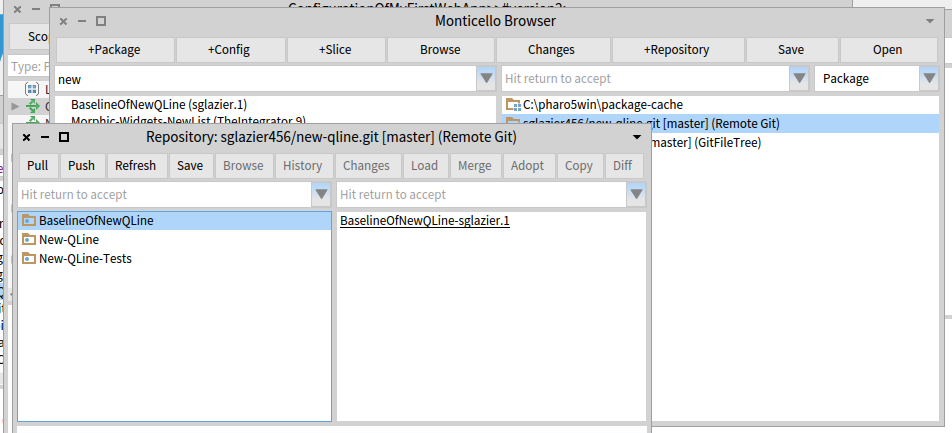
Hi Sean, I think I got something working (at least it seems to be working... I'm tracking a bug, but I can't reproduce it now. In Pharo5). Try the following in Pharo 5. Add a remote git repository as usual from Monticello, but, instead of the MCFileTreeGitRemoteRepository location: 'git@' name: '' subdirectory: '' branch: '' template, change the template to : MCFileTreeGitRemoteRepository basicFromUrl: 'gitfiletree://username:password@bitbucket.org/MyUsername/MyProject.git:master/subdirectory' asZnUrl Then press Ok and it should clone it properly for you (and not ask anymore for credentials). Tell me if that works for you, The same Url should also work with Metacello. Thierry Le 25/07/2016 à 23:40, Sean Glazier a écrit :
I do have the git hub desktop installed for windows as well. I aws thinking that in a command shell cmd.exe that if you have the ssl-agent running which I do that running the git command should just use the keys. Some where I think windows gets confused. when using source tree I imported the key and also imported the key for the running ssl agent pageant as well.
I could see it select the right sll key and it was the same one used and upload to the bitbucket server (public key of course using copy paste. I removed or backed up rather all previous sshssl keys I have used for SSH tunnels etc into other systems etc. I finally got source tree to push. But after a while, it seems to lose track of the key or something. I think it might have to do with the growing number of git shells that keep increasing until I have to finally reboot and the reapply the settings in SourceTree and it works again and I am fine until the number of shells gets too big.
There is a very real bug on the windows platform. I can say hooking up with git hub with their tool was easier. However I was only doing public repositories so I had no need for all the encryption. I got to get myself a better laptop again ;-).
I have been reading through acres of documentation. I was part of the Cincom crypto team and have worked with it a number of times. I even detected serious bugs in SSL that I reported long ago. Smalltalk during my tests that ran for hours went and put a large integer in for the session key which caused ssl on all platform to seg fault. Nice thing about Smalltalk is those attacks can be eliminated (unless of course,you are using a c dll that has the bug ;-) )
I think it is better to have the feature for https and just tell the developer that it is insecure.
I tried the get credentials and for whatever reason, it was not picking it up. I updated to the latest libraries etc. That worked for the guy on Linux, but on windows 10 especially it seems it loses track of things. I tried to uninstall reinstall as well. I had other ssh tools working under windows 8 but the upgrade to 10 I noticed the issues with ssh in general. Now that I have a gig where I need to use ssh again it seems windows 10 might be complicating things. the git hub tool seems to work better IMHO.
I would like to be able to do it direct from metacello. I like working with Pharo and want to use it and contribute to the project. I have Smalltalk in my blood and once I got trained on it I was hooked. It is more addictive that heroin and that is a compliment. IO think the developers have done great work with it. So I say thank you to all the developers who put their time and hearts into it.
Hopefully, I can get thing configured so it is using the ssh keys seamlessly. I must say thing are easier on a Linux box, but many customers use windoze. Personally, I liked windows 7 more than 8 IMHO..... I am not sure if the problem exists with git hubacello as well. It might since these interfaces are using git command as far as I can tell.
To use the https authentication, I found just putting the https url in as shown above was able to do the push. From what I read, as long as you specify the username and password in the url you should not get a prompt to authenticate. ( of course, the ssh key was supposed to work right too, so I can only report what I am observing on windoze 10) I used the commands as specified both from the debugger and the cmd shell and git seemed to accept it with out asking for the username password since they are in the url. It is good not to have a password that uses periods or /'s or anything that might not be URL friendly. So there is that. If you use the password in the URL it is something that needs to be parseable or you have to go through the trouble of providing the appropriate escape sequence etc.
I thank every one for the help. With luck, we can get things resolved and if it is a matter of documentation, being able to have the procedure written down. I know it is a tall order to try and keep up in the ever-changing worlds of tools. evry rlease of windoze itr feels like I am starting from scratch again ....
Kind Regards,
Sean Glazier
On Mon, Jul 25, 2016 at 10:47 AM, Dale Henrichs <dale.henrichs@gemtalksystems.com <mailto:dale.henrichs@gemtalksystems.com>> wrote:
Sean,
For GsDevKit_home[1] users on Windows, I recommend that users install GitHub DeskTop for Windows[2]. You get a bash shell installed that allows you to use git on windows in a reasonable environment ... I assume that at the bash shell level, you can work with local clones of bitbucket git repositories ...
Dale
[1] https://github.com/GsDevKit/GsDevKit_home/blob/master/docs/installation/conf...
[2] https://desktop.github.com/
On 7/25/16 6:58 AM, Sean Glazier wrote:
Hi,
Thank you for all your help. Yes, windows is a pain. I am using Pharo 5. I would love to know how to get the ssh part working on Linux as well since the other team member is a Linux user and it is his first time using Smalltalk. I think he saw it in college but that was about it. I have shared the sort of things you can do in Smalltalk compared to other languages. However, The tool set can be a bit intimidating at times. There is a learning curve even for experienced small talkers coming from a different toolset. So when I set it up for myself I want to set his up as well.
I think while it is insecure the https version is useful especially when tearing your hair out just trying to get source tree and bit bucket on speaking terms using ssh. I just spent the better part of a day and night trying to figure out why when both sides have the right key the server was still rejecting. It is windoze 10 of course. It should be a crime to sell that operating system! I have had more fun kicking cinder blocks with my feet. I mean that literally too, as I used to do that in the Okinawa Kempo classes. A broken toe is far more pleasant by comparison.
By the time morning rolled around I was having fantasies of making Bill Gates condemned to rolling a boulder uphill only to have it to always fall down and he would have to repeat for eternity . :-) But I digress...
If you could point me in the right direction it would help.
Thank you in advance :-)
Kind Regards,
Sean Glazier
On Mon, Jul 25, 2016 at 9:33 AM, Thierry Goubier <thierry.goubier@gmail.com <mailto:thierry.goubier@gmail.com>> wrote:
2016-07-25 14:49 GMT+02:00 Sean Glazier <<mailto:sglazier456@gmail.com>sglazier456@gmail.com <mailto:sglazier456@gmail.com>>:
yes I was using the command generated by the source tree tool. The code generates a command line command and that can use https if you form the commands as I detailed. I also indicated where the master:master and related switches can be replaced with what most people use which is just --all. the class forming the command can be extended to parse out the username password from the url you set it up with provided you include it or it could be extra parameters provided and stored. This is so that when the push and pull commands put together the url can be formed and placed on the command line as well. GITI will take care of using https etc. it just needs the url with the username password on it so that the command line does not ask for a password and hangs the image because Pharo is waiting for a response and the command line is waiting for the password to be inputted and you have a deadlock as I detailed in the method.
Yes, I understand that.
The command line git command that worked for me was: git -C "C:\pharo5win\new-qline" -c diff.mnemonicprefix=false -c core.quotepath=false push https://sglazier456:MY_PASSWORD@bitbucket.org/sglazier456/new-qline.git --all I am sure some of the other options are not really needed. As I indicated I used what source tree built as its command that it executed.
So with a git repository that needs a username password you can form the git push and pull commands as indicated.
to use ssh I did not see how that could be done from the command line on windows unless to were able to tell git to use ssh or the putty running on windows. Linux of course, is probably more straightforward to get working.
I know that there is a kind of special way to use ssh-agent in Windows, and get this to work.
I did not implement the https username and password support, because I was a bit unsure of writing in clear the username and password, and I didn't want to handle the terminal interaction to inject username and password into the git command upon request.
Right now the current version of the git remote repository is broken because it is using either old commands or an incorrect command. The push was sent to the command line as follows:
git -C "C:\pharo5win\new-qline"
I'm sure there is a push in the command otherwise none of the git support would work; I use that code every day professionnally for as long as GitFileTree existed. The git command has been complete for the past few years, so it will stay this way unless harm is proven with the lack of certain options.
This as far as I know is not a proper push command because it needs the push keyword followed by at least I think by the --all . I tried it from the windows command line and it worked for a repository that was not password protected. If it is, the command line will ask for the password and will not time out which deadlocks the push since pharo is waiting for the command to finish, which it cannot. So the image is locked until you give it a user interrupt to get the debugger.
I hope this helps in understanding what I ran into...
Windows is a hard platform for me to test on; I'll fetch a past discussion on ssh-agent on windows and I may create a branch for you to test. On which version of Pharo are you?
Regards,
Thierry
Kind Regards,
Sean Glazier
On Mon, Jul 25, 2016 at 7:20 AM, Thierry Goubier <<mailto:thierry.goubier@gmail.com>thierry.goubier@gmail.com <mailto:thierry.goubier@gmail.com>> wrote:
Hi Sean,
I think the issue is simply that GitFileTree does not support https with authentification. You need to switch to ssh with keys.
Now, about the various options you add on the git push command line (diff.mnemonicprefix, core.quotepath), could you detail them? The seems to be unnecessary in the git development scenarios I've seen so far.
Also note that master:master may be wrong, because you could be switching to another branch.
I expect all those issues to be taken care of through the new tools in development for Pharo6.
Regards,
Thierry
2016-07-25 10:04 GMT+02:00 Sean Glazier <<mailto:sglazier456@gmail.com>sglazier456@gmail.com <mailto:sglazier456@gmail.com>>:
some more information the git command that it runs is git -C "C:\pharo5win\new-qline" This is run in the method MCFileTreeGitRemoteRepository>>runProcessWrapperGitCommand: anArrayOfStrings in: aDirectory.
It is stuck on the line: command waitForExit.
this wait for exit has no timeout to it and you wait forever. I found out on windows the user interrupt is alt . Just like the Mac ;-)
I have no error in the error stream at all.
From the source tree tool the command should look more like this: git -c diff.mnemonicprefix=false -c core.quotepath=false push -v --tags origin master:master
and then followed by the -C "C:\pharo5win\new-qline"
git -C "C:\pharo5win\new-qline" -c diff.mnemonicprefix=false -c core.quotepath=false push -v --tags origin master:master
However doing this from a command line it asks for the users password like thus C:\pharo5win\New-Qline>git -C "C:\pharo5win\new-qline" -c diff.mnemonicprefix=false -c core.quotepath=false push -v --tags origin master:master Pushing to <https://sglazier456@bitbucket.org/sglazier456/new-qline.git>https://sglazier456@bitbucket.org/sglazier456/new-qline.git Password for '<https://sglazier456@bitbucket.org>https://sglazier456@bitbucket.org':
to avoid the password prompt you can do this
git -C "C:\pharo5win\new-qline" -c diff.mnemonicprefix=false -c core.quotepath=false push https://username:password@myrepository.biz/file.git -v --tags origin master:master
you can also replace -v --tags origin master:master with --all as well in my case it would look like git -C "C:\pharo5win\new-qline" -c diff.mnemonicprefix=false -c core.quotepath=false push https://sglazier456:MY_PASSWORD@bitbucket.org/sglazier456/new-qline.git -v --tags origin master:master
OR git -C "C:\pharo5win\new-qline" -c diff.mnemonicprefix=false -c core.quotepath=false push https://sglazier456:MY_PASSWORD@bitbucket.org/sglazier456/new-qline.git -all and that works with out the system waiting for a password. I notice that there is a class that has the username password for bit bucket in the method MCGitBasedNetworkRepository >> siteUsername: username sitePassword: pass "MCBitbucketRepository siteUsername: '' sitePassword: ''" "MCGitHubRepository siteUsername: '' sitePassword: ''" self siteUsername: username; sitePassword: pass I tried setting it up with the username and password in the url for the remote repository and no luck. the class MCFileTreeGitRemoteRepository should override the getPull and gitPush so as to include the url with the site name and password or there might be a need for a different creation class for the bitbucket remote repositories. However it is a standrad git command to be able to include the username password in the url. when one does a pull as well there is a hang as well for the same reasons. I am not attempting to hack this at the moment because I can use source tree to do the commits and pushes and pulls. I do think though since we have those commands available on the remote repos and people can mark it private requiring a username password. Also we should consider a repository configuration that specifys the SSH kaey and then run the command in the context of SSH. this would eliminate the username password issue and it is much more secure. SO since you are more experienced than I in this area of the code, I should ask how should we go about fixing the issue. Also were should I report this issue as well?
running the command from a cmd line produced the following: C:\pharo5win\New-Qline>git -C "C:\pharo5win\new-qline" usage: git [--version] [--help] [-C <path>] [-c name=value] [--exec-path[=<path>]] [--html-path] [--man-path] [--info-path] [-p|--paginate|--no-pager] [--no-replace-objects] [--bare] [--git-dir=<path>] [--work-tree=<path>] [--namespace=<name>] <command> [<args>]
The most commonly used git commands are: add Add file contents to the index bisect Find by binary search the change that introduced a bug branch List, create, or delete branches checkout Checkout a branch or paths to the working tree clone Clone a repository into a new directory commit Record changes to the repository diff Show changes between commits, commit and working tree, etc fetch Download objects and refs from another repository grep Print lines matching a pattern init Create an empty Git repository or reinitialize an existing one log Show commit logs merge Join two or more development histories together mv Move or rename a file, a directory, or a symlink pull Fetch from and integrate with another repository or a local branch push Update remote refs along with associated objects rebase Forward-port local commits to the updated upstream head reset Reset current HEAD to the specified state rm Remove files from the working tree and from the index show Show various types of objects status Show the working tree status tag Create, list, delete or verify a tag object signed with GPG
'git help -a' and 'git help -g' lists available subcommands and some concept guides. See 'git help <command>' or 'git help <concept>' to read about a specific subcommand or concept.
C:\pharo5win\New-Qline>
So according to the help the command it self is formulated incorrectly.
runProcessWrapperGitCommand: anArrayOfStrings in: aDirectory "Enclose all parameters with double quotes to protect."
| r aCommandString | aCommandString := String streamContents: [ :stream | anArrayOfStrings do: [ :e | stream nextPut: $"; nextPutAll: e; nextPutAll: '" ' ] ]. (Smalltalk at: #ProcessWrapper ifAbsent: [ self error: 'Please load ProcessWrapper' ]) ifNotNil: [ :pW | | command | command := pW new useStdout; useStderr; startWithCommand: self gitCommand , ' -C "' , (MCFileTreeFileUtils current directoryPathString: aDirectory) , '" ' , aCommandString; yourself. command waitForExit. self assert: command isRunning not. r := command upToEnd. command exitCode > 0 ifTrue: [ | errorString | errorString := command errorUpToEnd. errorString notEmpty ifTrue: [ MCFileTreeGitError new signal: 'Git error: ' , errorString ]. r := '' ] ]. ^ r
Kind Regards,
Sean Glazier
On Mon, Jul 25, 2016 at 1:01 AM, Sean Glazier <<mailto:sglazier456@gmail.com>sglazier456@gmail.com <mailto:sglazier456@gmail.com>> wrote:
Yes,
I created in Bitbucket a repository named New-QLine. I created aBaselinOfNewQLine which just has stubs. I created 2 Packages. New-Qline and New-Qline-Tests each of these have 3 tags underneath and no classes defined since I wanted to ensure I would have no loading issue and so I can verify committing code and then doing a push and then I also wanted to verify doing a Pull. The picture below is clipped from my pharo5 image.
In the window Respository:sglazier456/new-qline.git [master] (Remote Git) shown below. The code at this point has been committed successfully and now I want to Push it to the repository. Once I hit the Push button the image freezes. I can press the x button on the main Pharo 5 window and I get the dialog do you want to quit with out saving.
I am assuming that the push is using a git command. I am not familiar with the Pharo 5 keyboard shortcuts. I tried control b along with some others in hopes of interrupting this process and bringing the image back and being able to debug. However, I was unsuccessful in that. I was thinking that I might need to supply a setting so the ssh session can use the privateKey I generated and then I can be verified and the command continues.
I am not sure what is going on yet. I thought I would ask to see if it is something simple I am missing.
If you need to I can email you my privateKey so you can try it against the same repository I am using. git@bitbucket.org:sglazier456/new-qline.git <mailto:git@bitbucket.org:sglazier456/new-qline.git>
Partial sceen shot showing the repository window is below.
Inline image 1
Thank you for your help and if you can point me to where I need to added a break point I can provide more information :-)
Kind Regards,
Sean Glazier
On Mon, Jul 25, 2016 at 12:37 AM, Dale Henrichs <<mailto:dale.henrichs@gemtalksystems.com>dale.henrichs@gemtalksystems.com <mailto:dale.henrichs@gemtalksystems.com>> wrote:
I'd be interested in making this work ... could you supply additional details about the problems you are seeing perhaps we can fix the problems?
Dale
On 7/24/16 6:42 PM, Sean P. DeNigris wrote:
Dale Henrichs-3 wrote
Yes, Metacello supports bitbucket:// repos...
N.B. IIRC I wasn't able to use it for my private projects because it doesn't work with private repos accessed via SSH
----- Cheers, Sean -- View this message in context: <http://forum.world.st/Can-GitHubcello-be-used-against-BitBucket-tp4907386p4907660.html>http://forum.world.st/Can-GitHubcello-be-used-against-BitBucket-tp4907386p4907660.html Sent from the Pharo Smalltalk Users mailing list archive at Nabble.com.
Hi Sean, I have a solution for you, with just a specific setup of git. It a bit 'by hand', but it should work (at least it worked for me on a private github repository). I'll give you first a reasonable approach (limit the effect to a single repository) and then a global approach (affect all repositories). First limit the change to one repository: 1- Clone the repository from bitbucket, removing the username in the https url if any(*). It will query for both username and password. $ git clone https://bitbucket.org/MyName/MyRepository.git Cloning into MyRepository Username for 'https://bitbucket.org': MyUsername Password for 'https://MyUsername@bitbucket.org': ... 2- Switch to that repository, and add a credential.helper store config option (ask git to store all credentials to a .git-credentials file). $ cd MyRepository $ git config credential.helper 'store' 3- Do a git pull to get git to store the credentials... $ git pull Username for 'https://bitbucket.org': MyName Password for 'https://MyName@bitbucket.org': Already up-to-date. 4- Do a git pull again: we should not be asked for a username or a password again. $ git pull Already up-to-date. 5- Add this repository as a gitfiletree repository into Pharo (not a remote git). Push and pull now work! Credential storage will be kept over the project life and apply to other bitbucket repositories with https urls if you do step 2- in them. The global version is a bit more drastic (will apply to all https based bitbucket repositories, both current and new, if you use the same username), but shorter. 1- Add a credential.helper store global config option to git (ask git to store all credentials to a .git-credentials file). $ git config --global credential.helper 'store' 2- Clone the repository from bitbucket, removing the username in the https url if any(*). It will query for both username and password. $ git clone https://bitbucket.org/MyName/MyRepository.git Cloning into MyRepository Username for 'https://bitbucket.org': MyUsername Password for 'https://MyUsername@bitbucket.org': ... 3- Try a git pull in the repository to see that the username and password are already stored. $ cd MyRepository $ git pull already up-to-date 4- Use with GitFileTree and Pharo. Once the credentials have been stored and the global setting set, Pharo/GitFileTree and Metacello should be able to use https everywhere. If your project has a BaselineOfMyProject, then this should now work: Metacello new baseline: 'MyProject'; repository: 'gitfiletree://bitbucket.org/MyName/MyRepository?protocol=https'; load Regards, Thierry (*) I'm not sure that removing the MyUsername@ of the urlit is entirely significant or an effect of doing it with a private bitbucket repository, or while logged in into bitbucket. (**) I just noticed that in fact GitFileTree has full support for https://username:password@bitbucket.org/ urls, apart from a stupid bug. Argggg :( (Or the one who asked me for that feature never used it :() Le 25/07/2016 à 15:58, Sean Glazier a écrit :
Hi,
Thank you for all your help. Yes, windows is a pain. I am using Pharo 5. I would love to know how to get the ssh part working on Linux as well since the other team member is a Linux user and it is his first time using Smalltalk. I think he saw it in college but that was about it. I have shared the sort of things you can do in Smalltalk compared to other languages. However, The tool set can be a bit intimidating at times. There is a learning curve even for experienced small talkers coming from a different toolset. So when I set it up for myself I want to set his up as well.
I think while it is insecure the https version is useful especially when tearing your hair out just trying to get source tree and bit bucket on speaking terms using ssh. I just spent the better part of a day and night trying to figure out why when both sides have the right key the server was still rejecting. It is windoze 10 of course. It should be a crime to sell that operating system! I have had more fun kicking cinder blocks with my feet. I mean that literally too, as I used to do that in the Okinawa Kempo classes. A broken toe is far more pleasant by comparison.
By the time morning rolled around I was having fantasies of making Bill Gates condemned to rolling a boulder uphill only to have it to always fall down and he would have to repeat for eternity . :-) But I digress...
If you could point me in the right direction it would help.
Thank you in advance :-)
Kind Regards,
Sean Glazier
On Mon, Jul 25, 2016 at 9:33 AM, Thierry Goubier <thierry.goubier@gmail.com <mailto:thierry.goubier@gmail.com>> wrote:
2016-07-25 14:49 GMT+02:00 Sean Glazier <sglazier456@gmail.com <mailto:sglazier456@gmail.com>>:
yes I was using the command generated by the source tree tool. The code generates a command line command and that can use https if you form the commands as I detailed. I also indicated where the master:master and related switches can be replaced with what most people use which is just --all. the class forming the command can be extended to parse out the username password from the url you set it up with provided you include it or it could be extra parameters provided and stored. This is so that when the push and pull commands put together the url can be formed and placed on the command line as well. GITI will take care of using https etc. it just needs the url with the username password on it so that the command line does not ask for a password and hangs the image because Pharo is waiting for a response and the command line is waiting for the password to be inputted and you have a deadlock as I detailed in the method.
Yes, I understand that.
The command line git command that worked for me was: git -C "C:\pharo5win\new-qline" -c diff.mnemonicprefix=false -c core.quotepath=false push https://sglazier456:MY_PASSWORD@bitbucket.org/sglazier456/new-qline.git --all I am sure some of the other options are not really needed. As I indicated I used what source tree built as its command that it executed.
So with a git repository that needs a username password you can form the git push and pull commands as indicated.
to use ssh I did not see how that could be done from the command line on windows unless to were able to tell git to use ssh or the putty running on windows. Linux of course, is probably more straightforward to get working.
I know that there is a kind of special way to use ssh-agent in Windows, and get this to work.
I did not implement the https username and password support, because I was a bit unsure of writing in clear the username and password, and I didn't want to handle the terminal interaction to inject username and password into the git command upon request.
Right now the current version of the git remote repository is broken because it is using either old commands or an incorrect command. The push was sent to the command line as follows:
git -C "C:\pharo5win\new-qline"
I'm sure there is a push in the command otherwise none of the git support would work; I use that code every day professionnally for as long as GitFileTree existed. The git command has been complete for the past few years, so it will stay this way unless harm is proven with the lack of certain options.
This as far as I know is not a proper push command because it needs the push keyword followed by at least I think by the --all . I tried it from the windows command line and it worked for a repository that was not password protected. If it is, the command line will ask for the password and will not time out which deadlocks the push since pharo is waiting for the command to finish, which it cannot. So the image is locked until you give it a user interrupt to get the debugger.
I hope this helps in understanding what I ran into...
Windows is a hard platform for me to test on; I'll fetch a past discussion on ssh-agent on windows and I may create a branch for you to test. On which version of Pharo are you?
Regards,
Thierry
Kind Regards,
Sean Glazier
On Mon, Jul 25, 2016 at 7:20 AM, Thierry Goubier <thierry.goubier@gmail.com <mailto:thierry.goubier@gmail.com>> wrote:
Hi Sean,
I think the issue is simply that GitFileTree does not support https with authentification. You need to switch to ssh with keys.
Now, about the various options you add on the git push command line (diff.mnemonicprefix, core.quotepath), could you detail them? The seems to be unnecessary in the git development scenarios I've seen so far.
Also note that master:master may be wrong, because you could be switching to another branch.
I expect all those issues to be taken care of through the new tools in development for Pharo6.
Regards,
Thierry
2016-07-25 10:04 GMT+02:00 Sean Glazier <sglazier456@gmail.com <mailto:sglazier456@gmail.com>>:
some more information the git command that it runs is git -C "C:\pharo5win\new-qline" This is run in the method MCFileTreeGitRemoteRepository>>runProcessWrapperGitCommand: anArrayOfStrings in: aDirectory.
It is stuck on the line: command waitForExit.
this wait for exit has no timeout to it and you wait forever. I found out on windows the user interrupt is alt . Just like the Mac ;-)
I have no error in the error stream at all.
From the source tree tool the command should look more like this: git -c diff.mnemonicprefix=false -c core.quotepath=false push -v --tags origin master:master
and then followed by the -C "C:\pharo5win\new-qline"
git -C "C:\pharo5win\new-qline" -c diff.mnemonicprefix=false -c core.quotepath=false push -v --tags origin master:master
However doing this from a command line it asks for the users password like thus C:\pharo5win\New-Qline>git -C "C:\pharo5win\new-qline" -c diff.mnemonicprefix=false -c core.quotepath=false push -v --tags origin master:master Pushing to https://sglazier456@bitbucket.org/sglazier456/new-qline.git Password for 'https://sglazier456@bitbucket.org':
to avoid the password prompt you can do this
git -C "C:\pharo5win\new-qline" -c diff.mnemonicprefix=false -c core.quotepath=false push https://username:password@myrepository.biz/file.git -v --tags origin master:master
you can also replace -v --tags origin master:master with --all as well
in my case it would look like
git -C "C:\pharo5win\new-qline" -c diff.mnemonicprefix=false -c core.quotepath=false push https://sglazier456:MY_PASSWORD@bitbucket.org/sglazier456/new-qline.git -v --tags origin master:master
OR git -C "C:\pharo5win\new-qline" -c diff.mnemonicprefix=false -c core.quotepath=false push https://sglazier456:MY_PASSWORD@bitbucket.org/sglazier456/new-qline.git -all
and that works with out the system waiting for a password.
I notice that there is a class that has the username password for bit bucket in the method MCGitBasedNetworkRepository >> siteUsername: username sitePassword: pass "MCBitbucketRepository siteUsername: '' sitePassword: ''" "MCGitHubRepository siteUsername: '' sitePassword: ''" self siteUsername: username; sitePassword: pass
I tried setting it up with the username and password in the url for the remote repository and no luck. the class MCFileTreeGitRemoteRepository should override the getPull and gitPush so as to include the url with the site name and password or there might be a need for a different creation class for the bitbucket remote repositories. However it is a standrad git command to be able to include the username password in the url.
when one does a pull as well there is a hang as well for the same reasons.
I am not attempting to hack this at the moment because I can use source tree to do the commits and pushes and pulls. I do think though since we have those commands available on the remote repos and people can mark it private requiring a username password.
Also we should consider a repository configuration that specifys the SSH kaey and then run the command in the context of SSH. this would eliminate the username password issue and it is much more secure.
SO since you are more experienced than I in this area of the code, I should ask how should we go about fixing the issue. Also were should I report this issue as well?
running the command from a cmd line produced the following: C:\pharo5win\New-Qline>git -C "C:\pharo5win\new-qline" usage: git [--version] [--help] [-C <path>] [-c name=value] [--exec-path[=<path>]] [--html-path] [--man-path] [--info-path] [-p|--paginate|--no-pager] [--no-replace-objects] [--bare] [--git-dir=<path>] [--work-tree=<path>] [--namespace=<name>] <command> [<args>]
The most commonly used git commands are: add Add file contents to the index bisect Find by binary search the change that introduced a bug branch List, create, or delete branches checkout Checkout a branch or paths to the working tree clone Clone a repository into a new directory commit Record changes to the repository diff Show changes between commits, commit and working tree, etc fetch Download objects and refs from another repository grep Print lines matching a pattern init Create an empty Git repository or reinitialize an existing one log Show commit logs merge Join two or more development histories together mv Move or rename a file, a directory, or a symlink pull Fetch from and integrate with another repository or a local branch push Update remote refs along with associated objects rebase Forward-port local commits to the updated upstream head reset Reset current HEAD to the specified state rm Remove files from the working tree and from the index show Show various types of objects status Show the working tree status tag Create, list, delete or verify a tag object signed with GPG
'git help -a' and 'git help -g' lists available subcommands and some concept guides. See 'git help <command>' or 'git help <concept>' to read about a specific subcommand or concept.
C:\pharo5win\New-Qline>
So according to the help the command it self is formulated incorrectly.
runProcessWrapperGitCommand: anArrayOfStrings in: aDirectory "Enclose all parameters with double quotes to protect."
| r aCommandString | aCommandString := String streamContents: [ :stream | anArrayOfStrings do: [ :e | stream nextPut: $"; nextPutAll: e; nextPutAll: '" ' ] ]. (Smalltalk at: #ProcessWrapper ifAbsent: [ self error: 'Please load ProcessWrapper' ]) ifNotNil: [ :pW | | command | command := pW new useStdout; useStderr; startWithCommand: self gitCommand , ' -C "' , (MCFileTreeFileUtils current directoryPathString: aDirectory) , '" ' , aCommandString; yourself. command waitForExit. self assert: command isRunning not. r := command upToEnd. command exitCode > 0 ifTrue: [ | errorString | errorString := command errorUpToEnd. errorString notEmpty ifTrue: [ MCFileTreeGitError new signal: 'Git error: ' , errorString ]. r := '' ] ]. ^ r
Kind Regards,
Sean Glazier
On Mon, Jul 25, 2016 at 1:01 AM, Sean Glazier <sglazier456@gmail.com <mailto:sglazier456@gmail.com>> wrote:
Yes,
I created in Bitbucket a repository named New-QLine. I created aBaselinOfNewQLine which just has stubs. I created 2 Packages. New-Qline and New-Qline-Tests each of these have 3 tags underneath and no classes defined since I wanted to ensure I would have no loading issue and so I can verify committing code and then doing a push and then I also wanted to verify doing a Pull. The picture below is clipped from my pharo5 image.
In the window Respository:sglazier456/new-qline.git [master] (Remote Git) shown below. The code at this point has been committed successfully and now I want to Push it to the repository. Once I hit the Push button the image freezes. I can press the x button on the main Pharo 5 window and I get the dialog do you want to quit with out saving.
I am assuming that the push is using a git command. I am not familiar with the Pharo 5 keyboard shortcuts. I tried control b along with some others in hopes of interrupting this process and bringing the image back and being able to debug. However, I was unsuccessful in that. I was thinking that I might need to supply a setting so the ssh session can use the privateKey I generated and then I can be verified and the command continues.
I am not sure what is going on yet. I thought I would ask to see if it is something simple I am missing.
If you need to I can email you my privateKey so you can try it against the same repository I am using. git@bitbucket.org:sglazier456/new-qline.git
Partial sceen shot showing the repository window is below.
Inline image 1
Thank you for your help and if you can point me to where I need to added a break point I can provide more information :-)
Kind Regards,
Sean Glazier
On Mon, Jul 25, 2016 at 12:37 AM, Dale Henrichs <dale.henrichs@gemtalksystems.com <mailto:dale.henrichs@gemtalksystems.com>> wrote:
I'd be interested in making this work ... could you supply additional details about the problems you are seeing perhaps we can fix the problems?
Dale
On 7/24/16 6:42 PM, Sean P. DeNigris wrote:
Dale Henrichs-3 wrote
Yes, Metacello supports bitbucket:// repos...
N.B. IIRC I wasn't able to use it for my private projects because it doesn't work with private repos accessed via SSH
----- Cheers, Sean -- View this message in context: http://forum.world.st/Can-GitHubcello-be-used-against-BitBucket-tp4907386p49... Sent from the Pharo Smalltalk Users mailing list archive at Nabble.com.
Thierry and Sean, I am under the impression that the git has several alternatives for dealing with the problem s inherent in using https[1]. I did some experimenting a year ago with github and I seem to recall that it was possible to use one of the techniques described (I think I used a password with a cache) transparently ... Of course ssh credentials are much more convenient ... Dale [1] https://git-scm.com/docs/gitcredentials On 7/25/16 4:20 AM, Thierry Goubier wrote:
Hi Sean,
I think the issue is simply that GitFileTree does not support https with authentification. You need to switch to ssh with keys.
Now, about the various options you add on the git push command line (diff.mnemonicprefix, core.quotepath), could you detail them? The seems to be unnecessary in the git development scenarios I've seen so far.
Also note that master:master may be wrong, because you could be switching to another branch.
I expect all those issues to be taken care of through the new tools in development for Pharo6.
Regards,
Thierry
2016-07-25 10:04 GMT+02:00 Sean Glazier <sglazier456@gmail.com <mailto:sglazier456@gmail.com>>:
some more information the git command that it runs is git -C "C:\pharo5win\new-qline" This is run in the method MCFileTreeGitRemoteRepository>>runProcessWrapperGitCommand: anArrayOfStrings in: aDirectory.
It is stuck on the line: command waitForExit.
this wait for exit has no timeout to it and you wait forever. I found out on windows the user interrupt is alt . Just like the Mac ;-)
I have no error in the error stream at all.
From the source tree tool the command should look more like this: git -c diff.mnemonicprefix=false -c core.quotepath=false push -v --tags origin master:master
and then followed by the -C "C:\pharo5win\new-qline"
git -C "C:\pharo5win\new-qline" -c diff.mnemonicprefix=false -c core.quotepath=false push -v --tags origin master:master
However doing this from a command line it asks for the users password like thus C:\pharo5win\New-Qline>git -C "C:\pharo5win\new-qline" -c diff.mnemonicprefix=false -c core.quotepath=false push -v --tags origin master:master Pushing to https://sglazier456@bitbucket.org/sglazier456/new-qline.git Password for 'https://sglazier456@bitbucket.org':
to avoid the password prompt you can do this
git -C "C:\pharo5win\new-qline" -c diff.mnemonicprefix=false -c core.quotepath=false push https://username:password@myrepository.biz/file.git -v --tags origin master:master
you can also replace -v --tags origin master:master with --all as well in my case it would look like git -C "C:\pharo5win\new-qline" -c diff.mnemonicprefix=false -c core.quotepath=false push https://sglazier456:MY_PASSWORD@bitbucket.org/sglazier456/new-qline.git -v --tags origin master:master
OR git -C "C:\pharo5win\new-qline" -c diff.mnemonicprefix=false -c core.quotepath=false push https://sglazier456:MY_PASSWORD@bitbucket.org/sglazier456/new-qline.git -all and that works with out the system waiting for a password. I notice that there is a class that has the username password for bit bucket in the method MCGitBasedNetworkRepository >> siteUsername: username sitePassword: pass "MCBitbucketRepository siteUsername: '' sitePassword: ''" "MCGitHubRepository siteUsername: '' sitePassword: ''" self siteUsername: username; sitePassword: pass I tried setting it up with the username and password in the url for the remote repository and no luck. the class MCFileTreeGitRemoteRepository should override the getPull and gitPush so as to include the url with the site name and password or there might be a need for a different creation class for the bitbucket remote repositories. However it is a standrad git command to be able to include the username password in the url. when one does a pull as well there is a hang as well for the same reasons. I am not attempting to hack this at the moment because I can use source tree to do the commits and pushes and pulls. I do think though since we have those commands available on the remote repos and people can mark it private requiring a username password. Also we should consider a repository configuration that specifys the SSH kaey and then run the command in the context of SSH. this would eliminate the username password issue and it is much more secure. SO since you are more experienced than I in this area of the code, I should ask how should we go about fixing the issue. Also were should I report this issue as well?
running the command from a cmd line produced the following: C:\pharo5win\New-Qline>git -C "C:\pharo5win\new-qline" usage: git [--version] [--help] [-C <path>] [-c name=value] [--exec-path[=<path>]] [--html-path] [--man-path] [--info-path] [-p|--paginate|--no-pager] [--no-replace-objects] [--bare] [--git-dir=<path>] [--work-tree=<path>] [--namespace=<name>] <command> [<args>]
The most commonly used git commands are: add Add file contents to the index bisect Find by binary search the change that introduced a bug branch List, create, or delete branches checkout Checkout a branch or paths to the working tree clone Clone a repository into a new directory commit Record changes to the repository diff Show changes between commits, commit and working tree, etc fetch Download objects and refs from another repository grep Print lines matching a pattern init Create an empty Git repository or reinitialize an existing one log Show commit logs merge Join two or more development histories together mv Move or rename a file, a directory, or a symlink pull Fetch from and integrate with another repository or a local branch push Update remote refs along with associated objects rebase Forward-port local commits to the updated upstream head reset Reset current HEAD to the specified state rm Remove files from the working tree and from the index show Show various types of objects status Show the working tree status tag Create, list, delete or verify a tag object signed with GPG
'git help -a' and 'git help -g' lists available subcommands and some concept guides. See 'git help <command>' or 'git help <concept>' to read about a specific subcommand or concept.
C:\pharo5win\New-Qline>
So according to the help the command it self is formulated incorrectly.
runProcessWrapperGitCommand: anArrayOfStrings in: aDirectory "Enclose all parameters with double quotes to protect."
| r aCommandString | aCommandString := String streamContents: [ :stream | anArrayOfStrings do: [ :e | stream nextPut: $"; nextPutAll: e; nextPutAll: '" ' ] ]. (Smalltalk at: #ProcessWrapper ifAbsent: [ self error: 'Please load ProcessWrapper' ]) ifNotNil: [ :pW | | command | command := pW new useStdout; useStderr; startWithCommand: self gitCommand , ' -C "' , (MCFileTreeFileUtils current directoryPathString: aDirectory) , '" ' , aCommandString; yourself. command waitForExit. self assert: command isRunning not. r := command upToEnd. command exitCode > 0 ifTrue: [ | errorString | errorString := command errorUpToEnd. errorString notEmpty ifTrue: [ MCFileTreeGitError new signal: 'Git error: ' , errorString ]. r := '' ] ]. ^ r
Kind Regards, Sean Glazier
On Mon, Jul 25, 2016 at 1:01 AM, Sean Glazier <sglazier456@gmail.com <mailto:sglazier456@gmail.com>> wrote:
Yes,
I created in Bitbucket a repository named New-QLine. I created aBaselinOfNewQLine which just has stubs. I created 2 Packages. New-Qline and New-Qline-Tests each of these have 3 tags underneath and no classes defined since I wanted to ensure I would have no loading issue and so I can verify committing code and then doing a push and then I also wanted to verify doing a Pull. The picture below is clipped from my pharo5 image.
In the window Respository:sglazier456/new-qline.git [master] (Remote Git) shown below. The code at this point has been committed successfully and now I want to Push it to the repository. Once I hit the Push button the image freezes. I can press the x button on the main Pharo 5 window and I get the dialog do you want to quit with out saving.
I am assuming that the push is using a git command. I am not familiar with the Pharo 5 keyboard shortcuts. I tried control b along with some others in hopes of interrupting this process and bringing the image back and being able to debug. However, I was unsuccessful in that. I was thinking that I might need to supply a setting so the ssh session can use the privateKey I generated and then I can be verified and the command continues.
I am not sure what is going on yet. I thought I would ask to see if it is something simple I am missing.
If you need to I can email you my privateKey so you can try it against the same repository I am using. git@bitbucket.org:sglazier456/new-qline.git
Partial sceen shot showing the repository window is below.
Inline image 1
Thank you for your help and if you can point me to where I need to added a break point I can provide more information :-)
Kind Regards, Sean Glazier
On Mon, Jul 25, 2016 at 12:37 AM, Dale Henrichs <dale.henrichs@gemtalksystems.com <mailto:dale.henrichs@gemtalksystems.com>> wrote:
I'd be interested in making this work ... could you supply additional details about the problems you are seeing perhaps we can fix the problems?
Dale
On 7/24/16 6:42 PM, Sean P. DeNigris wrote:
Dale Henrichs-3 wrote
Yes, Metacello supports bitbucket:// repos...
N.B. IIRC I wasn't able to use it for my private projects because it doesn't work with private repos accessed via SSH
----- Cheers, Sean -- View this message in context: http://forum.world.st/Can-GitHubcello-be-used-against-BitBucket-tp4907386p49... Sent from the Pharo Smalltalk Users mailing list archive at Nabble.com.
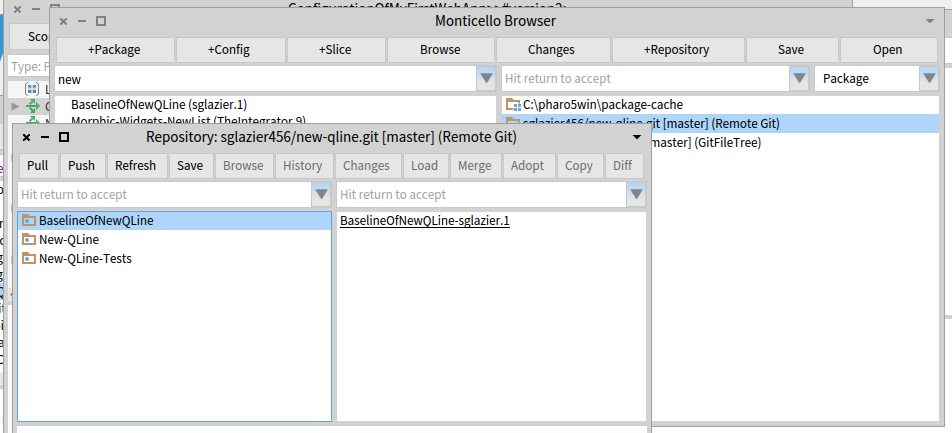
Hi Dale, what I'd like is a way to detect if credentials are necessary on a https repo, and add (or ask for them) at the smalltalk level. It would then be easy to handle that in the https url. Would anyone know how to do that with Zn? I know git has some kind of credentials cache for https, but I don't know how to use it. Thierry 2016-07-25 15:20 GMT+02:00 Dale Henrichs <dale.henrichs@gemtalksystems.com>:
Thierry and Sean,
I am under the impression that the git has several alternatives for dealing with the problem s inherent in using https[1]. I did some experimenting a year ago with github and I seem to recall that it was possible to use one of the techniques described (I think I used a password with a cache) transparently ... Of course ssh credentials are much more convenient ...
Dale
[1] https://git-scm.com/docs/gitcredentials
On 7/25/16 4:20 AM, Thierry Goubier wrote:
Hi Sean,
I think the issue is simply that GitFileTree does not support https with authentification. You need to switch to ssh with keys.
Now, about the various options you add on the git push command line (diff.mnemonicprefix, core.quotepath), could you detail them? The seems to be unnecessary in the git development scenarios I've seen so far.
Also note that master:master may be wrong, because you could be switching to another branch.
I expect all those issues to be taken care of through the new tools in development for Pharo6.
Regards,
Thierry
2016-07-25 10:04 GMT+02:00 Sean Glazier <sglazier456@gmail.com>:
some more information the git command that it runs is git -C "C:\pharo5win\new-qline" This is run in the method MCFileTreeGitRemoteRepository>>runProcessWrapperGitCommand: anArrayOfStrings in: aDirectory.
It is stuck on the line: command waitForExit.
this wait for exit has no timeout to it and you wait forever. I found out on windows the user interrupt is alt . Just like the Mac ;-)
I have no error in the error stream at all.
From the source tree tool the command should look more like this: git -c diff.mnemonicprefix=false -c core.quotepath=false push -v --tags origin master:master
and then followed by the -C "C:\pharo5win\new-qline"
git -C "C:\pharo5win\new-qline" -c diff.mnemonicprefix=false -c core.quotepath=false push -v --tags origin master:master
However doing this from a command line it asks for the users password like thus C:\pharo5win\New-Qline>git -C "C:\pharo5win\new-qline" -c diff.mnemonicprefix=false -c core.quotepath=false push -v --tags origin master:master Pushing to https://sglazier456@bitbucket.org/sglazier456/new-qline.git Password for 'https://sglazier456@bitbucket.org':
to avoid the password prompt you can do this
git -C "C:\pharo5win\new-qline" -c diff.mnemonicprefix=false -c core.quotepath=false push https://username:password@myrepository.biz/file.git -v --tags origin master:master
you can also replace -v --tags origin master:master with --all as well in my case it would look like git -C "C:\pharo5win\new-qline" -c diff.mnemonicprefix=false -c core.quotepath=false push https://sglazier456:MY_PASSWORD@bitbucket.org/sglazier456/new-qline.git -v --tags origin master:master
OR git -C "C:\pharo5win\new-qline" -c diff.mnemonicprefix=false -c core.quotepath=false push https://sglazier456:MY_PASSWORD@bitbucket.org/sglazier456/new-qline.git -all and that works with out the system waiting for a password. I notice that there is a class that has the username password for bit bucket in the method MCGitBasedNetworkRepository >> siteUsername: username sitePassword: pass "MCBitbucketRepository siteUsername: '' sitePassword: ''" "MCGitHubRepository siteUsername: '' sitePassword: ''" self siteUsername: username; sitePassword: pass I tried setting it up with the username and password in the url for the remote repository and no luck. the class MCFileTreeGitRemoteRepository should override the getPull and gitPush so as to include the url with the site name and password or there might be a need for a different creation class for the bitbucket remote repositories. However it is a standrad git command to be able to include the username password in the url. when one does a pull as well there is a hang as well for the same reasons. I am not attempting to hack this at the moment because I can use source tree to do the commits and pushes and pulls. I do think though since we have those commands available on the remote repos and people can mark it private requiring a username password. Also we should consider a repository configuration that specifys the SSH kaey and then run the command in the context of SSH. this would eliminate the username password issue and it is much more secure. SO since you are more experienced than I in this area of the code, I should ask how should we go about fixing the issue. Also were should I report this issue as well?
running the command from a cmd line produced the following: C:\pharo5win\New-Qline>git -C "C:\pharo5win\new-qline" usage: git [--version] [--help] [-C <path>] [-c name=value] [--exec-path[=<path>]] [--html-path] [--man-path] [--info-path] [-p|--paginate|--no-pager] [--no-replace-objects] [--bare] [--git-dir=<path>] [--work-tree=<path>] [--namespace=<name>] <command> [<args>]
The most commonly used git commands are: add Add file contents to the index bisect Find by binary search the change that introduced a bug branch List, create, or delete branches checkout Checkout a branch or paths to the working tree clone Clone a repository into a new directory commit Record changes to the repository diff Show changes between commits, commit and working tree, etc fetch Download objects and refs from another repository grep Print lines matching a pattern init Create an empty Git repository or reinitialize an existing one log Show commit logs merge Join two or more development histories together mv Move or rename a file, a directory, or a symlink pull Fetch from and integrate with another repository or a local branch push Update remote refs along with associated objects rebase Forward-port local commits to the updated upstream head reset Reset current HEAD to the specified state rm Remove files from the working tree and from the index show Show various types of objects status Show the working tree status tag Create, list, delete or verify a tag object signed with GPG
'git help -a' and 'git help -g' lists available subcommands and some concept guides. See 'git help <command>' or 'git help <concept>' to read about a specific subcommand or concept.
C:\pharo5win\New-Qline>
So according to the help the command it self is formulated incorrectly.
runProcessWrapperGitCommand: anArrayOfStrings in: aDirectory "Enclose all parameters with double quotes to protect."
| r aCommandString | aCommandString := String streamContents: [ :stream | anArrayOfStrings do: [ :e | stream nextPut: $"; nextPutAll: e; nextPutAll: '" ' ] ]. (Smalltalk at: #ProcessWrapper ifAbsent: [ self error: 'Please load ProcessWrapper' ]) ifNotNil: [ :pW | | command | command := pW new useStdout; useStderr; startWithCommand: self gitCommand , ' -C "' , (MCFileTreeFileUtils current directoryPathString: aDirectory) , '" ' , aCommandString; yourself. command waitForExit. self assert: command isRunning not. r := command upToEnd. command exitCode > 0 ifTrue: [ | errorString | errorString := command errorUpToEnd. errorString notEmpty ifTrue: [ MCFileTreeGitError new signal: 'Git error: ' , errorString ]. r := '' ] ]. ^ r
Kind Regards,
Sean Glazier
On Mon, Jul 25, 2016 at 1:01 AM, Sean Glazier < <sglazier456@gmail.com> sglazier456@gmail.com> wrote:
Yes,
I created in Bitbucket a repository named New-QLine. I created aBaselinOfNewQLine which just has stubs. I created 2 Packages. New-Qline and New-Qline-Tests each of these have 3 tags underneath and no classes defined since I wanted to ensure I would have no loading issue and so I can verify committing code and then doing a push and then I also wanted to verify doing a Pull. The picture below is clipped from my pharo5 image.
In the window Respository:sglazier456/new-qline.git [master] (Remote Git) shown below. The code at this point has been committed successfully and now I want to Push it to the repository. Once I hit the Push button the image freezes. I can press the x button on the main Pharo 5 window and I get the dialog do you want to quit with out saving.
I am assuming that the push is using a git command. I am not familiar with the Pharo 5 keyboard shortcuts. I tried control b along with some others in hopes of interrupting this process and bringing the image back and being able to debug. However, I was unsuccessful in that. I was thinking that I might need to supply a setting so the ssh session can use the privateKey I generated and then I can be verified and the command continues.
I am not sure what is going on yet. I thought I would ask to see if it is something simple I am missing.
If you need to I can email you my privateKey so you can try it against the same repository I am using. git@bitbucket.org:sglazier456/new-qline.git
Partial sceen shot showing the repository window is below.
[image: Inline image 1]
Thank you for your help and if you can point me to where I need to added a break point I can provide more information :-)
Kind Regards,
Sean Glazier
On Mon, Jul 25, 2016 at 12:37 AM, Dale Henrichs < <dale.henrichs@gemtalksystems.com>dale.henrichs@gemtalksystems.com> wrote:
I'd be interested in making this work ... could you supply additional details about the problems you are seeing perhaps we can fix the problems?
Dale
On 7/24/16 6:42 PM, Sean P. DeNigris wrote:
Dale Henrichs-3 wrote
Yes, Metacello supports bitbucket:// repos...
N.B. IIRC I wasn't able to use it for my private projects because it doesn't work with private repos accessed via SSH
----- Cheers, Sean -- View this message in context: <http://forum.world.st/Can-GitHubcello-be-used-against-BitBucket-tp4907386p49...> http://forum.world.st/Can-GitHubcello-be-used-against-BitBucket-tp4907386p49... Sent from the Pharo Smalltalk Users mailing list archive at Nabble.com.
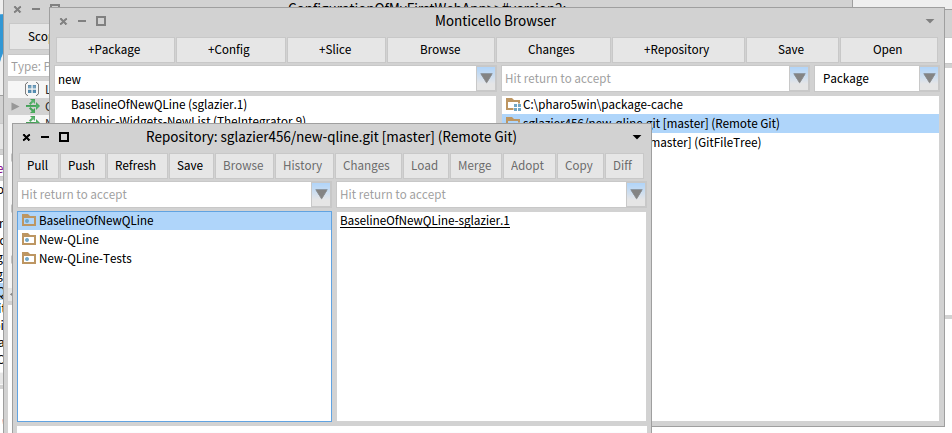
On 7/25/16 6:40 AM, Thierry Goubier wrote:
Hi Dale,
what I'd like is a way to detect if credentials are necessary on a https repo, and add (or ask for them) at the smalltalk level. Well the user should know from the get-go that they are using a private repo and if they supply an https: scheme then you can pretty much know that sooner or later you will need credentials It would then be easy to handle that in the https url. Would anyone know how to do that with Zn? Take a look at MetacelloPharo30Platform>>downloadJSON:username:pass: for and example of how to download with HTTPS credentials using Zinc.
I know git has some kind of credentials cache for https, but I don't know how to use it. Yeah the git credentials man page isn't quite as useful as you'd like :) I think that the solutions are os/platform dependent and IIRC none of them are convenient ...
Dale
2016-07-25 16:40 GMT+02:00 Dale Henrichs <dale.henrichs@gemtalksystems.com>:
On 7/25/16 6:40 AM, Thierry Goubier wrote:
Hi Dale,
what I'd like is a way to detect if credentials are necessary on a https repo, and add (or ask for them) at the smalltalk level.
Well the user should know from the get-go that they are using a private repo and if they supply an https: scheme then you can pretty much know that sooner or later you will need credentials
Ok.
It would then be easy to handle that in the https url. Would anyone know
how to do that with Zn?
Take a look at MetacelloPharo30Platform>>downloadJSON:username:pass: for and example of how to download with HTTPS credentials using Zinc.
I'll have a look. I tried a few urls(*) on Sean bitbucket example, and the difficulty is that base access to the repository is open (without authentication) and I need to understand how git create a push request to generate an url triggering an authentication :( (*) the response I got on those seems to be a login page instead of an authentication request :(
I know git has some kind of credentials cache for https, but I don't know how to use it.
Yeah the git credentials man page isn't quite as useful as you'd like :) I think that the solutions are os/platform dependent and IIRC none of them are convenient ...
In fact it gives a few hints to solve the problem outside Pharo :) Thierry
Dale
On 7/25/16 7:50 AM, Thierry Goubier wrote:
2016-07-25 16:40 GMT+02:00 Dale Henrichs <dale.henrichs@gemtalksystems.com <mailto:dale.henrichs@gemtalksystems.com>>:
On 7/25/16 6:40 AM, Thierry Goubier wrote:
Hi Dale,
what I'd like is a way to detect if credentials are necessary on a https repo, and add (or ask for them) at the smalltalk level.
Well the user should know from the get-go that they are using a private repo and if they supply an https: scheme then you can pretty much know that sooner or later you will need credentials
Ok.
It would then be easy to handle that in the https url. Would anyone know how to do that with Zn?
Take a look at MetacelloPharo30Platform>>downloadJSON:username:pass: for and example of how to download with HTTPS credentials using Zinc.
I'll have a look. I tried a few urls(*) on Sean bitbucket example, and the difficulty is that base access to the repository is open (without authentication) and I need to understand how git create a push request to generate an url triggering an authentication :(
(*) the response I got on those seems to be a login page instead of an authentication request :(
ah yes of course ... thus the need to use git credentials[1] ... Okay, I found GitHub documentation for "Caching Your GitHub password" for linux[2], windows[3], mac[4], and all[5]. these solutions are git-specific and not github specific so they should work for bitbucket just as well ... Dale [1] https://git-scm.com/docs/gitcredentials [2] https://help.github.com/articles/caching-your-github-password-in-git/#platfo... [3] https://help.github.com/articles/caching-your-github-password-in-git/#platfo... [4] https://help.github.com/articles/caching-your-github-password-in-git/#platfo... [5] https://help.github.com/articles/caching-your-github-password-in-git/#platfo...

Just a couple of articles to head off problems in case you first tried SSH and then switched to HTTPS. https://confluence.atlassian.com/bitbucket/change-the-remote-url-to-your-rep... https://help.github.com/articles/changing-a-remote-s-url/ cheers -ben On Mon, Jul 25, 2016 at 11:01 PM, Dale Henrichs <dale.henrichs@gemtalksystems.com> wrote:
On 7/25/16 7:50 AM, Thierry Goubier wrote:
2016-07-25 16:40 GMT+02:00 Dale Henrichs <dale.henrichs@gemtalksystems.com>:
On 7/25/16 6:40 AM, Thierry Goubier wrote:
Hi Dale,
what I'd like is a way to detect if credentials are necessary on a https repo, and add (or ask for them) at the smalltalk level.
Well the user should know from the get-go that they are using a private repo and if they supply an https: scheme then you can pretty much know that sooner or later you will need credentials
Ok.
It would then be easy to handle that in the https url. Would anyone know how to do that with Zn?
Take a look at MetacelloPharo30Platform>>downloadJSON:username:pass: for and example of how to download with HTTPS credentials using Zinc.
I'll have a look. I tried a few urls(*) on Sean bitbucket example, and the difficulty is that base access to the repository is open (without authentication) and I need to understand how git create a push request to generate an url triggering an authentication :(
(*) the response I got on those seems to be a login page instead of an authentication request :(
ah yes of course ... thus the need to use git credentials[1] ... Okay, I found GitHub documentation for "Caching Your GitHub password" for linux[2], windows[3], mac[4], and all[5]. these solutions are git-specific and not github specific so they should work for bitbucket just as well ...
Dale
[1] https://git-scm.com/docs/gitcredentials [2] https://help.github.com/articles/caching-your-github-password-in-git/#platfo... [3] https://help.github.com/articles/caching-your-github-password-in-git/#platfo... [4] https://help.github.com/articles/caching-your-github-password-in-git/#platfo... [5] https://help.github.com/articles/caching-your-github-password-in-git/#platfo...
As far as I can tell, the discussion is not about GitHubcello. If you need a help with GitHubcello please CC me, because I cannot follow everything. Uko
On 25 Jul 2016, at 17:50, Ben Coman <btc@openinworld.com> wrote:
Just a couple of articles to head off problems in case you first tried SSH and then switched to HTTPS.
https://confluence.atlassian.com/bitbucket/change-the-remote-url-to-your-rep...
https://help.github.com/articles/changing-a-remote-s-url/
cheers -ben
On Mon, Jul 25, 2016 at 11:01 PM, Dale Henrichs <dale.henrichs@gemtalksystems.com> wrote:
On 7/25/16 7:50 AM, Thierry Goubier wrote:
2016-07-25 16:40 GMT+02:00 Dale Henrichs <dale.henrichs@gemtalksystems.com>:
On 7/25/16 6:40 AM, Thierry Goubier wrote:
Hi Dale,
what I'd like is a way to detect if credentials are necessary on a https repo, and add (or ask for them) at the smalltalk level.
Well the user should know from the get-go that they are using a private repo and if they supply an https: scheme then you can pretty much know that sooner or later you will need credentials
Ok.
It would then be easy to handle that in the https url. Would anyone know how to do that with Zn?
Take a look at MetacelloPharo30Platform>>downloadJSON:username:pass: for and example of how to download with HTTPS credentials using Zinc.
I'll have a look. I tried a few urls(*) on Sean bitbucket example, and the difficulty is that base access to the repository is open (without authentication) and I need to understand how git create a push request to generate an url triggering an authentication :(
(*) the response I got on those seems to be a login page instead of an authentication request :(
ah yes of course ... thus the need to use git credentials[1] ... Okay, I found GitHub documentation for "Caching Your GitHub password" for linux[2], windows[3], mac[4], and all[5]. these solutions are git-specific and not github specific so they should work for bitbucket just as well ...
Dale
[1] https://git-scm.com/docs/gitcredentials [2] https://help.github.com/articles/caching-your-github-password-in-git/#platfo... [3] https://help.github.com/articles/caching-your-github-password-in-git/#platfo... [4] https://help.github.com/articles/caching-your-github-password-in-git/#platfo... [5] https://help.github.com/articles/caching-your-github-password-in-git/#platfo...
On 7/24/16 6:42 PM, Sean P. DeNigris wrote:
Dale Henrichs-3 wrote
Yes, Metacello supports bitbucket:// repos... N.B. IIRC I wasn't able to use it for my private projects because it doesn't work with private repos accessed via SSH
Could it be that the issue has to do with https authentication? It is possible to define a username and password for https authentication for BitBucket: MCBitbucketRepository siteUsername: '' sitePassword: '' Did you try this option? Or was the issue in a different area? Dale
On Mon, Jul 25, 2016 at 9:13 AM, Dale Henrichs < dale.henrichs@gemtalksystems.com> wrote:
M
Hi, I saw that class but did not know how to apply it. in metacello when i clicked on +Respository the was not a pattern for using it in the git remote repository pattern. Please forgive my ignorance since I am just coming up to speed using Pharo. I have been a long time cincomer and the tools set are different. I need to try and become an expert at it quick. I did not see it in any documentation on how to configure the remote repository. the following is the list I get when I add repository. [image: Inline image 1] then choosing the remote git repository I see: â[image: Inline image 2]â I guess I should be able to specify the siteUsername: and the site password somehow to get the correct repository configuration. I was trying different patterns but it was not working. I guess that is my ignorance showing. I have not used Pharo against a Git repo before. Kind Regards, Sean Glazier
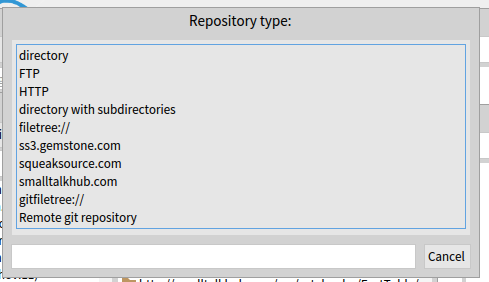
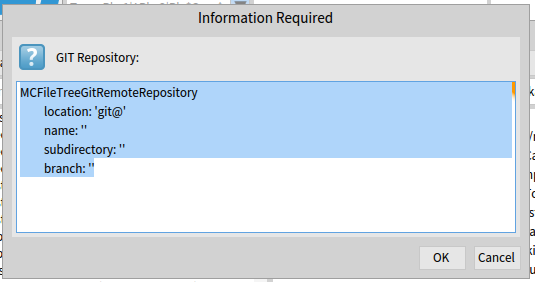
Hi Sean, what you see here is the Monticello way of expressing repositories, and it was my choice to limit it to ssh access to git; Metacello uses a different syntax and allways work with the web api of each web git provider (github / bitbucket) over https. Thierry 2016-07-25 15:38 GMT+02:00 Sean Glazier <sglazier456@gmail.com>:
On Mon, Jul 25, 2016 at 9:13 AM, Dale Henrichs < dale.henrichs@gemtalksystems.com> wrote:
M
Hi, I saw that class but did not know how to apply it. in metacello when i clicked on +Respository the was not a pattern for using it in the git remote repository pattern. Please forgive my ignorance since I am just coming up to speed using Pharo. I have been a long time cincomer and the tools set are different. I need to try and become an expert at it quick.
I did not see it in any documentation on how to configure the remote repository. the following is the list I get when I add repository. [image: Inline image 1]
then choosing the remote git repository I see:
â[image: Inline image 2]â
I guess I should be able to specify the siteUsername: and the site password somehow to get the correct repository configuration. I was trying different patterns but it was not working.
I guess that is my ignorance showing. I have not used Pharo against a Git repo before.
Kind Regards,
Sean Glazier
HI all I got the metacello talking to the bitbucket repository. It was not easy since the bit buck source tree tools took quite a while to get working. I had trouble with the SSH keys and needing to find the little-hidden tool setting so it would select it but only after a bloody reboot. I also got git file tree looking at the filesystem. using the remote git repository I was able to commit my packages and they showed up nicely on the git file tree. However when I went to do a push the image is running but I can not get it to respond. a screen shot is at the bottom. Since the Source tree tool had the same problem, I am assuming that I might have a similar issue. Is there a setting where I have to point Pharo to the sslPrivateKey. The packages were empty so it should not take log to do a push. I am still waiting for the image. Also forgive my ignorance is there a Key combo to interrupt this or is it hung because it is waiting for a git command that is not returning? [image: Inline image 1] Kind Regards, Sean Glazier On Sun, Jul 24, 2016 at 3:59 PM, Dale Henrichs < dale.henrichs@gemtalksystems.com> wrote:
On 7/24/16 9:55 AM, Yuriy Tymchuk wrote:
Well, AFAIK bitbucket is supported by Metacello, so if there is API good enough to get the directory tree of a repo it should be possible to create some kind of BitBucketcello
Yes, Metacello supports bitbucket:// repos...
Dale
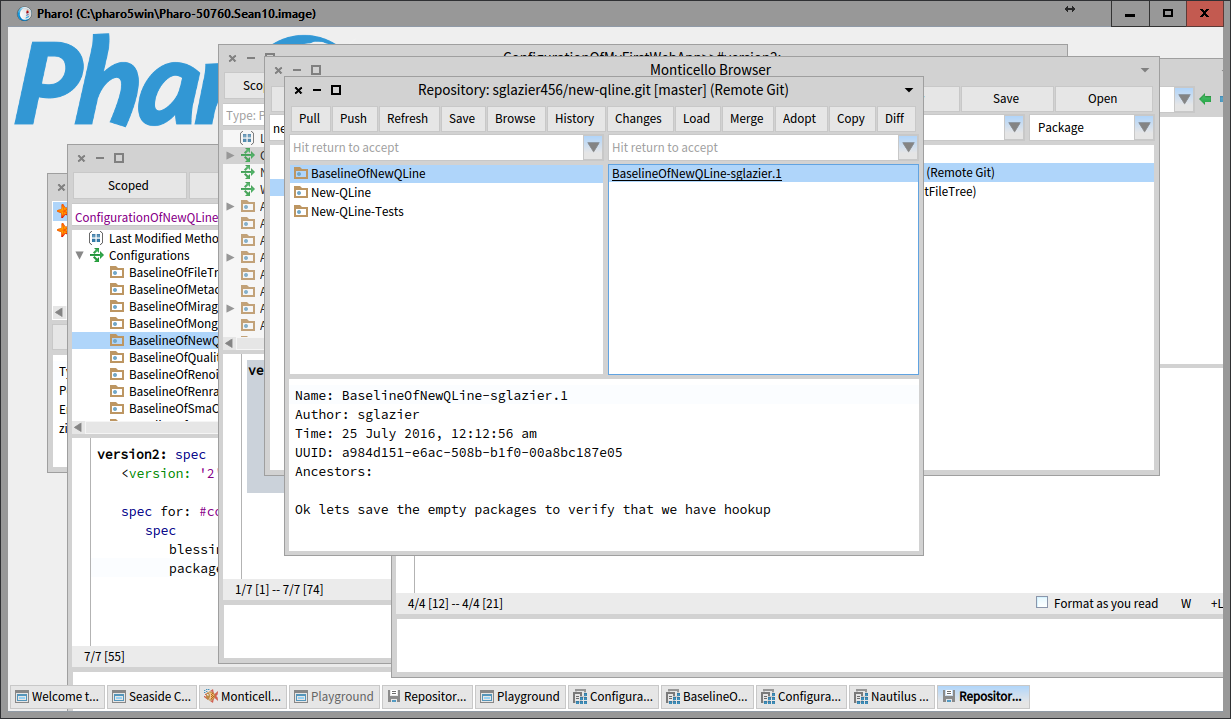
participants (7)
-
 Ben Coman
 -
 Dale Henrichs
 -
 Nicolas Passerini
 -
 Sean Glazier
 -
 Sean P. DeNigris
 -
 Thierry Goubier
 -
 Yuriy Tymchuk