the amazing Tools > Finder > Examples tool

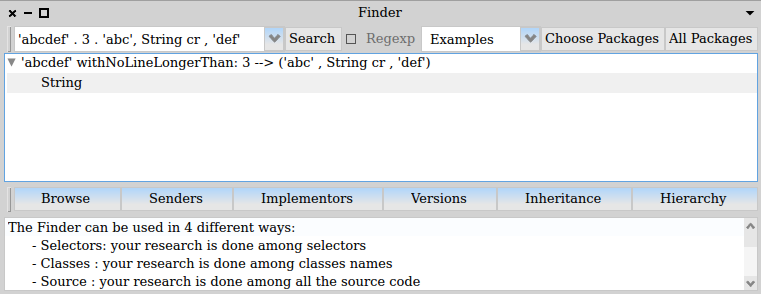
Just wanting to relate a recent experience using Examples in the Finder, since this is a great tool that I didn't learn how to use for a long time. I have just now again been pleasantly surprised and mildly amazed that it works a well as it does. Perhaps there is someone out there might gain from an introduction to its use... I am creating a mouse-over popup using Rossal, for which I needed to format a string to a maximum width. This is something I thought likely already done within the standard image but before rushing to the mail list to ask an old-hand where I might find it, I thought I'd just try... 1. World Menu > Tools > Finder 2. Choosing "Examples" from the pull down menu. 3. In the search-input-field typing: 'abcdef' . 3 . 'abc', String cr , 'def' 4. Clicking the <Search> button. which gave me one result String>>withNoLineLongerThan: that was exactly what I needed. You will notice that the search input field is an array of three items: * 'abcdef' - this first item is the receiver of the message * 3 - middle items are parameters to the message * 'abc', String cr , 'def' - the last item is the message-return-value The really cool part of this is being able to construct the message-return-value as an expression, to place a newline carriage-return where I would expect it to appear. cheers -ben
participants (1)
-
 Ben Coman