Morphic, Canvas, and Drawing Polygon Borders

I am having some trouble accurately drawing polygons using Morphic and the various Canvas types. My task is to recreate the Mac OS Platinum style buttons, and do be as pixel-accurate as I can. For the basic button, this involves creating a rectangle whose corners are always fattened by 2px on each side, no matter the extent of the underlying morph: â I can achieve this kind of outline when drawing individual lines one at a time with a Canvas: ```smalltalk canvas := FormCanvas extent: 150@30. rect := Rectangle point: (0@0) point: (150@30). vertices := { (rect left)@(rect top + 2). (rect left + 2)@(rect top). (rect right - 3)@(rect top). (rect right - 1)@(rect top + 2). (rect right -1)@(rect bottom - 3). (rect right - 3)@(rect bottom -1). (rect left + 2)@(rect bottom - 1). (rect left)@(rect bottom - 3). "(rect left)@(rect top + 2)" }. canvas line: (vertices at: 1) to: (vertices at: 2) color: Color black; line: (vertices at: 2) to: (vertices at: 3) color: Color black; line: (vertices at: 3) to: (vertices at: 4) color: Color black; line: (vertices at: 4) to: (vertices at: 5) color: Color black; line: (vertices at: 5) to: (vertices at: 6) color: Color black; line: (vertices at: 6) to: (vertices at: 7) color: Color black; line: (vertices at: 7) to: (vertices at: 8) color: Color black; line: (vertices at: 8) to: (vertices at: 1) color: Color black. canvas form asMorph openInWindow. ``` Which gives me: â But using the native Polygon drawing features of Canvas yield a different, and incorrect, result: ```smalltalk canvas := FormCanvas extent: 150@30. rect := Rectangle point: (0@0) point: (150@30). vertices := { (rect left)@(rect top + 2). (rect left + 2)@(rect top). (rect right - 3)@(rect top). (rect right - 1)@(rect top + 2). (rect right -1)@(rect bottom - 3). (rect right - 3)@(rect bottom -1). (rect left + 2)@(rect bottom - 1). (rect left)@(rect bottom - 3). "(rect left)@(rect top + 2)" }. canvas drawPolygon: vertices fillStyle: Color transparent borderWidth: 1 borderColor: Color black. canvas form asMorph openInHand. ``` â Either this is some kind of limitation in BalloonCanvas/BalloonEngine (which "becomes" the canvas for polygon draw operations) or I am doing something terribly wrong. Ideally I can trace this shape as a border, since I'll need to trace yet more additional borders around it (like the "default" button in Platinum, which has a fat complex border). Borders are already kind of complicated, so any help you all can provide would be much appreciated. FYI this same behavior is present in Squeak. -- Eric


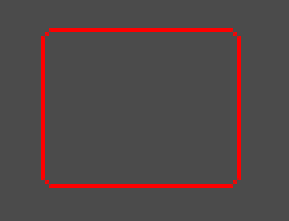
Hi Eric, I don't know exactly how Borders (BorderdMorphs) are drawn, but a simple way to create that kind of 1px border with 2px round edges may be using the a borderd morph: BorderedMorph new fillStyle: Color transparent; borderStyle: (RoundedBorder new cornerRadius: 2; width: 1; baseColor: Color red) Combining this with a Complex border to create that button with different colors for left-up/right-bottom edges is maybe more difficult. 2018-05-16 20:48 GMT+02:00 Eric Gade <eric.gade@gmail.com>:
I am having some trouble accurately drawing polygons using Morphic and the various Canvas types.
My task is to recreate the Mac OS Platinum style buttons, and do be as pixel-accurate as I can. For the basic button, this involves creating a rectangle whose corners are always fattened by 2px on each side, no matter the extent of the underlying morph:
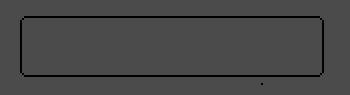
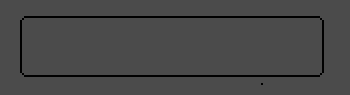
â I can achieve this kind of outline when drawing individual lines one at a time with a Canvas:
```smalltalk
canvas := FormCanvas extent: 150@30.
rect := Rectangle point: (0@0) point: (150@30).
vertices := { (rect left)@(rect top + 2). (rect left + 2)@(rect top). (rect right - 3)@(rect top). (rect right - 1)@(rect top + 2). (rect right -1)@(rect bottom - 3). (rect right - 3)@(rect bottom -1). (rect left + 2)@(rect bottom - 1). (rect left)@(rect bottom - 3). "(rect left)@(rect top + 2)" }.
canvas line: (vertices at: 1) to: (vertices at: 2) color: Color black; line: (vertices at: 2) to: (vertices at: 3) color: Color black; line: (vertices at: 3) to: (vertices at: 4) color: Color black; line: (vertices at: 4) to: (vertices at: 5) color: Color black; line: (vertices at: 5) to: (vertices at: 6) color: Color black; line: (vertices at: 6) to: (vertices at: 7) color: Color black; line: (vertices at: 7) to: (vertices at: 8) color: Color black; line: (vertices at: 8) to: (vertices at: 1) color: Color black.
canvas form asMorph openInWindow.
```
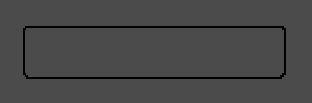
Which gives me:
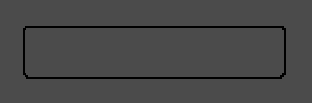
â But using the native Polygon drawing features of Canvas yield a different, and incorrect, result:
```smalltalk
canvas := FormCanvas extent: 150@30.
rect := Rectangle point: (0@0) point: (150@30).
vertices := { (rect left)@(rect top + 2). (rect left + 2)@(rect top). (rect right - 3)@(rect top). (rect right - 1)@(rect top + 2). (rect right -1)@(rect bottom - 3). (rect right - 3)@(rect bottom -1). (rect left + 2)@(rect bottom - 1). (rect left)@(rect bottom - 3). "(rect left)@(rect top + 2)" }.
canvas drawPolygon: vertices fillStyle: Color transparent borderWidth: 1 borderColor: Color black.
canvas form asMorph openInHand.
```
â Either this is some kind of limitation in BalloonCanvas/BalloonEngine (which "becomes" the canvas for polygon draw operations) or I am doing something terribly wrong.
Ideally I can trace this shape as a border, since I'll need to trace yet more additional borders around it (like the "default" button in Platinum, which has a fat complex border).
Borders are already kind of complicated, so any help you all can provide would be much appreciated.
FYI this same behavior is present in Squeak.
-- Eric

participants (2)
-
 Eric Gade
 -
 Nicolai Hess