
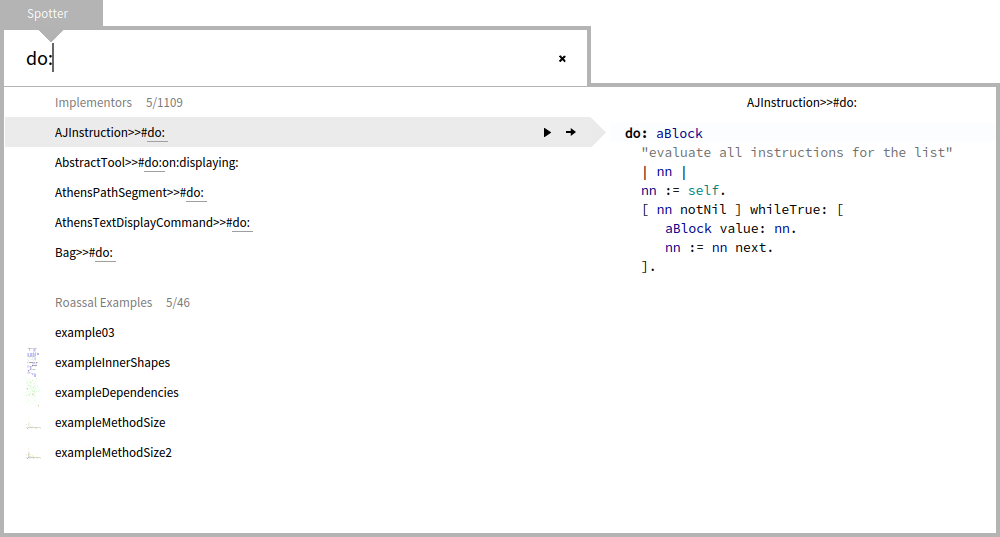
Hi, The Glamorous Team is happy to present a new feature in Spotter: preview (you toggle it with Cmd+p). We think this boosts the usefulness of the Spotter interface significantly. [image: Inline image 1] For more details, please take a look at: http://www.humane-assessment.com/blog/boosting-gtspotter-with-preview This is available in the Moose image, and it will soon be integrated in the Pharo one. Please let us know what you think. Cheers, Doru -- www.tudorgirba.com "Every thing has its own flow"

Really cool. What's the key combination for Windows? Thanks Doru *Lic. Ignacio Sniechowski, MBA* *Prosavic SRL* *Tel: (011) 4542-6714* On Mon, Feb 2, 2015 at 6:02 PM, Tudor Girba <tudor@tudorgirba.com> wrote:
Hi,
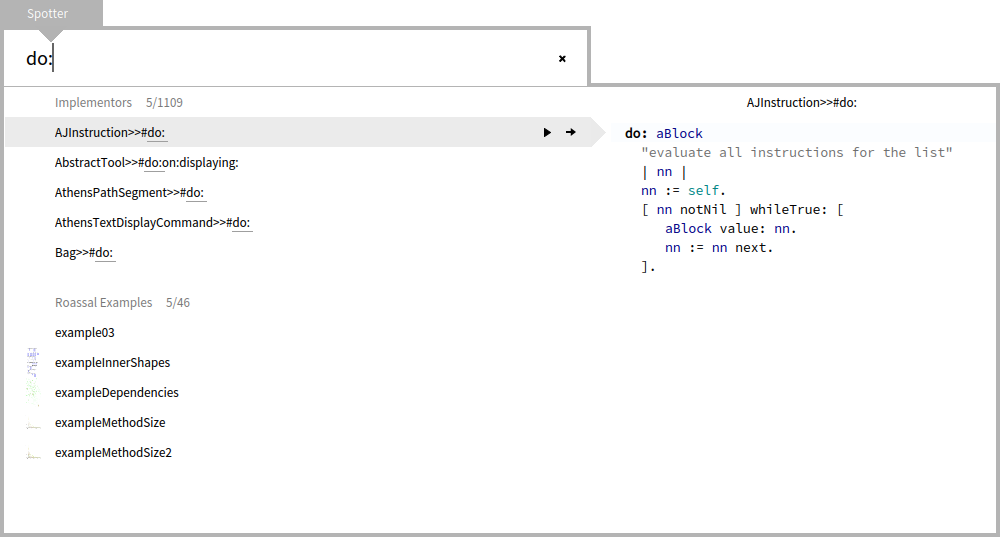
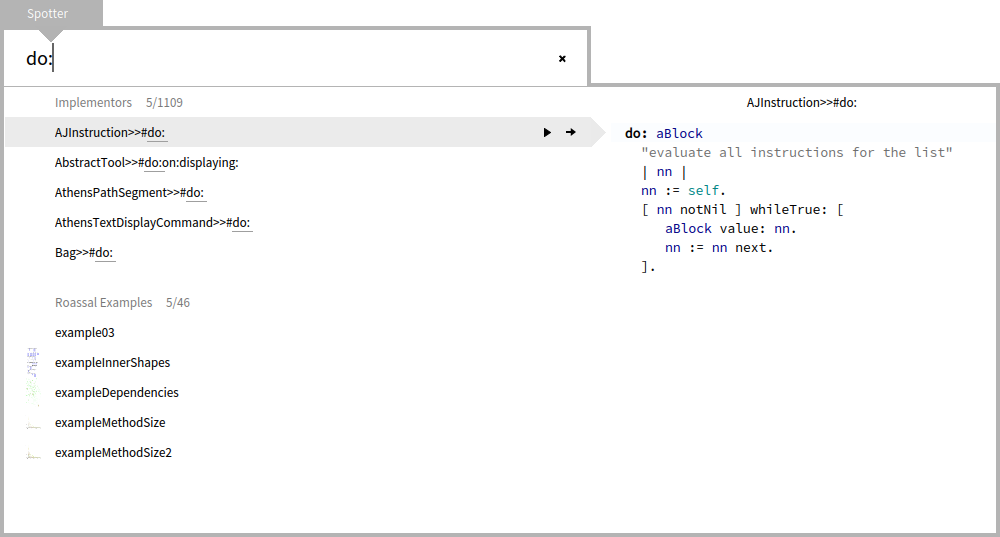
The Glamorous Team is happy to present a new feature in Spotter: preview (you toggle it with Cmd+p). We think this boosts the usefulness of the Spotter interface significantly.
[image: Inline image 1]
For more details, please take a look at: http://www.humane-assessment.com/blog/boosting-gtspotter-with-preview
This is available in the Moose image, and it will soon be integrated in the Pharo one.
Please let us know what you think.
Cheers, Doru
-- www.tudorgirba.com
"Every thing has its own flow"
Hi, The keybindings are: - trigger Spotter with Shift+Enter. - toggle preview with Cmd+P (or Alt+P on Windows/Linux) Doru On Mon, Feb 2, 2015 at 10:06 PM, Ignacio Sniechowski <0800nacho@gmail.com> wrote:
Really cool. What's the key combination for Windows? Thanks Doru
*Lic. Ignacio Sniechowski, MBA* *Prosavic SRL*
*Tel: (011) 4542-6714*
On Mon, Feb 2, 2015 at 6:02 PM, Tudor Girba <tudor@tudorgirba.com> wrote:
Hi,
The Glamorous Team is happy to present a new feature in Spotter: preview (you toggle it with Cmd+p). We think this boosts the usefulness of the Spotter interface significantly.
[image: Inline image 1]
For more details, please take a look at: http://www.humane-assessment.com/blog/boosting-gtspotter-with-preview
This is available in the Moose image, and it will soon be integrated in the Pharo one.
Please let us know what you think.
Cheers, Doru
-- www.tudorgirba.com
"Every thing has its own flow"
-- www.tudorgirba.com "Every thing has its own flow"

The keybindings are: - trigger Spotter with Shift+Enter. - toggle preview with Cmd+P (or Alt+P on Windows/Linux)
It would be great to have all the keybindings (also moving inside the Spotter) written somewhere in one place (for all platforms) so one doesn't need to go scavenge blogs and source code for them. And also as someone pointed out during Pharo Days... to have tooltips above the buttons showing the shortcut. But I love this thing... you always add something cool. :) Peter

"And also as someone pointed out during Pharo Days... to have tooltips above the buttons showing the shortcut." +1 GT tools have greatly enhanced the Pharo experience. I do think that GTInspector and GTPlayground could use a GUI cleanup in their design but GTSpotter is gorgeously well done. The nice thing about this tool is that the way its designed it can replace pretty much every single tool inside Pharo. I could imagine myself coding solely inside it. Who knows maybe in the future :) On Tue, Feb 3, 2015 at 6:35 PM, Peter Uhnák <i.uhnak@gmail.com> wrote:
The keybindings are:
- trigger Spotter with Shift+Enter. - toggle preview with Cmd+P (or Alt+P on Windows/Linux)
It would be great to have all the keybindings (also moving inside the Spotter) written somewhere in one place (for all platforms) so one doesn't need to go scavenge blogs and source code for them. And also as someone pointed out during Pharo Days... to have tooltips above the buttons showing the shortcut.
But I love this thing... you always add something cool. :)
Peter
Hi, Indeed, we will certainly add tooltips. Cheers, Doru On Tue, Feb 3, 2015 at 5:35 PM, Peter Uhnák <i.uhnak@gmail.com> wrote:
The keybindings are:
- trigger Spotter with Shift+Enter. - toggle preview with Cmd+P (or Alt+P on Windows/Linux)
It would be great to have all the keybindings (also moving inside the Spotter) written somewhere in one place (for all platforms) so one doesn't need to go scavenge blogs and source code for them. And also as someone pointed out during Pharo Days... to have tooltips above the buttons showing the shortcut.
But I love this thing... you always add something cool. :)
Peter
-- www.tudorgirba.com "Every thing has its own flow"

nacho wrote
Really cool.
Yes, awesome!! Why not preview by default (like Mac's Spotlight)? At Smalltalk's high-granularity, I would guess there's not much of a lag, no? ----- Cheers, Sean -- View this message in context: http://forum.world.st/spotter-preview-tp4803299p4803400.html Sent from the Pharo Smalltalk Users mailing list archive at Nabble.com.
Hi, We thought that the visual space occupied when in preview mode might be too much. But, once you open the preview, it stays opened for subsequent usages. Cheers, Doru On Tue, Feb 3, 2015 at 4:09 PM, Sean P. DeNigris <sean@clipperadams.com> wrote:
nacho wrote
Really cool.
Yes, awesome!! Why not preview by default (like Mac's Spotlight)? At Smalltalk's high-granularity, I would guess there's not much of a lag, no?
----- Cheers, Sean -- View this message in context: http://forum.world.st/spotter-preview-tp4803299p4803400.html Sent from the Pharo Smalltalk Users mailing list archive at Nabble.com.
-- www.tudorgirba.com "Every thing has its own flow"

On 02 Feb 2015, at 22:02, Tudor Girba <tudor@tudorgirba.com> wrote:
Hi,
The Glamorous Team is happy to present a new feature in Spotter: preview (you toggle it with Cmd+p). We think this boosts the usefulness of the Spotter interface significantly.
<spotter-method-preview.png>
For more details, please take a look at: http://www.humane-assessment.com/blog/boosting-gtspotter-with-preview <http://www.humane-assessment.com/blog/boosting-gtspotter-with-preview>
This is available in the Moose image, and it will soon be integrated in the Pharo one.
This is now in Pharo4 update 473 (the latest one from today). Marcus

Am 03.02.2015 um 13:25 schrieb Marcus Denker <marcus.denker@inria.fr>:
On 02 Feb 2015, at 22:02, Tudor Girba <tudor@tudorgirba.com <mailto:tudor@tudorgirba.com>> wrote:
Hi,
The Glamorous Team is happy to present a new feature in Spotter: preview (you toggle it with Cmd+p). We think this boosts the usefulness of the Spotter interface significantly.
<spotter-method-preview.png>
Really cool. I updated my pharo4 to 474 and can see the preview. But once switched on it seems to stay that way. Cmd+P does not remove the preview. Closing and opening the spotter again shows the preview opened. Norbert
For more details, please take a look at: http://www.humane-assessment.com/blog/boosting-gtspotter-with-preview <http://www.humane-assessment.com/blog/boosting-gtspotter-with-preview>
This is available in the Moose image, and it will soon be integrated in the Pharo one.
This is now in Pharo4 update 473 (the latest one from today).
Marcus
Hi, Hmm. I cannot reproduce your problem. I do this: - Shift+Enter - Spotter is opened without preview - Cmd+P - preview is opened - Esc - Shift+Enter - Spotter is opened with preview - Cmd+P - preview is closed - Shift+Enter - Spotter is opened without preview Does this not work for you in this way? Doru On Wed, Feb 4, 2015 at 10:22 AM, Norbert Hartl <norbert@hartl.name> wrote:
Am 03.02.2015 um 13:25 schrieb Marcus Denker <marcus.denker@inria.fr>:
On 02 Feb 2015, at 22:02, Tudor Girba <tudor@tudorgirba.com> wrote:
Hi,
The Glamorous Team is happy to present a new feature in Spotter: preview (you toggle it with Cmd+p). We think this boosts the usefulness of the Spotter interface significantly.
<spotter-method-preview.png>
Really cool. I updated my pharo4 to 474 and can see the preview. But once switched on it seems to stay that way. Cmd+P does not remove the preview. Closing and opening the spotter again shows the preview opened.
Norbert
For more details, please take a look at: http://www.humane-assessment.com/blog/boosting-gtspotter-with-preview
This is available in the Moose image, and it will soon be integrated in the Pharo one.
This is now in Pharo4 update 473 (the latest one from today).
Marcus
-- www.tudorgirba.com "Every thing has its own flow"
Am 04.02.2015 um 13:54 schrieb Tudor Girba <tudor@tudorgirba.com>:
Hi,
Hmm. I cannot reproduce your problem. I do this: - Shift+Enter - Spotter is opened without preview - Cmd+P - preview is opened - Esc - Shift+Enter - Spotter is opened with preview - Cmd+P - preview is closed - Shift+Enter - Spotter is opened without preview
Does this not work for you in this way?
Hmm, now it works. Sorry for the confusion. Now I have another problem. I had it twice that an inspector that was minimized for some time declines to be edited. Let's see what I can figure out. Norbert
Doru
On Wed, Feb 4, 2015 at 10:22 AM, Norbert Hartl <norbert@hartl.name <mailto:norbert@hartl.name>> wrote:
Am 03.02.2015 um 13:25 schrieb Marcus Denker <marcus.denker@inria.fr <mailto:marcus.denker@inria.fr>>:
On 02 Feb 2015, at 22:02, Tudor Girba <tudor@tudorgirba.com <mailto:tudor@tudorgirba.com>> wrote:
Hi,
The Glamorous Team is happy to present a new feature in Spotter: preview (you toggle it with Cmd+p). We think this boosts the usefulness of the Spotter interface significantly.
<spotter-method-preview.png>
Really cool. I updated my pharo4 to 474 and can see the preview. But once switched on it seems to stay that way. Cmd+P does not remove the preview. Closing and opening the spotter again shows the preview opened.
Norbert
For more details, please take a look at: http://www.humane-assessment.com/blog/boosting-gtspotter-with-preview <http://www.humane-assessment.com/blog/boosting-gtspotter-with-preview>
This is available in the Moose image, and it will soon be integrated in the Pharo one.
This is now in Pharo4 update 473 (the latest one from today).
Marcus
-- www.tudorgirba.com <http://www.tudorgirba.com/>
"Every thing has its own flow"

Hi, I really like Spotter. The preview feature makes me think that would be useful to have it in code completion. So often I use the wrong method because completion does not display class name. The ability to have code preview in code completion (and maybe class hierarchy too) would make me open far less browser I think. An easy first step may be that when I type Shift+enter to open Spotter it copies the word where the cursor is placed in a text editor in the Spotter search field. Cheers, Laurent Le lun. 2 févr. 2015 à 22:02, Tudor Girba <tudor@tudorgirba.com> a écrit :
Hi,
The Glamorous Team is happy to present a new feature in Spotter: preview (you toggle it with Cmd+p). We think this boosts the usefulness of the Spotter interface significantly.
For more details, please take a look at: http://www.humane-assessment.com/blog/boosting-gtspotter-with-preview
This is available in the Moose image, and it will soon be integrated in the Pharo one.
Please let us know what you think.
Cheers, Doru
-- www.tudorgirba.com
"Every thing has its own flow"
participants (8)
-
 Ignacio Sniechowski
 -
 kilon alios
 -
 Laurent
 -
 Marcus Denker
 -
 Norbert Hartl
 -
 Peter Uhnák
 -
 Sean P. DeNigris
 -
 Tudor Girba