Re: [Pharo-users] [Pharo-dev] FW: Label truncation in new Pharo 8.0 64-bit (stable)

On 2020-04-19 03:01, Sven Van Caekenberghe wrote:
Works for me (this font is larger than the default one). macOS, Pharo 9 64bit
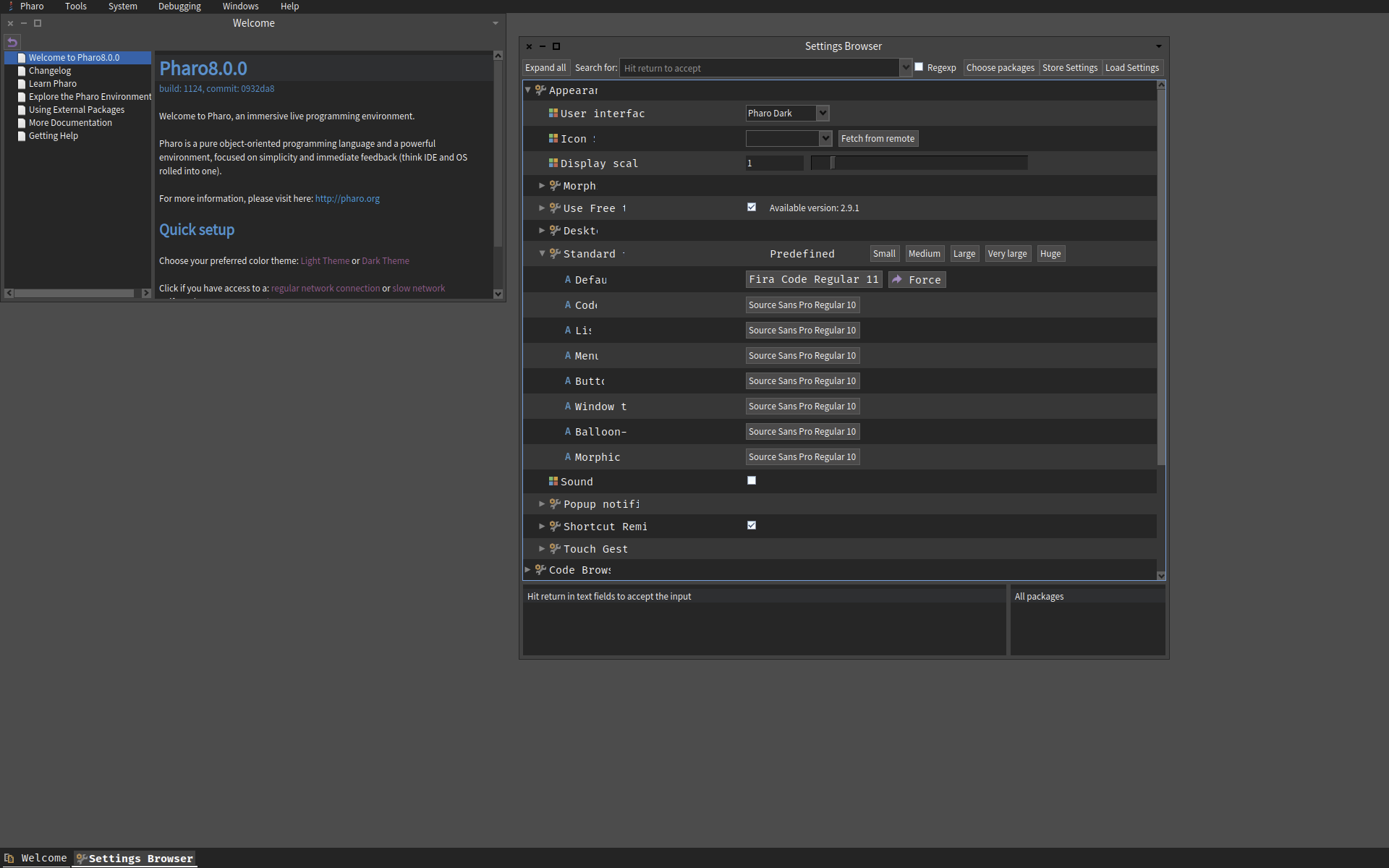
The screenshot below is taken on Windows 10 Pro. This time I did not change the theme. I did also update the fonts listed in the dialog before choosing FiraCode. The labels are still truncated. This is another new Pharo 8 64-bit (stable) with only the font changed. Why would formatting not work on Windows 10?
Can any Windows 10 Pharo users verify this problem?
On 19 Apr 2020, at 06:05, Shaping <shaping@uurda.org> wrote:
Can anyone suggest a fix for the truncated labels shown below in the screenshot of the Setting window? This happens in the Git client too.
Will Pharo tools be rewritten in Spec2, and does its formatting scheme solve generally the text-formatting problem, as font size is changed?
Why don't we opt for easy elastic rendering of GUIs by implementing Pharo as a web app? Has this been discussed? Willow is looking very good.
Shaping From: Pharo-users [mailto:pharo-users-bounces@lists.pharo.org] On Behalf Of Shaping Sent: Saturday, 18 April, 2020 04:16 To: 'Any question about pharo is welcome' <pharo-users@lists.pharo.org>; 'Pharo Development List' <pharo-dev@lists.pharo.org> Subject: [Pharo-users] Label truncation in new Pharo 8.0 64-bit (stable)
Hi everyone.
Below is a Pharo 8.0 64-bit (stable) image (installed with the new Launcher 2.0) with two changes:
-Light theme selected. -FiraCode 11 chosen as the default font.
<image001.png>
Truncated labels in the GUI on font change has always been a problem. Am I the only one experiencing this?
Shaping From: Pharo-users [mailto:pharo-users-bounces@lists.pharo.org] On Behalf Of Sanjay Minni Sent: Friday, 17 April, 2020 11:05 To: Any question about pharo is welcome <pharo-users@lists.pharo.org> Subject: Re: [Pharo-users] issues in setting up a new project on Github/Iceberg
Thanks tried just https and this worked too I suppose once cloned it does not really matter whether it was done using "clone from github.com" or "clone remote repository" --- Sanjay Minni +91-9900-902902
On Fri, 17 Apr 2020 at 19:43, Guillermo Polito <guillermopolito@gmail.com> wrote: Hi,
El 17 abr 2020, a las 15:30, Sanjay Minni <sm@planage.com> escribió:
Hi Guillermo,
Ok then given your comments - right now got it working as such - initially created as private in Github - changed to public - created clone from github - (did a repair repository (dont know why) and created "src" and designated it as source folder) - did a commit and push - changed repository back to private seems to work
can you give an example on how the "Remote URL" field is to be filled up - note its not taking HTTP as i am not sure about the syntax, assume SSH, Github, MyName, MyRepository, will try that as well
you should be able to use the URLs provided by the clone buttons in Github/gitlab/bitbucket, both https and ssh.
<image004.png>
note Just for Info to other users: I am using Windows 10, it seems to have SSH tools inbuilt and was able to use ssh (with passphrase) without hiccup, by putting my key files path in pharo setting-> ...-> use custom SSH keys, and uploading the .pub key in Github
:)
Thanks
--- Sanjay Minni +91-9900-902902
On Fri, 17 Apr 2020 at 18:36, Guillermo Polito <guillermopolito@gmail.com> wrote: Hi Sanjay,
This is a bug in Iceberg github integration that tries to access the repository to get metadata using Github REST API using anonymous access apparently. And since your project is private, this fails.
As a workaroung, I suggest you to clone using the last option that requires an url only:
<PastedGraphic-3.png>
This option will not use the Github API, so you should find no problems.
I'm planning doing an Iceberg sprint and fix many issues in the coming weeks. (Also if somebody wants to join, this is an open call :)) Guille
El 17 abr 2020, a las 12:49, Sanjay Minni <sm@planage.com> escribió:
Using Pharo 8 64 bit on Windows 10
I am trying to setup a new project on Github using Iceberg following the document "Manage your code with Iceberg dtd 25 March 2019)
After creating the project in github when I try to clone from Github as (I am at doc item1.4) The system throws an error and the project does not appear in iceberg although the files are downloaded. This happen in both cases whether I use HTTP or SSH
What is going wrong ?
also: assuming the clone is made, as per next item in doc 1.5, the directory "src" is created after the clone is made. is that correct ?... then how will the packages sources be mapped to ..\src <http://forum.world.st/file/t368721/1-GettingFirstEmptyProjFromGit.jpg>
<http://forum.world.st/file/t368721/0-GithubProjectCreation.jpg>
----- cheers, Sanjay -- Sent from: http://forum.world.st/Pharo-Smalltalk-Users-f1310670.html

Did you try another font ? Another size ? Did you try closing & reopening the Settings Browser ?
On 19 Apr 2020, at 16:31, shaping@uurda.org wrote:
On 2020-04-19 03:01, Sven Van Caekenberghe wrote: Works for me (this font is larger than the default one). macOS, Pharo 9 64bit
The screenshot below is taken on Windows 10 Pro. This time I did not change the theme. I did also update the fonts listed in the dialog before choosing FiraCode. The labels are still truncated. This is another new Pharo 8 64-bit (stable) with only the font changed. Why would formatting not work on Windows 10? Can any Windows 10 Pharo users verify this problem? <07e94bb1.png>
On 19 Apr 2020, at 06:05, Shaping <shaping@uurda.org> wrote:
Can anyone suggest a fix for the truncated labels shown below in the screenshot of the Setting window? This happens in the Git client too.
Will Pharo tools be rewritten in Spec2, and does its formatting scheme solve generally the text-formatting problem, as font size is changed?
Why donât we opt for easy elastic rendering of GUIs by implementing Pharo as a web app? Has this been discussed? Willow is looking very good.
Shaping From: Pharo-users [mailto:pharo-users-bounces@lists.pharo.org] On Behalf Of Shaping Sent: Saturday, 18 April, 2020 04:16 To: 'Any question about pharo is welcome' <pharo-users@lists.pharo.org>; 'Pharo Development List' <pharo-dev@lists.pharo.org> Subject: [Pharo-users] Label truncation in new Pharo 8.0 64-bit (stable)
Hi everyone.
Below is a Pharo 8.0 64-bit (stable) image (installed with the new Launcher 2.0) with two changes:
-Light theme selected. -FiraCode 11 chosen as the default font.
<image001.png>
Truncated labels in the GUI on font change has always been a problem. Am I the only one experiencing this?
Shaping From: Pharo-users [mailto:pharo-users-bounces@lists.pharo.org] On Behalf Of Sanjay Minni Sent: Friday, 17 April, 2020 11:05 To: Any question about pharo is welcome <pharo-users@lists.pharo.org> Subject: Re: [Pharo-users] issues in setting up a new project on Github/Iceberg
Thanks tried just https and this worked too I suppose once cloned it does not really matter whether it was done using "clone from github.com" or "clone remote repository" --- Sanjay Minni +91-9900-902902
On Fri, 17 Apr 2020 at 19:43, Guillermo Polito <guillermopolito@gmail.com> wrote: Hi,
El 17 abr 2020, a las 15:30, Sanjay Minni <sm@planage.com> escribió:
Hi Guillermo,
Ok then given your comments - right now got it working as such - initially created as private in Github - changed to public - created clone from github - (did a repair repository (dont know why) and created "src" and designated it as source folder) - did a commit and push - changed repository back to private seems to work
can you give an example on how the "Remote URL" field is to be filled up - note its not taking HTTP as i am not sure about the syntax, assume SSH, Github, MyName, MyRepository, will try that as well
you should be able to use the URLs provided by the clone buttons in Github/gitlab/bitbucket, both https and ssh.
<image004.png>
note Just for Info to other users: I am using Windows 10, it seems to have SSH tools inbuilt and was able to use ssh (with passphrase) without hiccup, by putting my key files path in pharo setting-> ...-> use custom SSH keys, and uploading the .pub key in Github
:)
Thanks
--- Sanjay Minni +91-9900-902902
On Fri, 17 Apr 2020 at 18:36, Guillermo Polito <guillermopolito@gmail.com> wrote: Hi Sanjay,
This is a bug in Iceberg github integration that tries to access the repository to get metadata using Github REST API using anonymous access apparently. And since your project is private, this fails.
As a workaroung, I suggest you to clone using the last option that requires an url only:
<PastedGraphic-3.png>
This option will not use the Github API, so you should find no problems.
Iâm planning doing an Iceberg sprint and fix many issues in the coming weeks. (Also if somebody wants to join, this is an open call :)) Guille
El 17 abr 2020, a las 12:49, Sanjay Minni <sm@planage.com> escribió:
Using Pharo 8 64 bit on Windows 10
I am trying to setup a new project on Github using Iceberg following the document "Manage your code with Iceberg dtd 25 March 2019)
After creating the project in github when I try to clone from Github as (I am at doc item1.4) The system throws an error and the project does not appear in iceberg although the files are downloaded. This happen in both cases whether I use HTTP or SSH
What is going wrong ?
also: assuming the clone is made, as per next item in doc 1.5, the directory "src" is created after the clone is made. is that correct ?... then how will the packages sources be mapped to ..\src
<http://forum.world.st/file/t368721/1-GettingFirstEmptyProjFromGit.jpg>
<http://forum.world.st/file/t368721/0-GithubProjectCreation.jpg>
----- cheers, Sanjay -- Sent from: http://forum.world.st/Pharo-Smalltalk-Users-f1310670.html
On 2020-04-19 08:34, Sven Van Caekenberghe wrote:
Did you try another font ? Another size ?
Yes. Same problem. It's broken in any case. I know the font works. I use it in several apps.
Did you try closing & reopening the Settings Browser ?
Yes, Settings refreshes correctly when cycled, but it's still broken because the painted area was not invalidated correctly the first time. If you study the truncation contour carefully, you'll notice that if forms a circular arc. Ring a bell? Here is more of the same problem in the Git client: Can the text-label formatting problem in Pharo 8 and later be fixed now? Or, must the fix wait for a rewriting of the tools in Spec2? Shaping
On 19 Apr 2020, at 16:31, shaping@uurda.org wrote:
On 2020-04-19 03:01, Sven Van Caekenberghe wrote: Works for me (this font is larger than the default one). macOS, Pharo 9 64bit The screenshot below is taken on Windows 10 Pro. This time I did not change the theme. I did also update the fonts listed in the dialog before choosing FiraCode. The labels are still truncated. This is another new Pharo 8 64-bit (stable) with only the font changed. Why would formatting not work on Windows 10? Can any Windows 10 Pharo users verify this problem? <07e94bb1.png>
On 19 Apr 2020, at 06:05, Shaping <shaping@uurda.org> wrote:
Can anyone suggest a fix for the truncated labels shown below in the screenshot of the Setting window? This happens in the Git client too.
Will Pharo tools be rewritten in Spec2, and does its formatting scheme solve generally the text-formatting problem, as font size is changed?
Why don't we opt for easy elastic rendering of GUIs by implementing Pharo as a web app? Has this been discussed? Willow is looking very good.
Shaping From: Pharo-users [mailto:pharo-users-bounces@lists.pharo.org] On Behalf Of Shaping Sent: Saturday, 18 April, 2020 04:16 To: 'Any question about pharo is welcome' <pharo-users@lists.pharo.org>; 'Pharo Development List' <pharo-dev@lists.pharo.org> Subject: [Pharo-users] Label truncation in new Pharo 8.0 64-bit (stable)
Hi everyone.
Below is a Pharo 8.0 64-bit (stable) image (installed with the new Launcher 2.0) with two changes:
-Light theme selected. -FiraCode 11 chosen as the default font.
<image001.png>
Truncated labels in the GUI on font change has always been a problem. Am I the only one experiencing this?
Shaping From: Pharo-users [mailto:pharo-users-bounces@lists.pharo.org] On Behalf Of Sanjay Minni Sent: Friday, 17 April, 2020 11:05 To: Any question about pharo is welcome <pharo-users@lists.pharo.org> Subject: Re: [Pharo-users] issues in setting up a new project on Github/Iceberg
Thanks tried just https and this worked too I suppose once cloned it does not really matter whether it was done using "clone from github.com" or "clone remote repository" --- Sanjay Minni +91-9900-902902
On Fri, 17 Apr 2020 at 19:43, Guillermo Polito <guillermopolito@gmail.com> wrote: Hi,
El 17 abr 2020, a las 15:30, Sanjay Minni <sm@planage.com> escribió:
Hi Guillermo,
Ok then given your comments - right now got it working as such - initially created as private in Github - changed to public - created clone from github - (did a repair repository (dont know why) and created "src" and designated it as source folder) - did a commit and push - changed repository back to private seems to work
can you give an example on how the "Remote URL" field is to be filled up - note its not taking HTTP as i am not sure about the syntax, assume SSH, Github, MyName, MyRepository, will try that as well
you should be able to use the URLs provided by the clone buttons in Github/gitlab/bitbucket, both https and ssh.
<image004.png>
note Just for Info to other users: I am using Windows 10, it seems to have SSH tools inbuilt and was able to use ssh (with passphrase) without hiccup, by putting my key files path in pharo setting-> ...-> use custom SSH keys, and uploading the .pub key in Github
:)
Thanks
--- Sanjay Minni +91-9900-902902
On Fri, 17 Apr 2020 at 18:36, Guillermo Polito <guillermopolito@gmail.com> wrote: Hi Sanjay,
This is a bug in Iceberg github integration that tries to access the repository to get metadata using Github REST API using anonymous access apparently. And since your project is private, this fails.
As a workaroung, I suggest you to clone using the last option that requires an url only:
<PastedGraphic-3.png>
This option will not use the Github API, so you should find no problems.
I'm planning doing an Iceberg sprint and fix many issues in the coming weeks. (Also if somebody wants to join, this is an open call :)) Guille
El 17 abr 2020, a las 12:49, Sanjay Minni <sm@planage.com> escribió:
Using Pharo 8 64 bit on Windows 10
I am trying to setup a new project on Github using Iceberg following the document "Manage your code with Iceberg dtd 25 March 2019)
After creating the project in github when I try to clone from Github as (I am at doc item1.4) The system throws an error and the project does not appear in iceberg although the files are downloaded. This happen in both cases whether I use HTTP or SSH
What is going wrong ?
also: assuming the clone is made, as per next item in doc 1.5, the directory "src" is created after the clone is made. is that correct ?... then how will the packages sources be mapped to ..\src <http://forum.world.st/file/t368721/1-GettingFirstEmptyProjFromGit.jpg>
<http://forum.world.st/file/t368721/0-GithubProjectCreation.jpg>
----- cheers, Sanjay -- Sent from: http://forum.world.st/Pharo-Smalltalk-Users-f1310670.html
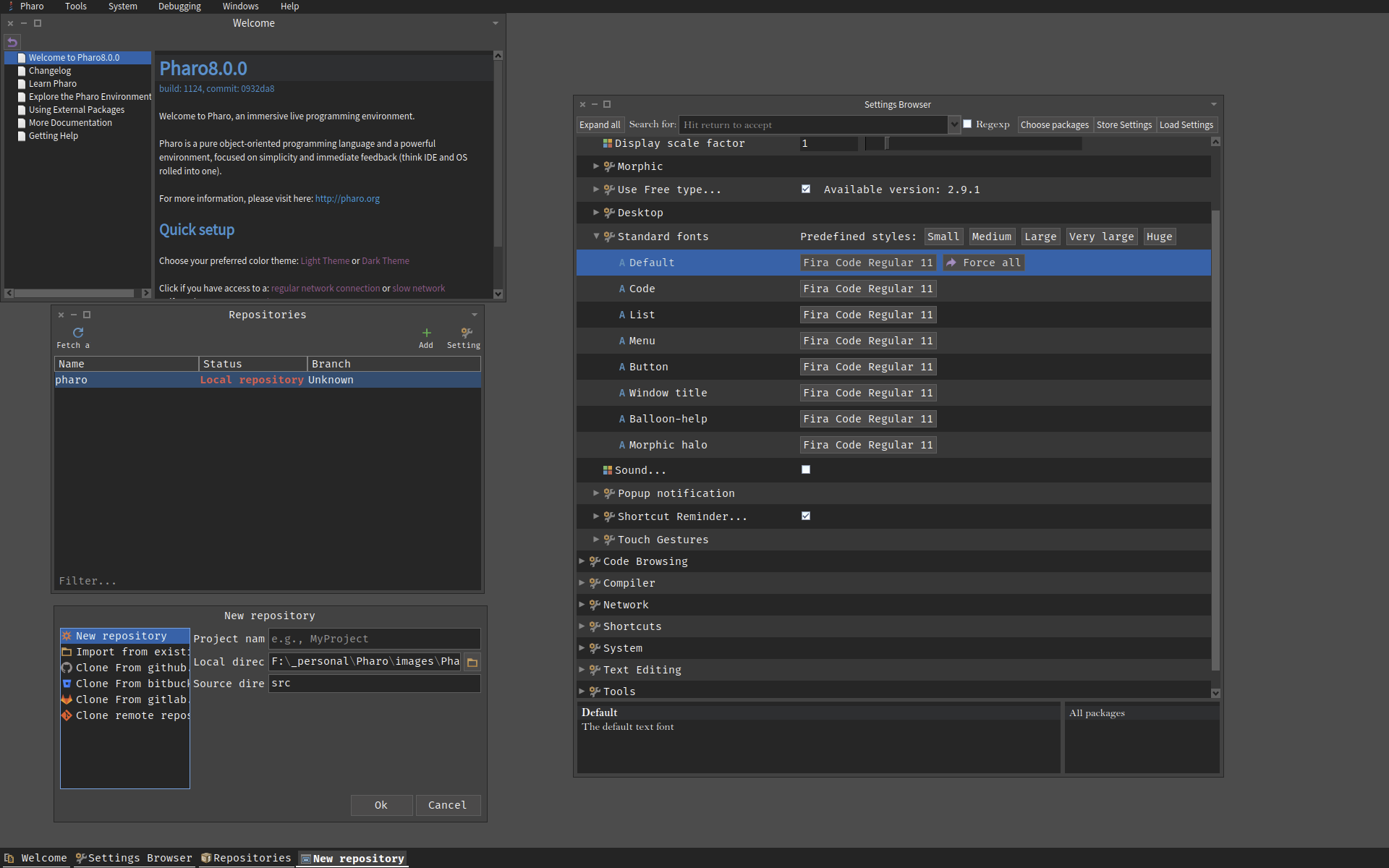
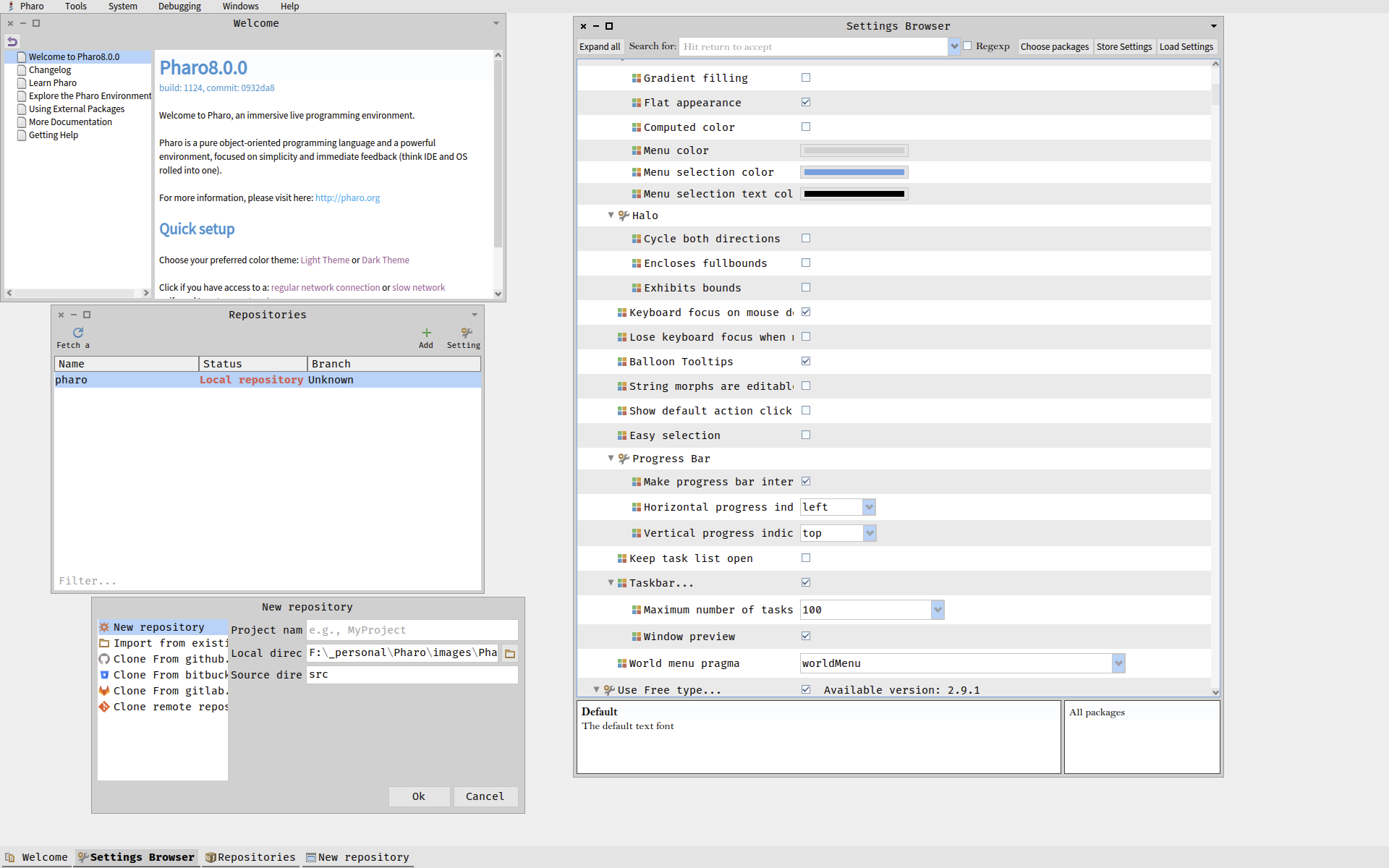
Below you can see a section of Settings where the labels do not fit. The GUI is broken even when the invalidation rectangle is correct: Shaping On 2020-04-19 08:49, shaping@uurda.org wrote:
On 2020-04-19 08:34, Sven Van Caekenberghe wrote:
Did you try another font ? Another size ?
Yes. Same problem. It's broken in any case. I know the font works. I use it in several apps.
Did you try closing & reopening the Settings Browser ?
Yes, Settings refreshes correctly when cycled, but it's still broken because the painted area was not invalidated correctly the first time. If you study the truncation contour carefully, you'll notice that if forms a circular arc. Ring a bell?
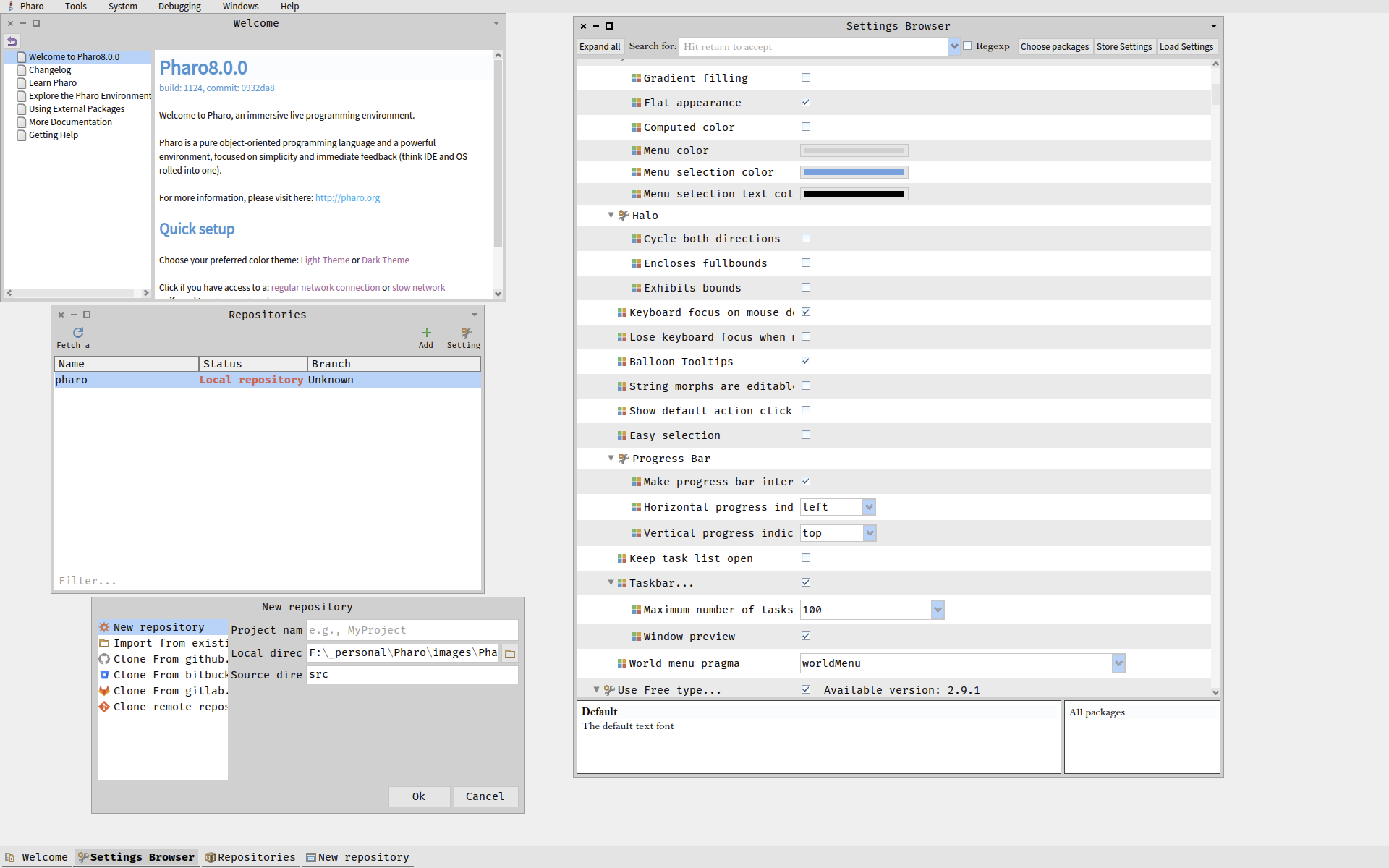
Here is more of the same problem in the Git client:
Can the text-label formatting problem in Pharo 8 and later be fixed now? Or, must the fix wait for a rewriting of the tools in Spec2?
Shaping
On 19 Apr 2020, at 16:31, shaping@uurda.org wrote:
On 2020-04-19 03:01, Sven Van Caekenberghe wrote: Works for me (this font is larger than the default one). macOS, Pharo 9 64bit The screenshot below is taken on Windows 10 Pro. This time I did not change the theme. I did also update the fonts listed in the dialog before choosing FiraCode. The labels are still truncated. This is another new Pharo 8 64-bit (stable) with only the font changed. Why would formatting not work on Windows 10? Can any Windows 10 Pharo users verify this problem? <07e94bb1.png>
On 19 Apr 2020, at 06:05, Shaping <shaping@uurda.org> wrote:
Can anyone suggest a fix for the truncated labels shown below in the screenshot of the Setting window? This happens in the Git client too.
Will Pharo tools be rewritten in Spec2, and does its formatting scheme solve generally the text-formatting problem, as font size is changed?
Why don't we opt for easy elastic rendering of GUIs by implementing Pharo as a web app? Has this been discussed? Willow is looking very good.
Shaping From: Pharo-users [mailto:pharo-users-bounces@lists.pharo.org] On Behalf Of Shaping Sent: Saturday, 18 April, 2020 04:16 To: 'Any question about pharo is welcome' <pharo-users@lists.pharo.org>; 'Pharo Development List' <pharo-dev@lists.pharo.org> Subject: [Pharo-users] Label truncation in new Pharo 8.0 64-bit (stable)
Hi everyone.
Below is a Pharo 8.0 64-bit (stable) image (installed with the new Launcher 2.0) with two changes:
-Light theme selected. -FiraCode 11 chosen as the default font.
<image001.png>
Truncated labels in the GUI on font change has always been a problem. Am I the only one experiencing this?
Shaping From: Pharo-users [mailto:pharo-users-bounces@lists.pharo.org] On Behalf Of Sanjay Minni Sent: Friday, 17 April, 2020 11:05 To: Any question about pharo is welcome <pharo-users@lists.pharo.org> Subject: Re: [Pharo-users] issues in setting up a new project on Github/Iceberg
Thanks tried just https and this worked too I suppose once cloned it does not really matter whether it was done using "clone from github.com" or "clone remote repository" --- Sanjay Minni +91-9900-902902
On Fri, 17 Apr 2020 at 19:43, Guillermo Polito <guillermopolito@gmail.com> wrote: Hi,
El 17 abr 2020, a las 15:30, Sanjay Minni <sm@planage.com> escribió:
Hi Guillermo,
Ok then given your comments - right now got it working as such - initially created as private in Github - changed to public - created clone from github - (did a repair repository (dont know why) and created "src" and designated it as source folder) - did a commit and push - changed repository back to private seems to work
can you give an example on how the "Remote URL" field is to be filled up - note its not taking HTTP as i am not sure about the syntax, assume SSH, Github, MyName, MyRepository, will try that as well
you should be able to use the URLs provided by the clone buttons in Github/gitlab/bitbucket, both https and ssh.
<image004.png>
note Just for Info to other users: I am using Windows 10, it seems to have SSH tools inbuilt and was able to use ssh (with passphrase) without hiccup, by putting my key files path in pharo setting-> ...-> use custom SSH keys, and uploading the .pub key in Github
:)
Thanks
--- Sanjay Minni +91-9900-902902
On Fri, 17 Apr 2020 at 18:36, Guillermo Polito <guillermopolito@gmail.com> wrote: Hi Sanjay,
This is a bug in Iceberg github integration that tries to access the repository to get metadata using Github REST API using anonymous access apparently. And since your project is private, this fails.
As a workaroung, I suggest you to clone using the last option that requires an url only:
<PastedGraphic-3.png>
This option will not use the Github API, so you should find no problems.
I'm planning doing an Iceberg sprint and fix many issues in the coming weeks. (Also if somebody wants to join, this is an open call :)) Guille
El 17 abr 2020, a las 12:49, Sanjay Minni <sm@planage.com> escribió:
Using Pharo 8 64 bit on Windows 10
I am trying to setup a new project on Github using Iceberg following the document "Manage your code with Iceberg dtd 25 March 2019)
After creating the project in github when I try to clone from Github as (I am at doc item1.4) The system throws an error and the project does not appear in iceberg although the files are downloaded. This happen in both cases whether I use HTTP or SSH
What is going wrong ?
also: assuming the clone is made, as per next item in doc 1.5, the directory "src" is created after the clone is made. is that correct ?... then how will the packages sources be mapped to ..\src <http://forum.world.st/file/t368721/1-GettingFirstEmptyProjFromGit.jpg>
<http://forum.world.st/file/t368721/0-GithubProjectCreation.jpg>
----- cheers, Sanjay -- Sent from: http://forum.world.st/Pharo-Smalltalk-Users-f1310670.html

Hi, you should never change the size of fonts only because it does not change the display scale factor. Try to first click on one button of predefined styles (small, medium...) and then change the font face without significant change in the font size. -- Pavel ne 19. 4. 2020 v 16:57 odesÃlatel <shaping@uurda.org> napsal:
Below you can see a section of Settings where the labels do not fit. The GUI is broken even when the invalidation rectangle is correct:
Shaping
On 2020-04-19 08:49, shaping@uurda.org wrote:
On 2020-04-19 08:34, Sven Van Caekenberghe wrote:
Did you try another font ? Another size ?
Yes. Same problem. It's broken in any case. I know the font works. I use it in several apps.
Did you try closing & reopening the Settings Browser ?
Yes, Settings refreshes correctly when cycled, but it's still broken because the painted area was not invalidated correctly the first time. If you study the truncation contour carefully, you'll notice that if forms a circular arc. Ring a bell?
Here is more of the same problem in the Git client:
Can the text-label formatting problem in Pharo 8 and later be fixed now? Or, must the fix wait for a rewriting of the tools in Spec2?
Shaping
On 19 Apr 2020, at 16:31, shaping@uurda.org wrote:
On 2020-04-19 03:01, Sven Van Caekenberghe wrote: Works for me (this font is larger than the default one). macOS, Pharo 9 64bit The screenshot below is taken on Windows 10 Pro. This time I did not change the theme. I did also update the fonts listed in the dialog before choosing FiraCode. The labels are still truncated. This is another new Pharo 8 64-bit (stable) with only the font changed. Why would formatting not work on Windows 10? Can any Windows 10 Pharo users verify this problem? <07e94bb1.png>
On 19 Apr 2020, at 06:05, Shaping <shaping@uurda.org> wrote:
Can anyone suggest a fix for the truncated labels shown below in the screenshot of the Setting window? This happens in the Git client too.
Will Pharo tools be rewritten in Spec2, and does its formatting scheme solve generally the text-formatting problem, as font size is changed?
Why don't we opt for easy elastic rendering of GUIs by implementing Pharo as a web app? Has this been discussed? Willow is looking very good.
Shaping From: Pharo-users [mailto:pharo-users-bounces@lists.pharo.org] On Behalf Of Shaping Sent: Saturday, 18 April, 2020 04:16 To: 'Any question about pharo is welcome' <pharo-users@lists.pharo.org>; 'Pharo Development List' <pharo-dev@lists.pharo.org> Subject: [Pharo-users] Label truncation in new Pharo 8.0 64-bit (stable)
Hi everyone.
Below is a Pharo 8.0 64-bit (stable) image (installed with the new Launcher 2.0) with two changes:
-Light theme selected. -FiraCode 11 chosen as the default font.
<image001.png>
Truncated labels in the GUI on font change has always been a problem. Am I the only one experiencing this?
Shaping From: Pharo-users [mailto:pharo-users-bounces@lists.pharo.org] On Behalf Of Sanjay Minni Sent: Friday, 17 April, 2020 11:05 To: Any question about pharo is welcome <pharo-users@lists.pharo.org> Subject: Re: [Pharo-users] issues in setting up a new project on Github/Iceberg
Thanks tried just https and this worked too I suppose once cloned it does not really matter whether it was done using "clone from github.com" or "clone remote repository" --- Sanjay Minni +91-9900-902902
On Fri, 17 Apr 2020 at 19:43, Guillermo Polito <guillermopolito@gmail.com> wrote: Hi,
El 17 abr 2020, a las 15:30, Sanjay Minni <sm@planage.com> escribió:
Hi Guillermo,
Ok then given your comments - right now got it working as such - initially created as private in Github - changed to public - created clone from github - (did a repair repository (dont know why) and created "src" and designated it as source folder) - did a commit and push - changed repository back to private seems to work
can you give an example on how the "Remote URL" field is to be filled up - note its not taking HTTP as i am not sure about the syntax, assume SSH, Github, MyName, MyRepository, will try that as well
you should be able to use the URLs provided by the clone buttons in Github/gitlab/bitbucket, both https and ssh.
<image004.png>
note Just for Info to other users: I am using Windows 10, it seems to have SSH tools inbuilt and was able to use ssh (with passphrase) without hiccup, by putting my key files path in pharo setting-> ...-> use custom SSH keys, and uploading the .pub key in Github
:)
Thanks
--- Sanjay Minni +91-9900-902902
On Fri, 17 Apr 2020 at 18:36, Guillermo Polito <guillermopolito@gmail.com> wrote: Hi Sanjay,
This is a bug in Iceberg github integration that tries to access the repository to get metadata using Github REST API using anonymous access apparently. And since your project is private, this fails.
As a workaroung, I suggest you to clone using the last option that requires an url only:
<PastedGraphic-3.png>
This option will not use the Github API, so you should find no problems.
I'm planning doing an Iceberg sprint and fix many issues in the coming weeks. (Also if somebody wants to join, this is an open call :)) Guille
El 17 abr 2020, a las 12:49, Sanjay Minni <sm@planage.com> escribió:
Using Pharo 8 64 bit on Windows 10
I am trying to setup a new project on Github using Iceberg following the document "Manage your code with Iceberg dtd 25 March 2019)
After creating the project in github when I try to clone from Github as (I am at doc item1.4) The system throws an error and the project does not appear in iceberg although the files are downloaded. This happen in both cases whether I use HTTP or SSH
What is going wrong ?
also: assuming the clone is made, as per next item in doc 1.5, the directory "src" is created after the clone is made. is that correct ?... then how will the packages sources be mapped to ..\src
<http://forum.world.st/file/t368721/1-GettingFirstEmptyProjFromGit.jpg>
<http://forum.world.st/file/t368721/0-GithubProjectCreation.jpg>
----- cheers, Sanjay -- Sent from: http://forum.world.st/Pharo-Smalltalk-Users-f1310670.html
participants (3)
-
 Pavel Krivanek
 -
 shaping@uurda.org
 -
 Sven Van Caekenberghe