Re: [Pharo-users] [Seaside] change n same words in browser with one action

You may use the Refactoring Browser from OmniBrowser to do that. 1) Open a scoped browser, i.e. select a method, contextual menu -> Refactoring scope -> Selection (you may filter by multiple methods, categories, classes or packages depending your current selection in OB) 2) In the new browser window, select method, contextual menu -> Refactor -> Source Regex... For example given the method: test1 | var1 var2 var3 var4 | var3 := #symbol1. var4 := 'cadena1'. var1 := 'my first testString'. var2 := 'my second testString'. ^ var1 foobar , var2 foobar a regex refactoring replacing #symbol1 with 'symbol1' and 'testString' with 'myString' could be: ORSourceRegexRefactoring new "Example 1: Replace symbols with strings" replace: '#(\w+)' with: '''$1''' ignoreCase: false; "Example 2: Replace occurrences of a string with another string" replace: '#*testString' with: 'myString'; yourself 3) Open menu on the refactoring source code, click Accept (DO NOT use the keyboard commands) 4) A new browser window will let you accept, filter, or cancel the refactorings. If you want to modify message patterns/nodes, use the Refactor -> Rewrite code... templates. Take a look at: http://st-www.cs.illinois.edu/users/brant/Refactory/Rewrite.html to learn about the rewrite rules. Hope it helps. Cheers, Hernán On 28/09/2012 4:51, Sabine Knöfel wrote:
Hi,
double clicking on one word in the system browser selects this word in one color and all other appearances of this wort in another color. This is nice. Is there a possibility to change ALL the occurences of this word in one action? I did noch find this feature yet.
I do not mean the search and replace dialog - to many clicks while developing.
Greetings Sabine
-- View this message in context: http://forum.world.st/change-n-same-words-in-browser-with-one-action-tp46493... Sent from the Seaside General mailing list archive at Nabble.com. _______________________________________________ seaside mailing list seaside@lists.squeakfoundation.org http://lists.squeakfoundation.org/cgi-bin/mailman/listinfo/seaside

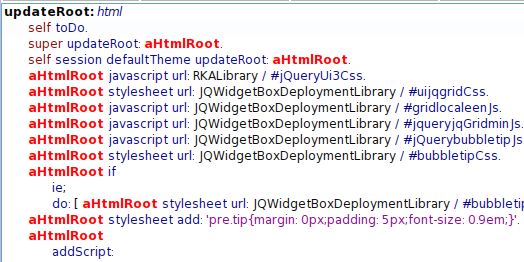
Thank you Hernán, the refactoring browser is a very powerful tool. But I need something quite easy. See the example screenshot. I just started to rename the parameter "aHtmlRoot" to "html". Now I have to doubleclick each single "aHtmlRoot" and paste "html". This is boring. It would like that all the highlighted words change in the same moment, I change the first one. This could be switched on in the system settings. This situation occurs at least daily to me. Am I the only one? Greetings Sabine PS: yes I know about cascading, this is not the point here;-) On Fri, Sep 28, 2012 at 7:42 PM, Hernán Morales Durand < hernan.morales@gmail.com> wrote:
You may use the Refactoring Browser from OmniBrowser to do that.
1) Open a scoped browser, i.e. select a method, contextual menu -> Refactoring scope -> Selection (you may filter by multiple methods, categories, classes or packages depending your current selection in OB) 2) In the new browser window, select method, contextual menu -> Refactor -> Source Regex...
For example given the method:
test1 | var1 var2 var3 var4 |
var3 := #symbol1. var4 := 'cadena1'. var1 := 'my first testString'. var2 := 'my second testString'. ^ var1 foobar , var2 foobar
a regex refactoring replacing #symbol1 with 'symbol1' and 'testString' with 'myString' could be:
ORSourceRegexRefactoring new "Example 1: Replace symbols with strings" replace: '#(\w+)' with: '''$1''' ignoreCase: false; "Example 2: Replace occurrences of a string with another string" replace: '#*testString' with: 'myString'; yourself
3) Open menu on the refactoring source code, click Accept (DO NOT use the keyboard commands) 4) A new browser window will let you accept, filter, or cancel the refactorings.
If you want to modify message patterns/nodes, use the Refactor -> Rewrite code... templates. Take a look at: http://st-www.cs.illinois.edu/** users/brant/Refactory/Rewrite.**html<http://st-www.cs.illinois.edu/users/brant/Refactory/Rewrite.html>to learn about the rewrite rules. Hope it helps. Cheers,
Hernán
On 28/09/2012 4:51, Sabine Knöfel wrote:
Hi,
double clicking on one word in the system browser selects this word in one color and all other appearances of this wort in another color. This is nice. Is there a possibility to change ALL the occurences of this word in one action? I did noch find this feature yet.
I do not mean the search and replace dialog - to many clicks while developing.
Greetings Sabine
-- View this message in context: http://forum.world.st/change-** n-same-words-in-browser-with-**one-action-tp4649372.html<http://forum.world.st/change-n-same-words-in-browser-with-one-action-tp46493...> Sent from the Seaside General mailing list archive at Nabble.com. ______________________________**_________________ seaside mailing list seaside@lists.**squeakfoundation.org <seaside@lists.squeakfoundation.org> http://lists.squeakfoundation.**org/cgi-bin/mailman/listinfo/**seaside<http://lists.squeakfoundation.org/cgi-bin/mailman/listinfo/seaside>
______________________________**_________________ seaside mailing list seaside@lists.**squeakfoundation.org <seaside@lists.squeakfoundation.org> http://lists.squeakfoundation.**org/cgi-bin/mailman/listinfo/**seaside<http://lists.squeakfoundation.org/cgi-bin/mailman/listinfo/seaside>

ah, ok.. you want something simpler than search&replace .. i remember in Squeak there was something, that you could select a piece of text, then type something, and then press cmd-g (if i remember) to search for same occurrence and replace it again. but i am not sure if it works in pharo. On 28 September 2012 20:23, Sabine Knöfel <sabine.knoefel@gmail.com> wrote:
Thank you Hernán,
the refactoring browser is a very powerful tool.
But I need something quite easy. See the example screenshot. I just started to rename the parameter "aHtmlRoot" to "html".
Now I have to doubleclick each single "aHtmlRoot" and paste "html". This is boring. It would like that all the highlighted words change in the same moment, I change the first one. This could be switched on in the system settings.
This situation occurs at least daily to me. Am I the only one?
Greetings Sabine
PS: yes I know about cascading, this is not the point here;-)
On Fri, Sep 28, 2012 at 7:42 PM, Hernán Morales Durand <hernan.morales@gmail.com> wrote:
You may use the Refactoring Browser from OmniBrowser to do that.
1) Open a scoped browser, i.e. select a method, contextual menu -> Refactoring scope -> Selection (you may filter by multiple methods, categories, classes or packages depending your current selection in OB) 2) In the new browser window, select method, contextual menu -> Refactor -> Source Regex...
For example given the method:
test1 | var1 var2 var3 var4 |
var3 := #symbol1. var4 := 'cadena1'. var1 := 'my first testString'. var2 := 'my second testString'. ^ var1 foobar , var2 foobar
a regex refactoring replacing #symbol1 with 'symbol1' and 'testString' with 'myString' could be:
ORSourceRegexRefactoring new "Example 1: Replace symbols with strings" replace: '#(\w+)' with: '''$1''' ignoreCase: false; "Example 2: Replace occurrences of a string with another string" replace: '#*testString' with: 'myString'; yourself
3) Open menu on the refactoring source code, click Accept (DO NOT use the keyboard commands) 4) A new browser window will let you accept, filter, or cancel the refactorings.
If you want to modify message patterns/nodes, use the Refactor -> Rewrite code... templates. Take a look at: http://st-www.cs.illinois.edu/users/brant/Refactory/Rewrite.html to learn about the rewrite rules. Hope it helps. Cheers,
Hernán
On 28/09/2012 4:51, Sabine Knöfel wrote:
Hi,
double clicking on one word in the system browser selects this word in one color and all other appearances of this wort in another color. This is nice. Is there a possibility to change ALL the occurences of this word in one action? I did noch find this feature yet.
I do not mean the search and replace dialog - to many clicks while developing.
Greetings Sabine
-- View this message in context: http://forum.world.st/change-n-same-words-in-browser-with-one-action-tp46493... Sent from the Seaside General mailing list archive at Nabble.com. _______________________________________________ seaside mailing list seaside@lists.squeakfoundation.org http://lists.squeakfoundation.org/cgi-bin/mailman/listinfo/seaside
_______________________________________________ seaside mailing list seaside@lists.squeakfoundation.org http://lists.squeakfoundation.org/cgi-bin/mailman/listinfo/seaside
_______________________________________________ seaside mailing list seaside@lists.squeakfoundation.org http://lists.squeakfoundation.org/cgi-bin/mailman/listinfo/seaside
-- Best regards, Igor Stasenko.
Hi Igor, yes! ;-) As far as I remember it was possible in VisualWorks, too. But I did not find it in Pharo. Sabine On Fri, Sep 28, 2012 at 8:41 PM, Igor Stasenko <siguctua@gmail.com> wrote:
ah, ok.. you want something simpler than search&replace ..
i remember in Squeak there was something, that you could select a piece of text, then type something, and then press cmd-g (if i remember) to search for same occurrence and replace it again. but i am not sure if it works in pharo.
On 28 September 2012 20:23, Sabine Knöfel <sabine.knoefel@gmail.com> wrote:
Thank you Hernán,
the refactoring browser is a very powerful tool.
But I need something quite easy. See the example screenshot. I just started to rename the parameter "aHtmlRoot" to "html".
Now I have to doubleclick each single "aHtmlRoot" and paste "html". This is boring. It would like that all the highlighted words change in the same moment, I change the first one. This could be switched on in the system settings.
This situation occurs at least daily to me. Am I the only one?
Greetings Sabine
PS: yes I know about cascading, this is not the point here;-)
On Fri, Sep 28, 2012 at 7:42 PM, Hernán Morales Durand <hernan.morales@gmail.com> wrote:
You may use the Refactoring Browser from OmniBrowser to do that.
1) Open a scoped browser, i.e. select a method, contextual menu -> Refactoring scope -> Selection (you may filter by multiple methods, categories, classes or packages depending your current selection in OB) 2) In the new browser window, select method, contextual menu -> Refactor -> Source Regex...
For example given the method:
test1 | var1 var2 var3 var4 |
var3 := #symbol1. var4 := 'cadena1'. var1 := 'my first testString'. var2 := 'my second testString'. ^ var1 foobar , var2 foobar
a regex refactoring replacing #symbol1 with 'symbol1' and 'testString' with 'myString' could be:
ORSourceRegexRefactoring new "Example 1: Replace symbols with strings" replace: '#(\w+)' with: '''$1''' ignoreCase: false; "Example 2: Replace occurrences of a string with another string" replace: '#*testString' with: 'myString'; yourself
3) Open menu on the refactoring source code, click Accept (DO NOT use
the
keyboard commands) 4) A new browser window will let you accept, filter, or cancel the refactorings.
If you want to modify message patterns/nodes, use the Refactor -> Rewrite code... templates. Take a look at: http://st-www.cs.illinois.edu/users/brant/Refactory/Rewrite.html to learn about the rewrite rules. Hope it helps. Cheers,
Hernán
On 28/09/2012 4:51, Sabine Knöfel wrote:
Hi,
double clicking on one word in the system browser selects this word in one color and all other appearances of this wort in another color. This is nice. Is there a possibility to change ALL the occurences of this word in one action? I did noch find this feature yet.
I do not mean the search and replace dialog - to many clicks while developing.
Greetings Sabine
-- View this message in context:
http://forum.world.st/change-n-same-words-in-browser-with-one-action-tp46493...
Sent from the Seaside General mailing list archive at Nabble.com. _______________________________________________ seaside mailing list seaside@lists.squeakfoundation.org http://lists.squeakfoundation.org/cgi-bin/mailman/listinfo/seaside
_______________________________________________ seaside mailing list seaside@lists.squeakfoundation.org http://lists.squeakfoundation.org/cgi-bin/mailman/listinfo/seaside
_______________________________________________ seaside mailing list seaside@lists.squeakfoundation.org http://lists.squeakfoundation.org/cgi-bin/mailman/listinfo/seaside
-- Best regards, Igor Stasenko. _______________________________________________ seaside mailing list seaside@lists.squeakfoundation.org http://lists.squeakfoundation.org/cgi-bin/mailman/listinfo/seaside

click on the text and command-F (on mac). Stef
Sabine
On Fri, Sep 28, 2012 at 8:41 PM, Igor Stasenko <siguctua@gmail.com> wrote: ah, ok.. you want something simpler than search&replace ..
i remember in Squeak there was something, that you could select a piece of text, then type something, and then press cmd-g (if i remember) to search for same occurrence and replace it again. but i am not sure if it works in pharo.
On 28 September 2012 20:23, Sabine Knöfel <sabine.knoefel@gmail.com> wrote:
Thank you Hernán,
the refactoring browser is a very powerful tool.
But I need something quite easy. See the example screenshot. I just started to rename the parameter "aHtmlRoot" to "html".
Now I have to doubleclick each single "aHtmlRoot" and paste "html". This is boring. It would like that all the highlighted words change in the same moment, I change the first one. This could be switched on in the system settings.
This situation occurs at least daily to me. Am I the only one?
Greetings Sabine
PS: yes I know about cascading, this is not the point here;-)
On Fri, Sep 28, 2012 at 7:42 PM, Hernán Morales Durand <hernan.morales@gmail.com> wrote:
You may use the Refactoring Browser from OmniBrowser to do that.
1) Open a scoped browser, i.e. select a method, contextual menu -> Refactoring scope -> Selection (you may filter by multiple methods, categories, classes or packages depending your current selection in OB) 2) In the new browser window, select method, contextual menu -> Refactor -> Source Regex...
For example given the method:
test1 | var1 var2 var3 var4 |
var3 := #symbol1. var4 := 'cadena1'. var1 := 'my first testString'. var2 := 'my second testString'. ^ var1 foobar , var2 foobar
a regex refactoring replacing #symbol1 with 'symbol1' and 'testString' with 'myString' could be:
ORSourceRegexRefactoring new "Example 1: Replace symbols with strings" replace: '#(\w+)' with: '''$1''' ignoreCase: false; "Example 2: Replace occurrences of a string with another string" replace: '#*testString' with: 'myString'; yourself
3) Open menu on the refactoring source code, click Accept (DO NOT use the keyboard commands) 4) A new browser window will let you accept, filter, or cancel the refactorings.
If you want to modify message patterns/nodes, use the Refactor -> Rewrite code... templates. Take a look at: http://st-www.cs.illinois.edu/users/brant/Refactory/Rewrite.html to learn about the rewrite rules. Hope it helps. Cheers,
Hernán
On 28/09/2012 4:51, Sabine Knöfel wrote:
Hi,
double clicking on one word in the system browser selects this word in one color and all other appearances of this wort in another color. This is nice. Is there a possibility to change ALL the occurences of this word in one action? I did noch find this feature yet.
I do not mean the search and replace dialog - to many clicks while developing.
Greetings Sabine
-- View this message in context: http://forum.world.st/change-n-same-words-in-browser-with-one-action-tp46493... Sent from the Seaside General mailing list archive at Nabble.com. _______________________________________________ seaside mailing list seaside@lists.squeakfoundation.org http://lists.squeakfoundation.org/cgi-bin/mailman/listinfo/seaside
_______________________________________________ seaside mailing list seaside@lists.squeakfoundation.org http://lists.squeakfoundation.org/cgi-bin/mailman/listinfo/seaside
_______________________________________________ seaside mailing list seaside@lists.squeakfoundation.org http://lists.squeakfoundation.org/cgi-bin/mailman/listinfo/seaside
-- Best regards, Igor Stasenko. _______________________________________________ seaside mailing list seaside@lists.squeakfoundation.org http://lists.squeakfoundation.org/cgi-bin/mailman/listinfo/seaside
Something like this? http://wiki.squeak.org/squeak/900 I don't know if it's still possibe in Pharo. Notice you have to manually select, type and replace each method. The RB rewriter can do that automatically for you. Cheers, Hernán On 28/09/2012 15:23, Sabine Knöfel wrote:
Thank you Hernán,
the refactoring browser is a very powerful tool.
But I need something quite easy. See the example screenshot. I just started to rename the parameter "aHtmlRoot" to "html".
Now I have to doubleclick each single "aHtmlRoot" and paste "html". This is boring. It would like that all the highlighted words change in the same moment, I change the first one. This could be switched on in the system settings.
This situation occurs at least daily to me. Am I the only one?
Greetings Sabine
PS: yes I know about cascading, this is not the point here;-)
On Fri, Sep 28, 2012 at 7:42 PM, Hernán Morales Durand <hernan.morales@gmail.com <mailto:hernan.morales@gmail.com>> wrote:
You may use the Refactoring Browser from OmniBrowser to do that.
1) Open a scoped browser, i.e. select a method, contextual menu -> Refactoring scope -> Selection (you may filter by multiple methods, categories, classes or packages depending your current selection in OB) 2) In the new browser window, select method, contextual menu -> Refactor -> Source Regex...
For example given the method:
test1 | var1 var2 var3 var4 |
var3 := #symbol1. var4 := 'cadena1'. var1 := 'my first testString'. var2 := 'my second testString'. ^ var1 foobar , var2 foobar
a regex refactoring replacing #symbol1 with 'symbol1' and 'testString' with 'myString' could be:
ORSourceRegexRefactoring new "Example 1: Replace symbols with strings" replace: '#(\w+)' with: '''$1''' ignoreCase: false; "Example 2: Replace occurrences of a string with another string" replace: '#*testString' with: 'myString'; yourself
3) Open menu on the refactoring source code, click Accept (DO NOT use the keyboard commands) 4) A new browser window will let you accept, filter, or cancel the refactorings.
If you want to modify message patterns/nodes, use the Refactor -> Rewrite code... templates. Take a look at: http://st-www.cs.illinois.edu/__users/brant/Refactory/Rewrite.__html <http://st-www.cs.illinois.edu/users/brant/Refactory/Rewrite.html> to learn about the rewrite rules. Hope it helps. Cheers,
Hernán
On 28/09/2012 4:51, Sabine Knöfel wrote:
Hi,
double clicking on one word in the system browser selects this word in one color and all other appearances of this wort in another color. This is nice. Is there a possibility to change ALL the occurences of this word in one action? I did noch find this feature yet.
I do not mean the search and replace dialog - to many clicks while developing.
Greetings Sabine
-- View this message in context: http://forum.world.st/change-__n-same-words-in-browser-with-__one-action-tp4... <http://forum.world.st/change-n-same-words-in-browser-with-one-action-tp46493...> Sent from the Seaside General mailing list archive at Nabble.com. _________________________________________________ seaside mailing list seaside@lists.__squeakfoundation.org <mailto:seaside@lists.squeakfoundation.org> http://lists.squeakfoundation.__org/cgi-bin/mailman/listinfo/__seaside <http://lists.squeakfoundation.org/cgi-bin/mailman/listinfo/seaside>
_________________________________________________ seaside mailing list seaside@lists.__squeakfoundation.org <mailto:seaside@lists.squeakfoundation.org> http://lists.squeakfoundation.__org/cgi-bin/mailman/listinfo/__seaside <http://lists.squeakfoundation.org/cgi-bin/mailman/listinfo/seaside>
_______________________________________________ seaside mailing list seaside@lists.squeakfoundation.org http://lists.squeakfoundation.org/cgi-bin/mailman/listinfo/seaside

Hello. Something like Syncron-Edit in Lazarus? See: http://wiki.freepascal.org/New_IDE_features_since#Syncron-Edit I know, that is Pascal, your eyes hurts :P Regards. 2012/9/28 Hernán Morales Durand <hernan.morales@gmail.com>
Something like this?
http://wiki.squeak.org/squeak/900
I don't know if it's still possibe in Pharo.
Notice you have to manually select, type and replace each method. The RB rewriter can do that automatically for you. Cheers,
Hernán
On 28/09/2012 15:23, Sabine Knöfel wrote:
Thank you Hernán,
the refactoring browser is a very powerful tool.
But I need something quite easy. See the example screenshot. I just started to rename the parameter "aHtmlRoot" to "html".
Now I have to doubleclick each single "aHtmlRoot" and paste "html". This is boring. It would like that all the highlighted words change in the same moment, I change the first one. This could be switched on in the system settings.
This situation occurs at least daily to me. Am I the only one?
Greetings Sabine
PS: yes I know about cascading, this is not the point here;-)
On Fri, Sep 28, 2012 at 7:42 PM, Hernán Morales Durand <hernan.morales@gmail.com <mailto:hernan.morales@gmail.com>> wrote:
You may use the Refactoring Browser from OmniBrowser to do that.
1) Open a scoped browser, i.e. select a method, contextual menu -> Refactoring scope -> Selection (you may filter by multiple methods, categories, classes or packages depending your current selection in OB) 2) In the new browser window, select method, contextual menu -> Refactor -> Source Regex...
For example given the method:
test1 | var1 var2 var3 var4 |
var3 := #symbol1. var4 := 'cadena1'. var1 := 'my first testString'. var2 := 'my second testString'. ^ var1 foobar , var2 foobar
a regex refactoring replacing #symbol1 with 'symbol1' and 'testString' with 'myString' could be:
ORSourceRegexRefactoring new "Example 1: Replace symbols with strings" replace: '#(\w+)' with: '''$1''' ignoreCase: false; "Example 2: Replace occurrences of a string with another string" replace: '#*testString' with: 'myString'; yourself
3) Open menu on the refactoring source code, click Accept (DO NOT use the keyboard commands) 4) A new browser window will let you accept, filter, or cancel the refactorings.
If you want to modify message patterns/nodes, use the Refactor -> Rewrite code... templates. Take a look at: http://st-www.cs.illinois.edu/__users/brant/Refactory/Rewrite.__html
<http://st-www.cs.illinois.edu/users/brant/Refactory/Rewrite.html> to learn about the rewrite rules. Hope it helps. Cheers,
Hernán
On 28/09/2012 4:51, Sabine Knöfel wrote:
Hi,
double clicking on one word in the system browser selects this word in one color and all other appearances of this wort in another color. This is nice. Is there a possibility to change ALL the occurences of this word in one action? I did noch find this feature yet.
I do not mean the search and replace dialog - to many clicks while developing.
Greetings Sabine
-- View this message in context:
http://forum.world.st/change-__n-same-words-in-browser-with-__one-action-tp4...
< http://forum.world.st/change-n-same-words-in-browser-with-one-action-tp46493...
Sent from the Seaside General mailing list archive at Nabble.com. _________________________________________________ seaside mailing list seaside@lists.__squeakfoundation.org <mailto:seaside@lists.squeakfoundation.org> http://lists.squeakfoundation. __org/cgi-bin/mailman/listinfo/__seaside < http://lists.squeakfoundation.org/cgi-bin/mailman/listinfo/seaside>
_________________________________________________ seaside mailing list seaside@lists.__squeakfoundation.org <mailto:seaside@lists.squeakfoundation.org> http://lists.squeakfoundation. __org/cgi-bin/mailman/listinfo/__seaside
<http://lists.squeakfoundation.org/cgi-bin/mailman/listinfo/seaside>
_______________________________________________ seaside mailing list seaside@lists.squeakfoundation.org http://lists.squeakfoundation.org/cgi-bin/mailman/listinfo/seaside
_______________________________________________ seaside mailing list seaside@lists.squeakfoundation.org http://lists.squeakfoundation.org/cgi-bin/mailman/listinfo/seaside

Select variable, CMD-R (for rename) and you'll have a refactoring window popup open. Restricted to variables..., but the whole process works without a single click of the mouse :)
participants (6)
-
 Camillo Bruni
 -
 Gastón Dall' Oglio
 -
 Hernán Morales Durand
 -
 Igor Stasenko
 -
 Sabine Knöfel
 -
 Stéphane Ducasse