Call for action for Roassal

Dear community, As you may have seen, Roassal has entered a stabilization phase. The book AgileVisualization.com will soon be released. After its release, Roassal will go over a new development phase. In order to prepare it, I am asking this question: What are the 3 aspects you would like to see improved in Roassal? You can answer publicly or by sending private messages. Kind regards, Alexandre -- _,.;:~^~:;._,.;:~^~:;._,.;:~^~:;._,.;:~^~:;._,.;: Alexandre Bergel http://www.bergel.eu ^~:;._,.;:~^~:;._,.;:~^~:;._,.;:~^~:;._,.;:~^~:;.

Great call and initiative. I would like see - better arrows (this is related also to the third point) - get the graphViz algo finished (even if not fully working) Anne and guillaume got lost in translation there but it would be a real game changer. - having a better output (arrows, edge) and animation (like the web library Telescope is using to render visualisation on the web) Guillaume knows it name. (Guillaume what is the name of the library you use) Stef Le 24/2/16 09:51, Alexandre Bergel a écrit :
Dear community,
As you may have seen, Roassal has entered a stabilization phase. The book AgileVisualization.com will soon be released. After its release, Roassal will go over a new development phase. In order to prepare it, I am asking this question:
What are the 3 aspects you would like to see improved in Roassal?
You can answer publicly or by sending private messages.
Kind regards, Alexandre

On 24/02/2016 12:42, stepharo wrote:
Great call and initiative.
I would like see - better arrows (this is related also to the third point) - get the graphViz algo finished (even if not fully working) Anne and guillaume got lost in translation there but it would be a real game changer. - having a better output (arrows, edge) and animation (like the web library Telescope is using to render visualisation on the web) Guillaume knows it name. (Guillaume what is the name of the library you use)
Stef
-- Cyril Ferlicot http://www.synectique.eu 165 Avenue Bretagne Lille 59000 France

hi, i just remembered two things: i'd like to see rounded corners on nodes. Excerpts from stepharo's message of 2016-02-24 12:42:49 +0100:
- having a better output (arrows, edge)
and related to edges: i'd like edges to connect to a node on the border of the box, not to the center of the node. this means the connecting point would always be at the middle of the side of one edge: ___\|/___ | | \| |/ --| |-- /| |\ |_________| /|\ bezier edges should always leave at a 90deg angle: ____|____ | | | | --| |-- | | |_________| | optionally, starting at the corners could also be nice: \_________/ | | | | | | | | |_________| / \ and in such a case bezier edges should leave at 135deg to each side. by default the edge should find the nearest connection point, but i'd like to configure a list of allowed points. finally, multiple edges in the same general direction should either leave at the same point, pick the nearest side that doesn't have an edge already. or spaced evenly along the same side if all available sides have edges already. the list of allowed connection points would have 12 options: the middle of 4 sides, 4 corners, and 4 sides as a whole when multiple edges should be spaced evenly. greetings, martin. -- eKita - the online platform for your entire academic life -- chief engineer eKita.co pike programmer pike.lysator.liu.se caudium.net societyserver.org secretary beijinglug.org mentor fossasia.org foresight developer foresightlinux.org realss.com unix sysadmin Martin Bähr working in china http://societyserver.org/mbaehr/

On Thu, Mar 10, 2016 at 12:36 AM, Martin Bähr <martin@realss.com> wrote:
hi,
i just remembered two things:
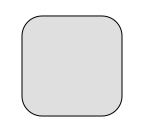
i'd like to see rounded corners on nodes.
We've added this quite some time ago, unless you have something else in mind. ~~~~~~~~~~~~~~~~~~~~~~~~~~~~~~~~~~~~~~ |v e| v := RTView new. e := RTRoundedBox new size: 100; borderRadius: 20; borderColor: Color black; borderWidth: 1; element. v add: e. v ~~~~~~~~~~~~~~~~~~~~~~~~~~~~~~~~~~~~~~ â
Excerpts from stepharo's message of 2016-02-24 12:42:49 +0100:
- having a better output (arrows, edge)
and related to edges:
i'd like edges to connect to a node on the border of the box, not to the center of the node. this means the connecting point would always be at the middle of the side of one edge:
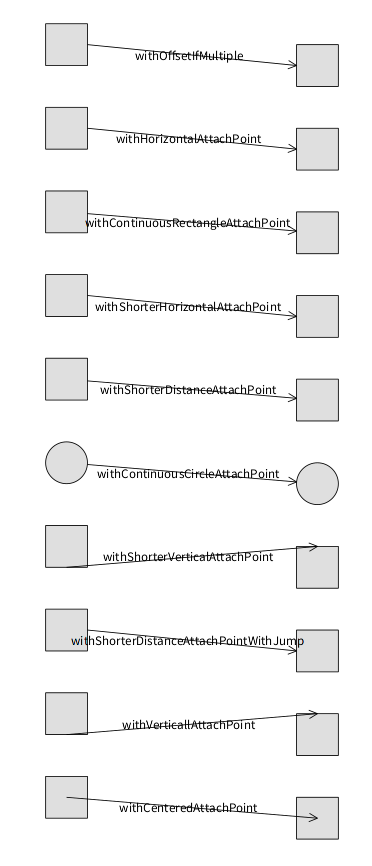
We have about 10 different attach points already. See the 'attach point' protocol of RTAbstractLine. Some of them also automatically add extra space if there are multiple lines between the same elements. As for bezier and multiline edges, their curvature isn't currently handled properly, but it's in my todo list (I'll work on this probably during the weekend). I'm sure it can be presented in more revealing way, but it's too late for me today (or is it too early?). You can play with it (drag the elements to see how it behaves). ~~~~~~~~~~~~~~~~~~~~~~~~~~~~~~~~~~~~~~ |v attachOptions es e offset| v := RTView new. attachOptions := RTAbstractLine selectors select: [ :each | each beginsWith: #with ]. offset := 0 @ 0. attachOptions do: [ :each | es := RTBox new borderColor: Color black; size: 50; elementsOn: #(a b). each = #withContinuousCircleAttachPoint ifTrue: [ es := RTEllipse new borderColor: Color black; size: 50; elementsOn: #(a b). ]. es translateBy: offset. es @ RTDraggable. offset := offset + (0 @ 100). v addAll: es. es second translateBy: 300 @ 25. e := RTArrowedLine new color: Color black; perform: each; edgeFrom: es first to: es second. e model: each. v add: e. e @ (RTLabelled new color: Color black). ]. v ~~~~~~~~~~~~~~~~~~~~~~~~~~~~~~~~~~~~~~ â
___\|/___ | | \| |/ --| |-- /| |\ |_________| /|\
bezier edges should always leave at a 90deg angle: ____|____ | | | | --| |-- | | |_________| |
optionally, starting at the corners could also be nice:
\_________/ | | | | | | | | |_________| / \
and in such a case bezier edges should leave at 135deg to each side.
by default the edge should find the nearest connection point, but i'd like to configure a list of allowed points.
finally, multiple edges in the same general direction should either leave at the same point, pick the nearest side that doesn't have an edge already. or spaced evenly along the same side if all available sides have edges already.
the list of allowed connection points would have 12 options: the middle of 4 sides, 4 corners, and 4 sides as a whole when multiple edges should be spaced evenly.
greetings, martin.
-- eKita - the online platform for your entire academic life -- chief engineer eKita.co pike programmer pike.lysator.liu.se caudium.net societyserver.org secretary beijinglug.org mentor fossasia.org foresight developer foresightlinux.org realss.com unix sysadmin Martin Bähr working in china http://societyserver.org/mbaehr/

This is very cool. We will all benefit from this documentation. One thing that I would still like to see fixed before the release is the edge building (this problem of not being able to properly specify random objects to be taken into account when building edges). Could we work on that? Cheers, Doru
On Feb 24, 2016, at 9:51 AM, Alexandre Bergel <alexandre.bergel@me.com> wrote:
Dear community,
As you may have seen, Roassal has entered a stabilization phase. The book AgileVisualization.com will soon be released. After its release, Roassal will go over a new development phase. In order to prepare it, I am asking this question:
What are the 3 aspects you would like to see improved in Roassal?
You can answer publicly or by sending private messages.
Kind regards, Alexandre -- _,.;:~^~:;._,.;:~^~:;._,.;:~^~:;._,.;:~^~:;._,.;: Alexandre Bergel http://www.bergel.eu ^~:;._,.;:~^~:;._,.;:~^~:;._,.;:~^~:;._,.;:~^~:;.
_______________________________________________ Moose-dev mailing list Moose-dev@list.inf.unibe.ch https://www.list.inf.unibe.ch/listinfo/moose-dev
-- www.tudorgirba.com www.feenk.com âLive like you mean it."
Do you have an example? I am not sure to understand. Alexandre
On Feb 25, 2016, at 12:40 PM, Tudor Girba <tudor@tudorgirba.com> wrote:
This is very cool. We will all benefit from this documentation.
One thing that I would still like to see fixed before the release is the edge building (this problem of not being able to properly specify random objects to be taken into account when building edges). Could we work on that?
Cheers, Doru
On Feb 24, 2016, at 9:51 AM, Alexandre Bergel <alexandre.bergel@me.com> wrote:
Dear community,
As you may have seen, Roassal has entered a stabilization phase. The book AgileVisualization.com will soon be released. After its release, Roassal will go over a new development phase. In order to prepare it, I am asking this question:
What are the 3 aspects you would like to see improved in Roassal?
You can answer publicly or by sending private messages.
Kind regards, Alexandre -- _,.;:~^~:;._,.;:~^~:;._,.;:~^~:;._,.;:~^~:;._,.;: Alexandre Bergel http://www.bergel.eu ^~:;._,.;:~^~:;._,.;:~^~:;._,.;:~^~:;._,.;:~^~:;.
_______________________________________________ Moose-dev mailing list Moose-dev@list.inf.unibe.ch https://www.list.inf.unibe.ch/listinfo/moose-dev
-- www.tudorgirba.com www.feenk.com
âLive like you mean it."
-- _,.;:~^~:;._,.;:~^~:;._,.;:~^~:;._,.;:~^~:;._,.;: Alexandre Bergel http://www.bergel.eu ^~:;._,.;:~^~:;._,.;:~^~:;._,.;:~^~:;._,.;:~^~:;.
Hi, We discussed this before. Try to draw a hierarchy using classes and inheritance objects (so, without using the class to superclass navigation). Something like this: view := RTMondrian new. view nodes: classes. view edges objects: inheritances; connectFrom: #superclass to: #subclass. view layout tree. view It wonât work. Cheers, Doru
On Feb 25, 2016, at 1:29 PM, Alexandre Bergel <alexandre.bergel@me.com> wrote:
Do you have an example? I am not sure to understand.
Alexandre
On Feb 25, 2016, at 12:40 PM, Tudor Girba <tudor@tudorgirba.com> wrote:
This is very cool. We will all benefit from this documentation.
One thing that I would still like to see fixed before the release is the edge building (this problem of not being able to properly specify random objects to be taken into account when building edges). Could we work on that?
Cheers, Doru
On Feb 24, 2016, at 9:51 AM, Alexandre Bergel <alexandre.bergel@me.com> wrote:
Dear community,
As you may have seen, Roassal has entered a stabilization phase. The book AgileVisualization.com will soon be released. After its release, Roassal will go over a new development phase. In order to prepare it, I am asking this question:
What are the 3 aspects you would like to see improved in Roassal?
You can answer publicly or by sending private messages.
Kind regards, Alexandre -- _,.;:~^~:;._,.;:~^~:;._,.;:~^~:;._,.;:~^~:;._,.;: Alexandre Bergel http://www.bergel.eu ^~:;._,.;:~^~:;._,.;:~^~:;._,.;:~^~:;._,.;:~^~:;.
_______________________________________________ Moose-dev mailing list Moose-dev@list.inf.unibe.ch https://www.list.inf.unibe.ch/listinfo/moose-dev
-- www.tudorgirba.com www.feenk.com
âLive like you mean it."
-- _,.;:~^~:;._,.;:~^~:;._,.;:~^~:;._,.;:~^~:;._,.;: Alexandre Bergel http://www.bergel.eu ^~:;._,.;:~^~:;._,.;:~^~:;._,.;:~^~:;._,.;:~^~:;.
_______________________________________________ Moose-dev mailing list Moose-dev@list.inf.unibe.ch https://www.list.inf.unibe.ch/listinfo/moose-dev
-- www.tudorgirba.com www.feenk.com "Value is always contextual."
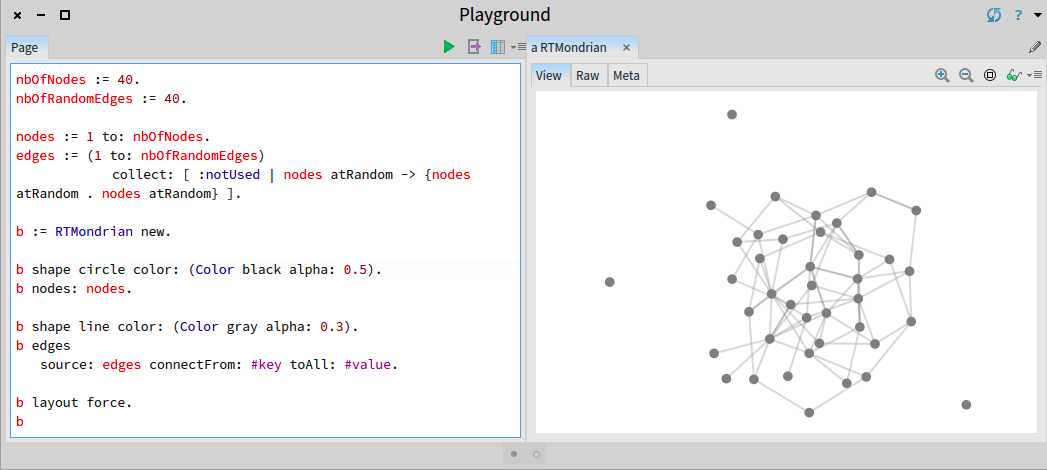
Oh, but this has been in Roassal for many months (I have implemented since right after ESUG). You need to use #source:connectFrom:toAll: Here is an example that randomly generate a graph and render it using this facility: -=-=-=-=-=-=-=-=-=-=-=-=-=-=-= nbOfNodes := 40. nbOfRandomEdges := 40. nodes := 1 to: nbOfNodes. edges := (1 to: nbOfRandomEdges) collect: [ :notUsed | nodes atRandom -> {nodes atRandom . nodes atRandom} ]. b := RTMondrian new. b shape circle color: (Color black alpha: 0.5). b nodes: nodes. b shape line color: (Color gray alpha: 0.3). b edges source: edges connectFrom: #key toAll: #value. b layout force. b -=-=-=-=-=-=-=-=-=-=-=-=-=-=-= Cheers, Alexandre
On Feb 25, 2016, at 1:37 PM, Tudor Girba <tudor@tudorgirba.com> wrote:
Hi,
We discussed this before. Try to draw a hierarchy using classes and inheritance objects (so, without using the class to superclass navigation). Something like this:
view := RTMondrian new. view nodes: classes. view edges objects: inheritances; connectFrom: #superclass to: #subclass. view layout tree. view
It wonât work.
Cheers, Doru
On Feb 25, 2016, at 1:29 PM, Alexandre Bergel <alexandre.bergel@me.com> wrote:
Do you have an example? I am not sure to understand.
Alexandre
On Feb 25, 2016, at 12:40 PM, Tudor Girba <tudor@tudorgirba.com> wrote:
This is very cool. We will all benefit from this documentation.
One thing that I would still like to see fixed before the release is the edge building (this problem of not being able to properly specify random objects to be taken into account when building edges). Could we work on that?
Cheers, Doru
On Feb 24, 2016, at 9:51 AM, Alexandre Bergel <alexandre.bergel@me.com> wrote:
Dear community,
As you may have seen, Roassal has entered a stabilization phase. The book AgileVisualization.com will soon be released. After its release, Roassal will go over a new development phase. In order to prepare it, I am asking this question:
What are the 3 aspects you would like to see improved in Roassal?
You can answer publicly or by sending private messages.
Kind regards, Alexandre -- _,.;:~^~:;._,.;:~^~:;._,.;:~^~:;._,.;:~^~:;._,.;: Alexandre Bergel http://www.bergel.eu ^~:;._,.;:~^~:;._,.;:~^~:;._,.;:~^~:;._,.;:~^~:;.
_______________________________________________ Moose-dev mailing list Moose-dev@list.inf.unibe.ch https://www.list.inf.unibe.ch/listinfo/moose-dev
-- www.tudorgirba.com www.feenk.com
âLive like you mean it."
-- _,.;:~^~:;._,.;:~^~:;._,.;:~^~:;._,.;:~^~:;._,.;: Alexandre Bergel http://www.bergel.eu ^~:;._,.;:~^~:;._,.;:~^~:;._,.;:~^~:;._,.;:~^~:;.
_______________________________________________ Moose-dev mailing list Moose-dev@list.inf.unibe.ch https://www.list.inf.unibe.ch/listinfo/moose-dev
-- www.tudorgirba.com www.feenk.com
"Value is always contextual."
-- _,.;:~^~:;._,.;:~^~:;._,.;:~^~:;._,.;:~^~:;._,.;: Alexandre Bergel http://www.bergel.eu ^~:;._,.;:~^~:;._,.;:~^~:;._,.;:~^~:;._,.;:~^~:;.
Oh, I missed this one :). So, now I can refactor the code that is still using the RTEdge class side methods :). Great! Thanks, Doru
On Feb 25, 2016, at 1:59 PM, Alexandre Bergel <alexandre.bergel@me.com> wrote:
Oh, but this has been in Roassal for many months (I have implemented since right after ESUG). You need to use #source:connectFrom:toAll:
Here is an example that randomly generate a graph and render it using this facility: -=-=-=-=-=-=-=-=-=-=-=-=-=-=-= nbOfNodes := 40. nbOfRandomEdges := 40.
nodes := 1 to: nbOfNodes. edges := (1 to: nbOfRandomEdges) collect: [ :notUsed | nodes atRandom -> {nodes atRandom . nodes atRandom} ].
b := RTMondrian new.
b shape circle color: (Color black alpha: 0.5). b nodes: nodes.
b shape line color: (Color gray alpha: 0.3). b edges source: edges connectFrom: #key toAll: #value.
b layout force. b -=-=-=-=-=-=-=-=-=-=-=-=-=-=-=
<Screen Shot 2016-02-25 at 1.57.24 PM.png>
Cheers, Alexandre
On Feb 25, 2016, at 1:37 PM, Tudor Girba <tudor@tudorgirba.com> wrote:
Hi,
We discussed this before. Try to draw a hierarchy using classes and inheritance objects (so, without using the class to superclass navigation). Something like this:
view := RTMondrian new. view nodes: classes. view edges objects: inheritances; connectFrom: #superclass to: #subclass. view layout tree. view
It wonât work.
Cheers, Doru
On Feb 25, 2016, at 1:29 PM, Alexandre Bergel <alexandre.bergel@me.com> wrote:
Do you have an example? I am not sure to understand.
Alexandre
On Feb 25, 2016, at 12:40 PM, Tudor Girba <tudor@tudorgirba.com> wrote:
This is very cool. We will all benefit from this documentation.
One thing that I would still like to see fixed before the release is the edge building (this problem of not being able to properly specify random objects to be taken into account when building edges). Could we work on that?
Cheers, Doru
On Feb 24, 2016, at 9:51 AM, Alexandre Bergel <alexandre.bergel@me.com> wrote:
Dear community,
As you may have seen, Roassal has entered a stabilization phase. The book AgileVisualization.com will soon be released. After its release, Roassal will go over a new development phase. In order to prepare it, I am asking this question:
What are the 3 aspects you would like to see improved in Roassal?
You can answer publicly or by sending private messages.
Kind regards, Alexandre -- _,.;:~^~:;._,.;:~^~:;._,.;:~^~:;._,.;:~^~:;._,.;: Alexandre Bergel http://www.bergel.eu ^~:;._,.;:~^~:;._,.;:~^~:;._,.;:~^~:;._,.;:~^~:;.
_______________________________________________ Moose-dev mailing list Moose-dev@list.inf.unibe.ch https://www.list.inf.unibe.ch/listinfo/moose-dev
-- www.tudorgirba.com www.feenk.com
âLive like you mean it."
-- _,.;:~^~:;._,.;:~^~:;._,.;:~^~:;._,.;:~^~:;._,.;: Alexandre Bergel http://www.bergel.eu ^~:;._,.;:~^~:;._,.;:~^~:;._,.;:~^~:;._,.;:~^~:;.
_______________________________________________ Moose-dev mailing list Moose-dev@list.inf.unibe.ch https://www.list.inf.unibe.ch/listinfo/moose-dev
-- www.tudorgirba.com www.feenk.com
"Value is always contextual."
-- _,.;:~^~:;._,.;:~^~:;._,.;:~^~:;._,.;:~^~:;._,.;: Alexandre Bergel http://www.bergel.eu ^~:;._,.;:~^~:;._,.;:~^~:;._,.;:~^~:;._,.;:~^~:;.
_______________________________________________ Moose-dev mailing list Moose-dev@list.inf.unibe.ch https://www.list.inf.unibe.ch/listinfo/moose-dev
-- www.tudorgirba.com www.feenk.com "Next time you see your life passing by, say 'hi' and get to know her."
Hi Anne, I've just added a Roassal plugin with the GraphViz-based layout. Note that I had to hack it to work with RTMultiLine (it was originally designed for different lines which are currently not part of Roassal), so it's possible there will be some issues. You can load it (if you have latest Roassal installed) via the Roassal plugin menu, or by executing the following Metacello new baseline: 'GraphVizLayout'; repository: 'github://peteruhnak/graphviz-layout:master/repository'; load Then look at the class-side examples in RTGraphVizLayout. Finally if you use this, you shouldn't move elements within the layout (because graphviz layout hard-codes the pathing)⦠we could probably change this in the future, but I am not sure how (ideally the layout would have to be recomputed, but that's expensive to do live), So to summarize: * you must have GraphViz installed in your system * you must use RTMultiLine for lines (because only they support bending) Let me know how it goes, â â Peter On Thu, Feb 25, 2016 at 2:02 PM, Tudor Girba <tudor@tudorgirba.com> wrote:
Oh, I missed this one :). So, now I can refactor the code that is still using the RTEdge class side methods :).
Great!
Thanks, Doru
On Feb 25, 2016, at 1:59 PM, Alexandre Bergel <alexandre.bergel@me.com> wrote:
Oh, but this has been in Roassal for many months (I have implemented since right after ESUG). You need to use #source:connectFrom:toAll:
Here is an example that randomly generate a graph and render it using this facility: -=-=-=-=-=-=-=-=-=-=-=-=-=-=-= nbOfNodes := 40. nbOfRandomEdges := 40.
nodes := 1 to: nbOfNodes. edges := (1 to: nbOfRandomEdges) collect: [ :notUsed | nodes atRandom -> {nodes atRandom . nodes atRandom} ].
b := RTMondrian new.
b shape circle color: (Color black alpha: 0.5). b nodes: nodes.
b shape line color: (Color gray alpha: 0.3). b edges source: edges connectFrom: #key toAll: #value.
b layout force. b -=-=-=-=-=-=-=-=-=-=-=-=-=-=-=
<Screen Shot 2016-02-25 at 1.57.24 PM.png>
Cheers, Alexandre
On Feb 25, 2016, at 1:37 PM, Tudor Girba <tudor@tudorgirba.com> wrote:
Hi,
We discussed this before. Try to draw a hierarchy using classes and inheritance objects (so, without using the class to superclass navigation). Something like this:
view := RTMondrian new. view nodes: classes. view edges objects: inheritances; connectFrom: #superclass to: #subclass. view layout tree. view
It wonât work.
Cheers, Doru
On Feb 25, 2016, at 1:29 PM, Alexandre Bergel <alexandre.bergel@me.com> wrote:
Do you have an example? I am not sure to understand.
Alexandre
On Feb 25, 2016, at 12:40 PM, Tudor Girba <tudor@tudorgirba.com> wrote:
This is very cool. We will all benefit from this documentation.
One thing that I would still like to see fixed before the release is the edge building (this problem of not being able to properly specify random objects to be taken into account when building edges). Could we work on that?
Cheers, Doru
On Feb 24, 2016, at 9:51 AM, Alexandre Bergel < alexandre.bergel@me.com> wrote:
Dear community,
As you may have seen, Roassal has entered a stabilization phase. The book AgileVisualization.com will soon be released. After its release, Roassal will go over a new development phase. In order to prepare it, I am asking this question:
What are the 3 aspects you would like to see improved in Roassal?
You can answer publicly or by sending private messages.
Kind regards, Alexandre -- _,.;:~^~:;._,.;:~^~:;._,.;:~^~:;._,.;:~^~:;._,.;: Alexandre Bergel http://www.bergel.eu ^~:;._,.;:~^~:;._,.;:~^~:;._,.;:~^~:;._,.;:~^~:;.
_______________________________________________ Moose-dev mailing list Moose-dev@list.inf.unibe.ch https://www.list.inf.unibe.ch/listinfo/moose-dev
-- www.tudorgirba.com www.feenk.com
âLive like you mean it."
-- _,.;:~^~:;._,.;:~^~:;._,.;:~^~:;._,.;:~^~:;._,.;: Alexandre Bergel http://www.bergel.eu ^~:;._,.;:~^~:;._,.;:~^~:;._,.;:~^~:;._,.;:~^~:;.
_______________________________________________ Moose-dev mailing list Moose-dev@list.inf.unibe.ch https://www.list.inf.unibe.ch/listinfo/moose-dev
-- www.tudorgirba.com www.feenk.com
"Value is always contextual."
-- _,.;:~^~:;._,.;:~^~:;._,.;:~^~:;._,.;:~^~:;._,.;: Alexandre Bergel http://www.bergel.eu ^~:;._,.;:~^~:;._,.;:~^~:;._,.;:~^~:;._,.;:~^~:;.
_______________________________________________ Moose-dev mailing list Moose-dev@list.inf.unibe.ch https://www.list.inf.unibe.ch/listinfo/moose-dev
-- www.tudorgirba.com www.feenk.com
"Next time you see your life passing by, say 'hi' and get to know her."
_______________________________________________ Moose-dev mailing list Moose-dev@list.inf.unibe.ch https://www.list.inf.unibe.ch/listinfo/moose-dev
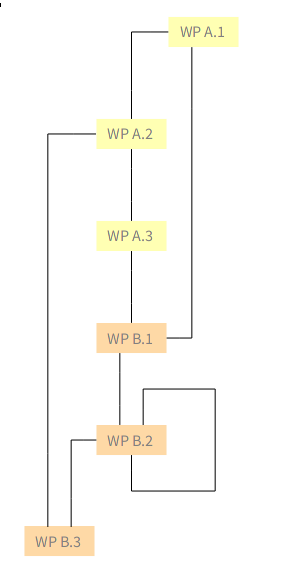

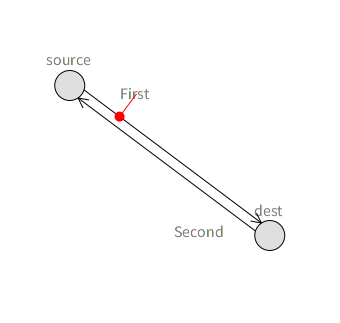
Better late than never :-) (working on the holidays backlog) I only have one request: better positioning on labels of nodes and edges. For example see the image: three of the four labels are badly positioned because the bounding box of their text is intersected by one or more edges. I know that to solve this generally is hard, but for simple cases like this it should be possible. Ah, and it should work well with animations and dragging of course ;-)
On Feb 24, 2016, at 05:51, Alexandre Bergel <alexandre.bergel@me.com> wrote:
Dear community,
As you may have seen, Roassal has entered a stabilization phase. The book AgileVisualization.com will soon be released. After its release, Roassal will go over a new development phase. In order to prepare it, I am asking this question:
What are the 3 aspects you would like to see improved in Roassal?
You can answer publicly or by sending private messages.
Kind regards, Alexandre -- _,.;:~^~:;._,.;:~^~:;._,.;:~^~:;._,.;:~^~:;._,.;: Alexandre Bergel http://www.bergel.eu ^~:;._,.;:~^~:;._,.;:~^~:;._,.;:~^~:;._,.;:~^~:;.
_______________________________________________ Moose-dev mailing list Moose-dev@list.inf.unibe.ch https://www.list.inf.unibe.ch/listinfo/moose-dev
---> Save our in-boxes! http://emailcharter.org <--- Johan Fabry - http://pleiad.cl/~jfabry PLEIAD and RyCh labs - Computer Science Department (DCC) - University of Chile
Thanks! Alexandre -- _,.;:~^~:;._,.;:~^~:;._,.;:~^~:;._,.;:~^~:;._,.;: Alexandre Bergel http://www.bergel.eu ^~:;._,.;:~^~:;._,.;:~^~:;._,.;:~^~:;._,.;:~^~:;.
On Mar 7, 2016, at 10:34 AM, Johan Fabry <jfabry@dcc.uchile.cl> wrote:
Better late than never :-) (working on the holidays backlog)
I only have one request: better positioning on labels of nodes and edges. For example see the image: three of the four labels are badly positioned because the bounding box of their text is intersected by one or more edges.
<Screen Shot 2016-03-07 at 10.31.24.png> I know that to solve this generally is hard, but for simple cases like this it should be possible.
Ah, and it should work well with animations and dragging of course ;-)
On Feb 24, 2016, at 05:51, Alexandre Bergel <alexandre.bergel@me.com <mailto:alexandre.bergel@me.com>> wrote:
Dear community,
As you may have seen, Roassal has entered a stabilization phase. The book AgileVisualization.com <http://agilevisualization.com/> will soon be released. After its release, Roassal will go over a new development phase. In order to prepare it, I am asking this question:
What are the 3 aspects you would like to see improved in Roassal?
You can answer publicly or by sending private messages.
Kind regards, Alexandre -- _,.;:~^~:;._,.;:~^~:;._,.;:~^~:;._,.;:~^~:;._,.;: Alexandre Bergel http://www.bergel.eu <http://www.bergel.eu/> ^~:;._,.;:~^~:;._,.;:~^~:;._,.;:~^~:;._,.;:~^~:;.
_______________________________________________ Moose-dev mailing list Moose-dev@list.inf.unibe.ch <mailto:Moose-dev@list.inf.unibe.ch> https://www.list.inf.unibe.ch/listinfo/moose-dev
---> Save our in-boxes! http://emailcharter.org <http://emailcharter.org/> <---
Johan Fabry - http://pleiad.cl/~jfabry <http://pleiad.cl/~jfabry> PLEIAD and RyCh labs - Computer Science Department (DCC) - University of Chile
_______________________________________________ Moose-dev mailing list Moose-dev@list.inf.unibe.ch https://www.list.inf.unibe.ch/listinfo/moose-dev
Hi Johan, I've just commited RTAnchorConstraint to latest Roassal, see class-side example there. I've been using it for my class diagrams where it works quite well, however class diagrams are usually orthogonal-ish, which makes it a bit nicer. The Anchor will avoid intersecting it's own line, and one of the end shapes (it should both but apparently I have a bug there...). It doesn't look at other lines, however you can specify on which side it should be. (You can also put the node label inside the circle with `el @ (RTLabelled new center)` but you probably know that.) â I have also a global edge labeling layout which produces good placement⦠but it's slow as hell⦠I need to write a fast flow alogrithm⦠Also the Anchor currently doesn't work with self-edges. On the other hand Roassal doesn't have self-edges yet so it shouldn't be a problem. :) Peter On Mon, Mar 7, 2016 at 2:34 PM, Johan Fabry <jfabry@dcc.uchile.cl> wrote:
Better late than never :-) (working on the holidays backlog)
I only have one request: better positioning on labels of nodes and edges. For example see the image: three of the four labels are badly positioned because the bounding box of their text is intersected by one or more edges.
I know that to solve this generally is hard, but for simple cases like this it should be possible.
Ah, and it should work well with animations and dragging of course ;-)
On Feb 24, 2016, at 05:51, Alexandre Bergel <alexandre.bergel@me.com> wrote:
Dear community,
As you may have seen, Roassal has entered a stabilization phase. The book AgileVisualization.com <http://agilevisualization.com> will soon be released. After its release, Roassal will go over a new development phase. In order to prepare it, I am asking this question:
What are the 3 aspects you would like to see improved in Roassal?
You can answer publicly or by sending private messages.
Kind regards, Alexandre -- _,.;:~^~:;._,.;:~^~:;._,.;:~^~:;._,.;:~^~:;._,.;: Alexandre Bergel http://www.bergel.eu ^~:;._,.;:~^~:;._,.;:~^~:;._,.;:~^~:;._,.;:~^~:;.
_______________________________________________ Moose-dev mailing list Moose-dev@list.inf.unibe.ch https://www.list.inf.unibe.ch/listinfo/moose-dev
---> Save our in-boxes! http://emailcharter.org <---
Johan Fabry - http://pleiad.cl/~jfabry PLEIAD and RyCh labs - Computer Science Department (DCC) - University of Chile
_______________________________________________ Moose-dev mailing list Moose-dev@list.inf.unibe.ch https://www.list.inf.unibe.ch/listinfo/moose-dev
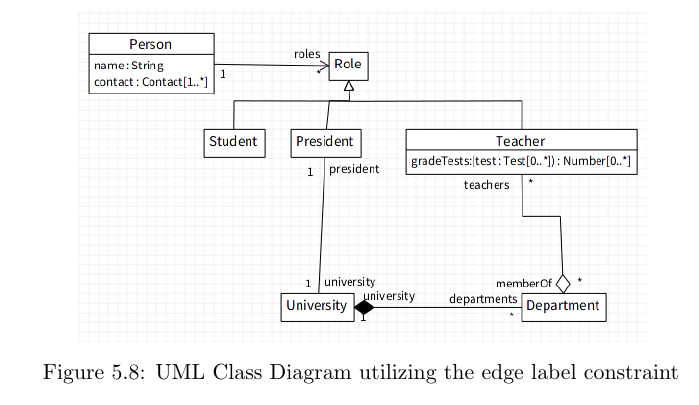
Excellent, thanks a lot! I will take a look at that tomorrow.
On Mar 7, 2016, at 11:34, Peter Uhnák <i.uhnak@gmail.com> wrote:
Hi Johan,
I've just commited RTAnchorConstraint to latest Roassal, see class-side example there.
I've been using it for my class diagrams where it works quite well, however class diagrams are usually orthogonal-ish, which makes it a bit nicer. <uml.png>
The Anchor will avoid intersecting it's own line, and one of the end shapes (it should both but apparently I have a bug there...). It doesn't look at other lines, however you can specify on which side it should be.
(You can also put the node label inside the circle with `el @ (RTLabelled new center)` but you probably know that.) <anchor.png> â I have also a global edge labeling layout which produces good placement⦠but it's slow as hell⦠I need to write a fast flow alogrithmâ¦
Also the Anchor currently doesn't work with self-edges. On the other hand Roassal doesn't have self-edges yet so it shouldn't be a problem. :)
Peter
On Mon, Mar 7, 2016 at 2:34 PM, Johan Fabry <jfabry@dcc.uchile.cl <mailto:jfabry@dcc.uchile.cl>> wrote:
Better late than never :-) (working on the holidays backlog)
I only have one request: better positioning on labels of nodes and edges. For example see the image: three of the four labels are badly positioned because the bounding box of their text is intersected by one or more edges.
<Screen Shot 2016-03-07 at 10.31.24.png> I know that to solve this generally is hard, but for simple cases like this it should be possible.
Ah, and it should work well with animations and dragging of course ;-)
On Feb 24, 2016, at 05:51, Alexandre Bergel <alexandre.bergel@me.com <mailto:alexandre.bergel@me.com>> wrote:
Dear community,
As you may have seen, Roassal has entered a stabilization phase. The book AgileVisualization.com <http://agilevisualization.com/> will soon be released. After its release, Roassal will go over a new development phase. In order to prepare it, I am asking this question:
What are the 3 aspects you would like to see improved in Roassal?
You can answer publicly or by sending private messages.
Kind regards, Alexandre -- _,.;:~^~:;._,.;:~^~:;._,.;:~^~:;._,.;:~^~:;._,.;: Alexandre Bergel http://www.bergel.eu <http://www.bergel.eu/> ^~:;._,.;:~^~:;._,.;:~^~:;._,.;:~^~:;._,.;:~^~:;.
_______________________________________________ Moose-dev mailing list Moose-dev@list.inf.unibe.ch <mailto:Moose-dev@list.inf.unibe.ch> https://www.list.inf.unibe.ch/listinfo/moose-dev <https://www.list.inf.unibe.ch/listinfo/moose-dev>
---> Save our in-boxes! http://emailcharter.org <http://emailcharter.org/> <---
Johan Fabry - http://pleiad.cl/~jfabry <http://pleiad.cl/~jfabry> PLEIAD and RyCh labs - Computer Science Department (DCC) - University of Chile
_______________________________________________ Moose-dev mailing list Moose-dev@list.inf.unibe.ch <mailto:Moose-dev@list.inf.unibe.ch> https://www.list.inf.unibe.ch/listinfo/moose-dev <https://www.list.inf.unibe.ch/listinfo/moose-dev>
---> Save our in-boxes! http://emailcharter.org <--- Johan Fabry - http://pleiad.cl/~jfabry PLEIAD and RyCh labs - Computer Science Department (DCC) - University of Chile
On Mar 7, 2016, at 11:34, Peter Uhnák <i.uhnak@gmail.com> wrote:
I've just commited RTAnchorConstraint to latest Roassal, see class-side example there.
I have been trying it, and there is a first version that works now, thanks! I even have a bug report for you ⦠before, when I removed the edge, the label was also removed automatically. Now this is no longer the case. :-( ---> Save our in-boxes! http://emailcharter.org <--- Johan Fabry - http://pleiad.cl/~jfabry PLEIAD and RyCh labs - Computer Science Department (DCC) - University of Chile
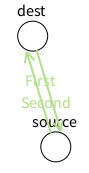
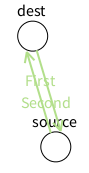
Heh, also a funny feature of your anchor constraints: they do not play well with layouts and animations. Try the code below (adapted from the example to use the layout and animation of LRP ) and you will see that the circles keep spinning around, they never stop. I think it would be better for them to stop ;-) | v lbls es e1 e2 a1 a2 layout stepping| v := RTView new. lbls := RTLabel new elementsOn: #(#First #Second). es := RTEllipse new size: 30; borderColor: Color black; elementsOn: #(#source #dest). v addAll: lbls; addAll: es. es @ RTDraggable. es @ RTLabeled. e1 := RTArrowedLine new withContinuousCircleAttachPoint; color: Color black; edgeFrom: es first to: es second. v add: e1. e2 := RTArrowedLine new withContinuousCircleAttachPoint; color: Color black; edgeFrom: es second to: es first. v add: e2. a1 := RTAnchorConstraint new. a1 anchorShape size: 10. a1 guideLine color: Color red. a1 element: lbls first; edge: e1; balance: 0.2; minDistance: 10; build. (a2 := RTAnchorConstraint new) element: lbls second; edge: e2; balance: 0.2; minDistance: 10; build. layout := RTForceBasedLayout new charge: -450; length: 100; doNotUseProgressBar; applyOn: es; yourself. layout initialLayout: RTSugiyamaLayout new. stepping := RTSpringLayoutStepping new view: v; layout: layout; afterBlock: [ v canvas camera focusOnCenter]. v addAnimation: stepping. ^ v
On Mar 9, 2016, at 17:56, Johan Fabry <jfabry@dcc.uchile.cl> wrote:
On Mar 7, 2016, at 11:34, Peter Uhnák <i.uhnak@gmail.com <mailto:i.uhnak@gmail.com>> wrote:
I've just commited RTAnchorConstraint to latest Roassal, see class-side example there.
I have been trying it, and there is a first version that works now, thanks!
I even have a bug report for you ⦠before, when I removed the edge, the label was also removed automatically. Now this is no longer the case. :-(
---> Save our in-boxes! http://emailcharter.org <http://emailcharter.org/> <---
Johan Fabry - http://pleiad.cl/~jfabry <http://pleiad.cl/~jfabry> PLEIAD and RyCh labs - Computer Science Department (DCC) - University of Chile
_______________________________________________ Moose-dev mailing list Moose-dev@list.inf.unibe.ch https://www.list.inf.unibe.ch/listinfo/moose-dev
---> Save our in-boxes! http://emailcharter.org <--- Johan Fabry - http://pleiad.cl/~jfabry PLEIAD and RyCh labs - Computer Science Department (DCC) - University of Chile
On Wed, Mar 9, 2016 at 10:02 PM, Johan Fabry <jfabry@dcc.uchile.cl> wrote:
Heh, also a funny feature of your anchor constraints: they do not play well with layouts and animations. Try the code below (adapted from the example to use the layout and animation of LRP ) and you will see that the circles keep spinning around, they never stop. I think it would be better for them to stop ;-)
can't help myself :) https://youtu.be/PGNiXGX2nLU?t=1m
stepping := RTSpringLayoutStepping new view: v; layout: layout; afterBlock: [ v canvas camera focusOnCenter].
The problem is that RTSpringLayoutStepping>>view sets in effect the layout on all elements in the view, which obviously won't work since they'll start competing. I'm not sure right now how to address it, but try this stepping := RTSpringLayoutStepping new view: RTView new; layout: layout; nodes: es; afterBlock: [ v canvas camera focusOnCenter].
I even have a bug report for you ⦠before, when I removed the edge, the label was also removed automatically. Now this is no longer the case. :-(
Ah right, thanks. I've extracted the class from my code and I have different removal mechanism... Please try the latest version, it should be fixed there. Peter
On Mar 9, 2016, at 18:51, Peter Uhnák <i.uhnak@gmail.com> wrote:
On Wed, Mar 9, 2016 at 10:02 PM, Johan Fabry <jfabry@dcc.uchile.cl <mailto:jfabry@dcc.uchile.cl>> wrote: Heh, also a funny feature of your anchor constraints: they do not play well with layouts and animations. Try the code below (adapted from the example to use the layout and animation of LRP ) and you will see that the circles keep spinning around, they never stop. I think it would be better for them to stop ;-)
can't help myself :)
https://youtu.be/PGNiXGX2nLU?t=1m <https://youtu.be/PGNiXGX2nLU?t=1m> Hehe, good one :-) https://youtu.be/uo0o8eQWfcI ! :-P
stepping := RTSpringLayoutStepping new view: v; layout: layout; afterBlock: [ v canvas camera focusOnCenter].
The problem is that RTSpringLayoutStepping>>view sets in effect the layout on all elements in the view, which obviously won't work since they'll start competing.
I'm not sure right now how to address it, but try this
stepping := RTSpringLayoutStepping new view: RTView new; layout: layout; nodes: es; afterBlock: [ v canvas camera focusOnCenter].
Sorry, I donât know enough of the internals to understand whatâs going on. The solution is not a solution for me, because it effectively removes the animation, we only see the the resulting layout. There is no other solution? Alex, do you have any idea?
Ah right, thanks. I've extracted the class from my code and I have different removal mechanism... Please try the latest version, it should be fixed there.
Fixed, thanks! But now there is a new bug RTAnchorConstraint>>computeExtraDistance that I cannot reliably reproduce, I only have a stack trace, sorry: Array(Object)>>errorSubscriptBounds: Array(Object)>>at: Array(SequenceableCollection)>>first Array(SequenceableCollection)>>anyOne Array(Collection)>>max RTAnchorConstraint>>computeExtraDistance [ :crossings | element translateBy: aSegment vector normal * (minDistance + self computeExtraDistance) negated ] in RTAnchorConstraint>>moveAwayFromSegment: BlockClosure>>cull: Set(Collection)>>ifNotEmpty: RTAnchorConstraint>>moveAwayFromSegment: RTAnchorConstraint>>moveElement RTAnchorConstraint>>update [ self update ] in RTAnchorConstraint>>build BlockClosure>>cull: BlockClosure>>cull:cull: TRTranslationCallback>>shape:step: [ :c | c isTranslationCallback ifTrue: [ c shape: self step: aStep ] ] in TREllipseShape(TRCallableObject)>>triggerCallbacksForStep: OrderedCollection>>do: TREllipseShape(TRCallableObject)>>triggerCallbacksForStep: TREllipseShape(TRAbstractBoxShape)>>fromRectangle: TREllipseShape(TRAbstractBoxShape)>>fromRectangle:color: RTEllipse>>updateFor:trachelShape: RTEllipse(RTShape)>>updateFor: RTElement(RTShapedObject)>>update ---> Save our in-boxes! http://emailcharter.org <--- Johan Fabry - http://pleiad.cl/~jfabry PLEIAD and RyCh labs - Computer Science Department (DCC) - University of Chile
On Mar 10, 2016, at 12:08, Alexandre Bergel <alexandre.bergel@me.com> wrote:
There is no other solution? Alex, do you have any idea?
To which problem?
Copy-paste from original mail: anchor constraints: they do not play well with layouts and animations. Try the code below (adapted from the example to use the layout and animation of LRP ) and you will see that the circles keep spinning around, they never stop. I think it would be better for them to stop ;-) | v lbls es e1 e2 a1 a2 layout stepping| v := RTView new. lbls := RTLabel new elementsOn: #(#First #Second). es := RTEllipse new size: 30; borderColor: Color black; elementsOn: #(#source #dest). v addAll: lbls; addAll: es. es @ RTDraggable. es @ RTLabeled. e1 := RTArrowedLine new withContinuousCircleAttachPoint; color: Color black; edgeFrom: es first to: es second. v add: e1. e2 := RTArrowedLine new withContinuousCircleAttachPoint; color: Color black; edgeFrom: es second to: es first. v add: e2. a1 := RTAnchorConstraint new. a1 anchorShape size: 10. a1 guideLine color: Color red. a1 element: lbls first; edge: e1; balance: 0.2; minDistance: 10; build. (a2 := RTAnchorConstraint new) element: lbls second; edge: e2; balance: 0.2; minDistance: 10; build. layout := RTForceBasedLayout new charge: -450; length: 100; doNotUseProgressBar; applyOn: es; yourself. layout initialLayout: RTSugiyamaLayout new. stepping := RTSpringLayoutStepping new view: v; layout: layout; afterBlock: [ v canvas camera focusOnCenter]. v addAnimation: stepping. ^ v ---> Save our in-boxes! http://emailcharter.org <--- Johan Fabry - http://pleiad.cl/~jfabry PLEIAD and RyCh labs - Computer Science Department (DCC) - University of Chile
To which problem?
The problem is that RTSpringLayoutStepping always uses all the elements in the view and ignores what you set to the layout. This is a problem, because it will try to also layout the anchor, but that will trigger the anchor to fix itself⦠and we get endless spinning. On Thu, Mar 10, 2016 at 4:21 PM, Johan Fabry <jfabry@dcc.uchile.cl> wrote:
On Mar 10, 2016, at 12:08, Alexandre Bergel <alexandre.bergel@me.com> wrote:
There is no other solution? Alex, do you have any idea?
To which problem?
Copy-paste from original mail:
anchor constraints: they do not play well with layouts and animations. Try the code below (adapted from the example to use the layout and animation of LRP ) and you will see that the circles keep spinning around, they never stop. I think it would be better for them to stop ;-)
| v lbls es e1 e2 a1 a2 layout stepping| v := RTView new. lbls := RTLabel new elementsOn: #(#First #Second). es := RTEllipse new size: 30; borderColor: Color black; elementsOn: #(#source #dest). v addAll: lbls; addAll: es. es @ RTDraggable. es @ RTLabeled. e1 := RTArrowedLine new withContinuousCircleAttachPoint; color: Color black; edgeFrom: es first to: es second. v add: e1. e2 := RTArrowedLine new withContinuousCircleAttachPoint; color: Color black; edgeFrom: es second to: es first. v add: e2. a1 := RTAnchorConstraint new. a1 anchorShape size: 10. a1 guideLine color: Color red. a1 element: lbls first; edge: e1; balance: 0.2; minDistance: 10; build. (a2 := RTAnchorConstraint new) element: lbls second; edge: e2; balance: 0.2; minDistance: 10; build. layout := RTForceBasedLayout new charge: -450; length: 100; doNotUseProgressBar; applyOn: es; yourself. layout initialLayout: RTSugiyamaLayout new. stepping := RTSpringLayoutStepping new view: v; layout: layout; afterBlock: [ v canvas camera focusOnCenter]. v addAnimation: stepping. ^ v
---> Save our in-boxes! http://emailcharter.org <---
Johan Fabry - http://pleiad.cl/~jfabry PLEIAD and RyCh labs - Computer Science Department (DCC) - University of Chile
_______________________________________________ Moose-dev mailing list Moose-dev@list.inf.unibe.ch https://www.list.inf.unibe.ch/listinfo/moose-dev
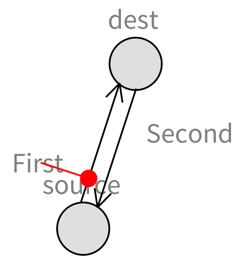
Hi! Thanks Peter for having spotted the problem. I have fixed it somehow (âsomehowâ because this is not an ideal solution, but good enough for now). Try this after having updated Roassal: -=-=-=-=-=-=-=-=-=-=-=-=-=-=-= | v lbls es e1 e2 a1 a2 layout stepping| v := RTView new. lbls := RTLabel new elementsOn: #(#First #Second). es := RTEllipse new size: 30; borderColor: Color black; elementsOn: #(#source #dest). v addAll: lbls; addAll: es. es @ RTDraggable. es @ RTLabeled. e1 := RTArrowedLine new withContinuousCircleAttachPoint; color: Color black; edgeFrom: es first to: es second. v add: e1. e2 := RTArrowedLine new withContinuousCircleAttachPoint; color: Color black; edgeFrom: es second to: es first. v add: e2. a1 := RTAnchorConstraint new. a1 anchorShape size: 10. a1 guideLine color: Color red. a1 element: lbls first; edge: e1; balance: 0.2; minDistance: 10; build. (a2 := RTAnchorConstraint new) element: lbls second; edge: e2; balance: 0.2; minDistance: 10; build. layout := RTForceBasedLayout new charge: -450; length: 100; doNotUseProgressBar; applyOn: es; yourself. layout initialLayout: RTSugiyamaLayout new. layout nodes: es. layout start: es. layout edges: { e1 . e2 }. stepping := RTSpringLayoutStepping new view: v; layoutWithoutPreparing: layout; afterBlock: [ v canvas camera focusOnCenter]. v addAnimation: stepping. ^ v -=-=-=-=-=-=-=-=-=-=-=-=-=-=-= Here is a screenshot: And this is all animated. Cool stuff! Alexandre -- _,.;:~^~:;._,.;:~^~:;._,.;:~^~:;._,.;:~^~:;._,.;: Alexandre Bergel http://www.bergel.eu ^~:;._,.;:~^~:;._,.;:~^~:;._,.;:~^~:;._,.;:~^~:;.
On Mar 10, 2016, at 12:42 PM, Peter Uhnák <i.uhnak@gmail.com> wrote:
To which problem?
The problem is that RTSpringLayoutStepping always uses all the elements in the view and ignores what you set to the layout.
This is a problem, because it will try to also layout the anchor, but that will trigger the anchor to fix itself⦠and we get endless spinning.
On Thu, Mar 10, 2016 at 4:21 PM, Johan Fabry <jfabry@dcc.uchile.cl <mailto:jfabry@dcc.uchile.cl>> wrote:
On Mar 10, 2016, at 12:08, Alexandre Bergel <alexandre.bergel@me.com <mailto:alexandre.bergel@me.com>> wrote:
There is no other solution? Alex, do you have any idea?
To which problem?
Copy-paste from original mail:
anchor constraints: they do not play well with layouts and animations. Try the code below (adapted from the example to use the layout and animation of LRP ) and you will see that the circles keep spinning around, they never stop. I think it would be better for them to stop ;-)
| v lbls es e1 e2 a1 a2 layout stepping| v := RTView new. lbls := RTLabel new elementsOn: #(#First #Second). es := RTEllipse new size: 30; borderColor: Color black; elementsOn: #(#source #dest). v addAll: lbls; addAll: es. es @ RTDraggable. es @ RTLabeled. e1 := RTArrowedLine new withContinuousCircleAttachPoint; color: Color black; edgeFrom: es first to: es second. v add: e1. e2 := RTArrowedLine new withContinuousCircleAttachPoint; color: Color black; edgeFrom: es second to: es first. v add: e2. a1 := RTAnchorConstraint new. a1 anchorShape size: 10. a1 guideLine color: Color red. a1 element: lbls first; edge: e1; balance: 0.2; minDistance: 10; build. (a2 := RTAnchorConstraint new) element: lbls second; edge: e2; balance: 0.2; minDistance: 10; build. layout := RTForceBasedLayout new charge: -450; length: 100; doNotUseProgressBar; applyOn: es; yourself. layout initialLayout: RTSugiyamaLayout new. stepping := RTSpringLayoutStepping new view: v; layout: layout; afterBlock: [ v canvas camera focusOnCenter]. v addAnimation: stepping. ^ v
---> Save our in-boxes! http://emailcharter.org <http://emailcharter.org/> <---
Johan Fabry - http://pleiad.cl/~jfabry <http://pleiad.cl/~jfabry> PLEIAD and RyCh labs - Computer Science Department (DCC) - University of Chile
_______________________________________________ Moose-dev mailing list Moose-dev@list.inf.unibe.ch <mailto:Moose-dev@list.inf.unibe.ch> https://www.list.inf.unibe.ch/listinfo/moose-dev <https://www.list.inf.unibe.ch/listinfo/moose-dev>
Any code I can have to reproduce the problem? Alexandre -- _,.;:~^~:;._,.;:~^~:;._,.;:~^~:;._,.;:~^~:;._,.;: Alexandre Bergel http://www.bergel.eu ^~:;._,.;:~^~:;._,.;:~^~:;._,.;:~^~:;._,.;:~^~:;.
On Mar 10, 2016, at 11:25 AM, Johan Fabry <jfabry@dcc.uchile.cl> wrote:
But now there is a new bug RTAnchorConstraint>>computeExtraDistance that I cannot reliably reproduce,

Hi, On the data input front, the main aspect in the workshops is "where the data comes from?". In the examples of the book, most of it comes from the Pharo/Moose image itself. Where providing external data sources (Tweets, medicine info, public spending) and we're creating custom objects to hold them, but some kind of "generic" spreadsheet for populating/viewing/editing data sources would be the best addition here. On the data output front, the HTML exporter generates a great impression. I think that improving it and including the support for some small "web applets" with sliders/menus/inbox would be the next step. Cheers, Offray On 24/02/16 03:51, Alexandre Bergel wrote:
Dear community,
As you may have seen, Roassal has entered a stabilization phase. The book AgileVisualization.com will soon be released. After its release, Roassal will go over a new development phase. In order to prepare it, I am asking this question:
What are the 3 aspects you would like to see improved in Roassal?
You can answer publicly or by sending private messages.
Kind regards, Alexandre
Hi Offray!
On the data input front, the main aspect in the workshops is "where the data comes from?". In the examples of the book, most of it comes from the Pharo/Moose image itself. Where providing external data sources (Tweets, medicine info, public spending) and we're creating custom objects to hold them, but some kind of "generic" spreadsheet for populating/viewing/editing data sources would be the best addition here.
Yes, you are right. I have tried to change this. However, I do not always have the data in hand. Help is welcome on this...
On the data output front, the HTML exporter generates a great impression. I think that improving it and including the support for some small "web applets" with sliders/menus/inbox would be the next step.
This is an interesting point. However, the web world is tough. Sure, we could improve the exporter. But competing against d3 and all its friends is difficult. For example, this morning Iâve heard about http://dimplejs.org . Frankly, it is much simpler to use it than embed a Roassal-generated visualization in an html page. Having Pharo play a bigger role on the web yes. But the Roassal effort cannot drag it all. Again, suggestion and help are more than welcome... Alexandre
On 24/02/16 03:51, Alexandre Bergel wrote:
Dear community,
As you may have seen, Roassal has entered a stabilization phase. The book AgileVisualization.com will soon be released. After its release, Roassal will go over a new development phase. In order to prepare it, I am asking this question:
What are the 3 aspects you would like to see improved in Roassal?
You can answer publicly or by sending private messages.
Kind regards, Alexandre
Hi Alexandre, On 28/03/16 12:55, Alexandre Bergel wrote:
Hi Offray!
On the data input front, the main aspect in the workshops is "where the data comes from?". In the examples of the book, most of it comes from the Pharo/Moose image itself. Where providing external data sources (Tweets, medicine info, public spending) and we're creating custom objects to hold them, but some kind of "generic" spreadsheet for populating/viewing/editing data sources would be the best addition here. Yes, you are right. I have tried to change this. However, I do not always have the data in hand. Help is welcome on this...
And help is coming (sort of... ;-)), because I meant "We're providing external data sources (Tweets, medicine info, public spending) and we're creating custom objects to hold them" in grafoscopio. In the "generic spreadsheet" front we're trying to provide support for SQLite, so we could try to see what aspects of grafoscopio can be used in tandem with Roassal.
On the data output front, the HTML exporter generates a great impression. I think that improving it and including the support for some small "web applets" with sliders/menus/inbox would be the next step. This is an interesting point. However, the web world is tough. Sure, we could improve the exporter. But competing against d3 and all its friends is difficult. For example, this morning Iâve heard about http://dimplejs.org . Frankly, it is much simpler to use it than embed a Roassal-generated visualization in an html page. Having Pharo play a bigger role on the web yes. But the Roassal effort cannot drag it all. Again, suggestion and help are more than welcome...
I don't know if is possible to use something like and exporter raphael.js or dimplejs or d3.js... I'm trying something like that for the pdf world, leveraging the power of pandoc and LaTeX, while keeping the moldability and interactivity of writing/visualizing inside Pharo. Anyway, is interesting to consider this future paths and know which are the perceptions of different actors while using Roassal. Cheers and thanks as always for this community and what it makes :-), Offray
participants (8)
-
 Alexandre Bergel
 -
 Cyril Ferlicot Delbecque
 -
 Johan Fabry
 -
 Martin Bähr
 -
 Offray Vladimir Luna Cárdenas
 -
 Peter Uhnák
 -
 stepharo
 -
 Tudor Girba