How to generically find methods in class hierarchies? (Aka narrow spotter?)

Iâm wondering if there are better ways of finding things that I am missing. In another thread I was asking about how to wrap the lookup of an item at an index in a collection. I had browsed the collection hierarchy and not seen anything (I kept coming back to the fact that I dont find the protocol categories very helpful, particularly in the collection hierarchy). I had also used spotter - and to explain - if you type âwrapâ into spotter there are 400 methods that come up, and when you scroll down them, after about 100 the list starts to go blank (bug?). Spotter seems like the key however, but Iâm wondering if there is a way to search for âwrapâ methods in a hierarchy (limit it, and not search the full image)? I tried typing Collection, diving in and typing wrap - but that doesnât work. However I thought I had read that there was a way to search in a hierarchy - but I can seem to work it out? (Also - while the show inherited methods in Calypso is useful - I find itâs not great when you have half a concept in mind as depending on prefixes and some of the less common naming of things, it can be hard to find stuff when itâs alphabetical and not filtered. So is there a trick Iâm missing? Tim Ps - Peter spotter the method I was after was called atWrap:, so it doesnât begging with w, and hence I missed it. Sent from my iPhone

On Sat, 30 Mar 2019 at 07:46, Tim Mackinnon <tim@testit.works> wrote:
Iâm wondering if there are better ways of finding things that I am missing.
In another thread I was asking about how to wrap the lookup of an item at an index in a collection.
I had browsed the collection hierarchy and not seen anything (I kept coming back to the fact that I dont find the protocol categories very helpful, particularly in the collection hierarchy).
I had also used spotter - and to explain - if you type âwrapâ into spotter there are 400 methods that come up, and when you scroll down them, after about 100 the list starts to go blank (bug?).
Spotter seems like the key however, but Iâm wondering if there is a way to search for âwrapâ methods in a hierarchy (limit it, and not search the full image)? I tried typing Collection, diving in and typing wrap - but that doesnât work. However I thought I had read that there was a way to search in a hierarchy - but I can seem to work it out?
(Also - while the show inherited methods in Calypso is useful - I find itâs not great when you have half a concept in mind as depending on prefixes and some of the less common naming of things, it can be hard to find stuff when itâs alphabetical and not filtered.
So is there a trick Iâm missing?
I mentioned in another thread before seeing this post. Try... Tools > Finder > Examples > #(10 20 30 40) . 5 . 10 P.S. It would be good in Exercism to talk students through using this tool. cheers -ben
Hi Ben - yes you are right that in this case that tool would work (and itâs magical when it does). While I sometimes use it - it is a bit buried away and rather clunky to specify things (it really could use some Spotter treatment and get plugged into Spotter ). However the biggest issue with it is that it only works on a very small subset of things I end up looking for. By the nature of the difficulty of doing it, itâs unary, binary and single keyword messages only. So something like #min:max: it will never throw up. But yes - kicking myself for not trying it in this case. Iâm still curious how I might have used Spotter to find this method - as I use Spotter a lot (but not as effectively as I should - so reviewing its usage). Tim Sent from my iPhone
On 30 Mar 2019, at 02:46, Ben Coman <btc@openinworld.com> wrote:
On Sat, 30 Mar 2019 at 07:46, Tim Mackinnon <tim@testit.works> wrote: Iâm wondering if there are better ways of finding things that I am missing.
In another thread I was asking about how to wrap the lookup of an item at an index in a collection.
I had browsed the collection hierarchy and not seen anything (I kept coming back to the fact that I dont find the protocol categories very helpful, particularly in the collection hierarchy).
I had also used spotter - and to explain - if you type âwrapâ into spotter there are 400 methods that come up, and when you scroll down them, after about 100 the list starts to go blank (bug?).
Spotter seems like the key however, but Iâm wondering if there is a way to search for âwrapâ methods in a hierarchy (limit it, and not search the full image)? I tried typing Collection, diving in and typing wrap - but that doesnât work. However I thought I had read that there was a way to search in a hierarchy - but I can seem to work it out?
(Also - while the show inherited methods in Calypso is useful - I find itâs not great when you have half a concept in mind as depending on prefixes and some of the less common naming of things, it can be hard to find stuff when itâs alphabetical and not filtered.
So is there a trick Iâm missing?
I mentioned in another thread before seeing this post.
Try... Tools > Finder > Examples > #(10 20 30 40) . 5 . 10
P.S. It would be good in Exercism to talk students through using this tool.
cheers -ben

On 30 Mar 2019, at 00:45, Tim Mackinnon <tim@testit.works> wrote:
I had also used spotter - and to explain - if you type âwrapâ into spotter there are 400 methods that come up, and when you scroll down them, after about 100 the list starts to go blank (bug?).
If I type 'wrap' I see this in Spotter: So it is hit #2/#3 in Messages ...
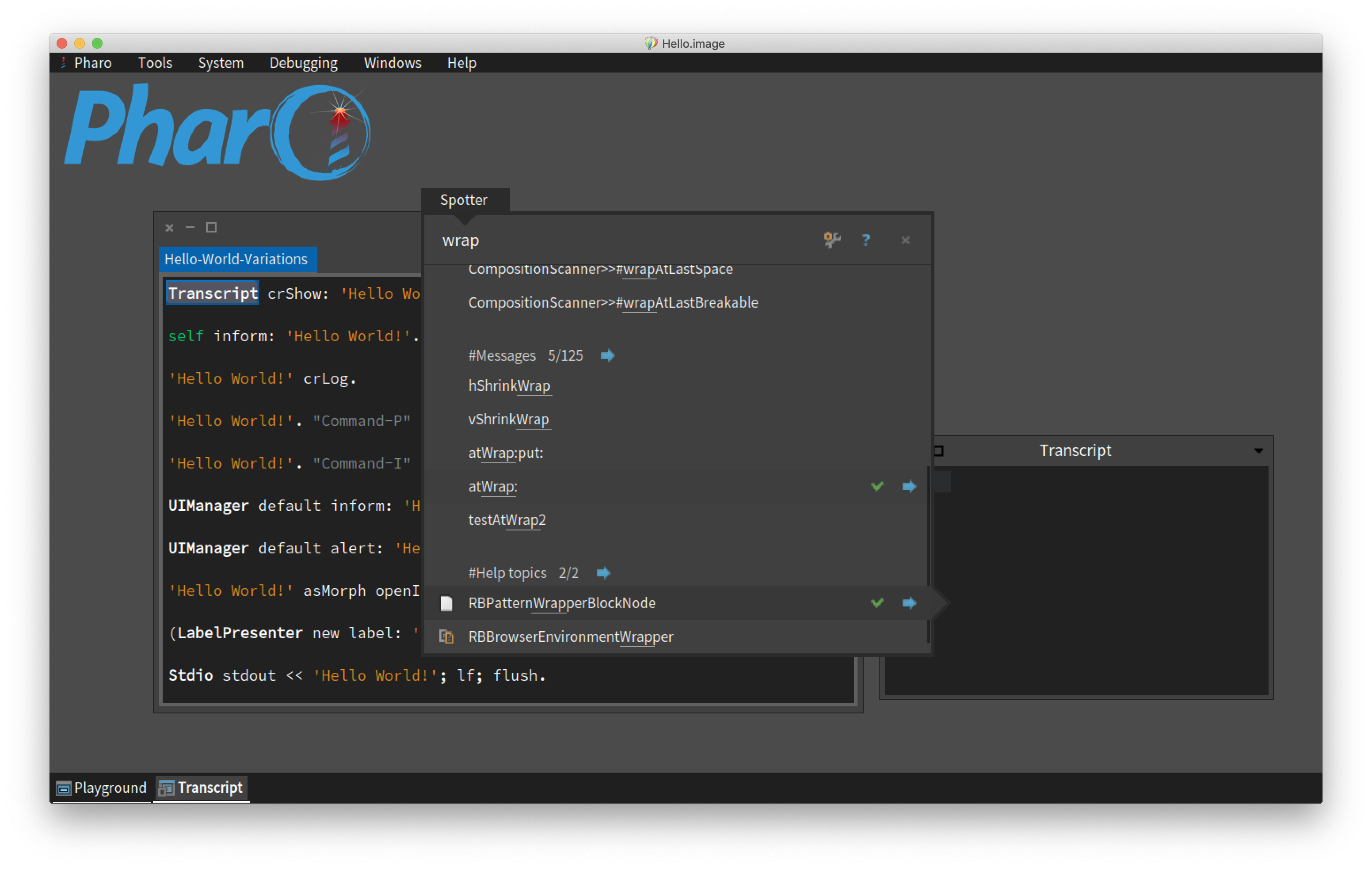
You - know, this has made me realise that I donât understand the difference between #messages and #implementors in Spotter? In my haste Iâve always jumped on the latter (as its first in the spotter list) - and implementors has much more methods. So thats a good tip. In realising this now, Iâm wondering how you easily jump down the sections with the keyboard on OSX - help says cmd-shift-down but it appears to not work (maybe a regression?). Iâd also like to learn how to modify that list as Windows always comes first, and I rarely use spotter to switch windows, and prefer to type "Coll <enter>â and get a new browser on collection (and not a window that happens to mention collection). Anyway - learning lots from this, thanks. Tim
On 30 Mar 2019, at 09:23, Sven Van Caekenberghe <sven@stfx.eu> wrote:
On 30 Mar 2019, at 00:45, Tim Mackinnon <tim@testit.works <mailto:tim@testit.works>> wrote:
I had also used spotter - and to explain - if you type âwrapâ into spotter there are 400 methods that come up, and when you scroll down them, after about 100 the list starts to go blank (bug?).
If I type 'wrap' I see this in Spotter:
<Screenshot 2019-03-30 at 10.22.06.png> So it is hit #2/#3 in Messages ...
On Sat, 30 Mar 2019 at 20:25, Tim Mackinnon <tim@testit.works> wrote:
You - know, this has made me realise that I donât understand the difference between #messages and #implementors in Spotter? In my haste Iâve always jumped on the latter (as its first in the spotter list) - and implementors has much more methods. So thats a good tip.
In realising this now, Iâm wondering how you easily jump down the sections with the keyboard on OSX - help says cmd-shift-down but it appears to not work (maybe a regression?).
Try... wrap #m but that is a bit insider knowledge and easy to miss. Perhaps showing this shortcut in the heading would help... "#Messages (#m) nnn/NNN" I took a poke at doing that, browsing senders of #spotterOrder: I found... CompiledMethod>>spotterForMessagesFor: aStep <spotterOrder: 12> aStep listProcessor title: 'Messages'; allCandidates: [ self messages asSortedCollection collect: [:each | GTSelector new name: each ] ]; filter: GTFilterSubstring But as a test changing the title to 'Messages x' is not reflected when I next open Spotter. Any clues where the "#Messages (#m) nnn/NNN" would be made? cheers -ben
participants (3)
-
 Ben Coman
 -
 Sven Van Caekenberghe
 -
 Tim Mackinnon