
Hello,
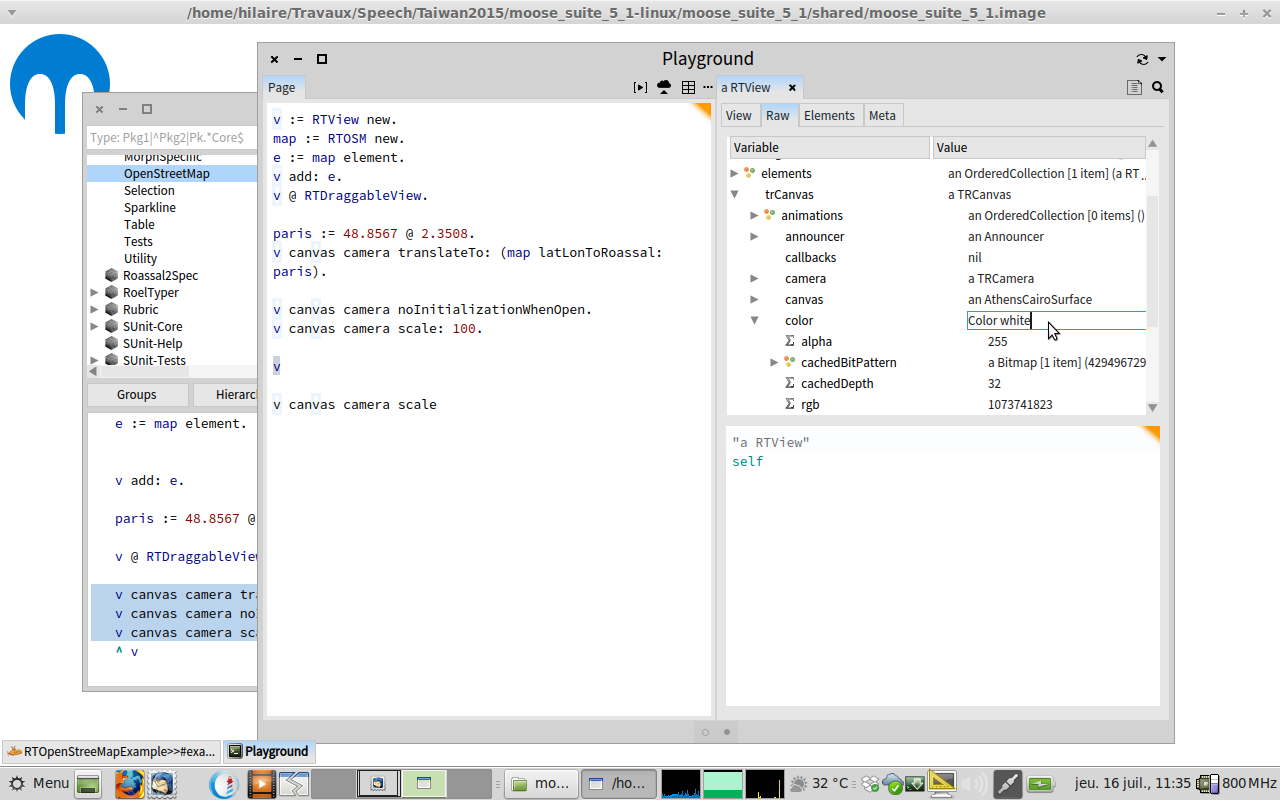
From a GL inspector, how am I supposed to change the value of an attribute. When I double click on its value, I have a in place editor, but changing and validating with Enter or Alt-s does not work.
Thanks Hilaire -- Dr. Geo http://drgeo.eu http://google.com/+DrgeoEu

I guess you mean GT Inspector, right? In that case, both Enter and Cmd+s should work. Could you describe what you do and perhaps add screeshots? Cheers, Doru On Wed, Jul 15, 2015 at 8:12 PM, Hilaire <hilaire@drgeo.eu> wrote:
Hello,
From a GL inspector, how am I supposed to change the value of an attribute. When I double click on its value, I have a in place editor, but changing and validating with Enter or Alt-s does not work.
Thanks
Hilaire
-- Dr. Geo http://drgeo.eu http://google.com/+DrgeoEu
-- www.tudorgirba.com "Every thing has its own flow"
Sorry, I don't have Cmd key on my keyboard. Thanks Hilaire Le 16/07/2015 03:53, Tudor Girba a écrit :
I guess you mean GT Inspector, right?
In that case, both Enter and Cmd+s should work.
Could you describe what you do and perhaps add screeshots?
Cheers, Doru
On Wed, Jul 15, 2015 at 8:12 PM, Hilaire <hilaire@drgeo.eu <mailto:hilaire@drgeo.eu>> wrote:
Hello,
From a GL inspector, how am I supposed to change the value of an attribute. When I double click on its value, I have a in place editor, but changing and validating with Enter or Alt-s does not work.
Thanks
Hilaire
-- Dr. Geo http://drgeo.eu http://google.com/+DrgeoEu
-- www.tudorgirba.com <http://www.tudorgirba.com>
"Every thing has its own flow"
-- Dr. Geo http://drgeo.eu http://google.com/+DrgeoEu
Le 16/07/2015 03:53, Tudor Girba a écrit :
Could you describe what you do and perhaps add screeshots?
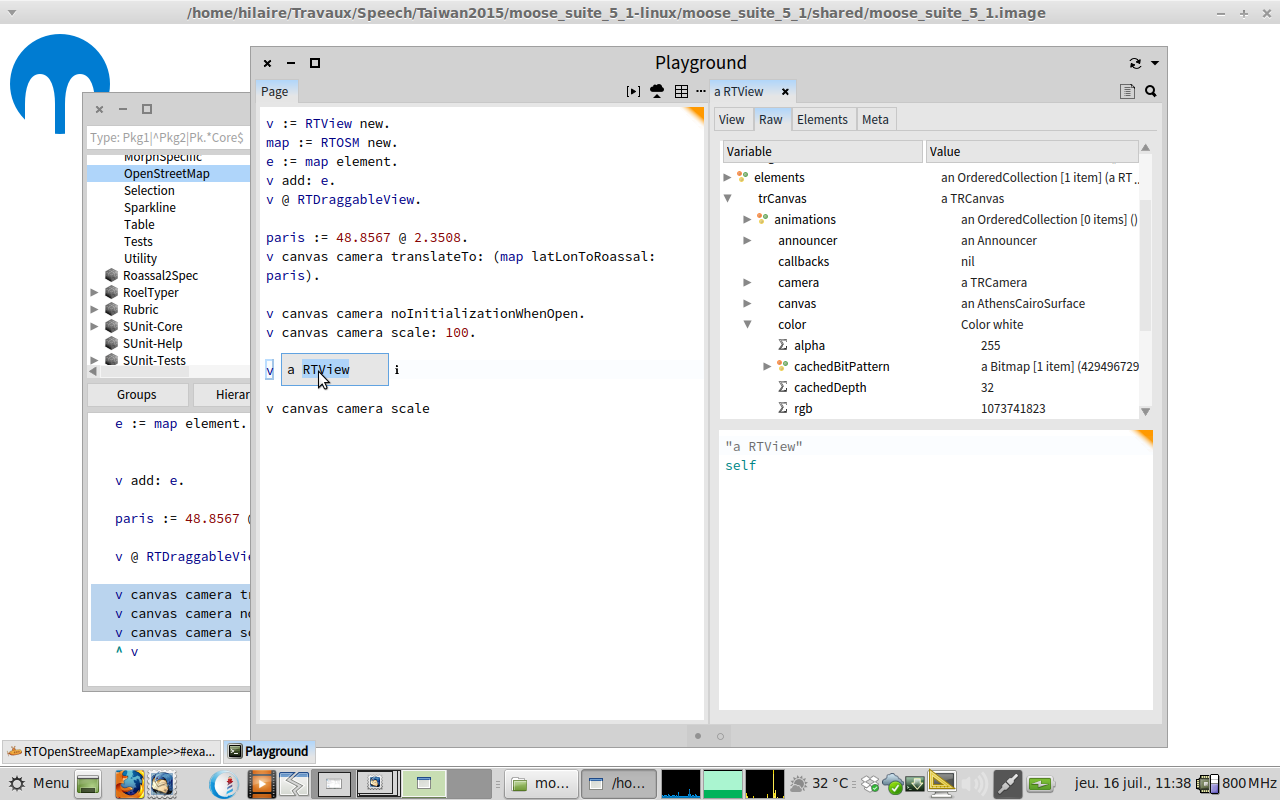
See screenshot. Btw, from the palyground, when I print a value and want to browse the printed class, how can I do it? Selecting the class and Alt/Ctrl-b does not work (capture2) Hilaire -- Dr. Geo http://drgeo.eu http://google.com/+DrgeoEu

If you want to change an attribute of a "subelement" in the tree - this does not work. only the attributes of the top/root node can be changed that way. As I understand the comments in this issue, this will not be changed. 14584 <https://pharo.fogbugz.com/default.asp?14584> GTInspector: explore only 2015-07-16 5:38 GMT+02:00 Hilaire <hilaire@drgeo.eu>:
Le 16/07/2015 03:53, Tudor Girba a écrit :
Could you describe what you do and perhaps add screeshots?
See screenshot.
Btw, from the palyground, when I print a value and want to browse the printed class, how can I do it? Selecting the class and Alt/Ctrl-b does not work (capture2)
Hilaire
-- Dr. Geo http://drgeo.eu http://google.com/+DrgeoEu

On 16 Jul 2015, at 09:25, Nicolai Hess <nicolaihess@web.de> wrote:
If you want to change an attribute of a "subelement" in the tree - this does not work. only the attributes of the top/root node can be changed that way.
As I understand the comments in this issue, this will not be changed. 14584 <https://pharo.fogbugz.com/default.asp?14584> GTInspector: explore only
Actually, what Doru says is that it will not be changed in current implementation because they are working in a complete new implementation (based on Brick and some other stuff they want to include). Which means it will be tackled, but with next iteration of the tool :) ⦠and yes, I find too that Doru assumes everybody understand/knows they are working on a new tool, and then he does not provide enough information⦠happens time to time :S Esteban
2015-07-16 5:38 GMT+02:00 Hilaire <hilaire@drgeo.eu <mailto:hilaire@drgeo.eu>>: Le 16/07/2015 03:53, Tudor Girba a écrit :
Could you describe what you do and perhaps add screeshots?
See screenshot.
Btw, from the palyground, when I print a value and want to browse the printed class, how can I do it? Selecting the class and Alt/Ctrl-b does not work (capture2)
Hilaire
-- Dr. Geo http://drgeo.eu <http://drgeo.eu/> http://google.com/+DrgeoEu <http://google.com/+DrgeoEu>

On 16 Jul 2015, at 05:38, Hilaire <hilaire@drgeo.eu> wrote:
Btw, from the palyground, when I print a value and want to browse the printed class, how can I do it? Selecting the class and Alt/Ctrl-b does not work (capture2)
Normally you should be able to do command-click on class and selector names, that works on Mac anyway. It was broken for a while in Pharo 5 but it seems to be fixed now. But if command-b fails too, then there might be another problem.
participants (5)
-
 Esteban Lorenzano
 -
 Hilaire
 -
 Nicolai Hess
 -
 Sven Van Caekenberghe
 -
 Tudor Girba