
So I decided to find out why Nuatilus delays to syntax highlight when I open ChronosManager I open my activity monitor to be amazed by the fact that pharo was consuming 30% of one of my cores. At the time I thought it was my fault because when my GUI steps I load from a png a form that I attack to a Morph. So I optomised that part loading all the pngs before hand , creating all the forms and during steping point only to the correct form. Nope still 30% ok change step time to 1 sec Nope still 30% ok delete step and step time alltogether Nope still 30% so the only explanation left is that pharo does not like I use images , which are not that big anyway , my whole image library is just 1 mb. So how I profile this ? Is there any way to find exactly where that 30% is consumed ? I tried to profile step and it retunred back with a mere 32ms , and I suspect thats the first step that loads the images , the second step would be much faster since it will just point to correct forms. So with a step of 32ms max and stepping once per second why a 30% CPU consumption ?

It depends on what you are doing in a step, but 1s step should not hurt. May be the problem is somewhere else. With DrGeo, I noted Athens is faster to BitBlt with bitmap operations (in my case, only scaling and displaying a From in a DrGeo canvas). Also, do your bitmaps come with 32 bits depth? -- Dr. Geo http://drgeo.eu

2016-01-15 21:53 GMT+01:00 Hilaire <hilaire@drgeo.eu>:
It depends on what you are doing in a step, but 1s step should not hurt. May be the problem is somewhere else. With DrGeo, I noted Athens is faster to BitBlt with bitmap operations (in my case, only scaling and displaying a From in a DrGeo canvas). Also, do your bitmaps come with 32 bits depth?
I suspect Rubric. Old pharo withouth Rubric in Nautilus -> ~ 0.5 % Current Pharo with Rubric in Nautilus -> ~ 10 % both with a fresh image and only one Nautilus window open.
-- Dr. Geo http://drgeo.eu

nicolai I could not get what you wrote :) could you repeat it ? Le 15/1/16 22:21, Nicolai Hess a écrit :
2016-01-15 21:53 GMT+01:00 Hilaire <hilaire@drgeo.eu <mailto:hilaire@drgeo.eu>>:
It depends on what you are doing in a step, but 1s step should not hurt. May be the problem is somewhere else. With DrGeo, I noted Athens is faster to BitBlt with bitmap operations (in my case, only scaling and displaying a From in a DrGeo canvas). Also, do your bitmaps come with 32 bits depth?
I suspect Rubric.
Old pharo withouth Rubric in Nautilus -> ~ 0.5 %
Current Pharo with Rubric in Nautilus -> ~ 10 %
both with a fresh image and only one Nautilus window open.
-- Dr. Geo http://drgeo.eu
ITs not the step, I removed the step as I said in my first post. Still 30% cpu consumption The images are PNGs and RGBA , 8bit On Fri, Jan 15, 2016 at 10:54 PM Hilaire <hilaire@drgeo.eu> wrote:
It depends on what you are doing in a step, but 1s step should not hurt. May be the problem is somewhere else. With DrGeo, I noted Athens is faster to BitBlt with bitmap operations (in my case, only scaling and displaying a From in a DrGeo canvas). Also, do your bitmaps come with 32 bits depth?
-- Dr. Geo http://drgeo.eu
taskbar was the problem, damn pharo gui is a huge pain in the hat. On Fri, Jan 15, 2016 at 11:32 PM Dimitris Chloupis <kilon.alios@gmail.com> wrote:
ITs not the step, I removed the step as I said in my first post. Still 30% cpu consumption
The images are PNGs and RGBA , 8bit
On Fri, Jan 15, 2016 at 10:54 PM Hilaire <hilaire@drgeo.eu> wrote:
It depends on what you are doing in a step, but 1s step should not hurt. May be the problem is somewhere else. With DrGeo, I noted Athens is faster to BitBlt with bitmap operations (in my case, only scaling and displaying a From in a DrGeo canvas). Also, do your bitmaps come with 32 bits depth?
-- Dr. Geo http://drgeo.eu

On 15 Jan 2016, at 23:30, Dimitris Chloupis <kilon.alios@gmail.com> wrote:
taskbar was the problem, damn pharo gui is a huge pain in the hat.
How so ?
On Fri, Jan 15, 2016 at 11:32 PM Dimitris Chloupis <kilon.alios@gmail.com> wrote: ITs not the step, I removed the step as I said in my first post. Still 30% cpu consumption
The images are PNGs and RGBA , 8bit
On Fri, Jan 15, 2016 at 10:54 PM Hilaire <hilaire@drgeo.eu> wrote: It depends on what you are doing in a step, but 1s step should not hurt. May be the problem is somewhere else. With DrGeo, I noted Athens is faster to BitBlt with bitmap operations (in my case, only scaling and displaying a From in a DrGeo canvas). Also, do your bitmaps come with 32 bits depth?
-- Dr. Geo http://drgeo.eu
2016-01-16 0:06 GMT+01:00 Sven Van Caekenberghe <sven@stfx.eu>:
On 15 Jan 2016, at 23:30, Dimitris Chloupis <kilon.alios@gmail.com> wrote:
taskbar was the problem, damn pharo gui is a huge pain in the hat.
How so ?
I would like to now that too. Btw, this is interesting too: WorldState debugShowDamage:true. And look all the flashing in a nautilus and or playground window.
On Fri, Jan 15, 2016 at 11:32 PM Dimitris Chloupis < kilon.alios@gmail.com> wrote: ITs not the step, I removed the step as I said in my first post. Still 30% cpu consumption
The images are PNGs and RGBA , 8bit
On Fri, Jan 15, 2016 at 10:54 PM Hilaire <hilaire@drgeo.eu> wrote: It depends on what you are doing in a step, but 1s step should not hurt. May be the problem is somewhere else. With DrGeo, I noted Athens is faster to BitBlt with bitmap operations (in my case, only scaling and displaying a From in a DrGeo canvas). Also, do your bitmaps come with 32 bits depth?
-- Dr. Geo http://drgeo.eu
2016-01-16 0:11 GMT+01:00 Nicolai Hess <nicolaihess@gmail.com>:
2016-01-16 0:06 GMT+01:00 Sven Van Caekenberghe <sven@stfx.eu>:
On 15 Jan 2016, at 23:30, Dimitris Chloupis <kilon.alios@gmail.com> wrote:
taskbar was the problem, damn pharo gui is a huge pain in the hat.
How so ?
I would like to now that too.
Btw, this is interesting too:
WorldState debugShowDamage:true.
And look all the flashing in a nautilus and or playground window.
Hm, I think this was my fault. The fix for 17201 <https://pharo.fogbugz.com/f/cases/17201/Marking-Diffs-broken-in-Pharo5> Marking Diffs broken in Pharo5 wasn't good.
On Fri, Jan 15, 2016 at 11:32 PM Dimitris Chloupis < kilon.alios@gmail.com> wrote: ITs not the step, I removed the step as I said in my first post. Still 30% cpu consumption
The images are PNGs and RGBA , 8bit
On Fri, Jan 15, 2016 at 10:54 PM Hilaire <hilaire@drgeo.eu> wrote: It depends on what you are doing in a step, but 1s step should not hurt. May be the problem is somewhere else. With DrGeo, I noted Athens is faster to BitBlt with bitmap operations (in my case, only scaling and displaying a From in a DrGeo canvas). Also, do your bitmaps come with 32 bits depth?
-- Dr. Geo http://drgeo.eu
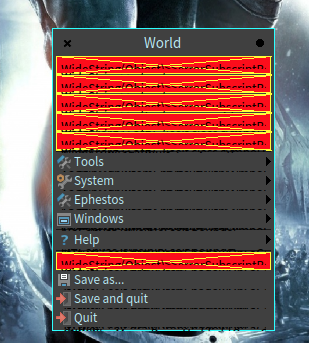
[image: Screen Shot 2016-01-16 at 00.38.10.png] and by the way menus on latest pharo 5 are broken On Sat, Jan 16, 2016 at 1:29 AM Nicolai Hess <nicolaihess@gmail.com> wrote:
2016-01-16 0:11 GMT+01:00 Nicolai Hess <nicolaihess@gmail.com>:
2016-01-16 0:06 GMT+01:00 Sven Van Caekenberghe <sven@stfx.eu>:
On 15 Jan 2016, at 23:30, Dimitris Chloupis <kilon.alios@gmail.com> wrote:
taskbar was the problem, damn pharo gui is a huge pain in the hat.
How so ?
I would like to now that too.
Btw, this is interesting too:
WorldState debugShowDamage:true.
And look all the flashing in a nautilus and or playground window.
Hm, I think this was my fault. The fix for 17201 <https://pharo.fogbugz.com/f/cases/17201/Marking-Diffs-broken-in-Pharo5> Marking Diffs broken in Pharo5 wasn't good.
On Fri, Jan 15, 2016 at 11:32 PM Dimitris Chloupis < kilon.alios@gmail.com> wrote: ITs not the step, I removed the step as I said in my first post. Still 30% cpu consumption
The images are PNGs and RGBA , 8bit
On Fri, Jan 15, 2016 at 10:54 PM Hilaire <hilaire@drgeo.eu> wrote: It depends on what you are doing in a step, but 1s step should not hurt. May be the problem is somewhere else. With DrGeo, I noted Athens is faster to BitBlt with bitmap operations (in my case, only scaling and displaying a From in a DrGeo canvas). Also, do your bitmaps come with 32 bits depth?
-- Dr. Geo http://drgeo.eu
â

On 16 Jan 2016, at 01:01, Dimitris Chloupis <kilon.alios@gmail.com> wrote:
<Screen Shot 2016-01-16 at 00.38.10.png>
and by the way menus on latest pharo 5 are broken
not the menus there is a problem with WideString and string primitives in latest spur vm. in the mean time you can download stable instead latest and you will be ok. Esteban
On Sat, Jan 16, 2016 at 1:29 AM Nicolai Hess <nicolaihess@gmail.com <mailto:nicolaihess@gmail.com>> wrote: 2016-01-16 0:11 GMT+01:00 Nicolai Hess <nicolaihess@gmail.com <mailto:nicolaihess@gmail.com>>:
2016-01-16 0:06 GMT+01:00 Sven Van Caekenberghe <sven@stfx.eu <mailto:sven@stfx.eu>>:
On 15 Jan 2016, at 23:30, Dimitris Chloupis <kilon.alios@gmail.com <mailto:kilon.alios@gmail.com>> wrote:
taskbar was the problem, damn pharo gui is a huge pain in the hat.
How so ?
I would like to now that too.
Btw, this is interesting too:
WorldState debugShowDamage:true.
And look all the flashing in a nautilus and or playground window.
Hm, I think this was my fault. The fix for 17201 <https://pharo.fogbugz.com/f/cases/17201/Marking-Diffs-broken-in-Pharo5> Marking Diffs broken in Pharo5 wasn't good.
On Fri, Jan 15, 2016 at 11:32 PM Dimitris Chloupis <kilon.alios@gmail.com <mailto:kilon.alios@gmail.com>> wrote: ITs not the step, I removed the step as I said in my first post. Still 30% cpu consumption
The images are PNGs and RGBA , 8bit
On Fri, Jan 15, 2016 at 10:54 PM Hilaire <hilaire@drgeo.eu <mailto:hilaire@drgeo.eu>> wrote: It depends on what you are doing in a step, but 1s step should not hurt. May be the problem is somewhere else. With DrGeo, I noted Athens is faster to BitBlt with bitmap operations (in my case, only scaling and displaying a From in a DrGeo canvas). Also, do your bitmaps come with 32 bits depth?
-- Dr. Geo http://drgeo.eu <http://drgeo.eu/>
â
yes thanks Esteban I am back to Pharo 4 and I am fine :) will stick with it, till the release of Pharo 5. On Sat, Jan 16, 2016 at 12:25 PM Esteban Lorenzano <estebanlm@gmail.com> wrote:
On 16 Jan 2016, at 01:01, Dimitris Chloupis <kilon.alios@gmail.com> wrote:
<Screen Shot 2016-01-16 at 00.38.10.png>
and by the way menus on latest pharo 5 are broken
not the menus there is a problem with WideString and string primitives in latest spur vm. in the mean time you can download stable instead latest and you will be ok.
Esteban
On Sat, Jan 16, 2016 at 1:29 AM Nicolai Hess <nicolaihess@gmail.com> wrote:
2016-01-16 0:11 GMT+01:00 Nicolai Hess <nicolaihess@gmail.com>:
2016-01-16 0:06 GMT+01:00 Sven Van Caekenberghe <sven@stfx.eu>:
On 15 Jan 2016, at 23:30, Dimitris Chloupis <kilon.alios@gmail.com> wrote:
taskbar was the problem, damn pharo gui is a huge pain in the hat.
How so ?
I would like to now that too.
Btw, this is interesting too:
WorldState debugShowDamage:true.
And look all the flashing in a nautilus and or playground window.
Hm, I think this was my fault. The fix for 17201 <https://pharo.fogbugz.com/f/cases/17201/Marking-Diffs-broken-in-Pharo5> Marking Diffs broken in Pharo5 wasn't good.
On Fri, Jan 15, 2016 at 11:32 PM Dimitris Chloupis < kilon.alios@gmail.com> wrote: ITs not the step, I removed the step as I said in my first post. Still 30% cpu consumption
The images are PNGs and RGBA , 8bit
On Fri, Jan 15, 2016 at 10:54 PM Hilaire <hilaire@drgeo.eu> wrote: It depends on what you are doing in a step, but 1s step should not hurt. May be the problem is somewhere else. With DrGeo, I noted Athens is faster to BitBlt with bitmap operations (in my case, only scaling and displaying a From in a DrGeo canvas). Also, do your bitmaps come with 32 bits depth?
-- Dr. Geo http://drgeo.eu
â
On 16 Jan 2016, at 11:27, Dimitris Chloupis <kilon.alios@gmail.com> wrote:
yes thanks Esteban I am back to Pharo 4 and I am fine :)
you do not need to go back to Pharo 4⦠just downloading stable VM is enough :) (and I need people helping me to find the bugs on Pharo 5, spur, FFI, etc. *before* release :P) cheers, Esteban
will stick with it, till the release of Pharo 5.
On Sat, Jan 16, 2016 at 12:25 PM Esteban Lorenzano <estebanlm@gmail.com <mailto:estebanlm@gmail.com>> wrote:
On 16 Jan 2016, at 01:01, Dimitris Chloupis <kilon.alios@gmail.com <mailto:kilon.alios@gmail.com>> wrote:
<Screen Shot 2016-01-16 at 00.38.10.png>
and by the way menus on latest pharo 5 are broken
not the menus there is a problem with WideString and string primitives in latest spur vm. in the mean time you can download stable instead latest and you will be ok.
Esteban
On Sat, Jan 16, 2016 at 1:29 AM Nicolai Hess <nicolaihess@gmail.com <mailto:nicolaihess@gmail.com>> wrote: 2016-01-16 0:11 GMT+01:00 Nicolai Hess <nicolaihess@gmail.com <mailto:nicolaihess@gmail.com>>:
2016-01-16 0:06 GMT+01:00 Sven Van Caekenberghe <sven@stfx.eu <mailto:sven@stfx.eu>>:
On 15 Jan 2016, at 23:30, Dimitris Chloupis <kilon.alios@gmail.com <mailto:kilon.alios@gmail.com>> wrote:
taskbar was the problem, damn pharo gui is a huge pain in the hat.
How so ?
I would like to now that too.
Btw, this is interesting too:
WorldState debugShowDamage:true.
And look all the flashing in a nautilus and or playground window.
Hm, I think this was my fault. The fix for 17201 <https://pharo.fogbugz.com/f/cases/17201/Marking-Diffs-broken-in-Pharo5> Marking Diffs broken in Pharo5 wasn't good.
On Fri, Jan 15, 2016 at 11:32 PM Dimitris Chloupis <kilon.alios@gmail.com <mailto:kilon.alios@gmail.com>> wrote: ITs not the step, I removed the step as I said in my first post. Still 30% cpu consumption
The images are PNGs and RGBA , 8bit
On Fri, Jan 15, 2016 at 10:54 PM Hilaire <hilaire@drgeo.eu <mailto:hilaire@drgeo.eu>> wrote: It depends on what you are doing in a step, but 1s step should not hurt. May be the problem is somewhere else. With DrGeo, I noted Athens is faster to BitBlt with bitmap operations (in my case, only scaling and displaying a From in a DrGeo canvas). Also, do your bitmaps come with 32 bits depth?
-- Dr. Geo http://drgeo.eu <http://drgeo.eu/>
â
Esteban I also get doSemantics: errors , I have been getting way way back before Spur while trying to use shortcuts. It was messing also with the rendering of the method list in Nautilus when there were too many methods, it turned to a red box of death. So I am not convinced my problem are just VM related but you can correct me if I am wrong. On Sat, Jan 16, 2016 at 12:41 PM Esteban Lorenzano <estebanlm@gmail.com> wrote:
On 16 Jan 2016, at 11:27, Dimitris Chloupis <kilon.alios@gmail.com> wrote:
yes thanks Esteban I am back to Pharo 4 and I am fine :)
you do not need to go back to Pharo 4⦠just downloading stable VM is enough :) (and I need people helping me to find the bugs on Pharo 5, spur, FFI, etc. *before* release :P)
cheers, Esteban
will stick with it, till the release of Pharo 5.
On Sat, Jan 16, 2016 at 12:25 PM Esteban Lorenzano <estebanlm@gmail.com> wrote:
On 16 Jan 2016, at 01:01, Dimitris Chloupis <kilon.alios@gmail.com> wrote:
<Screen Shot 2016-01-16 at 00.38.10.png>
and by the way menus on latest pharo 5 are broken
not the menus there is a problem with WideString and string primitives in latest spur vm. in the mean time you can download stable instead latest and you will be ok.
Esteban
On Sat, Jan 16, 2016 at 1:29 AM Nicolai Hess <nicolaihess@gmail.com> wrote:
2016-01-16 0:11 GMT+01:00 Nicolai Hess <nicolaihess@gmail.com>:
2016-01-16 0:06 GMT+01:00 Sven Van Caekenberghe <sven@stfx.eu>:
On 15 Jan 2016, at 23:30, Dimitris Chloupis <kilon.alios@gmail.com> wrote:
taskbar was the problem, damn pharo gui is a huge pain in the hat.
How so ?
I would like to now that too.
Btw, this is interesting too:
WorldState debugShowDamage:true.
And look all the flashing in a nautilus and or playground window.
Hm, I think this was my fault. The fix for 17201 <https://pharo.fogbugz.com/f/cases/17201/Marking-Diffs-broken-in-Pharo5> Marking Diffs broken in Pharo5 wasn't good.
On Fri, Jan 15, 2016 at 11:32 PM Dimitris Chloupis < kilon.alios@gmail.com> wrote: ITs not the step, I removed the step as I said in my first post. Still 30% cpu consumption
The images are PNGs and RGBA , 8bit
On Fri, Jan 15, 2016 at 10:54 PM Hilaire <hilaire@drgeo.eu> wrote: It depends on what you are doing in a step, but 1s step should not hurt. May be the problem is somewhere else. With DrGeo, I noted Athens is faster to BitBlt with bitmap operations (in my case, only scaling and displaying a From in a DrGeo canvas). Also, do your bitmaps come with 32 bits depth?
-- Dr. Geo http://drgeo.eu
â
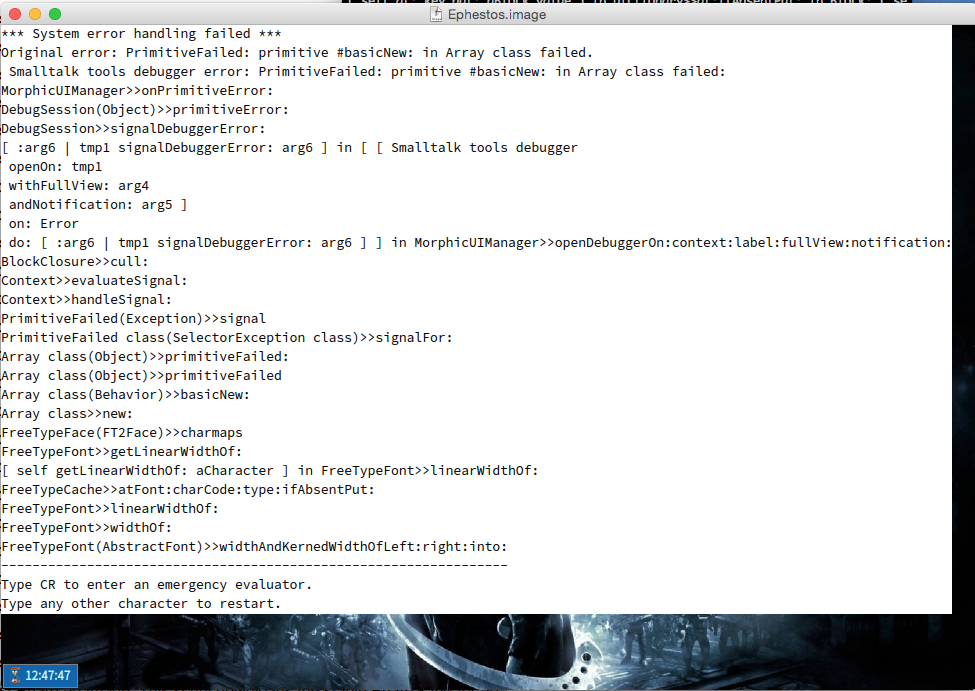
[image: Screen Shot 2016-01-16 at 12.47.59.png] yes even with stable VM is a mess, new problem I got pharo with this wget -O- get.pharo.org/alpha+vm | bash downloads fines, loads my libraries fine with my startup script as soon as i try to save the image the above happens On Sat, Jan 16, 2016 at 12:43 PM Dimitris Chloupis <kilon.alios@gmail.com> wrote:
Esteban I also get doSemantics: errors , I have been getting way way back before Spur while trying to use shortcuts. It was messing also with the rendering of the method list in Nautilus when there were too many methods, it turned to a red box of death. So I am not convinced my problem are just VM related but you can correct me if I am wrong.
On Sat, Jan 16, 2016 at 12:41 PM Esteban Lorenzano <estebanlm@gmail.com> wrote:
On 16 Jan 2016, at 11:27, Dimitris Chloupis <kilon.alios@gmail.com> wrote:
yes thanks Esteban I am back to Pharo 4 and I am fine :)
you do not need to go back to Pharo 4⦠just downloading stable VM is enough :) (and I need people helping me to find the bugs on Pharo 5, spur, FFI, etc. *before* release :P)
cheers, Esteban
will stick with it, till the release of Pharo 5.
On Sat, Jan 16, 2016 at 12:25 PM Esteban Lorenzano <estebanlm@gmail.com> wrote:
On 16 Jan 2016, at 01:01, Dimitris Chloupis <kilon.alios@gmail.com> wrote:
<Screen Shot 2016-01-16 at 00.38.10.png>
and by the way menus on latest pharo 5 are broken
not the menus there is a problem with WideString and string primitives in latest spur vm. in the mean time you can download stable instead latest and you will be ok.
Esteban
On Sat, Jan 16, 2016 at 1:29 AM Nicolai Hess <nicolaihess@gmail.com> wrote:
2016-01-16 0:11 GMT+01:00 Nicolai Hess <nicolaihess@gmail.com>:
2016-01-16 0:06 GMT+01:00 Sven Van Caekenberghe <sven@stfx.eu>:
On 15 Jan 2016, at 23:30, Dimitris Chloupis <kilon.alios@gmail.com> wrote:
taskbar was the problem, damn pharo gui is a huge pain in the hat.
How so ?
I would like to now that too.
Btw, this is interesting too:
WorldState debugShowDamage:true.
And look all the flashing in a nautilus and or playground window.
Hm, I think this was my fault. The fix for 17201 <https://pharo.fogbugz.com/f/cases/17201/Marking-Diffs-broken-in-Pharo5> Marking Diffs broken in Pharo5 wasn't good.
On Fri, Jan 15, 2016 at 11:32 PM Dimitris Chloupis < kilon.alios@gmail.com> wrote: ITs not the step, I removed the step as I said in my first post. Still 30% cpu consumption
The images are PNGs and RGBA , 8bit
On Fri, Jan 15, 2016 at 10:54 PM Hilaire <hilaire@drgeo.eu> wrote: It depends on what you are doing in a step, but 1s step should not hurt. May be the problem is somewhere else. With DrGeo, I noted Athens is faster to BitBlt with bitmap operations (in my case, only scaling and displaying a From in a DrGeo canvas). Also, do your bitmaps come with 32 bits depth?
-- Dr. Geo http://drgeo.eu
â
ok if I open a nautilus window and then I save the image , it does not create this error o_O crazy stuff :D On Sat, Jan 16, 2016 at 12:51 PM Dimitris Chloupis <kilon.alios@gmail.com> wrote:
[image: Screen Shot 2016-01-16 at 12.47.59.png]
yes even with stable VM is a mess, new problem
I got pharo with this
wget -O- get.pharo.org/alpha+vm | bash
downloads fines, loads my libraries fine with my startup script as soon as i try to save the image the above happens
On Sat, Jan 16, 2016 at 12:43 PM Dimitris Chloupis <kilon.alios@gmail.com> wrote:
Esteban I also get doSemantics: errors , I have been getting way way back before Spur while trying to use shortcuts. It was messing also with the rendering of the method list in Nautilus when there were too many methods, it turned to a red box of death. So I am not convinced my problem are just VM related but you can correct me if I am wrong.
On Sat, Jan 16, 2016 at 12:41 PM Esteban Lorenzano <estebanlm@gmail.com> wrote:
On 16 Jan 2016, at 11:27, Dimitris Chloupis <kilon.alios@gmail.com> wrote:
yes thanks Esteban I am back to Pharo 4 and I am fine :)
you do not need to go back to Pharo 4⦠just downloading stable VM is enough :) (and I need people helping me to find the bugs on Pharo 5, spur, FFI, etc. *before* release :P)
cheers, Esteban
will stick with it, till the release of Pharo 5.
On Sat, Jan 16, 2016 at 12:25 PM Esteban Lorenzano <estebanlm@gmail.com> wrote:
On 16 Jan 2016, at 01:01, Dimitris Chloupis <kilon.alios@gmail.com> wrote:
<Screen Shot 2016-01-16 at 00.38.10.png>
and by the way menus on latest pharo 5 are broken
not the menus there is a problem with WideString and string primitives in latest spur vm. in the mean time you can download stable instead latest and you will be ok.
Esteban
On Sat, Jan 16, 2016 at 1:29 AM Nicolai Hess <nicolaihess@gmail.com> wrote:
2016-01-16 0:11 GMT+01:00 Nicolai Hess <nicolaihess@gmail.com>:
2016-01-16 0:06 GMT+01:00 Sven Van Caekenberghe <sven@stfx.eu>:
On 15 Jan 2016, at 23:30, Dimitris Chloupis <kilon.alios@gmail.com> wrote:
taskbar was the problem, damn pharo gui is a huge pain in the hat.
How so ?
I would like to now that too.
Btw, this is interesting too:
WorldState debugShowDamage:true.
And look all the flashing in a nautilus and or playground window.
Hm, I think this was my fault. The fix for 17201 <https://pharo.fogbugz.com/f/cases/17201/Marking-Diffs-broken-in-Pharo5> Marking Diffs broken in Pharo5 wasn't good.
On Fri, Jan 15, 2016 at 11:32 PM Dimitris Chloupis < kilon.alios@gmail.com> wrote: ITs not the step, I removed the step as I said in my first post. Still 30% cpu consumption
The images are PNGs and RGBA , 8bit
On Fri, Jan 15, 2016 at 10:54 PM Hilaire <hilaire@drgeo.eu> wrote: It depends on what you are doing in a step, but 1s step should not hurt. May be the problem is somewhere else. With DrGeo, I noted Athens is faster to BitBlt with bitmap operations (in my case, only scaling and displaying a From in a DrGeo canvas). Also, do your bitmaps come with 32 bits depth?
-- Dr. Geo http://drgeo.eu
â
syntax highlighting does not work, critics its keep looping forever with "Updating critics..." message. I have to minimise and restore the nautlius window to get back syntax highlighting for one method then the next method i have to do the same. Big Nope.... Back I go to Pharo 4. Pharo 5 simply does not like me :D On Sat, Jan 16, 2016 at 12:54 PM Dimitris Chloupis <kilon.alios@gmail.com> wrote:
ok if I open a nautilus window and then I save the image , it does not create this error
o_O
crazy stuff
:D
On Sat, Jan 16, 2016 at 12:51 PM Dimitris Chloupis <kilon.alios@gmail.com> wrote:
[image: Screen Shot 2016-01-16 at 12.47.59.png]
yes even with stable VM is a mess, new problem
I got pharo with this
wget -O- get.pharo.org/alpha+vm | bash
downloads fines, loads my libraries fine with my startup script as soon as i try to save the image the above happens
On Sat, Jan 16, 2016 at 12:43 PM Dimitris Chloupis <kilon.alios@gmail.com> wrote:
Esteban I also get doSemantics: errors , I have been getting way way back before Spur while trying to use shortcuts. It was messing also with the rendering of the method list in Nautilus when there were too many methods, it turned to a red box of death. So I am not convinced my problem are just VM related but you can correct me if I am wrong.
On Sat, Jan 16, 2016 at 12:41 PM Esteban Lorenzano <estebanlm@gmail.com> wrote:
On 16 Jan 2016, at 11:27, Dimitris Chloupis <kilon.alios@gmail.com> wrote:
yes thanks Esteban I am back to Pharo 4 and I am fine :)
you do not need to go back to Pharo 4⦠just downloading stable VM is enough :) (and I need people helping me to find the bugs on Pharo 5, spur, FFI, etc. *before* release :P)
cheers, Esteban
will stick with it, till the release of Pharo 5.
On Sat, Jan 16, 2016 at 12:25 PM Esteban Lorenzano <estebanlm@gmail.com> wrote:
On 16 Jan 2016, at 01:01, Dimitris Chloupis <kilon.alios@gmail.com> wrote:
<Screen Shot 2016-01-16 at 00.38.10.png>
and by the way menus on latest pharo 5 are broken
not the menus there is a problem with WideString and string primitives in latest spur vm. in the mean time you can download stable instead latest and you will be ok.
Esteban
On Sat, Jan 16, 2016 at 1:29 AM Nicolai Hess <nicolaihess@gmail.com> wrote:
2016-01-16 0:11 GMT+01:00 Nicolai Hess <nicolaihess@gmail.com>:
2016-01-16 0:06 GMT+01:00 Sven Van Caekenberghe <sven@stfx.eu>:
On 15 Jan 2016, at 23:30, Dimitris Chloupis < kilon.alios@gmail.com> wrote:
taskbar was the problem, damn pharo gui is a huge pain in the hat.
How so ?
I would like to now that too.
Btw, this is interesting too:
WorldState debugShowDamage:true.
And look all the flashing in a nautilus and or playground window.
Hm, I think this was my fault. The fix for 17201 <https://pharo.fogbugz.com/f/cases/17201/Marking-Diffs-broken-in-Pharo5> Marking Diffs broken in Pharo5 wasn't good.
On Fri, Jan 15, 2016 at 11:32 PM Dimitris Chloupis < kilon.alios@gmail.com> wrote: ITs not the step, I removed the step as I said in my first post. Still 30% cpu consumption
The images are PNGs and RGBA , 8bit
On Fri, Jan 15, 2016 at 10:54 PM Hilaire <hilaire@drgeo.eu> wrote: It depends on what you are doing in a step, but 1s step should not hurt. May be the problem is somewhere else. With DrGeo, I noted Athens is faster to BitBlt with bitmap operations (in my case, only scaling and displaying a From in a DrGeo canvas). Also, do your bitmaps come with 32 bits depth?
-- Dr. Geo http://drgeo.eu
â
On 16 Jan 2016, at 11:59, Dimitris Chloupis <kilon.alios@gmail.com> wrote:
syntax highlighting does not work, critics its keep looping forever with "Updating critics..." message. I have to minimise and restore the nautlius window to get back syntax highlighting for one method then the next method i have to do the same.
syntax highlighting is because there is a new somekind experimental AST based highlighter. We want to finish it, but weâll see⦠Esteban
Big Nope....
Back I go to Pharo 4. Pharo 5 simply does not like me :D
On Sat, Jan 16, 2016 at 12:54 PM Dimitris Chloupis <kilon.alios@gmail.com <mailto:kilon.alios@gmail.com>> wrote:
ok if I open a nautilus window and then I save the image , it does not create this error
o_O
crazy stuff
:D
On Sat, Jan 16, 2016 at 12:51 PM Dimitris Chloupis <kilon.alios@gmail.com <mailto:kilon.alios@gmail.com>> wrote: <Screen Shot 2016-01-16 at 12.47.59.png>
yes even with stable VM is a mess, new problem
I got pharo with this
wget -O- get.pharo.org/alpha+vm <http://get.pharo.org/alpha+vm> | bash
downloads fines, loads my libraries fine with my startup script as soon as i try to save the image the above happens
On Sat, Jan 16, 2016 at 12:43 PM Dimitris Chloupis <kilon.alios@gmail.com <mailto:kilon.alios@gmail.com>> wrote: Esteban I also get doSemantics: errors , I have been getting way way back before Spur while trying to use shortcuts. It was messing also with the rendering of the method list in Nautilus when there were too many methods, it turned to a red box of death. So I am not convinced my problem are just VM related but you can correct me if I am wrong.
On Sat, Jan 16, 2016 at 12:41 PM Esteban Lorenzano <estebanlm@gmail.com <mailto:estebanlm@gmail.com>> wrote:
On 16 Jan 2016, at 11:27, Dimitris Chloupis <kilon.alios@gmail.com <mailto:kilon.alios@gmail.com>> wrote:
yes thanks Esteban I am back to Pharo 4 and I am fine :)
you do not need to go back to Pharo 4⦠just downloading stable VM is enough :) (and I need people helping me to find the bugs on Pharo 5, spur, FFI, etc. *before* release :P)
cheers, Esteban
will stick with it, till the release of Pharo 5.
On Sat, Jan 16, 2016 at 12:25 PM Esteban Lorenzano <estebanlm@gmail.com <mailto:estebanlm@gmail.com>> wrote:
On 16 Jan 2016, at 01:01, Dimitris Chloupis <kilon.alios@gmail.com <mailto:kilon.alios@gmail.com>> wrote:
<Screen Shot 2016-01-16 at 00.38.10.png>
and by the way menus on latest pharo 5 are broken
not the menus there is a problem with WideString and string primitives in latest spur vm. in the mean time you can download stable instead latest and you will be ok.
Esteban
On Sat, Jan 16, 2016 at 1:29 AM Nicolai Hess <nicolaihess@gmail.com <mailto:nicolaihess@gmail.com>> wrote: 2016-01-16 0:11 GMT+01:00 Nicolai Hess <nicolaihess@gmail.com <mailto:nicolaihess@gmail.com>>:
2016-01-16 0:06 GMT+01:00 Sven Van Caekenberghe <sven@stfx.eu <mailto:sven@stfx.eu>>:
On 15 Jan 2016, at 23:30, Dimitris Chloupis <kilon.alios@gmail.com <mailto:kilon.alios@gmail.com>> wrote:
taskbar was the problem, damn pharo gui is a huge pain in the hat.
How so ?
I would like to now that too.
Btw, this is interesting too:
WorldState debugShowDamage:true.
And look all the flashing in a nautilus and or playground window.
Hm, I think this was my fault. The fix for 17201 <https://pharo.fogbugz.com/f/cases/17201/Marking-Diffs-broken-in-Pharo5> Marking Diffs broken in Pharo5 wasn't good.
On Fri, Jan 15, 2016 at 11:32 PM Dimitris Chloupis <kilon.alios@gmail.com <mailto:kilon.alios@gmail.com>> wrote: ITs not the step, I removed the step as I said in my first post. Still 30% cpu consumption
The images are PNGs and RGBA , 8bit
On Fri, Jan 15, 2016 at 10:54 PM Hilaire <hilaire@drgeo.eu <mailto:hilaire@drgeo.eu>> wrote: It depends on what you are doing in a step, but 1s step should not hurt. May be the problem is somewhere else. With DrGeo, I noted Athens is faster to BitBlt with bitmap operations (in my case, only scaling and displaying a From in a DrGeo canvas). Also, do your bitmaps come with 32 bits depth?
-- Dr. Geo http://drgeo.eu <http://drgeo.eu/>
â
syntax highlighting does not work, critics its keep looping forever with "Updating critics..." message. I have to minimise and restore the nautlius window to get back syntax highlighting for one method then the next method i have to do the same.
syntax highlighting is because there is a new somekind experimental AST based highlighter.
What would be nice is that when we push something in the release there is a real support behind. It took us three months of work with frank to get rubric used. Then the last glitches are just because we do not want syntax hi in certain parts. Stef
We want to finish it, but weâll seeâ¦
Esteban

On 16 Jan 2016, at 12:38, stepharo <stepharo@free.fr> wrote:
syntax highlighting does not work, critics its keep looping forever with "Updating critics..." message. I have to minimise and restore the nautlius window to get back syntax highlighting for one method then the next method i have to do the same.
syntax highlighting is because there is a new somekind experimental AST based highlighter.
What would be nice is that when we push something in the release there is a real support behind. It took us three months of work with frank to get rubric used. Then the last glitches are just because we do not want syntax hi in certain parts.
Slow syntax highlighting is not due to the new one but due to changes related to rubric. It gets a bit hard to follow these discussionsâ¦. could people not instead use their time and energy to add issue tracker entries and (especially) comment on existing ones? Marcus
my bad Marcus done https://pharo.fogbugz.com/f/cases/16020/Syntax-Highlighting-Rubric-First-sho... and https://pharo.fogbugz.com/f/cases/17401/Nautilus-code-critic-seem-not-workin... On Sat, Jan 16, 2016 at 2:03 PM Marcus Denker <marcus.denker@inria.fr> wrote:
On 16 Jan 2016, at 12:38, stepharo <stepharo@free.fr> wrote:
syntax highlighting does not work, critics its keep looping forever with "Updating critics..." message. I have to minimise and restore the nautlius window to get back syntax highlighting for one method then the next method i have to do the same.
syntax highlighting is because there is a new somekind experimental AST based highlighter.
What would be nice is that when we push something in the release there is a real support behind. It took us three months of work with frank to get rubric used. Then the last glitches are just because we do not want syntax hi in certain parts.
Slow syntax highlighting is not due to the new one but due to changes related to rubric.
It gets a bit hard to follow these discussionsâ¦. could people not instead use their time and energy to add issue tracker entries and (especially) comment on existing ones?
Marcus
If there is anything I can do to help you out dont hesitate to ask. I tried to improve auto completion but I have to confess after 30 hours of work I could not figure out how things really worked. So I gave up and went back to coding my own stuff. On Sat, Jan 16, 2016 at 1:39 PM stepharo <stepharo@free.fr> wrote:
syntax highlighting does not work, critics its keep looping forever with "Updating critics..." message. I have to minimise and restore the nautlius window to get back syntax highlighting for one method then the next method i have to do the same.
syntax highlighting is because there is a new somekind experimental AST based highlighter.
What would be nice is that when we push something in the release there is a real support behind. It took us three months of work with frank to get rubric used. Then the last glitches are just because we do not want syntax hi in certain parts.
Stef
We want to finish it, but weâll seeâ¦
Esteban

Both the syntax highlighting and critics run their own background process to do work. The general Morphic UI runs at priority 40, critics at 39 and 30. This means that highlighting will not be computed before the critics have finished evaluating, and if there is too much work in the UI thread both of these will take forever. Best regards, Henrik From: Pharo-users [mailto:pharo-users-bounces@lists.pharo.org] On Behalf Of Dimitris Chloupis Sent: Saturday, January 16, 2016 12:00 PM To: Any question about pharo is welcome <pharo-users@lists.pharo.org> Subject: Re: [Pharo-users] Morphic is super slow syntax highlighting does not work, critics its keep looping forever with "Updating critics..." message. I have to minimise and restore the nautlius window to get back syntax highlighting for one method then the next method i have to do the same. Big Nope.... Back I go to Pharo 4. Pharo 5 simply does not like me :D On Sat, Jan 16, 2016 at 12:54 PM Dimitris Chloupis <kilon.alios@gmail.com<mailto:kilon.alios@gmail.com>> wrote: ok if I open a nautilus window and then I save the image , it does not create this error o_O crazy stuff :D On Sat, Jan 16, 2016 at 12:51 PM Dimitris Chloupis <kilon.alios@gmail.com<mailto:kilon.alios@gmail.com>> wrote: [Screen Shot 2016-01-16 at 12.47.59.png] yes even with stable VM is a mess, new problem I got pharo with this wget -O- get.pharo.org/alpha+vm<http://get.pharo.org/alpha+vm> | bash downloads fines, loads my libraries fine with my startup script as soon as i try to save the image the above happens On Sat, Jan 16, 2016 at 12:43 PM Dimitris Chloupis <kilon.alios@gmail.com<mailto:kilon.alios@gmail.com>> wrote: Esteban I also get doSemantics: errors , I have been getting way way back before Spur while trying to use shortcuts. It was messing also with the rendering of the method list in Nautilus when there were too many methods, it turned to a red box of death. So I am not convinced my problem are just VM related but you can correct me if I am wrong. On Sat, Jan 16, 2016 at 12:41 PM Esteban Lorenzano <estebanlm@gmail.com<mailto:estebanlm@gmail.com>> wrote: On 16 Jan 2016, at 11:27, Dimitris Chloupis <kilon.alios@gmail.com<mailto:kilon.alios@gmail.com>> wrote: yes thanks Esteban I am back to Pharo 4 and I am fine :) you do not need to go back to Pharo 4⦠just downloading stable VM is enough :) (and I need people helping me to find the bugs on Pharo 5, spur, FFI, etc. *before* release :P) cheers, Esteban will stick with it, till the release of Pharo 5. On Sat, Jan 16, 2016 at 12:25 PM Esteban Lorenzano <estebanlm@gmail.com<mailto:estebanlm@gmail.com>> wrote: On 16 Jan 2016, at 01:01, Dimitris Chloupis <kilon.alios@gmail.com<mailto:kilon.alios@gmail.com>> wrote: <Screen Shot 2016-01-16 at 00.38.10.png> and by the way menus on latest pharo 5 are broken not the menus there is a problem with WideString and string primitives in latest spur vm. in the mean time you can download stable instead latest and you will be ok. Esteban On Sat, Jan 16, 2016 at 1:29 AM Nicolai Hess <nicolaihess@gmail.com<mailto:nicolaihess@gmail.com>> wrote: 2016-01-16 0:11 GMT+01:00 Nicolai Hess <nicolaihess@gmail.com<mailto:nicolaihess@gmail.com>>: 2016-01-16 0:06 GMT+01:00 Sven Van Caekenberghe <sven@stfx.eu<mailto:sven@stfx.eu>>:
On 15 Jan 2016, at 23:30, Dimitris Chloupis <kilon.alios@gmail.com<mailto:kilon.alios@gmail.com>> wrote:
taskbar was the problem, damn pharo gui is a huge pain in the hat.
How so ? I would like to now that too. Btw, this is interesting too: WorldState debugShowDamage:true. And look all the flashing in a nautilus and or playground window. Hm, I think this was my fault. The fix for 17201<https://pharo.fogbugz.com/f/cases/17201/Marking-Diffs-broken-in-Pharo5> Marking Diffs broken in Pharo5 wasn't good.
On Fri, Jan 15, 2016 at 11:32 PM Dimitris Chloupis <kilon.alios@gmail.com<mailto:kilon.alios@gmail.com>> wrote: ITs not the step, I removed the step as I said in my first post. Still 30% cpu consumption
The images are PNGs and RGBA , 8bit
On Fri, Jan 15, 2016 at 10:54 PM Hilaire <hilaire@drgeo.eu<mailto:hilaire@drgeo.eu>> wrote: It depends on what you are doing in a step, but 1s step should not hurt. May be the problem is somewhere else. With DrGeo, I noted Athens is faster to BitBlt with bitmap operations (in my case, only scaling and displaying a From in a DrGeo canvas). Also, do your bitmaps come with 32 bits depth?
-- Dr. Geo http://drgeo.eu<http://drgeo.eu/>
â
and this is all fixed by https://pharo.fogbugz.com/f/cases/17201/Marking-Diffs-broken-in-Pharo5
On 16 Jan 2016, at 13:55, Henrik Nergaard <henrik.nergaard@uia.no> wrote:
Both the syntax highlighting and critics run their own background process to do work. The general Morphic UI runs at priority 40, critics at 39 and 30. This means that highlighting will not be computed before the critics have finished evaluating, and if there is too much work in the UI thread both of these will take forever.
Best regards, Henrik
From: Pharo-users [mailto:pharo-users-bounces@lists.pharo.org <mailto:pharo-users-bounces@lists.pharo.org>] On Behalf Of Dimitris Chloupis Sent: Saturday, January 16, 2016 12:00 PM To: Any question about pharo is welcome <pharo-users@lists.pharo.org <mailto:pharo-users@lists.pharo.org>> Subject: Re: [Pharo-users] Morphic is super slow
syntax highlighting does not work, critics its keep looping forever with "Updating critics..." message. I have to minimise and restore the nautlius window to get back syntax highlighting for one method then the next method i have to do the same.
Big Nope....
Back I go to Pharo 4. Pharo 5 simply does not like me :D
On Sat, Jan 16, 2016 at 12:54 PM Dimitris Chloupis <kilon.alios@gmail.com <mailto:kilon.alios@gmail.com>> wrote:
ok if I open a nautilus window and then I save the image , it does not create this error
o_O
crazy stuff
:D
On Sat, Jan 16, 2016 at 12:51 PM Dimitris Chloupis <kilon.alios@gmail.com <mailto:kilon.alios@gmail.com>> wrote: <image001.png>
yes even with stable VM is a mess, new problem
I got pharo with this
wget -O- get.pharo.org/alpha+vm <http://get.pharo.org/alpha+vm> | bash
downloads fines, loads my libraries fine with my startup script as soon as i try to save the image the above happens
On Sat, Jan 16, 2016 at 12:43 PM Dimitris Chloupis <kilon.alios@gmail.com <mailto:kilon.alios@gmail.com>> wrote: Esteban I also get doSemantics: errors , I have been getting way way back before Spur while trying to use shortcuts. It was messing also with the rendering of the method list in Nautilus when there were too many methods, it turned to a red box of death. So I am not convinced my problem are just VM related but you can correct me if I am wrong.
On Sat, Jan 16, 2016 at 12:41 PM Esteban Lorenzano <estebanlm@gmail.com <mailto:estebanlm@gmail.com>> wrote: On 16 Jan 2016, at 11:27, Dimitris Chloupis <kilon.alios@gmail.com <mailto:kilon.alios@gmail.com>> wrote:
yes thanks Esteban I am back to Pharo 4 and I am fine :)
you do not need to go back to Pharo 4⦠just downloading stable VM is enough :) (and I need people helping me to find the bugs on Pharo 5, spur, FFI, etc. *before* release :P)
cheers, Esteban
will stick with it, till the release of Pharo 5.
On Sat, Jan 16, 2016 at 12:25 PM Esteban Lorenzano <estebanlm@gmail.com <mailto:estebanlm@gmail.com>> wrote: On 16 Jan 2016, at 01:01, Dimitris Chloupis <kilon.alios@gmail.com <mailto:kilon.alios@gmail.com>> wrote:
<Screen Shot 2016-01-16 at 00.38.10.png>
and by the way menus on latest pharo 5 are broken
not the menus there is a problem with WideString and string primitives in latest spur vm. in the mean time you can download stable instead latest and you will be ok.
Esteban
On Sat, Jan 16, 2016 at 1:29 AM Nicolai Hess <nicolaihess@gmail.com <mailto:nicolaihess@gmail.com>> wrote: 2016-01-16 0:11 GMT+01:00 Nicolai Hess <nicolaihess@gmail.com <mailto:nicolaihess@gmail.com>>:
2016-01-16 0:06 GMT+01:00 Sven Van Caekenberghe <sven@stfx.eu <mailto:sven@stfx.eu>>:
On 15 Jan 2016, at 23:30, Dimitris Chloupis <kilon.alios@gmail.com <mailto:kilon.alios@gmail.com>> wrote:
taskbar was the problem, damn pharo gui is a huge pain in the hat.
How so ?
I would like to now that too.
Btw, this is interesting too:
WorldState debugShowDamage:true.
And look all the flashing in a nautilus and or playground window.
Hm, I think this was my fault. The fix for 17201 <https://pharo.fogbugz.com/f/cases/17201/Marking-Diffs-broken-in-Pharo5> Marking Diffs broken in Pharo5 wasn't good.
On Fri, Jan 15, 2016 at 11:32 PM Dimitris Chloupis <kilon.alios@gmail.com <mailto:kilon.alios@gmail.com>> wrote: ITs not the step, I removed the step as I said in my first post. Still 30% cpu consumption
The images are PNGs and RGBA , 8bit
On Fri, Jan 15, 2016 at 10:54 PM Hilaire <hilaire@drgeo.eu <mailto:hilaire@drgeo.eu>> wrote: It depends on what you are doing in a step, but 1s step should not hurt. May be the problem is somewhere else. With DrGeo, I noted Athens is faster to BitBlt with bitmap operations (in my case, only scaling and displaying a From in a DrGeo canvas). Also, do your bitmaps come with 32 bits depth?
-- Dr. Geo http://drgeo.eu <http://drgeo.eu/>
â
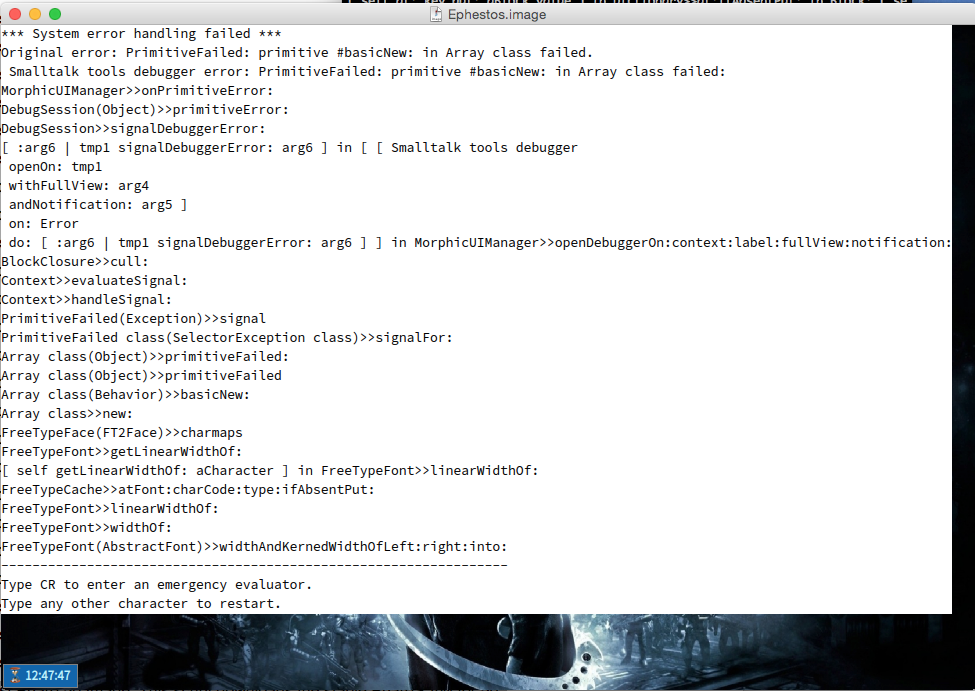
yes, there is a problem in the cleanup of freetype fonts. thatâs not a vm bug, but it started to happen very often after migrating. Is in my high priority TODO list, right after a couple of FFI tweaks :S Esteban
On 16 Jan 2016, at 11:54, Dimitris Chloupis <kilon.alios@gmail.com> wrote:
ok if I open a nautilus window and then I save the image , it does not create this error
o_O
crazy stuff
:D
On Sat, Jan 16, 2016 at 12:51 PM Dimitris Chloupis <kilon.alios@gmail.com <mailto:kilon.alios@gmail.com>> wrote: <Screen Shot 2016-01-16 at 12.47.59.png>
yes even with stable VM is a mess, new problem
I got pharo with this
wget -O- get.pharo.org/alpha+vm <http://get.pharo.org/alpha+vm> | bash
downloads fines, loads my libraries fine with my startup script as soon as i try to save the image the above happens
On Sat, Jan 16, 2016 at 12:43 PM Dimitris Chloupis <kilon.alios@gmail.com <mailto:kilon.alios@gmail.com>> wrote: Esteban I also get doSemantics: errors , I have been getting way way back before Spur while trying to use shortcuts. It was messing also with the rendering of the method list in Nautilus when there were too many methods, it turned to a red box of death. So I am not convinced my problem are just VM related but you can correct me if I am wrong.
On Sat, Jan 16, 2016 at 12:41 PM Esteban Lorenzano <estebanlm@gmail.com <mailto:estebanlm@gmail.com>> wrote:
On 16 Jan 2016, at 11:27, Dimitris Chloupis <kilon.alios@gmail.com <mailto:kilon.alios@gmail.com>> wrote:
yes thanks Esteban I am back to Pharo 4 and I am fine :)
you do not need to go back to Pharo 4⦠just downloading stable VM is enough :) (and I need people helping me to find the bugs on Pharo 5, spur, FFI, etc. *before* release :P)
cheers, Esteban
will stick with it, till the release of Pharo 5.
On Sat, Jan 16, 2016 at 12:25 PM Esteban Lorenzano <estebanlm@gmail.com <mailto:estebanlm@gmail.com>> wrote:
On 16 Jan 2016, at 01:01, Dimitris Chloupis <kilon.alios@gmail.com <mailto:kilon.alios@gmail.com>> wrote:
<Screen Shot 2016-01-16 at 00.38.10.png>
and by the way menus on latest pharo 5 are broken
not the menus there is a problem with WideString and string primitives in latest spur vm. in the mean time you can download stable instead latest and you will be ok.
Esteban
On Sat, Jan 16, 2016 at 1:29 AM Nicolai Hess <nicolaihess@gmail.com <mailto:nicolaihess@gmail.com>> wrote: 2016-01-16 0:11 GMT+01:00 Nicolai Hess <nicolaihess@gmail.com <mailto:nicolaihess@gmail.com>>:
2016-01-16 0:06 GMT+01:00 Sven Van Caekenberghe <sven@stfx.eu <mailto:sven@stfx.eu>>:
On 15 Jan 2016, at 23:30, Dimitris Chloupis <kilon.alios@gmail.com <mailto:kilon.alios@gmail.com>> wrote:
taskbar was the problem, damn pharo gui is a huge pain in the hat.
How so ?
I would like to now that too.
Btw, this is interesting too:
WorldState debugShowDamage:true.
And look all the flashing in a nautilus and or playground window.
Hm, I think this was my fault. The fix for 17201 <https://pharo.fogbugz.com/f/cases/17201/Marking-Diffs-broken-in-Pharo5> Marking Diffs broken in Pharo5 wasn't good.
On Fri, Jan 15, 2016 at 11:32 PM Dimitris Chloupis <kilon.alios@gmail.com <mailto:kilon.alios@gmail.com>> wrote: ITs not the step, I removed the step as I said in my first post. Still 30% cpu consumption
The images are PNGs and RGBA , 8bit
On Fri, Jan 15, 2016 at 10:54 PM Hilaire <hilaire@drgeo.eu <mailto:hilaire@drgeo.eu>> wrote: It depends on what you are doing in a step, but 1s step should not hurt. May be the problem is somewhere else. With DrGeo, I noted Athens is faster to BitBlt with bitmap operations (in my case, only scaling and displaying a From in a DrGeo canvas). Also, do your bitmaps come with 32 bits depth?
-- Dr. Geo http://drgeo.eu <http://drgeo.eu/>
â
Take your time, no rush, Pharo 4 is fine for me. It even has Spotter that I use a lot. More than enough for my needs. I was using Pharo 5 to report back issues and problems but I just cant work with it anymore. So I will sit here and wait here, using a stable version that I know works very well for me without complaining about anything that brakes using a version I should not be using for production code anyway. On Sat, Jan 16, 2016 at 1:04 PM Esteban Lorenzano <estebanlm@gmail.com> wrote:
yes, there is a problem in the cleanup of freetype fonts. thatâs not a vm bug, but it started to happen very often after migrating.
Is in my high priority TODO list, right after a couple of FFI tweaks :S
Esteban
On 16 Jan 2016, at 11:54, Dimitris Chloupis <kilon.alios@gmail.com> wrote:
ok if I open a nautilus window and then I save the image , it does not create this error
o_O
crazy stuff
:D
On Sat, Jan 16, 2016 at 12:51 PM Dimitris Chloupis <kilon.alios@gmail.com> wrote:
<Screen Shot 2016-01-16 at 12.47.59.png>
yes even with stable VM is a mess, new problem
I got pharo with this
wget -O- get.pharo.org/alpha+vm | bash
downloads fines, loads my libraries fine with my startup script as soon as i try to save the image the above happens
On Sat, Jan 16, 2016 at 12:43 PM Dimitris Chloupis <kilon.alios@gmail.com> wrote:
Esteban I also get doSemantics: errors , I have been getting way way back before Spur while trying to use shortcuts. It was messing also with the rendering of the method list in Nautilus when there were too many methods, it turned to a red box of death. So I am not convinced my problem are just VM related but you can correct me if I am wrong.
On Sat, Jan 16, 2016 at 12:41 PM Esteban Lorenzano <estebanlm@gmail.com> wrote:
On 16 Jan 2016, at 11:27, Dimitris Chloupis <kilon.alios@gmail.com> wrote:
yes thanks Esteban I am back to Pharo 4 and I am fine :)
you do not need to go back to Pharo 4⦠just downloading stable VM is enough :) (and I need people helping me to find the bugs on Pharo 5, spur, FFI, etc. *before* release :P)
cheers, Esteban
will stick with it, till the release of Pharo 5.
On Sat, Jan 16, 2016 at 12:25 PM Esteban Lorenzano <estebanlm@gmail.com> wrote:
On 16 Jan 2016, at 01:01, Dimitris Chloupis <kilon.alios@gmail.com> wrote:
<Screen Shot 2016-01-16 at 00.38.10.png>
and by the way menus on latest pharo 5 are broken
not the menus there is a problem with WideString and string primitives in latest spur vm. in the mean time you can download stable instead latest and you will be ok.
Esteban
On Sat, Jan 16, 2016 at 1:29 AM Nicolai Hess <nicolaihess@gmail.com> wrote:
2016-01-16 0:11 GMT+01:00 Nicolai Hess <nicolaihess@gmail.com>:
2016-01-16 0:06 GMT+01:00 Sven Van Caekenberghe <sven@stfx.eu>:
On 15 Jan 2016, at 23:30, Dimitris Chloupis < kilon.alios@gmail.com> wrote:
taskbar was the problem, damn pharo gui is a huge pain in the hat.
How so ?
I would like to now that too.
Btw, this is interesting too:
WorldState debugShowDamage:true.
And look all the flashing in a nautilus and or playground window.
Hm, I think this was my fault. The fix for 17201 <https://pharo.fogbugz.com/f/cases/17201/Marking-Diffs-broken-in-Pharo5> Marking Diffs broken in Pharo5 wasn't good.
On Fri, Jan 15, 2016 at 11:32 PM Dimitris Chloupis < kilon.alios@gmail.com> wrote: ITs not the step, I removed the step as I said in my first post. Still 30% cpu consumption
The images are PNGs and RGBA , 8bit
On Fri, Jan 15, 2016 at 10:54 PM Hilaire <hilaire@drgeo.eu> wrote: It depends on what you are doing in a step, but 1s step should not hurt. May be the problem is somewhere else. With DrGeo, I noted Athens is faster to BitBlt with bitmap operations (in my case, only scaling and displaying a From in a DrGeo canvas). Also, do your bitmaps come with 32 bits depth?
-- Dr. Geo http://drgeo.eu
â
Yes nautilus is full of wrong changed messages and others. Stef Le 16/1/16 00:11, Nicolai Hess a écrit :
2016-01-16 0:06 GMT+01:00 Sven Van Caekenberghe <sven@stfx.eu <mailto:sven@stfx.eu>>:
> On 15 Jan 2016, at 23:30, Dimitris Chloupis <kilon.alios@gmail.com <mailto:kilon.alios@gmail.com>> wrote: > > taskbar was the problem, damn pharo gui is a huge pain in the hat.
How so ?
I would like to now that too.
Btw, this is interesting too:
WorldState debugShowDamage:true.
And look all the flashing in a nautilus and or playground window.
> On Fri, Jan 15, 2016 at 11:32 PM Dimitris Chloupis <kilon.alios@gmail.com <mailto:kilon.alios@gmail.com>> wrote: > ITs not the step, I removed the step as I said in my first post. Still 30% cpu consumption > > The images are PNGs and RGBA , 8bit > > > On Fri, Jan 15, 2016 at 10:54 PM Hilaire <hilaire@drgeo.eu <mailto:hilaire@drgeo.eu>> wrote: > It depends on what you are doing in a step, but 1s step should not hurt. > May be the problem is somewhere else. > With DrGeo, I noted Athens is faster to BitBlt with bitmap operations > (in my case, only scaling and displaying a From in a DrGeo canvas). > Also, do your bitmaps come with 32 bits depth? > > -- > Dr. Geo > http://drgeo.eu > > >
taskbarTask (self valueOfProperty: #noTaskbarTask ifAbsent: [ false ]) ifTrue: [ ^ nil ]. ^ nil "TaskbarTask morph: self state: self taskbarState icon: self taskbarIcon label: self taskbarLabel" The uncommented part was the one that was slowing me down, its a copy from SystemWindow, on a new image of Pharo consumption drops to 15% but still have issues with Nautilus etc. latsabben at Slack also recommended caching which helped also taskbarTask â "myTask := nil." myTask ifNil: [ myTask := TaskbarTask morph: self state: self taskbarState icon: self taskbarIcon label: self taskbarLabel ]. myTask label: self taskbarLabel. ^myTask Anyway I decided to port my project to C++ and Unreal Engine because I have many issues with Pharo speed wise and stability wise with Pharo 5. Plus many IDE features I miss like proper auto completion etc. To be fair I tried to make custom gui with python and it was even slower in the past. So its clear I need a high performance language + API, because I will be building a very heavy GUI (many more animations) and I would like also some fast 3d functionality too. On Sat, Jan 16, 2016 at 1:07 AM Sven Van Caekenberghe <sven@stfx.eu> wrote:
On 15 Jan 2016, at 23:30, Dimitris Chloupis <kilon.alios@gmail.com> wrote:
taskbar was the problem, damn pharo gui is a huge pain in the hat.
How so ?
On Fri, Jan 15, 2016 at 11:32 PM Dimitris Chloupis < kilon.alios@gmail.com> wrote: ITs not the step, I removed the step as I said in my first post. Still 30% cpu consumption
The images are PNGs and RGBA , 8bit
On Fri, Jan 15, 2016 at 10:54 PM Hilaire <hilaire@drgeo.eu> wrote: It depends on what you are doing in a step, but 1s step should not hurt. May be the problem is somewhere else. With DrGeo, I noted Athens is faster to BitBlt with bitmap operations (in my case, only scaling and displaying a From in a DrGeo canvas). Also, do your bitmaps come with 32 bits depth?
-- Dr. Geo http://drgeo.eu

On Sat, Jan 16, 2016 at 7:28 AM, Dimitris Chloupis <kilon.alios@gmail.com> wrote:
taskbarTask (self valueOfProperty: #noTaskbarTask ifAbsent: [ false ]) ifTrue: [ ^ nil ]. ^ nil "TaskbarTask morph: self state: self taskbarState icon: self taskbarIcon label: self taskbarLabel"
The uncommented part was the one that was slowing me down, its a copy from SystemWindow, on a new image of Pharo consumption drops to 15% but still have issues with Nautilus etc.
latsabben at Slack also recommended caching which helped also
taskbarTask "myTask := nil." myTask ifNil: [ myTask := TaskbarTask morph: self state: self taskbarState icon: self taskbarIcon label: self taskbarLabel ]. myTask label: self taskbarLabel. ^myTask
Anyway I decided to port my project to C++ and Unreal Engine because I have many issues with Pharo speed wise
See my other post, in about an hour I moved your App from 55% cpu usage on my machine to 7%, only 1% above our 6% idle. We *do* need to address that minimum idle, but its at the VM level since in-Image profiling shows 90% time in ProcessorScheduler class>>idleProcess. So to me the Image seems not too bad performance wise
and stability wise with Pharo 5.
Well, you are talking about bleeding edge alpha software.
Plus many IDE features I miss like proper auto completion etc.
You've probably mentioned this somewhere previously, but in another thread could you leave us with a summary of what is missing from auto completion.
To be fair I tried to make custom gui with python and it was even slower in the past.
So its clear I need a high performance language + API, because I will be building a very heavy GUI (many more animations) and I would like also some fast 3d functionality too.
good luck with it. cheers -ben
On Sat, Jan 16, 2016 at 1:07 AM Sven Van Caekenberghe <sven@stfx.eu> wrote:
On 15 Jan 2016, at 23:30, Dimitris Chloupis <kilon.alios@gmail.com> wrote:
taskbar was the problem, damn pharo gui is a huge pain in the hat.
How so ?
On Fri, Jan 15, 2016 at 11:32 PM Dimitris Chloupis <kilon.alios@gmail.com> wrote: ITs not the step, I removed the step as I said in my first post. Still 30% cpu consumption
The images are PNGs and RGBA , 8bit
On Fri, Jan 15, 2016 at 10:54 PM Hilaire <hilaire@drgeo.eu> wrote: It depends on what you are doing in a step, but 1s step should not hurt. May be the problem is somewhere else. With DrGeo, I noted Athens is faster to BitBlt with bitmap operations (in my case, only scaling and displaying a From in a DrGeo canvas). Also, do your bitmaps come with 32 bits depth?
-- Dr. Geo http://drgeo.eu
Hello Ben :) First thanks for investing 1 hour of your precious time to look through my code. I really appreciate it . If there is one thing I love about pharo is the super amazing community. Yes definetly my fault as always :D I did not know about this profiling, I used it for the creating of my Morphs but it did not occur to me to google like you did and go with profiling all processes. A huge thank you to latsaben and the rest of you guys. I downgraded down to Pharo 4 and again I agree 5 is the unstable version anyway but I loved using the new tools and could not wait till April for the Pharo 5 release :) The problem is battling without documentation is very hard and I have spent at least 10 hours trying to understand how taskbar works and I still fail. Your code solves my problem , apart from 1. Loading those pngs is sloowwwww, one would expect that accesing the files themselves to get the binary data is what is slow for pharo but no, thats is fast enough. What is slow , because I profiled this is converting the binary data to form is consuming a ton of time. The result is that to load a GUI with only 1 mb of pngs takes 1 second. Also with your solution I lose the ability to update my taskbar icon, by the way the non optimised code I was using is a direct copy from SystemWindow class, which means that class should be optimised too. Another problem is the scaling of images, really bad with morphic though Athens must be better. Auto completion problems are well knows, sometimes autocompletion does not show all methods, sometimes autocompletion shows every character you type so for example ChronosManager open will show ChronosManager o ChronosManager op ChronosManager ope ChronosMAnager open Sometimes it shows methods that do not even belong to the class forcing me to use Spotter to find the correct method. Its a a mess. I am not abandoning pharo, I love it even with its flaws. But I try to outsource as much as I can my workflow from pharo to external libraries and apps that are way more mature and efficient for what I am trying to do. I always inteded to make Blender work with Pharo, I accomplished that now I want to make Unreal engine to work with pharo, so I can make a triangle of love, Blender for asset creation, Unreal for real time rendering of 2d and 3d graphics , Pharo as the brain of the logic and advanced scripting of the other 2. This is was my dream and goal all along. So I will be moving my GUI to Unreal that will allow me much more advanced and performance orientated features that mix 2d with 3d but I will keeping my main logic in pharo. On Sat, Jan 16, 2016 at 6:35 AM Ben Coman <btc@openinworld.com> wrote:
On Sat, Jan 16, 2016 at 7:28 AM, Dimitris Chloupis <kilon.alios@gmail.com> wrote:
taskbarTask (self valueOfProperty: #noTaskbarTask ifAbsent: [ false ]) ifTrue: [ ^ nil ]. ^ nil "TaskbarTask morph: self state: self taskbarState icon: self taskbarIcon label: self taskbarLabel"
The uncommented part was the one that was slowing me down, its a copy from SystemWindow, on a new image of Pharo consumption drops to 15% but still have issues with Nautilus etc.
latsabben at Slack also recommended caching which helped also
taskbarTask "myTask := nil." myTask ifNil: [ myTask := TaskbarTask morph: self state: self taskbarState icon: self taskbarIcon label: self taskbarLabel ]. myTask label: self taskbarLabel. ^myTask
Anyway I decided to port my project to C++ and Unreal Engine because I have many issues with Pharo speed wise
See my other post, in about an hour I moved your App from 55% cpu usage on my machine to 7%, only 1% above our 6% idle. We *do* need to address that minimum idle, but its at the VM level since in-Image profiling shows 90% time in ProcessorScheduler class>>idleProcess. So to me the Image seems not too bad performance wise
and stability wise with Pharo 5.
Well, you are talking about bleeding edge alpha software.
Plus many IDE features I miss like proper auto completion etc.
You've probably mentioned this somewhere previously, but in another thread could you leave us with a summary of what is missing from auto completion.
To be fair I tried to make custom gui with python and it was even slower in the past.
So its clear I need a high performance language + API, because I will be building a very heavy GUI (many more animations) and I would like also some fast 3d functionality too.
good luck with it. cheers -ben
On Sat, Jan 16, 2016 at 1:07 AM Sven Van Caekenberghe <sven@stfx.eu>
wrote:
On 15 Jan 2016, at 23:30, Dimitris Chloupis <kilon.alios@gmail.com> wrote:
taskbar was the problem, damn pharo gui is a huge pain in the hat.
How so ?
On Fri, Jan 15, 2016 at 11:32 PM Dimitris Chloupis <kilon.alios@gmail.com> wrote: ITs not the step, I removed the step as I said in my first post. Still 30% cpu consumption
The images are PNGs and RGBA , 8bit
On Fri, Jan 15, 2016 at 10:54 PM Hilaire <hilaire@drgeo.eu> wrote: It depends on what you are doing in a step, but 1s step should not
hurt.
May be the problem is somewhere else. With DrGeo, I noted Athens is faster to BitBlt with bitmap operations (in my case, only scaling and displaying a From in a DrGeo canvas). Also, do your bitmaps come with 32 bits depth?
-- Dr. Geo http://drgeo.eu
On Sat, Jan 16, 2016 at 4:03 PM, Dimitris Chloupis <kilon.alios@gmail.com> wrote:
Hello Ben :)
First thanks for investing 1 hour of your precious time to look through my code. I really appreciate it . If there is one thing I love about pharo is the super amazing community.
Yes definetly my fault as always :D
I did not know about this profiling, I used it for the creating of my Morphs but it did not occur to me to google like you did and go with profiling all processes.
A huge thank you to latsaben and the rest of you guys. I downgraded down to Pharo 4 and again I agree 5 is the unstable version anyway but I loved using the new tools and could not wait till April for the Pharo 5 release :)
The problem is battling without documentation is very hard and I have spent at least 10 hours trying to understand how taskbar works and I still fail.
Your code solves my problem , apart from 1. Loading those pngs is sloowwwww, one would expect that accesing the files themselves to get the binary data is what is slow for pharo but no, thats is fast enough. What is slow , because I profiled this is converting the binary data to form is consuming a ton of time. The result is that to load a GUI with only 1 mb of pngs takes 1 second.
What is the practical effect of this that is most concerning? 1. The time taken loading it the first time after installing from Catalog Browser ? 2. The time taken to start it *each* time from World > Chronos Manager, if you open/close it a lot? 3. Distributing Chronos Manager as a packaged application? each time you want to open it Not sure if the following will suit your needs, but in the definition of ChrGUIMorph try moving 'secondsTimerFormCollection' from instanceVariableNames: to classVariableNames: then test by opening/closing the app a few times. After taking a while opening the first time, subsequent openings seem to be faster.
Also with your solution I lose the ability to update my taskbar icon, by the way the non optimised code I was using is a direct copy from SystemWindow class, which means that class should be optimised too.
So consider that solution just a problem-isolation step on the way ;). I had another look because I was intrigued that even though you used LRUCache for the /icons/ variable, the ifAbsent: block in #logotinyIcon was being executed anyway. I thought that must be cache size too small and items bumped out, so as a test I replace LRUCache with Dictionary, but the the ifAbsent: block was *still* getting executed (note, this is at steady-state, not startup). So I thought /icons/ must be getting reset. Investigating by putting the following at the top of #initializeIcons... Transcript crShow: thisContext printString , ' <-- ', thisContext sender printString, ' <-- ', thisContext sender sender printString. So now this executes every time I open the World menu. And after ChronosManager is opened, the Transcript scroll rapidly. So everywhere you do something like this... icon: ChrStopwatchSettingsPNG new logotinyIcon where logotinyIcon returns an object, the object created by #new is thrown away. Worse, #new invokes #initialize and hence #initializeIcons wipes out your cache every cycle. Try making /icons/ a class variable and moving methods like logotinyIcon to the class side, so instead you do... icon: ChrStopwatchSettingsPNG logotinyIcon Also move #initializeIcons to class side and add a class side #initialize method to call it. Note that will only be executed when the class is first loaded, so you will probably need to execute it manually in your image. One thing I'm interested in the choice of LRUCache over Dictionary for the cache? Did you find Dictionary was taking too much space? I didn't try implementing the above yet, but I guessing you'll get the performance fix while maintaining the flexibility you want. cheers -ben
Another problem is the scaling of images, really bad with morphic though Athens must be better.
Auto completion problems are well knows, sometimes autocompletion does not show all methods, sometimes autocompletion shows every character you type so for example ChronosManager open will show ChronosManager o ChronosManager op ChronosManager ope ChronosManager open
Sometimes it shows methods that do not even belong to the class forcing me to use Spotter to find the correct method. Its a a mess.
I am not abandoning pharo, I love it even with its flaws. But I try to outsource as much as I can my workflow from pharo to external libraries and apps that are way more mature and efficient for what I am trying to do.
I always inteded to make Blender work with Pharo, I accomplished that now I want to make Unreal engine to work with pharo, so I can make a triangle of love, Blender for asset creation, Unreal for real time rendering of 2d and 3d graphics , Pharo as the brain of the logic and advanced scripting of the other 2. This is was my dream and goal all along. So I will be moving my GUI to Unreal that will allow me much more advanced and performance orientated features that mix 2d with 3d but I will keeping my main logic in pharo.
On Sat, Jan 16, 2016 at 6:35 AM Ben Coman <btc@openinworld.com> wrote:
On Sat, Jan 16, 2016 at 7:28 AM, Dimitris Chloupis <kilon.alios@gmail.com> wrote:
taskbarTask (self valueOfProperty: #noTaskbarTask ifAbsent: [ false ]) ifTrue: [ ^ nil ]. ^ nil "TaskbarTask morph: self state: self taskbarState icon: self taskbarIcon label: self taskbarLabel"
The uncommented part was the one that was slowing me down, its a copy from SystemWindow, on a new image of Pharo consumption drops to 15% but still have issues with Nautilus etc.
latsabben at Slack also recommended caching which helped also
taskbarTask "myTask := nil." myTask ifNil: [ myTask := TaskbarTask morph: self state: self taskbarState icon: self taskbarIcon label: self taskbarLabel ]. myTask label: self taskbarLabel. ^myTask
Anyway I decided to port my project to C++ and Unreal Engine because I have many issues with Pharo speed wise
See my other post, in about an hour I moved your App from 55% cpu usage on my machine to 7%, only 1% above our 6% idle. We *do* need to address that minimum idle, but its at the VM level since in-Image profiling shows 90% time in ProcessorScheduler class>>idleProcess. So to me the Image seems not too bad performance wise
and stability wise with Pharo 5.
Well, you are talking about bleeding edge alpha software.
Plus many IDE features I miss like proper auto completion etc.
You've probably mentioned this somewhere previously, but in another thread could you leave us with a summary of what is missing from auto completion.
To be fair I tried to make custom gui with python and it was even slower in the past.
So its clear I need a high performance language + API, because I will be building a very heavy GUI (many more animations) and I would like also some fast 3d functionality too.
good luck with it. cheers -ben
On Sat, Jan 16, 2016 at 1:07 AM Sven Van Caekenberghe <sven@stfx.eu> wrote:
On 15 Jan 2016, at 23:30, Dimitris Chloupis <kilon.alios@gmail.com> wrote:
taskbar was the problem, damn pharo gui is a huge pain in the hat.
How so ?
On Fri, Jan 15, 2016 at 11:32 PM Dimitris Chloupis <kilon.alios@gmail.com> wrote: ITs not the step, I removed the step as I said in my first post. Still 30% cpu consumption
The images are PNGs and RGBA , 8bit
On Fri, Jan 15, 2016 at 10:54 PM Hilaire <hilaire@drgeo.eu> wrote: It depends on what you are doing in a step, but 1s step should not hurt. May be the problem is somewhere else. With DrGeo, I noted Athens is faster to BitBlt with bitmap operations (in my case, only scaling and displaying a From in a DrGeo canvas). Also, do your bitmaps come with 32 bits depth?
-- Dr. Geo http://drgeo.eu
Hello Ben with your help and some more digging around I managed to solve my issues and I am now also able to update the taskbar button moprh without any major hit to my cpu. Pharo is now at 6-7% of one core which is not bad at all. So what you mention does not seem to affect my performance. However there is still the problem of ChronoManager taking over a second to open its gui . The problem with the loading of image is purely on how PNG are loaded. For example if I profile ChronosManager open I get 1241 for my the initialisation of the class out of this 800ms are wasted just loading the pngs with this summary 48.8% {794ms} Form class>>fromFileNamed: | 47.9% {779ms} Form class>>fromBinaryStream: | 47.9% {779ms} ImageReadWriter class>>formFromStream: | 47.9% {779ms} PNGReadWriter>>nextImage | 47.6% {774ms} PNGReadWriter>>processIDATChunk | 47.2% {768ms} PNGReadWriter>>processNonInterlaced | 32.9% {536ms} PNGReadWriter>>filterScanline:count: | |28.0% {456ms} PNGReadWriter>>filterPaeth: | | |15.4% {250ms} PNGReadWriter>>paethPredictLeft:above:aboveLeft: | | |12.6% {205ms} primitives Reading the full report is clear that a major hit is how pharo tries to compile the png to a form. full report 1624 tallies, 1626 msec. **Tree** -------------------------------- Process: other processes -------------------------------- 15.1% {246ms} InputEventFetcher>>eventLoop 15.1% {246ms} InputEventFetcher>>waitForInput 8.6% {139ms} SoundPlayer class>>playLoop 8.3% {134ms} primitives -------------------------------- Process: (40s) Morphic UI Process: nil -------------------------------- 76.3% {1241ms} ChronosManager class(Behavior)>>new 76.3% {1241ms} ChronosManager>>initialize 76.3% {1241ms} ChrGUIMorph class(Behavior)>>new 76.3% {1241ms} ChrGUIMorph>>initialize 48.8% {794ms} ChrGUIMorph>>secondsTimerForm |48.8% {794ms} Form class>>fromFileNamed: | 47.9% {779ms} Form class>>fromBinaryStream: | 47.9% {779ms} ImageReadWriter class>>formFromStream: | 47.9% {779ms} PNGReadWriter>>nextImage | 47.6% {774ms} PNGReadWriter>>processIDATChunk | 47.2% {768ms} PNGReadWriter>>processNonInterlaced | 32.9% {536ms} PNGReadWriter>>filterScanline:count: | |28.0% {456ms} PNGReadWriter>>filterPaeth: | | |15.4% {250ms} PNGReadWriter>>paethPredictLeft:above:aboveLeft: | | |12.6% {205ms} primitives | |2.8% {46ms} PNGReadWriter>>filterHorizontal: | |1.6% {26ms} PNGReadWriter>>filterVertical: | 7.0% {113ms} ZLibReadStream(InflateStream)>>next:into:startingAt: | |7.0% {113ms} ZLibReadStream(InflateStream)>>next | | 7.0% {113ms} ZLibReadStream(InflateStream)>>pastEndRead | | 4.7% {76ms} ZLibReadStream(InflateStream)>>next | | 1.9% {31ms} ZLibReadStream(InflateStream)>>bitPosition | 3.0% {49ms} primitives | 2.6% {43ms} ZLibReadStream(InflateStream)>>next | |2.6% {43ms} ZLibReadStream(InflateStream)>>pastEndRead | | 1.7% {28ms} ZLibReadStream(InflateStream)>>next | 1.2% {19ms} PNGReadWriter>>copyPixelsRGBA: 21.1% {342ms} ChrStopwatchPanelM class(Behavior)>>new |21.1% {342ms} ChrStopwatchPanelM>>initialize | 3.0% {48ms} ChrStopwatchSettingsPNG>>stopwatchSecondaryPanelIcon | |2.3% {37ms} Form class>>fromBinaryStream: | | 2.3% {37ms} ImageReadWriter class>>formFromStream: | | 2.3% {37ms} PNGReadWriter>>nextImage | | 2.3% {37ms} PNGReadWriter>>processIDATChunk | | 2.3% {37ms} PNGReadWriter>>processNonInterlaced | | 2.0% {33ms} PNGReadWriter>>filterScanline:count: | | 1.9% {31ms} PNGReadWriter>>filterPaeth: | | 1.1% {18ms} primitives | 2.8% {46ms} ChrStopwatchPanelM>>prepareStopwatchButton | |2.7% {44ms} ChrSwitchButtonM class>>createWithAction: | | 2.7% {44ms} ChrSwitchButtonM class(Behavior)>>new | | 2.7% {44ms} ChrSwitchButtonM>>initialize | | 2.6% {42ms} ChronosManager class>>defaultFont | | 2.6% {42ms} ChronosManager class>>defaultFontPointSize: | | 2.3% {38ms} FileReference(AbstractFileReference)>>allDirectories | | 2.3% {38ms} SelectVisitor class>>breadthFirst:select: | | 2.3% {38ms} SelectVisitor(AbstractEnumerationVisitor)>>breadthFirst: | | 2.3% {38ms} SelectVisitor(AbstractEnumerationVisitor)>>visit:with: | | 2.3% {38ms} BreadthFirstGuide>>show: | | 2.3% {38ms} BreadthFirstGuide>>visitNextEntry: | | 2.3% {38ms} FileReference>>entries | | 2.3% {38ms} FileSystem>>entriesAt: | | 2.3% {38ms} FileSystem>>entriesAt:do: | | 2.3% {38ms} FileSystem>>entriesAt:ifAbsent:do: | | 2.0% {33ms} MacStore(FileSystemStore)>>directoryAt:ifAbsent:nodesDo: | | 1.8% {29ms} MacStore(DiskStore)>>basicEntry:path:nodesDo: | | 1.6% {26ms} primitives | 2.8% {45ms} ChrStopwatchPanelM>>prepareHelpLabel | |2.8% {45ms} ChronosManager class>>defaultFontPointSize: | | 2.3% {38ms} FileReference(AbstractFileReference)>>allDirectories | | 2.3% {38ms} SelectVisitor class>>breadthFirst:select: | | 2.3% {38ms} SelectVisitor(AbstractEnumerationVisitor)>>breadthFirst: | | 2.3% {38ms} SelectVisitor(AbstractEnumerationVisitor)>>visit:with: | | 2.3% {38ms} BreadthFirstGuide>>show: | | 2.3% {38ms} BreadthFirstGuide>>visitNextEntry: | | 2.3% {38ms} FileReference>>entries | | 2.3% {38ms} FileSystem>>entriesAt: | | 2.3% {38ms} FileSystem>>entriesAt:do: | | 2.3% {38ms} FileSystem>>entriesAt:ifAbsent:do: | | 2.0% {32ms} MacStore(FileSystemStore)>>directoryAt:ifAbsent:nodesDo: | | 2.0% {32ms} MacStore(DiskStore)>>basicEntry:path:nodesDo: | | 1.1% {18ms} primitives | 2.8% {45ms} ChrStopwatchPanelM>>prepareBrakelimitLabel | |2.8% {45ms} ChronosManager class>>defaultFontPointSize: | | 2.5% {40ms} FileReference(AbstractFileReference)>>allDirectories | | 2.5% {40ms} SelectVisitor class>>breadthFirst:select: | | 2.5% {40ms} SelectVisitor(AbstractEnumerationVisitor)>>breadthFirst: | | 2.5% {40ms} SelectVisitor(AbstractEnumerationVisitor)>>visit:with: | | 2.5% {40ms} BreadthFirstGuide>>show: | | 2.5% {40ms} BreadthFirstGuide>>visitNextEntry: | | 2.5% {40ms} FileReference>>entries | | 2.5% {40ms} FileSystem>>entriesAt: | | 2.5% {40ms} FileSystem>>entriesAt:do: | | 2.5% {40ms} FileSystem>>entriesAt:ifAbsent:do: | | 2.3% {38ms} MacStore(FileSystemStore)>>directoryAt:ifAbsent:nodesDo: | | 1.9% {31ms} MacStore(DiskStore)>>basicEntry:path:nodesDo: | | 1.3% {21ms} primitives | 2.6% {42ms} ChrStopwatchPanelM>>prepareTimelimitLabel | |2.6% {42ms} ChronosManager class>>defaultFontPointSize: | | 2.3% {37ms} FileReference(AbstractFileReference)>>allDirectories | | 2.3% {37ms} SelectVisitor class>>breadthFirst:select: | | 2.3% {37ms} SelectVisitor(AbstractEnumerationVisitor)>>breadthFirst: | | 2.3% {37ms} SelectVisitor(AbstractEnumerationVisitor)>>visit:with: | | 2.3% {37ms} BreadthFirstGuide>>show: | | 2.3% {37ms} BreadthFirstGuide>>visitNextEntry: | | 2.3% {37ms} FileReference>>entries | | 2.3% {37ms} FileSystem>>entriesAt: | | 2.3% {37ms} FileSystem>>entriesAt:do: | | 2.3% {37ms} FileSystem>>entriesAt:ifAbsent:do: | | 1.5% {25ms} MacStore(FileSystemStore)>>directoryAt:ifAbsent:nodesDo: | | 1.1% {18ms} MacStore(DiskStore)>>basicEntry:path:nodesDo: | 2.6% {42ms} ChrStopwatchPanelM>>prepareTimerButton | |2.4% {39ms} ChrSwitchButtonM class>>createWithAction: | | 2.4% {39ms} ChrSwitchButtonM class(Behavior)>>new | | 2.4% {39ms} ChrSwitchButtonM>>initialize | | 2.2% {36ms} ChronosManager class>>defaultFont | | 2.2% {36ms} ChronosManager class>>defaultFontPointSize: | | 2.2% {36ms} FileReference(AbstractFileReference)>>allDirectories | | 2.2% {36ms} SelectVisitor class>>breadthFirst:select: | | 2.2% {36ms} SelectVisitor(AbstractEnumerationVisitor)>>breadthFirst: | | 2.2% {36ms} SelectVisitor(AbstractEnumerationVisitor)>>visit:with: | | 2.2% {36ms} BreadthFirstGuide>>show: | | 2.2% {36ms} BreadthFirstGuide>>visitNextEntry: | | 2.2% {36ms} FileReference>>entries | | 2.2% {36ms} FileSystem>>entriesAt: | | 2.2% {36ms} FileSystem>>entriesAt:do: | | 2.2% {36ms} FileSystem>>entriesAt:ifAbsent:do: | | 1.5% {24ms} MacStore(FileSystemStore)>>directoryAt:ifAbsent:nodesDo: | | 1.5% {24ms} MacStore(DiskStore)>>basicEntry:path:nodesDo: | 2.2% {36ms} ChrStopwatchPanelM>>prepareDailygoalLabel | |2.2% {36ms} ChronosManager class>>defaultFontPointSize: | | 2.2% {36ms} FileReference(AbstractFileReference)>>allDirectories | | 2.2% {36ms} SelectVisitor class>>breadthFirst:select: | | 2.2% {36ms} SelectVisitor(AbstractEnumerationVisitor)>>breadthFirst: | | 2.2% {36ms} SelectVisitor(AbstractEnumerationVisitor)>>visit:with: | | 2.2% {36ms} BreadthFirstGuide>>show: | | 2.2% {36ms} BreadthFirstGuide>>visitNextEntry: | | 2.0% {32ms} FileReference>>entries | | 2.0% {32ms} FileSystem>>entriesAt: | | 2.0% {32ms} FileSystem>>entriesAt:do: | | 2.0% {32ms} FileSystem>>entriesAt:ifAbsent:do: | | 1.8% {30ms} MacStore(FileSystemStore)>>directoryAt:ifAbsent:nodesDo: | | 1.7% {28ms} MacStore(DiskStore)>>basicEntry:path:nodesDo: | | 1.2% {19ms} primitives | 2.2% {36ms} ChrStopwatchPanelM>>prepareStopwatchLabel | 2.2% {36ms} ChronosManager class>>defaultFontPointSize: | 2.2% {36ms} FileReference(AbstractFileReference)>>allDirectories | 2.2% {36ms} SelectVisitor class>>breadthFirst:select: | 2.2% {36ms} SelectVisitor(AbstractEnumerationVisitor)>>breadthFirst: | 2.2% {36ms} SelectVisitor(AbstractEnumerationVisitor)>>visit:with: | 2.2% {36ms} BreadthFirstGuide>>show: | 2.2% {36ms} BreadthFirstGuide>>visitNextEntry: | 2.2% {36ms} FileReference>>entries | 2.2% {36ms} FileSystem>>entriesAt: | 2.2% {36ms} FileSystem>>entriesAt:do: | 2.2% {36ms} FileSystem>>entriesAt:ifAbsent:do: | 2.1% {34ms} MacStore(FileSystemStore)>>directoryAt:ifAbsent:nodesDo: | 1.9% {31ms} MacStore(DiskStore)>>basicEntry:path:nodesDo: | 1.0% {17ms} primitives 4.7% {77ms} ChronosManager class>>defaultFontPointSize: |4.4% {71ms} FileReference(AbstractFileReference)>>allDirectories | 4.4% {71ms} SelectVisitor class>>breadthFirst:select: | 4.4% {71ms} SelectVisitor(AbstractEnumerationVisitor)>>breadthFirst: | 4.4% {71ms} SelectVisitor(AbstractEnumerationVisitor)>>visit:with: | 4.4% {71ms} BreadthFirstGuide>>show: | 4.4% {71ms} BreadthFirstGuide>>visitNextEntry: | 4.4% {71ms} FileReference>>entries | 4.4% {71ms} FileSystem>>entriesAt: | 4.4% {71ms} FileSystem>>entriesAt:do: | 4.4% {71ms} FileSystem>>entriesAt:ifAbsent:do: | 3.5% {57ms} MacStore(FileSystemStore)>>directoryAt:ifAbsent:nodesDo: | 3.1% {51ms} MacStore(DiskStore)>>basicEntry:path:nodesDo: | 2.0% {32ms} primitives 1.4% {22ms} ChrGUIMorph>>centralGUIform 1.4% {22ms} Form class>>fromFileNamed: 1.4% {22ms} Form class>>fromBinaryStream: 1.4% {22ms} ImageReadWriter class>>formFromStream: 1.4% {22ms} PNGReadWriter>>nextImage 1.2% {20ms} PNGReadWriter>>processIDATChunk 1.2% {20ms} PNGReadWriter>>processNonInterlaced **Leaves** 16.4% {267ms} PNGReadWriter>>paethPredictLeft:above:aboveLeft: 15.1% {246ms} InputEventFetcher>>waitForInput 14.3% {232ms} PNGReadWriter>>filterPaeth: 9.9% {160ms} MacStore(DiskStore)>>basicEntry:path:nodesDo: 8.3% {134ms} SoundPlayer class>>playLoop 6.4% {104ms} ZLibReadStream(InflateStream)>>next 3.8% {61ms} Array(SequenceableCollection)>>= 3.1% {51ms} PNGReadWriter>>processNonInterlaced 3.1% {51ms} PNGReadWriter>>filterHorizontal: 2.8% {46ms} ZLibReadStream(InflateStream)>>bitPosition 2.2% {35ms} PNGReadWriter>>filterVertical: 1.7% {27ms} FreeTypeFace class>>fromFile:index: 1.6% {26ms} False>>ifTrue:ifFalse: **Memory** old +20,113,604 bytes young +74,448 bytes used +20,188,052 bytes free +601,016 bytes **GCs** full 5 totalling 294ms (18.0% uptime), avg 59.0ms incr 34 totalling 13ms (1.0% uptime), avg 0.0ms tenures 4 (avg 8 GCs/tenure) root table 0 overflows On Sat, Jan 16, 2016 at 2:31 PM Ben Coman <btc@openinworld.com> wrote:
On Sat, Jan 16, 2016 at 4:03 PM, Dimitris Chloupis <kilon.alios@gmail.com> wrote:
Hello Ben :)
First thanks for investing 1 hour of your precious time to look through my code. I really appreciate it . If there is one thing I love about pharo is the super amazing community.
Yes definetly my fault as always :D
I did not know about this profiling, I used it for the creating of my Morphs but it did not occur to me to google like you did and go with profiling all processes.
A huge thank you to latsaben and the rest of you guys. I downgraded down to Pharo 4 and again I agree 5 is the unstable version anyway but I loved using the new tools and could not wait till April for the Pharo 5 release :)
The problem is battling without documentation is very hard and I have spent at least 10 hours trying to understand how taskbar works and I still fail.
Your code solves my problem , apart from 1. Loading those pngs is sloowwwww, one would expect that accesing the files themselves to get the binary data is what is slow for pharo but no, thats is fast enough. What is slow , because I profiled this is converting the binary data to form is consuming a ton of time. The result is that to load a GUI with only 1 mb of pngs takes 1 second.
What is the practical effect of this that is most concerning? 1. The time taken loading it the first time after installing from Catalog Browser ? 2. The time taken to start it *each* time from World > Chronos Manager, if you open/close it a lot? 3. Distributing Chronos Manager as a packaged application? each time you want to open it
Not sure if the following will suit your needs, but in the definition of ChrGUIMorph try moving 'secondsTimerFormCollection' from instanceVariableNames: to classVariableNames:
then test by opening/closing the app a few times. After taking a while opening the first time, subsequent openings seem to be faster.
Also with your solution I lose the ability to update my taskbar icon, by
the
way the non optimised code I was using is a direct copy from SystemWindow class, which means that class should be optimised too.
So consider that solution just a problem-isolation step on the way ;). I had another look because I was intrigued that even though you used LRUCache for the /icons/ variable, the ifAbsent: block in #logotinyIcon was being executed anyway. I thought that must be cache size too small and items bumped out, so as a test I replace LRUCache with Dictionary, but the the ifAbsent: block was *still* getting executed (note, this is at steady-state, not startup). So I thought /icons/ must be getting reset. Investigating by putting the following at the top of #initializeIcons...
Transcript crShow: thisContext printString , ' <-- ', thisContext sender printString, ' <-- ', thisContext sender sender printString.
So now this executes every time I open the World menu. And after ChronosManager is opened, the Transcript scroll rapidly. So everywhere you do something like this... icon: ChrStopwatchSettingsPNG new logotinyIcon where logotinyIcon returns an object, the object created by #new is thrown away. Worse, #new invokes #initialize and hence #initializeIcons wipes out your cache every cycle.
Try making /icons/ a class variable and moving methods like logotinyIcon to the class side, so instead you do... icon: ChrStopwatchSettingsPNG logotinyIcon
Also move #initializeIcons to class side and add a class side #initialize method to call it. Note that will only be executed when the class is first loaded, so you will probably need to execute it manually in your image.
One thing I'm interested in the choice of LRUCache over Dictionary for the cache? Did you find Dictionary was taking too much space?
I didn't try implementing the above yet, but I guessing you'll get the performance fix while maintaining the flexibility you want.
cheers -ben
Another problem is the scaling of images, really bad with morphic though Athens must be better.
Auto completion problems are well knows, sometimes autocompletion does not show all methods, sometimes autocompletion shows every character you type so for example ChronosManager open will show ChronosManager o ChronosManager op ChronosManager ope ChronosManager open
Sometimes it shows methods that do not even belong to the class forcing me to use Spotter to find the correct method. Its a a mess.
I am not abandoning pharo, I love it even with its flaws. But I try to outsource as much as I can my workflow from pharo to external libraries and apps that are way more mature and efficient for what I am trying to do.
I always inteded to make Blender work with Pharo, I accomplished that now I want to make Unreal engine to work with pharo, so I can make a triangle of love, Blender for asset creation, Unreal for real time rendering of 2d and 3d graphics , Pharo as the brain of the logic and advanced scripting of the other 2. This is was my dream and goal all along. So I will be moving my GUI to Unreal that will allow me much more advanced and performance orientated features that mix 2d with 3d but I will keeping my main logic in pharo.
On Sat, Jan 16, 2016 at 6:35 AM Ben Coman <btc@openinworld.com> wrote:
On Sat, Jan 16, 2016 at 7:28 AM, Dimitris Chloupis <kilon.alios@gmail.com> wrote:
taskbarTask (self valueOfProperty: #noTaskbarTask ifAbsent: [ false ]) ifTrue: [ ^ nil ]. ^ nil "TaskbarTask morph: self state: self taskbarState icon: self taskbarIcon label: self taskbarLabel"
The uncommented part was the one that was slowing me down, its a copy from SystemWindow, on a new image of Pharo consumption drops to 15% but
still
have issues with Nautilus etc.
latsabben at Slack also recommended caching which helped also
taskbarTask "myTask := nil." myTask ifNil: [ myTask := TaskbarTask morph: self state: self taskbarState icon: self taskbarIcon label: self taskbarLabel ]. myTask label: self taskbarLabel. ^myTask
Anyway I decided to port my project to C++ and Unreal Engine because I have many issues with Pharo speed wise
See my other post, in about an hour I moved your App from 55% cpu usage on my machine to 7%, only 1% above our 6% idle. We *do* need to address that minimum idle, but its at the VM level since in-Image profiling shows 90% time in ProcessorScheduler class>>idleProcess. So to me the Image seems not too bad performance wise
and stability wise with Pharo 5.
Well, you are talking about bleeding edge alpha software.
Plus many IDE features I miss like proper auto completion etc.
You've probably mentioned this somewhere previously, but in another thread could you leave us with a summary of what is missing from auto completion.
To be fair I tried to make custom gui with python and it was even slower in the past.
So its clear I need a high performance language + API, because I will be building a very heavy GUI (many more animations) and I would like also some fast 3d functionality too.
good luck with it. cheers -ben
On Sat, Jan 16, 2016 at 1:07 AM Sven Van Caekenberghe <sven@stfx.eu> wrote:
On 15 Jan 2016, at 23:30, Dimitris Chloupis <kilon.alios@gmail.com
wrote:
taskbar was the problem, damn pharo gui is a huge pain in the hat.
How so ?
On Fri, Jan 15, 2016 at 11:32 PM Dimitris Chloupis <kilon.alios@gmail.com> wrote: ITs not the step, I removed the step as I said in my first post. Still 30% cpu consumption
The images are PNGs and RGBA , 8bit
On Fri, Jan 15, 2016 at 10:54 PM Hilaire <hilaire@drgeo.eu> wrote: It depends on what you are doing in a step, but 1s step should not hurt. May be the problem is somewhere else. With DrGeo, I noted Athens is faster to BitBlt with bitmap operations (in my case, only scaling and displaying a From in a DrGeo canvas). Also, do your bitmaps come with 32 bits depth?
-- Dr. Geo http://drgeo.eu
On Sat, Jan 16, 2016 at 8:43 PM, Dimitris Chloupis <kilon.alios@gmail.com> wrote:
Hello Ben with your help and some more digging around I managed to solve my issues and I am now also able to update the taskbar button moprh without any major hit to my cpu. Pharo is now at 6-7% of one core which is not bad at all.
So what you mention does not seem to affect my performance. However there is still the problem of ChronoManager taking over a second to open its gui .
That profile report didn't format very well. Probably better to put it in a text file to attach. let me know when you've updated the catalog and I'll take another look. cheers -ben
there is no need to update the catalog, my project is in github and catalog always loads the latest github version . One of the advantages of using github ;) and any change I do my code is immediately commited and pushed into github. On Sat, Jan 16, 2016 at 3:37 PM Ben Coman <btc@openinworld.com> wrote:
On Sat, Jan 16, 2016 at 8:43 PM, Dimitris Chloupis <kilon.alios@gmail.com> wrote:
Hello Ben with your help and some more digging around I managed to solve my issues and I am now also able to update the taskbar button moprh without any major hit to my cpu. Pharo is now at 6-7% of one core which is not bad at all.
So what you mention does not seem to affect my performance. However there is still the problem of ChronoManager taking over a second to open its gui .
That profile report didn't format very well. Probably better to put it in a text file to attach. let me know when you've updated the catalog and I'll take another look.
cheers -ben
Okay. So I haven't with git from Pharo before. What definite actions do I need to take to update? I see the github://kilon/ChronosManager:master repository only contains: * one BaselineOfChronosManager.package revision 4, which is the current loaded * one ChronosManager.package revision 62, which is the current loaded How do I get those to show a later version that I can load? Also, if I click on <History> for ChronosManager.package revision 62, then from ChronosManager-kilonAlios.61 context menu I select <View changes> it gives an error: "Error: Could not find version 'ChronosManager-kilonAlios.61'. Maybe you need to add a repository?" Being familiar with git command line that is somewhat expected, but could those more familiar with its usage in Pharo comment on this? cheers -ben On Sat, Jan 16, 2016 at 9:41 PM, Dimitris Chloupis <kilon.alios@gmail.com> wrote:
there is no need to update the catalog, my project is in github and catalog always loads the latest github version .
One of the advantages of using github ;)
and any change I do my code is immediately commited and pushed into github.
On Sat, Jan 16, 2016 at 3:37 PM Ben Coman <btc@openinworld.com> wrote:
On Sat, Jan 16, 2016 at 8:43 PM, Dimitris Chloupis <kilon.alios@gmail.com> wrote:
Hello Ben with your help and some more digging around I managed to solve my issues and I am now also able to update the taskbar button moprh without any major hit to my cpu. Pharo is now at 6-7% of one core which is not bad at all.
So what you mention does not seem to affect my performance. However there is still the problem of ChronoManager taking over a second to open its gui .
That profile report didn't format very well. Probably better to put it in a text file to attach. let me know when you've updated the catalog and I'll take another look.
cheers -ben
Ben is super simple with github, you just load it from package browser in a clean image (it will always get the latest version) or if you want to get the latest version on top of existing ChronosManager version , because Package Browser has a problem that does not get the latest version when you have one older version already loaded you do Metacello new baseline: 'ChronosManager'; repository: 'github://kilon/ChronosManager'; get; load On Sat, Jan 16, 2016 at 4:25 PM Ben Coman <btc@openinworld.com> wrote:
Okay. So I haven't with git from Pharo before. What definite actions do I need to take to update?
I see the github://kilon/ChronosManager:master repository only contains: * one BaselineOfChronosManager.package revision 4, which is the current loaded * one ChronosManager.package revision 62, which is the current loaded
How do I get those to show a later version that I can load?
Also, if I click on <History> for ChronosManager.package revision 62, then from ChronosManager-kilonAlios.61 context menu I select <View changes> it gives an error: "Error: Could not find version 'ChronosManager-kilonAlios.61'. Maybe you need to add a repository?" Being familiar with git command line that is somewhat expected, but could those more familiar with its usage in Pharo comment on this?
cheers -ben
On Sat, Jan 16, 2016 at 9:41 PM, Dimitris Chloupis <kilon.alios@gmail.com> wrote:
there is no need to update the catalog, my project is in github and catalog always loads the latest github version .
One of the advantages of using github ;)
and any change I do my code is immediately commited and pushed into github.
On Sat, Jan 16, 2016 at 3:37 PM Ben Coman <btc@openinworld.com> wrote:
On Sat, Jan 16, 2016 at 8:43 PM, Dimitris Chloupis <kilon.alios@gmail.com> wrote:
Hello Ben with your help and some more digging around I managed to
solve
my issues and I am now also able to update the taskbar button moprh without any major hit to my cpu. Pharo is now at 6-7% of one core which is not bad at all.
So what you mention does not seem to affect my performance. However there is still the problem of ChronoManager taking over a second to open its gui .
That profile report didn't format very well. Probably better to put it in a text file to attach. let me know when you've updated the catalog and I'll take another look.
cheers -ben
Ben just leave it, dont waste your time, again 1.000.000 thank you for helping me out but i am just too tired of battling with lack of documentation and pharo limitations. I will port my project to Unreal engine and maybe I will keep pharo just for scripting , but then I doubt that because Unreal has an IDE not unlike Pharo and full live coding abilities even for C++ code. It was fun, time to move on. Big thank you to the community for helping me out and the awesome work they do on Pharo, I will definetly be around monitoring the mailing list and keep making video tutorials for pharo, though less frequently. On Sat, Jan 16, 2016 at 4:45 PM Dimitris Chloupis <kilon.alios@gmail.com> wrote:
Ben is super simple with github, you just load it from package browser in a clean image (it will always get the latest version) or if you want to get the latest version on top of existing ChronosManager version , because Package Browser has a problem that does not get the latest version when you have one older version already loaded
you do
Metacello new baseline: 'ChronosManager'; repository: 'github://kilon/ChronosManager'; get; load
On Sat, Jan 16, 2016 at 4:25 PM Ben Coman <btc@openinworld.com> wrote:
Okay. So I haven't with git from Pharo before. What definite actions do I need to take to update?
I see the github://kilon/ChronosManager:master repository only contains: * one BaselineOfChronosManager.package revision 4, which is the current loaded * one ChronosManager.package revision 62, which is the current loaded
How do I get those to show a later version that I can load?
Also, if I click on <History> for ChronosManager.package revision 62, then from ChronosManager-kilonAlios.61 context menu I select <View changes> it gives an error: "Error: Could not find version 'ChronosManager-kilonAlios.61'. Maybe you need to add a repository?" Being familiar with git command line that is somewhat expected, but could those more familiar with its usage in Pharo comment on this?
cheers -ben
On Sat, Jan 16, 2016 at 9:41 PM, Dimitris Chloupis <kilon.alios@gmail.com> wrote:
there is no need to update the catalog, my project is in github and catalog always loads the latest github version .
One of the advantages of using github ;)
and any change I do my code is immediately commited and pushed into github.
On Sat, Jan 16, 2016 at 3:37 PM Ben Coman <btc@openinworld.com> wrote:
On Sat, Jan 16, 2016 at 8:43 PM, Dimitris Chloupis <kilon.alios@gmail.com> wrote:
Hello Ben with your help and some more digging around I managed to
solve
my issues and I am now also able to update the taskbar button moprh without any major hit to my cpu. Pharo is now at 6-7% of one core which is not bad at all.
So what you mention does not seem to affect my performance. However there is still the problem of ChronoManager taking over a second to open its gui .
That profile report didn't format very well. Probably better to put it in a text file to attach. let me know when you've updated the catalog and I'll take another look.
cheers -ben
Cool. cheers -ben On Sat, Jan 16, 2016 at 10:51 PM, Dimitris Chloupis <kilon.alios@gmail.com> wrote:
Ben just leave it, dont waste your time, again 1.000.000 thank you for helping me out but i am just too tired of battling with lack of documentation and pharo limitations. I will port my project to Unreal engine and maybe I will keep pharo just for scripting , but then I doubt that because Unreal has an IDE not unlike Pharo and full live coding abilities even for C++ code.
It was fun, time to move on. Big thank you to the community for helping me out and the awesome work they do on Pharo, I will definetly be around monitoring the mailing list and keep making video tutorials for pharo, though less frequently.
On Sat, Jan 16, 2016 at 4:45 PM Dimitris Chloupis <kilon.alios@gmail.com> wrote:
Ben is super simple with github, you just load it from package browser in a clean image (it will always get the latest version) or if you want to get the latest version on top of existing ChronosManager version , because Package Browser has a problem that does not get the latest version when you have one older version already loaded
you do
Metacello new baseline: 'ChronosManager'; repository: 'github://kilon/ChronosManager'; get; load
On Sat, Jan 16, 2016 at 4:25 PM Ben Coman <btc@openinworld.com> wrote:
Okay. So I haven't with git from Pharo before. What definite actions do I need to take to update?
I see the github://kilon/ChronosManager:master repository only contains: * one BaselineOfChronosManager.package revision 4, which is the current loaded * one ChronosManager.package revision 62, which is the current loaded
How do I get those to show a later version that I can load?
Also, if I click on <History> for ChronosManager.package revision 62, then from ChronosManager-kilonAlios.61 context menu I select <View changes> it gives an error: "Error: Could not find version 'ChronosManager-kilonAlios.61'. Maybe you need to add a repository?" Being familiar with git command line that is somewhat expected, but could those more familiar with its usage in Pharo comment on this?
cheers -ben
On Sat, Jan 16, 2016 at 9:41 PM, Dimitris Chloupis <kilon.alios@gmail.com> wrote:
there is no need to update the catalog, my project is in github and catalog always loads the latest github version .
One of the advantages of using github ;)
and any change I do my code is immediately commited and pushed into github.
On Sat, Jan 16, 2016 at 3:37 PM Ben Coman <btc@openinworld.com> wrote:
On Sat, Jan 16, 2016 at 8:43 PM, Dimitris Chloupis <kilon.alios@gmail.com> wrote:
Hello Ben with your help and some more digging around I managed to solve my issues and I am now also able to update the taskbar button moprh without any major hit to my cpu. Pharo is now at 6-7% of one core which is not bad at all.
So what you mention does not seem to affect my performance. However there is still the problem of ChronoManager taking over a second to open its gui .
That profile report didn't format very well. Probably better to put it in a text file to attach. let me know when you've updated the catalog and I'll take another look.
cheers -ben

Hi, On 16/01/16 03:03, Dimitris Chloupis wrote: [...]
I am not abandoning pharo, I love it even with its flaws. But I try to outsource as much as I can my workflow from pharo to external libraries and apps that are way more mature and efficient for what I am trying to do.
[...] Nice to see this in your work flow. That's a similar case for mine with pandoc ;-). Cheers, Offray
taskbar was the problem, what was it? damn pharo gui is a huge pain in the hat. And we improved it a lot already. But this is not by accident that Alain spent a couple of years working on Bloc
On Fri, Jan 15, 2016 at 11:32 PM Dimitris Chloupis <kilon.alios@gmail.com <mailto:kilon.alios@gmail.com>> wrote:
ITs not the step, I removed the step as I said in my first post. Still 30% cpu consumption
The images are PNGs and RGBA , 8bit
On Fri, Jan 15, 2016 at 10:54 PM Hilaire <hilaire@drgeo.eu <mailto:hilaire@drgeo.eu>> wrote:
It depends on what you are doing in a step, but 1s step should not hurt. May be the problem is somewhere else. With DrGeo, I noted Athens is faster to BitBlt with bitmap operations (in my case, only scaling and displaying a From in a DrGeo canvas). Also, do your bitmaps come with 32 bits depth?
-- Dr. Geo http://drgeo.eu
Yeap I cannot wait for Bloc :) a big thanks to Alain, Bloc already looks amazing from the little I tried. I am sure the loading of PNGs will be optimised at some point too in the future. Everything is a matter of time. Stef see my previous posts to see what was the issue but that summary is that I copied a method from SystemWindow which apparently was not optimized and was creation a new morph each cycle for a taskbar button. On Sat, Jan 16, 2016 at 10:08 AM stepharo <stepharo@free.fr> wrote:
taskbar was the problem,
what was it?
damn pharo gui is a huge pain in the hat.
And we improved it a lot already. But this is not by accident that Alain spent a couple of years working on Bloc
On Fri, Jan 15, 2016 at 11:32 PM Dimitris Chloupis <kilon.alios@gmail.com> wrote:
ITs not the step, I removed the step as I said in my first post. Still 30% cpu consumption
The images are PNGs and RGBA , 8bit
On Fri, Jan 15, 2016 at 10:54 PM Hilaire <hilaire@drgeo.eu> wrote:
It depends on what you are doing in a step, but 1s step should not hurt. May be the problem is somewhere else. With DrGeo, I noted Athens is faster to BitBlt with bitmap operations (in my case, only scaling and displaying a From in a DrGeo canvas). Also, do your bitmaps come with 32 bits depth?
-- Dr. Geo http://drgeo.eu
ok found how to update the taskbar button , I add this to my step World submorphs do: [ :each| (each isKindOf: TaskbarMorph) ifTrue: [each updateTaskButtons]] pharo at 6-9% consumption of course depending on the size of the pharo window. Not bad at all :) Thank you all for your help, problem solved On Sat, Jan 16, 2016 at 10:12 AM Dimitris Chloupis <kilon.alios@gmail.com> wrote:
Yeap I cannot wait for Bloc :)
a big thanks to Alain, Bloc already looks amazing from the little I tried. I am sure the loading of PNGs will be optimised at some point too in the future. Everything is a matter of time.
Stef see my previous posts to see what was the issue but that summary is that I copied a method from SystemWindow which apparently was not optimized and was creation a new morph each cycle for a taskbar button.
On Sat, Jan 16, 2016 at 10:08 AM stepharo <stepharo@free.fr> wrote:
taskbar was the problem,
what was it?
damn pharo gui is a huge pain in the hat.
And we improved it a lot already. But this is not by accident that Alain spent a couple of years working on Bloc
On Fri, Jan 15, 2016 at 11:32 PM Dimitris Chloupis <kilon.alios@gmail.com> wrote:
ITs not the step, I removed the step as I said in my first post. Still 30% cpu consumption
The images are PNGs and RGBA , 8bit
On Fri, Jan 15, 2016 at 10:54 PM Hilaire <hilaire@drgeo.eu> wrote:
It depends on what you are doing in a step, but 1s step should not hurt. May be the problem is somewhere else. With DrGeo, I noted Athens is faster to BitBlt with bitmap operations (in my case, only scaling and displaying a From in a DrGeo canvas). Also, do your bitmaps come with 32 bits depth?
-- Dr. Geo http://drgeo.eu
8 bits * 4 = 32 bits right? Le 15/01/2016 22:32, Dimitris Chloupis a écrit :
The images are PNGs and RGBA , 8bit
-- Dr. Geo http://drgeo.eu
ah yes you are correct is per channel, my bad. You think thats what slows pharo down ? On Sat, Jan 16, 2016 at 6:55 PM Hilaire <hilaire@drgeo.eu> wrote:
8 bits * 4 = 32 bits right?
Le 15/01/2016 22:32, Dimitris Chloupis a écrit :
The images are PNGs and RGBA , 8bit
-- Dr. Geo http://drgeo.eu
No it is ok as Pharo depth is also 32 bits Hilaire Le 16/01/2016 18:00, Dimitris Chloupis a écrit :
ah yes you are correct is per channel, my bad. You think thats what slows pharo down ?
-- Dr. Geo http://drgeo.eu
On Sat, Jan 16, 2016 at 4:35 AM, Dimitris Chloupis <kilon.alios@gmail.com> wrote:
So I decided to find out why Nuatilus delays to syntax highlight when I open ChronosManager I open my activity monitor to be amazed by the fact that pharo was consuming 30% of one of my cores.
At the time I thought it was my fault because when my GUI steps I load from a png a form that I attack to a Morph. So I optimised that part loading all the pngs before hand , creating all the forms and during steping point only to the correct form.
Nope still 30%
ok change step time to 1 sec
Nope still 30%
ok delete step and step time alltogether
Nope still 30%
so the only explanation left is that pharo does not like I use images , which are not that big anyway , my whole image library is just 1 mb.
So how I profile this ? Is there any way to find exactly where that 30% is consumed ?
See below
I tried to profile step and it retunred back with a mere 32ms , and I suspect thats the first step that loads the images , the second step would be much faster since it will just point to correct forms. So with a step of 32ms max and stepping once per second why a 30% CPU consumption ?
I loaded ChronosManager from the catalog, started it from the World menu, and I see 55% cpu. I googled for pharo profiling and found [1] which describes using World > System > Start Profiling All Processes. Profiled without & with your app running WorldMorph>>doOneCycle moved from 9% to 29% A couple of steps in I see #interCyclePause is the same at 9%, so your app seems full responsible for the 20% increase :) Drilling down (a long way) along the most expensive path until I find one of you classes (2.5%) ChrGUIMorph>>taskbarButtonFor: and a few steps further down (0.3%) ChrGUIMorph>>taskbarIcon then (0.3%) ImageReadWriter class>>formFromStream: then (0.3%) PNGReadWriter>>processNonInterlaced So its creating this icon every cycle. Modifying... ChrGUIMorph>>taskbarIcon ^ChrStopwatchSettingsPNG new logotinyIcon to... ChrGUIMorph>>taskbarIcon ^Smalltalk ui icons referencesIcon drops cpu usage to 9%, and if I close your app it drops to 6%. Profiling your app again, and again drilling down through WorldState>>doOneCycleNowFor: I see a long chain at 2.5% usage from WorldMorph>>runStepMethods all the way down to FileSystem>>entriedAt:ifAbsent:do. So filesystem access occuring every cycle is where the time is being spent. Along that chain I see ChrGUIMorph>>secondsFromTimerForm is calling ChronosManager>>workingPath outside of the nil check for the cache in secondsTimerFormCollection. Moving "wp := ChronosManager workingPath" inside the #ifNil: drops cpu usage to 7%. cheers -ben [1] http://pharobooks.gforge.inria.fr/PharoByExampleTwo-Eng/latest/Profiling.pdf
participants (10)
-
 Ben Coman
 -
 Dimitris Chloupis
 -
 Esteban Lorenzano
 -
 Henrik Nergaard
 -
 Hilaire
 -
 Marcus Denker
 -
 Nicolai Hess
 -
 Offray Vladimir Luna Cárdenas
 -
 stepharo
 -
 Sven Van Caekenberghe