
Hi, I made a configuration to install the new Idea Icon Pack from configurations browser for Pharo 4. You can install it and then choose your new icon set in settings. You can also manual install them by: Gofer it smalltalkhubUser: 'Pharo' project: 'MetaRepoForPharo40'; configurationOf: 'IdeaIcons'; loadStable. ThemeIcons current: #IdeaUIThemeIcons asClass new. âIn Pharo 4, you might need to execute thisâ AbstractNautilusUI resetIconCaches. This icon pack works also for Pharo 3 If you lost it, here a couple of screenshots:
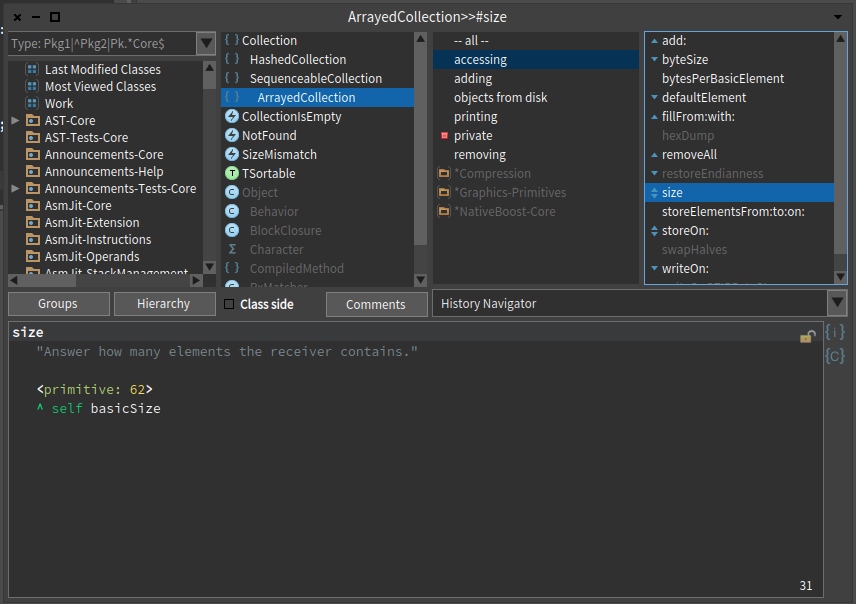
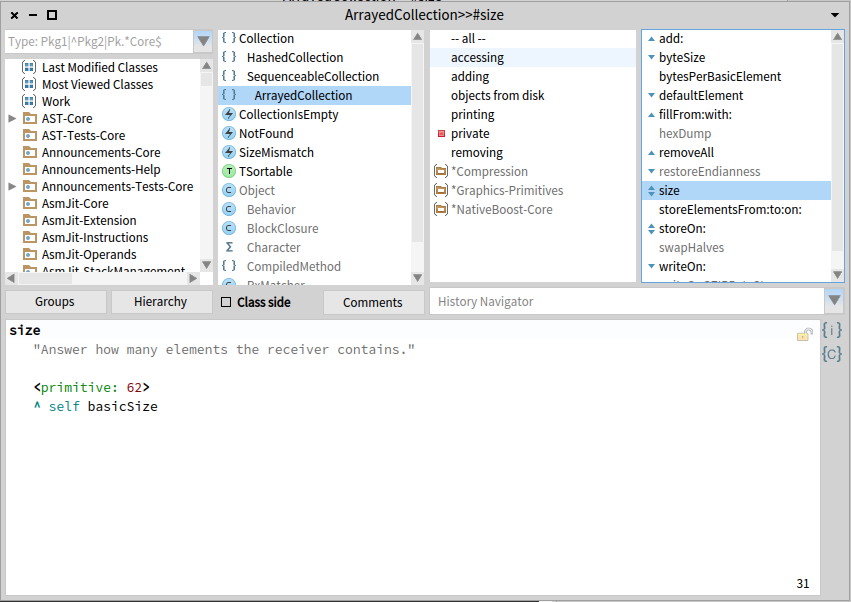

What an improvement. Thanks! Norbert
Am 30.04.2015 um 12:11 schrieb Esteban Lorenzano <estebanlm@gmail.com>:
Hi,
I made a configuration to install the new Idea Icon Pack from configurations browser for Pharo 4. You can install it and then choose your new icon set in settings.
You can also manual install them by:
Gofer it smalltalkhubUser: 'Pharo' project: 'MetaRepoForPharo40'; configurationOf: 'IdeaIcons'; loadStable.
ThemeIcons current: #IdeaUIThemeIcons asClass new. âIn Pharo 4, you might need to execute thisâ AbstractNautilusUI resetIconCaches.
This icon pack works also for Pharo 3
If you lost it, here a couple of screenshots:
<Screen Shot 2015-04-30 at 12.01.20.png>
<Screen Shot 2015-04-30 at 12.01.57.png>

Very nice and a super clean install procedure, I love it when things come together !
On 30 Apr 2015, at 12:11, Esteban Lorenzano <estebanlm@gmail.com> wrote:
Hi,
I made a configuration to install the new Idea Icon Pack from configurations browser for Pharo 4. You can install it and then choose your new icon set in settings.
You can also manual install them by:
Gofer it smalltalkhubUser: 'Pharo' project: 'MetaRepoForPharo40'; configurationOf: 'IdeaIcons'; loadStable.
ThemeIcons current: #IdeaUIThemeIcons asClass new. âIn Pharo 4, you might need to execute thisâ AbstractNautilusUI resetIconCaches.
This icon pack works also for Pharo 3
If you lost it, here a couple of screenshots:
<Screen Shot 2015-04-30 at 12.01.20.png>
<Screen Shot 2015-04-30 at 12.01.57.png>

+1 to Sven and Norbert. I will integrate them to my app. By the way the smallPrintItIcon and the smallDoItIcon look pretty similar, so some kind of change would be nice. Good work, Offray El 30/04/15 a las 05:46, Sven Van Caekenberghe escribió:
Very nice and a super clean install procedure, I love it when things come together !
On 30 Apr 2015, at 12:11, Esteban Lorenzano <estebanlm@gmail.com> wrote:
Hi,
I made a configuration to install the new Idea Icon Pack from configurations browser for Pharo 4. You can install it and then choose your new icon set in settings.
You can also manual install them by:
Gofer it smalltalkhubUser: 'Pharo' project: 'MetaRepoForPharo40'; configurationOf: 'IdeaIcons'; loadStable.
ThemeIcons current: #IdeaUIThemeIcons asClass new. âIn Pharo 4, you might need to execute thisâ AbstractNautilusUI resetIconCaches.
This icon pack works also for Pharo 3
If you lost it, here a couple of screenshots:
<Screen Shot 2015-04-30 at 12.01.20.png>
<Screen Shot 2015-04-30 at 12.01.57.png>
On 04 May 2015, at 03:00, Offray Vladimir Luna Cárdenas <offray@riseup.net> wrote:
+1 to Sven and Norbert. I will integrate them to my app. By the way the smallPrintItIcon and the smallDoItIcon look pretty similar, so some kind of change would be nice.
they donât: maybe you are mistaken the images?
Good work,
thanks, Esteban
Offray
El 30/04/15 a las 05:46, Sven Van Caekenberghe escribió:
Very nice and a super clean install procedure, I love it when things come together !
On 30 Apr 2015, at 12:11, Esteban Lorenzano <estebanlm@gmail.com> wrote:
Hi,
I made a configuration to install the new Idea Icon Pack from configurations browser for Pharo 4. You can install it and then choose your new icon set in settings.
You can also manual install them by:
Gofer it smalltalkhubUser: 'Pharo' project: 'MetaRepoForPharo40'; configurationOf: 'IdeaIcons'; loadStable.
ThemeIcons current: #IdeaUIThemeIcons asClass new. âIn Pharo 4, you might need to execute thisâ AbstractNautilusUI resetIconCaches.
This icon pack works also for Pharo 3
If you lost it, here a couple of screenshots:
<Screen Shot 2015-04-30 at 12.01.20.png>
<Screen Shot 2015-04-30 at 12.01.57.png>

At least in my Image they do. I send you an screenshot. Cheers, Offray El 04/05/15 a las 01:48, Esteban Lorenzano escribió:
On 04 May 2015, at 03:00, Offray Vladimir Luna Cárdenas <offray@riseup.net <mailto:offray@riseup.net>> wrote:
+1 to Sven and Norbert. I will integrate them to my app. By the way the smallPrintItIcon and the smallDoItIcon look pretty similar, so some kind of change would be nice.
they donât:
maybe you are mistaken the images?
Good work,
thanks,
Esteban
Offray
El 30/04/15 a las 05:46, Sven Van Caekenberghe escribió:
Very nice and a super clean install procedure, I love it when things come together !
On 30 Apr 2015, at 12:11, Esteban Lorenzano <estebanlm@gmail.com <mailto:estebanlm@gmail.com>> wrote:
Hi,
I made a configuration to install the new Idea Icon Pack from configurations browser for Pharo 4. You can install it and then choose your new icon set in settings.
You can also manual install them by:
Gofer it smalltalkhubUser: 'Pharo' project: 'MetaRepoForPharo40'; configurationOf: 'IdeaIcons'; loadStable.
ThemeIcons current: #IdeaUIThemeIcons asClass new. âIn Pharo 4, you might need to execute thisâ AbstractNautilusUI resetIconCaches.
This icon pack works also for Pharo 3
If you lost it, here a couple of screenshots:
<Screen Shot 2015-04-30 at 12.01.20.png>
<Screen Shot 2015-04-30 at 12.01.57.png>
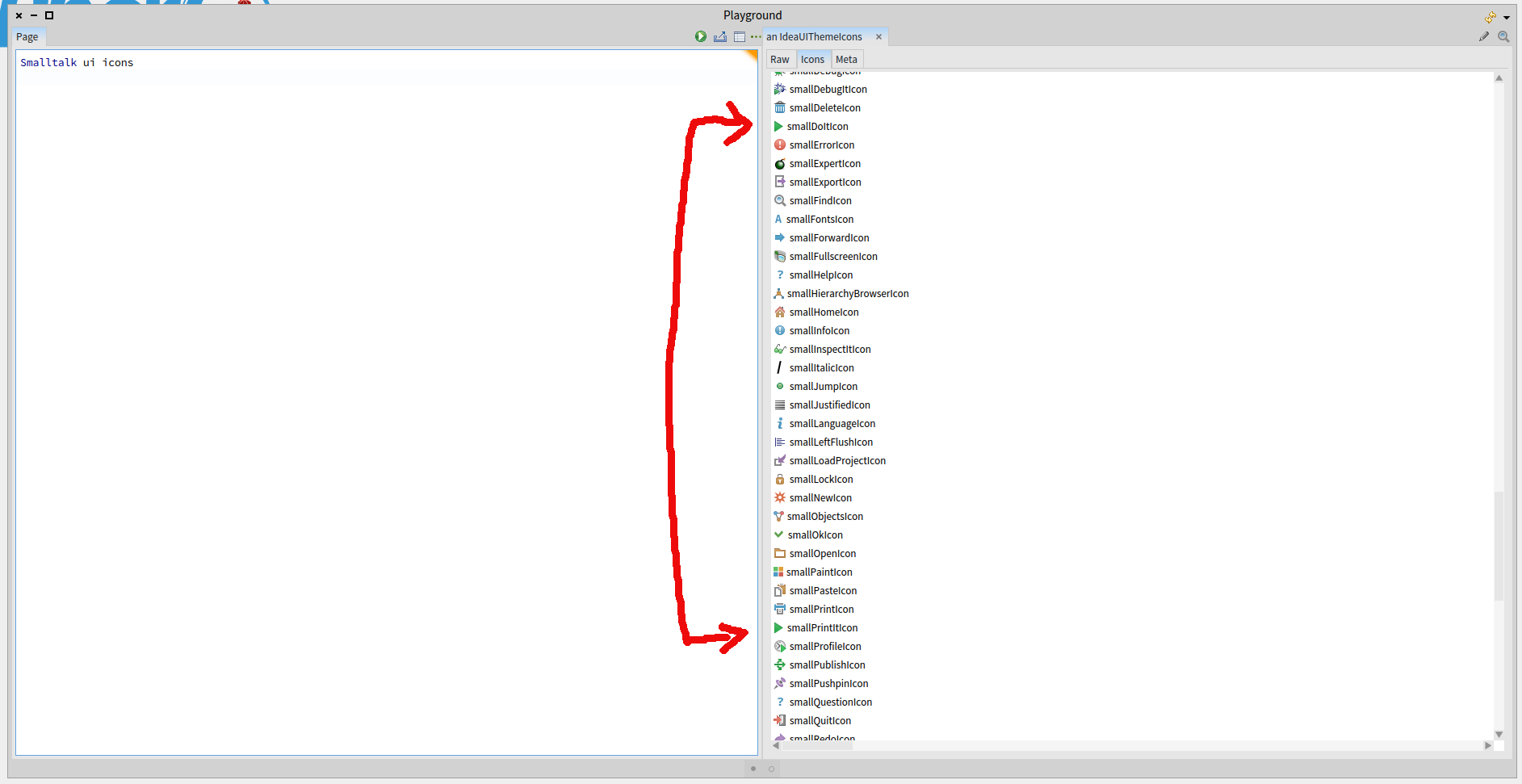
ahhh⦠is âprint itâ, not âprintâ⦠and it is correct like until I find something better⦠because both are more or less same, but changes where they direct result of execution :)
On 04 May 2015, at 21:57, Offray Vladimir Luna Cárdenas <offray@riseup.net> wrote:
At least in my Image they do. I send you an screenshot.
Cheers,
Offray
El 04/05/15 a las 01:48, Esteban Lorenzano escribió:
On 04 May 2015, at 03:00, Offray Vladimir Luna Cárdenas <offray@riseup.net <mailto:offray@riseup.net> <mailto:offray@riseup.net <mailto:offray@riseup.net>>> wrote:
+1 to Sven and Norbert. I will integrate them to my app. By the way the smallPrintItIcon and the smallDoItIcon look pretty similar, so some kind of change would be nice.
they donât:
maybe you are mistaken the images?
Good work,
thanks,
Esteban
Offray
El 30/04/15 a las 05:46, Sven Van Caekenberghe escribió:
Very nice and a super clean install procedure, I love it when things come together !
On 30 Apr 2015, at 12:11, Esteban Lorenzano <estebanlm@gmail.com <mailto:estebanlm@gmail.com> <mailto:estebanlm@gmail.com <mailto:estebanlm@gmail.com>>> wrote:
Hi,
I made a configuration to install the new Idea Icon Pack from configurations browser for Pharo 4. You can install it and then choose your new icon set in settings.
You can also manual install them by:
Gofer it smalltalkhubUser: 'Pharo' project: 'MetaRepoForPharo40'; configurationOf: 'IdeaIcons'; loadStable.
ThemeIcons current: #IdeaUIThemeIcons asClass new. âIn Pharo 4, you might need to execute thisâ AbstractNautilusUI resetIconCaches.
This icon pack works also for Pharo 3
If you lost it, here a couple of screenshots:
<Screen Shot 2015-04-30 at 12.01.20.png>
<Screen Shot 2015-04-30 at 12.01.57.png>
<ideaSimilarIcons.png>
May be the small icon of the glasses works better now that the print preview is not "polluting" the writing of code, but has a tooltip with glasses on it. Cheers, Offray El 04/05/15 a las 15:25, Esteban Lorenzano escribió:
ahhh⦠is âprint itâ, not âprintâ⦠and it is correct like until I find something better⦠because both are more or less same, but changes where they direct result of execution :)
On 04 May 2015, at 21:57, Offray Vladimir Luna Cárdenas <offray@riseup.net <mailto:offray@riseup.net>> wrote:
At least in my Image they do. I send you an screenshot.
Cheers,
Offray
El 04/05/15 a las 01:48, Esteban Lorenzano escribió:
On 04 May 2015, at 03:00, Offray Vladimir Luna Cárdenas <offray@riseup.net <mailto:offray@riseup.net> <mailto:offray@riseup.net>> wrote:
+1 to Sven and Norbert. I will integrate them to my app. By the way the smallPrintItIcon and the smallDoItIcon look pretty similar, so some kind of change would be nice.
they donât:
maybe you are mistaken the images?
Good work,
thanks,
Esteban
Offray
El 30/04/15 a las 05:46, Sven Van Caekenberghe escribió:
Very nice and a super clean install procedure, I love it when things come together !
On 30 Apr 2015, at 12:11, Esteban Lorenzano <estebanlm@gmail.com <mailto:estebanlm@gmail.com> <mailto:estebanlm@gmail.com>> wrote:
Hi,
I made a configuration to install the new Idea Icon Pack from configurations browser for Pharo 4. You can install it and then choose your new icon set in settings.
You can also manual install them by:
Gofer it smalltalkhubUser: 'Pharo' project: 'MetaRepoForPharo40'; configurationOf: 'IdeaIcons'; loadStable.
ThemeIcons current: #IdeaUIThemeIcons asClass new. âIn Pharo 4, you might need to execute thisâ AbstractNautilusUI resetIconCaches.
This icon pack works also for Pharo 3
If you lost it, here a couple of screenshots:
<Screen Shot 2015-04-30 at 12.01.20.png>
<Screen Shot 2015-04-30 at 12.01.57.png>
<ideaSimilarIcons.png>
On 05 May 2015, at 01:10, Offray Vladimir Luna Cárdenas <offray@riseup.net> wrote:
May be the small icon of the glasses works better now that the print preview is not "polluting" the writing of code, but has a tooltip with glasses on it.
no, because thatâs the icon for âinspectâ and what you see there is is playground specific: is showing the result and offering you the possibility of inspect it, yet the glasses. Esteban
Cheers,
Offray
El 04/05/15 a las 15:25, Esteban Lorenzano escribió:
ahhh⦠is âprint itâ, not âprintâ⦠and it is correct like until I find something better⦠because both are more or less same, but changes where they direct result of execution :)
On 04 May 2015, at 21:57, Offray Vladimir Luna Cárdenas <offray@riseup.net <mailto:offray@riseup.net> <mailto:offray@riseup.net <mailto:offray@riseup.net>>> wrote:
At least in my Image they do. I send you an screenshot.
Cheers,
Offray
El 04/05/15 a las 01:48, Esteban Lorenzano escribió:
On 04 May 2015, at 03:00, Offray Vladimir Luna Cárdenas <offray@riseup.net <mailto:offray@riseup.net> <mailto:offray@riseup.net <mailto:offray@riseup.net>> <mailto:offray@riseup.net>> wrote:
+1 to Sven and Norbert. I will integrate them to my app. By the way the smallPrintItIcon and the smallDoItIcon look pretty similar, so some kind of change would be nice.
they donât:
maybe you are mistaken the images?
Good work,
thanks,
Esteban
Offray
El 30/04/15 a las 05:46, Sven Van Caekenberghe escribió:
Very nice and a super clean install procedure, I love it when things come together !
On 30 Apr 2015, at 12:11, Esteban Lorenzano <estebanlm@gmail.com <mailto:estebanlm@gmail.com> <mailto:estebanlm@gmail.com <mailto:estebanlm@gmail.com>> <mailto:estebanlm@gmail.com>> wrote:
Hi,
I made a configuration to install the new Idea Icon Pack from configurations browser for Pharo 4. You can install it and then choose your new icon set in settings.
You can also manual install them by:
Gofer it smalltalkhubUser: 'Pharo' project: 'MetaRepoForPharo40'; configurationOf: 'IdeaIcons'; loadStable.
ThemeIcons current: #IdeaUIThemeIcons asClass new. âIn Pharo 4, you might need to execute thisâ AbstractNautilusUI resetIconCaches.
This icon pack works also for Pharo 3
If you lost it, here a couple of screenshots:
<Screen Shot 2015-04-30 at 12.01.20.png>
<Screen Shot 2015-04-30 at 12.01.57.png>
<ideaSimilarIcons.png>
Hi, El 04/05/15 a las 18:05, Esteban Lorenzano escribió:
On 05 May 2015, at 01:10, Offray Vladimir Luna Cárdenas <offray@riseup.net <mailto:offray@riseup.net>> wrote:
May be the small icon of the glasses works better now that the print preview is not "polluting" the writing of code, but has a tooltip with glasses on it.
no, because thatâs the icon for âinspectâ and what you see there is is playground specific: is showing the result and offering you the possibility of inspect it, yet the glasses.
Esteban
Ok. It was just an idea. Maybe something else will work, a "play" icon with a "page" or "print" icon. What is wise is that slightly different actions have slightly different icons. Cheers, Offray

While we are at it, the icon for methods with a self flag: #SomeSymbol is a bit hard.. Can't we have the flags back? The danger sign isn't too appropriate. and self halt. which gives a kind of strange circle isn't too nice either. Are there icons in the set that would fit better? Phil On Tue, May 5, 2015 at 5:59 PM, Offray Vladimir Luna Cárdenas < offray@riseup.net> wrote:
Hi,
El 04/05/15 a las 18:05, Esteban Lorenzano escribió:
On 05 May 2015, at 01:10, Offray Vladimir Luna Cárdenas <
offray@riseup.net <mailto:offray@riseup.net>> wrote:
May be the small icon of the glasses works better now that the print preview is not "polluting" the writing of code, but has a tooltip with glasses on it.
no, because thatâs the icon for âinspectâ and what you see there is is playground specific: is showing the result and offering you the possibility of inspect it, yet the glasses.
Esteban
Ok. It was just an idea. Maybe something else will work, a "play" icon with a "page" or "print" icon. What is wise is that slightly different actions have slightly different icons.
Cheers,
Offray
On 05 May 2015, at 18:04, phil@highoctane.be wrote:
While we are at it, the icon for methods with a
self flag: #SomeSymbol
is a bit hard.. Can't we have the flags back? The danger sign isn't too appropriate.
nope, the flags are gone for good⦠they were ugly even before :) (and they have white borders so not good for dark theme) the sign Iâm using is a âwarningâ sign⦠is kind of appropriate, but I can search for something less âbig".
and
self halt.
which gives a kind of strange circle isn't too nice either.
is a breakpoint sign in Idea set⦠so again⦠is appropriate but probably to big or strong. I can search something better, but I do not ensure a result :)
Are there icons in the set that would fit better?
Well⦠those are the ones I found more appropriate, I did not chose them random or without thought. But, I will do a re-pass⦠and maybe I will modify some icon. Not that I have all the time of the world, but eventually I will have insomnia again :) Esteban
Phil
On Tue, May 5, 2015 at 5:59 PM, Offray Vladimir Luna Cárdenas <offray@riseup.net <mailto:offray@riseup.net>> wrote: Hi,
El 04/05/15 a las 18:05, Esteban Lorenzano escribió:
On 05 May 2015, at 01:10, Offray Vladimir Luna Cárdenas <offray@riseup.net <mailto:offray@riseup.net> <mailto:offray@riseup.net <mailto:offray@riseup.net>>> wrote:
May be the small icon of the glasses works better now that the print preview is not "polluting" the writing of code, but has a tooltip with glasses on it.
no, because thatâs the icon for âinspectâ and what you see there is is playground specific: is showing the result and offering you the possibility of inspect it, yet the glasses.
Esteban
Ok. It was just an idea. Maybe something else will work, a "play" icon with a "page" or "print" icon. What is wise is that slightly different actions have slightly different icons.
Cheers,
Offray
I made a pass and changed flag and halt icons. Not sure, but they will *probably* work better⦠weâll see. Esteban
On 05 May 2015, at 18:32, Esteban Lorenzano <estebanlm@gmail.com> wrote:
On 05 May 2015, at 18:04, phil@highoctane.be <mailto:phil@highoctane.be> wrote:
While we are at it, the icon for methods with a
self flag: #SomeSymbol
is a bit hard.. Can't we have the flags back? The danger sign isn't too appropriate.
nope, the flags are gone for good⦠they were ugly even before :) (and they have white borders so not good for dark theme) the sign Iâm using is a âwarningâ sign⦠is kind of appropriate, but I can search for something less âbig".
and
self halt.
which gives a kind of strange circle isn't too nice either.
is a breakpoint sign in Idea set⦠so again⦠is appropriate but probably to big or strong. I can search something better, but I do not ensure a result :)
Are there icons in the set that would fit better?
Well⦠those are the ones I found more appropriate, I did not chose them random or without thought. But, I will do a re-pass⦠and maybe I will modify some icon. Not that I have all the time of the world, but eventually I will have insomnia again :)
Esteban
Phil
On Tue, May 5, 2015 at 5:59 PM, Offray Vladimir Luna Cárdenas <offray@riseup.net <mailto:offray@riseup.net>> wrote: Hi,
El 04/05/15 a las 18:05, Esteban Lorenzano escribió:
On 05 May 2015, at 01:10, Offray Vladimir Luna Cárdenas <offray@riseup.net <mailto:offray@riseup.net> <mailto:offray@riseup.net <mailto:offray@riseup.net>>> wrote:
May be the small icon of the glasses works better now that the print preview is not "polluting" the writing of code, but has a tooltip with glasses on it.
no, because thatâs the icon for âinspectâ and what you see there is is playground specific: is showing the result and offering you the possibility of inspect it, yet the glasses.
Esteban
Ok. It was just an idea. Maybe something else will work, a "play" icon with a "page" or "print" icon. What is wise is that slightly different actions have slightly different icons.
Cheers,
Offray
On 05 May 2015, at 17:59, Offray Vladimir Luna Cárdenas <offray@riseup.net> wrote:
Hi,
El 04/05/15 a las 18:05, Esteban Lorenzano escribió:
On 05 May 2015, at 01:10, Offray Vladimir Luna Cárdenas <offray@riseup.net <mailto:offray@riseup.net>> wrote:
May be the small icon of the glasses works better now that the print preview is not "polluting" the writing of code, but has a tooltip with glasses on it.
no, because thatâs the icon for âinspectâ and what you see there is is playground specific: is showing the result and offering you the possibility of inspect it, yet the glasses.
Esteban
Ok. It was just an idea. Maybe something else will work, a "play" icon with a "page" or "print" icon. What is wise is that slightly different actions have slightly different icons.
yes, but that means I need to take pixelimator and create an icon. A painful and not really compensating task. I can try it, with time (it is in my todo). but it will happen when it happens :) Esteban
Cheers,
Offray
Hi, El 05/05/15 a las 11:34, Esteban Lorenzano escribió:
On 05 May 2015, at 17:59, Offray Vladimir Luna Cárdenas <offray@riseup.net> wrote:
Hi,
El 04/05/15 a las 18:05, Esteban Lorenzano escribió:
On 05 May 2015, at 01:10, Offray Vladimir Luna Cárdenas <offray@riseup.net <mailto:offray@riseup.net>> wrote:
May be the small icon of the glasses works better now that the print preview is not "polluting" the writing of code, but has a tooltip with glasses on it.
no, because thatâs the icon for âinspectâ and what you see there is is playground specific: is showing the result and offering you the possibility of inspect it, yet the glasses.
Esteban
Ok. It was just an idea. Maybe something else will work, a "play" icon with a "page" or "print" icon. What is wise is that slightly different actions have slightly different icons.
yes, but that means I need to take pixelimator and create an icon. A painful and not really compensating task. I can try it, with time (it is in my todo). but it will happen when it happens :)
Esteban
Fine :). Surely creating icons by hand is not the proper solution. Idea icons are a nice improvement and when they get better and we have more icons and themes surely we will have a more broad repertory to choose from. Cheers, Offray
participants (5)
-
 Esteban Lorenzano
 -
 Norbert Hartl
 -
 Offray Vladimir Luna Cárdenas
 -
 phil@highoctane.be
 -
 Sven Van Caekenberghe