
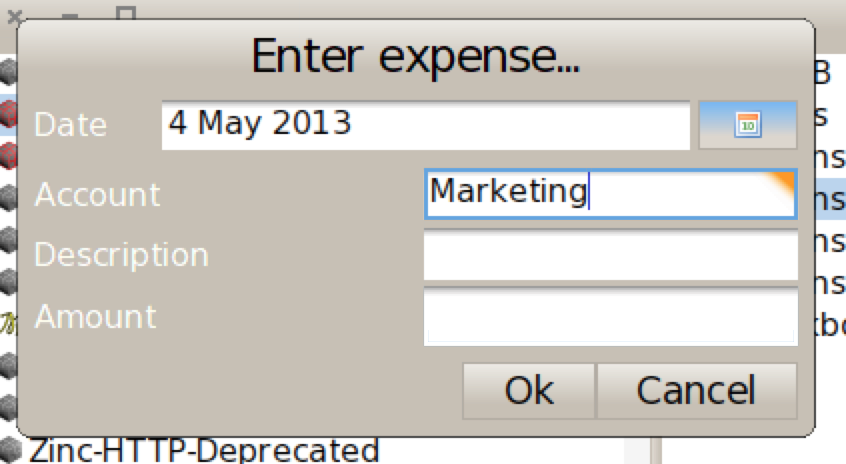
I'm having difficulty expressing a one-to-many relationship in a Spec UI (in Pharo 2.0). I want to have a dialog where the user can enter a business expense, which will be assigned to a particular account (see screenshot). I tried: - using a DropListModel. This disrupted the flow because it seems it can't be typed into, so the user has to mouse through to find the correct account - using a TextInputFieldModel with entry completion. It seems that this suffers the same fate as above. In its current form, it's almost unusable. Pressing the down arrow to select an item from the completion menu makes the menu disappear, tab makes the widget lose focus, and I have complete on enter disabled, so again one must mouse click on the menu What would be the best way to express this without forcing the user to take their hands off the keyboard? Thanks! Sean

From a UI point of view, drop list is your man.
I will quickly have a look :) Ben On May 5, 2013, at 4:50 AM, DeNigris Sean <sean@clipperadams.com> wrote:
I'm having difficulty expressing a one-to-many relationship in a Spec UI (in Pharo 2.0). I want to have a dialog where the user can enter a business expense, which will be assigned to a particular account (see screenshot).
I tried: - using a DropListModel. This disrupted the flow because it seems it can't be typed into, so the user has to mouse through to find the correct account - using a TextInputFieldModel with entry completion. It seems that this suffers the same fate as above. In its current form, it's almost unusable. Pressing the down arrow to select an item from the completion menu makes the menu disappear, tab makes the widget lose focus, and I have complete on enter disabled, so again one must mouse click on the menu
What would be the best way to express this without forcing the user to take their hands off the keyboard?
Thanks! Sean
<Screen Shot 2013-05-04 at 10.41.59 PM.png>
After a bit of experimentation :) As an example here, I take DropListExample On the DropList when you type something like 'Gr', nothing is shown but the list actually highlight it (in green -> second selection). So if then you press enter, it selects it. That's quite weird :) I will have a look of how to have the same behaviour without having to press enter and without having to duplicate the list code Ben On May 5, 2013, at 4:50 AM, DeNigris Sean <sean@clipperadams.com> wrote:
I'm having difficulty expressing a one-to-many relationship in a Spec UI (in Pharo 2.0). I want to have a dialog where the user can enter a business expense, which will be assigned to a particular account (see screenshot).
I tried: - using a DropListModel. This disrupted the flow because it seems it can't be typed into, so the user has to mouse through to find the correct account - using a TextInputFieldModel with entry completion. It seems that this suffers the same fate as above. In its current form, it's almost unusable. Pressing the down arrow to select an item from the completion menu makes the menu disappear, tab makes the widget lose focus, and I have complete on enter disabled, so again one must mouse click on the menu
What would be the best way to express this without forcing the user to take their hands off the keyboard?
Thanks! Sean
<Screen Shot 2013-05-04 at 10.41.59 PM.png>
I also notice you can use arrowDown and arrowUp, but not really helping if the list is long :) I propose a fix here: https://pharo.fogbugz.com/default.asp?10531 Ben On May 5, 2013, at 4:50 AM, DeNigris Sean <sean@clipperadams.com> wrote:
I'm having difficulty expressing a one-to-many relationship in a Spec UI (in Pharo 2.0). I want to have a dialog where the user can enter a business expense, which will be assigned to a particular account (see screenshot).
I tried: - using a DropListModel. This disrupted the flow because it seems it can't be typed into, so the user has to mouse through to find the correct account - using a TextInputFieldModel with entry completion. It seems that this suffers the same fate as above. In its current form, it's almost unusable. Pressing the down arrow to select an item from the completion menu makes the menu disappear, tab makes the widget lose focus, and I have complete on enter disabled, so again one must mouse click on the menu
What would be the best way to express this without forcing the user to take their hands off the keyboard?
Thanks! Sean
<Screen Shot 2013-05-04 at 10.41.59 PM.png>
participants (2)
-
 Benjamin
 -
 DeNigris Sean