Seaside and Ajax/JQuery

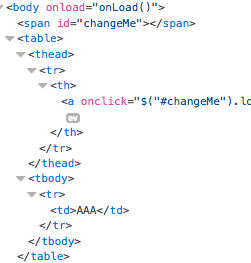
Hello All. I try to use Ajax/JQuery to update a value in a HTML table by clicking on the table heading. The new value (the update) is not written in the tabledata I associated an id with, but before the table. The code : renderContentOn: html html table: [ html tableHead: [ html tableRow: [ html tableHeading: [ html anchor url: 'javascript:void(0)'; onClick: ((html jQuery: #changeMe) load html: 'BBB'); with: 'Update']. ] ]. html tableBody: [ html span id: #changeMe; with: [html tableData: [html render: 'AAA']]. ] ] The debugger in Firefox displays clearly that the "span id: #changeMe" is not written at the correct place in the generated javascript. [image: Images intégrées 1] What am I doing wrong? Regards -- Dominique

Le 19/02/2018 à 21:56, Dominique Dartois a écrit :
Hello All. I try to use Ajax/JQuery to update a value in a HTML table by clicking on the table heading. The new value (the update) is not written in the tabledata I associated an id with, but before the table.
The code :
renderContentOn: html
html table: [
html tableHead: [
html tableRow: [
html tableHeading: [ html anchor url: 'javascript:void(0)'; onClick:
((html jQuery: #changeMe) load html: 'BBB'); with: 'Update'].
]
].
html tableBody: [
html span id: #changeMe; with: [html tableData: [html render: 'AAA']].
]
]
The debugger in Firefox displays clearly that the "span id: #changeMe" is not written at the correct place in the generated javascript.
Images intégrées 1
What am I doing wrong? Regards -- Dominique
Hi, This is possibly because in HTML5 a table element can only contains: - tr - th - td - caption - col - colgroup - thead - tbody - tfoot It should not contains span to be valid. Maybe your browser make this change to make the HTML valid. -- Cyril Ferlicot https://ferlicot.fr
2018-02-19 22:02 GMT+01:00 Cyril Ferlicot D. <cyril.ferlicot@gmail.com>:
Le 19/02/2018 à 21:56, Dominique Dartois a écrit :
Hello All. I try to use Ajax/JQuery to update a value in a HTML table by clicking on the table heading. The new value (the update) is not written in the tabledata I associated an id with, but before the table.
The code :
renderContentOn: html
html table: [
html tableHead: [
html tableRow: [
html tableHeading: [ html anchor url: 'javascript:void(0)'; onClick:
((html jQuery: #changeMe) load html: 'BBB'); with: 'Update'].
]
].
html tableBody: [
html span id: #changeMe; with: [html tableData: [html render: 'AAA']].
]
]
The debugger in Firefox displays clearly that the "span id: #changeMe" is not written at the correct place in the generated javascript.
Images intégrées 1
What am I doing wrong? Regards -- Dominique
Hi,
This is possibly because in HTML5 a table element can only contains: - tr - th - td - caption - col - colgroup - thead - tbody - tfoot
It should not contains span to be valid. Maybe your browser make this change to make the HTML valid.
-- Cyril Ferlicot https://ferlicot.fr
Thank you so much Cyril. The right code is : html tableData id: #changeMe ; with: [html render: 'AAA']. and not : html span id: #changeMe; with: [html tableData: [html render: 'AAA']]. Thanks again Regards -- Dominique

Dominique Dartois wrote:
2018-02-19 22:02 GMT+01:00 Cyril Ferlicot D. <cyril.ferlicot@gmail.com <mailto:cyril.ferlicot@gmail.com>>:
Le 19/02/2018 ?? 21:56, Dominique Dartois a ??crit : > Hello All. > I try to use Ajax/JQuery to update a value in a HTML table by clicking > on the table heading. > The new value (the update) is not written in the tabledata I associated > an id with, but before the table. > > The code : > > renderContentOn: html > > html table: [ > > html tableHead: [ > > html tableRow: [ > > html tableHeading: [ html anchor url: 'javascript:void(0)'; onClick: > > ((html jQuery: #changeMe) load html: 'BBB'); with: 'Update']. > > ] > > ]. > > html tableBody: [ > > html span id: #changeMe; with: [html tableData: [html render: 'AAA']]. > > ] > > ] > > > The debugger in Firefox displays clearly that the "span id: #changeMe" > is not written at the correct place in the generated javascript. > > Images int??gr??es 1 > > What am I doing wrong? > Regards > -- > Dominique
Hi,
This is possibly because in HTML5 a table element can only contains: - tr - th - td - caption - col - colgroup - thead - tbody - tfoot
It should not contains span to be valid. Maybe your browser make this change to make the HTML valid.
-- Cyril Ferlicot https://ferlicot.fr
Thank you so much Cyril.
The right code is : html tableData id: #changeMe ; with: [html render: 'AAA'].
Why not simply html tableData id: #changeMe; with: 'AAA'. ?
and not : html span id: #changeMe; with: [html tableData: [html render: 'AAA']].
Thanks again Regards
-- Dominique
participants (3)
-
 Cyril Ferlicot D.
 -
 Dominique Dartois
 -
 Herbert VojÄÃk