Setting rowHeight: for Spec FastTableModel

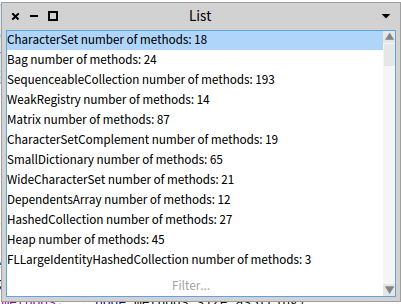
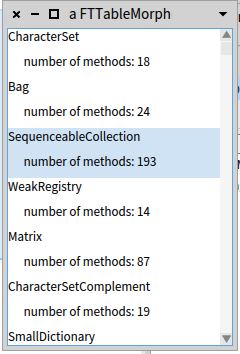
Hi, I have a code like this: FastTableModel new displayBlock: [ :node | node name ]; items: Collection withAllSubclasses; openWithSpec. Which works fine. But I would like to define row height for each item. FTTableMorph has a method rowHeight:. Is it possible? One possible use case could be: FastTableModel new displayBlock: [ :node | node name, String cr, â number of methods: ', node methods size asString ]; items: Collection withAllSubclasses; "rowHeight: 50;â âdoes not work" openWithSpec In that case, each list item is composed by a class name on the first line, and the number of methods on the second line. For FTTableMorph the code looks like this: FTTableMorph new extent: 650@500; selectRowIndex: 1; showFirstRowSelection; dataSource: (FTEasyListDataSource new elements: Collection withAllSubclasses; display: [ :node | Smalltalk ui theme newColumnIn: World for: { node name asStringMorph. (' number of methods: ', node methods size asString) asStringMorph }]); rowHeight: 50; beMultipleSelection; openInWindow Or do you propose another solution? Thanks! Juraj

On 22/06/17 10:51, Juraj Kubelka wrote:
Hi,
I have a code like this:
FastTableModel new displayBlock: [ :node | node name ]; items: Collection withAllSubclasses; openWithSpec.
Which works fine. But I would like to define row height for each item. FTTableMorph has a method rowHeight:. Is it possible?
Sure. Not all properties of fasttable are exposed, and I never got a good answer on the design question of what and how to expose and propagate properties in Spec. I see the following design questions: Exposing all the Morphic properties makes for a stronger dependency on Morphic. Spec itself is written so it can be easily ported from one underlying widget & gui layer to another (bloc, cocoa, qt, less so for web?), and different layers have different properties. What is common and what needs adapters or even layer-specific code? When nesting components, how do properties propagate? Define once and reuse everywhere is the goal, but that requires defining where components can find property values: Theme, Application, Session. In Spec there is no model/API defined for that, and there is no systematic approach taken, just pragmatic choices. Stephan

What considerations are there to have individual row heights? i.e. How close are we to having a spreadsheet interface like simplfied Excel? cheers -ben On Thu, Jun 22, 2017 at 4:51 PM, Juraj Kubelka <juraj.kubelka@icloud.com> wrote:
Hi,
I have a code like this:
FastTableModel new displayBlock: [ :node | node name ]; items: Collection withAllSubclasses; openWithSpec.
Which works fine. But I would like to define row height for each item. FTTableMorph has a method rowHeight:. Is it possible?
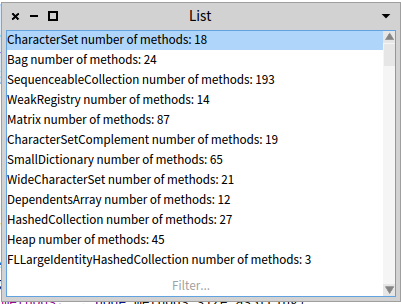
One possible use case could be:
FastTableModel new displayBlock: [ :node | node name, String cr, â number of methods: ', node methods size asString ]; items: Collection withAllSubclasses; "rowHeight: 50;â âdoes not work" openWithSpec
In that case, each list item is composed by a class name on the first line, and the number of methods on the second line.
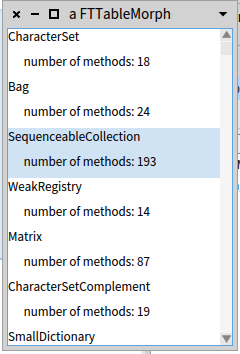
For FTTableMorph the code looks like this:
FTTableMorph new extent: 650@500; selectRowIndex: 1; showFirstRowSelection; dataSource: (FTEasyListDataSource new elements: Collection withAllSubclasses; display: [ :node | Smalltalk ui theme newColumnIn: World for: { node name asStringMorph. (' number of methods: ', node methods size asString) asStringMorph }]); *rowHeight: 50;* beMultipleSelection; openInWindow
Or do you propose another solution?
Thanks! Juraj
El 22-06-2017, a las 17:19, Ben Coman <btc@openinworld.com> escribió:
What considerations are there to have individual row heights?
The way I understand FastTable, it is not possible to have each item with different height. Cheers, Juraj
i.e. How close are we to having a spreadsheet interface like simplfied Excel?
cheers -ben
On Thu, Jun 22, 2017 at 4:51 PM, Juraj Kubelka <juraj.kubelka@icloud.com <mailto:juraj.kubelka@icloud.com>> wrote: Hi,
I have a code like this:
FastTableModel new displayBlock: [ :node | node name ]; items: Collection withAllSubclasses; openWithSpec.
Which works fine. But I would like to define row height for each item. FTTableMorph has a method rowHeight:. Is it possible?
One possible use case could be:
FastTableModel new displayBlock: [ :node | node name, String cr, â number of methods: ', node methods size asString ]; items: Collection withAllSubclasses; "rowHeight: 50;â âdoes not work" openWithSpec
<Captura de pantalla 2017-06-22 a la(s) 10.50.08.png>
In that case, each list item is composed by a class name on the first line, and the number of methods on the second line.
For FTTableMorph the code looks like this:
FTTableMorph new extent: 650@500; selectRowIndex: 1; showFirstRowSelection; dataSource: (FTEasyListDataSource new elements: Collection withAllSubclasses; display: [ :node | Smalltalk ui theme newColumnIn: World for: { node name asStringMorph. (' number of methods: ', node methods size asString) asStringMorph }]); rowHeight: 50; beMultipleSelection; openInWindow
<Captura de pantalla 2017-06-22 a la(s) 10.49.08.png>
Or do you propose another solution?
Thanks! Juraj

On 22 Jun 2017, at 17:49, Juraj Kubelka <juraj.kubelka@icloud.com> wrote:
El 22-06-2017, a las 17:19, Ben Coman <btc@openinworld.com <mailto:btc@openinworld.com>> escribió:
What considerations are there to have individual row heights?
The way I understand FastTable, it is not possible to have each item with different height.
thatâs correct. There was a proposal to give it variable heights but I think it was never implemented. cheers! Esteban
Cheers, Juraj
i.e. How close are we to having a spreadsheet interface like simplfied Excel?
cheers -ben
On Thu, Jun 22, 2017 at 4:51 PM, Juraj Kubelka <juraj.kubelka@icloud.com <mailto:juraj.kubelka@icloud.com>> wrote: Hi,
I have a code like this:
FastTableModel new displayBlock: [ :node | node name ]; items: Collection withAllSubclasses; openWithSpec.
Which works fine. But I would like to define row height for each item. FTTableMorph has a method rowHeight:. Is it possible?
One possible use case could be:
FastTableModel new displayBlock: [ :node | node name, String cr, â number of methods: ', node methods size asString ]; items: Collection withAllSubclasses; "rowHeight: 50;â âdoes not work" openWithSpec
<Captura de pantalla 2017-06-22 a la(s) 10.50.08.png>
In that case, each list item is composed by a class name on the first line, and the number of methods on the second line.
For FTTableMorph the code looks like this:
FTTableMorph new extent: 650@500; selectRowIndex: 1; showFirstRowSelection; dataSource: (FTEasyListDataSource new elements: Collection withAllSubclasses; display: [ :node | Smalltalk ui theme newColumnIn: World for: { node name asStringMorph. (' number of methods: ', node methods size asString) asStringMorph }]); rowHeight: 50; beMultipleSelection; openInWindow
<Captura de pantalla 2017-06-22 a la(s) 10.49.08.png>
Or do you propose another solution?
Thanks! Juraj
participants (4)
-
 Ben Coman
 -
 Esteban Lorenzano
 -
 Juraj Kubelka
 -
 Stephan Eggermont