Full screen not really Full screen for Pharo 1.4 / 2.0 and Macos Lion

Sadly enough pharo does not seem to maximise properly when i click on the full screen button, it leaves a lot of empty space on top and bottom. Is that problem known ? I can take some screenshots if you want. I have the latest Macosx Lion and pharo is updated.Â

yes, please... can you provide some screenshots? because for me it works perfectly well... Esteban On Aug 22, 2012, at 1:30 PM, dimitris chloupis <thekilon@yahoo.co.uk> wrote:
Sadly enough pharo does not seem to maximise properly when i click on the full screen button, it leaves a lot of empty space on top and bottom. Is that problem known ? I can take some screenshots if you want. I have the latest Macosx Lion and pharo is updated.
my pleasure here is the screenshot ---> http://www.pasteall.org/pic/show.php?id=36840 2 things to note here a) The grey areas should not be there . Pharo should cover the entire surface. b) My computer is a macbook air [2011] , so it uses the a bit unusual resolution of 1366x768 which might be the reason why Pharo does not display properly. Though the mystery is that has a problem not with 1366 but with the 768. But I leave that to your expert minds. ________________________________ From: Esteban Lorenzano <estebanlm@gmail.com> To: A friendly place where any question about pharo is welcome <pharo-users@lists.gforge.inria.fr> Sent: Wednesday, 22 August 2012, 14:32 Subject: Re: [Pharo-users] Full screen not really Full screen for Pharo 1.4 / 2.0 and Macos Lion yes, please... can you provide some screenshots? because for me it works perfectly well... Esteban On Aug 22, 2012, at 1:30 PM, dimitris chloupis <thekilon@yahoo.co.uk> wrote: Sadly enough pharo does not seem to maximise properly when i click on the full screen button, it leaves a lot of empty space on top and bottom. Is that problem known ? I can take some screenshots if you want. I have the latest Macosx Lion and pharo is updated.Â

On 22 Aug 2012, at 13:32, Esteban Lorenzano <estebanlm@gmail.com> wrote:
yes, please... can you provide some screenshots? because for me it works perfectly well...
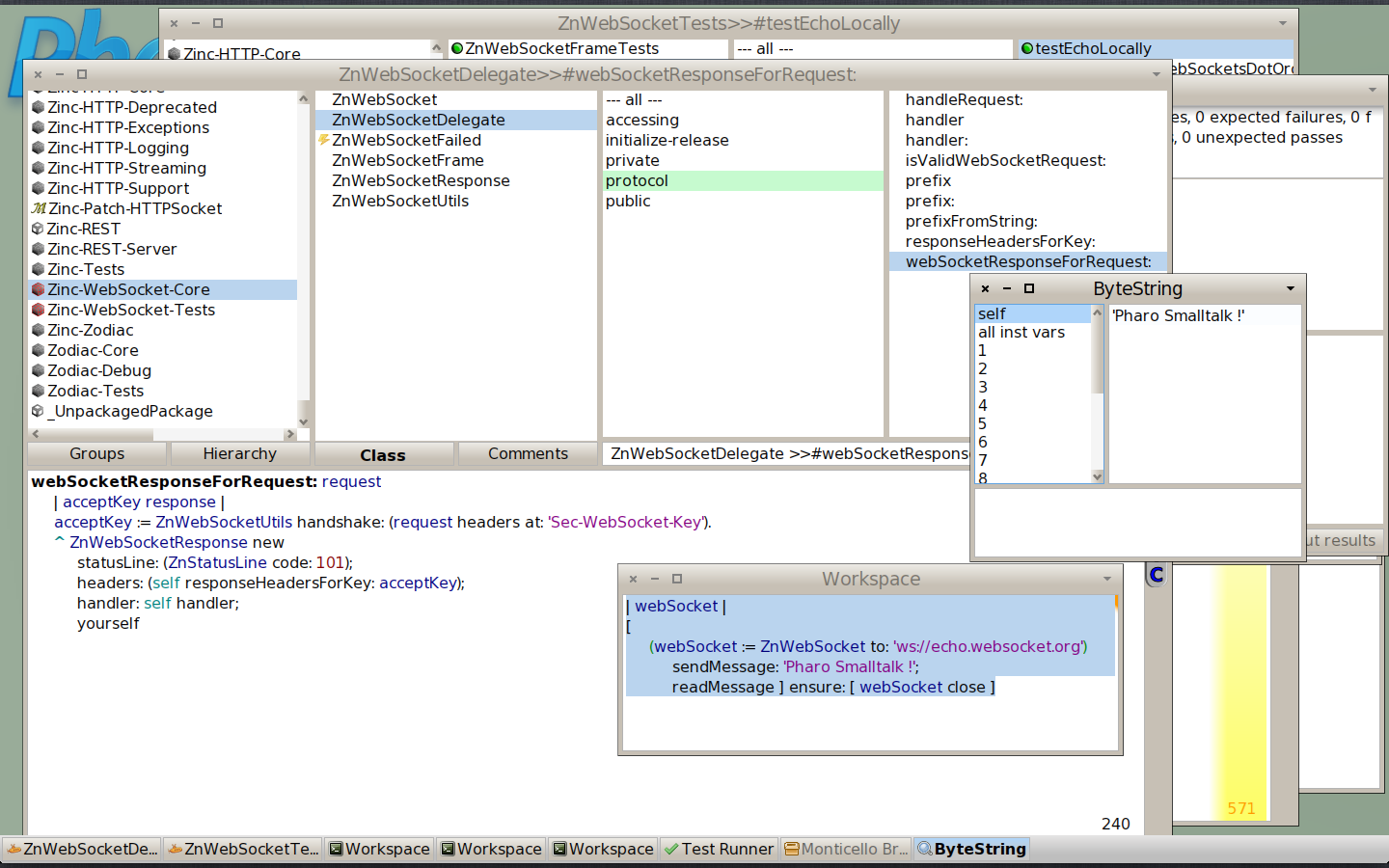
Yeah, it works very well indeed, here is a screenshot on a MacBook Pro with a 1400x900 screen running Mac OS X 10.8, Pharo 2.0, latest VM: There is just a small amount lost (the black lines), but I can live with that. I love this feature: it helps to stay focused ;-) Sven -- Sven Van Caekenberghe http://stfx.eu Smalltalk is the Red Pill
yes... it is a problem of the "unusual resolution" for sure... I will add that to my "infinite todo list", to fix it as soon as I can spare some time :) On Aug 22, 2012, at 1:46 PM, Sven Van Caekenberghe <sven@beta9.be> wrote:
On 22 Aug 2012, at 13:32, Esteban Lorenzano <estebanlm@gmail.com> wrote:
yes, please... can you provide some screenshots? because for me it works perfectly well...
Yeah, it works very well indeed, here is a screenshot on a MacBook Pro with a 1400x900 screen running Mac OS X 10.8, Pharo 2.0, latest VM:
<Screen Shot 2012-08-22 at 13.42.43.png>
There is just a small amount lost (the black lines), but I can live with that.
I love this feature: it helps to stay focused ;-)
Sven
-- Sven Van Caekenberghe http://stfx.eu Smalltalk is the Red Pill
yeah but my problem is not just some thin black lines, the gaps are so big that make full screen practically useless. Any pointers where I should look if I want to hack this to oblivion ? Or is that Slang territory I rather not touch ? I can live without a full screen mode by the way. Its not a big problem. ________________________________ From: Esteban Lorenzano <estebanlm@gmail.com> To: A friendly place where any question about pharo is welcome <pharo-users@lists.gforge.inria.fr> Sent: Wednesday, 22 August 2012, 14:50 Subject: Re: [Pharo-users] Full screen not really Full screen for Pharo 1.4 / 2.0 and Macos Lion yes... it is a problem of the "unusual resolution" for sure... I will add that to my "infinite todo list", to fix it as soon as I can spare some time :) On Aug 22, 2012, at 1:46 PM, Sven Van Caekenberghe <sven@beta9.be> wrote:
On 22 Aug 2012, at 13:32, Esteban Lorenzano <estebanlm@gmail.com> wrote:
yes, please... can you provide some screenshots? because for me it works perfectly well...Â
Yeah, it works very well indeed, here is a screenshot on a MacBook Pro with a 1400x900 screen running Mac OS X 10.8, Pharo 2.0, latest VM:
<Screen Shot 2012-08-22 at 13.42.43.png>
There is just a small amount lost (the black lines), but I can live with that.
I love this feature: it helps to stay focused ;-)
Sven
-- Sven Van Caekenberghe http://stfx.eu Smalltalk is the Red Pill
he... this is not even slang territory... is Objective-C territory.... if you are used to do vm stuff, you can give it a try, I would be thankful :) On Aug 22, 2012, at 1:55 PM, dimitris chloupis <thekilon@yahoo.co.uk> wrote:
yeah but my problem is not just some thin black lines, the gaps are so big that make full screen practically useless. Any pointers where I should look if I want to hack this to oblivion ? Or is that Slang territory I rather not touch ?
I can live without a full screen mode by the way. Its not a big problem.
From: Esteban Lorenzano <estebanlm@gmail.com> To: A friendly place where any question about pharo is welcome <pharo-users@lists.gforge.inria.fr> Sent: Wednesday, 22 August 2012, 14:50 Subject: Re: [Pharo-users] Full screen not really Full screen for Pharo 1.4 / 2.0 and Macos Lion
yes... it is a problem of the "unusual resolution" for sure... I will add that to my "infinite todo list", to fix it as soon as I can spare some time :)
On Aug 22, 2012, at 1:46 PM, Sven Van Caekenberghe <sven@beta9.be> wrote:
On 22 Aug 2012, at 13:32, Esteban Lorenzano <estebanlm@gmail.com> wrote:
yes, please... can you provide some screenshots? because for me it works perfectly well...
Yeah, it works very well indeed, here is a screenshot on a MacBook Pro with a 1400x900 screen running Mac OS X 10.8, Pharo 2.0, latest VM:
<Screen Shot 2012-08-22 at 13.42.43.png>
There is just a small amount lost (the black lines), but I can live with that.
I love this feature: it helps to stay focused ;-)
Sven
-- Sven Van Caekenberghe http://stfx.eu Smalltalk is the Red Pill

kilon wrote
Sadly enough pharo does not seem to maximise properly when i click on the full screen button, it leaves a lot of empty space on top and bottom. Is that problem known ? I can take some screenshots if you want. I have the latest Macosx Lion and pharo is updated.Â
I have the same problem. But it only happens if you use the MacOS Lion Fullscreen Button in the upper right corner of the Pharo Window. If you use the Pharo Fullscreen function: *Display toggleFullscreen* everything works well. -- View this message in context: http://forum.world.st/Full-screen-not-really-Full-screen-for-Pharo-1-4-2-0-a... Sent from the Pharo Smalltalk Users mailing list archive at Nabble.com.
oh nice it works fine for me , thanks for the help. No I am not an objc coder just a python coder specializing in blender python and a pharo/squeak beginner. I try to avoid objc and any kind of C. ________________________________ From: Helene Bilbo <thereluctantprogrammer@fastmail.fm> To: pharo-users@lists.gforge.inria.fr Sent: Wednesday, 22 August 2012, 15:26 Subject: Re: [Pharo-users] Full screen not really Full screen for Pharo 1.4 / 2.0 and Macos Lion kilon wrote
Sadly enough pharo does not seem to maximise properly when i click on the full screen button, it leaves a lot of empty space on top and bottom. Is that problem known ? I can take some screenshots if you want. I have the latest Macosx Lion and pharo is updated.Â
I have the same problem. But it only happens if you use the MacOS Lion Fullscreen Button in the upper right corner of the Pharo Window. If you use the Pharo Fullscreen function: *Display toggleFullscreen* everything works well. -- View this message in context: http://forum.world.st/Full-screen-not-really-Full-screen-for-Pharo-1-4-2-0-a... Sent from the Pharo Smalltalk Users mailing list archive at Nabble.com.
participants (4)
-
 dimitris chloupis
 -
 Esteban Lorenzano
 -
 Helene Bilbo
 -
 Sven Van Caekenberghe