
 What is wrong with this spec? Why is the checkbox attached to the buttom? I would have expected it to be directly underneath the password label. Is this default behavior and how can I prevent this? defaultSpec    <spec: #default>    ^SpecLayout composed      newColumn: [ :col |        col          newRow: [ :row |            row              add: #usernameLabel ;              add: #usernameField ]          height: self inputTextHeight;          newRow: [ :row |            row              add: #passwordLabel;              add: #passwordField ]          height: self inputTextHeight;            newRow: [ :row |            row              add: #showPasswordCheckBox]          height: self inputTextHeight ];       yourself Thank you Sebastian
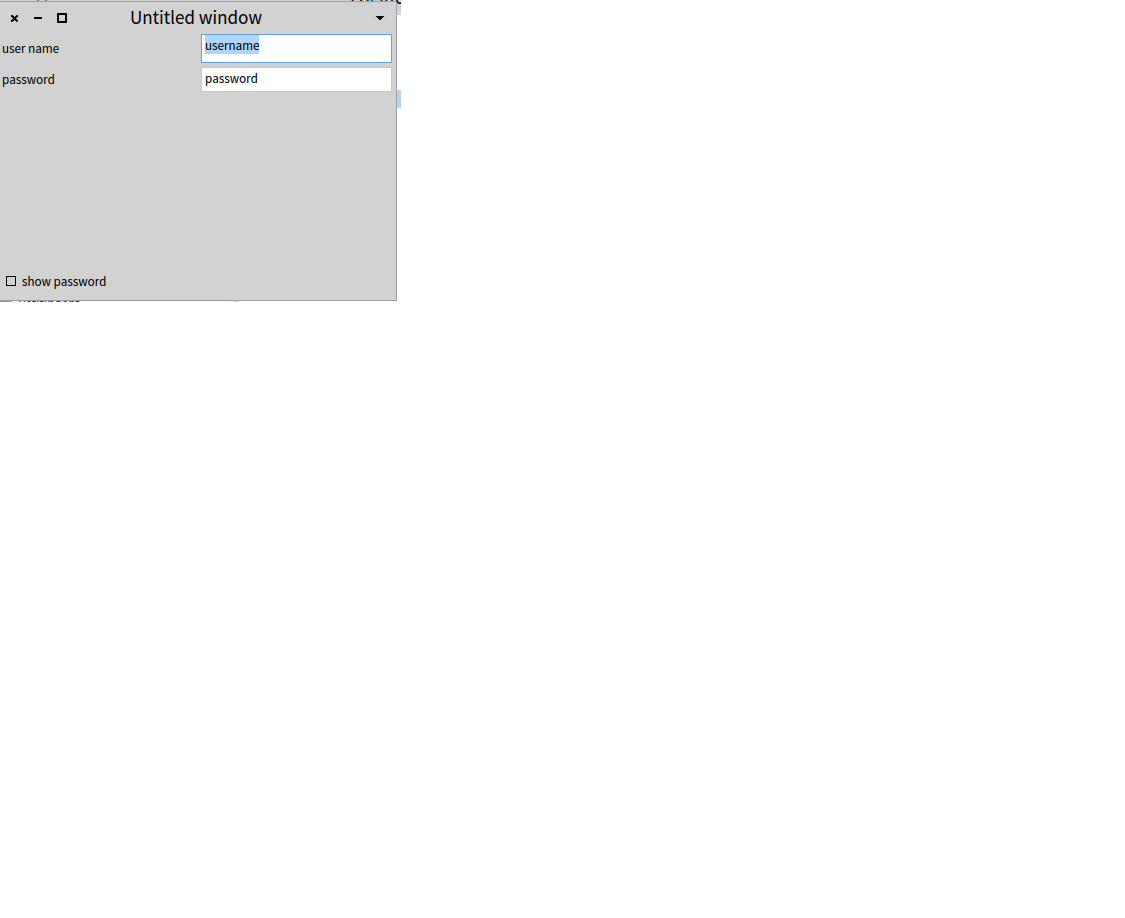

Hi Sebastian, the problem is that the layout tries to always take all the available space. What I usually do is add an empty row at the bottom newRow: [ :row | ] to take all the excessive space. Peter On Sat, Feb 14, 2015 at 12:52 AM, Sebastian Heidbrink <sheidev@yahoo.de> wrote:
What is wrong with this spec? Why is the checkbox attached to the buttom? I would have expected it to be directly underneath the password label. Is this default behavior and how can I prevent this?
defaultSpec <spec: #default> ^SpecLayout composed newColumn: [ :col | col newRow: [ :row | row add: #usernameLabel ; add: #usernameField ] height: self inputTextHeight; newRow: [ :row | row add: #passwordLabel; add: #passwordField ] height: self inputTextHeight; newRow: [ :row | row add: #showPasswordCheckBox] height: self inputTextHeight ]; yourself
Thank you Sebastian

Le 14/02/2015 00:52, Sebastian Heidbrink a écrit :
What is wrong with this spec? Why is the checkbox attached to the buttom? I would have expected it to be directly underneath the password label. Is this default behavior and how can I prevent this?
I don't know spec at all, but it looks like a shrink attributes should be used. May be there is on the spec api. Hilaire -- Dr. Geo - http://drgeo.eu iStoa - http://istoa.drgeo.eu
Le 14/02/2015 10:21, Hilaire a écrit :
Le 14/02/2015 00:52, Sebastian Heidbrink a écrit :
What is wrong with this spec? Why is the checkbox attached to the buttom? I would have expected it to be directly underneath the password label. Is this default behavior and how can I prevent this?
I don't know spec at all, but it looks like a shrink attributes should be used. May be there is on the spec api.
Hilaire
Another remark, why is height: self inputTextHeight; needed? Should not spec have a default automatic way to set it, deducing from the row contents? Hilaire -- Dr. Geo - http://drgeo.eu iStoa - http://istoa.drgeo.eu
Another remark, why is height: self inputTextHeight; needed?
Should not spec have a default automatic way to set it, deducing from the row contents?
Actually it would do the opposite. The content has no fixed height so if you don't specify the height it will actually expand the content (the layout always uses all available space if not constrained). You can see for yourself if you remove the height here... ================================= view := DynamicComposableModel new instantiateModels: #( usernameLabel LabelModel usernameField TextInputFieldModel passwordLabel LabelModel passwordField TextInputFieldModel showPasswordCheckBox CheckBoxModel ); yourself. view usernameLabel text: 'Username'. view passwordLabel text: 'Password'. view showPasswordCheckBox label: 'Show password'. layout := SpecLayout composed newColumn: [ :col | col newRow: [ :row | row add: #usernameLabel; add: #usernameField ] height: DynamicComposableModel inputTextHeight; newRow: [ :row | row add: #passwordLabel; add: #passwordField ] height: DynamicComposableModel inputTextHeight; newRow: [ :row | row add: #showPasswordCheckBox] height: DynamicComposableModel inputTextHeight; newRow: [ :row | ] ]; yourself. view openWithSpecLayout: layout. ===================================== Peter
However the more worrying thing I've just noticed is that the usernameField is taller than passwordField... that seems like a bug. Peter
Le 14/02/2015 10:42, Peter Uhnák a écrit :
Actually it would do the opposite. The content has no fixed height so if you don't specify the height it will actually expand the content (the layout always uses all available space if not constrained).
But should it not shrink by default? It will be both easier and make more sense Hilaire -- Dr. Geo - http://drgeo.eu iStoa - http://istoa.drgeo.eu
On Sat, Feb 14, 2015 at 7:26 PM, Hilaire <hilaire@drgeo.eu> wrote:
Le 14/02/2015 10:42, Peter Uhnák a écrit :
Actually it would do the opposite. The content has no fixed height so if you don't specify the height it will actually expand the content (the layout always uses all available space if not constrained).
But should it not shrink by default? It will be both easier and make more sense
It would definitely make sense, especially considering we are basically setting the height of input text to "inputTextHeight". :) But then again, there are many things in Spec that would need to be addressed, so some extra work will be required in many areas for some time. Peter
Hmmm I don't know! It was from the examples :-D Sebastian Am 14.02.2015 um 01:25 schrieb Hilaire:
Le 14/02/2015 10:21, Hilaire a écrit :
Le 14/02/2015 00:52, Sebastian Heidbrink a écrit :
What is wrong with this spec? Why is the checkbox attached to the buttom? I would have expected it to be directly underneath the password label. Is this default behavior and how can I prevent this?
I don't know spec at all, but it looks like a shrink attributes should be used. May be there is on the spec api.
Hilaire
Another remark, why is height: self inputTextHeight; needed?
Should not spec have a default automatic way to set it, deducing from the row contents?
Hilaire
participants (3)
-
 Hilaire
 -
 Peter Uhnák
 -
 Sebastian Heidbrink