Get implementors list window from Spotter

Hi, How can I open the implementors list from Spotter? I want to browse through the code of the different implementors as I do by selecting a selector and searching an implementor (or Ctr+M). Regards, Esteban A. Maringolo

mySelector #impl
On 20 Sep 2016, at 20:00, Esteban A. Maringolo <emaringolo@gmail.com> wrote:
Hi,
How can I open the implementors list from Spotter?
I want to browse through the code of the different implementors as I do by selecting a selector and searching an implementor (or Ctr+M).
Regards,
Esteban A. Maringolo

You can also press do: mySelector Cmd+m Cheers, Doru
On Sep 20, 2016, at 8:18 PM, Esteban Lorenzano <estebanlm@gmail.com> wrote:
mySelector #impl
On 20 Sep 2016, at 20:00, Esteban A. Maringolo <emaringolo@gmail.com> wrote:
Hi,
How can I open the implementors list from Spotter?
I want to browse through the code of the different implementors as I do by selecting a selector and searching an implementor (or Ctr+M).
Regards,
Esteban A. Maringolo
-- www.tudorgirba.com www.feenk.com "Quality cannot be an afterthought."

I repeat my comment from before: The discoverability of UI of Spotter is much too low. Please please please add a bit of explanation to the spotter window to show all these cool things with the hashtags and the keyboard shortcuts. There is *no way* for a normal Pharo user to discover this. -- Does this mail seem too brief? Sorry for that, I donât mean to be rude! Please see http://emailcharter.org . Johan Fabry - http://pleiad.cl/~jfabry PLEIAD and RyCh labs - Computer Science Department (DCC) - University of Chile
On Sep 20, 2016, at 15:19, Tudor Girba <tudor@tudorgirba.com> wrote:
You can also press do: mySelector Cmd+m
Cheers, Doru
On Sep 20, 2016, at 8:18 PM, Esteban Lorenzano <estebanlm@gmail.com> wrote:
mySelector #impl
On 20 Sep 2016, at 20:00, Esteban A. Maringolo <emaringolo@gmail.com> wrote:
Hi,
How can I open the implementors list from Spotter?
I want to browse through the code of the different implementors as I do by selecting a selector and searching an implementor (or Ctr+M).
Regards,
Esteban A. Maringolo
-- www.tudorgirba.com www.feenk.com
"Quality cannot be an afterthought."
We tried to address this with the help? Please let me know if some parts need updates or more explanations. Doru
On Sep 20, 2016, at 9:03 PM, Johan Fabry <jfabry@dcc.uchile.cl> wrote:
I repeat my comment from before: The discoverability of UI of Spotter is much too low. Please please please add a bit of explanation to the spotter window to show all these cool things with the hashtags and the keyboard shortcuts. There is *no way* for a normal Pharo user to discover this.
-- Does this mail seem too brief? Sorry for that, I donât mean to be rude! Please see http://emailcharter.org .
Johan Fabry - http://pleiad.cl/~jfabry PLEIAD and RyCh labs - Computer Science Department (DCC) - University of Chile
On Sep 20, 2016, at 15:19, Tudor Girba <tudor@tudorgirba.com> wrote:
You can also press do: mySelector Cmd+m
Cheers, Doru
On Sep 20, 2016, at 8:18 PM, Esteban Lorenzano <estebanlm@gmail.com> wrote:
mySelector #impl
On 20 Sep 2016, at 20:00, Esteban A. Maringolo <emaringolo@gmail.com> wrote:
Hi,
How can I open the implementors list from Spotter?
I want to browse through the code of the different implementors as I do by selecting a selector and searching an implementor (or Ctr+M).
Regards,
Esteban A. Maringolo
-- www.tudorgirba.com www.feenk.com
"Quality cannot be an afterthought."
-- www.tudorgirba.com www.feenk.com "Being happy is a matter of choice."
Sorry, I donât mean to sound like a smartass, but apparently the data shows that this is not sufficient. Otherwise people would not ask on the mailing list, like Esteban did originally (and as I remember other people asking). Speaking for myself, I honestly would not think about clicking on the ? icon to expect these kinds of instructions. I cannot say exactly why, I only have a feeling that the ? does not transmit to me that there are âpower userâ tips, and I expect a ? icon to just tell me basic things. -- Does this mail seem too brief? Sorry for that, I donât mean to be rude! Please see http://emailcharter.org . Johan Fabry - http://pleiad.cl/~jfabry PLEIAD and RyCh labs - Computer Science Department (DCC) - University of Chile
On Sep 20, 2016, at 17:04, Tudor Girba <tudor@tudorgirba.com> wrote:
We tried to address this with the help? Please let me know if some parts need updates or more explanations.
Doru
On Sep 20, 2016, at 9:03 PM, Johan Fabry <jfabry@dcc.uchile.cl> wrote:
I repeat my comment from before: The discoverability of UI of Spotter is much too low. Please please please add a bit of explanation to the spotter window to show all these cool things with the hashtags and the keyboard shortcuts. There is *no way* for a normal Pharo user to discover this.
-- Does this mail seem too brief? Sorry for that, I donât mean to be rude! Please see http://emailcharter.org .
Johan Fabry - http://pleiad.cl/~jfabry PLEIAD and RyCh labs - Computer Science Department (DCC) - University of Chile
On Sep 20, 2016, at 15:19, Tudor Girba <tudor@tudorgirba.com> wrote:
You can also press do: mySelector Cmd+m
Cheers, Doru
On Sep 20, 2016, at 8:18 PM, Esteban Lorenzano <estebanlm@gmail.com> wrote:
mySelector #impl
On 20 Sep 2016, at 20:00, Esteban A. Maringolo <emaringolo@gmail.com> wrote:
Hi,
How can I open the implementors list from Spotter?
I want to browse through the code of the different implementors as I do by selecting a selector and searching an implementor (or Ctr+M).
Regards,
Esteban A. Maringolo
-- www.tudorgirba.com www.feenk.com
"Quality cannot be an afterthought."
-- www.tudorgirba.com www.feenk.com
"Being happy is a matter of choice."
Hi,
On Sep 21, 2016, at 3:16 AM, Johan Fabry <jfabry@dcc.uchile.cl> wrote:
Sorry, I donât mean to sound like a smartass, but apparently the data shows that this is not sufficient. Otherwise people would not ask on the mailing list, like Esteban did originally (and as I remember other people asking).
Speaking for myself, I honestly would not think about clicking on the ? icon to expect these kinds of instructions. I cannot say exactly why, I only have a feeling that the ? does not transmit to me that there are âpower userâ tips, and I expect a ? icon to just tell me basic things.
Thanks for the feedback. Still, my question remains: is the help explanatory enough or do we need to improve it? Doru
-- Does this mail seem too brief? Sorry for that, I donât mean to be rude! Please see http://emailcharter.org .
Johan Fabry - http://pleiad.cl/~jfabry PLEIAD and RyCh labs - Computer Science Department (DCC) - University of Chile
On Sep 20, 2016, at 17:04, Tudor Girba <tudor@tudorgirba.com> wrote:
We tried to address this with the help? Please let me know if some parts need updates or more explanations.
Doru
On Sep 20, 2016, at 9:03 PM, Johan Fabry <jfabry@dcc.uchile.cl> wrote:
I repeat my comment from before: The discoverability of UI of Spotter is much too low. Please please please add a bit of explanation to the spotter window to show all these cool things with the hashtags and the keyboard shortcuts. There is *no way* for a normal Pharo user to discover this.
-- Does this mail seem too brief? Sorry for that, I donât mean to be rude! Please see http://emailcharter.org .
Johan Fabry - http://pleiad.cl/~jfabry PLEIAD and RyCh labs - Computer Science Department (DCC) - University of Chile
On Sep 20, 2016, at 15:19, Tudor Girba <tudor@tudorgirba.com> wrote:
You can also press do: mySelector Cmd+m
Cheers, Doru
On Sep 20, 2016, at 8:18 PM, Esteban Lorenzano <estebanlm@gmail.com> wrote:
mySelector #impl
On 20 Sep 2016, at 20:00, Esteban A. Maringolo <emaringolo@gmail.com> wrote:
Hi,
How can I open the implementors list from Spotter?
I want to browse through the code of the different implementors as I do by selecting a selector and searching an implementor (or Ctr+M).
Regards,
Esteban A. Maringolo
-- www.tudorgirba.com www.feenk.com
"Quality cannot be an afterthought."
-- www.tudorgirba.com www.feenk.com
"Being happy is a matter of choice."
-- www.tudorgirba.com www.feenk.com "There are no old things, there are only old ways of looking at them."
On Sep 21, 2016, at 01:14, Tudor Girba <tudor@tudorgirba.com> wrote:
Speaking for myself, I honestly would not think about clicking on the ? icon to expect these kinds of instructions. I cannot say exactly why, I only have a feeling that the ? does not transmit to me that there are âpower userâ tips, and I expect a ? icon to just tell me basic things.
Thanks for the feedback. Still, my question remains: is the help explanatory enough or do we need to improve it?
After reading through everything, I think itâs actually too long. There is too much information and it is structured as a story. You could read all of this once (although I think many people will give up after a few pages), but there is no way to remember all of this information. My suggestion is to add something like a quick reference card (remember those?) for Spotter. For example like http://marc-abramowitz.com/archives/2006/04/10/emacs-22-reference-card/ This has to be manually curated, something like the âExtensions installed in the imageâ is not right because again itâs too much info and not ordered in sequence of importance. Then add a button to the UI so that this can be shown when needed. -- Does this mail seem too brief? Sorry for that, I donât mean to be rude! Please see http://emailcharter.org . Johan Fabry - http://pleiad.cl/~jfabry PLEIAD and RyCh labs - Computer Science Department (DCC) - University of Chile
2016-09-20 15:19 GMT-03:00 Tudor Girba <tudor@tudorgirba.com>:
You can also press do: mySelector Cmd+m
On Sep 20, 2016, at 8:18 PM, Esteban Lorenzano <estebanlm@gmail.com> wrote: mySelector #impl
I open spotter, type 'printString' and press Ctrl+M and nothing happens. If I type #impl it filters the implementors. Neither of those opens this, *expected*, window. The image is a fresh 'Pharo5.0 of 16 April 2015 update 50761'. Regards, -- Esteban.
Hi, Could you try with Alt+M? About the wish to open the Message Browser, this is indeed not supported. What we miss is a category action. In this case, the Implementors would open the Message Browser. So, in this case, the use case would be: #mySelector Cmd+m Cmd+Shift+Enter Would this address your expectation? Cheers, Doru
On Sep 20, 2016, at 10:21 PM, Esteban A. Maringolo <emaringolo@gmail.com> wrote:
2016-09-20 15:19 GMT-03:00 Tudor Girba <tudor@tudorgirba.com>:
You can also press do: mySelector Cmd+m
On Sep 20, 2016, at 8:18 PM, Esteban Lorenzano <estebanlm@gmail.com> wrote: mySelector #impl
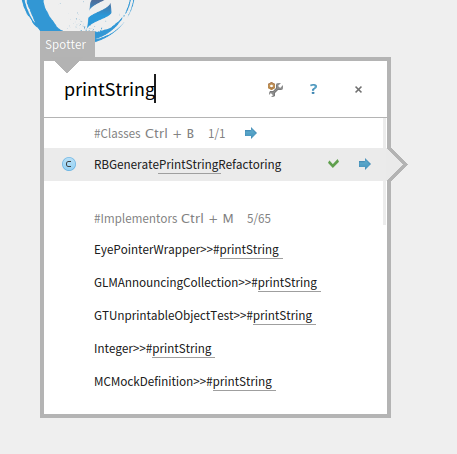
I open spotter, type 'printString' and press Ctrl+M and nothing happens. <image.png>
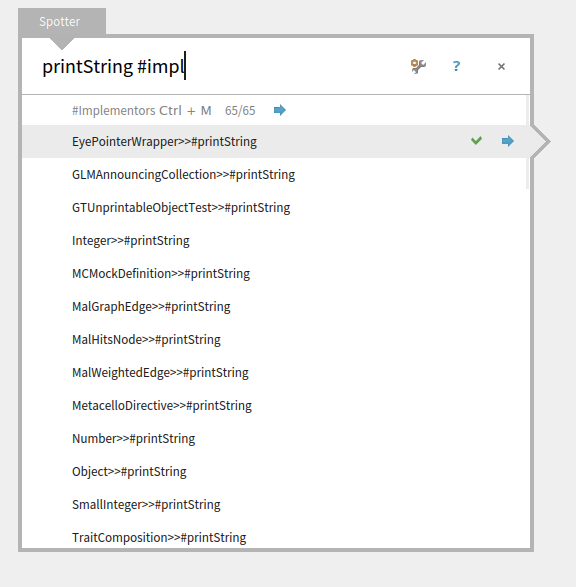
If I type #impl it filters the implementors. <image.png>
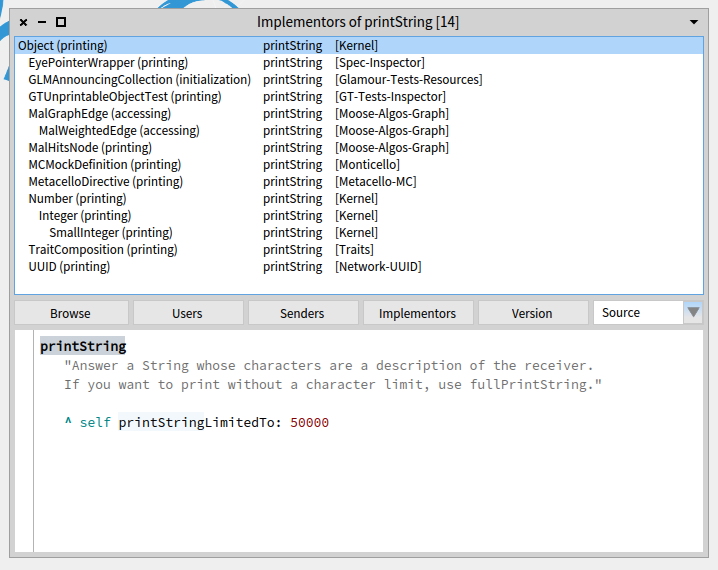
Neither of those opens this, expected, window.
<image.png>
The image is a fresh 'Pharo5.0 of 16 April 2015 update 50761'.
Regards,
-- Esteban.
-- www.tudorgirba.com www.feenk.com "Value is always contextual."
2016-09-20 17:30 GMT-03:00 Tudor Girba <tudor@tudorgirba.com>:
Hi,
Could you try with Alt+M?
It doesn't work, everything works with Ctrl as command modifier.
About the wish to open the Message Browser, this is indeed not supported.
What we miss is a category action. In this case, the Implementors would open the Message Browser. So, in this case, the use case would be:
#mySelector Cmd+m Cmd+Shift+Enter
Would this address your expectation?
I'm not used to doble shortcuts, I'd prefer a single Ctrl+Shift+M to open the message browser. But as long as the function is there, I don't mind using the mouse to access it rather than adding a shortcut if it doesn't follow a common shortcut pattern, I have to use the mouse for many features, so I'm already dependent of it. Regards, Esteban A. Maringolo
Hi,
On Sep 20, 2016, at 10:37 PM, Esteban A. Maringolo <emaringolo@gmail.com> wrote:
2016-09-20 17:30 GMT-03:00 Tudor Girba <tudor@tudorgirba.com>:
Hi,
Could you try with Alt+M?
It doesn't work, everything works with Ctrl as command modifier.
What version do you use? What operating system?
About the wish to open the Message Browser, this is indeed not supported.
What we miss is a category action. In this case, the Implementors would open the Message Browser. So, in this case, the use case would be:
#mySelector Cmd+m Cmd+Shift+Enter
Would this address your expectation?
I'm not used to doble shortcuts, I'd prefer a single Ctrl+Shift+M to open the message browser. But as long as the function is there, I don't mind using the mouse to access it rather than adding a shortcut if it doesn't follow a common shortcut pattern, I have to use the mouse for many features, so I'm already dependent of it.
Ok. The shortcut would be standard for all categories. Of course, settable from the settings. Could you please open an issue with your request? Cheers, Doru
Regards,
Esteban A. Maringolo
-- www.tudorgirba.com www.feenk.com âSoftware has no shape. Actually, it has no one shape. It has many."
Esteban A. Maringolo 2016-09-20 17:41 GMT-03:00 Tudor Girba <tudor@tudorgirba.com>:
It doesn't work, everything works with Ctrl as command modifier.
What version do you use? What operating system?
'Pharo5.0 of 16 April 2015 update 50761' Ubuntu Linux 16.04 64 bit.
Could you please open an issue with your request?
Sure, Where? Regards,
On Sep 20, 2016, at 10:46 PM, Esteban A. Maringolo <emaringolo@gmail.com> wrote:
Esteban A. Maringolo
2016-09-20 17:41 GMT-03:00 Tudor Girba <tudor@tudorgirba.com>:
It doesn't work, everything works with Ctrl as command modifier.
What version do you use? What operating system?
'Pharo5.0 of 16 April 2015 update 50761' Ubuntu Linux 16.04 64 bit.
Could you please open an issue with your request?
Sure, Where?
https://pharo.fogbugz.com Doru
Regards,
-- www.tudorgirba.com www.feenk.com "If you can't say why something is relevant, it probably isn't."
2016-09-20 17:49 GMT-03:00 Tudor Girba <tudor@tudorgirba.com>:
Could you please open an issue with your request? Sure, Where? https://pharo.fogbugz.com
Done. <https://pharo.fogbugz.com/f/cases/19118/Spotter-implementors-should-offer-op...> Esteban A. Maringolo

On Wed, Sep 21, 2016 at 2:00 AM, Esteban A. Maringolo <emaringolo@gmail.com> wrote:
Hi,
How can I open the implementors list from Spotter?
I want to browse through the code of the different implementors as I do by selecting a selector and searching an implementor (or Ctr+M).
Regards,
Esteban A. Maringolo
What might be good is next to the <Show All> button, there was a button that opened the old ImplementsOf dialog. cheers -ben
On Mon, Sep 26, 2016 at 4:07 PM, Ben Coman <btc@openinworld.com> wrote:
On Wed, Sep 21, 2016 at 2:00 AM, Esteban A. Maringolo <emaringolo@gmail.com> wrote:
Hi,
How can I open the implementors list from Spotter?
I want to browse through the code of the different implementors as I do by selecting a selector and searching an implementor (or Ctr+M).
Regards,
Esteban A. Maringolo
What might be good is next to the <Show All> button, there was a button that opened the old ImplementsOf dialog.
I meant to add, in practice what I find happened is that I use Spotter to do initial search for implementors, then I randomly select onne of the so that I can do ctrl-M to get to the ImplementorsOf dialog. It would be nice to skip that intermediate step.
cheers -ben

Me too ;) I thought that I was the only one not being able to use Spotter :)
I meant to add, in practice what I find happened is that I use Spotter to do initial search for implementors, then I randomly select onne of the so that I can do ctrl-M to get to the ImplementorsOf dialog. It would be nice to skip that intermediate step.
cheers -ben
participants (6)
-
 Ben Coman
 -
 Esteban A. Maringolo
 -
 Esteban Lorenzano
 -
 Johan Fabry
 -
 stepharo
 -
 Tudor Girba