
For a new project I started to use pharo 2.0. But I find it really cumbersome to use the new keyboard shortcuts. As long as I use 1.4 in parallel I don't want to switch to the new ones. I've found a setting in Settings named "use historical shortcuts" but it is not effective in most places. Is there a way change that? Norbert

which most places? the new shortcuts were defined in nautilus, and the historical shortcuts are then targeting nautilus usage. Other places didn't change (or should not change) any keybinding. Esteban On Feb 19, 2013, at 11:56 AM, Norbert Hartl <norbert@hartl.name> wrote:
For a new project I started to use pharo 2.0. But I find it really cumbersome to use the new keyboard shortcuts. As long as I use 1.4 in parallel I don't want to switch to the new ones. I've found a setting in Settings named "use historical shortcuts" but it is not effective in most places. Is there a way change that?
Norbert
Am 19.02.2013 um 11:59 schrieb Esteban Lorenzano <estebanlm@gmail.com>:
which most places?
e.g. in Nautilus with historical shortcuts on I can't click on a method and press cmd-n to browse senders. Norbert
the new shortcuts were defined in nautilus, and the historical shortcuts are then targeting nautilus usage. Other places didn't change (or should not change) any keybinding.
Esteban
On Feb 19, 2013, at 11:56 AM, Norbert Hartl <norbert@hartl.name> wrote:
For a new project I started to use pharo 2.0. But I find it really cumbersome to use the new keyboard shortcuts. As long as I use 1.4 in parallel I don't want to switch to the new ones. I've found a setting in Settings named "use historical shortcuts" but it is not effective in most places. Is there a way change that?
ha... problem is that is not "use historical keys" (I don't know what that setting does, btw) is "Use old style keys" under Nautilus group Esteban On Feb 19, 2013, at 12:39 PM, Norbert Hartl <norbert@hartl.name> wrote:
Am 19.02.2013 um 11:59 schrieb Esteban Lorenzano <estebanlm@gmail.com>:
which most places?
e.g. in Nautilus with historical shortcuts on I can't click on a method and press cmd-n to browse senders.
Norbert
the new shortcuts were defined in nautilus, and the historical shortcuts are then targeting nautilus usage. Other places didn't change (or should not change) any keybinding.
Esteban
On Feb 19, 2013, at 11:56 AM, Norbert Hartl <norbert@hartl.name> wrote:
For a new project I started to use pharo 2.0. But I find it really cumbersome to use the new keyboard shortcuts. As long as I use 1.4 in parallel I don't want to switch to the new ones. I've found a setting in Settings named "use historical shortcuts" but it is not effective in most places. Is there a way change that?

This setting "use Historical keys" is to set if you want cmd+arrows to switch between windows or opt+tab Ben On Feb 19, 2013, at 12:44 PM, Esteban Lorenzano <estebanlm@gmail.com> wrote:
ha... problem is that is not "use historical keys" (I don't know what that setting does, btw) is "Use old style keys" under Nautilus group
Esteban
On Feb 19, 2013, at 12:39 PM, Norbert Hartl <norbert@hartl.name> wrote:
Am 19.02.2013 um 11:59 schrieb Esteban Lorenzano <estebanlm@gmail.com>:
which most places?
e.g. in Nautilus with historical shortcuts on I can't click on a method and press cmd-n to browse senders.
Norbert
the new shortcuts were defined in nautilus, and the historical shortcuts are then targeting nautilus usage. Other places didn't change (or should not change) any keybinding.
Esteban
On Feb 19, 2013, at 11:56 AM, Norbert Hartl <norbert@hartl.name> wrote:
For a new project I started to use pharo 2.0. But I find it really cumbersome to use the new keyboard shortcuts. As long as I use 1.4 in parallel I don't want to switch to the new ones. I've found a setting in Settings named "use historical shortcuts" but it is not effective in most places. Is there a way change that?

On Feb 19, 2013, at 1:09 PM, Benjamin <benjamin.vanryseghem.pharo@gmail.com> wrote:
This setting "use Historical keys" is to set if you want cmd+arrows to switch between windows or opt+tab
We should think about cleaning this up in 3.0â¦
Ben
On Feb 19, 2013, at 12:44 PM, Esteban Lorenzano <estebanlm@gmail.com> wrote:
ha... problem is that is not "use historical keys" (I don't know what that setting does, btw) is "Use old style keys" under Nautilus group
Esteban
On Feb 19, 2013, at 12:39 PM, Norbert Hartl <norbert@hartl.name> wrote:
Am 19.02.2013 um 11:59 schrieb Esteban Lorenzano <estebanlm@gmail.com>:
which most places?
e.g. in Nautilus with historical shortcuts on I can't click on a method and press cmd-n to browse senders.
Norbert
the new shortcuts were defined in nautilus, and the historical shortcuts are then targeting nautilus usage. Other places didn't change (or should not change) any keybinding.
Esteban
On Feb 19, 2013, at 11:56 AM, Norbert Hartl <norbert@hartl.name> wrote:
For a new project I started to use pharo 2.0. But I find it really cumbersome to use the new keyboard shortcuts. As long as I use 1.4 in parallel I don't want to switch to the new ones. I've found a setting in Settings named "use historical shortcuts" but it is not effective in most places. Is there a way change that?
Thanks Esteban! Norbert Am 19.02.2013 um 12:44 schrieb Esteban Lorenzano <estebanlm@gmail.com>:
ha... problem is that is not "use historical keys" (I don't know what that setting does, btw) is "Use old style keys" under Nautilus group
Esteban
On Feb 19, 2013, at 12:39 PM, Norbert Hartl <norbert@hartl.name> wrote:
Am 19.02.2013 um 11:59 schrieb Esteban Lorenzano <estebanlm@gmail.com>:
which most places?
e.g. in Nautilus with historical shortcuts on I can't click on a method and press cmd-n to browse senders.
Norbert
the new shortcuts were defined in nautilus, and the historical shortcuts are then targeting nautilus usage. Other places didn't change (or should not change) any keybinding.
Esteban
On Feb 19, 2013, at 11:56 AM, Norbert Hartl <norbert@hartl.name> wrote:
For a new project I started to use pharo 2.0. But I find it really cumbersome to use the new keyboard shortcuts. As long as I use 1.4 in parallel I don't want to switch to the new ones. I've found a setting in Settings named "use historical shortcuts" but it is not effective in most places. Is there a way change that?
That was short time fun. If I select the "old style" option and try to find a class using cmd-f I get the following error Maybe I stay in 1.4 a while longer⦠Norbert Am 19.02.2013 um 12:44 schrieb Esteban Lorenzano <estebanlm@gmail.com>:
ha... problem is that is not "use historical keys" (I don't know what that setting does, btw) is "Use old style keys" under Nautilus group
Esteban
On Feb 19, 2013, at 12:39 PM, Norbert Hartl <norbert@hartl.name> wrote:
Am 19.02.2013 um 11:59 schrieb Esteban Lorenzano <estebanlm@gmail.com>:
which most places?
e.g. in Nautilus with historical shortcuts on I can't click on a method and press cmd-n to browse senders.
Norbert
the new shortcuts were defined in nautilus, and the historical shortcuts are then targeting nautilus usage. Other places didn't change (or should not change) any keybinding.
Esteban
On Feb 19, 2013, at 11:56 AM, Norbert Hartl <norbert@hartl.name> wrote:
For a new project I started to use pharo 2.0. But I find it really cumbersome to use the new keyboard shortcuts. As long as I use 1.4 in parallel I don't want to switch to the new ones. I've found a setting in Settings named "use historical shortcuts" but it is not effective in most places. Is there a way change that?
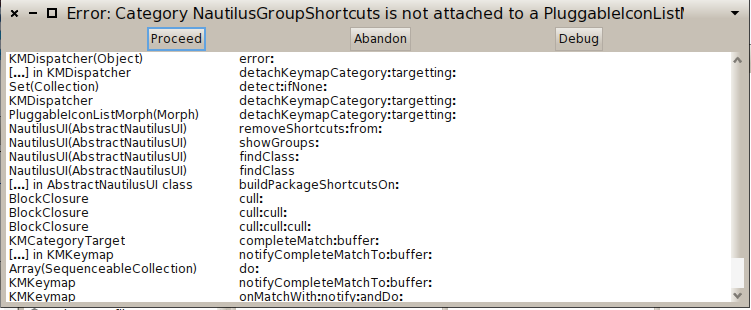
I cannot reproduce it... did you tried in a new nautilus instance? please, do not stay in 1.4... we need the feedback of people using 2.0 to improve, otherwise we will not realize what is wrong :) Esteban On Feb 19, 2013, at 2:12 PM, Norbert Hartl <norbert@hartl.name> wrote:
That was short time fun. If I select the "old style" option and try to find a class using cmd-f I get the following error
<Bildschirmfoto 2013-02-19 um 14.10.24.png>
Maybe I stay in 1.4 a while longerâ¦
Norbert
Am 19.02.2013 um 12:44 schrieb Esteban Lorenzano <estebanlm@gmail.com>:
ha... problem is that is not "use historical keys" (I don't know what that setting does, btw) is "Use old style keys" under Nautilus group
Esteban
On Feb 19, 2013, at 12:39 PM, Norbert Hartl <norbert@hartl.name> wrote:
Am 19.02.2013 um 11:59 schrieb Esteban Lorenzano <estebanlm@gmail.com>:
which most places?
e.g. in Nautilus with historical shortcuts on I can't click on a method and press cmd-n to browse senders.
Norbert
the new shortcuts were defined in nautilus, and the historical shortcuts are then targeting nautilus usage. Other places didn't change (or should not change) any keybinding.
Esteban
On Feb 19, 2013, at 11:56 AM, Norbert Hartl <norbert@hartl.name> wrote:
For a new project I started to use pharo 2.0. But I find it really cumbersome to use the new keyboard shortcuts. As long as I use 1.4 in parallel I don't want to switch to the new ones. I've found a setting in Settings named "use historical shortcuts" but it is not effective in most places. Is there a way change that?
Am 19.02.2013 um 14:19 schrieb Esteban Lorenzano <estebanlm@gmail.com>:
I cannot reproduce it... did you tried in a new nautilus instance?
I downloaded latest 2.0 image. I opened it, opened the Settings browser, searched for "old style", checked option. Closed Settings browser, opened over world menu a system browser, click in the left-most pane (classes), pressed cmd-f, typed RxMatcher, selected appearing RxMatcher in list and pressed enter. Norbert
please, do not stay in 1.4... we need the feedback of people using 2.0 to improve, otherwise we will not realize what is wrong :)
Esteban
On Feb 19, 2013, at 2:12 PM, Norbert Hartl <norbert@hartl.name> wrote:
That was short time fun. If I select the "old style" option and try to find a class using cmd-f I get the following error
<Bildschirmfoto 2013-02-19 um 14.10.24.png>
Maybe I stay in 1.4 a while longerâ¦
Norbert
Am 19.02.2013 um 12:44 schrieb Esteban Lorenzano <estebanlm@gmail.com>:
ha... problem is that is not "use historical keys" (I don't know what that setting does, btw) is "Use old style keys" under Nautilus group
Esteban
On Feb 19, 2013, at 12:39 PM, Norbert Hartl <norbert@hartl.name> wrote:
Am 19.02.2013 um 11:59 schrieb Esteban Lorenzano <estebanlm@gmail.com>:
which most places?
e.g. in Nautilus with historical shortcuts on I can't click on a method and press cmd-n to browse senders.
Norbert
the new shortcuts were defined in nautilus, and the historical shortcuts are then targeting nautilus usage. Other places didn't change (or should not change) any keybinding.
Esteban
On Feb 19, 2013, at 11:56 AM, Norbert Hartl <norbert@hartl.name> wrote:
For a new project I started to use pharo 2.0. But I find it really cumbersome to use the new keyboard shortcuts. As long as I use 1.4 in parallel I don't want to switch to the new ones. I've found a setting in Settings named "use historical shortcuts" but it is not effective in most places. Is there a way change that?
he, I have it... providing a fix now... On Feb 19, 2013, at 2:25 PM, Norbert Hartl <norbert@hartl.name> wrote:
Am 19.02.2013 um 14:19 schrieb Esteban Lorenzano <estebanlm@gmail.com>:
I cannot reproduce it... did you tried in a new nautilus instance?
I downloaded latest 2.0 image. I opened it, opened the Settings browser, searched for "old style", checked option. Closed Settings browser, opened over world menu a system browser, click in the left-most pane (classes), pressed cmd-f, typed RxMatcher, selected appearing RxMatcher in list and pressed enter.
Norbert
please, do not stay in 1.4... we need the feedback of people using 2.0 to improve, otherwise we will not realize what is wrong :)
Esteban
On Feb 19, 2013, at 2:12 PM, Norbert Hartl <norbert@hartl.name> wrote:
That was short time fun. If I select the "old style" option and try to find a class using cmd-f I get the following error
<Bildschirmfoto 2013-02-19 um 14.10.24.png>
Maybe I stay in 1.4 a while longerâ¦
Norbert
Am 19.02.2013 um 12:44 schrieb Esteban Lorenzano <estebanlm@gmail.com>:
ha... problem is that is not "use historical keys" (I don't know what that setting does, btw) is "Use old style keys" under Nautilus group
Esteban
On Feb 19, 2013, at 12:39 PM, Norbert Hartl <norbert@hartl.name> wrote:
Am 19.02.2013 um 11:59 schrieb Esteban Lorenzano <estebanlm@gmail.com>:
which most places?
e.g. in Nautilus with historical shortcuts on I can't click on a method and press cmd-n to browse senders.
Norbert
the new shortcuts were defined in nautilus, and the historical shortcuts are then targeting nautilus usage. Other places didn't change (or should not change) any keybinding.
Esteban
On Feb 19, 2013, at 11:56 AM, Norbert Hartl <norbert@hartl.name> wrote:
For a new project I started to use pharo 2.0. But I find it really cumbersome to use the new keyboard shortcuts. As long as I use 1.4 in parallel I don't want to switch to the new ones. I've found a setting in Settings named "use historical shortcuts" but it is not effective in most places. Is there a way change that?
thanks! N. Am 19.02.2013 um 14:38 schrieb Esteban Lorenzano <estebanlm@gmail.com>:
he, I have it... providing a fix now...
On Feb 19, 2013, at 2:25 PM, Norbert Hartl <norbert@hartl.name> wrote:
Am 19.02.2013 um 14:19 schrieb Esteban Lorenzano <estebanlm@gmail.com>:
I cannot reproduce it... did you tried in a new nautilus instance?
I downloaded latest 2.0 image. I opened it, opened the Settings browser, searched for "old style", checked option. Closed Settings browser, opened over world menu a system browser, click in the left-most pane (classes), pressed cmd-f, typed RxMatcher, selected appearing RxMatcher in list and pressed enter.
Norbert
please, do not stay in 1.4... we need the feedback of people using 2.0 to improve, otherwise we will not realize what is wrong :)
Esteban
On Feb 19, 2013, at 2:12 PM, Norbert Hartl <norbert@hartl.name> wrote:
That was short time fun. If I select the "old style" option and try to find a class using cmd-f I get the following error
<Bildschirmfoto 2013-02-19 um 14.10.24.png>
Maybe I stay in 1.4 a while longerâ¦
Norbert
Am 19.02.2013 um 12:44 schrieb Esteban Lorenzano <estebanlm@gmail.com>:
ha... problem is that is not "use historical keys" (I don't know what that setting does, btw) is "Use old style keys" under Nautilus group
Esteban
On Feb 19, 2013, at 12:39 PM, Norbert Hartl <norbert@hartl.name> wrote:
Am 19.02.2013 um 11:59 schrieb Esteban Lorenzano <estebanlm@gmail.com>:
which most places?
e.g. in Nautilus with historical shortcuts on I can't click on a method and press cmd-n to browse senders.
Norbert
the new shortcuts were defined in nautilus, and the historical shortcuts are then targeting nautilus usage. Other places didn't change (or should not change) any keybinding.
Esteban
On Feb 19, 2013, at 11:56 AM, Norbert Hartl <norbert@hartl.name> wrote:
For a new project I started to use pharo 2.0. But I find it really cumbersome to use the new keyboard shortcuts. As long as I use 1.4 in parallel I don't want to switch to the new ones. I've found a setting in Settings named "use historical shortcuts" but it is not effective in most places. Is there a way change that?
slice is in inbox, I will integrate in half an hour http://code.google.com/p/pharo/issues/detail?id=7542 On Feb 19, 2013, at 2:45 PM, Norbert Hartl <norbert@hartl.name> wrote:
thanks!
N. Am 19.02.2013 um 14:38 schrieb Esteban Lorenzano <estebanlm@gmail.com>:
he, I have it... providing a fix now...
On Feb 19, 2013, at 2:25 PM, Norbert Hartl <norbert@hartl.name> wrote:
Am 19.02.2013 um 14:19 schrieb Esteban Lorenzano <estebanlm@gmail.com>:
I cannot reproduce it... did you tried in a new nautilus instance?
I downloaded latest 2.0 image. I opened it, opened the Settings browser, searched for "old style", checked option. Closed Settings browser, opened over world menu a system browser, click in the left-most pane (classes), pressed cmd-f, typed RxMatcher, selected appearing RxMatcher in list and pressed enter.
Norbert
please, do not stay in 1.4... we need the feedback of people using 2.0 to improve, otherwise we will not realize what is wrong :)
Esteban
On Feb 19, 2013, at 2:12 PM, Norbert Hartl <norbert@hartl.name> wrote:
That was short time fun. If I select the "old style" option and try to find a class using cmd-f I get the following error
<Bildschirmfoto 2013-02-19 um 14.10.24.png>
Maybe I stay in 1.4 a while longerâ¦
Norbert
Am 19.02.2013 um 12:44 schrieb Esteban Lorenzano <estebanlm@gmail.com>:
ha... problem is that is not "use historical keys" (I don't know what that setting does, btw) is "Use old style keys" under Nautilus group
Esteban
On Feb 19, 2013, at 12:39 PM, Norbert Hartl <norbert@hartl.name> wrote:
Am 19.02.2013 um 11:59 schrieb Esteban Lorenzano <estebanlm@gmail.com>:
which most places?
e.g. in Nautilus with historical shortcuts on I can't click on a method and press cmd-n to browse senders.
Norbert
the new shortcuts were defined in nautilus, and the historical shortcuts are then targeting nautilus usage. Other places didn't change (or should not change) any keybinding.
Esteban
On Feb 19, 2013, at 11:56 AM, Norbert Hartl <norbert@hartl.name> wrote:
For a new project I started to use pharo 2.0. But I find it really cumbersome to use the new keyboard shortcuts. As long as I use 1.4 in parallel I don't want to switch to the new ones. I've found a setting in Settings named "use historical shortcuts" but it is not effective in most places. Is there a way change that?

Question: should I do a Load or a Merge of such slices in Monticello? TIA Phil 2013/2/19 Esteban Lorenzano <estebanlm@gmail.com>:
slice is in inbox, I will integrate in half an hour
http://code.google.com/p/pharo/issues/detail?id=7542
On Feb 19, 2013, at 2:45 PM, Norbert Hartl <norbert@hartl.name> wrote:
thanks!
N. Am 19.02.2013 um 14:38 schrieb Esteban Lorenzano <estebanlm@gmail.com>:
he, I have it... providing a fix now...
On Feb 19, 2013, at 2:25 PM, Norbert Hartl <norbert@hartl.name> wrote:
Am 19.02.2013 um 14:19 schrieb Esteban Lorenzano <estebanlm@gmail.com>:
I cannot reproduce it... did you tried in a new nautilus instance?
I downloaded latest 2.0 image. I opened it, opened the Settings browser, searched for "old style", checked option. Closed Settings browser, opened over world menu a system browser, click in the left-most pane (classes), pressed cmd-f, typed RxMatcher, selected appearing RxMatcher in list and pressed enter.
Norbert
please, do not stay in 1.4... we need the feedback of people using 2.0 to improve, otherwise we will not realize what is wrong :)
Esteban
On Feb 19, 2013, at 2:12 PM, Norbert Hartl <norbert@hartl.name> wrote:
That was short time fun. If I select the "old style" option and try to find a class using cmd-f I get the following error
<Bildschirmfoto 2013-02-19 um 14.10.24.png>
Maybe I stay in 1.4 a while longerâ¦
Norbert
Am 19.02.2013 um 12:44 schrieb Esteban Lorenzano <estebanlm@gmail.com>:
ha... problem is that is not "use historical keys" (I don't know what that setting does, btw) is "Use old style keys" under Nautilus group
Esteban
On Feb 19, 2013, at 12:39 PM, Norbert Hartl <norbert@hartl.name> wrote:
Am 19.02.2013 um 11:59 schrieb Esteban Lorenzano <estebanlm@gmail.com>:
which most places?
e.g. in Nautilus with historical shortcuts on I can't click on a method and press cmd-n to browse senders.
Norbert
the new shortcuts were defined in nautilus, and the historical shortcuts are then targeting nautilus usage. Other places didn't change (or should not change) any keybinding.
Esteban
On Feb 19, 2013, at 11:56 AM, Norbert Hartl <norbert@hartl.name> wrote:
For a new project I started to use pharo 2.0. But I find it really cumbersome to use the new keyboard shortcuts. As long as I use 1.4 in parallel I don't want to switch to the new ones. I've found a setting in Settings named "use historical shortcuts" but it is not effective in most places. Is there a way change that?
slices need to be merged, always and just the latest one, not all Esteban On Feb 19, 2013, at 3:11 PM, "phil@highoctane.be" <phil@highoctane.be> wrote:
Question: should I do a Load or a Merge of such slices in Monticello?
TIA Phil
2013/2/19 Esteban Lorenzano <estebanlm@gmail.com>:
slice is in inbox, I will integrate in half an hour
http://code.google.com/p/pharo/issues/detail?id=7542
On Feb 19, 2013, at 2:45 PM, Norbert Hartl <norbert@hartl.name> wrote:
thanks!
N. Am 19.02.2013 um 14:38 schrieb Esteban Lorenzano <estebanlm@gmail.com>:
he, I have it... providing a fix now...
On Feb 19, 2013, at 2:25 PM, Norbert Hartl <norbert@hartl.name> wrote:
Am 19.02.2013 um 14:19 schrieb Esteban Lorenzano <estebanlm@gmail.com>:
I cannot reproduce it... did you tried in a new nautilus instance?
I downloaded latest 2.0 image. I opened it, opened the Settings browser, searched for "old style", checked option. Closed Settings browser, opened over world menu a system browser, click in the left-most pane (classes), pressed cmd-f, typed RxMatcher, selected appearing RxMatcher in list and pressed enter.
Norbert
please, do not stay in 1.4... we need the feedback of people using 2.0 to improve, otherwise we will not realize what is wrong :)
Esteban
On Feb 19, 2013, at 2:12 PM, Norbert Hartl <norbert@hartl.name> wrote:
That was short time fun. If I select the "old style" option and try to find a class using cmd-f I get the following error
<Bildschirmfoto 2013-02-19 um 14.10.24.png>
Maybe I stay in 1.4 a while longerâ¦
Norbert
Am 19.02.2013 um 12:44 schrieb Esteban Lorenzano <estebanlm@gmail.com>:
ha... problem is that is not "use historical keys" (I don't know what that setting does, btw) is "Use old style keys" under Nautilus group
Esteban
On Feb 19, 2013, at 12:39 PM, Norbert Hartl <norbert@hartl.name> wrote:
Am 19.02.2013 um 11:59 schrieb Esteban Lorenzano <estebanlm@gmail.com>:
which most places?
e.g. in Nautilus with historical shortcuts on I can't click on a method and press cmd-n to browse senders.
Norbert
the new shortcuts were defined in nautilus, and the historical shortcuts are then targeting nautilus usage. Other places didn't change (or should not change) any keybinding.
Esteban
On Feb 19, 2013, at 11:56 AM, Norbert Hartl <norbert@hartl.name> wrote:
For a new project I started to use pharo 2.0. But I find it really cumbersome to use the new keyboard shortcuts. As long as I use 1.4 in parallel I don't want to switch to the new ones. I've found a setting in Settings named "use historical shortcuts" but it is not effective in most places. Is there a way change that?

A bit related to this thread... is there an easy way to add a custom shortcut to an already existing context menu action in Nautilus? I'd love to have c-r trigger #format, as it did in 1.4's OB :) 2013/2/19 Esteban Lorenzano <estebanlm@gmail.com>
slices need to be merged, always and just the latest one, not all
Esteban
On Feb 19, 2013, at 3:11 PM, "phil@highoctane.be" <phil@highoctane.be> wrote:
Question: should I do a Load or a Merge of such slices in Monticello?
TIA Phil
2013/2/19 Esteban Lorenzano <estebanlm@gmail.com>:
slice is in inbox, I will integrate in half an hour
http://code.google.com/p/pharo/issues/detail?id=7542
On Feb 19, 2013, at 2:45 PM, Norbert Hartl <norbert@hartl.name> wrote:
thanks!
N. Am 19.02.2013 um 14:38 schrieb Esteban Lorenzano <estebanlm@gmail.com>:
he, I have it... providing a fix now...
On Feb 19, 2013, at 2:25 PM, Norbert Hartl <norbert@hartl.name> wrote:
Am 19.02.2013 um 14:19 schrieb Esteban Lorenzano <estebanlm@gmail.com>:
I cannot reproduce it... did you tried in a new nautilus instance?
I downloaded latest 2.0 image. I opened it, opened the Settings browser, searched for "old style", checked option. Closed Settings browser, opened over world menu a system browser, click in the left-most pane (classes), pressed cmd-f, typed RxMatcher, selected appearing RxMatcher in list and pressed enter.
Norbert
please, do not stay in 1.4... we need the feedback of people using 2.0 to improve, otherwise we will not realize what is wrong :)
Esteban
On Feb 19, 2013, at 2:12 PM, Norbert Hartl <norbert@hartl.name> wrote:
That was short time fun. If I select the "old style" option and try to find a class using cmd-f I get the following error
<Bildschirmfoto 2013-02-19 um 14.10.24.png>
Maybe I stay in 1.4 a while longerâ¦
Norbert
Am 19.02.2013 um 12:44 schrieb Esteban Lorenzano <estebanlm@gmail.com>:
ha... problem is that is not "use historical keys" (I don't know what that setting does, btw) is "Use old style keys" under Nautilus group
Esteban
On Feb 19, 2013, at 12:39 PM, Norbert Hartl <norbert@hartl.name> wrote:
Am 19.02.2013 um 11:59 schrieb Esteban Lorenzano <estebanlm@gmail.com>:
which most places?
e.g. in Nautilus with historical shortcuts on I can't click on a method and press cmd-n to browse senders.
Norbert
the new shortcuts were defined in nautilus, and the historical shortcuts are then targeting nautilus usage. Other places didn't change (or should not change) any keybinding.
Esteban
On Feb 19, 2013, at 11:56 AM, Norbert Hartl <norbert@hartl.name> wrote:
For a new project I started to use pharo 2.0. But I find it really cumbersome to use the new keyboard shortcuts. As long as I use 1.4 in parallel I don't want to switch to the new ones. I've found a setting in Settings named "use historical shortcuts" but it is not effective in most places. Is there a way change that?
-- Bernat Romagosa.
You can using key mapping. But cmd r is already use to rename (temp or the method depending of the selection) Ben On Feb 26, 2013, at 12:08 PM, Bernat Romagosa <tibabenfortlapalanca@gmail.com> wrote:
A bit related to this thread... is there an easy way to add a custom shortcut to an already existing context menu action in Nautilus?
I'd love to have c-r trigger #format, as it did in 1.4's OB :)
2013/2/19 Esteban Lorenzano <estebanlm@gmail.com> slices need to be merged, always and just the latest one, not all
Esteban
On Feb 19, 2013, at 3:11 PM, "phil@highoctane.be" <phil@highoctane.be> wrote:
Question: should I do a Load or a Merge of such slices in Monticello?
TIA Phil
2013/2/19 Esteban Lorenzano <estebanlm@gmail.com>:
slice is in inbox, I will integrate in half an hour
http://code.google.com/p/pharo/issues/detail?id=7542
On Feb 19, 2013, at 2:45 PM, Norbert Hartl <norbert@hartl.name> wrote:
thanks!
N. Am 19.02.2013 um 14:38 schrieb Esteban Lorenzano <estebanlm@gmail.com>:
he, I have it... providing a fix now...
On Feb 19, 2013, at 2:25 PM, Norbert Hartl <norbert@hartl.name> wrote:
Am 19.02.2013 um 14:19 schrieb Esteban Lorenzano <estebanlm@gmail.com>:
I cannot reproduce it... did you tried in a new nautilus instance?
I downloaded latest 2.0 image. I opened it, opened the Settings browser, searched for "old style", checked option. Closed Settings browser, opened over world menu a system browser, click in the left-most pane (classes), pressed cmd-f, typed RxMatcher, selected appearing RxMatcher in list and pressed enter.
Norbert
please, do not stay in 1.4... we need the feedback of people using 2.0 to improve, otherwise we will not realize what is wrong :)
Esteban
On Feb 19, 2013, at 2:12 PM, Norbert Hartl <norbert@hartl.name> wrote:
That was short time fun. If I select the "old style" option and try to find a class using cmd-f I get the following error
<Bildschirmfoto 2013-02-19 um 14.10.24.png>
Maybe I stay in 1.4 a while longerâ¦
Norbert
Am 19.02.2013 um 12:44 schrieb Esteban Lorenzano <estebanlm@gmail.com>:
ha... problem is that is not "use historical keys" (I don't know what that setting does, btw) is "Use old style keys" under Nautilus group
Esteban
On Feb 19, 2013, at 12:39 PM, Norbert Hartl <norbert@hartl.name> wrote:
Am 19.02.2013 um 11:59 schrieb Esteban Lorenzano <estebanlm@gmail.com>:
which most places?
e.g. in Nautilus with historical shortcuts on I can't click on a method and press cmd-n to browse senders.
Norbert
the new shortcuts were defined in nautilus, and the historical shortcuts are then targeting nautilus usage. Other places didn't change (or should not change) any keybinding.
Esteban
On Feb 19, 2013, at 11:56 AM, Norbert Hartl <norbert@hartl.name> wrote:
For a new project I started to use pharo 2.0. But I find it really cumbersome to use the new keyboard shortcuts. As long as I use 1.4 in parallel I don't want to switch to the new ones. I've found a setting in Settings named "use historical shortcuts" but it is not effective in most places. Is there a way change that?
-- Bernat Romagosa.
Oh, I meant while editing, for me c-r just seems to indent the current line... 2013/2/26 Benjamin <benjamin.vanryseghem.pharo@gmail.com>
You can using key mapping.
But cmd r is already use to rename (temp or the method depending of the selection)
Ben
On Feb 26, 2013, at 12:08 PM, Bernat Romagosa < tibabenfortlapalanca@gmail.com> wrote:
A bit related to this thread... is there an easy way to add a custom shortcut to an already existing context menu action in Nautilus?
I'd love to have c-r trigger #format, as it did in 1.4's OB :)
2013/2/19 Esteban Lorenzano <estebanlm@gmail.com>
slices need to be merged, always and just the latest one, not all
Esteban
On Feb 19, 2013, at 3:11 PM, "phil@highoctane.be" <phil@highoctane.be> wrote:
Question: should I do a Load or a Merge of such slices in Monticello?
TIA Phil
2013/2/19 Esteban Lorenzano <estebanlm@gmail.com>:
slice is in inbox, I will integrate in half an hour
http://code.google.com/p/pharo/issues/detail?id=7542
On Feb 19, 2013, at 2:45 PM, Norbert Hartl <norbert@hartl.name> wrote:
thanks!
N. Am 19.02.2013 um 14:38 schrieb Esteban Lorenzano <estebanlm@gmail.com :
he, I have it... providing a fix now...
On Feb 19, 2013, at 2:25 PM, Norbert Hartl <norbert@hartl.name> wrote:
Am 19.02.2013 um 14:19 schrieb Esteban Lorenzano <estebanlm@gmail.com :
I cannot reproduce it... did you tried in a new nautilus instance?
I downloaded latest 2.0 image. I opened it, opened the Settings browser, searched for "old style", checked option. Closed Settings browser, opened over world menu a system browser, click in the left-most pane (classes), pressed cmd-f, typed RxMatcher, selected appearing RxMatcher in list and pressed enter.
Norbert
please, do not stay in 1.4... we need the feedback of people using 2.0 to improve, otherwise we will not realize what is wrong :)
Esteban
On Feb 19, 2013, at 2:12 PM, Norbert Hartl <norbert@hartl.name> wrote:
That was short time fun. If I select the "old style" option and try to find a class using cmd-f I get the following error
<Bildschirmfoto 2013-02-19 um 14.10.24.png>
Maybe I stay in 1.4 a while longerâ¦
Norbert
Am 19.02.2013 um 12:44 schrieb Esteban Lorenzano <estebanlm@gmail.com :
ha... problem is that is not "use historical keys" (I don't know what that setting does, btw) is "Use old style keys" under Nautilus group
Esteban
On Feb 19, 2013, at 12:39 PM, Norbert Hartl <norbert@hartl.name> wrote:
Am 19.02.2013 um 11:59 schrieb Esteban Lorenzano <estebanlm@gmail.com :
which most places?
e.g. in Nautilus with historical shortcuts on I can't click on a method and press cmd-n to browse senders.
Norbert
the new shortcuts were defined in nautilus, and the historical shortcuts are then targeting nautilus usage. Other places didn't change (or should not change) any keybinding.
Esteban
On Feb 19, 2013, at 11:56 AM, Norbert Hartl <norbert@hartl.name> wrote:
For a new project I started to use pharo 2.0. But I find it really cumbersome to use the new keyboard shortcuts. As long as I use 1.4 in parallel I don't want to switch to the new ones. I've found a setting in Settings named "use historical shortcuts" but it is not effective in most places. Is there a way change that?
-- Bernat Romagosa.
-- Bernat Romagosa.
cmd+shift+r indent the line, no ? Ben On Feb 26, 2013, at 1:43 PM, Bernat Romagosa <tibabenfortlapalanca@gmail.com> wrote:
Oh, I meant while editing, for me c-r just seems to indent the current line...
2013/2/26 Benjamin <benjamin.vanryseghem.pharo@gmail.com> You can using key mapping.
But cmd r is already use to rename (temp or the method depending of the selection)
Ben
On Feb 26, 2013, at 12:08 PM, Bernat Romagosa <tibabenfortlapalanca@gmail.com> wrote:
A bit related to this thread... is there an easy way to add a custom shortcut to an already existing context menu action in Nautilus?
I'd love to have c-r trigger #format, as it did in 1.4's OB :)
2013/2/19 Esteban Lorenzano <estebanlm@gmail.com> slices need to be merged, always and just the latest one, not all
Esteban
On Feb 19, 2013, at 3:11 PM, "phil@highoctane.be" <phil@highoctane.be> wrote:
Question: should I do a Load or a Merge of such slices in Monticello?
TIA Phil
2013/2/19 Esteban Lorenzano <estebanlm@gmail.com>:
slice is in inbox, I will integrate in half an hour
http://code.google.com/p/pharo/issues/detail?id=7542
On Feb 19, 2013, at 2:45 PM, Norbert Hartl <norbert@hartl.name> wrote:
thanks!
N. Am 19.02.2013 um 14:38 schrieb Esteban Lorenzano <estebanlm@gmail.com>:
he, I have it... providing a fix now...
On Feb 19, 2013, at 2:25 PM, Norbert Hartl <norbert@hartl.name> wrote:
Am 19.02.2013 um 14:19 schrieb Esteban Lorenzano <estebanlm@gmail.com>:
I cannot reproduce it... did you tried in a new nautilus instance?
I downloaded latest 2.0 image. I opened it, opened the Settings browser, searched for "old style", checked option. Closed Settings browser, opened over world menu a system browser, click in the left-most pane (classes), pressed cmd-f, typed RxMatcher, selected appearing RxMatcher in list and pressed enter.
Norbert
please, do not stay in 1.4... we need the feedback of people using 2.0 to improve, otherwise we will not realize what is wrong :)
Esteban
On Feb 19, 2013, at 2:12 PM, Norbert Hartl <norbert@hartl.name> wrote:
That was short time fun. If I select the "old style" option and try to find a class using cmd-f I get the following error
<Bildschirmfoto 2013-02-19 um 14.10.24.png>
Maybe I stay in 1.4 a while longerâ¦
Norbert
Am 19.02.2013 um 12:44 schrieb Esteban Lorenzano <estebanlm@gmail.com>:
ha... problem is that is not "use historical keys" (I don't know what that setting does, btw) is "Use old style keys" under Nautilus group
Esteban
On Feb 19, 2013, at 12:39 PM, Norbert Hartl <norbert@hartl.name> wrote:
Am 19.02.2013 um 11:59 schrieb Esteban Lorenzano <estebanlm@gmail.com>:
which most places?
e.g. in Nautilus with historical shortcuts on I can't click on a method and press cmd-n to browse senders.
Norbert
the new shortcuts were defined in nautilus, and the historical shortcuts are then targeting nautilus usage. Other places didn't change (or should not change) any keybinding.
Esteban
On Feb 19, 2013, at 11:56 AM, Norbert Hartl <norbert@hartl.name> wrote:
For a new project I started to use pharo 2.0. But I find it really cumbersome to use the new keyboard shortcuts. As long as I use 1.4 in parallel I don't want to switch to the new ones. I've found a setting in Settings named "use historical shortcuts" but it is not effective in most places. Is there a way change that?
-- Bernat Romagosa.
-- Bernat Romagosa.
Well, I'm on Linux and I don't have a cmd key, but control+r and control+shift+r both indent the current line for me... 2013/2/26 Benjamin <benjamin.vanryseghem.pharo@gmail.com>
cmd+shift+r indent the line, no ?
Ben
On Feb 26, 2013, at 1:43 PM, Bernat Romagosa < tibabenfortlapalanca@gmail.com> wrote:
Oh, I meant while editing, for me c-r just seems to indent the current line...
2013/2/26 Benjamin <benjamin.vanryseghem.pharo@gmail.com>
You can using key mapping.
But cmd r is already use to rename (temp or the method depending of the selection)
Ben
On Feb 26, 2013, at 12:08 PM, Bernat Romagosa < tibabenfortlapalanca@gmail.com> wrote:
A bit related to this thread... is there an easy way to add a custom shortcut to an already existing context menu action in Nautilus?
I'd love to have c-r trigger #format, as it did in 1.4's OB :)
2013/2/19 Esteban Lorenzano <estebanlm@gmail.com>
slices need to be merged, always and just the latest one, not all
Esteban
On Feb 19, 2013, at 3:11 PM, "phil@highoctane.be" <phil@highoctane.be> wrote:
Question: should I do a Load or a Merge of such slices in Monticello?
TIA Phil
2013/2/19 Esteban Lorenzano <estebanlm@gmail.com>:
slice is in inbox, I will integrate in half an hour
http://code.google.com/p/pharo/issues/detail?id=7542
On Feb 19, 2013, at 2:45 PM, Norbert Hartl <norbert@hartl.name> wrote:
thanks!
N. Am 19.02.2013 um 14:38 schrieb Esteban Lorenzano <estebanlm@gmail.com :
he, I have it... providing a fix now...
On Feb 19, 2013, at 2:25 PM, Norbert Hartl <norbert@hartl.name> wrote:
Am 19.02.2013 um 14:19 schrieb Esteban Lorenzano <estebanlm@gmail.com :
I cannot reproduce it... did you tried in a new nautilus instance?
I downloaded latest 2.0 image. I opened it, opened the Settings browser, searched for "old style", checked option. Closed Settings browser, opened over world menu a system browser, click in the left-most pane (classes), pressed cmd-f, typed RxMatcher, selected appearing RxMatcher in list and pressed enter.
Norbert
please, do not stay in 1.4... we need the feedback of people using 2.0 to improve, otherwise we will not realize what is wrong :)
Esteban
On Feb 19, 2013, at 2:12 PM, Norbert Hartl <norbert@hartl.name> wrote:
That was short time fun. If I select the "old style" option and try to find a class using cmd-f I get the following error
<Bildschirmfoto 2013-02-19 um 14.10.24.png>
Maybe I stay in 1.4 a while longerâ¦
Norbert
Am 19.02.2013 um 12:44 schrieb Esteban Lorenzano <estebanlm@gmail.com :
ha... problem is that is not "use historical keys" (I don't know what that setting does, btw) is "Use old style keys" under Nautilus group
Esteban
On Feb 19, 2013, at 12:39 PM, Norbert Hartl <norbert@hartl.name> wrote:
Am 19.02.2013 um 11:59 schrieb Esteban Lorenzano <estebanlm@gmail.com :
which most places?
e.g. in Nautilus with historical shortcuts on I can't click on a method and press cmd-n to browse senders.
Norbert
the new shortcuts were defined in nautilus, and the historical shortcuts are then targeting nautilus usage. Other places didn't change (or should not change) any keybinding.
Esteban
On Feb 19, 2013, at 11:56 AM, Norbert Hartl <norbert@hartl.name> wrote:
For a new project I started to use pharo 2.0. But I find it really cumbersome to use the new keyboard shortcuts. As long as I use 1.4 in parallel I don't want to switch to the new ones. I've found a setting in Settings named "use historical shortcuts" but it is not effective in most places. Is there a way change that?
-- Bernat Romagosa.
-- Bernat Romagosa.
-- Bernat Romagosa.
ok, and if you select the selector of the current method in the text pane and do ctrl+r, then what is happening ? Ben On Feb 26, 2013, at 1:52 PM, Bernat Romagosa <tibabenfortlapalanca@gmail.com> wrote:
Well, I'm on Linux and I don't have a cmd key, but control+r and control+shift+r both indent the current line for me...
2013/2/26 Benjamin <benjamin.vanryseghem.pharo@gmail.com> cmd+shift+r indent the line, no ?
Ben
On Feb 26, 2013, at 1:43 PM, Bernat Romagosa <tibabenfortlapalanca@gmail.com> wrote:
Oh, I meant while editing, for me c-r just seems to indent the current line...
2013/2/26 Benjamin <benjamin.vanryseghem.pharo@gmail.com> You can using key mapping.
But cmd r is already use to rename (temp or the method depending of the selection)
Ben
On Feb 26, 2013, at 12:08 PM, Bernat Romagosa <tibabenfortlapalanca@gmail.com> wrote:
A bit related to this thread... is there an easy way to add a custom shortcut to an already existing context menu action in Nautilus?
I'd love to have c-r trigger #format, as it did in 1.4's OB :)
2013/2/19 Esteban Lorenzano <estebanlm@gmail.com> slices need to be merged, always and just the latest one, not all
Esteban
On Feb 19, 2013, at 3:11 PM, "phil@highoctane.be" <phil@highoctane.be> wrote:
Question: should I do a Load or a Merge of such slices in Monticello?
TIA Phil
2013/2/19 Esteban Lorenzano <estebanlm@gmail.com>:
slice is in inbox, I will integrate in half an hour
http://code.google.com/p/pharo/issues/detail?id=7542
On Feb 19, 2013, at 2:45 PM, Norbert Hartl <norbert@hartl.name> wrote:
thanks!
N. Am 19.02.2013 um 14:38 schrieb Esteban Lorenzano <estebanlm@gmail.com>:
he, I have it... providing a fix now...
On Feb 19, 2013, at 2:25 PM, Norbert Hartl <norbert@hartl.name> wrote:
Am 19.02.2013 um 14:19 schrieb Esteban Lorenzano <estebanlm@gmail.com>:
I cannot reproduce it... did you tried in a new nautilus instance?
I downloaded latest 2.0 image. I opened it, opened the Settings browser, searched for "old style", checked option. Closed Settings browser, opened over world menu a system browser, click in the left-most pane (classes), pressed cmd-f, typed RxMatcher, selected appearing RxMatcher in list and pressed enter.
Norbert
please, do not stay in 1.4... we need the feedback of people using 2.0 to improve, otherwise we will not realize what is wrong :)
Esteban
On Feb 19, 2013, at 2:12 PM, Norbert Hartl <norbert@hartl.name> wrote:
That was short time fun. If I select the "old style" option and try to find a class using cmd-f I get the following error
<Bildschirmfoto 2013-02-19 um 14.10.24.png>
Maybe I stay in 1.4 a while longerâ¦
Norbert
Am 19.02.2013 um 12:44 schrieb Esteban Lorenzano <estebanlm@gmail.com>:
ha... problem is that is not "use historical keys" (I don't know what that setting does, btw) is "Use old style keys" under Nautilus group
Esteban
On Feb 19, 2013, at 12:39 PM, Norbert Hartl <norbert@hartl.name> wrote:
Am 19.02.2013 um 11:59 schrieb Esteban Lorenzano <estebanlm@gmail.com>:
which most places?
e.g. in Nautilus with historical shortcuts on I can't click on a method and press cmd-n to browse senders.
Norbert
the new shortcuts were defined in nautilus, and the historical shortcuts are then targeting nautilus usage. Other places didn't change (or should not change) any keybinding.
Esteban
On Feb 19, 2013, at 11:56 AM, Norbert Hartl <norbert@hartl.name> wrote:
For a new project I started to use pharo 2.0. But I find it really cumbersome to use the new keyboard shortcuts. As long as I use 1.4 in parallel I don't want to switch to the new ones. I've found a setting in Settings named "use historical shortcuts" but it is not effective in most places. Is there a way change that?
-- Bernat Romagosa.
-- Bernat Romagosa.
-- Bernat Romagosa.
Same behaviour, it indents the current line, even if the selector is selected. Maybe we've accidentally found a bug? :) 2013/2/26 Benjamin <benjamin.vanryseghem.pharo@gmail.com>
ok, and if you select the selector of the current method in the text pane and do ctrl+r, then what is happening ?
Ben
On Feb 26, 2013, at 1:52 PM, Bernat Romagosa < tibabenfortlapalanca@gmail.com> wrote:
Well, I'm on Linux and I don't have a cmd key, but control+r and control+shift+r both indent the current line for me...
2013/2/26 Benjamin <benjamin.vanryseghem.pharo@gmail.com>
cmd+shift+r indent the line, no ?
Ben
On Feb 26, 2013, at 1:43 PM, Bernat Romagosa < tibabenfortlapalanca@gmail.com> wrote:
Oh, I meant while editing, for me c-r just seems to indent the current line...
2013/2/26 Benjamin <benjamin.vanryseghem.pharo@gmail.com>
You can using key mapping.
But cmd r is already use to rename (temp or the method depending of the selection)
Ben
On Feb 26, 2013, at 12:08 PM, Bernat Romagosa < tibabenfortlapalanca@gmail.com> wrote:
A bit related to this thread... is there an easy way to add a custom shortcut to an already existing context menu action in Nautilus?
I'd love to have c-r trigger #format, as it did in 1.4's OB :)
2013/2/19 Esteban Lorenzano <estebanlm@gmail.com>
slices need to be merged, always and just the latest one, not all
Esteban
On Feb 19, 2013, at 3:11 PM, "phil@highoctane.be" <phil@highoctane.be> wrote:
Question: should I do a Load or a Merge of such slices in Monticello?
TIA Phil
2013/2/19 Esteban Lorenzano <estebanlm@gmail.com>:
slice is in inbox, I will integrate in half an hour
http://code.google.com/p/pharo/issues/detail?id=7542
On Feb 19, 2013, at 2:45 PM, Norbert Hartl <norbert@hartl.name> wrote:
thanks!
N. Am 19.02.2013 um 14:38 schrieb Esteban Lorenzano < estebanlm@gmail.com>:
he, I have it... providing a fix now...
On Feb 19, 2013, at 2:25 PM, Norbert Hartl <norbert@hartl.name> wrote:
Am 19.02.2013 um 14:19 schrieb Esteban Lorenzano < estebanlm@gmail.com>:
I cannot reproduce it... did you tried in a new nautilus instance?
I downloaded latest 2.0 image. I opened it, opened the Settings browser, searched for "old style", checked option. Closed Settings browser, opened over world menu a system browser, click in the left-most pane (classes), pressed cmd-f, typed RxMatcher, selected appearing RxMatcher in list and pressed enter.
Norbert
please, do not stay in 1.4... we need the feedback of people using 2.0 to improve, otherwise we will not realize what is wrong :)
Esteban
On Feb 19, 2013, at 2:12 PM, Norbert Hartl <norbert@hartl.name> wrote:
That was short time fun. If I select the "old style" option and try to find a class using cmd-f I get the following error
<Bildschirmfoto 2013-02-19 um 14.10.24.png>
Maybe I stay in 1.4 a while longerâ¦
Norbert
Am 19.02.2013 um 12:44 schrieb Esteban Lorenzano < estebanlm@gmail.com>:
ha... problem is that is not "use historical keys" (I don't know what that setting does, btw) is "Use old style keys" under Nautilus group
Esteban
On Feb 19, 2013, at 12:39 PM, Norbert Hartl <norbert@hartl.name> wrote:
Am 19.02.2013 um 11:59 schrieb Esteban Lorenzano < estebanlm@gmail.com>:
which most places?
e.g. in Nautilus with historical shortcuts on I can't click on a method and press cmd-n to browse senders.
Norbert
the new shortcuts were defined in nautilus, and the historical shortcuts are then targeting nautilus usage. Other places didn't change (or should not change) any keybinding.
Esteban
On Feb 19, 2013, at 11:56 AM, Norbert Hartl <norbert@hartl.name> wrote:
For a new project I started to use pharo 2.0. But I find it really cumbersome to use the new keyboard shortcuts. As long as I use 1.4 in parallel I don't want to switch to the new ones. I've found a setting in Settings named "use historical shortcuts" but it is not effective in most places. Is there a way change that?
-- Bernat Romagosa.
-- Bernat Romagosa.
-- Bernat Romagosa.
-- Bernat Romagosa.

On Linux try the alt key for cmd On Feb 26, 2013, at 4:52 AM, Bernat Romagosa <tibabenfortlapalanca@gmail.com> wrote:
Well, I'm on Linux and I don't have a cmd key, but control+r and control+shift+r both indent the current line for me...
2013/2/26 Benjamin <benjamin.vanryseghem.pharo@gmail.com> cmd+shift+r indent the line, no ?
Ben
On Feb 26, 2013, at 1:43 PM, Bernat Romagosa <tibabenfortlapalanca@gmail.com> wrote:
Oh, I meant while editing, for me c-r just seems to indent the current line...
2013/2/26 Benjamin <benjamin.vanryseghem.pharo@gmail.com> You can using key mapping.
But cmd r is already use to rename (temp or the method depending of the selection)
Ben
On Feb 26, 2013, at 12:08 PM, Bernat Romagosa <tibabenfortlapalanca@gmail.com> wrote:
A bit related to this thread... is there an easy way to add a custom shortcut to an already existing context menu action in Nautilus?
I'd love to have c-r trigger #format, as it did in 1.4's OB :)
2013/2/19 Esteban Lorenzano <estebanlm@gmail.com> slices need to be merged, always and just the latest one, not all
Esteban
On Feb 19, 2013, at 3:11 PM, "phil@highoctane.be" <phil@highoctane.be> wrote:
Question: should I do a Load or a Merge of such slices in Monticello?
TIA Phil
2013/2/19 Esteban Lorenzano <estebanlm@gmail.com>:
slice is in inbox, I will integrate in half an hour
http://code.google.com/p/pharo/issues/detail?id=7542
On Feb 19, 2013, at 2:45 PM, Norbert Hartl <norbert@hartl.name> wrote:
thanks!
N. Am 19.02.2013 um 14:38 schrieb Esteban Lorenzano <estebanlm@gmail.com>:
he, I have it... providing a fix now...
On Feb 19, 2013, at 2:25 PM, Norbert Hartl <norbert@hartl.name> wrote:
Am 19.02.2013 um 14:19 schrieb Esteban Lorenzano <estebanlm@gmail.com>:
I cannot reproduce it... did you tried in a new nautilus instance?
I downloaded latest 2.0 image. I opened it, opened the Settings browser, searched for "old style", checked option. Closed Settings browser, opened over world menu a system browser, click in the left-most pane (classes), pressed cmd-f, typed RxMatcher, selected appearing RxMatcher in list and pressed enter.
Norbert
please, do not stay in 1.4... we need the feedback of people using 2.0 to improve, otherwise we will not realize what is wrong :)
Esteban
On Feb 19, 2013, at 2:12 PM, Norbert Hartl <norbert@hartl.name> wrote:
That was short time fun. If I select the "old style" option and try to find a class using cmd-f I get the following error
<Bildschirmfoto 2013-02-19 um 14.10.24.png>
Maybe I stay in 1.4 a while longerâ¦
Norbert
Am 19.02.2013 um 12:44 schrieb Esteban Lorenzano <estebanlm@gmail.com>:
ha... problem is that is not "use historical keys" (I don't know what that setting does, btw) is "Use old style keys" under Nautilus group
Esteban
On Feb 19, 2013, at 12:39 PM, Norbert Hartl <norbert@hartl.name> wrote:
Am 19.02.2013 um 11:59 schrieb Esteban Lorenzano <estebanlm@gmail.com>:
which most places?
e.g. in Nautilus with historical shortcuts on I can't click on a method and press cmd-n to browse senders.
Norbert
the new shortcuts were defined in nautilus, and the historical shortcuts are then targeting nautilus usage. Other places didn't change (or should not change) any keybinding.
Esteban
On Feb 19, 2013, at 11:56 AM, Norbert Hartl <norbert@hartl.name> wrote:
For a new project I started to use pharo 2.0. But I find it really cumbersome to use the new keyboard shortcuts. As long as I use 1.4 in parallel I don't want to switch to the new ones. I've found a setting in Settings named "use historical shortcuts" but it is not effective in most places. Is there a way change that?
-- Bernat Romagosa.
-- Bernat Romagosa.
-- Bernat Romagosa.
There is a potential problem for me with 2.0: It includes NativeBoost/Athens.... As I am targeting iOS running on a StackVM, am I stuck to 1.4? Is there anything to do to ensure that Pharo 2.0 is not a dead end for such developments? Maybe this is just me scaring myself... There is value in an all software Pharo stack. Which is why I went that way in the first place. Phil 2013/2/19 Esteban Lorenzano <estebanlm@gmail.com>:
I cannot reproduce it... did you tried in a new nautilus instance?
please, do not stay in 1.4... we need the feedback of people using 2.0 to improve, otherwise we will not realize what is wrong :)
Esteban
On Feb 19, 2013, at 2:12 PM, Norbert Hartl <norbert@hartl.name> wrote:
That was short time fun. If I select the "old style" option and try to find a class using cmd-f I get the following error
<Bildschirmfoto 2013-02-19 um 14.10.24.png>
Maybe I stay in 1.4 a while longerâ¦
Norbert
Am 19.02.2013 um 12:44 schrieb Esteban Lorenzano <estebanlm@gmail.com>:
ha... problem is that is not "use historical keys" (I don't know what that setting does, btw) is "Use old style keys" under Nautilus group
Esteban
On Feb 19, 2013, at 12:39 PM, Norbert Hartl <norbert@hartl.name> wrote:
Am 19.02.2013 um 11:59 schrieb Esteban Lorenzano <estebanlm@gmail.com>:
which most places?
e.g. in Nautilus with historical shortcuts on I can't click on a method and press cmd-n to browse senders.
Norbert
the new shortcuts were defined in nautilus, and the historical shortcuts are then targeting nautilus usage. Other places didn't change (or should not change) any keybinding.
Esteban
On Feb 19, 2013, at 11:56 AM, Norbert Hartl <norbert@hartl.name> wrote:
For a new project I started to use pharo 2.0. But I find it really cumbersome to use the new keyboard shortcuts. As long as I use 1.4 in parallel I don't want to switch to the new ones. I've found a setting in Settings named "use historical shortcuts" but it is not effective in most places. Is there a way change that?
you are just scared :) 1) NB does not need to be used in 2.0... is just there, as any other package... it just will not work in iOS, but the image will be ok 2) Athens will replace old graphics infrastructure, but not in 2.0 and certainly, that should not be a problem for use it in iOS in the future (since athens is a framework that uses cairo, but can use other backends, like the old balllon3d) Esteban On Feb 19, 2013, at 2:55 PM, "phil@highoctane.be" <phil@highoctane.be> wrote:
There is a potential problem for me with 2.0:
It includes NativeBoost/Athens....
As I am targeting iOS running on a StackVM, am I stuck to 1.4? Is there anything to do to ensure that Pharo 2.0 is not a dead end for such developments?
Maybe this is just me scaring myself... There is value in an all software Pharo stack. Which is why I went that way in the first place.
Phil
2013/2/19 Esteban Lorenzano <estebanlm@gmail.com>:
I cannot reproduce it... did you tried in a new nautilus instance?
please, do not stay in 1.4... we need the feedback of people using 2.0 to improve, otherwise we will not realize what is wrong :)
Esteban
On Feb 19, 2013, at 2:12 PM, Norbert Hartl <norbert@hartl.name> wrote:
That was short time fun. If I select the "old style" option and try to find a class using cmd-f I get the following error
<Bildschirmfoto 2013-02-19 um 14.10.24.png>
Maybe I stay in 1.4 a while longerâ¦
Norbert
Am 19.02.2013 um 12:44 schrieb Esteban Lorenzano <estebanlm@gmail.com>:
ha... problem is that is not "use historical keys" (I don't know what that setting does, btw) is "Use old style keys" under Nautilus group
Esteban
On Feb 19, 2013, at 12:39 PM, Norbert Hartl <norbert@hartl.name> wrote:
Am 19.02.2013 um 11:59 schrieb Esteban Lorenzano <estebanlm@gmail.com>:
which most places?
e.g. in Nautilus with historical shortcuts on I can't click on a method and press cmd-n to browse senders.
Norbert
the new shortcuts were defined in nautilus, and the historical shortcuts are then targeting nautilus usage. Other places didn't change (or should not change) any keybinding.
Esteban
On Feb 19, 2013, at 11:56 AM, Norbert Hartl <norbert@hartl.name> wrote:
For a new project I started to use pharo 2.0. But I find it really cumbersome to use the new keyboard shortcuts. As long as I use 1.4 in parallel I don't want to switch to the new ones. I've found a setting in Settings named "use historical shortcuts" but it is not effective in most places. Is there a way change that?
It might be a good idea to open a new thread if you have a new topic to discuss. thanks, Norbert Am 19.02.2013 um 14:55 schrieb phil@highoctane.be:
There is a potential problem for me with 2.0:
It includes NativeBoost/Athens....
As I am targeting iOS running on a StackVM, am I stuck to 1.4? Is there anything to do to ensure that Pharo 2.0 is not a dead end for such developments?
Maybe this is just me scaring myself... There is value in an all software Pharo stack. Which is why I went that way in the first place.
Phil
2013/2/19 Esteban Lorenzano <estebanlm@gmail.com>:
I cannot reproduce it... did you tried in a new nautilus instance?
please, do not stay in 1.4... we need the feedback of people using 2.0 to improve, otherwise we will not realize what is wrong :)
Esteban
On Feb 19, 2013, at 2:12 PM, Norbert Hartl <norbert@hartl.name> wrote:
That was short time fun. If I select the "old style" option and try to find a class using cmd-f I get the following error
<Bildschirmfoto 2013-02-19 um 14.10.24.png>
Maybe I stay in 1.4 a while longerâ¦
Norbert
Am 19.02.2013 um 12:44 schrieb Esteban Lorenzano <estebanlm@gmail.com>:
ha... problem is that is not "use historical keys" (I don't know what that setting does, btw) is "Use old style keys" under Nautilus group
Esteban
On Feb 19, 2013, at 12:39 PM, Norbert Hartl <norbert@hartl.name> wrote:
Am 19.02.2013 um 11:59 schrieb Esteban Lorenzano <estebanlm@gmail.com>:
which most places?
e.g. in Nautilus with historical shortcuts on I can't click on a method and press cmd-n to browse senders.
Norbert
the new shortcuts were defined in nautilus, and the historical shortcuts are then targeting nautilus usage. Other places didn't change (or should not change) any keybinding.
Esteban
On Feb 19, 2013, at 11:56 AM, Norbert Hartl <norbert@hartl.name> wrote:
For a new project I started to use pharo 2.0. But I find it really cumbersome to use the new keyboard shortcuts. As long as I use 1.4 in parallel I don't want to switch to the new ones. I've found a setting in Settings named "use historical shortcuts" but it is not effective in most places. Is there a way change that?
participants (7)
-
 Benjamin
 -
 Bernat Romagosa
 -
 Esteban Lorenzano
 -
 Marcus Denker
 -
 Norbert Hartl
 -
 Paul DeBruicker
 -
 phil@highoctane.be